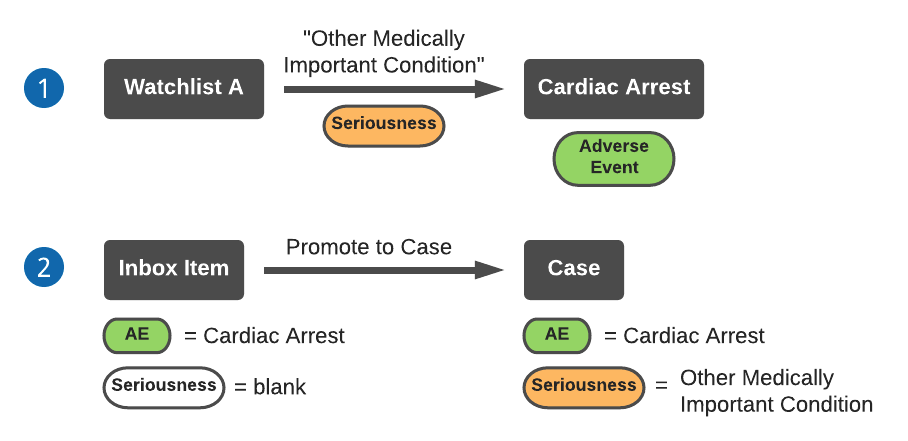
Note: If the Inbox Item being promoted already has a specified Seriousness (it is not blank), the watchlist will not update the Case Seriousness upon Case promotion.
1. Watchlist A sets the Seriousness to "Other Medically Important Condition" for adverse event Cardiac Arrest.
2. After you promote an Inbox Item containing adverse event Cardiac Arrest and a blank **Seriousness** field to a Case, the Case Seriousness will be automatically set to "Other Medically Important Condition".
If multiple watchlists are configured to set the Case Seriousness for the same adverse event, Vault will assign all specified Seriousness criteria to the Case with the respective adverse event. In other words, the Case Seriousness is cumulative.
The following diagram describes an example of a watchlist assigning Case Seriousness to an Inbox Item with a specified (not blank) **Seriousness** field:
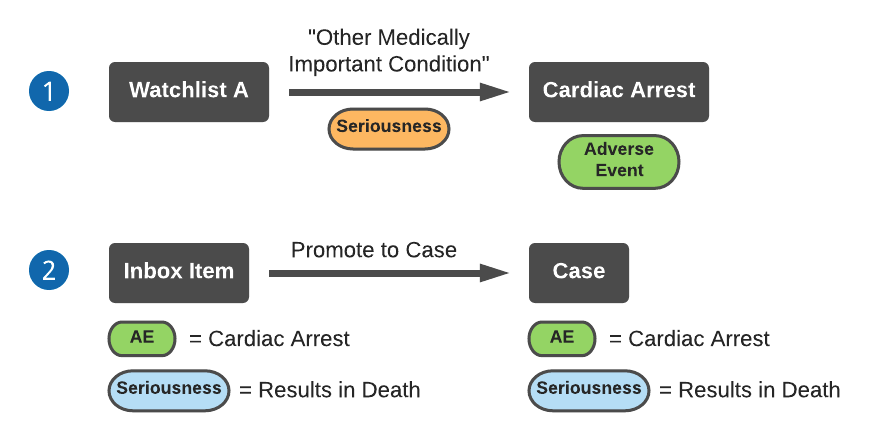 1. Watchlist A sets the Seriousness to "Other Medically Important Condition" for adverse event Cardiac Arrest.
2. After you promote an Inbox Item containing adverse event Cardiac Arrest and a specified Seriousness to a Case, the Inbox Item Seriousness will copy over to the Case. The Watchlist does not update the Case Seriousness.
## How to Trigger Watchlist Auto-Calculation
Vault calculates and assigns watchlist tags on a _Case_ following:
* _Case_ promotion.
* _Case Adverse Event_ creation, update, or deletion.
* _Case Product_ creation, update, or deletion.
Vault calculates and assigns DME watchlist tags following:
* _Case_ promotion.
* _Case Adverse Event_ creation, update, or deletion.
* _Case Product_ creation.
* _Product_ or _Drug Role_ update on a _Case Product_.
1. Watchlist A sets the Seriousness to "Other Medically Important Condition" for adverse event Cardiac Arrest.
2. After you promote an Inbox Item containing adverse event Cardiac Arrest and a specified Seriousness to a Case, the Inbox Item Seriousness will copy over to the Case. The Watchlist does not update the Case Seriousness.
## How to Trigger Watchlist Auto-Calculation
Vault calculates and assigns watchlist tags on a _Case_ following:
* _Case_ promotion.
* _Case Adverse Event_ creation, update, or deletion.
* _Case Product_ creation, update, or deletion.
Vault calculates and assigns DME watchlist tags following:
* _Case_ promotion.
* _Case Adverse Event_ creation, update, or deletion.
* _Case Product_ creation.
* _Product_ or _Drug Role_ update on a _Case Product_.