# FDA MedWatch 3500A (August 2024 Version) Generation Mapping

Learn how Vault generates the August 2024 version of the FDA MedWatch 3500A form from a _Case_. For details about the available FDA MedWatch 3500A formats supported by Safety and how Vault handles certain data during form generation, see <a href="/en/gr/802644/">FDA MedWatch 3500A Generation Data Mapping</a>.

## Prerequisite

To enable this version of the FDA MedWatch 3500A form, your Admin must contact <a class="external-link " href="https://support.veeva.com/hc/en-us" target="_blank" rel="noopener">Veeva Support<i class="fa fa-external-link" aria-hidden="true"></i></a> and then complete the <a href="/en/gr/780867/">required configuration</a>. Once configured, Vault generates the August 2024 version of the form, instead of the October 2015 version.

## Header

<a href="https://platform.veevavault.help/assets/images/saf-fda-3500a-header.png" data-lightbox="saf-fda-3500a-header.png" data-title="" data-alt="FDA MedWatch (August 2024 Version) 3500A Header Section">
  <img class="docimage" src="https://platform.veevavault.help/assets/images/saf-fda-3500a-header.png" alt="FDA MedWatch (August 2024 Version) 3500A Header Section" style="max-width: 50%;"  />
</a>

<table>
    <thead>
        <tr>
            <th>FDA MedWatch 3500A Field</th>
            <th>Populated Value</th>
        </tr> 
    </thead>
    <tbody>
        <tr>
            <td>Mfr. Report #</td>
            <td><p>For device <em>Cases</em>, Vault exports the <em>FDA Manufacturer Report Number</em> on the <em>Case Product</em> on the <em>Transmission</em>. If blank, and only one <em>Case Product</em> on the <em>Case</em> related to the <em>Transmission</em> includes an <em>FDA Manufacturer Report Number</em>, Vault exports that value.</p> 
            <p>For non-device <em>Cases</em> and device <em>Cases</em> on which the <em>FDA Manufacturer Report Number</em> is blank, Vault maps the <a href="/en/gr/01287/#details-section-fields"><em>UID</em></a> on the <em>Case</em>.</p>
            </td>
        </tr>
        <tr>
            <td>UF/Importer Report #</td>
            <td>Vault does not populate this field.</td>
        </tr>
        <tr>
            <td>Exemption/Variance #</td>
            <td>Vault does not populate this field.</td>
        </tr>
    </tbody>
</table>

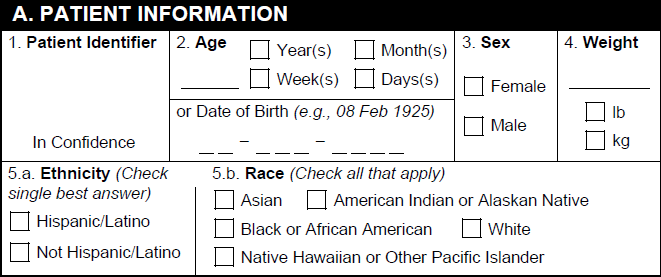
## A. Patient Information

<a href="https://platform.veevavault.help/assets/images/saf-fda-3500a-a-patient-inormation.png" data-lightbox="saf-fda-3500a-a-patient-inormation.png" data-title="" data-alt="A. Patient Information Section">
  <img class="docimage" src="https://platform.veevavault.help/assets/images/saf-fda-3500a-a-patient-inormation.png" alt="A. Patient Information Section" style=""  />
</a>

<table>
    <thead>
        <tr>
            <th>FDA MedWatch 3500A Field</th>
            <th>Populated Value</th>
        </tr> 
    </thead>
    <tbody>
        <tr>
            <td>1. Patient Identifier</td>
            <td>The value in the <em>Patient Initials / ID</em> field on the <em>Case</em>. If this field is blank, Vault populates the value entered in the <em>Investigation MRN</em> field.</td>
        </tr>
        <tr>
            <td>2. Age</td>
            <td>The value from one (1) of the following <em>Case</em> fields, ordered by priority:
                <ol><li><em>Age (value and unit)</em></li>
                    <li><em>Age (normalized)</em></li>
                </ol>
            </td>
        </tr>
        <tr>
            <td>2. Date of Birth</td>
            <td>The date in the <em>Date of Birth</em> field on the <em>Case</em>.</td>
        </tr>
        <tr>
            <td>3a. Sex</td>
            <td>The value in the <em>Sex</em> field on the <em>Case</em> as follows:
            <ul>
            <li>If the <em>Sex</em> field is set to <em>Male</em>, Vault selects the Male checkbox.</li>
            <li>If the <em>Sex</em> field is set to <em>Female</em>, Vault selects the Female checkbox.</li>
            <li>If the <em>Sex</em> field is blank or has a <em>Reason Omitted</em> value, Vault does not select a checkbox.</li>
            </ul>
            </td>
        </tr>
        <tr>
            <td>3b. Gender</td>
            <td>The value in the <em>Gender</em> field on the <em>Case</em> as follows:
            <ul>
            <li>If the <em>Gender</em> field is set to <em>Cisgender Man</em>, Vault selects the Cisgender man/boy checkbox.</li>
            <li>If the <em>Gender</em> field is set to <em>Cisgender Woman</em>, Vault selects the Cisgender woman/girl checkbox.</li>
            <li>If the <em>Gender</em> field is set to <em>Transgender Man/FtM</em>, Vault selects the Transgender man/trans man/female-to-male (FTM) checkbox.</li>
            <li>If the <em>Gender</em> field is set to <em>Transgender Woman/MtF</em>, Vault selects the Transgender woman/trans woman/male-to-female (MTF) checkbox.</li>
            <li>If the <em>Gender</em> field is set to any other value, Vault selects the Other gender category; please specify: checkbox and populates any custom text entry in the field.</li>
            <li>If the <em>Gender</em> field is blank, Vault does not select a checkbox.</li>
            </ul>
            </td>
        </tr>
        <tr>
            <td>4. Weight</td>
            <td>The value from one (1) of the following <em>Case</em> fields, ordered by priority:
                <ol><li><em>Weight (value and unit)</em></li>
                    <li><em>Weight (normalized)</em></li>
                </ol></td>
        </tr>
        <tr>
            <td>5. Ethnicity</td>
            <td>The value from the <em>Ethnicity</em> field on the <em>Case</em>.</td>
        </tr>
        <tr>
            <td>6. Race</td>
            <td>The value from the <em>Race</em> field on the <em>Case</em>.</td>
        </tr>
    </tbody>
</table>

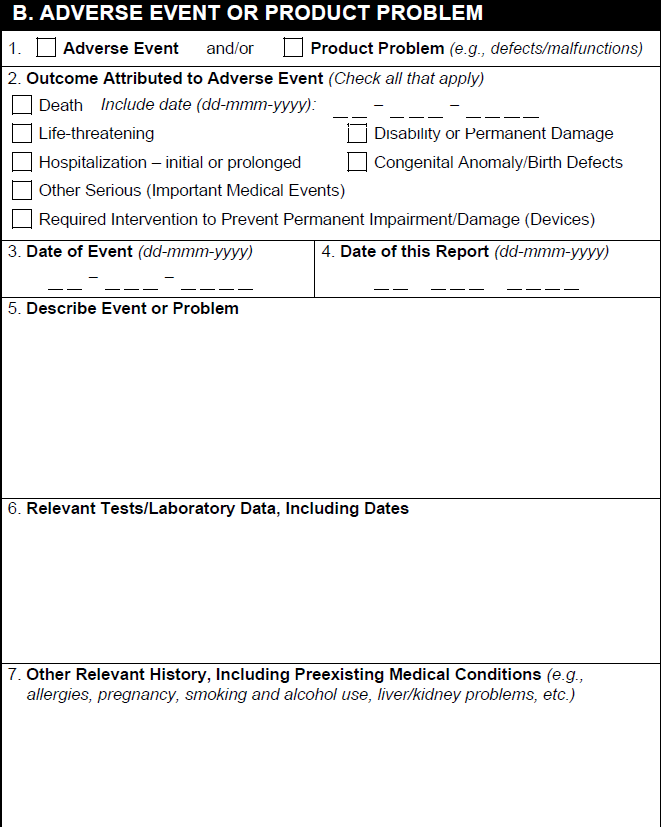
## B. Adverse Event or Product Problem

<a href="https://platform.veevavault.help/assets/images/saf-fda-3500a-b-adverse-event-or-product-problem.png" data-lightbox="saf-fda-3500a-b-adverse-event-or-product-problem.png" data-title="" data-alt="B. Adverse Event or Product Problem Section">
  <img class="docimage" src="https://platform.veevavault.help/assets/images/saf-fda-3500a-b-adverse-event-or-product-problem.png" alt="B. Adverse Event or Product Problem Section" style="max-width: 50%;"  />
</a>

<table>
    <thead>
        <tr>
            <th>FDA MedWatch 3500A Field</th>
            <th>Populated Value</th>
        </tr> 
    </thead>
    <tbody>
        <tr>
            <td>1. Type of Report</td>
            <td>Based on the report type, Vault selects:
                <ul>
                    <li>For non-device <em>Cases</em>, the Adverse Event checkbox. </li>
                    <li>For device or Combination Product <em>Cases</em>, one (1) or both checkboxes. Vault selects the Product Problem checkbox if the <em>Device Report Type</em> includes <em>Malfunction</em> or <em>Product Problem</em>.</li>
                </ul>
            </td>
        </tr>
        <tr>
            <td>2. Outcome Attributed to Adverse Event</td>
            <td>Vault selects the appropriate checkbox based on the <em>Seriousness</em> field in the <em>Details</em> section of the <em>Case</em>. If the adverse event resulted in death, Vault populates the date in the <em>Date of Death</em> field on the <em>Case</em>.</td>
        </tr>
        <tr>
            <td>3. Date of Event</td>
            <td>The earliest <em>Onset Date</em> for any <em>Case Adverse Event</em> associated with the <em>Case</em> version.</td>
        </tr>
        <tr>
            <td>4. Date of this Report</td>
            <td>The date when the report was generated, according to the Vault's timezone.</td>
        </tr>
        <tr>
            <td>5. Describe Event or Problem</td>
            <td>Any text in the <em>Narrative</em> on the <em>Case</em>. After the narrative text, Vault populates any text in the <em>Company Comments</em> field. If the narrative text overflows onto additional pages, <em>Company Comments</em> also appear on the overflow pages.</td>
        </tr>
        <tr>
            <td>6. Relevant Test/Laboratory Data</td>
            <td><p>Vault populates a row for each <em>Case Test Result</em> record on the <em>Case</em>, sorted alphabetically and from oldest to latest. <em>Lab Test Results</em> with no <em>Test Date</em> appear at the end of the list.</p>
            <p>The information exported includes:</p>
                <ul>
                    <li><em>Test Name (LLT)</em> and <em>Test Name (Reported)</em></li>
                    <li><em>Result (Unit)</em> or <em>Result (Unit) Text</em></li>
                    <li><em>Result (Code)</em> or <em>Result (qualifier)</em> and <em>Result</em> and <em>Result (Unit)</em></li>
                    <li><em>Test Name (LLT)</em> and <em>Test Name (Reported)</em>, <em>Result</em></li>
                    <li><em>Test Date</em></li>
                    </ul>
                <p>Text that exceeds the available space appears on overflow pages.</p></td>
        </tr>
        <tr>
            <td>6. Additional comments</td>
            <td><p>For each <em>Case Test Result</em> record in the B6. Relevant Test/Laboratory Data section, Vault populates the following information when available:</p>
                <ul>
                    <li><em>Normal Low Value - Normal High Value</em> and the unit in the <em>Test Result</em> field or the <em>Result (Unit) Text</em> field</li>
                    <li><em>Comments</em></li>
                    <li><em>Result (Text)</em></li>
                    </ul>
                <p>In addition, for adverse events that resulted in death, the following information is populated from each <em>Case Cause of Death</em> record:</p>
                <ul>
                    <li>Reported Causes of Death: <em>Cause (MedDRA)</em> or <em>Cause (Reported)</em></li>
                    <li>Autopsy-Determined Cause of Death: <em>Cause (MedDRA)</em> or <em>Cause (Reported)</em></li>
                    </ul>
                    <p>Text that exceeds the available space appears on overflow pages.</p></td>
        </tr>
        <tr>
            <td>7. Other Relevant History, Including Preexisting Medical Conditions</td>
            <td><p>The following information is repeated for each <em>Case Medical History</em> record, populated from the following fields:</p>
                <ul>
                    <li><em>Condition / Procedure (MedDRA)</em> or <em>Condition / Procedure (Reported)</em></li>
                    <li><em>Start Date</em> or <code>---</code>, <em>End Date</em> or <code>---</code>, <em>Continuing</em></li>
                    <li><em>Comments</em></li>
                </ul>
                <p>After listing each medical history line item, Vault populates any text in the <em>Medical History Text</em> field on the <em>Case</em>.</p>
        </td>
        </tr>
        </tbody>
    </table>

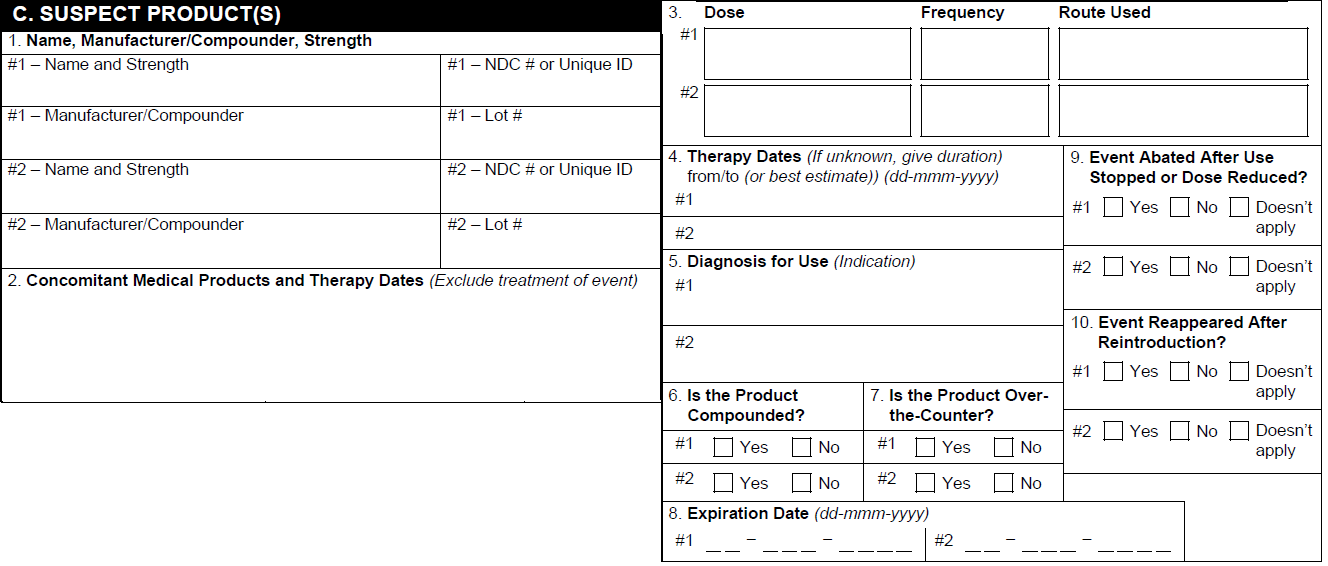
## C. Suspect Products

<a href="https://platform.veevavault.help/assets/images/saf-fda-3500a-c-suspect-products.png" data-lightbox="saf-fda-3500a-c-suspect-products.png" data-title="" data-alt="C. Suspect Product(s) Section">
  <img class="docimage" src="https://platform.veevavault.help/assets/images/saf-fda-3500a-c-suspect-products.png" alt="C. Suspect Product(s) Section" style="max-width: 80%;"  />
</a>

<table>
    <thead>
        <tr>
            <th>FDA MedWatch 3500A Field</th>
            <th>Populated Value</th>
        </tr> 
    </thead>
    <tbody>
        <tr>
            <td>1. Name, Strength, Manufacturer/Compounder</td>
            <td><p>For <em>Case Products</em> assigned a <em>Drug Role</em> of <em>Suspect</em>, <em>Interacting</em>, or <em>Drug Not Administered</em>, Vault populates:</p>
                <ul>
                <li><strong>Product Name</strong>: Depending on your Admin's configuration, Vault first attempts to map the <em>Product (Reported)</em> to the <em>Product (Coded)</em> value from the <em>Case Product</em>. If the configured default value is blank, Vault maps the other value, if available.</li>
                <li><strong>Strength</strong>: The <em>Strength</em> on the associated <em>Product Registration</em> record.</li>
                <li><strong>Unit</strong>: The <em>Unit</em> on the associated <em>Product Registration</em> record.</li>
                <li><strong>NDC # or Unique ID</strong>: The <em>National Drug Code</em> on the associated <em>Product Registration</em> record.</li>
                <li><strong>Manufacturer/Compounder Name</strong>: The value in the <em>Manufacturer</em> field on the <em>Product</em> record. If blank, Vault maps the value in the <em>Organization</em> field on the associated <em>Product Family</em>.</li>
                <li><strong>Lot #</strong>: The value in the <em>Batch/Lot Number</em> field on the associated <em>Product Dosage</em> record on the <em>Case</em>.</li>
            </ul></td>
        </tr>
        <tr>
            <td>2. List Medical Product and Treatment Given at the Same Time of the Event and Date</td>
            <td><p>For each associated <em>Case Product</em> record, Vault populates:</p>
                <ul>
                    <li><em>Product</em> or <em>Product (Reported)</em></li>
                    <li><em>First Admin Date</em> or <code>---</code> or <code>unk</code>, <em>Last Admin Date</em> or <code>---</code> or <code>unk</code>, <em>Duration</em>, <em>Action Taken</em></li>
                    <li><em>Dose</em> or <em>Dose Text</em> and <em>Frequency</em></li>
                    <li><em>Indication (MedDRA)</em> or <em>Indication (Reported)</em></li>
                </ul>
                <p>If the therapy dates are unknown, Vault populates this field with the value from the <em>Duration</em> field. Vault updates the <em>Duration</em> field value to <em>Ongoing</em> if any of the following values are in the <em>Action Taken</em> field:</p>
                    <ul>
                        <li><em>Dose reduced</em></li>
                        <li><em>Dose increased</em></li>
                        <li><em>Dose not changed</em></li>
                    </ul>
                <div class="note-border alert-info">
  <div class="alert alert-info" role="alert">
    <div><i class="far fa-info-circle"></i></div>
    <div class="alert-text">
      <p><strong>Note</strong>: For device-only <em>Cases</em>, Vault maps this information to Section D.11 of the form.</p>
    </div>
  </div>
</div>


                </td>
        </tr>
        <tr>
            <td>3. Dose, Frequency, Route Used</td>
            <td><p>For <em>Case Products</em> assigned a <em>Drug Role</em> of <em>Suspect</em>, <em>Interacting</em>, or <em>Drug Not Administered</em>, Vault populates:</p>
                <ul>
                <li><strong>Dose or Amount</strong>: The text value in the <em>Dose</em> field.</li>
                <li><strong>Unit</strong>: The unit value in the <em>Dose</em> field or <code>UNKNOWN - UNK</code>.</li>
                <li><strong>Frequency</strong>: The value and unit in the <em>Frequency</em> field as follows:
                <ul>
                <li>If set to <em>Every 1 days</em> or <em>1 times per days</em>, Vault exports <code>Daily</code></li>
                <li>If set to <em>2 times per days</em>, Vault exports <code>BID</code></li>
                <li>If set to <em>3 times per days</em>, Vault exports <code>TID</code></li>
                <li>If set to <em>4 times per days</em>, Vault exports <code>QID</code></li>
                <li>If set to <em>Other > as necessary</em>, Vault exports <code>PRN</code></li>
                <li>For all other settings, Vault exports <code>Other</code> and maps the <em>Frequency</em> text to the Other Frequency box on the form.</li>
                </ul></li>
                <li><strong>Route</strong>: The value in the <em>Patient RoA</em> field or Vault exports <code>Other</code> and maps the <em>Patient RoA</em> text to the Other Route box on the form. If the <em>Patient RoA</em> field is blank or has a <em>Reason Omitted</em> value, Vault exports <code>Unknown</code>.</li>
            </ul></td>
        </tr>
        <tr>
            <td>4. Treatment Dates/Therapy Dates</td>
            <td><p>Vault populates information from the following <em>Product Dosage</em> fields from the <em>Case</em>:</p>
                <p><em>First Admin Date</em> or <code>---</code> or <code>unk</code>, <em>Last Admin Date</em> or <code>---</code> or <code>unk</code>, <em>Duration</em></p>
                <p>If the therapy dates are unknown, Vault populates this field ith the value from the <em>Duration</em> field. Vault updates the <em>Duration</em> field value to <em>Ongoing</em> if any of the following values are in the <em>Action Taken</em> field:</p>
                    <ul>
                        <li><em>Dose reduced</em></li>
                        <li><em>Dose increased</em></li>
                        <li><em>Dose not changed</em></li>
                    </ul>
            </td>
        </tr>
        <tr>
            <td>5. Diagnosis for use</td>
            <td>The value in either the <em>Name (MedDRA)</em> or <em>Indication (Reported)</em> field on the associated <em>Product Indication</em> record on the <em>Case</em>.</td>
        </tr>
        <tr>
            <td><a id="dechallenge"></a>6. Product Type</td>
            <td>Vault maps values from the applicable FDA <em>Product Registration</em> to select checkboxes.</td>
        </tr>
        <tr>
            <td>7. Expiration Date</td>
            <td>The date in the <em>Expiration Date</em> field on the associated <em>Case Product</em>.</td>
        </tr>
        <tr>
            <td>8. Event Abated after use Stopped or Dose Reduced?</td>
            <td>Vault uses the following fields to calculate whether a dechallenge test occurred and populates the appropriate checkbox:
                <ul>
                    <li><em>Action Taken</em> on the primary <em>Case Product</em></li>
                    <li><em>Outcome</em> on the primary <em>Case Adverse Event</em></li>
                </ul>
                <p>The following table outlines how Vault populates the form based on the field values:</p>
                <table>
                    <thead>
                        <tr>
                            <th>Action Taken (G.k.8)</th>
                            <th>E2B Code*</th>
                            <th>Outcome (E.i.7)</th>
                            <th>FDA 3500A C.8 Box</th>
                        </tr>
                    </thead>
                    <tbody>
                        <tr>
                            <td>Drug Withdrawn<br>Dose Reduced</td>
                            <td>1<br>2</td>
                            <td>Recovered/Resolved<br>Recovering/Resolving<br>Recovered/Resolved with Sequalea</td>
                            <td>Yes</td>
                        </tr>
                        <tr>
                            <td>Drug Withdrawn<br>Dose Reduced</td>
                            <td>1<br>2</td>
                            <td>Not Recovered<br>Not Resolved<br>Ongoing<br>Fatal</td>
                            <td>No</td>
                        </tr>
                        <tr>
                            <td>Drug Withdrawn<br>Dose Reduced</td>
                            <td>1<br>2</td>
                            <td>Unknown (blank)</td>
                            <td>(blank)</td>
                        </tr>
                        <tr>
                            <td>Dose Increased<br>Dose Not Changed<br>Not Applicable</td>
                            <td>3<br>4<br>9</td>
                            <td>Any</td>
                            <td>Doesn't apply</td>
                        </tr>
                        <tr>
                            <td>Unknown</td>
                            <td>0</td>
                            <td>Any</td>
                            <td>(blank)</td>
                        </tr>
                        <tr>
                            <td colspan="3">Any other condition</td>
                            <td>(blank)</td>
                        </tr>
                    </tbody>
                    <tfoot>
                        <tr>
                            <td colspan="4">*Includes custom <a href="/en/gr/01195/#action-taken"><em>Action Taken Controlled Vocabulary</em></a> records</td>
                        </tr>
                    </tfoot>
                </table>
            </td>
        </tr>
        <tr>
            <td>9. Event Reappeared After Reintroduction?</td>
            <td>Vault uses the <em>Reaction Recurrence</em> field on the primary <em>Case Assessment</em> to determine whether a rechallenge test occurred and populate the appropriate checkbox.
                <ul>
                    <li>If the <em>Reaction Recurrence</em> field is set to <em>yes – yes (rechallenge was done, reaction recurred)</em>, then the Yes checkbox is selected.</li>
                    <li>If the <em>Reaction Recurrence</em> field is set to <em>yes - no (rechallenge was done, reaction did not recur)</em>, then the No checkbox is selected.</li>
                    <li>If the <em>Reaction Recurrence</em> field is set to any of the following options, then the Doesn't apply checkbox is selected:
                    <ul>
                    <li><em>yes - unk (rechallenge was done, outcome unknown)</em></li>
                    <li><em>no - n/a (no rechallenge was done, recurrance is not applicable)</em></li>
                    <li>The field is left blank</li>
                </ul></li>
                </ul></td>
        </tr>
    </tbody>
</table>

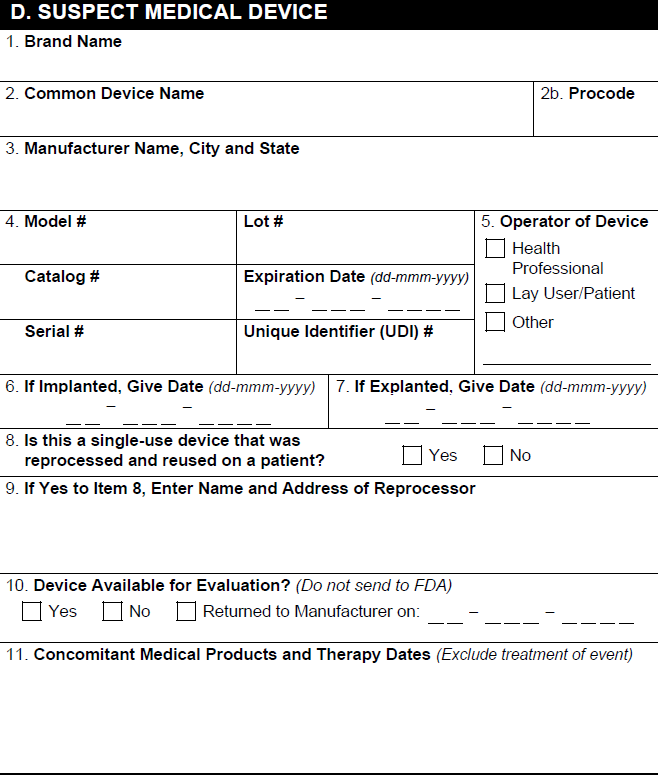
## D. Suspect Medical Device {#section-d}

<a href="https://platform.veevavault.help/assets/images/saf-fda-3500a-d-suspect-medical-device.png" data-lightbox="saf-fda-3500a-d-suspect-medical-device.png" data-title="" data-alt="D. Suspect Medical Device Section">
  <img class="docimage" src="https://platform.veevavault.help/assets/images/saf-fda-3500a-d-suspect-medical-device.png" alt="D. Suspect Medical Device Section" style="max-width: 50%;"  />
</a>

To map <a href="/en/gr/802644/#device-products">device data to this section</a>, Vault considers whether: 

* The _Transmission_ includes a _Case Product_.
* The _Combination Product_ has multiple device constituents.

<table>
    <thead>
        <tr>
            <th>FDA MedWatch 3500A Field</th>
            <th>Populated Value</th>
        </tr> 
    </thead>
    <tbody>
        <tr>
            <td>1. Brand Name</td>
            <td>The value in the <em>Product (Reported)</em> field on the <em>Device</em>-type <em>Case Product</em>.
            
                    <div class="note-border alert-info">
  <div class="alert alert-info" role="alert">
    <div><i class="far fa-info-circle"></i></div>
    <div class="alert-text">
      <p><strong>Note</strong>: Your Admin can configure your Vault to export the <strong>Product (Coded)</strong> field by default. See <a href="/en/gr/01403/">Enable Export Product (Reported) to CIOMS I and FDA 3500A</a> for details.</p>
    </div>
  </div>
</div>

</td>
        </tr>
        <tr>
            <td>2a. Common Device Name</td>
            <td>The value in the <em>Generic Name</em> field on the <em>Product</em>.</td>
        </tr>
        <tr>
            <td>2b. Procode</td>
            <td>The value in the <em>Product Code</em> field on the associated <em>Product Registration</em>.</td>
        </tr>
        <tr>
            <td>3. Manufacturer Name, City and State</td>
            <td>If an organization is selected in the <em>Manufacturer</em> field on the associated <em>Product Family</em> record, Vault populates the associated name, city, and state. Otherwise, Vault populates the value in the <em>Organization</em> field of the associated <em>Product Family</em>.</td>
        </tr>
        <tr>
            <td>4. Model #</td>
            <td>The value in the <em>Model Number</em> field on the <em>Device</em>-type <em>Case Product</em>.</td>
        </tr>
        <tr>
            <td>4. Lot #</td>
            <td>The value in the <em>Lot Number</em> field on the <em>Device</em>-type <em>Case Product</em>.</td>
        </tr>
        <tr>
            <td>4. Catalog #</td>
            <td>The value in the <em>Catalog Number</em> field on the <em>Device</em>-type <em>Case Product</em>.</td>
        </tr>
        <tr>
            <td>4. Expiration Date</td>
            <td>The value in the <em>Expiration Date</em> field on the <em>Device</em>-type <em>Case Product</em>.</td>
        </tr>
        <tr>
            <td>4. Serial #</td>
            <td>The value in the <em>Serial Number</em> field on the <em>Device</em>-type <em>Case Product</em>.</td>
        </tr>
        <tr>
            <td>4. Unique Device Identifier (UDI)#</td>
            <td>The value in the <em>Unique Identifier</em> field on the <em>Device</em>-type <em>Case Product</em>.</td>
        </tr>
        <tr>
            <td>5. Operator of Device</td>
            <td>The value in the <em>Operator of Device</em> field on the <em>Device</em>-type <em>Case Product</em>. If the value is <em>Other</em>, Vault selects the Other checkbox and populates the value in the <em>Operator of Device (Other)</em> field.</td>
        </tr>
        <tr>
            <td>6a. If Implanted, Give Date</td>
            <td>The date in the <em>Date Implanted</em> field on the <em>Device</em>-type <em>Case Product</em>.</td>
        </tr>
        <tr>
            <td>6b. If Explanted, Give Date</td>
            <td>The date in the <em>Date Explanted</em> field on the <em>Device</em>-type <em>Case Product</em>.</td>
        </tr>
        <tr>
            <td>7a. Is this a single-use device that was reprocessed and reused on a patient?</td>
            <td>Vault selects the appropriate checkbox based on the <em>Reprocessed/Reused</em> field on the <em>Device</em>-type <em>Case Product</em>.</td>
        </tr>
        <tr>
            <td>7b. If yes, enter the name and address of the reprocessor</td>
            <td>The value in the <em>Reprocessor</em> field on the <em>Device</em>-type <em>Case Product</em>.</td>
        </tr>
        <tr>
            <td>8. Was this device ever serviced by a third-party servicer?</td>
            <td>Vault selects the appropriate checkbox based on the value in the <em>Third-party servicer for device?</em> field on the <em>Device</em>-type <em>Case Product</em>.</td>
        </tr>
        <tr>
            <td>9. Is this Device Available for Evaluation?</td>
            <td>Vault selects the appropriate checkbox based on the <em>Device Available</em> field on the <em>Device</em>-type <em>Case Product</em>. If there is a date in the <em>Returned Date</em> field, Vault populates the date and selects the Returned to Manufacturer checkbox.</td>
        </tr>
        <tr>
            <td>10. Concomitant Medical Products and Therapy Dates</td>
            <td>
                <p>For each associated <em>Case Product</em> record, Vault populates values from the following fields:</p>
                <ul>
                    <li><em>Product</em> or <em>Product (Reported)</em></li>
                    <li><em>First Admin Date</em>, <em>Last Admin Date</em></li>
                </ul>
            </td>
        </tr>
    </tbody>
</table>


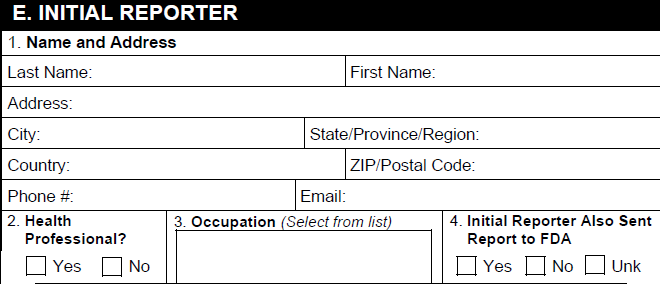
## E. Initial Reporter

<a href="https://platform.veevavault.help/assets/images/saf-fda-3500a-e-initial-reporter.png" data-lightbox="saf-fda-3500a-e-initial-reporter.png" data-title="" data-alt="E. Initial Reporter Section">
  <img class="docimage" src="https://platform.veevavault.help/assets/images/saf-fda-3500a-e-initial-reporter.png" alt="E. Initial Reporter Section" style="max-width: 50%;"  />
</a>

<table>
    <thead>
        <tr>
            <th>FDA MedWatch 3500A Field</th>
            <th>Populated Value</th>
        </tr> 
    </thead>
    <tbody>
        <tr>
            <td>1. Name and Address</td>
            <td>Vault populates the form fields using the name and address on the primary <em>Reporter</em>-type <em>Case Contact</em> record.</td>
        </tr>
        <tr>
            <td>2. Health Professional?</td>
            <td>Vault selects the appropriate checkbox based on the value in the <em>Qualification</em> field on the primary <em>Reporter</em>-type <em>Case Contact</em> record.</td>
        </tr>
        <tr>
            <td>3. Occupation</td>
            <td>The value in the <em>Qualification</em> field on the primary <em>Reporter</em>-type <em>Case Contact</em> record. Vault populates <code>Non-Health Professional</code> if the value is any of the following:
            <ul>
            <li><em>Consumer or other non health professional</em></li>
            <li><em>Lawyer</em></li>
            <li><em>Patient</em></li>
            <li><em>Parent</em></li>
            </ul></td>
        </tr>
        <tr>
            <td>4. Initial reporter also sent report to FDA
            </td>
            <td>Vault selects the appropriate checkbox based on the value in the <em>Sent to FDA?</em> field on the primary <em>Reporter</em>-type <em>Case Contact</em> record.</td>
        </tr>
    </tbody>
</table>

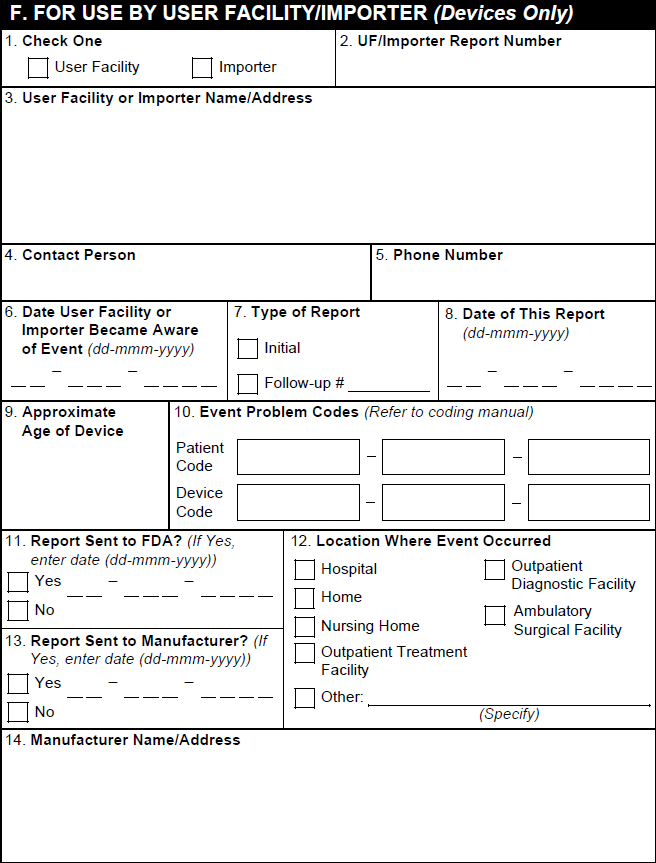
## F. For Use by User Facility/Importer (Devices Only)

<div class="note-border alert-info">
  <div class="alert alert-info" role="alert">
    <div><i class="far fa-info-circle"></i></div>
    <div class="alert-text">
      <p><strong>Note</strong>: Vault does not populate section F, but the section is available on the form for manual data entry.</p>
    </div>
  </div>
</div>


<a href="https://platform.veevavault.help/assets/images/saf-fda-3500a-f-for-use-by-user-facility-importer.png" data-lightbox="saf-fda-3500a-f-for-use-by-user-facility-importer.png" data-title="" data-alt="F. For Use by User Facility/Importer (Devices Only)">
  <img class="docimage" src="https://platform.veevavault.help/assets/images/saf-fda-3500a-f-for-use-by-user-facility-importer.png" alt="F. For Use by User Facility/Importer (Devices Only)" style="max-width: 50%;"  />
</a>

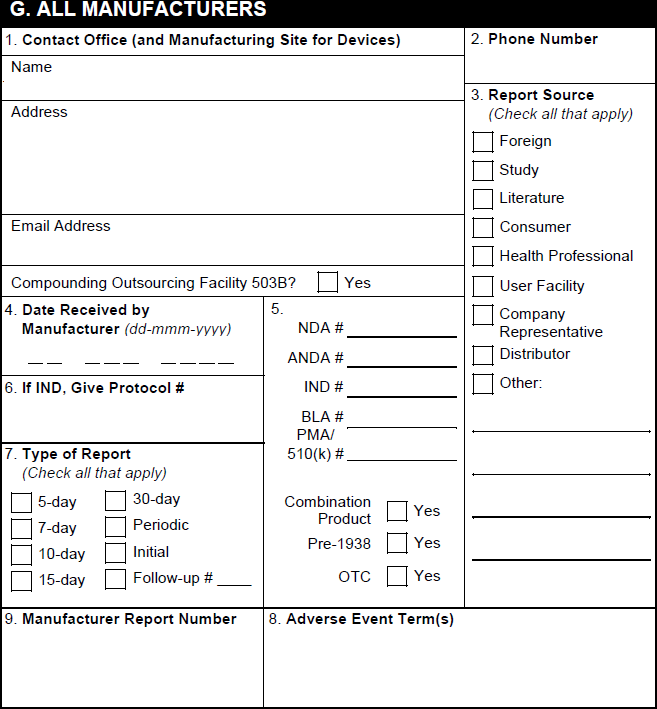
## G. All Manufacturers

<a href="https://platform.veevavault.help/assets/images/saf-fda-3500a-g-all-manufacturers.png" data-lightbox="saf-fda-3500a-g-all-manufacturers.png" data-title="" data-alt="G. All Manufacturers Section">
  <img class="docimage" src="https://platform.veevavault.help/assets/images/saf-fda-3500a-g-all-manufacturers.png" alt="G. All Manufacturers Section" style="max-width: 50%;"  />
</a>

To map <a href="/en/gr/802644/#device-products">device data to fields G.4 and G.5</a> in this section, Vault considers whether the _Transmission_ includes a _Case Product_.

<table>
    <thead>
        <tr>
            <th>FDA MedWatch 3500A Field</th>
            <th>Populated Value</th>
        </tr> 
    </thead>
    <tbody>
        <tr>
            <td>1. Contact Office (and Manufacturing Site for Devices) or Compounding Outsourcing Facility</td>
            <td>Vault populates the contact information for the user selected in the <em>Sender User</em> field on the associated <em>Transmission</em> (<em>Submission</em> or <em>Distribution</em>) record. When generating a form preview from the <em>Case</em>, Vault populates contact details for the <em>Organization</em> on the <em>Case</em> and the phone number for the organization selected in the <em>Manufacturer</em> on the <em>Product</em> record associated with the <em>Case Product</em>.</td>
        </tr>
    <tr>
        <td>2. Report Source</td>
        <td>Vault selects the appropriate checkboxes as follows:
                <table>
                    <thead>
                        <tr>
                            <th>Checkbox</th>
                            <th>Logic</th>
                        </tr>
                    </thead>
                    <tbody>
                        <tr>
                            <td>Foreign</td>
                            <td>Checked based on the <em>Country</em> field on the primary <em>Reporter</em>-type <em>Case Contact</em>.</td>
                        </tr>
                        <tr>
                            <td>Study</td>
                            <td>Checked when the <em>Report Type</em> of the <em>Case</em> corresponds to a <a href="/en/gr/01195/#report-type">Report Type Controlled Vocabulary</a> where the <em>E2B Code</em> is <code>2</code>, for example, <em>Study</em> or <em>Literature (Study)</em>.</td>
                        </tr>
                        <tr>
                            <td>Literature</td>
                            <td>Checked when the <em>Report Type</em> of the <em>Case</em> corresponds to a <a href="/en/gr/01195/#report-type">Report Type Controlled Vocabulary</a> where <em>Literature</em> is set to <em>Yes</em>, for example, <em>Literature (Spontaneous)</em> or <em>Literature (Study)</em>.</td>
                        </tr>
                        <tr>
                            <td>Consumer</td>
                            <td>Checked when the <em>Qualification</em> of the <em>Reporter</em>-type <em>Case Contact</em> corresponds to a <a href="/en/gr/01195/#qualification">Qualification Controlled Vocabulary</a> where <em>Qualified HCP</em> is set to <em>No</em>, for example, <em>Consumer</em> or <em>other non health professional</em>.</td>
                        </tr>
                        <tr>
                            <td>Health Professional</td>
                            <td>Checked when the <em>Qualification</em> of the <em>Reporter</em>-type <em>Case Contact</em> corresponds to a <a href="/en/gr/01195/#qualification">Qualification Controlled Vocabulary</a> where <em>Qualified HCP</em> is set to <em>Yes</em>, for example, <em>Physician</em>.</td>
                        </tr>
                        <tr>
                            <td>User Facility</td>
                            <td>Checked when <em>FDA 3500A Report Source</em> is set to <em>User Facility</em> on the primary <em>Reporter</em>-type <em>Case Contact</em>.</td>
                        </tr>
                        <tr>
                            <td>Company Representative</td>
                            <td>Checked when <em>FDA 3500A Report Source</em> is set to <em>Company Representative</em> on the primary <em>Reporter</em>-type <em>Case Contact</em>.</td>
                        </tr>
                        <tr>
                            <td>Distributor</td>
                            <td>Checked when <em>FDA 3500A Report Source</em> is set to <em>Distributor</em> on the primary <em>Reporter</em>-type <em>Case Contact</em>.</td>
                        </tr>
                        <tr>
                            <td>Other</td>
                            <td>Checked when <em>FDA 3500A Report Source</em> is set to <em>Other</em> on the primary <em>Reporter</em>-type <em>Case Contact</em>. Vault also populates the value from the <em>Case Identifier</em> field from the associated <em>Transmission</em> (<em>Submission</em> or <em>Distribution</em>).</td>
                        </tr>
                    </tbody>
                </table>
            </td>
        </tr>        
        <tr>
            <td>3. Date Received by Manufacturer</td>
            <td><p>Vault uses the following logic to populate this field:</p>
            <p><strong>Initial Case</strong>: Vault maps the date from one (1) of the following <em>Case</em> fields, ordered by priority:</p>
                 <ol><li><em>New Info Date</em></li>
                     <li><em>Initial Receipt Date</em></li></ol>
            <p>A <em>Case</em> is considered initial when it meets any of the following conditions:</p>
                <ul>
                    <li>For a report generated from a <em>Transmission</em>, the <em>Transmission Reason</em> field value must map to <em>E2B Code</em> <code>I</code> (Initial)</li>
                    <li>For a report preview generated from a <em>Case</em>, the <em>Case Version</em> must be less than or equal to 1.0</li>
                </ul>
            <p><strong>Follow-Up</strong>: Vault maps the date from the <em>New Info Date</em> field on the <em>Case</em>, if populated. A <em>Case</em> is considered follow-up when it meets any of the following conditions:</p>
                <ul>
                    <li>For a report generated from a <em>Transmission</em>, the <em>Transmission Reason</em> field value must not map to <em>E2B Code</em> <code>I</code>.</li>
                    <li>For a report preview generated from a <em>Case</em>, the <em>Case Version</em> must be greater than 1.0</li>
                </ul>
            </td>
        </tr>
        <tr>
            <td>4. NDA #</td>
            <td>If the <em>Registration Type</em> field on the associated <em>Product Registration</em> is set to <em>NDA</em>, Vault maps this value from the <em>Registration Number</em> field.</td>
        </tr>
        <tr>
            <td>4. ANDA #</td>
            <td>If the <em>Registration Type</em> field on the associated <em>Product Registration</em> is set to <em>ANDA</em>, Vault maps this value from the <em>Registration Number</em> field.</td>
        </tr>
        <tr>
            <td>4. IND #</td>
            <td><p>For study <em>Cases</em> with a <em>Study Type</em> of <em>Clinical Trial</em> or blank, if there is a US <em>Study Registration</em> with a <em>Registration Type</em> of <em>IND</em>, Vault populates the IND number from the <em>Study Registration Number</em> field from that <em>Study Registration</em>.</p> 
            <p>In all other scenarios, if the <em>Registration Type</em> field on the associated <em>Case <em>Product Registration</em></em> is set to <em>IND</em>, Vault takes this value from the <em>Registration Number</em> field.</p></td>
        </tr>
        <tr>
            <td>4. BLA #</td>
            <td>If the <em>Registration Type</em> field on the associated <em>Product Registration</em> is set to <em>BLA</em>, Vault maps this value from the <em>Registration Number</em> field.</td>
        </tr>
        <tr>
            <td>4. PMA/510(k) #</td>
            <td>If the <em>Registration Type</em> field on the associated <em>Product Registration</em> is set to either <em>PMA</em> or <em>510k</em>, Vault maps this value from the <em>Registration Number</em> field.</td>
        </tr>
        <tr>
            <td>4. Combination Product</td>
            <td>When any <em>Case Product</em> is part of a <em>Combination Product</em>, Vault selects this checkbox.
      <div class="note-border alert-info">
  <div class="alert alert-info" role="alert">
    <div><i class="far fa-info-circle"></i></div>
    <div class="alert-text">
      <p><strong>Note</strong>: For study <em>Cases</em> with <em>Products</em> that are part of a <em>Combination Product</em>, if <em>Study Content Protection</em> is enabled or a blinded regulatory report preview is generated, Vault does not select this checkbox.</p>
    </div>
  </div>
</div>

</td>
        </tr>
        <tr>
            <td>4. Pre-ANDA</td>
            <td>Vault does not support this field</td>
        </tr>
        <tr>
            <td>4. Pre-1938</td>
            <td>If the <em>International Birthdate</em> on the associated <em>Product</em> record is set to a date earlier than 1938, Vault selects this checkbox.</td>
        </tr>
        <tr>
            <td>4. OTC</td>
            <td>Across all <em>Case Products</em> in sections C and D, if any part of a <em>Product</em> has an FDA registration with the <em>Registered As</em> field set to a <em>Transmission Product Type</em> of <em>OTC Drug</em> or <em>OTC Device</em>, Vault selects this checkbox.</td>
        </tr>
        <tr>
            <td><a id="compounded-product"></a>4. Compounded Product</td>
            <td>Vault selects this checkbox if any <em>Case Product</em> in section C or D includes:
            <ul>
            <li>A <em>Compounding Type</em></li>
            <li>An FDA registration for a <em>Product</em> with a <em>Compounding Type</em></li>
            </ul>
            </td>
        </tr>
        <tr>
            <td>5. If IND/PreANDA, Give Protocol #</td>
            <td>The value in the <em>Sponsor Study Number</em> field on the <em>Case</em>.</td>
        </tr>
        <tr>
            <td><a id="type-of-report"></a>6. Type of Report</td>
            <td>Vault selects the appropriate checkbox based on the value in the <em>FDA Report Type</em> field, which is set based on the <em>Due in Days</em> reporting rule parameter. Otherwise, Vault selects checkboxes based on the following logic:
                <ul>
                    <li><strong>5-day</strong>: When the <em>Device Report Type</em> field on the <em>Case</em> contains <em>Public Health Risk</em>.</li>
                    <li><strong>7-day</strong>: When the <em>Case</em> is <a href="/en/gr/01156/#case-assessment-tags">tagged as a SUSAR</a> and the <em>Seriousness</em> field on the primary <em>Case Adverse Event</em> contains <em>Results in Death</em> or <em>Life-Threatening</em>.</li>
                    <li><strong>15-day</strong>: Vault selects this checkbox using the following logic:
                    <ul>
                        <li>For an initial study <em>Case</em>, the <em>Case</em> is <a href="/en/gr/01156/#case-assessment-tags">tagged as a SUSAR</a> and does not qualify for the 7-day option (for example, the <em>Seriousness</em> field on the primary <em>Case Adverse Event</em> does not contain <em>Results in Death</em> or <em>Life-Threatening</em>).</li> 
                        <li>For a postmarket spontaneous <em>Case</em>, whether initial or follow-up, the <em>Seriousness</em> field on the primary <em>Case Adverse Event</em> is populated and the <em>Case Expectedness</em> is set to <em>No</em>.</li>
                    </ul>
                    </li>
                    <li><strong>30-day</strong>: For device malfunction-only reports.</li>
                    <li><strong>Periodic</strong>: When any of the following conditions are met:
                    <ul>
                    <li>The <em>Seriousness</em> field on the primary <em>Case Adverse Event</em> is not populated.</li>
                    <li>The <em>Seriousness</em> field on the primary <em>Case Adverse Event</em> is populated and the <em>Case Expectedness</em> field is set to <em>Yes </em>.</li>
                    <li>The <em>Case</em> is a follow-up study <em>Case</em> <a href="/en/gr/01156/#case-assessment-tags">tagged as a SUSAR</a>.
                    <div class="note-border alert-info">
  <div class="alert alert-info" role="alert">
    <div><i class="far fa-info-circle"></i></div>
    <div class="alert-text">
      <p><strong>Note</strong>: When generating FDA MedWatch 3500A preview reports, Vault selects the Periodic checkbox when it shouldn’t. This is a known limitation that will be addressed in a future release. When generating <em>Transmissions</em>, Vault selects the G.7 Report Type checkboxes accurately.</p>
    </div>
  </div>
</div>

</li>
                </ul>
            </li>
            <li><strong>Initial</strong> and <strong>Follow-up #</strong>: Vault selects these checkboxes using the following logic:
                <ul>
                    <li>If a <em>Transmission</em> record exists for the <em>Case</em> and a value is populated in the <em>Transmission Reason</em> field:
                        <ul>
                            <li>If the <em>Transmission Reason</em> is <em>Initial</em>, Vault selects Initial.</li>
                            <li>If the <em>Transmission Reason</em> is populated with any other value, Vault selects Follow-Up #.</li>
                        </ul>
                    </li>
                    <li>If there is no <em>Transmission </em> record associated with the <em>Case</em>:
                        <ul>
                            <li>If the <em>Case</em> <em>New Info Date</em> is on or before the <em>Receipt Date</em>, Vault selects Initial.</li>
                            <li>If the <em>Case</em> <em>New Info Date</em> is later than the <em>Receipt Date</em>, Vault selects Follow-Up #.</li>
                        </ul>
                    </li>
                </ul>
            </li>
        </ul>
        <p>When no report type applies based on the above criteria, Vault selects the Periodic checkbox.</p> 
        <p>Vault populates the Follow-up # value from the <em>Follow-up Number</em> field on the <em>Submission</em> record.</p></td>
    </tr>
    <tr>
      <td>7. Adverse Event Term(s)</td>
      <td>The value in the <em>Event (MedDRA)</em> field or the <em>Event (Reported) - English</em> field on the primary <em>Case Adverse Event</em> record.</td>
    </tr>
    <tr>
      <td>8. Manufacturer Report Number</td>
      <td><p>For device <em>Cases</em>, Vault exports the <em>FDA Manufacturer Report Number</em> on the <em>Case Product</em> on the <em>Transmission</em>. If blank, and only one <em>Case Product</em> on the <em>Case</em> related to the <em>Transmission</em> includes an <em>FDA Manufacturer Report Number</em>, Vault exports that value.</p> 
        <p>For non-device <em>Cases</em> and device <em>Cases</em> on which the <em>FDA Manufacturer Report Number</em> is blank, Vault maps the <a href="/en/gr/01287/#details-section-fields"><em>UID</em></a> on the <em>Case</em>.</p></td>
    </tr>
  </tbody>
</table>

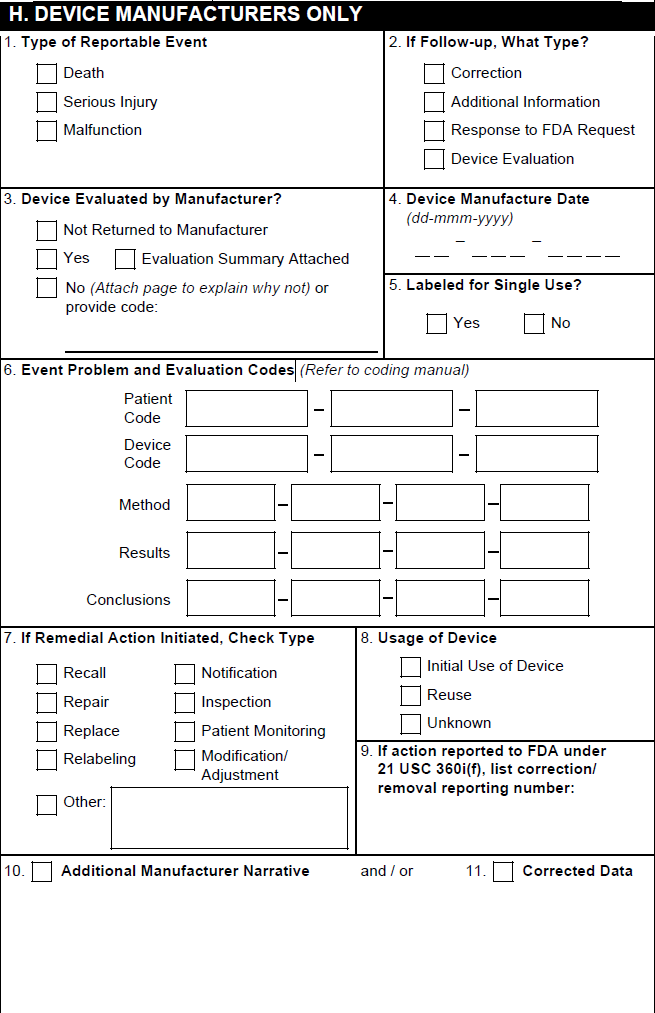
## H. Device Manufacturers Only

<a href="https://platform.veevavault.help/assets/images/saf-fda-3500a-h-device-manufactureres-only.png" data-lightbox="saf-fda-3500a-h-device-manufactureres-only.png" data-title="" data-alt="H. Device Manufacturers Only">
  <img class="docimage" src="https://platform.veevavault.help/assets/images/saf-fda-3500a-h-device-manufactureres-only.png" alt="H. Device Manufacturers Only" style="max-width: 50%;"  />
</a>

Vault populates <a href="/en/gr/802644/#device-products">device data to this section</a> as follows: 

* When the _Case Product_ on the _Transmission_ is a device.
* For _Cases_ concerning _Combination Product_ with _Device_ type _Product Constituents_.

<table>
    <tr>
        <th>FDA MedWatch 3500A Field</th>
        <th>Populated Value</th>
    </tr>
    <tr>
        <td>1. Type of Reportable Event</td>
        <td><p>Vault selects the Death checkbox if the <em>Seriousness</em> of any <em>Case Adverse Event</em> contains <em>Results in death</em>.</p> 
            <p>Vault selects the Serious Injury checkbox based on the value in the <em>Device Report Type</em> field on the <em>Case</em>.</p> 
            <p>Vault selects the Malfunction checkbox based on the value in the <em>Malfunction</em> field on the primary <em>Device</em>-type <em>Case Product</em>. If that field is blank, Vault selects a checkbox based on the <em>Device Report Type</em> field on the <em>Case</em>.</p>
            <p>Vault does not support the Summary Report checkbox or the No. of events summarized field.</p>
        </td>
    </tr>
    <tr>
        <td>2. If Follow-up, What Type?</td>
        <td>Vault selects the appropriate checkboxes based on the <em>Device Follow-Up Type</em> field on the <em>Case</em>.</td>
    </tr>
    <tr>
        <td>3. Device Evaluated by Manufacturer?</td>
        <td><p>Vault selects the appropriate checkbox based on the <em>Device Evaluated</em> field on the associated <em>Case Product</em> as follows:</p>
        <ul>
        <li>If set to <em>Yes</em>, Vault selects the Yes checkbox.</li>
        <li>If set to <em>No</em> or <em>Not Returned to Manufacturer</em>, Vault selects the No checkbox.</li>
        </ul>
        </td>
    </tr>
    <tr>
        <td>4. Device Manufacture Date</td>
        <td>The value from the <em>Manufacture Date</em> field on the associated <em>Case Product</em>.</td>
    </tr>
    <tr>
        <td>5. Labeled for Single Use?</td>
        <td>For <em>Device</em>-type <em>Case Products</em>, the value from the <em>Single Use</em> field.</td>
    </tr>
    <tr>
        <td>6. Adverse Event Problem</td>
        <td>Based on the <em>Device Type Code</em> and <em>Device Code</em> on each <em>Device</em>-type <em>Case Product</em>, Vault populates the level 1, 2, or 3 FDA or IMDRF codes. To use IMDRF codes, your Admin must <a href="/en/gr/01331/">enable the IMDRF Dictionary for Maintenance, Case Processing, and Submissions</a>. Vault populates this section as follows:
            <ul>
                <li><p><strong>Health Effect - Clinical Code</strong>: If the <em>Device Type Code</em> is <em>Health Effects - Clinical signs and Symptoms or Conditions</em>, Vault exports up to three (3) FDA or IMDRF codes. If no Health Effect - Clinical Code codes are found, Vault populates the field with <code>Unknown</code>. If there are more than three (3) Health Effect - Clinical Code codes, all appear on the overflow pages instead of in this section.</p></li>
                <li><p><strong>Health Effect - Impact Code</strong>: If the <em>Device Type Code</em> is <em>Health Effects - Health Impact</em>, Vault exports up to three (3) FDA or IMDRF codes. If no Health Effect - Health Impact codes are found, Vault populates the field with <code>Unknown</code>. If there are more than three (3) Health Effect - Health Impact codes, all appear on the overflow pages instead of in this section.</p></li>
                <li><p><strong>Medical Device Problem Code</strong>: If the <em>Device Type Code</em> is <em>Medical Device Problem</em>, Vault exports up to three (3) FDA or IMDRF codes. If no Medical Device Problem codes are found, Vault populates the field with <code>Unknown</code>. If there are more than three (3) Medical Device Problem codes, all appear on the overflow pages instead of in this section.</p></li>
                <li><p><strong>Component Code</strong>: If the <em>Device Type Code</em> is <em>Medical Device Component</em>, Vault exports up to three (3) FDA or IMDRF codes. If no Medical Device Component codes are found, Vault populates the field with <code>Unknown</code>. If there are more than three (3) Medical Device Component codes, all appear on the overflow pages instead of in this section.</p></li>
                <li><p><strong>Type of Investigation</strong>: If the <em>Device Type Code</em> is <em>Type of Investigation</em>, Vault exports up to four (4) FDA or IMDRF codes. If no Type of Investigation codes are found, Vault populates the field with <code>Unknown</code>. If there are more than four (4) Type of Investigation codes, all appear on the overflow pages instead of in this section.</p></li>
                <li><p><strong>Investigation Findings</strong>: If the <em>Device Type Code</em> is <em>Investigation Finding</em>, Vault exports up to four (4) FDA or IMDRF codes. If no Investigation Finding codes are found, Vault populates the field with <code>Unknown</code>. If there are more than four (4) Investigation Finding codes, all appear on the overflow pages instead of in this section.</p></li>
                <li><p><strong>Investigation Conclusions</strong>: If the <em>Device Type Code</em> is <em>Investigation Conclusion</em>, Vault exports up to four (4) FDA or IMDRF codes. If no Investigation Conclusion codes are found, Vault populates the field with <code>Unknown</code>. If there are more than four (4) Investigation Conclusion codes, all appear on the overflow pages instead of in this section.</p></li>
            </ul>
        </td>
    </tr>
    <tr>
        <td>7. If Remedial Action Initiated, Check Type</td>
        <td>Vault selects the appropriate boxes using the following priority order:
            <ul>
                <li>The <em>Remedial Action</em> on each <em>Device</em>-type <em>Case Product</em>. For any <em>Case Product</em> with <em>Other</em> as the <em>Remedial Action</em>, Vault exports the <em>Remedial Action Other</em> text.</li>
                <li>The <em>Remedial Action</em> on the <em>Case</em>. When the <em>Remedial Action</em> is <em>Other</em>, Vault exports the text in the <em>Remedial Action-Other</em> field of the <em>Case</em>.</li>
            </ul>
        </td>
    </tr>
    <tr>
        <td>8. Usage of Device</td>
        <td>Vault selects the appropriate box based on the value in the <em>Device Usage Type</em> field on the associated <em>Device</em>-type <em>Case Product</em>.</td>
    </tr>
    <tr>
        <td>9. If action reported to FDA under 21 USC 360i(g), list correction/removal reporting number</td>
        <td>The value from the <em>Correction/Removal Reporting Number</em> field on the associated <em>Device</em>-type <em>Case Product</em>.</td>
    </tr>
    <tr>
        <td>10. Related Report Number</td>
        <td>Vault does not support this field.</td>
    </tr>
    <tr>
        <td>11. Additional Manufacturer Narrative</td>
        <td>The <em>Additional Manufacturer Narrative</em> on each <em>Device</em>-type <em>Case Product</em>. Text that exceeds the field character limit appears in the overflow pages under the heading <code>H.11 Additional Manufacturer Narrative</code>.</td>
    </tr>
</table>


<div class="note-border alert-info">
  <div class="alert alert-info" role="alert">
    <div><i class="far fa-info-circle"></i></div>
    <div class="alert-text">
      <p><strong>Note</strong>:  If your organization is not using <em>Case Product</em>-level device coding, Vault exports FDA codes for one device. This is either the highest-ranked or earliest-entered device on the <em>Case</em>. The code entered on the <em>Case</em> is populated for each of the following:</p>
<ul>
  <li>Device Problem</li>
  <li>Evaluation Method</li>
  <li>Evaluation Result</li>
  <li>Evaluation Conclusion</li>
</ul>
    </div>
  </div>
</div>


## Overflow Pages {#overflow}

When generating the FDA MedWatch 3500A form, Vault exports any text that exceeds field character limits to overflow pages. In the applicable field, Vault truncates the text to 15 characters and appends <code>(Continued)</code> to indicate the information is on the overflow pages. Any text on the overflow pages is identified with the relevant section and field names.

To map <a href="/en/gr/802644/#device-products">device data to this section</a>, Vault considers whether: 

* The _Transmission_ includes a _Case Product_.
* The _Combination Product_ has multiple device constituents.

[1]: #overflow
[2]: #section-d