# Configure Back Reporting
Vault supports configurable back reporting for any reporting destination, including agencies and licensed partners. Back reporting means sending an individual case safety report (ICSR) back to the same organization from which you received the case. Vault enables back reporting for Health Canada on the HCP MHPD _Transmission Profile_ only. You can enable back reporting for additional reporting destinations.
### Example Scenario
Consider the example scenario shown in the following diagram and list, where Vault prevents back reporting to the EMA:
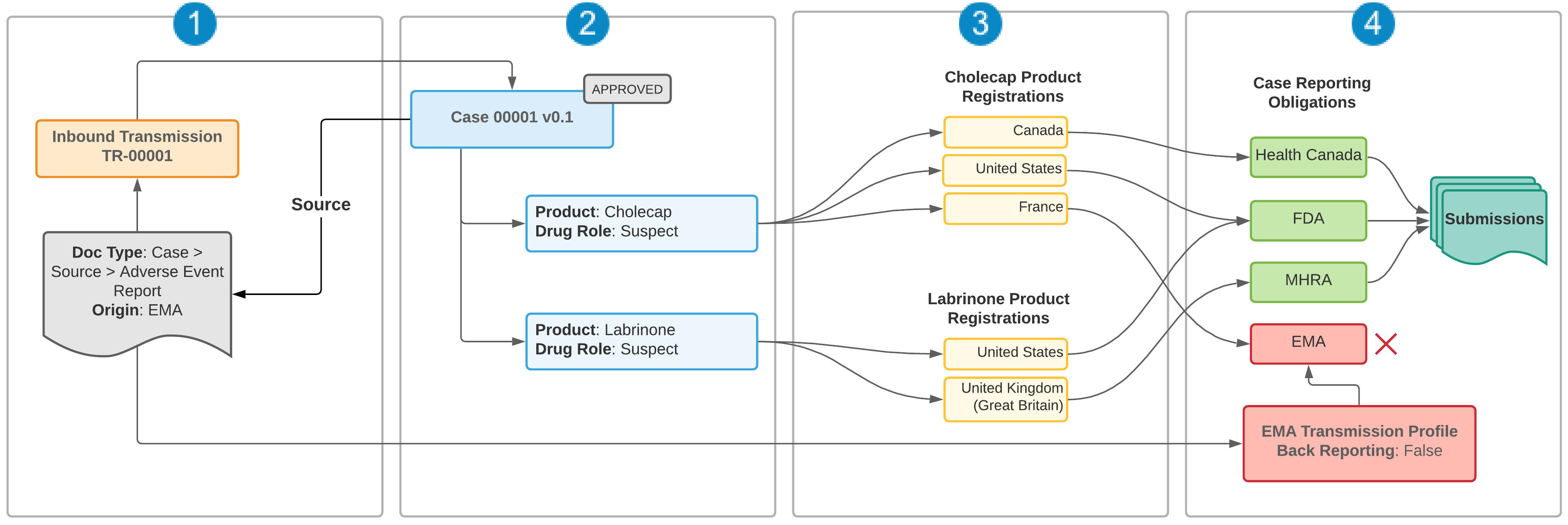 1. A document with **Origin**=EMA is used to create an Inbox Item, which is then promoted to Case 00001. Vault maps the **Origin** field from the source document to the Inbound Transmission, which is a child record under Case 00001.
2. Case 00001 is processed and approved. The Case contains two suspect products: _Cholecap_ and _Labrinone_. The Case triggers the _Evaluate Reporting Obligations_ action by moving to the Approved state.
3. To determine regulatory reporting requirements, the reporting rules engine evaluates Product Registrations for Cholecap and Labrinone. The combined reporting obligations for both products require reporting to Health Canada, FDA, MHRA, and EMA.
4. Because the Case was received from the EMA (Case > Inbound Transmission >Origin=EMA), and the EMA Transmission Profile does not have the **Back Reporting** checkbox selected, a Submission is not generated for the EMA. Vault generates Submission records normally for the remaining reporting destinations.
## Prerequisites
Contact Veeva Support to request that this feature be made available in your Vault.
Once this feature has been turned on in your Vault, administrators must make the following configuration changes:
* Add the **Origin** field to the `Case > Source > Adverse Event Report` document type.
* Add the **Back Reporting** field to **Transmission Profile** layouts.
## Back Reporting Components {#back-reporting-components}
Back reporting is controlled through the _Back Reporting_ setting on _Transmission Profiles_ and the _Origin_ field on _Inbound Transmissions_.
### Transmission Profile Back Reporting Setting (Business Admin)
Use the **Back Reporting** checkbox on the Transmission Profile object to identify whether back reporting is turned on for a reporting destination. Leave the checkbox blank to prevent back reporting.
### Origin on Case Source Document and Inbound Transmission
The **Origin** field on the Case Inbound Transmission identifies the report sender.
There are two ways you can set this field:
* Set the **Origin** field on the Case Inbound Transmission manually.
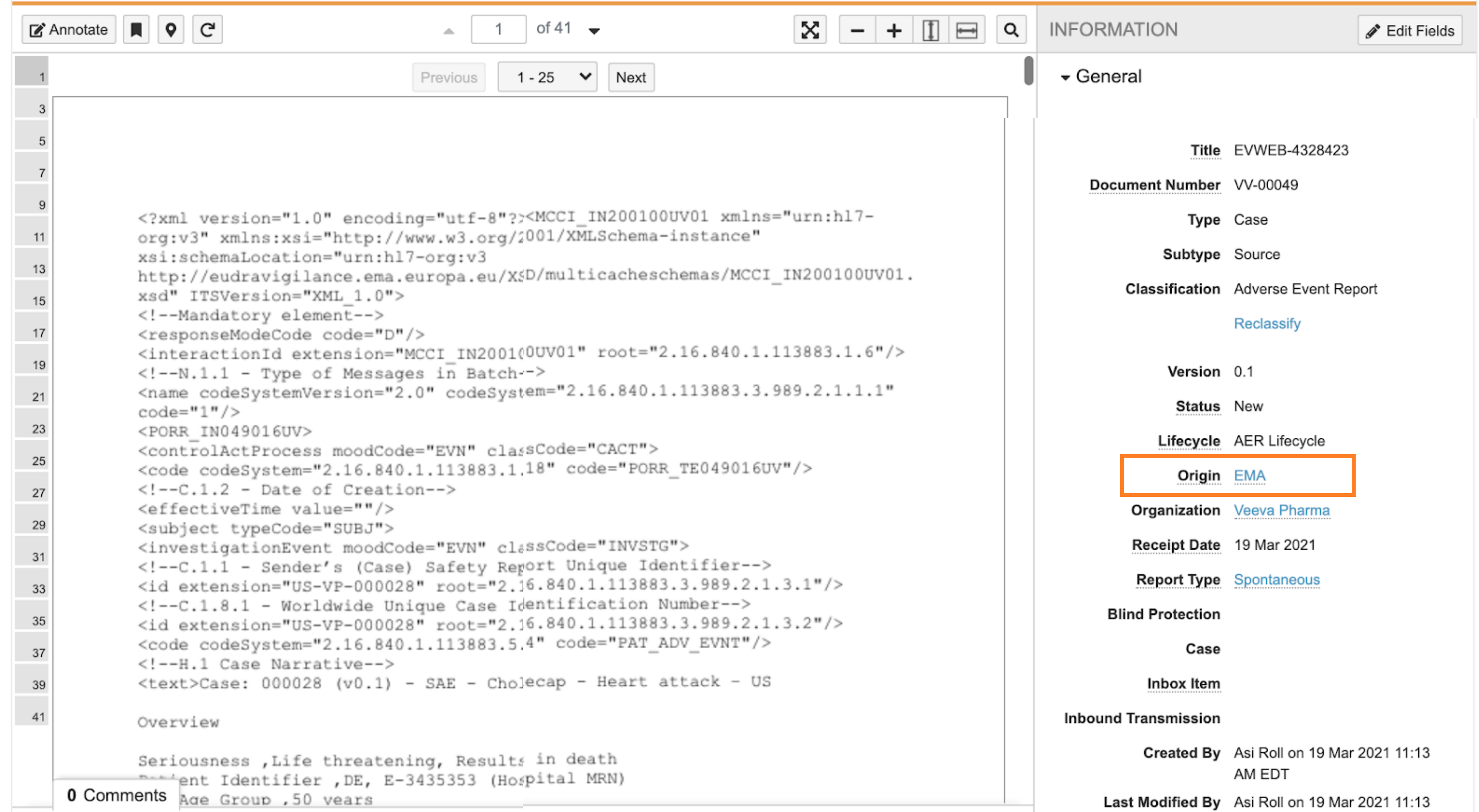
* If you are creating an Inbox Item from a source document, specify the **Origin** field on the document before using the **Create Inbox Item From Document** action. Vault maps the **Origin** field from the document to the Inbound Transmission when the Inbox Item is promoted to a Case.
1. A document with **Origin**=EMA is used to create an Inbox Item, which is then promoted to Case 00001. Vault maps the **Origin** field from the source document to the Inbound Transmission, which is a child record under Case 00001.
2. Case 00001 is processed and approved. The Case contains two suspect products: _Cholecap_ and _Labrinone_. The Case triggers the _Evaluate Reporting Obligations_ action by moving to the Approved state.
3. To determine regulatory reporting requirements, the reporting rules engine evaluates Product Registrations for Cholecap and Labrinone. The combined reporting obligations for both products require reporting to Health Canada, FDA, MHRA, and EMA.
4. Because the Case was received from the EMA (Case > Inbound Transmission >Origin=EMA), and the EMA Transmission Profile does not have the **Back Reporting** checkbox selected, a Submission is not generated for the EMA. Vault generates Submission records normally for the remaining reporting destinations.
## Prerequisites
Contact Veeva Support to request that this feature be made available in your Vault.
Once this feature has been turned on in your Vault, administrators must make the following configuration changes:
* Add the **Origin** field to the `Case > Source > Adverse Event Report` document type.
* Add the **Back Reporting** field to **Transmission Profile** layouts.
## Back Reporting Components {#back-reporting-components}
Back reporting is controlled through the _Back Reporting_ setting on _Transmission Profiles_ and the _Origin_ field on _Inbound Transmissions_.
### Transmission Profile Back Reporting Setting (Business Admin)
Use the **Back Reporting** checkbox on the Transmission Profile object to identify whether back reporting is turned on for a reporting destination. Leave the checkbox blank to prevent back reporting.
### Origin on Case Source Document and Inbound Transmission
The **Origin** field on the Case Inbound Transmission identifies the report sender.
There are two ways you can set this field:
* Set the **Origin** field on the Case Inbound Transmission manually.
* If you are creating an Inbox Item from a source document, specify the **Origin** field on the document before using the **Create Inbox Item From Document** action. Vault maps the **Origin** field from the document to the Inbound Transmission when the Inbox Item is promoted to a Case.
 ## How Vault Evaluates Back Reporting
Vault considers back reporting when either the _Evaluate Reporting Obligations_ action or the _Evaluate Early Notification Obligations_ action runs on a _Case_:
1. For each reporting rule that is triggered, Vault looks at whether the _Case_ was received from that reporting destination (_Case_ > _Inbound Transmission_ > _Origin_).
2. If the _Case_ was received from that reporting destination, Vault does not generate an ICSR _Transmission_ unless the reporting destination's _Transmission Profile_ has the _Back Reporting_ field selected.
## How Vault Evaluates Back Reporting
Vault considers back reporting when either the _Evaluate Reporting Obligations_ action or the _Evaluate Early Notification Obligations_ action runs on a _Case_:
1. For each reporting rule that is triggered, Vault looks at whether the _Case_ was received from that reporting destination (_Case_ > _Inbound Transmission_ > _Origin_).
2. If the _Case_ was received from that reporting destination, Vault does not generate an ICSR _Transmission_ unless the reporting destination's _Transmission Profile_ has the _Back Reporting_ field selected.