# Cross Reporting

In addition to the <a href="/en/gr/01256/">general reporting rules engine</a>, Veeva Safety supports evaluating rules for cross reporting scenarios, such as FDA IND-to-NDA and cross-trial reporting. The following list describes the difference between general and cross reporting:

* In general reporting, Vault evaluates either _Study Registrations_ or _Product Registrations_ depending on the report type and study type of the _Case_. In other words, Vault generates either investigational or marketing reports, not both.
* For cross reporting, Vault evaluates additional investigational or marketing registrations, based on where the _Company Products_ on the _Case_ (or their _Substances_) are marketed or investigated worldwide. Cross reporting obligations are evaluated after _Submissions_ are generated for general reporting.

For both general and cross reporting, Vault evaluates only active _Product Registrations_ and _Study Registrations_ when determining the reportability of a _Case_.

Safety supports the following scenarios to automatically generate additional _Submissions_ for cross reporting:

<table>
   <thead>
      <tr>
         <th>Scenario</th>
         <th>Description</th>
      </tr>
   </thead>
   <tbody>
      <tr>
         <td>Investigational to Marketing</td>
         <td><p>After evaluating a clinical trial <em>Case</em> for general reporting based on its <em>Study Registrations</em>, Vault evaluates whether any company <em>Case Products</em> or their <em>Substances</em> are marketed elsewhere.</p>
            <p>This scenario is supported for both same-agency (for example, FDA IND-to-NDA) and cross-agency reporting.</p></td>
      </tr>
      <tr>
         <td>Investigational to Investigational</td>
         <td>After evaluating a clinical trial <em>Case</em> for general reporting based on its <em>Study Registrations</em>, Vault evaluates whether any company <em>Case Products</em> or their <em>Substances</em> are investigated in other studies.</td>
      </tr>
      <tr>
         <td>Marketing to Marketing</td>
         <td>After evaluating a postmarket <em>Case</em> for general reporting based on its <em>Product Registrations</em>, Vault evaluates whether any company <em>Case Products</em> or their <em>Substances</em> are marketed elsewhere.</td>
      </tr>
      <tr>
         <td>Marketing to Investigational</td>
         <td>After evaluating a postmarket <em>Case</em> for general reporting based on its <em>Product Registrations</em>, Vault evaluates whether the company <em>Case Products</em> or their <em>Substances</em> are investigated elsewhere.</td>
      </tr>
   </tbody>
</table>

 <div class="note-border alert-info">
  <div class="alert alert-info" role="alert">
    <div><i class="far fa-info-circle"></i></div>
    <div class="alert-text">
      <p><strong>Note</strong>: <a id="unknown-formulation-products"></a>When generating <em>Submissions</em> for an <a href="/en/gr/01215/#unknown-formulation-products">unknown formulation <em>Product</em></a>, Vault does not evaluate cross reporting obligations for other <em>Products</em> within its <em>Product Family</em>, preventing duplicate report generation.</p>
    </div>
  </div>
</div>


The <a href="/en/gr/01250/#reporting-scenario">_Reporting Scenario_ parameter</a> on a _Safety Rule_ controls whether one or more cross reporting scenarios apply to a rule. Certain rules in the _FDA Reporting Rule Set_ support cross reporting. Cross reporting scenarios can be added to additional rules using the _Reporting Scenario_ parameter. Contact Veeva Services for assistance in adding custom cross reporting rules.

During cross reporting evaluations, Vault uses the <a href="#registration-categories-investigational-vs-marketing">registration category</a> to match the relevant cross reporting scenarios. _Product Registrations_ and _Study Registrations_ can be categorized as _Investigational_ or _Marketing_.

Generated _Submissions_ must have a unique mapping to a <a href="/en/gr/01202/#transmission-profile-selection">_Transmission Profile_</a>. In other words, Vault does not generate multiple _Submissions_ using the same _Transmission Profile_.

On a Vault-generated _Submission_, the _Transmission Message_ attachment contains a `SafetyRuleLog` audit log for the reporting rules and scenarios evaluated.

## Cross Reporting for Non-Company Sponsored Products and Studies

Your Business Admin can <a href="/en/gr/01215/#non-company-product">specify a _Product_ as a _Non-Company Product_</a>.
If the _Product_ has one or more registrations, Vault will consider Marketing→Investigational and Marketing→Marketing (Cross-Agency) cross reporting scenarios for the _Product_.

In contrast, your Business Admin can <a href="/en/gr/01216/#non-company-sponsored-study">specify a _Study_ as a _Non-Company Sponsored Study_</a>.
Vault does not consider cross reporting scenarios for such _Studies_.


## Cross Reporting in the FDA Reporting Rule Set {#cross-reporting-fda-rule-set}

Cross reporting is supported for versions 3 and 4 of the <a href="/en/gr/01256/">_FDA ICSR Reporting Rule Set_</a>.

The _Active Rule Version_ on the _Safety Rule Set_ must be set to `3` or `4` to activate the cross reporting scenarios. See <a href="/en/gr/01251/">Manage Reporting Rule Versions</a> for more information.

In versions 3 and 4, the following FDA _Safety Rules_ evaluate the _Investigational to Marketing (same agency)_ scenario:
* _Downgrade to Non-Serious_
* _Downgrade to SAE_
* _SUSAR_
* _SUSAR (Death)_
* _SUSAR (Life Threatening)_

In version 4, the following FDA _Safety Rules_ additionally evaluate the _Investigational to Investigational (same agency)_ and _Investigational to Investigational (cross agency)_ scenarios to support FDA E2B(R3) IND cross reporting requirements:

* _Downgrade to SAE_
* _SUSAR_
* _SUSAR (Death)_
* _SUSAR (Life Threatening)_

## Enable Same Agency Cross Reporting

The _Inv. to Marketing (same agency)_ field on an _Agency_ determines whether Vault can generate two _Submissions_ to the same _Agency_ for cross reporting. This field is enabled for the FDA by default. Your Admin can enable this field on additional agencies if required.

## Cross Reporting Scenarios

Each _Safety Rule_ can specify the reporting scenarios it supports using the _Reporting Scenario_ rule parameter.

For same-agency reporting, two _Submissions_ can be generated for the same reporting destination (for example, FDA IND-to-NDA). For cross-agency reporting, Vault ensures only one _Submission_ per reporting destination is generated.


<div class="note-border alert-info">
  <div class="alert alert-info" role="alert">
    <div><i class="far fa-info-circle"></i></div>
    <div class="alert-text">
      <p><strong>Note</strong>: 
When generating <em>Submissions</em> for cross reporting, Vault ensures only one <em>Submission</em> per registration type (Investigational or Marketing) and <em>Agency</em> is generated.
In the event that an <em>Agency</em> has both X→Investigational and X→ Marketing reporting obligations then Vault uses the <em>Cross Report Priority</em> field (if enabled) on the <em>Agency</em> to prioritize which <em>Submissions</em> to an <em>Agency</em> to generate.
See <a href="/en/gr/01213/#add-an-organization">Add an Organization</a> for the options available for this field.</p>
    </div>
  </div>
</div>


The following sections describe supported cross reporting scenarios.

### 1. Investigational to Marketing (Same Agency)

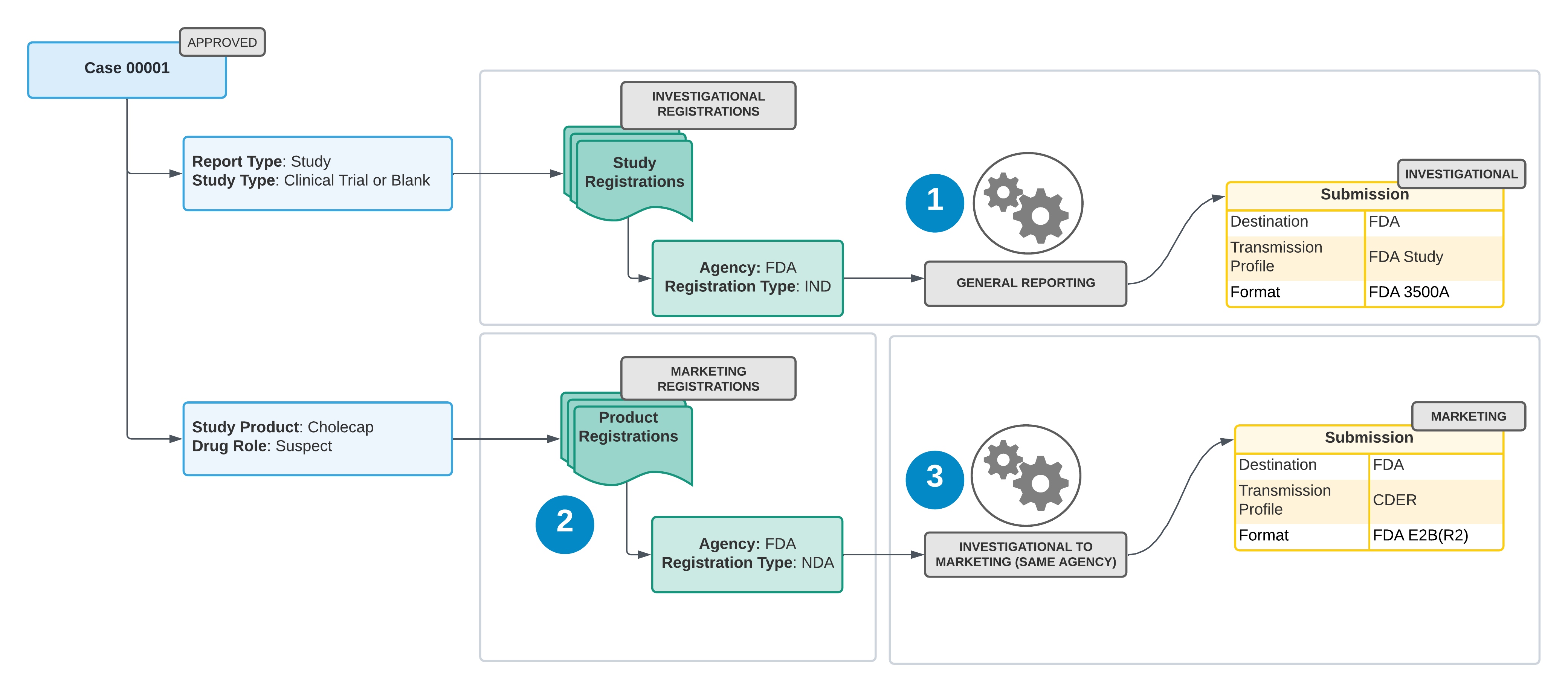
This scenario applies to clinical trial _Cases_ containing _Case Products_ or _Substances_ marketed in the same jurisdiction where they are being investigated.

<div class="note-border alert-info">
  <div class="alert alert-info" role="alert">
    <div><i class="far fa-info-circle"></i></div>
    <div class="alert-text">
      <p><strong>Note</strong>: The <em>Inv. to Marketing (same agency)</em> setting must be enabled on the target <em>Agency</em> for this cross reporting scenario to execute.</p>
    </div>
  </div>
</div>


<a href="https://platform.veevavault.help/assets/images/saf-cross-reporting-inv-to-marketing.png" data-lightbox="saf-cross-reporting-inv-to-marketing.png" data-title="Investigational to Marketing (Same Agency) Cross Reporting" data-alt="Investigational to Marketing (Same Agency) Cross Reporting">
  <img class="docimage" src="https://platform.veevavault.help/assets/images/saf-cross-reporting-inv-to-marketing.png" alt="Investigational to Marketing (Same Agency) Cross Reporting" style="max-width: 90%;"  />
</a>

1. Vault generates investigational _Submissions_ for the applicable _Agencies_, based on the _Study Registration_ countries (general reporting scenario).

2. Vault queries each company _Case Product_ with a _Drug Role_ of _Suspect_ or _Interacting_ to find marketing registrations from the following sources:
* The _Case Product's_ _Product Registrations_. If the _Case Product_ is part of a _Combination Product_, Vault queries the _Combination Product's_ _Product Registrations_ instead. The _Combination Product Registration_ designated as the <a href="/en/gr/01214/#pmoa">_PMOA_</a> takes precedence above other registrations.
* The _Product Registrations_ of any _Company Product_ that shares the same _Product Substance_ (active ingredient) with the _Case Product_.

3. Vault generates marketing _Submissions_ for _Product Registrations_ that share the same reporting destination as the Investigational Submissions generated by the general reporting scenario. To generate these _Submissions_, a matching <a href="/en/gr/01202/#transmission-profile-selection">_Transmission Profile_</a> must exist.

<div class="note-border alert-info">
  <div class="alert alert-info" role="alert">
    <div><i class="far fa-info-circle"></i></div>
    <div class="alert-text">
      <p><strong>Note</strong>: When evaluating cross reportable registrations, only shared products or product substances are considered as eligible products.</p>
    </div>
  </div>
</div>


### 2. Investigational to Marketing (Cross Agency)

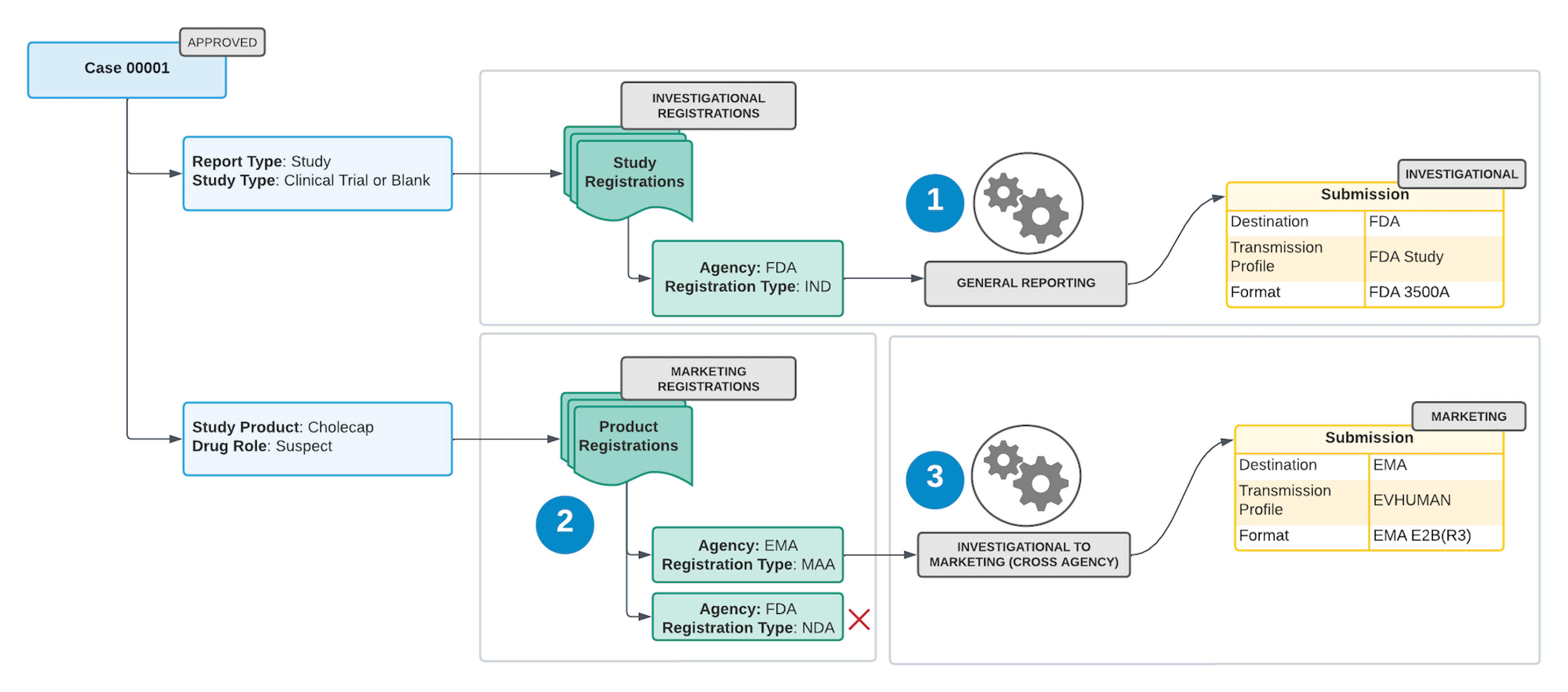
This scenario applies to clinical trial _Cases_ containing _Case Products_ or _Substances_ marketed in a different jurisdiction than where they are being investigated.

<a href="https://platform.veevavault.help/assets/images/saf-cross-reporting-inv-to-marketing-cross-agency.png" data-lightbox="saf-cross-reporting-inv-to-marketing-cross-agency.png" data-title="Investigational to Marketing (Cross Agency) Cross Reporting" data-alt="Investigational to Marketing (Cross Agency) Cross Reporting">
  <img class="docimage" src="https://platform.veevavault.help/assets/images/saf-cross-reporting-inv-to-marketing-cross-agency.png" alt="Investigational to Marketing (Cross Agency) Cross Reporting" style="max-width: 90%;"  />
</a>

1. Vault generates investigational _Submissions_ for the applicable agencies, based on the _Study Registration_ countries (general reporting scenario).

2. Vault queries each company _Case Product_ with a _Drug Role_ of _Suspect_ or _Interacting_ to find marketing registrations from the following sources:
* The _Case Product's_ _Product Registrations_. If the _Case Product_ is part of a _Combination Product_, Vault queries the _Combination Product's Registrations_ instead. The _Combination Product Registration_ designated as the <a href="/en/gr/01214/#pmoa">_PMOA_</a> takes precedence above other registrations.
* The _Product Registrations_ of any _Company Product_ that shares the same _Product Substance_ (active ingredient) with the _Case Product_.

3. Vault generates marketing _Submissions_ for _Product Registrations_ with reporting destinations that are different from the Investigational Submissions generated by the general reporting scenario. To generate these _Submissions_, a matching <a href="/en/gr/01202/#transmission-profile-selection">_Transmission Profile_</a> must exist.

<div class="note-border alert-info">
  <div class="alert alert-info" role="alert">
    <div><i class="far fa-info-circle"></i></div>
    <div class="alert-text">
      <p><strong>Note</strong>: When evaluating cross reportable registrations, only shared products or product substances are considered as eligible products.</p>
    </div>
  </div>
</div>


### 3. Investigational to Investigational (Cross Agency) {#inv-to-inv}

For clinical trial _Cases_, after generating a _Submission_ for the _Study Registration_ (general reporting), Vault determines whether any company _Case Products_, or their _Substances_, are being investigated or used as comparators in another _Study_ with an _Investigational_ registration in different jurisdictions.

If so, Vault generates _Submissions_ for the additional _Study_ with unique reporting destinations.

<div class="note-border alert-info">
  <div class="alert alert-info" role="alert">
    <div><i class="far fa-info-circle"></i></div>
    <div class="alert-text">
      <p><strong>Note</strong>: When evaluating cross reportable registrations, only shared products or product substances are considered as eligible products.</p>
    </div>
  </div>
</div>


When calculating reporting obligations to the PMDA on a Global Case, Vault also determines whether any _Studies_ registered with a non-PMDA agency have _Products_ registered with the PMDA. If so, Vault generates _Submissions_ to the PMDA.

### 4. Marketing to Marketing (Cross Agency)

For postmarket _Cases_, after generating a _Submission_ for a company _Case Product_, Vault determines whether the _Substance_ (active ingredient) is shared by any _Company Products_ with a _Marketing_ Registration in different jurisdictions.

If so, Vault generates _Submissions_ for the other company _Product_ with unique reporting destinations.

<div class="note-border alert-info">
  <div class="alert alert-info" role="alert">
    <div><i class="far fa-info-circle"></i></div>
    <div class="alert-text">
      <p><strong>Note</strong>: When evaluating cross reportable registrations, only shared <em>Products</em> or <em>Product Substances</em> are considered as eligible products.</p>
    </div>
  </div>
</div>


### 5. Marketing to Investigational (Cross Agency)

For postmarket _Cases_, after generating a _Submission_ for a company _Case Product_, Vault determines whether that _Product_, or its _Substance_ (active ingredient), is being investigated or used as comparators in another _Study_ with _Investigational_ registrations in different jurisdictions.

If so, Vault generates _Submissions_ for the _Study_ with unique reporting destinations.

<div class="note-border alert-info">
  <div class="alert alert-info" role="alert">
    <div><i class="far fa-info-circle"></i></div>
    <div class="alert-text">
      <p><strong>Note</strong>: When evaluating cross reportable registrations, only shared <em>Products</em> or <em>Product Substances</em> are considered as eligible products.</p>
    </div>
  </div>
</div>


## Registration Categories: Investigational vs. Marketing

A registration can be assigned the _Investigational_ or _Marketing_ category. You can select the _Registration Type_ on a _Study Registration_ or a _Product Registration_.

On a _Registration Type_ of _Controlled Vocabulary_, the _Registration Category_ field identifies whether a registration category is _Investigational_ or _Marketing_.

The following table outlines the Vault-managed _Registration Types_ and their _Registration Category_:

<table>
   <thead>
      <tr>
         <th>Registration Type</th>
         <th>API Name</th>
         <th>Registration Category</th>
      </tr>
   </thead>
   <tbody>
      <tr>
         <td>Marketing Authorisation Application (MAA)</td>
         <td><code>maa__v</code></td>
         <td>Marketing</td>
      </tr>
      <tr>
         <td>Clinical Trial Application (CTA)</td>
         <td><code>cta__v</code></td>
         <td>Investigational</td>
      </tr>
      <tr>
         <td>New Drug Application (NDA)</td>
         <td><code>nda__v</code></td>
         <td>Marketing</td>
      </tr>
      <tr>
         <td>Abbreviated New Drug Application (ANDA)</td>
         <td><code>anda__v</code></td>
         <td>Marketing</td>
      </tr>
      <tr>
         <td>Biologic License Application (BLA)</td>
         <td><code>bla__v</code></td>
         <td>Marketing</td>
      </tr>
      <tr>
         <td>Investigation New Drug Application</td>
         <td><code>ind__v</code></td>
         <td>Investigational</td>
      </tr>
      <tr>
         <td>Premarket Approval Application (PMA)</td>
         <td><code>pma__v</code></td>
         <td>Marketing</td>
      </tr>
      <tr>
         <td>Premarket Notification 510k (510k)</td>
         <td><code>510k__v</code></td>
         <td>Marketing</td>
      </tr>
      <tr>
         <td>Humanitarian Device Exemption (HDE)</td>
         <td><code>hde__v</code></td>
         <td>Marketing</td>
      </tr>
   </tbody>
</table>

If a _Registration Type_ is not specified, Vault uses the following logic to classify the _Registration Category_ for _Study Cases_:

* Investigational: When the _Case_ has a _Study Type_ of _Clinical Trial_ or blank.
* Marketing: When the _Case_ has a _Study Type_ of any other value, such as _Individual Patient Use_ or _Other Study_.

<div class="note-border alert-info">
  <div class="alert alert-info" role="alert">
    <div><i class="far fa-info-circle"></i></div>
    <div class="alert-text">
      <p><strong>Note</strong>: <em>Study Products</em> with a <em>Study Product Role</em> of <em>Investigational</em> or <em>Active Comparator</em> are considered to be investigational medicinal products.</p>
    </div>
  </div>
</div>


## Cross Reporting Evaluation of Expectedness Rule Parameter {#cr-eval-of-expectedness-rp}

The <a href="/en/gr/740208/#cr-wo-ds-exp-sub">_Cross Reporting without Datasheet Expectedness Substitution_</a> ICSR setting determines how the Safety Reporting Rule Engine evaluates the _Expected_ rule parameter for cross reporting scenarios where additional products are found through a _Substance_ lookup.


<div class="note-border alert-info">
  <div class="alert alert-info" role="alert">
    <div><i class="far fa-info-circle"></i></div>
    <div class="alert-text">
      <p><strong>Note</strong>: To use this feature, your Admin must enable <a href="/en/gr/01425/">Cross Reporting without Expectedness Substitution</a>.</p>
    </div>
  </div>
</div>


If this setting is enabled, the Rule Engine calculates expectedness in the same way as for general reporting (that is, without substitution based on cross reportable _Datasheets_).
See the <a href="/en/gr/01250/">Reporting Rule Parameter Reference</a> for more information on how general reporting calculates expectedness.

If this setting is not enabled, the Rule Engine uses the following logic to calculate expectedness:

1. Determines if there are other _Company Products_ with the same _Substance_ that have an associated marketing _Product Registration_.
    * If so, Vault evaluates expectedness using the local and core _Datasheets_ for that _Company Product_.
    * If there are no _Product_ _Datasheets_, Vault uses the value from the _Expected_ field on the relevant _Case Assessment_.
2. Determines if there are clinical trial _Studies_ where company _Case Products_ or their _Substances_ have an associated investigational _Study Registration_.
    * If so, Vault evaluates expectedness using the _Study Product_ and _Study_ core _Datasheets_, if available, otherwise Vault uses the core _Datasheet_ of the substituted _Product_.
    * If there are no _Study Product_, _Study_, or _Product_ core _Datasheets_, Vault uses the value from the _Expected_ field on the relevant _Case Assessment_.

### Clinical Trial Study Case Expectedness Evaluations

Vault offers several configurable options to <a href="/en/gr/822874/">evaluate expectedness for clinical trial study _Cases_</a>. These options apply to both general and cross reporting.

## Cross Reporting Substance Matching

Vault supports the following methods of _Substance_ matching when determining the cross reporting obligations for an _Agency_ based on _Case Product Substances_:

<table>
   <thead>
      <tr>
         <th>Matching Method</th>
         <th>Description</th>
      </tr>
   </thead>
   <tbody>
      <tr>
         <td><a href="#exact">Exact Matching</a></td>
         <td>This method is the most restrictive. The cross-reportable <em>Product</em> must include the exact same <em>Substance</em> list as the <em>Case Product</em>.</td>
      </tr>
      <tr>
         <td><a href="#subset">Subset Matching</a></td>
         <td>
            <p>The cross-reportable <em>Product</em> must include all of the <em>Substances</em> within the <em>Case Product</em>. The cross-reportable <em>Product</em> may include additional <em>Substances</em> in this scenario.</p>
            <p>Subset matching includes Exact matching scenarios.</p>
         </td>
      </tr>
      <tr>
         <td><a href="#partial">Partial Matching</a></td>
         <td>
            <p>This method is the least restrictive. The cross-reportable <em>Product</em> must include at least one of the same <em>Substances</em> as the <em>Case Product</em>.</p>
            <p>Partial matching includes both Subset and Exact matching scenarios.</p>
         </td>
      </tr>
   </tbody>
</table>

Your Business Admin can set the _Substance_ matching method for an _Agency_ using the <a href="/en/gr/01213/#cross-reporting-substance-lookup-method">_Cross Reporting Substance Lookup Method_</a> field.

The following sections describe each of the available _Substance_ matching methods.

### Exact Matching Method (Most Restrictive) {#exact}

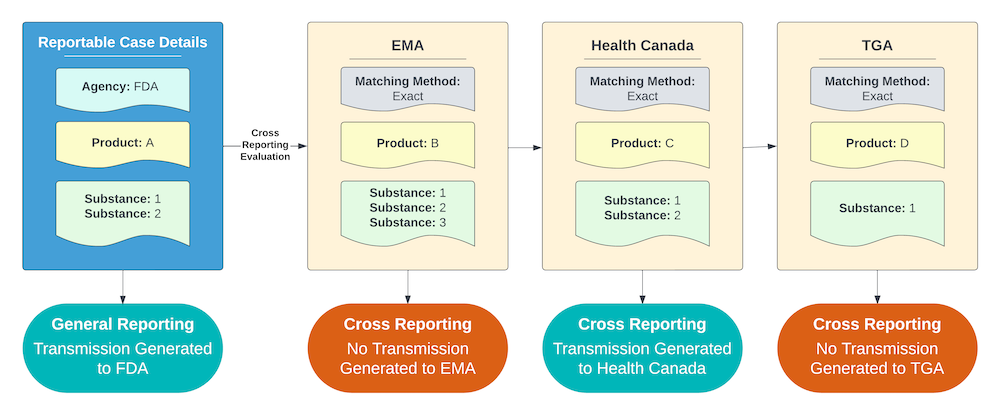
For an _Agency_ using the Exact Matching method, Vault reports to the _Agency_ if the cross-reportable _Product_ contains the exact same _Substance_ list as the _Case Product_.

The example shown below includes the following criteria:

* All of the _Agencies_ with potentially cross-reportable _Products_ are using the Exact Matching method.
* Product C contains the exact same _Substance_ list as Product A, but Products B and D do not.

As a result, Vault sends a report to the _Agency_ that Product C is registered with for any _Cases_ containing Product A. Reports are not sent to _Agencies_ with only Products B and D registered.

<a href="https://platform.veevavault.help/assets/images/saf-substance-matching-exact.png" data-lightbox="saf-substance-matching-exact.png" data-title="Cross Reporting Substance Matching: Exact Method Example" data-alt="Cross Reporting Substance Matching: Exact Method Example">
  <img class="docimage" src="https://platform.veevavault.help/assets/images/saf-substance-matching-exact.png" alt="Cross Reporting Substance Matching: Exact Method Example" style=""  />
</a>

### Subset Matching Method {#subset}

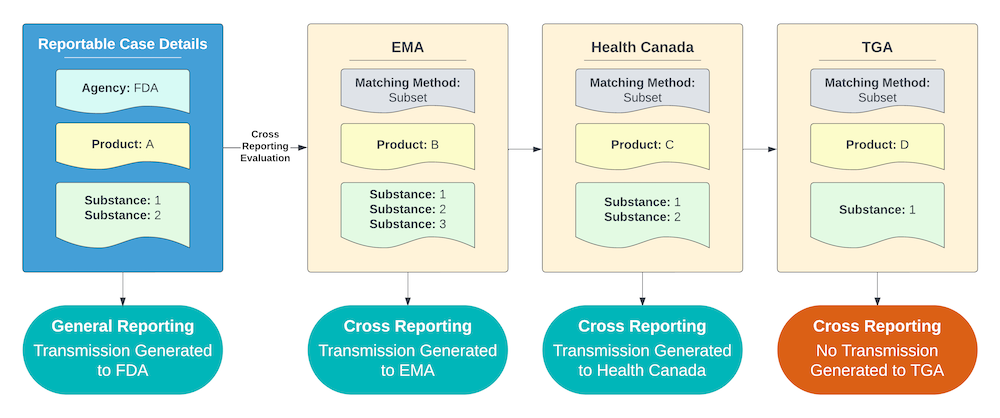
For an _Agency_ using the Subset Matching method, Vault reports to the _Agency_ if the cross-reportable _Product_ contains all of the same _Substances_ as the _Case Product_.

The example shown below includes the following criteria:

* All of the _Agencies_ with potentially cross-reportable _Products_ are using the Subset Matching method.
* Products B and C contain all the _Substances_ of Product A, but Product D does not.

As a result, Vault sends a report to the _Agencies_ that Product B and C are registered with for any _Cases_ containing Product A.
<a href="https://platform.veevavault.help/assets/images/saf-substance-matching-subset.png" data-lightbox="saf-substance-matching-subset.png" data-title="Cross Reporting Substance Matching: Subset Method Example" data-alt="Cross Reporting Substance Matching: Subset Method Example">
  <img class="docimage" src="https://platform.veevavault.help/assets/images/saf-substance-matching-subset.png" alt="Cross Reporting Substance Matching: Subset Method Example" style=""  />
</a>

### Partial Matching Method (Least Restrictive) {#partial}

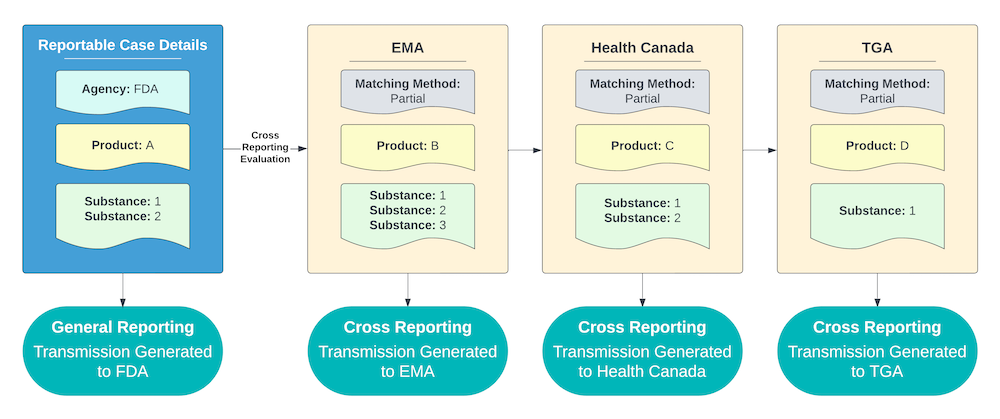
For an _Agency_ using the Partial Matching method, Vault reports to the _Agency_ if the cross-reportable _Product_ contains at least one of the same _Substances_ as the _Case Product_.

The example shown below includes the following criteria:

* All of the _Agencies_ with potentially cross-reportable _Products_ are using the Partial Matching method.
* Products B, C, and D each contain at least one of the _Substances_ of Product A.

As a result, Vault sends a report to the _Agencies_ that Product B, C, and D are registered with for any _Cases_ containing Product A.
<a href="https://platform.veevavault.help/assets/images/saf-substance-matching-partial.png" data-lightbox="saf-substance-matching-partial.png" data-title="Cross Reporting Substance Matching: Partial Method Example" data-alt="Cross Reporting Substance Matching: Partial Method Example">
  <img class="docimage" src="https://platform.veevavault.help/assets/images/saf-substance-matching-partial.png" alt="Cross Reporting Substance Matching: Partial Method Example" style=""  />
</a>