# Manage Active Rule Versions
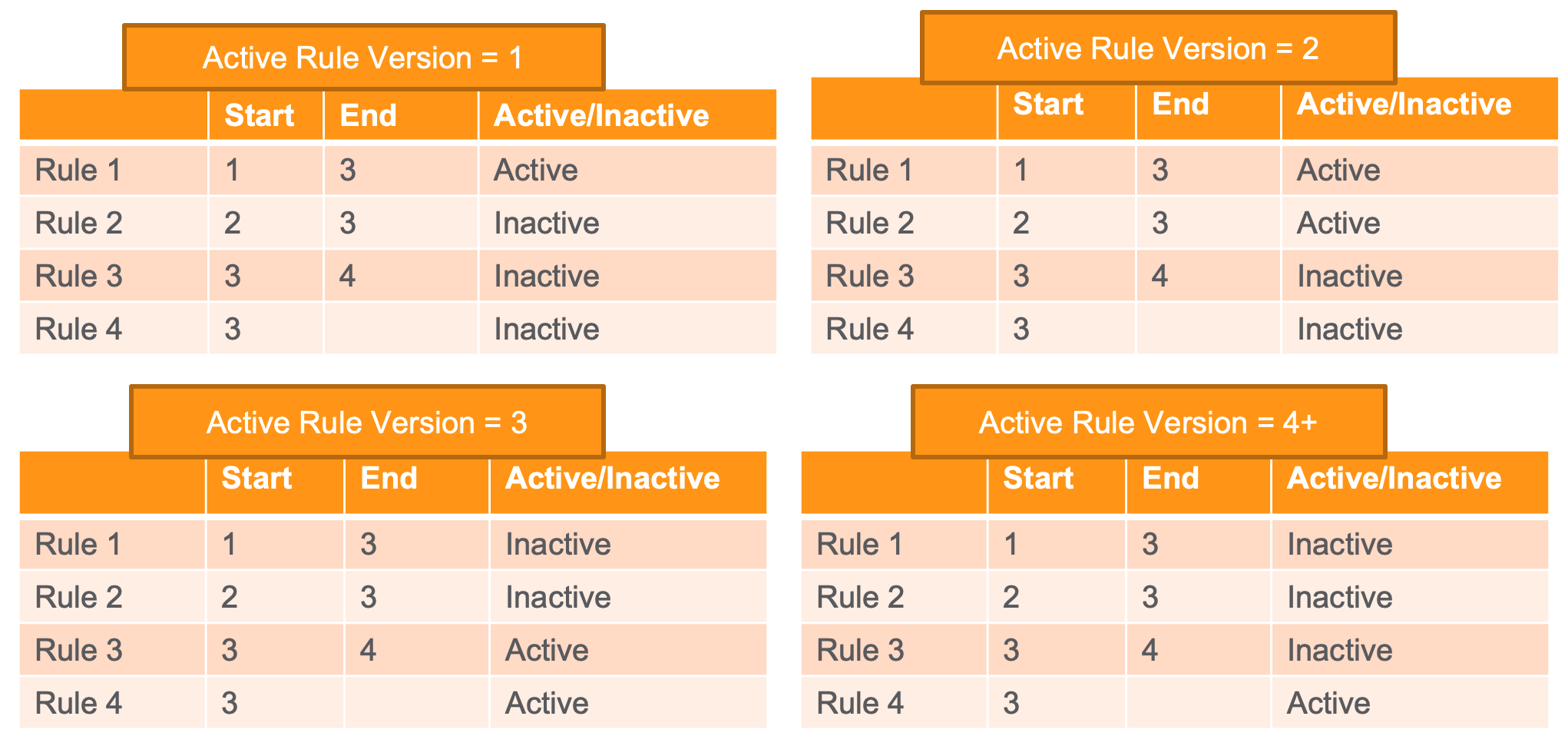
The _Active Rule Version_ on a _Safety Rule Set_ indicates to the Reporting Rules Engine which of the set's _Safety Rules_ to execute when evaluating a _Case_. Each _Safety Rule_ has an assigned _Safety Rule Version_ number and _Safety Rule Version End_ number. A _Safety Rule_ is active within a _Safety Rule Set_ if the rule's _Safety Rule Version_ and _Safety Rule Version End_ meet the following conditions:
* The _Safety Rule Version_ is less than or equal to the set's _Active Rule Version_.
* The _Safety Rule Version End_ is greater than the set's _Active Rule Version_, or the _Safety Rule Version End_ is blank (unspecified).
The following examples illustrate how _Safety Rules_ become active or inactive depending on the _Active Rule Version_ of the _Safety Rule Set_:
 ## Recommended Rule Set Versions
The ability to set the _Active Rule Version_ of a standard _Safety Rule Set_ allows you to choose when to adopt new _Safety Rules_ for that set. To adopt the latest reporting rules for the standard _Safety Rule Sets_, we strongly recommend you use the following versions:
|Safety Rule Set|Version|
|--- |--- |
|EMA ICSR Reporting Rule Set|3|
|FDA ICSR Reporting Rule Set|4|
|PMDA ICSR Reporting Rule Set|3|
## Set the Active Rule Version of a Safety Rule Set
To set the _Active Rule Version_ of a _Safety Rule Set_:
1. Navigate to **Business Admin > Objects > Safety Rule Sets**.
2. Open the _Safety Rule Set_ you want to edit.
3. Set the **Active Rule Version** field to the earliest version that should be made active.\
This field accepts a number between 0 and 1,000.
4. Select **Save**.
## Recommended Rule Set Versions
The ability to set the _Active Rule Version_ of a standard _Safety Rule Set_ allows you to choose when to adopt new _Safety Rules_ for that set. To adopt the latest reporting rules for the standard _Safety Rule Sets_, we strongly recommend you use the following versions:
|Safety Rule Set|Version|
|--- |--- |
|EMA ICSR Reporting Rule Set|3|
|FDA ICSR Reporting Rule Set|4|
|PMDA ICSR Reporting Rule Set|3|
## Set the Active Rule Version of a Safety Rule Set
To set the _Active Rule Version_ of a _Safety Rule Set_:
1. Navigate to **Business Admin > Objects > Safety Rule Sets**.
2. Open the _Safety Rule Set_ you want to edit.
3. Set the **Active Rule Version** field to the earliest version that should be made active.\
This field accepts a number between 0 and 1,000.
4. Select **Save**.