 ## Add an MAH Distribution List
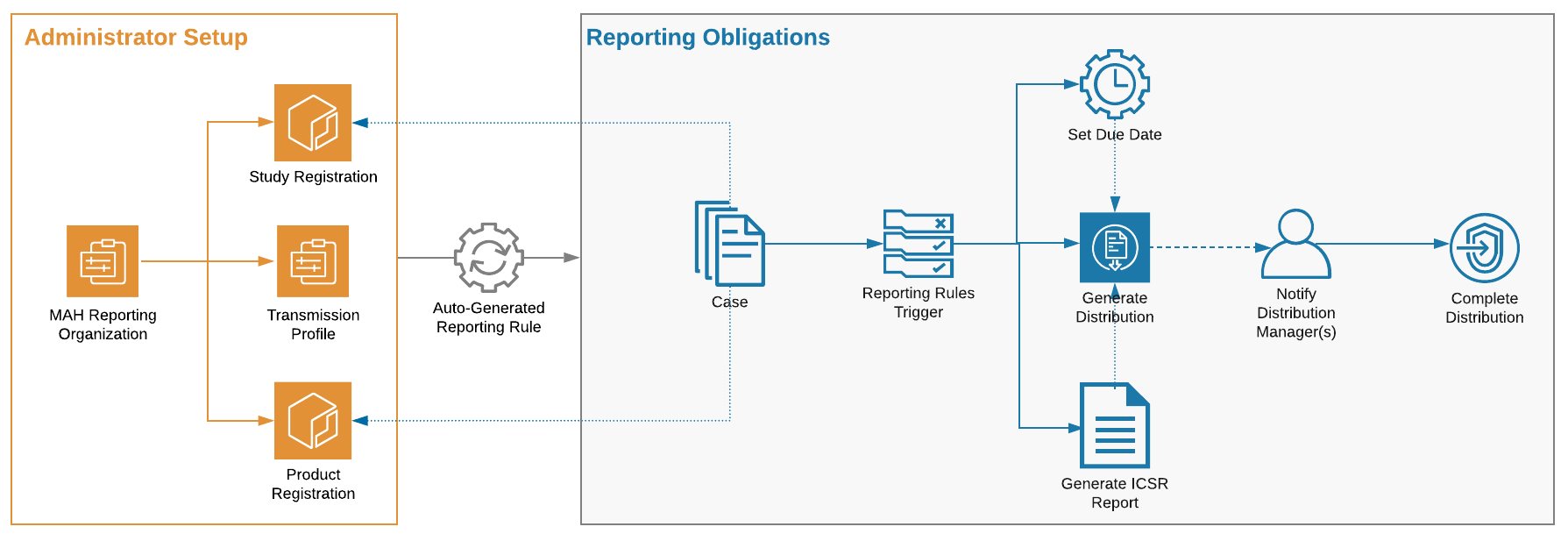
To create an MAH Distribution List, assign the `reporting_organization__v` on a Product Registration or Study Registration.
1. Configure an Organization for the market authorization holder.
2. To create an MAH Distribution List for a Product Registration, configure a Product Registration and populate the **MAH** (`reporting_organization__v`) field. When a Case contains a Case Product linked with this Product Registration, the MAH reporting obligation will be triggered.
3. To create an MAH Distribution List for a Study Registration, configure a Study Registration and populate the **Reporting Organization** (`reporting_organization__v`) field. When a Case is associated with a Study linked with this Study Registration, the MAH reporting obligation will be triggered.
4. Configure the Transmission Profile for the Origin and Destination pair. You can configure an Email Transmission Profile, Manual Transmission Profile, or AS2 Gateway Transmission Profile.
**Result**
When a Case includes a Product Registration or Study Registration with an MAH Distribution List, that reporting rule applies to the Case.
## Add an MAH Distribution List
To create an MAH Distribution List, assign the `reporting_organization__v` on a Product Registration or Study Registration.
1. Configure an Organization for the market authorization holder.
2. To create an MAH Distribution List for a Product Registration, configure a Product Registration and populate the **MAH** (`reporting_organization__v`) field. When a Case contains a Case Product linked with this Product Registration, the MAH reporting obligation will be triggered.
3. To create an MAH Distribution List for a Study Registration, configure a Study Registration and populate the **Reporting Organization** (`reporting_organization__v`) field. When a Case is associated with a Study linked with this Study Registration, the MAH reporting obligation will be triggered.
4. Configure the Transmission Profile for the Origin and Destination pair. You can configure an Email Transmission Profile, Manual Transmission Profile, or AS2 Gateway Transmission Profile.
**Result**
When a Case includes a Product Registration or Study Registration with an MAH Distribution List, that reporting rule applies to the Case.
Note: For Reporting Families set up to use the FDA or EMA reporting ruleset, the system generates Distribution record(s) regardless of the registration country on the Case Product or Study Registration.
Note: If the Reporting Organization value on a Study Registration or the MAH value on a Product Registration changes, any previously-created Distribution records remain active. If necessary, you can deactivate these records manually.