# Understand the Reporting Rules Engine

Safety's Reporting Rules Engine simplifies the process of managing Individual Case Safety Report (ICSR) reporting obligations. The Reporting Rules Engine comprises of the following parts:

* <a href="/en/gr/01252/">**Safety Rule Sets**</a>: Collections of reporting rules (_Safety Rules_ and _Safety Rule Parameters_) which can be assigned to an _Agency, Market Authority Holder (MAH), or Reporting Family_.
* **Safety Rules**: Reporting rules containing one or more <a href="/en/gr/01250/">_Safety Rule Parameters_</a> that define the conditions for which a _Transmission_ is generated.
* **Active Rule Version**: The <a href="/en/gr/01251/">_Active Rule Version_</a> of a _Safety Rule Set_ indicates to the Reporting Rules Engine which of the set's _Safety Rules_ to execute when evaluating a _Case_.
* <a href="/en/gr/01202/">**Transmission Profiles**</a>: Generates _Transmissions_ for an origin-and-destination pair with the appropriate ICSR file format.

Admins can set up _Safety Rule Sets, Safety Rules,_ and _Transmission Profiles_ for regulatory agencies, partners, study sites, and market authorization holders such that when the Reporting Rules Engine runs on a _Case_, Vault creates the necessary _Transmissions._

Note: Vault provides _Safety Rule Sets_, _Safety Rules_, and _Transmission Profiles_ for certain <a href="/en/gr/01245/">standard agencies</a>, including the FDA, EMA, MHRA, and PMDA.

The following actions trigger the Reporting Rules Engine to run on a _Case_:

* [Evaluate Early Notification Obligations][3]
* [Evaluate Reporting Obligations][4]

Depending on your Vault's configuration, you can trigger these actions manually or Vault can trigger them through the _Case_ lifecycle.

## Evaluate Early Notification Obligations {#eeno}

When the _Evaluate Early Notification Obligations_ action runs on a _Case_, Vault generates _Early Notification Reports_ as required. For more information on _Early Notification Reports_, see <a href="/en/gr/01264/#types">ICSR Transmissions Overview</a> and <a href="/en/gr/1022564/">Create an ICSR Transmission</a>.

## Evaluate Reporting Obligations {#ero}

When the _Evaluate Reporting Obligation_ action runs on a _Case_, Vault generates and assigns due dates (and [approval due dates][5], if configured) for _Submissions_ and _Distributions_ as required. For more information on _Submissions_ and _Distributions_, see <a href="/en/gr/01264/#types">ICSR Transmissions Overview</a> and <a href="/en/gr/1022564/">Create an ICSR Transmission</a>

## Submission Rules

The _Submission Rules_ field on an <a href="/en/gr/01213/">Agency</a> assigns a _Safety Rule Set_ to an _Agency_. While certain <a href="/en/gr/01245/">standard agencies</a> are preconfigured with a _Submission Rule_, you can <a href="/en/gr/01253/">assign _Submission Rules_</a> to additional _Agencies_.

To generate a _Submission_ for an _Agency_, the rules engine must evaluate an active _Product Registration_ or _Study Registration_ for a country within the _Agency_'s jurisdiction. The _Agency_ field on the associated _Country_ record identifies which regulatory agency has <a href="/en/gr/01213/#manage-agencies">jurisdiction</a> over that country.

<div class="note-border alert-info">
  <div class="alert alert-info" role="alert">
    <div><i class="far fa-info-circle"></i></div>
    <div class="alert-text">
      <p><strong>Note</strong>: If a <em>Product</em> has multiple <em>Product Type</em> registrations based on agency requirements, you can create country-specific <em>Product Registrations</em>.</p>
    </div>
  </div>
</div>


When evaluating reporting obligations, Vault looks at the country selection on _Case Registrations_. For general reporting, Vault looks at the following registrations by report type:

* For _Cases_ with a non-<em>Study</em> type of report, Vault evaluates the active _Product Registrations_.
* For _Cases_ with a _Report Type_ of _Study_, Vault evaluates the active _Study Registrations_. However, if the _Study Has Unspecified Products_ field is selected on the associated _Study_, Vault evaluates the active _Product Registrations_ instead for _Cases_ involving that _Study_.


<div class="note-border alert-info">
  <div class="alert alert-info" role="alert">
    <div><i class="far fa-info-circle"></i></div>
    <div class="alert-text">
      <p><strong>Note</strong>: After Vault generates <em>Submissions</em> for general reporting, Vault evaluates additional investigational or marketing registrations associated with the <em>Case</em> for the purposes of <a href="/en/gr/01247/">Cross Reporting</a>.</p>
    </div>
  </div>
</div>


### FDA Registration Details {#fda}

For automatically generated _Submissions_ to the FDA, Vault populates the appropriate [product][1] or [study][2] registration details based on existing registrations. Vault does not populate FDA registration details for any _Submissions_ generated through <a href="/en/gr/727950/">_Transmission Output Templates_</a>.

#### Product Registrations {#product-registrations}

For _Submissions_ generated based on _Product Registrations_ for non-study types of _Cases_, Vault populates the following registration fields differently for general reporting and cross reporting:

* **General Reporting**
  * **Reportable Product**: The passing _Product_ of the _Case_
  * **Reportable Product Registration**: Assigned based on the following priority of marketing _Product Registrations_ for the _Reportable Product_:
    1. Earliest _Registration Date_
    2. Lowest _Registration Number_
    3. Earliest _Created Date_
* **Cross Reporting**
  * **Reportable Product Registration**: Assigned based on the following priority of existing FDA marketing _Product Registrations_:
    1. Shortest _Due in Days_
    2. Earliest _Registration Date_
    3. Lowest _Registration Number_
    4. Earliest _Created Date_
  * **Reportable Product**: The _Product_ of the _Reportable Product Registration_

When evaluating _Product Registrations_ for a _Case_ that contains an <a href="/en/gr/01215/#unknown-formulation-products">unknown formulation _Product_</a>, Vault considers all _Product Registrations_ within the _Product Family_. When evaluating _Registration Numbers_ of existing _Product Registrations_ to determine the lowest number, Vault  ignores any letters in the field values. For example, "C123" is lower than "A321".

#### Study Registrations {#study-registrations}

For _Submissions_ generated based on _Study Registrations_ for study types of _Cases_, Vault populates the following registration fields for general reporting:

* **Reportable Product**: The passing _Product_ of the _Case_
* **Reportable Study Registration**: Assigned based on the following priority for the _Study_ of the _Case_:
     1. Lowest _Registration Number_
     2. Earliest _Created Date_
* **Reportable Study**: The _Study_ of the _Case_ when the case is a Clinical Trial Study

When evaluating _Registration Numbers_ of existing _Study Registrations_ to determine the lowest number, Vault ignores any letters in the field values. For example, "C123" is lower than "A321".

### General Reporting Example {#example}

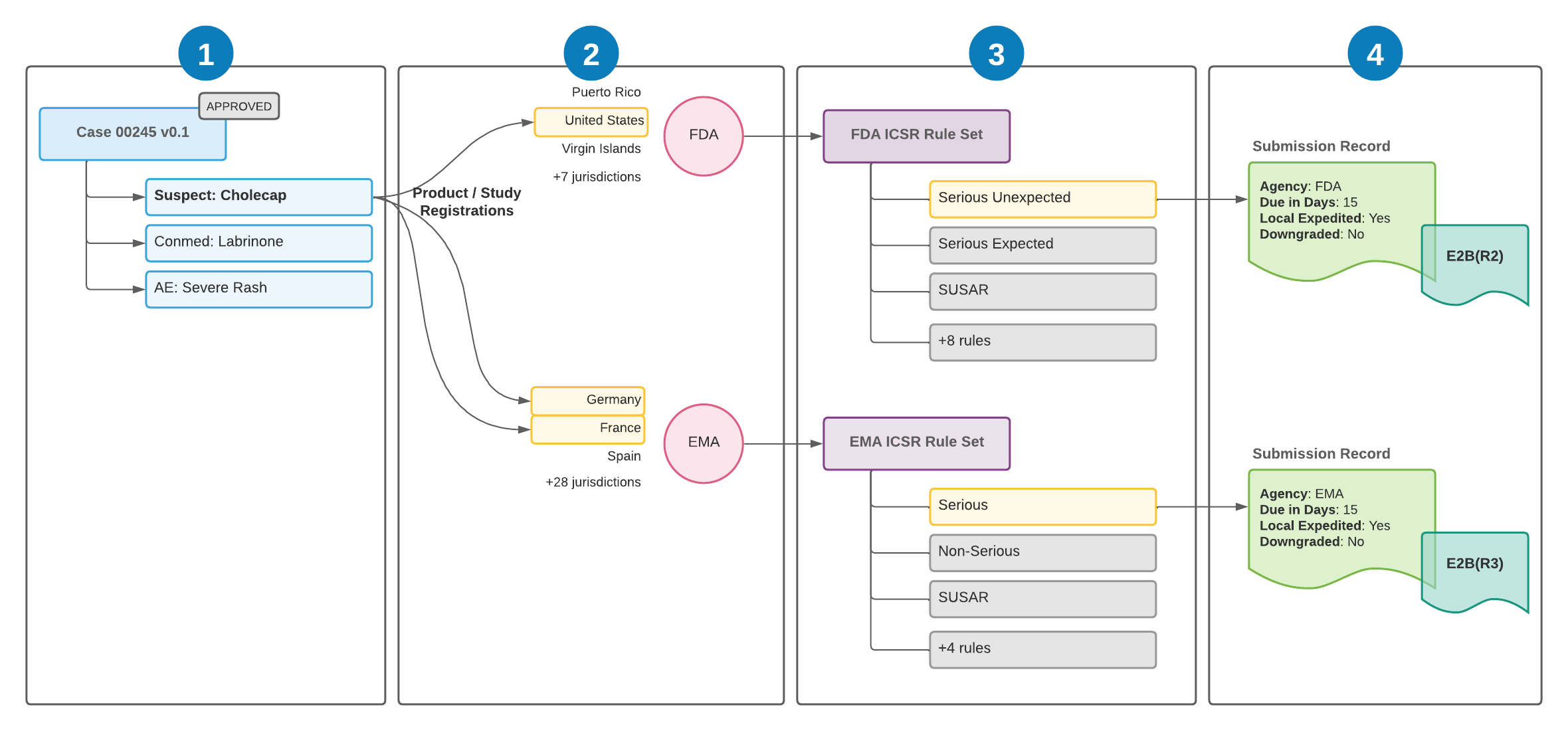
The following illustration shows how Vault Safety evaluates regulatory reporting requirements for general reporting:

<a href="https://platform.veevavault.help/assets/images/saf-reporting-rules-agency-rule-sets.png" data-lightbox="saf-reporting-rules-agency-rule-sets.png" data-title="Evaluating Submission Reporting Rules for a Case" data-alt="Evaluating Submission Reporting Rules for a Case">
  <img class="docimage" src="https://platform.veevavault.help/assets/images/saf-reporting-rules-agency-rule-sets.png" alt="Evaluating Submission Reporting Rules for a Case" style=""  />
</a>

<img class="inline" src="https://platform.veevavault.help/assets/images/saf-icon1.png" alt="1" style="" /> _Case_ 00245 is entered and approved. The _Case_ contains the primary _Case Product_ of `Cholecap`. The _Case_ triggers the reporting rules engine by moving to the _Approved_ state.

<img class="inline" src="https://platform.veevavault.help/assets/images/saf-icon2.png" alt="2" style="" /> To determine regulatory reporting requirements, the reporting rules engine evaluates Cholecap's _Product Registrations_. \
Cholecap has _Product Registrations_ for the following countries:
* **United States**: This country's jurisdiction is the FDA. Vault proceeds to evaluate the FDA rule set to generate an FDA _Submission_.
* **Germany**: This country's jurisdiction is the EMA. Vault proceeds to evaluate the EMA rule set to generate an EMA _Submission_.
* **France**: This country's jurisdiction is also the EMA. No further _Submissions_ are generated because another EMA registration is already being evaluated. Vault generates a single _Submission_ when there are multiple registrations with the same agency jurisdiction.

<img class="inline" src="https://platform.veevavault.help/assets/images/saf-icon3.png" alt="3" style="" /> For each rule set, the rules engine iterates through the rules in order. Each rule consists of parameters that define how it is evaluated. Each parameter is evaluated against _Case_ information. When all parameters of a rule are evaluated successfully, the rule is considered a match, and no other rules are evaluated for that rule set.

<img class="inline" src="https://platform.veevavault.help/assets/images/saf-icon4.png" alt="4" style="" /> Vault generates _Submission_ records for the _Case_ using the matching rules, and populates the due date and other fields on the _Submission_ accordingly. Vault generates the transmission document in the appropriate format for submission.

## Distribution Rules

Assign a _Safety Rule Set_ to a _Reporting Family_ to automatically generate _Distributions_ for trading partners. Vault Safety supports the following types of _Reporting Families_ for _Distributions_:

* <a href="/en/gr/01254/">**Partner Distribution List**</a>: You can create a _Partner Distribution List_ to automatically generate _Distributions_ for partners or sites.
* <a href="/en/gr/01255/">**MAH Distribution List**</a>: Assigned through the _Reporting Organization_ field on a _Product Registration_ or _Study Registration_, an _MAH Distribution List_ generates a _Distribution_ to a market authorization holder (MAH) in place of generating a _Submission_ to an agency.

<div class="note-border alert-info">
  <div class="alert alert-info" role="alert">
    <div><i class="far fa-info-circle"></i></div>
    <div class="alert-text">
      <p><strong>Note</strong>: In the event where both a <em>Reporting Obligation</em> and one or more <em>Partner Distribution Rules</em> exist for a single active <em>Product Registration</em> or <em>Study Registration</em>, Vault Safety creates a <em>Distribution</em> record for each reporting rule, including when both reporting rules are to the same destination.</p>
    </div>
  </div>
</div>


## Case Approval Due Date Calculation {#case-approval-dd-calc}

If the <a href="/en/gr/979973/">Case Approval Due Date</a> feature is configured in your Vault, on reportable _Cases_ other than OLT reports, Vault populates _Approval Due Dates_ based on the _Approval Due in Days_ and _Due in Days_ reporting rule parameters of the passing reporting rules as follows:

* If at least one reporting rule with an _Approval Due in Days_ rule parameter passes, across all passing reporting rules, Vault calculates the _Approval Due Date_ based on the _New Info Date_ + the lowest _Approval Due in Days_ or _Due in Days_ value.
* If no passing reporting rules includes an _Approval Due in Days_ rule parameter, Vault populates the _Due Date_ of the _Case_.

For OLT reporting, Vault populates _Approval Due Dates_ on _Cases_ as follows:

* For OLT reporting alone, Vault maps the _Approval Due in Days_ value from the previous _Transmission_ to calculate the _Approval Due Date_. If _Approval Due in Days_ is blank, Vault populates the _Due Date_ of the _Case_.
* For OLT reporting when general or cross reporting to another destination is also required, Vault considers the lowest _Approval Due in Days_ or _Due in Days_ value across all _Transmissions_, including OLT _Transmissions_.

For non-reportable _Cases_, Vault populates _Approval Due Dates_ as follows:

* If the _Case_ includes a _Seriousness_ value, Vault calculates the _Approval Due Date_ based on the _New Info Date_ + 15 days
* Otherwise, Vault calculates the _Approval Due Date_ based on the _New Info Date_ + 30 days

After calculating _Approval Due Dates_, Vault populates the reporting rule with the lowest _Approval Due in Days_ and _Due in Days_ values in the _Approval Due Date Rule_ _Due Date Rule_ fields on the _Case_ using the format `(Current Date): Rule Set={Safety Rule Set Name}, Rule={Safety Rule Name}, Reporting Scenario={Reporting Scenario}`, where `{Reporting Scenario}` indicates either `General Reporting` or one of the cross-reporting scenarios depending on the configuration of the passing rule's <a href="/en/gr/01250/#reporting-scenario">_Reporting Scenario_</a> rule parameter.

## Download the Submission Rule Log for a Case {#submission-rule-log}

When either of the _Evaluate Reporting Obligations_ or _Evaluate Early Reporting Obligations_ actions runs on a _Case_ (whether manually or automatically as part of the _Case_ workflow), Vault keeps a log of which _Destinations_ were evaluated (_Agencies_ or _Partners_ for _Early Notifications_, _Agencies_ for _Submissions_, _Partners_ for _Distributions_). It also logs the names of any _Transmission Output Templates_ used and whether the _Case_ passed one (1) or more of the associated _Destination's_ safety rules.

You can access this log from the **All Actions** menu of a _Case_ by selecting **Download Submission Rule Log**. The log is in CSV format. Once downloaded, you can open the file in a text editor or spreadsheet application.


<div class="note-border alert-info">
  <div class="alert alert-info" role="alert">
    <div><i class="far fa-info-circle"></i></div>
    <div class="alert-text">
      <p><strong>Note</strong>: 
If you experience unexpected behavior when generating <em>Transmissions</em>, such as an <em>Early Notification</em>, a <em>Submission</em>, or a <em>Distribution</em> not generating when it should, your Admin can use the
<a href="/en/gr/659226/">Troubleshooting Safety Rules</a>
article to help diagnose and fix the <em>Safety Rules</em> in your Vault.</p>
    </div>
  </div>
</div>


[1]: #product-registrations
[2]: #study-registrations
[3]: #eeno
[4]: #ero
[5]: #case-approval-dd-calc