# Deleting Object Records
The _Delete_ option allows you to permanently delete an object record from your Vault. Once an object record and its related references are deleted, including attachments, relationships, and field values, they cannot be restored.
Users cannot delete object records unless they have the appropriate deletion [permissions][2].
## Deleting Object Records
To delete an object record from Vault, navigate to the record and select **Delete** from the **Actions** menu. Certain [restrictions][1] may prevent you from deleting an object record.
## Viewing Object Record Deletion Logs
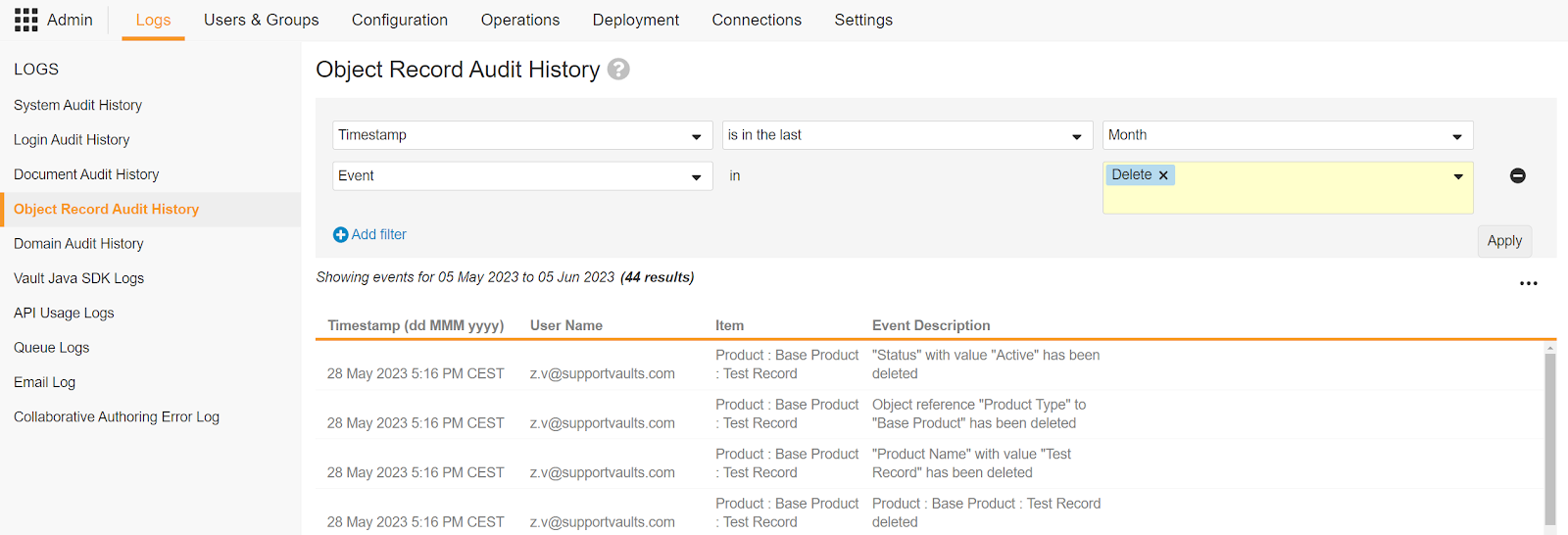
Admins can review object record deletions by navigating to **Admin > Logs > Object Record Audit History**. The tab displays the date and time of the deletion, the username that performed the deletion, the record that was deleted, and the deletion event description. You can apply filters to narrow down the results.
In the event the audit trail is not enabled
for the related object, the _Delete_ event is not displayed in the _Object Record Audit History_ log, because audit events are not captured on the object.
Admins must also have the [necessary permission][2] to access the Object Record Audit History log.
The screenshot below shows the _Delete_ event for a deleted object record. When you delete an object record, the _Object Record Audit History_ log captures information about the deleted record, including its _Object Type_ and field values. You can apply filters to narrow down the results further.
 ## Restoring Deleted Object Records
Once an object, object record, object relationship, or object field is deleted, it cannot be restored. In the event any of these Vault elements are deleted, they become inaccessible. This also applies to the object record's related references, such as attachments.
You can retrieve the IDs of deleted object records within 30 days of deletion using the Retrieve Deleted Object Record ID API endpoint. This endpoint retrieves the IDs only, not the object records themselves.
## Restrictions for Object Record Deletion {#restrictions}
In situations where an object record is in use within your Vault, you cannot delete that record. In these cases, you can change the record's _Status_ to _Inactive_ to prevent users from accessing the _Delete_ option, without compromising configurations or document metadata.
Admins can also define deletion rules
, which affect how Vault behaves when you attempt to delete an object record that is either the parent object record in a parent-child relationship or the referenced object record in a reference relationship.
### Blocking References
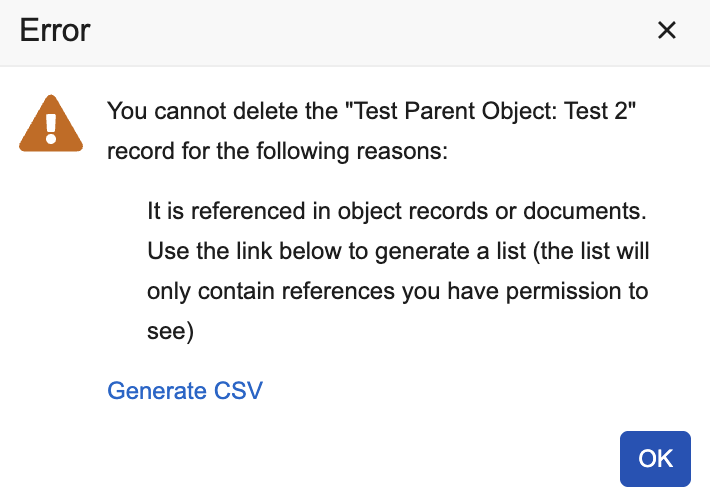
When you attempt to delete an object record that is in use, an error message dialog displays listing the reasons Vault blocked the deletion. For example, the record may be in use in an active workflow. If the record is used in inbound object or document references, the error dialog provides a CSV file with a list of each document or object that references the object.
You can only view records and reference fields in the CSV file to which you have permission to access. In addition, the amount of records in the CSV file cannot exceed 10,000. Document references to the deleted record are version specific, meaning each document version that references the record appears on a new row in the CSV file.
## Restoring Deleted Object Records
Once an object, object record, object relationship, or object field is deleted, it cannot be restored. In the event any of these Vault elements are deleted, they become inaccessible. This also applies to the object record's related references, such as attachments.
You can retrieve the IDs of deleted object records within 30 days of deletion using the Retrieve Deleted Object Record ID API endpoint. This endpoint retrieves the IDs only, not the object records themselves.
## Restrictions for Object Record Deletion {#restrictions}
In situations where an object record is in use within your Vault, you cannot delete that record. In these cases, you can change the record's _Status_ to _Inactive_ to prevent users from accessing the _Delete_ option, without compromising configurations or document metadata.
Admins can also define deletion rules
, which affect how Vault behaves when you attempt to delete an object record that is either the parent object record in a parent-child relationship or the referenced object record in a reference relationship.
### Blocking References
When you attempt to delete an object record that is in use, an error message dialog displays listing the reasons Vault blocked the deletion. For example, the record may be in use in an active workflow. If the record is used in inbound object or document references, the error dialog provides a CSV file with a list of each document or object that references the object.
You can only view records and reference fields in the CSV file to which you have permission to access. In addition, the amount of records in the CSV file cannot exceed 10,000. Document references to the deleted record are version specific, meaning each document version that references the record appears on a new row in the CSV file.
 ## Preventing Unplanned Object Record Deletion
There are several ways to minimize the risk of accidental object record deletion:
* Assess user security profiles and role permissions
* Control Delete permissions for users on object records based on the risk and business requirements.
* Configure object workflows to secure and manage the deletion process.
## Related Permissions {#permissions}
The following permissions apply when deleting object records and viewing object record deletion information:
| Type | Permission Label | Controls |
| --- | --- | --- |
| Security Profile | Admin: Logs: Object Record Audit | Grants the ability to view **Admin > Logs > Object Record Audit History**. |
| Security Profile | Application: Vault Owner
Actions: All Object Records: All Object Record Delete | Grants the ability to delete any object record, regardless of the record's sharing settings. |
| Security Profile | Objects: \[Object\]: Delete | Grants the ability to delete object records for the specified object. |
| Object Lifecycle Role | Object Lifecycles: Role
: \[State\]: Delete | Grants the ability for users within the role to delete object records in that lifecycle state. |
[1]: #restrictions
[2]: #permissions
## Preventing Unplanned Object Record Deletion
There are several ways to minimize the risk of accidental object record deletion:
* Assess user security profiles and role permissions
* Control Delete permissions for users on object records based on the risk and business requirements.
* Configure object workflows to secure and manage the deletion process.
## Related Permissions {#permissions}
The following permissions apply when deleting object records and viewing object record deletion information:
| Type | Permission Label | Controls |
| --- | --- | --- |
| Security Profile | Admin: Logs: Object Record Audit | Grants the ability to view **Admin > Logs > Object Record Audit History**. |
| Security Profile | Application: Vault Owner
Actions: All Object Records: All Object Record Delete | Grants the ability to delete any object record, regardless of the record's sharing settings. |
| Security Profile | Objects: \[Object\]: Delete | Grants the ability to delete object records for the specified object. |
| Object Lifecycle Role | Object Lifecycles: Role
: \[State\]: Delete | Grants the ability for users within the role to delete object records in that lifecycle state. |
[1]: #restrictions
[2]: #permissions