# About the Quality-RIM Connection

Within Vault, an organization may use the QMS application in a Quality Vault to ensure that a change to a product or system is introduced in a controlled and coordinated manner. The same organization may use the Registrations application in a RIM Vault to determine the impacted markets for that change and manage the filing updates and approvals for relevant health authorities. In such a case, using separate systems can result in duplicate data entry and a lack of synchronization, which prolongs the process and results in changes that occur without a proper understanding of regulatory impact.

This feature enables organizations using both a Quality Vault and a RIM Vault to share data about change events that have regulatory impact. The Quality-RIM Connection automates document and data sharing between these two applications, supporting change control initiation, regulatory assessment, and close out.


<div class="note-border alert-info">
  <div class="alert alert-info" role="alert">
    <div><i class="far fa-info-circle"></i></div>
    <div class="alert-text">
      <p><strong>Note</strong>: This connection and its various integration capabilities must be <a href="/en/gr/57247/">configured</a>
 by an Admin.</p>
    </div>
  </div>
</div>


## About the Quality-RIM Connection

The Quality to RIM Connection helps to solve several industry challenges that exist for change events, including:

* **Regulatory Impact Assessments**: When users create change controls in a Quality Vault, they define the scope of the change by creating _Regulatory Change Item_ records. Each _Regulatory Change Item_ record identifies a type of change, such as a manufacturing equipment change, and the item being changed (for example, a Wonderdrug Tablet 40mg). A QMS change control can include multiple _Regulatory Change Items_. At the appropriate point in the change control process, the connection automatically creates _Change Item_ records in the Registrations Vault–-one for each _Regulatory_ _Change Item_ in the QMS _Change Control_. Regulatory organizes _Change Items_ into _Events_ based on their filing strategy and conducts an _Impact Assessment,_ producing _Activity Change Item_ records representing a type of change, such as a manufacturing equipment change, to an item (for example, a Wonderdrug Tablet 40mg) in a specific market, like the United States. In order to reflect the _Regulatory Impact Assessment_ results in your Quality Vault, the connection automatically creates _Regulatory Activity Item_ records in QMS for each _Activity Change Item_ in Registrations. The _Regulatory Activity Items_ are linked to the source change control record, and Quality users working on the change control can see the status of the regulatory activities in real time.
* **Filing Updates**: When the change control is approved for implementation in QMS, the connection automatically alerts country users in Registrations that they can begin their filings to get the change approved for all countries and relevant health authorities. 
* [**Product Transfer**][3]: When various product and materials records are created, updated, or deleted in a RIM Vault, the connection creates or updates the corresponding record in the Quality Vault. This includes _Product_, _Product Family_, and _Product Variant_ records, which can then be associated with _Change Controls_.
* [**Document Exchange**][2]: A source Quality or RIM Vault document is transferred with its metadata to the target Vault as a CrossLink. The connection maintains the CrossLink and metadata as the source document undergoes updates and re-enters the _Steady_ state, or enters the _Superseded_ and _Obsolete_ states.


<div class="note-border alert-info">
  <div class="alert alert-info" role="alert">
    <div><i class="far fa-info-circle"></i></div>
    <div class="alert-text">
      <p><strong>Note</strong>: As of the 25R1 release, the Quality-RIM Connection’s Variation Management (Change Management) feature is superseded by the <a href="/en/gr/57086/#enhanced-cc">Enhanced Change Control</a>
 feature. Veeva customers should consider using the connection’s Enhanced Change Control feature instead.</p>
    </div>
  </div>
</div>


## How Enhanced Change Control Works {#enhanced-cc}

The connection's Enhanced Change Control feature allows Vault to recognize a many-to-many relationship between _Quality Event_ records in RIM Vaults and _Change Control_ records in Quality Vaults, which provides added flexibility for users completing assessments, determining an appropriate filing strategy, completing submissions, and tracking partial health authority decisions.

This connection includes two QMS standard objects and lifecycles, _Regulatory Change Item_ and _Regulatory Activity Item_, that interact with two standard RIM objects, _Change Item_ and _Activity Change Item_. 
  * When QMS team members create _Change Controls_ in their Quality Vault that require regulatory assessments, the _Change Controls_ are tied to the _Product_, _Product Family_, and _Product Variant_ records through the manual creation of _Regulatory Change Item_ records. 
  * The connection then creates _Change Items_ in the RIM Vault, and Regulatory team members can associate the appropriate _Event_ records in RIM. When additionally <a href="/en/gr/57247/#rim-enhanced-change-control">configured</a>
, RIM Vaults can either:
    * Create _Event_ records with related _Change Items_ for each Quality _Change Control_, or
    * Create separate _Event_ records with related _Change Items_ for each combination of Quality _Change Control_ and _Product Family_ records.
  * During regulatory assessments, Regulatory users in the RIM Vault can notify the Quality team that corrections are needed on a _Change Control_. Regulatory users can update a _Change Item_ in an _In Assessment_ state, populating the _Correction Required_ field and setting the state to _Requires Correction_. The connection automatically updates the corresponding _Regulatory Change Item_ in the Quality Vault and notifies the Quality Team that updates are required. Once the Quality Team has made the necessary changes to the _Change Control_, they can update the _Regulatory Change Item_ by populating the field _Correction Details_ and setting the state to _Corrected_. Should the Quality team need to notify the Regulatory team a correction is needed while the record is in _In Assessment_ state, they can change the _Regulatory Change Item_ state to _Corrected_ and enter details of the change in the _Correction Details_ field.
    * This two-step process does not impact _Activity Change Item_ or _Regulatory Activity Item_ records.

Regulatory team members can also bundle and split _Activity Change Items_ to support their business needs. In turn, the connection creates _Regulatory_ _Activity Items_ in Quality Vaults, which provides Quality teams the status of each _Product_ in each impacted market. Once _Activities_ are dispositioned, submissions are complete, and health authority decisions are received, the connection updates the status of the _Activity Change Items_ in RIM and the _Regulatory Activity Items_ in QMS. Quality teams can provide individual assessments on each item affected by a _Change Control_ and request reassessments of individual items if the scope of the _Change Control_ changes. Regulatory teams can create an appropriate filing strategy based on the impact of each change in a _Change Control_ record.


<div class="note-border alert-info">
  <div class="alert alert-info" role="alert">
    <div><i class="far fa-info-circle"></i></div>
    <div class="alert-text">
      <p><strong>Note</strong>: The Product Transfer integration must be enabled in order to use Enhanced Change Control.</p>
    </div>
  </div>
</div>


### Enhanced Change Control Trigger Points

The connection uses specific events (trigger points) in the Quality and RIM Vaults to exchange Enhanced Change Control data.

Within the Quality Vault, these are when:

1. A *Regulatory Change Item* is transitioned to the *Planned*, *In Progress*, *Cancelled*, *Closed*, or *Corrected* state.
2. A *Regulatory Change Item* is updated while in the *Planned*, *In Progress*, *Cancelled*, *Closed*, or *Corrected* state. This excludes modifications which occur via lookup fields (Item 3).
3. A *Regulatory Change Item*'s lookup fields which reference the below are modified while RCI record is in the *Planned*, *In Progress*, *Cancelled*, *Closed*, or *Corrected* state:
    * *Change Control Description*
    * *Justification*
    * *Lifecycle State*
    * *Title*

Within the RIM Vault, these are when:

1. A *Change Item* is transitioned to the *In Assessment*, *Impact Identified*, *Not Applicable*, *Approved - Ready for Implementation*, *Partially Approved*, *Not Approved*, or *Requires Correction* state.
2. A *Change Item* is updated while in the *In Assessment*, *Impact Identified*, *Not Applicable*, *Approved - Ready for Implementation*, *Partially Approved*, *Not Approved*, or *Requires Correction* state.
3. An *Activity Change Item* is created or transitions to any state.
4. Fields within an *Activity Change Item*'s related *Activity*, *Regulatory Objective*, or *Event* are modified.

## How Document Exchange Works {#doc-exchange}

The connection's feature for Document Exchange enables Vault to create and maintain document CrossLinks and metadata across your Quality and RIM Vaults. The document types and fields Vault transfers are determined and mapped by an Admin when <a href="/en/gr/57247/">configuring</a>
 the feature. As such, a document in either Vault can be considered to be the source (outbound) or target (inbound) document.

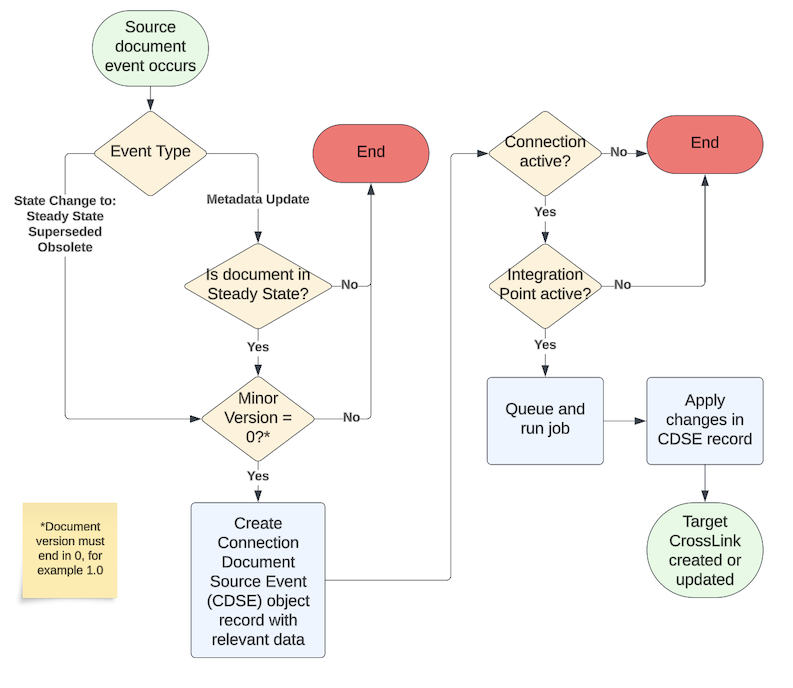
When, for example, a source Quality document reaches its _Steady_ state, Vault creates a CrossLink document in the target RIM Vault and populates metadata accordingly. Once created, Vault maintains the target CrossLink when the source document:

* Undergoes a metadata update while in the _Steady_ state.
* Re-enters the _Steady_ state after up-versioning.
* Enters the _Superseded_ or _Obsolete_ state.

See the use case below and the feature's <a href="/en/gr/57247/#document-exchange-limitations">limitations</a>
 for more information.

The diagram below provides a basic overview of this process, as well as the various criteria which must be met in order for a CrossLinked document to be created and maintained in a target Vault.

<a href="https://platform.veevavault.help/assets/images/quality-rim-connection-document-exchange-flow-24R3.png" data-lightbox="images" data-title="" data-alt="Quality RIM Doc Exchange integration flow diagram">
  <img class="docimage" src="https://platform.veevavault.help/assets/images/quality-rim-connection-document-exchange-flow-24R3.png" alt="Quality RIM Doc Exchange integration flow diagram" style="max-width: 500px;"  />
</a>

### Document Exchange Use Case

VeePharm classifies master batch records in Quality under the _Operations > Master Batch Record_ document subtype, and in RIM under the _Quality > Regional Information > Batch Records (Master/Executed)_ classification.

These documents' respective lifecycles map state types to states as follows:

| State Type | Quality State | RIM State |
|---|---|---|
| **Steady State** | Effective | Approved |
| **Superseded State** | Superseded | Superseded |
| **Obsolete State** | Obsolete | Obsolete |

The table below illustrates Vault actions and outcomes for a single _Master Batch Record_ document as it undergoes various document events throughout its lifecycle.

| Quality _Master Batch Record_ document event | RIM _Batch Record (Master/Executed)_ CrossLink result |
|---|---|
| Quality draft document v0.1 routed for approval, entering the Approved state v1.0. | None. Quality's Approved state is not the Steady state, therefore a CrossLink is not created. |
| Quality document v1.0 moved to the Effective (Steady) state. | RIM CrossLink v1.0 created in the Approved (Steady) state. |
| Quality document v1.1 created and routed for approval. It enters the Approved state (v2.0), then the Effective (Steady) state. Document v1.0 set to the Superseded state. | RIM CrossLink updated to v2.0, remaining in the Approved (Steady) state. CrossLink v1.0 set to the Superseded state. |
| Quality document v2.0 _Country_ document field updated from "United States" only to "United States" and "Puerto Rico". | RIM CrossLink v2.0 _Country_ document field updated from "United States" only to "United States" and "Puerto Rico". |
| Quality document v2.0 moved to the Obsolete state. | RIM CrossLink v2.0 moved to the Obsolete state. |

The examples above mostly follow a positive flow, in that document events are encountered and processed as expected. Below are some possible scenarios in which a new or updated Quality _Master Batch Record_ produces different results in RIM.

| Quality _Master Batch Record_ document event | Scenario | RIM _Batch Record (Master/Executed)_ CrossLink result |
|---|---|---|
| A VeePharm Admin is migrating finalized batch records from a local drive, creating a Quality document v3.0 in the Effective (Steady) state. | The document exists only in the Steady state. It does not enter the Steady state from another state during the migration. | None. The integration does not create target CrossLinks for source documents created in the Steady state.  |
| Quality document v1.0 up-versioned in quick succession to v2.0, then v3.0. Both versions enter the Effective (Steady) state. | Rapid transition to v3.0 occurs before the connection job processes the transition to v2.0. | RIM CrossLink v1.0 up-versioned to v3.0 in the Approved (Steady) state. Version history reflects versions 1.0, 2.0, and 3.0. |
| Quality document v1.0 up-versioned in quick succession to v2.0, then v3.0. Only v3.0 enters the Effective (Steady) state. | The user deletes Quality document v2.0 before the connection job processes it in RIM. | RIM CrossLink v1.0 up-versioned to 3.0 in the Approved (Steady) state. Version history reflects versions 1.0 and 3.0. |
| Quality document v4.0 moved to the Obsolete state. | RIM CrossLink v4.0 exists, however the RIM Obsolete state type does not have a mapped state. | RIM CrossLink v4.0 remains in its current Approved (Steady) state. Vault generates a User Exception Message. |
| Quality document v3.1 _Country_ field updated from "United States" only to "United States" and "Puerto Rico". | Quality document v3.1 is in a draft state. | RIM CrossLink v3.0 _Country_ field remains as "United States" only, until the Quality document enters a future Steady state (v4.0) and Vault updates the RIM CrossLink document and metadata. |
| Quality document v1.0's _Country_ field is empty (null) when the document enters the Effective (Steady) state. | The connection attempts to create RIM CrossLink v1.0 with an empty _Country_ value. | Vault generates a User Exception Message. The _Country_ field is required for this RIM document type. |

## How Product Transfer Works {#product-transfer}

The connection's Product Transfer feature automatically transfers product data from a RIM Vault to a Quality Vault to provide a common set of data that can be referenced in _Quality_ events and documents. This automation eliminates the overhead and potential user error associated with manually replicating product data. It also ensures that Vault applications remain consistent with regard to product data.

Transferred product data includes:

- _Product Family_
- _Product_
- _Product Variant_
- _Product Family Product_
- _Complex Product Component_

### Materials Product Data

As of 26R1, Product Transfer includes materials product data, where the connection transfers various RIM record types to the Quality Vault as _Material_ and _Material Product_ records. This can reduce an organization's reliance on external [master data management tools][4] or custom integrations.


<div class="note-border alert-info">
  <div class="alert alert-info" role="alert">
    <div><i class="far fa-info-circle"></i></div>
    <div class="alert-text">
      <p><strong>Note</strong>: The Quality-RIM Connection does not currently support transferring materials product data for Enhanced Change Control.</p>
    </div>
  </div>
</div>


When any of the below object records are created, updated, or deleted in RIM, the _RIM-Quality: Material_ Integration Point transfers them to the Quality Vault:

| RIM Object | Quality Object(s) | Considerations |
|---|---|---|
| Active Substance | Material |  |
| Active Substance Alias | Material, Related Material | _Related Material_ links to the parent _Active Substance_ |
| Inactive Ingredient | Material |  |
| Inactive Ingredient Alias | Material, Related Material | _Related Material_ links to the parent _Inactive Ingredient_ |
| Packaging | Material, Related Material | _Related Material_ created when a _Packaging_'s _Packaging Contained Within_ field references a parent _Packaging_ record |
| Container | Material |  |
| Packaging Container | Material Product, Related Material | _Related Material_ created when a _Packaging Container_ is linked to a parent _Packaging_ record |


When any of the below object records are created, updated, or deleted in RIM, the _RIM-Quality: Material Product_ Integration Point transfers them to the Quality Vault:

| RIM Object | Quality Object |
|---|---|
| Packaging Product Variant | Material Product |
| Product Packaging | Material Product |

### Master Product Data from External Systems {#master-product-data}

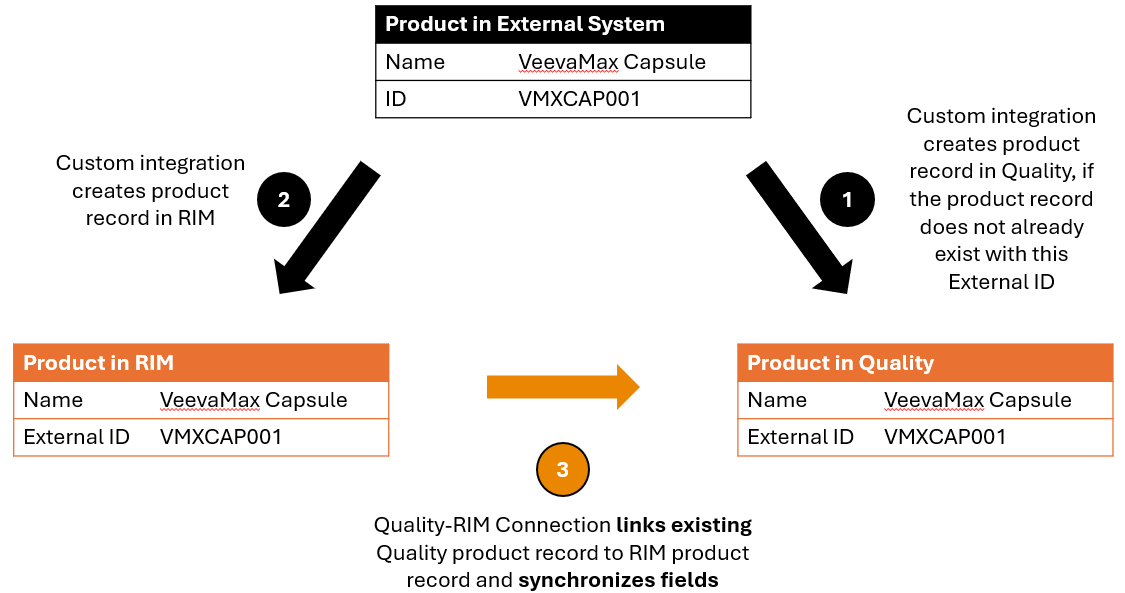
Some organizations manage master product data outside of Vault in an external system. They build custom integrations to directly push product data from the external system into their RIM and Quality Vaults. When this occurs, the connection's Product Transfer feature relies upon an _External ID_ field on [supported records][3] to ensure that data remains consistent across the two Vaults.

External integrations are responsible for assigning a unique identifier to product records created in the RIM and Quality Vaults. That way, when the connection's Product Transfer feature runs, it knows whether a _Product_ record in RIM matches a _Product_ record in Quality. If the connection finds a match, it links the records in the two Vaults. Before creating a product record in the Quality Vault, an external integration must look for an existing record with a matching _External ID_ to determine whether the connection already created it. 

The diagram below illustrates how an organization's external system manages master product data, integrates with the RIM and Quality Vaults, and uses the Quality-RIM Connection's Product Transfer feature to keep the Vaults' product data synchronized.

<a href="https://platform.veevavault.help/assets/images/quality-rim-connection-master-product-data-flow-25R2.png" data-lightbox="images" data-title="" data-alt="Quality RIM Master Product Data flow diagram">
  <img class="docimage" src="https://platform.veevavault.help/assets/images/quality-rim-connection-master-product-data-flow-25R2.png" alt="Quality RIM Master Product Data flow diagram" style="max-width: 500px;"  />
</a>

[1]: #enhanced-cc
[2]: #doc-exchange
[3]: #product-transfer
[4]: #master-product-data