# How Vault Evaluates Expectedness

Upon <a href="/en/gr/01169/">assessment generation</a>, Vault evaluates the expectedness of _Event (LLTs)_ on _Case Adverse Events_ based on the corresponding product family, product core, local, study core, and study product <a href="/en/gr/01198/">_Datasheets_</a>. Evaluation results appear on <a href="/en/gr/01287/#expectedness-section">_Case Assessment Expectedness_ records</a>. Vault then evaluates expectedness across all assessments to determine the <a href="/en/gr/737265/">expectedness for the _Case_</a>.

Depending on your Admin's configuration, Vault can also <a href="/en/gr/774230/">copy the justification</a> for adverse event expectedness evaluations from _Datasheets_ to _Case Assessment Expectedness_ and _Localized Case Assessment_ records. Vault also includes configurable options for <a href="/en/gr/822874/">evaluating expectedness on clinical trial study _Cases_</a>.

Vault generates <a href="/en/gr/01287/#expectedness-section">_Case Assessment Expectedness_ records</a> for each of the following _Datasheet_ sources associated with the _Case Product_ in the _Case Assessment_.

<table>
    <thead>
        <tr>
            <th>Source</th>
            <th>Expectedness Generation</th>
        </tr>
    </thead>
    <tbody>
        <tr>
            <td>Product Family Datasheet</td>
            <td>If an assessment's <em>Case Product</em> inherits a <em>Datasheet</em> from the <em>Product Family</em>, Vault generates a <em>Case Assessment Expectedness</em> record for the <em>Datasheet</em>.</td>
        </tr>
        <tr>
            <td>Product Core Datasheet</td>
            <td>If an assessment's <em>Case Product</em> has a core <em>Datasheet</em>, Vault generates a <em>Case Assessment Expectedness</em> record for the core <em>Datasheet</em>.</td>
        </tr>
        <tr>
            <td>Study Core Datasheet</td>
            <td>When the assessment's <em>Case Product</em> is of the type <em>Study Product</em>, and if the <em>Study Product Role</em> is <em>Investigational</em>, Vault generates a <em>Case Assessment Expectedness</em> record for the <em>Study</em>'s core <em>Datasheet</em>.</td>
        </tr>
        <tr>
            <td>Local Datasheets</td>
            <td>Vault generates <em>Case Assessment Expectedness</em> records for each <em>Case Product Registration</em> with a local <em>Datasheet</em>. Admins can configure local <em>Datasheet</em> to inherit listed events from the core <em>Datasheet</em>.</td>
        </tr>
        <tr>
            <td>Study Product Datasheet</td>
            <td>When the assessment's <em>Case Product</em> is of the type <em>Study Product</em>, Vault generates a <em>Case Assessment Expectedness</em> record for the study product <em>Datasheet</em>. Admins can configure study product <em>Datasheets</em> to inherit listed events from the study core <em>Datasheet</em>.</td>
        </tr>
        <tr>
            <td>Study Product Placeholder Datasheet</td>
            <td>When <a href="/en/gr/01198/#assoc-datasheets"><em>Study Product Placeholders</em> are associated with <em>Datasheets</em></a>, Vault generates <em>Case Assessment Expectedness</em> records for blinded <em>Study Products</em> on <em>Cases</em> for double-blinded clinical trial <em>Studies</em> without <em>Study Arms</em>.</td>
        </tr>
    </tbody>
</table>

Vault links all _Case Assessment Expectedness_ records to the source _Datasheet_ and the latest version of the referenced datasheet document in the _Library_.

<div class="note-border alert-info">
  <div class="alert alert-info" role="alert">
    <div><i class="far fa-info-circle"></i></div>
    <div class="alert-text">
      <p><strong>Note</strong>:</p>
<ul>
  <li>When assessing <em>Combination Products</em>, the <em>Case</em> expectedness is based on the drug or biologic constituent. Vault does not evaluate device constituent expectedness.</li>
  <li>In Vaults not configured with <a href="/en/gr/774366/">Datasheet Expectedness for Blinded Study Products</a>, for blinded <em>Cases</em> associated with double-blinded <em>Studies</em>, Vault does not generate <em>Case Assessment Expectedness</em> records while <em>Study Products</em> are blinded, therefore <a href="/en/gr/737265/">roll-ups</a> do not occur. In this scenario, after unblinding a <em>Case Product</em>, Vault generates <em>Case Assessment Expectedness</em> records and roll-ups occur.</li>
</ul>
    </div>
  </div>
</div>


## About Matching Adverse Events to Datasheet Terms {#match-aes}

To evaluate adverse event expectedness, Vault first checks whether the _Event (LLT)_ on a _Case Adverse Event_ matches a _MedDRA Term_ on the _Datasheets_ related to the _Case Product_ or _Case Product Registration_. To be considered a match: 

* For product core and study core _Datasheets_, the _Event (LLT)_ must be listed on or fall under the hierarchy of a _MedDRA Term_ on the _Datasheet_.
* For local and study product _Datasheets_, Vault checks whether the _Event (LLT)_ is listed on or falls under the hierarchy of a _MedDRA Term_ on a _Datasheet_ using the following priority:

    1. The local or study product _Datasheet_ 
    2. The product core or study core _Datasheet_

Vault also:

* Performs additional checks based on the <a href="/en/gr/01198/#important-terms">precise expectedness</a> and <a href="/en/gr/01198/#important-terms">conditional expectedness</a> settings on the _Datasheet_.
* Evaluates the expectedness of _Event (LLTs)_ [without specified demographics][1], [with specified demographics][2], and for <a href="/en/gr/822874/">clinical trial study _Cases_</a>.

### Expectedness Evaluations Without Demographics {#expectedness-no-dems}

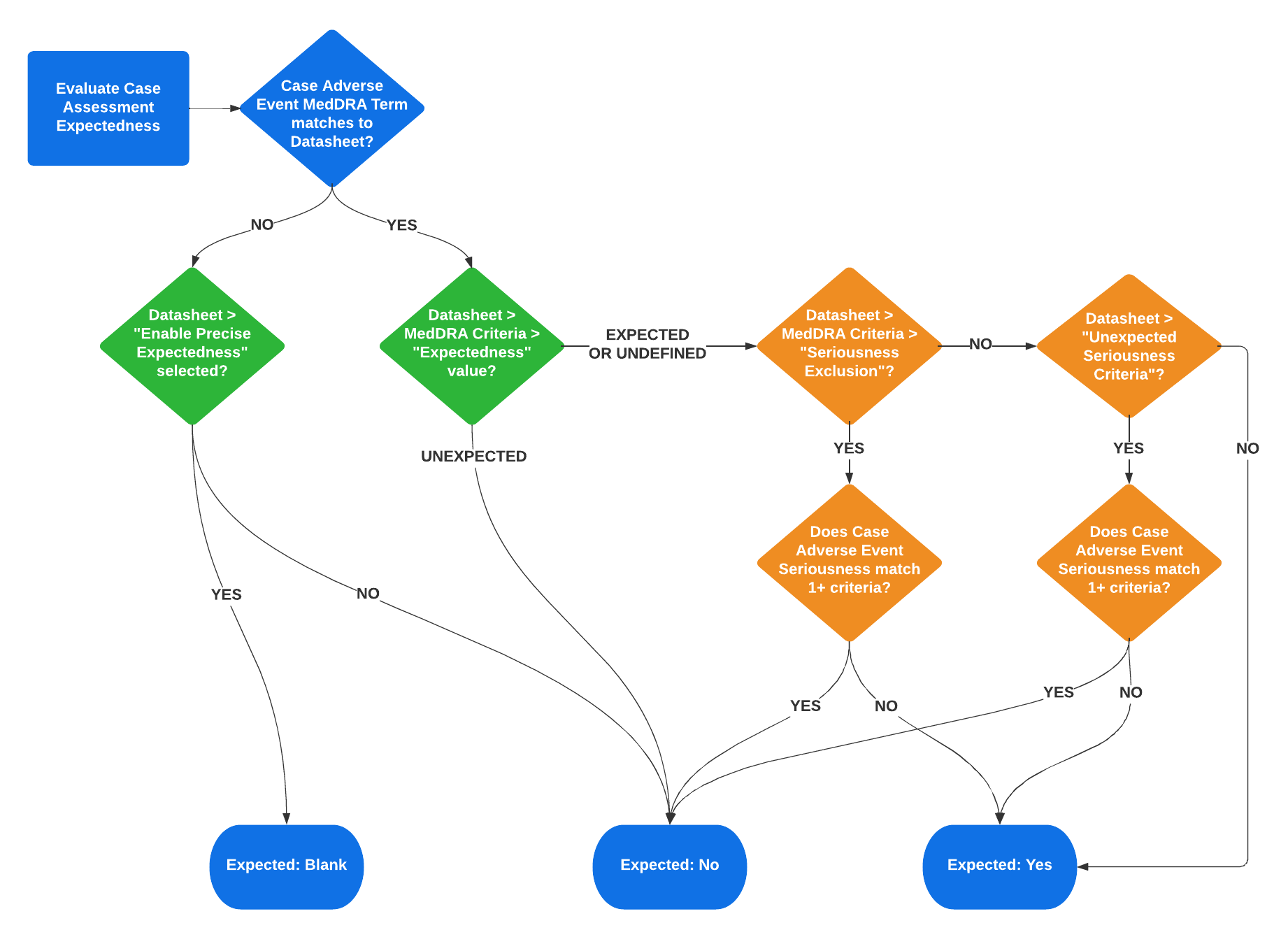
The following flowchart illustrates how Vault evaluates _Case Assessment Expectedness_. The green components show the precise expectedness evaluation, while the orange components show the conditional expectedness evaluation:

<a href="https://platform.veevavault.help/assets/images/saf-expectedness-evaluation-logic-flowchart.png" data-lightbox="saf-expectedness-evaluation-logic-flowchart.png" data-title="Expectedness Evaluation Logic" data-alt="Expectedness Evaluation Logic">
  <img class="docimage" src="https://platform.veevavault.help/assets/images/saf-expectedness-evaluation-logic-flowchart.png" alt="Expectedness Evaluation Logic" style="max-width: 70%;"  />
</a>

The following table outlines the different expectedness scenarios, based on the _Datasheet_ settings and _MedDRA Criteria_ settings for the event term:

<table>
   <thead>
   <tr>
         <th rowspan="2">Term Matched on Datasheet?</th>
         <th colspan="2">Datasheet</th>
         <th colspan="2">MedDRA Criteria</th>
         <th rowspan="2">Case Assessment Expectedness</th> 
   </tr>
      <tr>
         <th>Precise Expectedness Enabled?</th>
         <th>Unexpected Seriousness Criteria</th>
         <th>Expectedness</th>
         <th>Seriousness Exclusion</th>
      </tr>
   </thead>
   <tbody>
      <tr>
         <td>Yes</td>
         <td>N/A</td>
         <td>Blank</td>
         <td>Expected <sup>1</sup></td>
         <td>Blank</td>
         <td>Yes</td>
      </tr>
      <tr>
         <td>Yes</td>
         <td>N/A</td>
         <td>N/A<sup>2</sup></td>
         <td>Expected</td>
         <td>Yes: not matching <sup>3</sup></td>
         <td>Yes</td>
      </tr>
      <tr>
         <td>Yes</td>
         <td>N/A</td>
         <td>Yes: not matching <sup>3</sup></td>
         <td>Expected</td>
         <td>Blank</td>
         <td>Yes</td>
      </tr>
      <tr>
         <td>Yes</td>
         <td>N/A</td>
         <td>N/A<sup>2</sup></td>
         <td>Expected</td>
         <td>Yes: matching <sup>3</sup></td>
         <td>No</td>
      </tr>
      <tr>
         <td>Yes</td>
         <td>N/A</td>
         <td>Yes: matching <sup>3</sup></td>
         <td>Expected</td>
         <td>Blank</td>
         <td>No</td>
      </tr>
      <tr>
         <td>Yes</td>
         <td>N/A</td>
         <td>N/A</td>
         <td>Unexpected</td>
         <td>N/A</td>
         <td>No</td>
      </tr>
      <tr>
         <td>No</td>
         <td>No</td>
         <td>N/A</td>
         <td>N/A</td>
         <td>N/A</td>
         <td>No</td>
      </tr>
      <tr>
         <td>No</td>
         <td>Yes</td>
         <td>N/A</td>
         <td>N/A</td>
         <td>N/A</td>
         <td>Blank</td>
      </tr>
      <tfoot>
        <tr>
            <td colspan="6">1. If "Expectedness" is not defined, the value defaults to Expected.</td>
        </tr>
        <tr>
            <td colspan="6">2. When "Seriousness Exclusion" is defined on a <strong>MedDRA Criteria</strong> record, this setting takes precedence and the Datasheet's "Unexpected Seriousness Criteria" setting is ignored.</td>
        </tr>
        <tr>
            <td colspan="6">3. Matching refers to whether the Case Adverse Event has one (1) or more Seriousness values that match a Seriousness condition defined on the Datasheet or MedDRA Criteria.</td>
        </tr>
      </tfoot>
   </tbody>
</table>

### Expectedness Evaluations With Demographics {#expectedness-with-dems}

Expectedness evaluations in Vault support age and sex criteria. This enables creating more precise product _Datasheets_ for adverse events that affect specific demographics.

When matching patient details to _MedDRA Criteria_ terms on _Datasheets_, Vault prioritizes the _Expected/Unexpected Event Terms_ record with the most details. For example, if a _Datasheet_ includes the same _MedDRA Criteria_ term, once with sex as the only demographic detail and once with sex and age range specified, Vault matches _Case Adverse Events_ using the second, more detailed, record.

When matching based on sex, if the _Case_ specifies the Patient's sex, Vault matches to _MedDRA Criteria_ terms on the _Datasheet_ that include that sex if such a record exists. If the _MedDRA Criteria_ term appears on the _Datasheet_ without a specified sex, Vault matches if all other criteria match the details on the _Case_.

When matching based on age, Vault matches the patient's age to the age range of the adverse event on the _Datasheet_ using the following priority order:

1. _Age at Onset_ calculated using the _Onset_ date of the _Case Adverse Event_ and the _Date of Birth_ in the _Patient_ section. If those values are not available, Vault maps from the manually populated _Age at Onset_ in the _Patient_ section.<br>If the _Age at Onset_ value uses _Decades_ as the unit, Vault considers both the lower and upper bounds of the decade when evaluating expectedness. For example, if the patient's age is entered using `2` in the _Number_ field and _Decade_ in the _Unit_ field, indicating they are between 10–20 years old, and the adverse event on the _Datasheet_ is expected only for patients with an age range of 2–12 years old, Vault considers this adverse event unexpected since the upper bound of the decade (age 20) is outside the expected age range.
2. _Age Group_ based on the <a href="/en/gr/01195/#age-group">Age Group Controlled Vocabulary type</a>. When matching is based on _Age Group_, the _Patient Age Group_ must fall entirely within the age range on the _Datasheet_. The following table provides examples of when Vault matches the _Patient Age Group_ to the age range of the adverse event on the _Datasheet_.

<table>
   <thead>
       <tr>
         <th>Patient Age Group <br>(Controlled Vocabulary Age Range)</th>
         <th>Datasheet Age Range</th>
         <th>Expectedness Match?</th>
       </tr>
   </thead>
   <tbody>
       <tr>
           <td>Child (2–11 years old)</td>
           <td>Age Range Start: 2 years<br>Age Range End: 20 years</td>
           <td>Matched</td>
        </tr>
        <tr>
           <td>Adolescent (12–17 years old)</td>
           <td>Age Range Start: 5 years<br>Age Range End: 15 years</td>
           <td>Not matched</td>
        </tr>
        <tr>
           <td>Adolescent (12–17 years old)</td>
           <td>Age Range Start: 5 years<br>Age Range End: 20 years</td>
           <td>Matched</td>
        </tr>
        <tr>
           <td>Adult (18–64 years old)</td>
           <td>Age Range Start: 35 years<br>Age Range End: 55 years</td>
           <td>Not matched</td>
        </tr>
        <tr>
           <td>Elderly (65+ years old)</td>
           <td>Age Range Start: 60 years<br>Age Range End: blank</td>
           <td>Matched</td>
        </tr>
    </tbody>
</table>

### Expectedness Evaluations for Clinical Trial Study Cases {#expectedness-evals}

Learn more about <a href="/en/gr/822874/">expectedness evaluations for clinical trial study _Cases_</a>.

### How-To Videos: Understanding Expectedness Evaluations

Watch our quick video tutorials on <a href="/en/gr/01302/#understanding-expectedness-evaluations">Understanding Expectedness Evaluations</a> and <a href="/en/gr/01302/#understanding-precise-expectedness-evaluations">Understanding Precise Expectedness Evaluations</a>.

## When Vault Evaluates Expectedness {#expectedness-when}

Vault evaluates expectedness upon _Case_ creation and aggregate report generation. Vault reevaluates expectedness when any of the following related fields are updated on a _Case_ record:

* _Case Assessment_
* _Case Adverse Event_
* _Case Product_
* _Case Patient Sex_
* _Case Patient Age_ (including _Date of Birth_, _Age at Onset_, or _Age Group_)

For clinical trial study _Cases_, expectedness is also reevaluated when the related _Case Adverse Event Onset_ date is updated. If your Admin has enabled <a href="/en/gr/774366/">Datasheet Expectedness for Blinded Study Products</a>, Vault also reevaluates expectedness when you modify the _Blinded Name_ field on a _Case Product_.

Depending on your Admin's configuration, Vault can always reevaluate expectedness based on [follow-up information][4].

When reevaluating expectedness, Vault replaces the previous system-generated _Case Assessment Expectedness_ records with new records.

<div class="note-border alert-info">
  <div class="alert alert-info" role="alert">
    <div><i class="far fa-info-circle"></i></div>
    <div class="alert-text">
      <p><strong>Note</strong>:  <em>Case Assessment Expectedness</em> records with an <em>Overridden</em> status are not deleted and do not get recreated, unless an associated <em>Product</em> or <em>Adverse Event</em> is updated.</p>
    </div>
  </div>
</div>


The following table provides more information:
<table>
    <thead>
        <tr>
            <th>Object or Field</th>
            <th>Conditions</th>
        </tr>
    </thead>
    <tbody>
        <tr>
            <td><em>Case</em></td>
            <td><p>Vault evaluates expectedness upon <em>Case</em> promotion. For clinical trial study <em>Cases</em>, Vault also reevaluates expectedness if the <em>Adverse Event Onset Date</em> changes.</p>
                <div class="note-border alert-info">
  <div class="alert alert-info" role="alert">
    <div><i class="far fa-info-circle"></i></div>
    <div class="alert-text">
      <p><strong>Note</strong>: To evaluate expectedness for an E2B-imported <em>Case</em>, products in the E2B file must be matched to a preconfigured <em>Company Product</em>. Expectedness is not evaluated for the <em>Imported Case</em> object type.</p>
    </div>
  </div>
</div>


            </td>
        </tr>
        <tr>
            <td><em>Case Assessment</em></td>
            <td>Vault evaluates expectedness when a <em>Case Assessment</em> is created or updated.</td>
        </tr>
        <tr>
            <td><em>Case Adverse Event</em></td>
            <td><p>Vault evaluates expectedness when a <em>Case Adverse Event</em> related to a <em>Case Assessment</em> is created or either of the following fields are modified:</p>
                <ul>
                    <li><em>MedDRA Term (Event MedDRA)</em></li>
                    <li><em>Seriousness</em></li>
                </ul>
            </td>
        </tr>
        <tr>
            <td><em>Case Product</em></td>
            <td><p>Vault evaluates expectedness when a <em>Case Product</em> with an <a href="/en/gr/01169/#drug-role">eligible <em>Drug Role</em></a> related to a <em>Case Assessment</em> is created or the linked <em>Product</em> or <em>Study Product</em> is updated.</p>
            <p>If your Admin has enabled <a href="/en/gr/774366/">Datasheet Expectedness for Blinded Study Products</a>, Vault also reevaluates expectedness when you modify the <em>Blinded Name</em> field.</p>
            </td>
        </tr>
        <tr>
            <td><em>Case Product Indication</em></td>
            <td>Vault evaluates expectedness when an <em>Indication</em> under the <em>Case Product</em> related to a <em>Case Assessment</em> is created or the <em>Indication (Reported)</em> field is updated.</td>
        </tr>
        <tr>
            <td><em>Case Patient Sex</em></td>
            <td>Vault evaluates expectedness when the patient's <em>Sex</em> is added, changed, or deleted.</td>
        </tr>
        <tr>
            <td><em>Case Patient Age</em></td>
            <td><p>Vault evaluates expectedness when any of the following age-related fields on the <em>Case</em> are added, updated, or deleted:</p>
                <ul>
                    <li><em>Date of Birth</em></li>
                    <li><em>Age at Onset</em></li>
                    <li><em>Age Group</em></li>
                    <li><em>Adverse Event Onset</em></li>
                </ul>
            </td>
        </tr>
    </tbody>
</table>

### Follow-Up Information Expectedness Reevaluation {#follow-up-expectedness}

Your Admin's configuration of the <a href="/en/gr/740208/#auto-gen-assessments">_Recalculate Post-Market Expectedness on Follow-up_</a> application setting determines when Vault reevaluates the expectedness of adverse events on postmarket _Cases_. This includes when _Inbox Item_ information is merged into an in-flight _Case_ or promoted to a follow-up _Case_. This setting also impacts expectedness evaluations on _Cases_ <a href="/en/gr/696910/#pmda-fu-expectedness">reportable to the PMDA</a>.

If the setting is clear, Vault copies _Case Assessment Expectedness_ records from the previous _Case_ version. Expectedness is not reevaluated unless the new information changes any of the following:

* _Event (Coded)_ or _Seriousness_ on the _Case Adverse Event_
* <a href="/en/gr/01153/">_Age at Onset_</a> or _Sex_ on the _Case Patient_
* _Product (Coded)_ or _Indication_ on the _Case Product_

If the setting is selected:

* For all _Case Assessment Expectedness_ records on which the _Expected (status)_ is _Auto Calculated_ or blank, Vault reevaluates expectedness.
* Vault generates any new or missing _Case Assessment Expectedness_ records for _Case Products_ in _Case Assessments_.
* Vault maps global _Case Assessment Expectedness_ updates to _Localized Case Assessments_ as follows:
  * For expectedness evaluations based on local _Datasheets_, when the _Country_ on the local _Datasheet_ matches the _Country_ of the _Localized Case_, Vault maps _Expected_ field values for which _Expected (status)_ is _Overridden_, _Auto Calculated_, or blank.
  * For expectedness evaluations based on core _Datasheets_, Vault maps _Expected_ field values for which _Expected (status)_ is _Overridden_, _Auto Calculated_, or blank. If multiple _Expected_ values apply, Vault maps the value with the latest _Last Modified Date_.
  * Otherwise, Vault maps the _Expected_ value from the associated _Case Assessment_.

[1]: #expectedness-no-dems
[2]: #expectedness-with-dems
[3]: #expectedness-evals
[4]: #follow-up-expectedness
