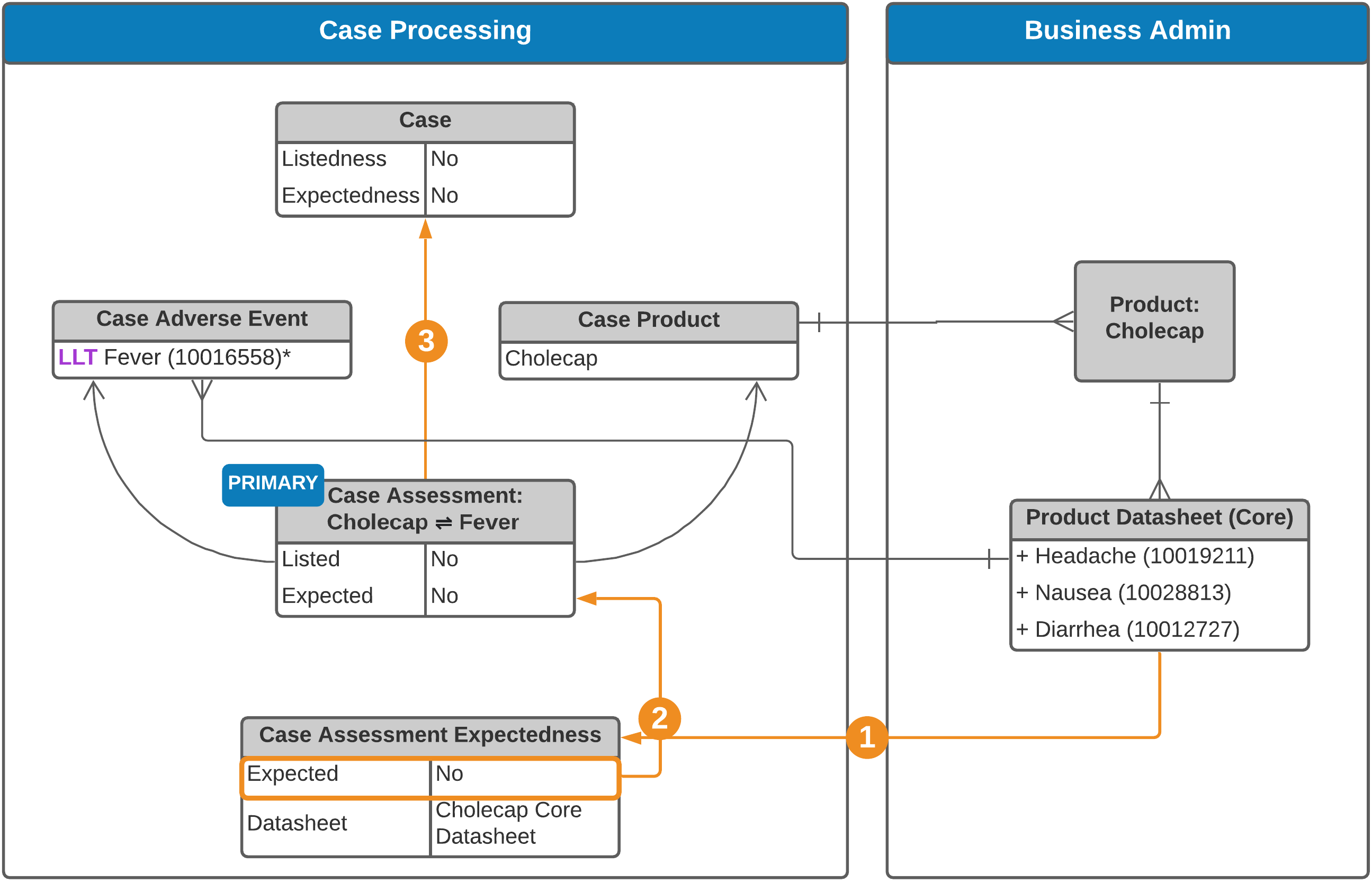
 See an [explanation of the steps][2] below.
**Study Case**
See an [explanation of the steps][2] below.
**Study Case**
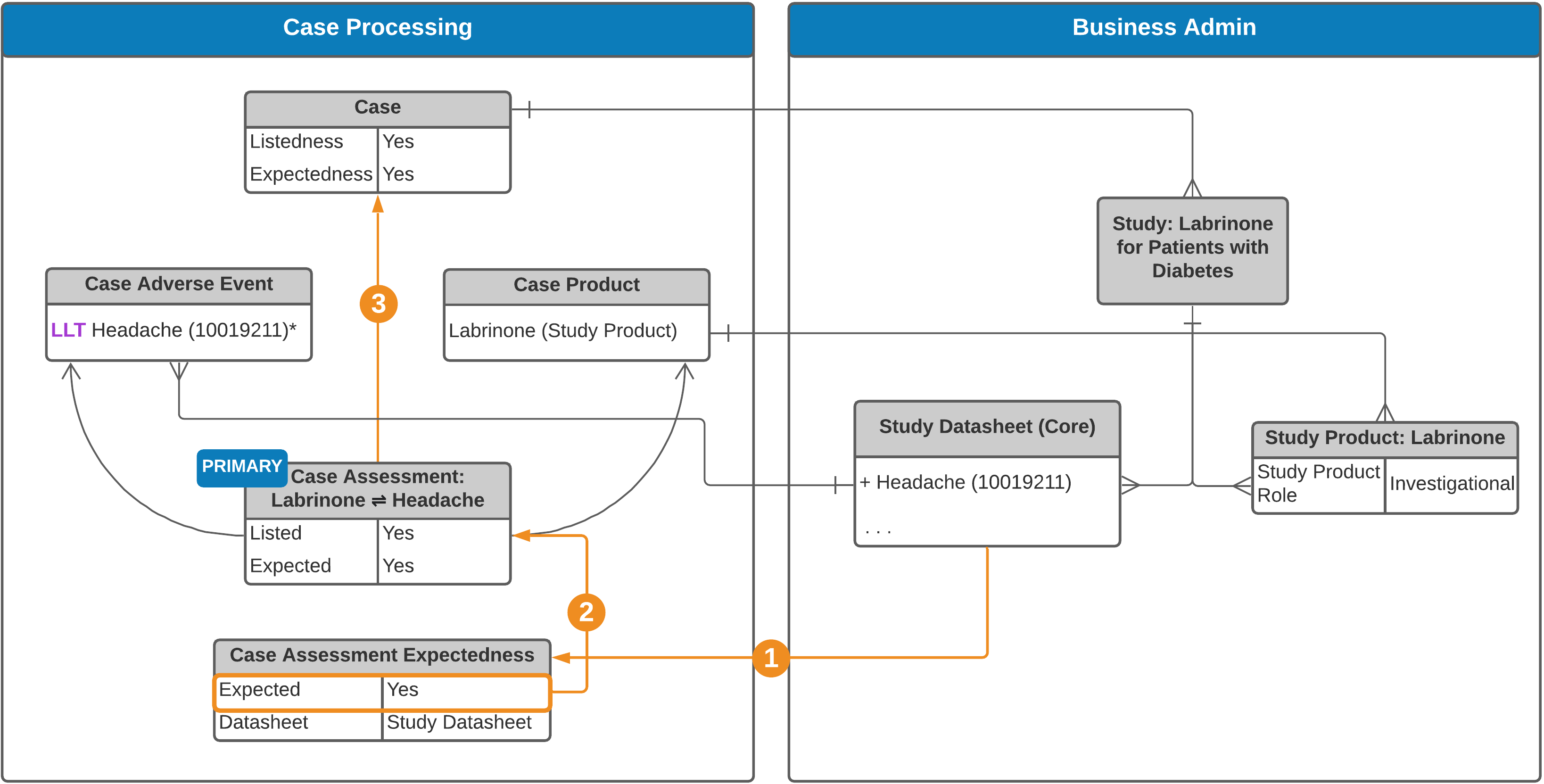 See an [explanation of the steps][2] below.
**Multi-Product Clinical Trial Study Case**
See an [explanation of the steps][2] below.
**Multi-Product Clinical Trial Study Case**
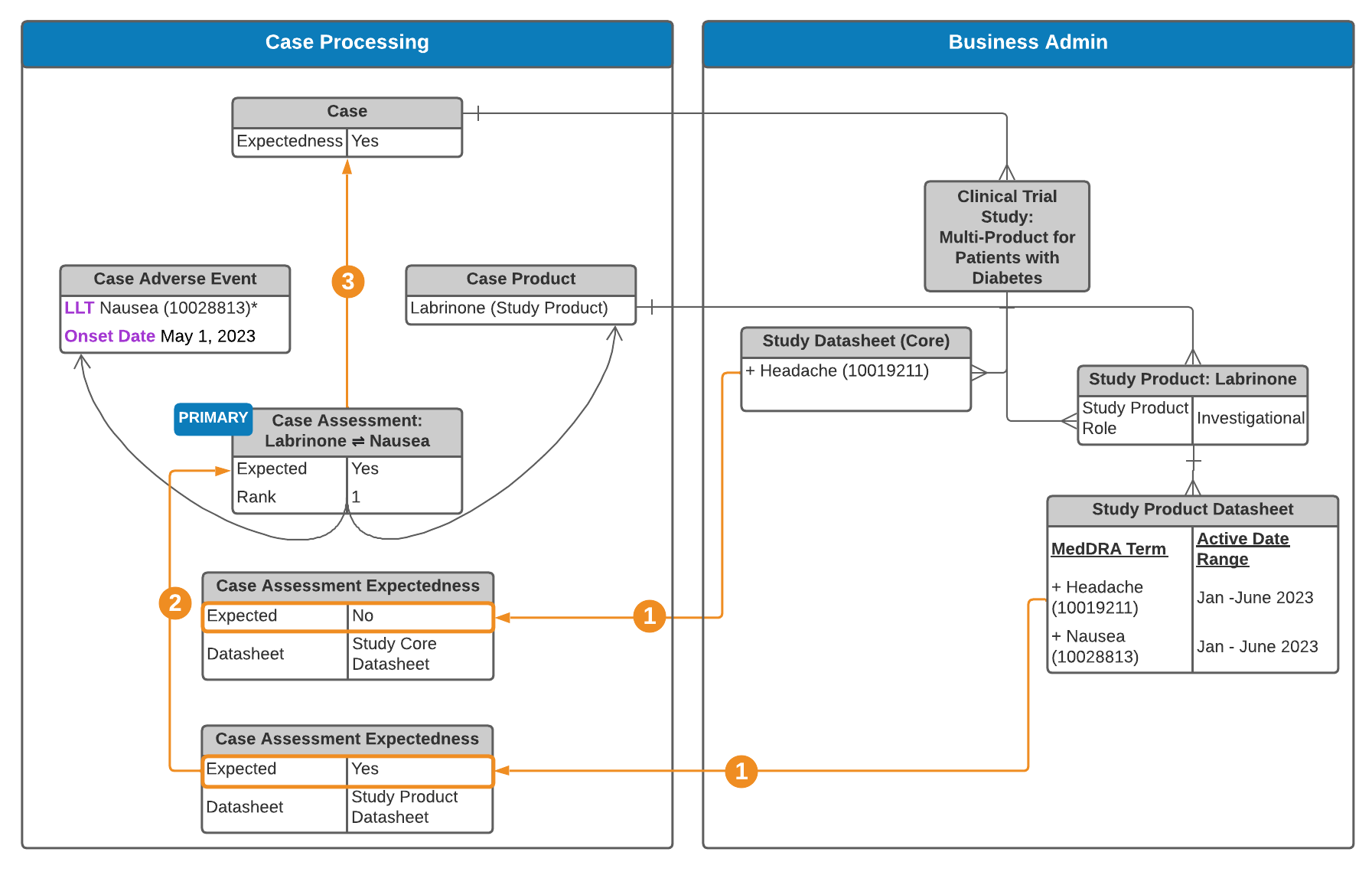 See an [explanation of the steps][2] below.
 **Expectedness Generation**
Vault generates _Case Assessment Expectedness_ records for each relevant _Datasheet_:
* **Non-Study Cases**: For each product _Datasheet_ (product family, product core, or local) related to _Case Products_.
* **Study Cases**: Based on the following _Datasheets_, when configured:
* Study product
* Study core
* Product (product family, product core, or local) related to _Case Products_
**Expectedness Generation**
Vault generates _Case Assessment Expectedness_ records for each relevant _Datasheet_:
* **Non-Study Cases**: For each product _Datasheet_ (product family, product core, or local) related to _Case Products_.
* **Study Cases**: Based on the following _Datasheets_, when configured:
* Study product
* Study core
* Product (product family, product core, or local) related to _Case Products_
Note: When both Study Product Datasheets and Study Core Datasheets are set up, Case Assessment Expectedness records are generated for both. If your Admin has enabled Agency-Based Auto-Expectedness for Clinical Trial Study Cases or Datasheet Expectedness for Blinded Study Products, see Expectedness Evaluations for Clinical Trial Study Cases for how Vault may generate additional Case Assessment Expectedness records.
 **Case Assessment Listedness and Expectedness**
To automatically populate the **Expected** and **Listedness** fields on a Case Assessment, Vault looks at the Case Assessment's **Expectedness** records using the following logic:
To populate the **Listedness** field on the Case Assessment:
**Case Assessment Listedness and Expectedness**
To automatically populate the **Expected** and **Listedness** fields on a Case Assessment, Vault looks at the Case Assessment's **Expectedness** records using the following logic:
To populate the **Listedness** field on the Case Assessment:
| Case Report Type | Auto-Population Logic |
|---|---|
| Non-Study Case | If there is an Expectedness record corresponding to the Product's Core or Product Family Datasheet, this rolls up to populate the Listedness field on the Case Assessment. If there are no Expectedness records, the Listedness field is not automatically populated. |
| Study Case | If there is an Expectedness record corresponding to the Study Core Datasheet, this Expectedness rolls up to populate the Listedness field on the Case Assessment. If there is no Study Product or Study Core Datasheet, but there is an Expectedness record corresponding to the Product's Core or Product Family Datasheet, this value rolls up to the Listedness field. If there are no Expectedness records, the Listedness field is not automatically populated. |
| Case Report Type | Auto-Population Logic |
|---|---|
| Non-Study Case | Vault evaluates all Expectedness records under the Case Assessment to set the Expected field, using the following logic:
|
| Study Case | If there are Expectedness records, Vault roll-up for Study Products is as follows:
If there is no Study Product or Study Core Datasheet, Vault evaluates all Expectedness records under the Case Assessment to set the Expected field as follows:
|
 **Case Listedness and Expectedness**
At the _Case_-level, for both study and non-study _Cases_, both the _Listedness (Core)_ and _Case Expectedness_ fields are synced with the primary _Case Assessment_. Unless the _Case_ fields are [overridden][1], any time the primary _Case Assessment_ changes, Vault updates the associated _Case_-level fields to match.
## Study Product Placeholder Expectedness Roll-Up Evaluation
If your Admin has enabled Datasheet Expectedness for Blinded Study Products, for double-blinded clinical trial study _Cases_ without _Study Arms_, Vault generates _Case Assessment_, _Case Assessment Result_, and _Expectedness_ records based on each _Datasheet_ associated with _Study Product Placeholders_ on the blinded _Case_. Vault rolls up the most conservative _Expected_ value across all _Expectedness_ records, including overridden values, to the _Expected_ field of the associated _Case Assessment_. For example, if there are multiple _Expectedness_ records and only one (1) has _Expected_ set to _No_, Vault rolls up _No_ to the _Case Assessment_ regardless of the _Datasheet_ type.
## Override Case Expectedness or Listedness
There are two ways to update the Case Expectedness or Listedness fields:
* Edit the field on the primary Case Assessment to override the calculated expectedness. The associated **(Status)** field updates to "Overridden" on the Case Assessment but remains Auto Calculated on the Case.
**Case Listedness and Expectedness**
At the _Case_-level, for both study and non-study _Cases_, both the _Listedness (Core)_ and _Case Expectedness_ fields are synced with the primary _Case Assessment_. Unless the _Case_ fields are [overridden][1], any time the primary _Case Assessment_ changes, Vault updates the associated _Case_-level fields to match.
## Study Product Placeholder Expectedness Roll-Up Evaluation
If your Admin has enabled Datasheet Expectedness for Blinded Study Products, for double-blinded clinical trial study _Cases_ without _Study Arms_, Vault generates _Case Assessment_, _Case Assessment Result_, and _Expectedness_ records based on each _Datasheet_ associated with _Study Product Placeholders_ on the blinded _Case_. Vault rolls up the most conservative _Expected_ value across all _Expectedness_ records, including overridden values, to the _Expected_ field of the associated _Case Assessment_. For example, if there are multiple _Expectedness_ records and only one (1) has _Expected_ set to _No_, Vault rolls up _No_ to the _Case Assessment_ regardless of the _Datasheet_ type.
## Override Case Expectedness or Listedness
There are two ways to update the Case Expectedness or Listedness fields:
* Edit the field on the primary Case Assessment to override the calculated expectedness. The associated **(Status)** field updates to "Overridden" on the Case Assessment but remains Auto Calculated on the Case.Note: Overridden Case Assessment Expectedness records are not deleted or re-created, unless an associated Product or Adverse Event is updated.
Note: If you use this option, Vault will not update the Case Expectedness or Listedness to match any future changes to the associated fields on the primary Case Assessment.