# Create Workbench SAR Reports

Learn about SAR aggregate reports in Workbench and how to generate them.

## About Workbench SARs

Safety Workbench provides Serious Adverse Reactions (SAR) authoring and table generation capabilities. Masked and unmasked versions of all reports can be generated.

The following table summarizes the SAR tabulations that Safety Workbench generates:

| Tabulation| Description|
| --- | --- |
| _SAR Line Listing_| This report prints the _Case_ listings for SAR occurrences that match report criteria. |
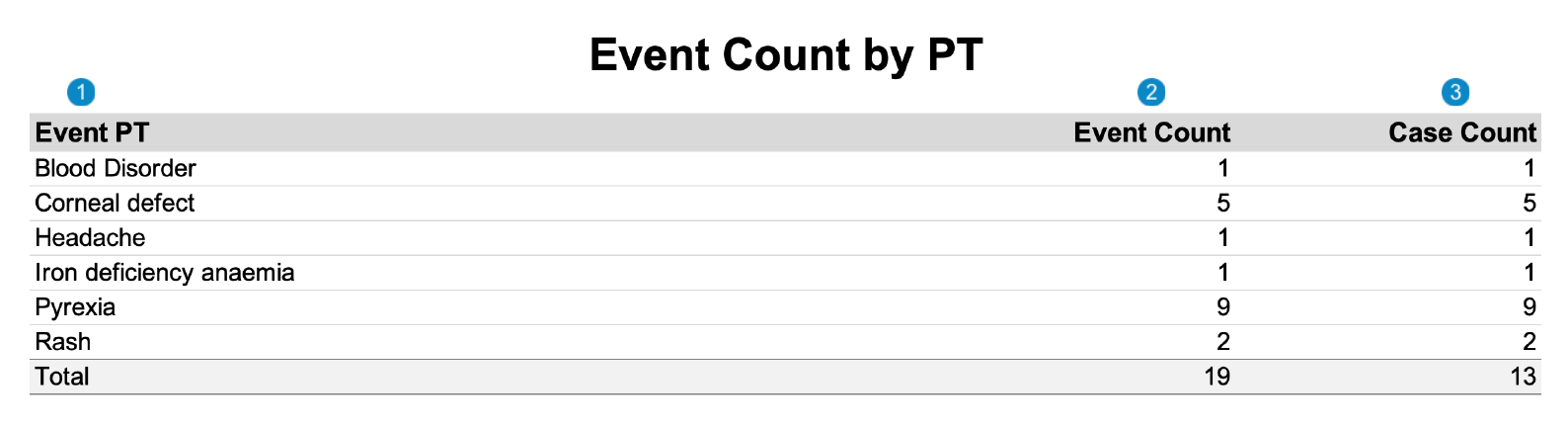
| _SAR Tabulation by PT_| This report prints the _Case_ listings for SAR occurrences that match report criteria, organized by the MedDRA Preferred Term (PT). |
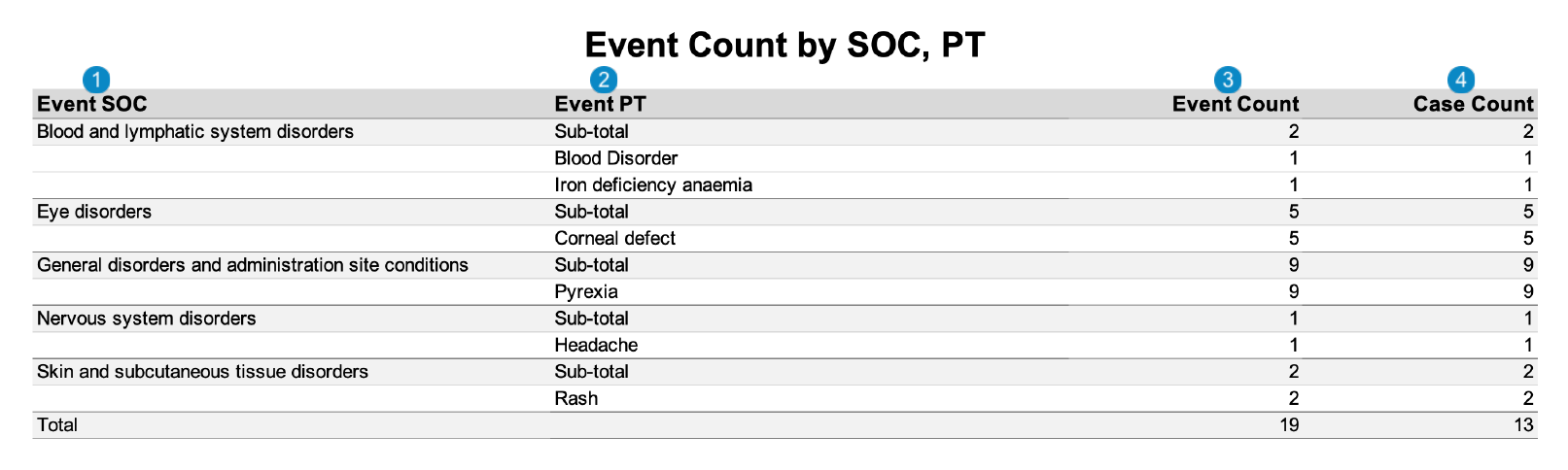
| _SAR Tabulation by SOC, PT_| This report prints the _Case_ listings for SAR occurrences that match report criteria, organized by the MedDRA System Organ Class (SOC) and then by the Preferred Term (PT). |
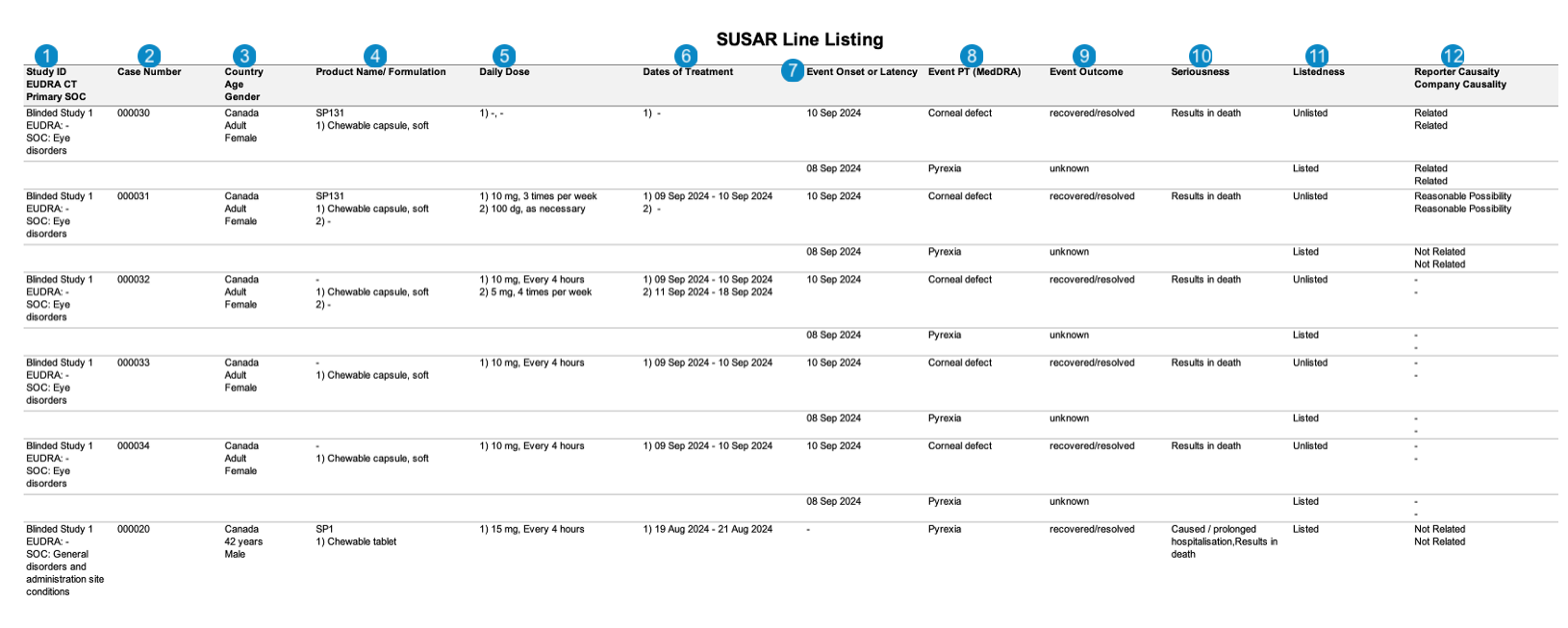
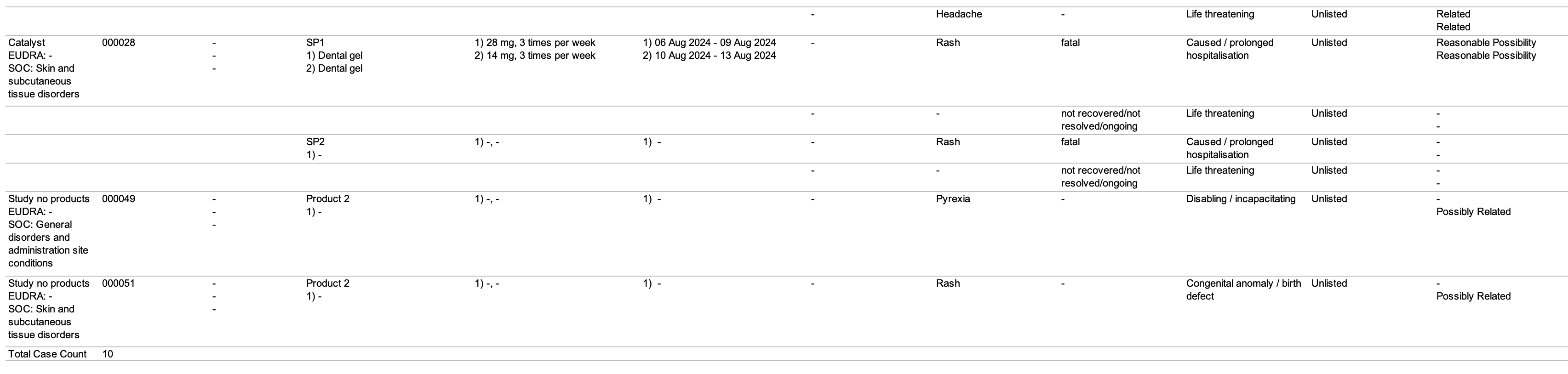
| _SUSAR Line Listing_| This report prints the _Case_ listings for SUSAR (suspected unexpected serious adverse reaction) occurrences that match report criteria. |

<div class="note-border alert-info">
  <div class="alert alert-info" role="alert">
    <div><i class="far fa-info-circle"></i></div>
    <div class="alert-text">
      <p><strong>Note</strong>: Your Admin can configure custom <a href="/en/gr/774151/">SAR report templates</a>
 for your organization.</p>
    </div>
  </div>
</div>


## Prerequisites

Your Admin must <a href="/en/gr/774141/">configure Workbench SAR reports</a>
.

## SAR Criteria

Vault uses the _SAR Principal_ view to assess each _Case_. To qualify for the SAR report, each returned _Case_ must meet the following criteria:
* One (1) of the following are met:
    * Contains at least one (1) _Product_ defined by the product filter in the _SAR Principal_ view.
    * Contains at least one (1) _Study_ defined by the study filter.
* The _Case Category_ derived field is _Interventional_.
* Contains at least one (1) SAR. This is when at least one (1) event on the _Case_ is serious and related to a _Study Drug Role_ of _IMP_, _Comparator_, _Placebo_, or blank.

## SUSAR Criteria

A SUSAR report provides a more specific subset of SAR data. To qualify for the SUSAR report, a _Case_ must have at least one (1) _Adverse Event_ that meets the following criteria:
* Is unlisted: Vault does the following to determine listedness:
    1. Identifies the relevant datasheet for the _Case_ by ensuring the values for the following fields match between the datasheet and the _Case Adverse Event_:
        * _MedDRA Term_
        * _Active Start Date_
        * _Active End Date_
    2. Identifies the _Case_ as listed if at least one (1) _MedDRA Term_ on the datasheet is expected. Vault identifies the _Case_ as unlisted if all matching _MedDRA Terms_ are unexpected.
* Is serious: Vault identifies an event as serious when the _Seriousness_ field on the _Case Adverse Event_ record is populated.
* Is related to the suspect _Product_: Vault identifies a _Case Adverse Event_ as related to a _Case Product_ when any _Case Assessment Result_ for this pair has _Causality Established_ set to _Yes_ or blank.

## Create a Workbench SAR Report

To create a Workbench SAR report:

1. Navigate to **Workbench > Ad-Hoc Reports**.
2. Select **Create**.
3. Complete the following information:
    * **Name**: Enter a name for this report.
    * **Workbench View**: Select a <a href="/en/gr/774141/#about-provisioned-sar-views">SAR view</a>
 from the drop-down or use the **Advanced Search** (<img class="inline" src="https://platform.veevavault.help/assets/images/saf-binoculars-icon.png" alt="binoculars-icon" style="" />) icon to use filters and refine your search.
4. Set up _Workbench Report_ <a href="/en/gr/752968/">filters</a>
, <a href="/en/gr/752971/">layout</a>
, and <a href="/en/gr/752973/#standard-workbench-aggregate-report-templates">advanced options</a>
 (standard templates) as needed.
5. Select **Save**.
6. <a href="/en/gr/752975/">Run and download</a>
 the SAR report.

## Workbench SAR Table Generation Data Mapping

The following sections describe how Workbench generates SAR tabulations:
* [SAR Line Listing][1]
* [SAR Tabulation by PT][2]
* [SAR Tabulation by SOC, PT][3]
* [SUSAR Line Listing][4]

### SAR Line Listing

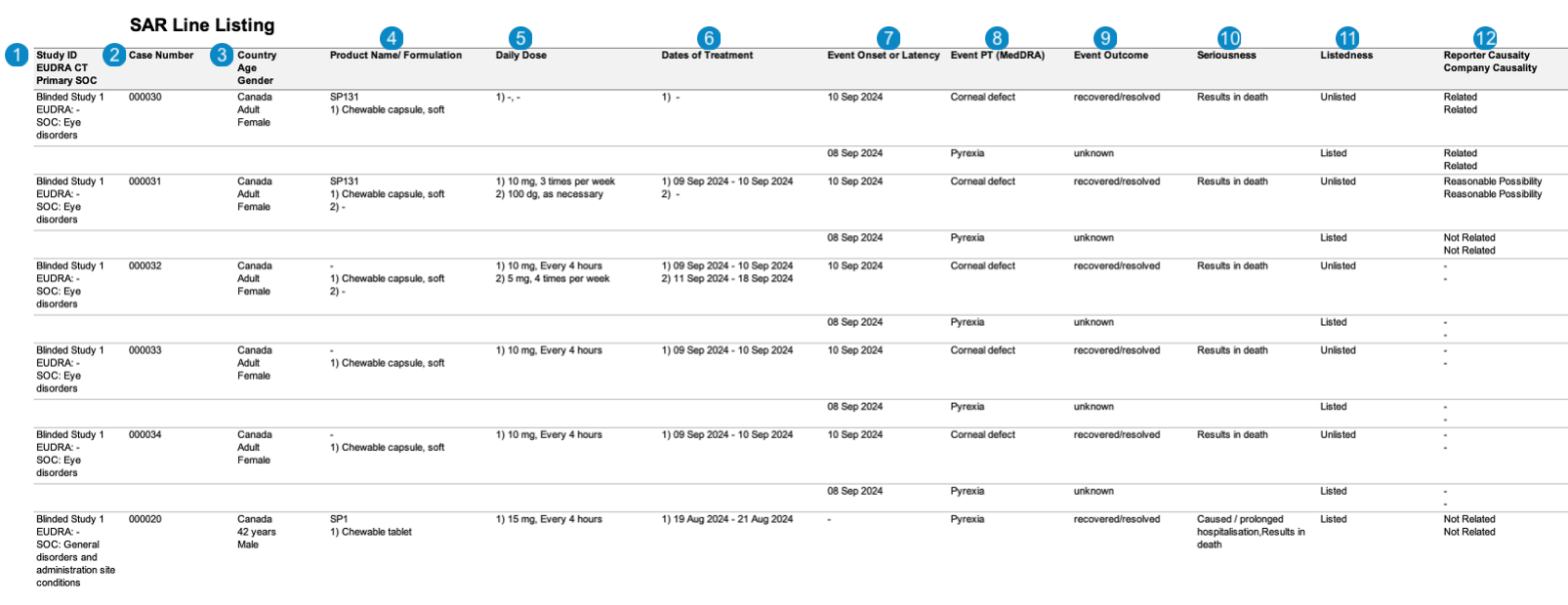
The following images displays the Workbench _SAR Line Listing_:
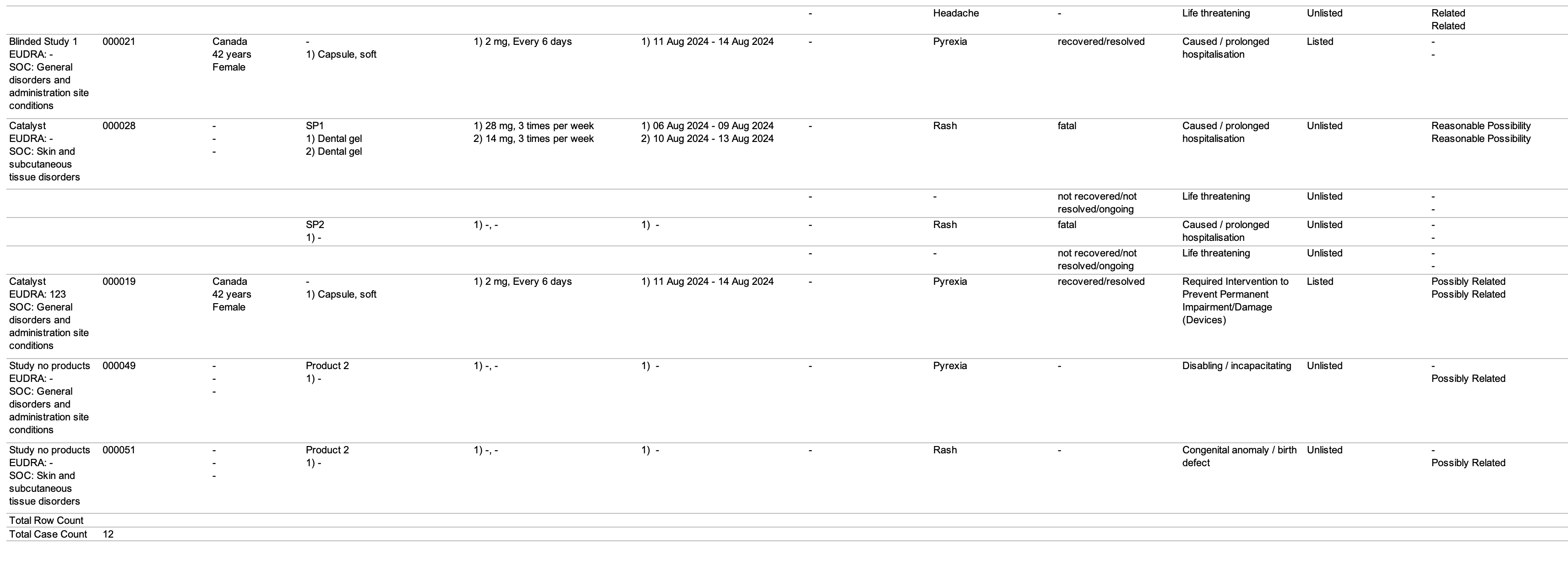
<a href="https://platform.veevavault.help/assets/images/saf-workbench-sar-line-listing-table1.png" data-lightbox="saf-workbench-sar-line-listing-table1.png" data-title="" data-alt="saf-workbench-sar-line-listing-table1">
  <img class="docimage" src="https://platform.veevavault.help/assets/images/saf-workbench-sar-line-listing-table1.png" alt="saf-workbench-sar-line-listing-table1" style=""  />
</a>
<a href="https://platform.veevavault.help/assets/images/saf-workbench-sar-line-listing-table2.png" data-lightbox="saf-workbench-sar-line-listing-table2.png" data-title="" data-alt="saf-workbench-sar-line-listing-table2">
  <img class="docimage" src="https://platform.veevavault.help/assets/images/saf-workbench-sar-line-listing-table2.png" alt="saf-workbench-sar-line-listing-table2" style=""  />
</a>

<table>
    <thead>
        <tr>
            <th>Number</th>
            <th>Name</th>
            <th>Description</th>
        </tr>
    </thead>
    <tbody>
        <tr>
            <td style="text-align: center"><img class="inline" src="https://platform.veevavault.help/assets/images/saf-icon1.png" alt="1" style="" /></td>
            <td>Study ID<br>EUDRA CT<br>Primary SOC</td>
            <td>Vault maps these values from the following fields:
                <ul>
                    <li><em>Study ID</em>: <em>Case Study > Study Number</em><br>
                        <code>case_version__v.study_number__v</code>
                    </li>
                    <li><em>EUDRA CT</em>: <em>Case Study Registration > Registration Number</em><br>
                        <code>case_study_registration__v.registration_number_value<br>
                                WHERE<br>
                                 country_value__v.agency__v = EMA</code>
                    </li>
                    <li><em>Primary SOC</em>: The MedDRA System Organ Class (SOC) for the primary <em>Case Adverse Event</em><br>
                        <code>event_meddra__v.soc_term__v<br>
                                WHERE<br>
                                event_meddra__v.rank__v = 1</code>
                    </li>
                </ul>
            </td>
        </tr>
        <tr>
            <td style="text-align: center" id="icsr-initial-follow-up"><img class="inline" src="https://platform.veevavault.help/assets/images/saf-icon2.png" alt="2" style="" /></td>
            <td>Case Number</td>
            <td>Vault maps this value from the <em>Case > Case Number</em> field.<br>
                <code>case_version__v.case_number__v</code>
            </td>
        </tr>
        <tr>
            <td style="text-align: center"><img class="inline" src="https://platform.veevavault.help/assets/images/saf-icon3.png" alt="3" style="" /></td>
            <td>Country<br>Age<br>Gender</td>
            <td>Vault maps these values from the following fields:
                <ul>
                    <li><em>Country</em>: <em>Case > Event Country</em><br>
                        <code>case_version__v.event_country__v.name__v</code>
                    </li>
                    <li><em>Age</em>: <em>Case > Age and Age (unit)</em><br>Vault calculates the age to the closest full number in years.<br>
                        <code>(case_version__v.age_value__v case_version__v.age_unit__v)<br>
                              OR<br>
                              (case_version__v.age_normalized_year__v case_version__v.age_unit__v)</code>
                    </li>
                    <li><em>Gender</em>: <em>Case > Patient Sex</em><br>
                        <code>case_version__v.gender_value__v.name__v</code>
                    </li>
                </ul>
            </td>
        </tr>
        <tr>
            <td style="text-align: center"><img class="inline" src="https://platform.veevavault.help/assets/images/saf-icon4.png" alt="4" style="" /></td>
            <td>Product Name/Formulation</td>
            <td>Vault maps these values from the following fields:
                <ul>
                    <li><em>Product Name</em>: <em>Case Product > Product</em><br>
                        <code>case_product__v.product_name__v</code>
                    </li>
                    <li><em>Formulation</em>: <em>Case Product Dosage > Dose Form</em><br> 
                        <code>case_product_dosage__v.dose_form_text__v</code>
                    </li>
                </ul>
            </td>
        </tr>
        <tr>
            <td style="text-align: center"><img class="inline" src="https://platform.veevavault.help/assets/images/saf-icon5.png" alt="5" style="" /></td>
            <td>Daily Dose</td>
            <td>Vault maps these values from the following fields:
                <ul>
                    <li><em>Case Product Dosage > Dose</em> (number and unit)<br>
                        <code>case_product_dosage__v.case_product_dosage__v.dose_number__v<br>
                                case_product_dosage__v.case_product_dosage__v.dose_unit_text__v</code>
                    </li>
                    <li><em>Case Product Dosage > Frequency</em> (number and unit)<br>
                        <code>case_product_dosage__v.frequency_number__v<br>
                                case_product_dosage__v.frequency_unit__v</code>
                    </li>
                </ul>
            </td>
        </tr>
        <tr>
            <td style="text-align: center"><img class="inline" src="https://platform.veevavault.help/assets/images/saf-icon6.png" alt="6" style="" /></td>
            <td>Dates of Treatment</td>
            <td>Vault maps these values from the <em>Case Product Dosage > First Admin Date</em> to <em>Case Product Dosage > Last Admin Date</em> in the format (DD-MMM-YYYY).<br>
                <code>case_product_dosage__v.firstadmin_normalized__v - case_product_dosage__v.lastadmin_normalized__v</code>
            </td>
        </tr>
        <tr>
            <td style="text-align: center"><img class="inline" src="https://platform.veevavault.help/assets/images/saf-icon7.png" alt="7" style="" /></td>
            <td>Event Onset or Latency</td>
            <td><p>Vault maps this value from the <em>Case Adverse Event > Onset</em> field.<br>
                <code>case_adverse_event__v.onset_date__v</code></p>
                <p>If the <em>Onset</em> field is blank, Vault maps this value from the <em>Case Assessment > First Dose Latency</em> (number and unit) field.<br>
                    <code>case_assessment__v.first_dose_interval_number__v<br>
                    case_assessment__v.first_dose_interval_unit__v</code></p>
            </td>
        </tr>
        <tr>
            <td style="text-align: center"><img class="inline" src="https://platform.veevavault.help/assets/images/saf-icon8.png" alt="8" style="" /></td>
            <td>Event PT (MedDRA)</td>
            <td>The MedDRA PT of the <em>Case Adverse Event</em>.<br>
                <code>case_adverse_event__v.event_meddra__v.pt_term__v</code>
            </td>
        </tr>
        <tr>
            <td style="text-align: center"><img class="inline" src="https://platform.veevavault.help/assets/images/saf-icon9.png" alt="9" style="" /></td>
            <td>Event Outcome</td>
            <td>Vault maps this value from the <em>Case Adverse Event > Outcome</em> field.<br>
                <code>case_adverse_event__v.event_outcomes__v.name__v</code>
            </td>
        </tr>
        <tr>
            <td style="text-align: center"><img class="inline" src="https://platform.veevavault.help/assets/images/saf-icon10.png" alt="10" style="" /></td>
            <td>Seriousness</td>
            <td>The level of impact the adverse event had on the patient. Vault maps these values from the <em>Case Adverse Event > Seriousness</em> field.<br>
                <code>case_adverse_event__v.seriousness__v</code>
            </td>
        </tr>
        <tr>
            <td style="text-align: center"><img class="inline" src="https://platform.veevavault.help/assets/images/saf-icon11.png" alt="11" style="" /></td>
            <td>Listedness</td>
            <td><p>Whether the <em>Case</em> is listed or unlisted.</p>
                <p>Vault sets the value to <code>Listed</code> if at least one (1) <em>MedDRA Term</em> on the datasheet is expected.</p>
                <p>Vault sets the value to <code>Unlisted</code> if all matching <em>MedDRA Terms</em> are unexpected.</p>
            </td>
        </tr>
        <tr>
            <td style="text-align: center"><img class="inline" src="https://platform.veevavault.help/assets/images/saf-icon12.png" alt="12" style="" /></td>
            <td>Reporter Causality<br>Company Causality</td>
            <td>The results of the <em>Case Assessment</em> for the <em>Reporter</em> and <em>Company</em> source type. Vault maps these values from the <em>Case Assessment Result > Assessment Result</em> field.<br>
                <code>case_assessment__v.case_assessment_result__v.assessment_result__v</code>
            </td>
        </tr>
    </tbody>
</table>

### SAR Tabulation by PT

The following image displays the Workbench _SAR Tabulation by PT_:
<a href="https://platform.veevavault.help/assets/images/saf-workbench-sar-tabulation-by-pt-table.png" data-lightbox="saf-workbench-sar-tabulation-by-pt-table.png" data-title="" data-alt="saf-workbench-sar-tabulation-by-pt-table">
  <img class="docimage" src="https://platform.veevavault.help/assets/images/saf-workbench-sar-tabulation-by-pt-table.png" alt="saf-workbench-sar-tabulation-by-pt-table" style="max-width: 70%;"  />
</a>

<table>
    <thead>
        <tr>
            <th>Number</th>
            <th>Name</th>
            <th>Description</th>
        </tr>
    </thead>
    <tbody>
        <tr>
            <td style="text-align: center"><img class="inline" src="https://platform.veevavault.help/assets/images/saf-icon1.png" alt="1" style="" /></td>
            <td>Event PT</td>
            <td>The MedDRA PT of the <em>Case Adverse Event</em>.<br>
                <code>case_adverse_event__v.event_meddra__v.pt_term__v</code>
            </td>
        </tr>
        <tr>
            <td style="text-align: center"><a id="icsr-initial-follow-up"></a><img class="inline" src="https://platform.veevavault.help/assets/images/saf-icon2.png" alt="2" style="" /></td>
            <td>Event Count</td>
            <td>The total sum of adverse events for each MedDRA PT.</td>
        </tr>
        <tr>
            <td style="text-align: center"><img class="inline" src="https://platform.veevavault.help/assets/images/saf-icon3.png" alt="3" style="" /></td>
            <td>Case Count</td>
            <td>The total sum of <em>Cases</em> for each MedDRA PT.</td>
        </tr>
    </tbody>
</table>

### SAR Tabulation by SOC, PT

The following image displays the Workbench _SAR Tabulation by SOC, PT_:
<a href="https://platform.veevavault.help/assets/images/saf-workbench-sar-tabulation-by-soc-pt-table.png" data-lightbox="saf-workbench-sar-tabulation-by-soc-pt-table.png" data-title="" data-alt="saf-workbench-sar-tabulation-by-soc-pt-table">
  <img class="docimage" src="https://platform.veevavault.help/assets/images/saf-workbench-sar-tabulation-by-soc-pt-table.png" alt="saf-workbench-sar-tabulation-by-soc-pt-table" style="max-width: 70%;"  />
</a>

<table>
    <thead>
        <tr>
            <th>Number</th>
            <th>Name</th>
            <th>Description</th>
        </tr>
    </thead>
    <tbody>
        <tr>
            <td style="text-align: center"><img class="inline" src="https://platform.veevavault.help/assets/images/saf-icon1.png" alt="1" style="" /></td>
            <td>Event SOC</td>
            <td>The MedDRA SOC of the <em>Case Adverse Event</em>.<br>
                <code>case_adverse_event__v.event_meddra__v.soc_term__v</code>
            </td>
        </tr>
        <tr>
            <td style="text-align: center"><img class="inline" src="https://platform.veevavault.help/assets/images/saf-icon2.png" alt="2" style="" /></td>
            <td>Event PT</td>
            <td>The MedDRA PT of the <em>Case Adverse Event</em>.<br>
                <code>case_adverse_event__v.event_meddra__v.pt_term__v</code>
            </td>
        </tr>
        <tr>
            <td style="text-align: center"><a id="icsr-initial-follow-up"></a><img class="inline" src="https://platform.veevavault.help/assets/images/saf-icon3.png" alt="3" style="" /></td>
            <td>Event Count</td>
            <td>The total sum of adverse events for each MedDRA PT.</td>
        </tr>
        <tr>
            <td style="text-align: center"><img class="inline" src="https://platform.veevavault.help/assets/images/saf-icon4.png" alt="4" style="" /></td>
            <td>Case Count</td>
            <td>The total sum of <em>Cases</em> for each MedDRA PT.</td>
        </tr>
    </tbody>
</table>

### SUSAR Line Listing

The following images displays the Workbench _SUSAR Line Listing_:
<a href="https://platform.veevavault.help/assets/images/saf-workbench-susar-line-listing-table1.png" data-lightbox="saf-workbench-susar-line-listing-table1.png" data-title="" data-alt="saf-workbench-susar-line-listing-table1">
  <img class="docimage" src="https://platform.veevavault.help/assets/images/saf-workbench-susar-line-listing-table1.png" alt="saf-workbench-susar-line-listing-table1" style=""  />
</a>
<a href="https://platform.veevavault.help/assets/images/saf-workbench-susar-line-listing-table2.png" data-lightbox="saf-workbench-susar-line-listing-table2.png" data-title="" data-alt="saf-workbench-susar-line-listing-table2">
  <img class="docimage" src="https://platform.veevavault.help/assets/images/saf-workbench-susar-line-listing-table2.png" alt="saf-workbench-susar-line-listing-table2" style=""  />
</a>

<table>
    <thead>
        <tr>
            <th>Number</th>
            <th>Name</th>
            <th>Description</th>
        </tr>
    </thead>
    <tbody>
        <tr>
            <td style="text-align: center"><img class="inline" src="https://platform.veevavault.help/assets/images/saf-icon1.png" alt="1" style="" /></td>
            <td>Study ID<br>EUDRA CT<br>Primary SOC</td>
            <td>Vault maps these values from the following fields:
                <ul>
                    <li><em>Study ID</em>: <em>Case Study > Study Number</em><br>
                        <code>case_version__v.study_number__v</code>
                    </li>
                    <li><em>EUDRA CT</em>: <em>Case Study Registration > Registration Number</em><br>
                        <code>case_study_registration__v.registration_number_value<br>
                                WHERE<br> 
                                country_value__v.agency__v = EMA</code>
                    </li>
                    <li><em>Primary SOC</em>: The MedDRA System Organ Class (SOC) for the primary <em>Case Adverse Event</em><br>
                        <code>event_meddra__v.soc_term__v<br>
                                WHERE<br>
                                event_meddra__v.rank__v = 1</code>
                    </li>
                </ul>
            </td>
        </tr>
        <tr>
            <td style="text-align: center"><a id="icsr-initial-follow-up"></a><img class="inline" src="https://platform.veevavault.help/assets/images/saf-icon2.png" alt="2" style="" /></td>
            <td>Case Number</td>
            <td>Vault maps this value from the <em>Case > Case Number</em> field.<br>
                <code>case_version__v.case_number__v</code>
            </td>
        </tr>
        <tr>
            <td style="text-align: center"><img class="inline" src="https://platform.veevavault.help/assets/images/saf-icon3.png" alt="3" style="" /></td>
            <td>Country<br>Age<br>Gender</td>
            <td>Vault maps these values from the following fields:
                <ul>
                    <li><em>Country</em>: <em>Case > Event Country</em><br>
                        <code>case_version__v.event_country__v.name__v</code>
                    </li>
                    <li><em>Age</em>: <em>Case > Age and Age (unit)</em><br>Vault calculates the age to the closest full number in years.<br>
                        <code>(case_version__v.age_value__v case_version__v.age_unit__v)<br>
                              OR<br>
                              (case_version__v.age_normalized_year__v case_version__v.age_unit__v)</code>
                    </li>
                    <li><em>Gender</em>: <em>Case > Patient Sex</em><br>
                        <code>case_version__v.gender_value__v.name__v</code>
                    </li>
                </ul>
            </td>
        </tr>
        <tr>
            <td style="text-align: center"><img class="inline" src="https://platform.veevavault.help/assets/images/saf-icon4.png" alt="4" style="" /></td>
            <td>Product Name/Formulation</td>
            <td>Vault maps these values from the following fields:
                <ul>
                    <li><em>Product Name</em>: <em>Case Product > Product</em><br>
                        <code>case_product__v.product_name__v</code>
                    </li>
                    <li><em>Formulation</em>: <em>Case Product Dosage > Dose Form</em><br> 
                        <code>case_product_dosage__v.dose_form_text__v</code>
                    </li>
                </ul>
            </td>
        </tr>
        <tr>
            <td style="text-align: center"><img class="inline" src="https://platform.veevavault.help/assets/images/saf-icon5.png" alt="5" style="" /></td>
            <td>Daily Dose</td>
            <td>Vault maps these values from the following fields:
                <ul>
                    <li><em>Case Product Dosage > Dose</em> (number and unit)<br>
                        <code>case_product_dosage__v.case_product_dosage__v.dose_number__v<br>
                                case_product_dosage__v.case_product_dosage__v.dose_unit_text__v</code>
                    </li>
                    <li><em>Case Product Dosage > Frequency</em> (number and unit)<br>
                        <code>case_product_dosage__v.frequency_number__v<br>
                                case_product_dosage__v.frequency_unit__v</code>
                    </li>
                </ul>
            </td>
        </tr>
        <tr>
            <td style="text-align: center"><img class="inline" src="https://platform.veevavault.help/assets/images/saf-icon6.png" alt="6" style="" /></td>
            <td>Dates of Treatment</td>
            <td>Vault maps these values from the <em>Case Product Dosage > First Admin Date</em> to <em>Case Product Dosage > Last Admin Date</em> in the format (DD-MMM-YYYY).<br>
                <code>case_product_dosage__v.firstadmin_normalized__v - case_product_dosage__v.lastadmin_normalized__v</code>
            </td>
        </tr>
        <tr>
            <td style="text-align: center"><img class="inline" src="https://platform.veevavault.help/assets/images/saf-icon7.png" alt="7" style="" /></td>
            <td>Event Onset or Latency</td>
            <td><p>Vault maps this value from the <em>Case Adverse Event > Onset</em> field.<br>
                <code>case_adverse_event__v.onset_date__v</code></p>
                <p>If the <em>Onset</em> field is blank, Vault maps this value from the <em>Case Assessment > First Dose Latency</em> (number and unit) field.<br>
                    <code>case_assessment__v.first_dose_interval_number__v<br>
                    case_assessment__v.first_dose_interval_unit__v</code></p>
            </td>
        </tr>
        <tr>
            <td style="text-align: center"><img class="inline" src="https://platform.veevavault.help/assets/images/saf-icon8.png" alt="8" style="" /></td>
            <td>Event PT (MedDRA)</td>
            <td>The MedDRA PT of the <em>Case Adverse Event</em>.<br>
                <code>case_adverse_event__v.event_meddra__v.pt_term__v</code>
            </td>
        </tr>
        <tr>
            <td style="text-align: center"><img class="inline" src="https://platform.veevavault.help/assets/images/saf-icon9.png" alt="9" style="" /></td>
            <td>Event Outcome</td>
            <td>Vault maps this value from the <em>Case Adverse Event > Outcome</em> field.<br>
                <code>case_adverse_event__v.event_outcomes__v.name__v</code>
            </td>
        </tr>
        <tr>
            <td style="text-align: center"><img class="inline" src="https://platform.veevavault.help/assets/images/saf-icon10.png" alt="10" style="" /></td>
            <td>Seriousness</td>
            <td>The level of impact the adverse event had on the patient. Vault maps these values from the <em>Case Adverse Event > Seriousness</em> field.<br>
                <code>case_adverse_event__v.seriousness__v</code>
            </td>
        </tr>
        <tr>
            <td style="text-align: center"><img class="inline" src="https://platform.veevavault.help/assets/images/saf-icon11.png" alt="11" style="" /></td>
            <td>Listedness</td>
            <td><p>Whether the <em>Case</em> is listed or unlisted.</p>
                <p>Vault sets the value to <code>Listed</code> if at least one (1) <em>MedDRA Term</em> on the datasheet is expected.</p>
                <p>Vault sets the value to <code>Unlisted</code> if all matching <em>MedDRA Terms</em> are unexpected.</p>
            </td>
        </tr>
        <tr>
            <td style="text-align: center"><img class="inline" src="https://platform.veevavault.help/assets/images/saf-icon12.png" alt="12" style="" /></td>
            <td>Reporter Causality<br>Company Causality</td>
            <td>The results of the <em>Case Assessment</em> for the <em>Reporter</em> and <em>Company</em> source type. Vault maps these values from the <em>Case Assessment Result > Assessment Result</em> field.<br>
                <code>case_assessment__v.case_assessment_result__v.assessment_result__v</code>
            </td>
        </tr>
    </tbody>
</table>

[1]: #sar-line-listing
[2]: #sar-tabulation-by-pt
[3]: #sar-tabulation-by-soc-pt
[4]: #susar-line-listing