# Create Workbench PBRER Aggregate Reports

Workbench provides Periodic Benefit-Risk Evaluation Report (PBRER) table generation capabilities. Vault generates the following standard PBRER tabulations and line listings, with support for masked and unmasked versions of each:

* [Summary Tabulation of ADRs from Postmarketing Sources][8]
* [Cumulative Tabulation of Serious Adverse Events From Clinical Trials][9]
* [Interval Line Listings of Serious Adverse Reactions][10]

In addition to the standard PBRER tabulations and line listings, Vault can produce masked and unmasked versions of the following log-type reports:
* [Case Series Report][19]
* [Open Cases Report][20]

<div class="note-border alert-info">
  <div class="alert alert-info" role="alert">
    <div><i class="far fa-info-circle"></i></div>
    <div class="alert-text">
      <p><strong>Note</strong>: This article uses the generic term reports to refer to standard PBRER tabulations, line listings, and log-type reports.</p>
    </div>
  </div>
</div>


## Prerequisites
To generate Workbench PBRER aggregate reports:
* Your Admin must configure the following features:
   * <a href="/en/gr/691317/">Isolate Blinded Clinical Trial Information</a>
   * <a href="/en/gr/883618/">Workbench PBRER Aggregate Reports</a>
* Your Admin must configure <a href="/en/gr/01216/#add-a-study-product">_Study Products_</a> to generate table data from _Study_-type _Cases_
* Your Admin must grant you permissions to view and prepare aggregate reports
* Depending on your business process, your Admin may: 
   * Configure a <a href="/en/gr/01198/#datasheet-types">_Datasheet_</a> for each _Study Product_, _Study_, or _Product_ with a list of expected adverse events in order to classify adverse events as _Listed_ or _Unlisted_ in Workbench PBRER reports
   * Configure custom <a href="/en/gr/774151/#pbrer-templates">Workbench PBRER report templates</a> for your organization

## Overview
To generate a Workbench PBRER aggregate report:
1. [Create a _Workbench Report Set_][1] to combine the desired PBRER _Workbench Report Definitions_ into a single record. For example, you can create a _Workbench Report Set_ that contains both masked and unmasked versions of each PBRER report.
2. [Specify the required PBRER filters][2] on the _Workbench Report Set_.
3. [Generate then run the PBRER _Workbench Reports_][4] from the _Workbench Report Set_.

To learn how Vault maps data to each Workbench PBRER report, see [PBRER Table Generation Data Mapping][5].

## Create a PBRER Workbench Report Set {#create-workbench-report-set}
To create a PBRER _Workbench Report Set_:
1. Navigate to **Workbench > Report Sets**.
2. Select **Create**.
3. On the _Create Workbench Report Set_ page, enter a name for the report.
4. Select **Save** or **Save + Create** to save the _Workbench Report Set_ and create another.
5. In the _Reports to Generate_ section, add a <a href="/en/gr/826869/#add-workbench-report-definitions">_Workbench Report Definition_</a> to the _Workbench Report Set_ for each PBRER report you want to include.

 <div class="note-border alert-info">
  <div class="alert alert-info" role="alert">
    <div><i class="far fa-info-circle"></i></div>
    <div class="alert-text">
      <p><strong>Note</strong>: When your Admin configures Workbench PBRER Aggregate Reports, they <a href="/en/gr/883618/#create-workbench-report-definitions">create a <em>Workbench Report Definition</em></a> for each masked and unmasked report. If your <em>Workbench Report Set</em> does not contain the expected PBRER reports, contact your Admin for assistance.</p>
    </div>
  </div>
</div>


**Result**

Vault sets the lifecycle state of the _Workbench Report Set_ to _Draft_.

## Specify PBRER Workbench Report Set Filters {#specify-workbench-report-set-filters}
To specify _Workbench Report Set_ filters for all _Workbench Reports_ in the _Workbench Report Set_:
1. Expand the _Filters_ section and select **Refresh**.
2. Select **Edit**.
3. In the _Filters_ section, populate the [required filter fields][3].
4. Select **Save**.

### Filter Section Fields {#filter-section-fields}
The following fields may be available:

<table>
    <thead>
        <tr>
            <th>Field</th>
            <th>Description</th>
        </tr>
    </thead>
    <tbody>
        <tr>
            <td id="data-period-start"><em>Data Period Start</em></td>
            <td>
                <p>
                    Use the calendar to select the start date for the reporting period or enter the date manually.
                </p>
                <p>
                    Vault uses this date, along with the <em>Data Period End</em> value, to determine the reporting period, which defines <a href="/en/gr/01127/">the <em>Cases</em> to include in generated interval (but not cumulative) reports</a>. Vault includes <em>Cases</em> with a <em>New Info Date</em> value (or <em>Receipt</em> field value, if the <em>New Info Date</em> field is blank) that is on or within the specified reporting period.
                </p>
                <div class="note-border alert-info">
  <div class="alert alert-info" role="alert">
    <div><i class="far fa-info-circle"></i></div>
    <div class="alert-text">
      <p><strong>Note</strong>: If there are multiple versions of the <em>Case</em> within the reporting period, Vault lists only the most recent <em>Case</em> version.</p>
    </div>
  </div>
</div>


            </td>
        </tr>
        <tr>
            <td id="datasheet-active-date"><em>Datasheet Active Date</em></td>
            <td>
                <p>
                    Use the calendar to select the date at which to consider <em>Datasheets</em> active or enter the date manually.
                </p>
                <p>
                    Vault uses this date to determine <a href="/en/gr/01198/#active-range-aggregates">adverse event term expectedness</a>. If the <em>Datasheet Active Date</em> is outside of a term's active range, Vault considers that term unexpected and displays an asterisk (*) next to the term in the following report, whether masked or unmasked:
                </p>
                <ul>
                    <li><a href="/en/gr/883619/#interval-line-listing-sar">Interval Line Listings of Serious Adverse Reactions</a></li>
                </ul>
            </td>
        </tr>
        <tr>
            <td id="aggregate-reporting-group"><em>Aggregate Reporting Group</em></td>
            <td>
                <p>
                    Select an <a href="/en/gr/873342/"><em>Aggregate Reporting Group</em></a> from the drop-down, or use the <strong>Advanced Search</strong> (<img class="inline" src="https://platform.veevavault.help/assets/images/icon-binoculars.png" alt="Binoculars Icon" style="" />) icon to use filters and refine your search.
                </p>
                <p>
                    Vault considers the following <em>Cases</em> eligible for inclusion in the generated reports:
                </p>
                <ul>
                    <li><em>Cases</em> with a <em>Product</em> in the <em>Aggregate Reporting Group</em></li>
                    <li><em>Cases</em> with a <em>Study</em> in the <em>Aggregate Reporting Group</em></li>
                    <li>If the <em>Case</em> contains any blinded <em>Products</em>, Vault considers the <em>Case</em> provided any of the <em>Study Products</em> on the <em>Case Study</em> are included in the <em>Aggregate Reporting Group</em></li>
                </ul>
            </td>
        </tr>
        <tr>
            <td><em>Data Period End</em></td>
            <td>
                Use the calendar to select the end date for the reporting period or enter the date manually.
            </td>
        </tr>
        <tr>
            <td><em>Case Completed</em></td>
            <td>
                Select whether the <em>Case</em> is open or completed from the drop-down. If you leave this field blank, the report filters for all <em>Cases</em>.
            </td>
        </tr>
    </tbody>
</table>

## Generate and Run a PBRER Workbench Report Set {#generate-run-workbench-report-set}
After you have populated your _Workbench Report Set_ with the relevant PBRER _Workbench Report Definitions_ and you've specified the relevant PBRER filters, you can then <a href="/en/gr/860557/">generate and run all specified PBRER _Workbench Reports_</a> from the _Workbench Report Set_.

## PBRER Table Generation Data Mapping {#table-generation-data-mapping}
When you generate PBRER _Workbench Reports_ from a _Workbench Report Set_, Vault uses its _Workbench Report Definitions_ to create _Workbench Reports_. After this point, whenever you <a href="/en/gr/860557/#run-all-reports">run</a> the _Workbench Report Set_, Vault creates CSV and Excel files for each _Workbench Report_ and attaches these files to each _Workbench Report_. Vault populates these files with _Cases_ that meet:
* [The inclusion criteria for all Workbench PBRER reports][6]
* [The filtering criteria defined on the _Workbench Report Set_][2]
* The inclusion criteria on the specific report


### Inclusion Criteria for All Workbench PBRER Reports {#inclusion-criteria-for-all}
Vault considers the following criteria when assessing _Cases_ for inclusion in any Workbench PBRER report:
* **Drug Roles**: Vault considers _Case Products_ with the following _Drug Role_ values:
   * _Suspect_
   * _Interacting_
   * _Drug Not Administered_
* **Lifecycle States**: Vault considers completed _Cases_<sup><a href="#states">1</a></sup>---that is, _Cases_ with the following _Lifecycle State_ values: 
   * _Closed_
   * _Approved_
   * _Superseded_   

<div class="note-border alert-info">
  <div class="alert alert-info" role="alert">
    <div><i class="far fa-info-circle"></i></div>
    <div class="alert-text">
      <p><strong>Note</strong>: Vault excludes <em>Cases</em> that contain the following field values:</p>
<ul>
    <li>A <em>Lifecycle State</em> value of <em>Nullified</em> or <em>Voided</em></li>
    <li>A <em>Suppress Submission</em> value of <em>Yes</em></li>
</ul>
    </div>
  </div>
</div>


1. <a id="states"></a>The <a href="/en/gr/883619/#open-cases-report">Open Cases Report</a> differs from this _Lifecycle State_ filter logic. It includes _Cases_ with any open _Lifecycle State_ value.

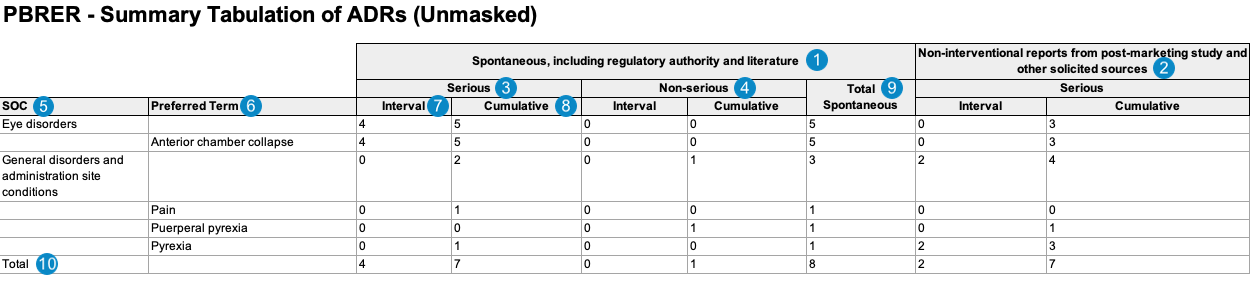
### Summary Tabulation of Adverse Drug Reactions from Postmarketing Sources {#summary-tabulation-adr}
When generating the Summary Tabulation of Adverse Drug Reactions from Postmarketing Sources, Vault uses the logic defined by your Admin in the corresponding _<a href="/en/gr/883618/#pbrer-views-pbrer-reports">Workbench View</a>_. By default, this generates report data in the following structure:

<a href="https://platform.veevavault.help/assets/images/workbench-pbrer-adr-tabulation-unmasked-sample.png" data-lightbox="workbench-pbrer-adr-tabulation-unmasked-sample.png" data-title="Sample Workbench PBRER ADR Tabulation, Unmasked" data-alt="Sample Workbench PBRER ADR Tabulation, Unmasked">
  <img class="docimage" src="https://platform.veevavault.help/assets/images/workbench-pbrer-adr-tabulation-unmasked-sample.png" alt="Sample Workbench PBRER ADR Tabulation, Unmasked" style=""  />
</a>

<div class="note-border alert-info">
  <div class="alert alert-info" role="alert">
    <div><i class="far fa-info-circle"></i></div>
    <div class="alert-text">
      <p><strong>Note</strong>: To aid in understanding how Vault maps Summary Tabulation of Adverse Drug Reactions from Postmarketing Sources reporting data to PBRER files, the following table includes both descriptions and Vault object and field names.</p>
    </div>
  </div>
</div>


<table>
        <tr>
            <th>Reference Image Number</th>
            <th>PBRER Report Field Name</th>
            <th>Description</th>
        </tr>
        <tr>
            <td style="text-align: center"><img class="inline" src="https://platform.veevavault.help/assets/images/saf-icon1.png" alt="1" style="" /></td>
            <td>Spontaneous, including regulatory authority and literature</td>
            <td>Cases are listed in this category when the Case <strong>Report Type</strong> is set to one of the following:
                <ul>
                    <li>Spontaneous</li>
                    <li>Literature (Spontaneous)</li>
                    <li>Other</li>
                    <li>Not Available</li>
                </ul>
                <code>case_version__v.report_type__v = 1, 3, 4 <br>{Spontaneous | Literature (Spontaneous) | Other | Not available}</code>
            </td>
        </tr>
        <tr>
            <td style="text-align: center"><img class="inline" src="https://platform.veevavault.help/assets/images/saf-icon2.png" alt="2" style="" /></td>
            <td>Non-interventional</td>
            <td>Cases are listed in this category when they match one of the following scenarios:
                <table>
                    <thead>
                        <tr>
                            <th>Scenario</th>
                            <th>Report Type</th>
                            <th>Study Type</th>
                            <th>Causality Established</th>
                        </tr>
                    </thead>
                    <tbody>
                        <tr>
                            <td>1</td>
                            <td><ul>
                                    <li>Study</li>
                                    <li>Literature (Study)</li>
                                    <li>A <a href="/en/gr/01195/#report-type">custom Report Type</a> with an E2B Code of <code>2</code></li>
                                </ul>
                            </td>
                            <td><ul>
                                <li>Individual Patient Use</li>
                                <li>Other Study</li>
                                <li>A <a href="/en/gr/01195/#study-type">custom Study Type</a> where the E2B Code is <em>not</em> set to <code>1</code> (Clinical Trial)</li>
                            </ul></td>
                            <td><ul>
                                <li>Yes</li>
                                <li>Blank</li>
                            </ul></td>
                        </tr>
                        <tr>
                            <td>2</td>
                            <td><ul>
                                    <li>Literature (Study)</li>
                                    <li>A <a href="/en/gr/01195/#report-type">custom Report Type</a> with both of the following:
                                        <ol>
                                            <li>The E2B Code field set to <code>2</code></li>
                                            <li>The Literature field set to Yes</li>
                                        </ol>
                                    </li>
                                </ul>
                            </td>
                            <td><ul>
                                <li>Blank</li>
                                <li>A <a href="/en/gr/01195/#study-type">custom Study Type</a> without a valid E2B Code</li>
                            </ul>
                        </td>
                        <td><ul>
                                <li>Yes</li>
                                <li>Blank</li>
                            </ul></td>
                        </tr>
                    </tbody>
                </table>
                <code>COUNT IF<br>(case_version_v.report_type__v.controlled_vocabulary__v.e2b_code__v = 2
                    <br>AND case_version__v.study_product_reason__v.controlled_vocabulary__v.e2b_code__v ≠ 1)<br>AND case_assessment__v.case_assessment_result__v.causality_established__v = Yes OR Blank<br>OR<br>(case_version_v.report_type__v.controlled_vocabulary__v.e2b_code__v = 2
                    <br>AND case_version_v.report_type__v.controlled_vocabulary__v.literature__v = Yes
                    <br>AND case_version__v.study_product_reason__v = blank)
                <br>AND case_assessment__v.case_assessment_result__v.causality_established__v = Yes OR Blank</code>
            </td>
        </tr>
        <tr>
            <td style="text-align: center"><img class="inline" src="https://platform.veevavault.help/assets/images/saf-icon3.png" alt="3" style="" /></td>
            <td>Serious</td>
            <td>Number of adverse events with a value entered in the Case Adverse Event <strong>Seriousness</strong> field.
                <code>case_adverse_event__v.seriousness__v ≠ EMPTY</code></td>
        </tr>
        <tr>
            <td style="text-align: center"><img class="inline" src="https://platform.veevavault.help/assets/images/saf-icon4.png" alt="4" style="" /></td>
            <td>Non-Serious</td>
            <td>Number of adverse events with an empty Case Adverse Event <strong>Seriousness</strong> field.
                <code>case_adverse_event__v.serious__v = EMPTY</code></td>
        </tr>
        <tr>
            <td style="text-align: center"><img class="inline" src="https://platform.veevavault.help/assets/images/saf-icon5.png" alt="5" style="" /></td>
            <td>SOC</td>
            <td>
                <p>
                    Vault maps the MedDRA System Organ Class (SOC) for the adverse event from the <em>SOC</em> value on the <em>MedDRA</em> record linked to the <em>Case Adverse Event</em> (via the <em>Event (LLT)</em> field).
                </p>
                <p><code>case_adverse_event__v.event_meddra__v.soc_term__v</code></p>
            </td>
        </tr>
        <tr>
            <td style="text-align: center"><img class="inline" src="https://platform.veevavault.help/assets/images/saf-icon6.png" alt="6" style="" /></td>
            <td>Preferred Term</td>
            <td>
                <p>
                    Vault maps the MedDRA Preferred Term (<em>MedDRA PT</em>) for each <em>Case Adverse Event</em>, grouped by the MedDRA SOC.
                </p>
                <p>
                    <code>case_adverse_event__v.event_meddra__v.pt_term__v</code>
                </p>
               <div class="note-border alert-info">
  <div class="alert alert-info" role="alert">
    <div><i class="far fa-info-circle"></i></div>
    <div class="alert-text">
      <p><strong>Note</strong>: When a <em>Case</em> contains multiple <em>Case Adverse Events</em> coded under the same <em>MedDRA PT</em>, the report counts a single PT event instead of multiple events.</p>
    </div>
  </div>
</div>


            </td>
        </tr>
        <tr>
            <td style="text-align: center"><img class="inline" src="https://platform.veevavault.help/assets/images/saf-icon7.png" alt="7" style="" /></td>
            <td>
                Interval
            </td>
            <td>
                <p>
                    The number of adverse events with a <em>Case</em> date within the aggregate report interval reporting period (Data Period Start to Data Period End). <a href="/en/gr/01127/">How Aggregate Reports Filter by Data Period</a> provides more information.
                </p>
                <p>
                    <code><em>DATE</em> ≥ pbrer__v.data_period_start__v AND<br>
                    <em>DATE</em> ≤ pbrer__v.data_period_end__v</code>
                </p>
                <p>
                    If the <em>Case New Info Date</em> is blank, Vault uses the <em>Receipt Date</em>:
                </p>
                <p>
                    <code>case_version__v.receipt_date__v</code>
                </p>
                <p>
                    Otherwise, Vault uses the <em>New Info Date</em>:
                </p>
                <p>
                    <code>case_version__v.new_info_date__v</code>
                </p>
            </td>
        </tr>
        <tr>
            <td style="text-align: center"><img class="inline" src="https://platform.veevavault.help/assets/images/saf-icon8.png" alt="8" style="" /></td>
            <td>Cumulative</td>
            <td>
                <p>
                    The number of adverse events with a <em>Case</em> date within the aggregate report cumulative reporting period (up to the Data Period End). <a href="/en/gr/01127/">How Aggregate Reports Filter by Data Period</a> provides more information.
                </p>
                <p>
                    <code><em>DATE</em> ≤ pbrer__v.data_period_end__v</code>
                </p>
                <p>
                    If the <em>Case New Info Date</em> is blank, Vault uses the <em>Receipt Date</em>:
                </p>
                <p>
                    <code>case_version__v.receipt_date__v</code>
                </p>
                <p>
                    Otherwise, Vault uses the <em>New Info Date</em>:
                </p>
                <p>
                    <code>case_version__v.new_info_date__v</code>
                </p>
            </td>
        </tr>
        <tr>
            <td style="text-align: center"><img class="inline" src="https://platform.veevavault.help/assets/images/saf-icon9.png" alt="9" style="" /></td>
            <td>Total Spontaneous</td>
            <td>The total number of all adverse events within the "Spontaneous, including regulatory authority and literature" category, including both serious and non-serious, within the cumulative reporting period.
            </td>
        </tr>
        <tr>
            <td style="text-align: center"><img class="inline" src="https://platform.veevavault.help/assets/images/saf-icon10.png" alt="10" style="" /></td>
            <td>Total</td>
            <td>The total number of adverse events for each category within the reporting period.</td>
        </tr>
</table>

#### Case Inclusion Criteria {#tabulation-adr-inclusion-criteria}
Vault determines which data to include in the Summary Tabulation of Adverse Drug Reactions from Postmarketing Sources based on the following constraining criteria:
* [General PBRER report _Case_ filtering criteria][6]---that is, specific values for:
   * _Drug Roles_
   * _Lifecycle States_
* The [filters defined on the _Workbench Report Set_][3]---that is, specific values for:
   * _Data Period Start_
   * _Data Period End_
   * _Aggregate Reporting Group_

<div class="note-border alert-info">
  <div class="alert alert-info" role="alert">
    <div><i class="far fa-info-circle"></i></div>
    <div class="alert-text">
      <p><strong>Note</strong>: Vault excludes <em>Cases</em> that contain the following field values:</p>
<ul>
    <li>A <em>Lifecycle State</em> value of <em>Nullified</em> or <em>Voided</em></li>
    <li>A <em>Suppress Submission</em> value of <em>Yes</em></li>
</ul>
    </div>
  </div>
</div>


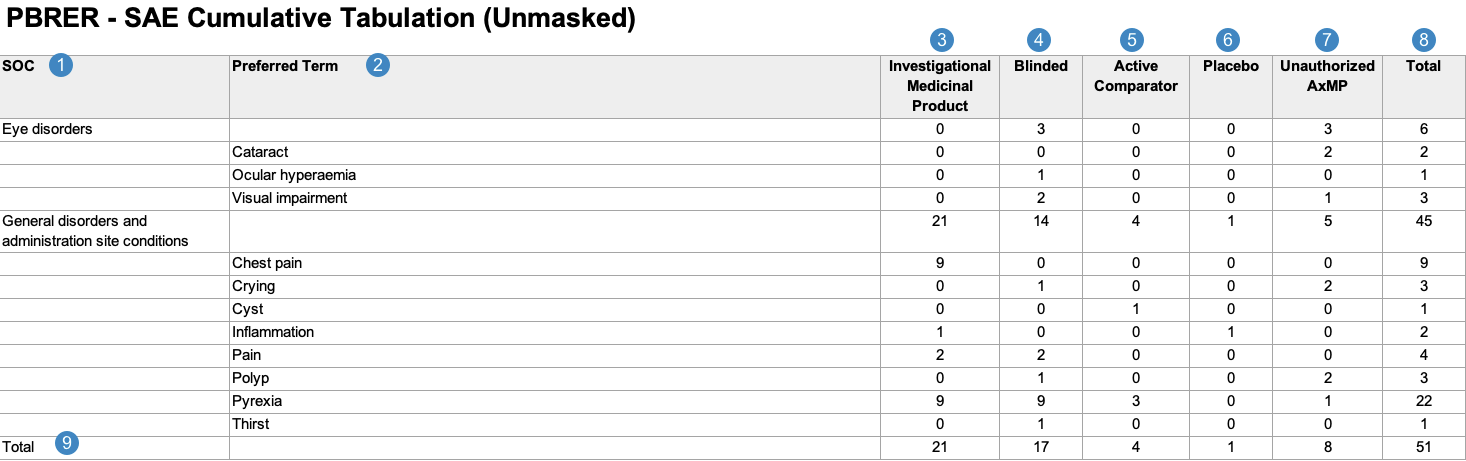
### Cumulative Tabulation of Serious Adverse Events From Clinical Trials {#cumulative-tabulation-sae}
When generating the Cumulative Tabulation of Serious Adverse Events from Clinical Trials, Vault uses the logic defined by your Admin in the corresponding <a href="/en/gr/883618/#pbrer-views-pbrer-reports"><em>Workbench View</em></a>. By default, this generates report data in the following structure:

<a href="https://platform.veevavault.help/assets/images/workbench-pbrer-sae-tabulation-unmasked-sample.png" data-lightbox="workbench-pbrer-sae-tabulation-unmasked-sample.png" data-title="Sample Workbench PBRER SAE Tabulation, Unmasked" data-alt="Sample Workbench PBRER SAE Tabulation, Unmasked">
  <img class="docimage" src="https://platform.veevavault.help/assets/images/workbench-pbrer-sae-tabulation-unmasked-sample.png" alt="Sample Workbench PBRER SAE Tabulation, Unmasked" style=""  />
</a>

<div class="note-border alert-info">
  <div class="alert alert-info" role="alert">
    <div><i class="far fa-info-circle"></i></div>
    <div class="alert-text">
      <p><strong>Note</strong>: To aid in understanding how Vault maps Cumulative Tabulation of Serious Adverse Events From Clinical Trials reporting data to PBRER files, the following table includes both descriptions and Vault object and field names.</p>
    </div>
  </div>
</div>


<table>
  <thead>
    <tr>
      <th>Reference Image Number</th>
      <th>PBRER Report Field Name</th>
      <th>Description</th>
    </tr>
  </thead>
  <tbody>
    <tr>
      <td style="text-align: center"><img class="inline" src="https://platform.veevavault.help/assets/images/saf-icon1.png" alt="1" style="" /></td>
      <td>SOC</td>
      <td>
        <p>
            Vault maps the MedDRA System Organ Class (SOC) for the adverse event from the <em>SOC</em> value on the <em>MedDRA</em> record linked to the <em>Case Adverse Event</em>  (via the <em>Event (LLT)</em> field).
        </p>
        <p><code>case_adverse_event__v.event_meddra__v.soc_term__v</code></p>
      </td>
    </tr>
    <tr>
      <td style="text-align: center"><img class="inline" src="https://platform.veevavault.help/assets/images/saf-icon2.png" alt="2" style="" /></td>
      <td>Preferred Term</td>
      <td>
        <p>
            Vault maps the MedDRA Preferred Term (<em>MedDRA PT</em>) for each <em>Case Adverse Event</em>, grouped by the MedDRA SOC.
        </p>
        <p>
            <code>case_adverse_event__v.event_meddra__v.pt_term__v</code>
        </p>
       <div class="note-border alert-info">
  <div class="alert alert-info" role="alert">
    <div><i class="far fa-info-circle"></i></div>
    <div class="alert-text">
      <p><strong>Note</strong>: When a <em>Case</em> contains multiple <em>Case Adverse Events</em> coded under the same <em>MedDRA PT</em>, the report counts a single PT event instead of multiple events.</p>
    </div>
  </div>
</div>


      </td>
    </tr>
    <tr>
      <td style="text-align: center"><img class="inline" src="https://platform.veevavault.help/assets/images/saf-icon3.png" alt="3" style="" /></td>
      <td>Investigational Medicinal Product</td>
      <td>
        <p>        
            Vault totals the number of <em>Case Adverse Events</em> with <em>Study Case Products</em> that have a <em>Study Product Role</em> value of <em>Investigational</em>.<sup><a href="#sae-tab-count">1</a></sup>
        </p>
        <p><code>COUNT IF</code></p>
        <p><code>case_product__v.study_product__v.study_product_role__v == lead_agent__v (Investigational)</code></p>
        </td>
    </tr>
    <tr>
      <td style="text-align: center"><img class="inline" src="https://platform.veevavault.help/assets/images/saf-icon4.png" alt="4" style="" /></td>
      <td>Blinded</td>
      <td>
        <p>        
            Vault totals the number of <em>Case Adverse Events</em> with blinded <em>Study Case Products</em>.<sup><a href="#sae-tab-count">1</a></sup>
        </p>
        <p><code>COUNT IF</code></p>
        <p><code>case_version__v.case_product__v.study_product__v == Blank</code></p>
        <p><code>AND</code></p>
        <p><code>case_product__v.drug_role__v CONTAINS pbrer__v.drug_roles_to_include__v</code></p>
      </td>
    </tr>
    <tr>
      <td style="text-align: center"><img class="inline" src="https://platform.veevavault.help/assets/images/saf-icon5.png" alt="5" style="" /></td>
      <td>Active Comparator</td>
      <td>
        <p>
            Vault totals the number of <em>Case Adverse Events</em> with active comparators&mdash;that is, a <em>Study Case Product</em> with a <em>Study Product Role</em> value of <em>Active Comparator</em>.<sup><a href="#sae-tab-count">1</a></sup>
        </p>       
        <p><code>COUNT IF</code></p>
        <p><code>case_product__v.study_product__v.study_product_role__v == active_comparator__v</code></p>
        <p><code>AND</code></p>
        <p><code>case_product__v.drug_role__v CONTAINS pbrer__v.drug_roles_to_include__v</code></p>
      </td>
    </tr>
    <tr>
      <td style="text-align: center"><img class="inline" src="https://platform.veevavault.help/assets/images/saf-icon6.png" alt="6" style="" /></td>
      <td>Placebo</td>
      <td>
        <p>
            Vault totals the number of <em>Case Adverse Events</em> with placebos&mdash;that is, a <em>Study Case Product</em> with a <em>Study Product Role</em> value of <em>Placebo</em>.<sup><a href="#sae-tab-count">1</a></sup>
        </p> 
        <p><code>COUNT IF</code></p>
        <p><code>case_product__v.study_product__v.study_product_role__v == placebo__v</code></p>
        <p><code>AND</code></p>
        <p><code>case_product__v.drug_role__v CONTAINS pbrer__v.drug_roles_to_include__v</code></p>
      </td>
    </tr>
    <tr>
      <td style="text-align: center"><img class="inline" src="https://platform.veevavault.help/assets/images/saf-icon7.png" alt="7" style="" /></td>
      <td>Unauthorized AxMP</td>
      <td>
        <p>
            Vault totals the number of <em>Case Adverse Events</em> with unauthorized AxMPs<sup><a href="#sae-tab-count">1</a></sup>, as determined by the following:
        </p>
        <ul>
            <li>One (1) or more <em>Study Products</em> has a <em>Study Product Role</em> of <em>Auxiliary</em></li>
            <li>A <em>Study Product</em> or one (1) or more <em>Study Product Countries</em> have an <em>Auxiliary Medicinal Product Status</em> of <em>Not Authorized</em></li>
        </ul>
        <p><code>COUNT IF</code></p>
        <p><code>case_product__v.study_product__v.study_product_role__v == auxiliary__v</code></p>
        <p><code>AND</code></p>
        <p><code>case_product__v.study_product__v.aux_medicinal_product_status__v == Not Authorized</code></p>
        <p><code>AND</code></p>
        <p><code>case_product__v.drug_role__v CONTAINS pbrer__v.drug_roles_to_include__v</code></p>
         <div class="note-border alert-info">
  <div class="alert alert-info" role="alert">
    <div><i class="far fa-info-circle"></i></div>
    <div class="alert-text">
      <p><strong>Note</strong>: By default, Vault includes an Unauthorized AxMP column in this report per EMA regulations. If your Admin has not configured <a href="/en/gr/806959/">Auxiliary Medicinal Product Support</a>, or if the <em>Study</em> does not include any unauthorized AxMPs, your Admin can remove this column from the corresponding <a href="/en/gr/752971/"><em>Workbench Report Definition</em> layout</a>.</p>
    </div>
  </div>
</div>


      </td>
    </tr>
    <tr>
      <td style="text-align: center"><img class="inline" src="https://platform.veevavault.help/assets/images/saf-icon8.png" alt="8" style="" /></td>
      <td>Total</td>
      <td>
        <p>
            Vault maps the sum of the following types of <em>Case Adverse Events</em> for each SOC and PT:
        </p>
        <ul>
          <li>Investigational Medicinal Product</li>
          <li>Blinded</li>
          <li>Active Comparator</li>
          <li>Placebo</li>
          <li>Unauthorized AxMP</li>
        </ul>
      </td>
    </tr>
    <tr>
      <td style="text-align: center"><img class="inline" src="https://platform.veevavault.help/assets/images/saf-icon9.png" alt="9" style="" /></td>
      <td>Total</td>
      <td>
        <p>
            Vault maps the total number of <em>Case Adverse Events</em> for each of the following categories:
        </p>
        <ul>
          <li>Investigational Medicinal Product</li>
          <li>Blinded</li>
          <li>Active Comparator</li>
          <li>Placebo</li>
          <li>Unauthorized AxMP</li>
        </ul>
      </td>
    </tr>
    <tr>
      <td colspan="3"><a id="sae-tab-count"></a>1. Although a <em>Case Adverse Event</em> may contain multiple <em>Case Study Products</em> that correspond to different columns in the Cumulative Tabulation of Serious Adverse Events From Clinical Trials, Vault only counts the <em>Case Adverse Event</em> in a single column, based on <a href="/en/gr/840364/">the product's causality</a>.</td>
    </tr>
  </tbody>
</table>

#### Case Inclusion Criteria {#tabulation-sae-inclusion-criteria}
Vault determines which data to include in the Cumulative Tabulation of Serious Adverse Events From Clinical Trials based on the following constraining criteria:
* [General PBRER report _Case_ filtering criteria][6]---that is, specific values for:
   * _Drug Roles_
   * _Lifecycle States_
* The [filters defined on the _Workbench Report Set_][3]---that is, specific values for:
   * _Data Period End_
   * _Aggregate Reporting Group_
* Inclusion criteria specific to the Cumulative Tabulation of Serious Adverse Events from Clinical Trials—that is:
   * _Seriousness_: Vault considers _Cases_ with at least one (1) _Case Adverse Event_ with a non-blank _Seriousness_ value
   * _Case Category_: See the [_Case Report Type_ and _Study Type Inclusion Scenarios_][13] table below

<div class="note-border alert-info">
  <div class="alert alert-info" role="alert">
    <div><i class="far fa-info-circle"></i></div>
    <div class="alert-text">
      <p><strong>Note</strong>: Vault excludes <em>Cases</em> that contain the following field values:</p>
<ul>
    <li>A <em>Lifecycle State</em> value of <em>Nullified</em> or <em>Voided</em></li>
    <li>A <em>Suppress Submission</em> value of <em>Yes</em></li>
</ul>
    </div>
  </div>
</div>


#### Case Report Type and Study Type Inclusion Scenarios {#report-study-type-inclusion-scenarios-sae}
Vault considers _Cases_ that include the specified values in either of the following scenarios:

<table>
  <thead>
    <tr>
      <th>Scenario</th>
      <th>Report Type</th>
      <th>Study Type</th>
    </tr>
  </thead>
  <tbody>
    <tr>
      <td>1</td>
      <td>
        <ul>
          <li><em>Study</em></li>
          <li>A <a href="/en/gr/01195/#report-type">custom <em>Report Type</em></a> with an <em>E2B Code</em> of <code>2</code></li>
        </ul>
      </td>
      <td>
        <ul>
          <li><em>Clinical Trial</em></li>
          <li>A <a href="/en/gr/01195/#study-type">custom <em>Study Type</em></a> with an <em>E2B Code</em> of <code>1</code></li>
        </ul>
      </td>
    </tr>
    <tr>
      <td></td>
      <td colspan="2">
        <p><code>case_version_v.report_type__v.controlled_vocabulary__v.e2b_code__v = 2</code></p>
        <p><code>AND</code></p>
        <p><code>case_version__v.study_product_reason__v.controlled_vocabulary__v.e2b_code__v = 1</code></p>
      </td>
    </tr>
    <tr>
      <td>2</td>
      <td>
        <ul>
          <li><em>Study</em></li>
          <li>A <em>custom Report Type</em> with:
            <ul>
              <li>An <em>E2B Code</em> of <code>2</code></li>
              <li>A <em>Literature</em> value of <em>No</em> or blank</li>
            </ul>
          </li>
        </ul>
      </td>
      <td>
        <ul>
          <li>Blank</li>
          <li>A <em>custom Study Type</em> without a valid <em>E2B Code</em></li>
        </ul>
      </td>
    </tr>
    <tr>
      <td></td>
      <td colspan="2">
        <p><code>case_version_v.report_type__v.controlled_vocabulary__v.e2b_code__v = 2</code></p>
        <p><code>AND</code></p>
        <p><code>case_version_v.report_type__v.controlled_vocabulary__v.literature__v ≠ Yes</code></p>
        <p><code>AND</code></p>
        <p><code>case_version_v.study_product_reason_v = blank</code></p>
      </td>
    </tr>
  </tbody>
</table>

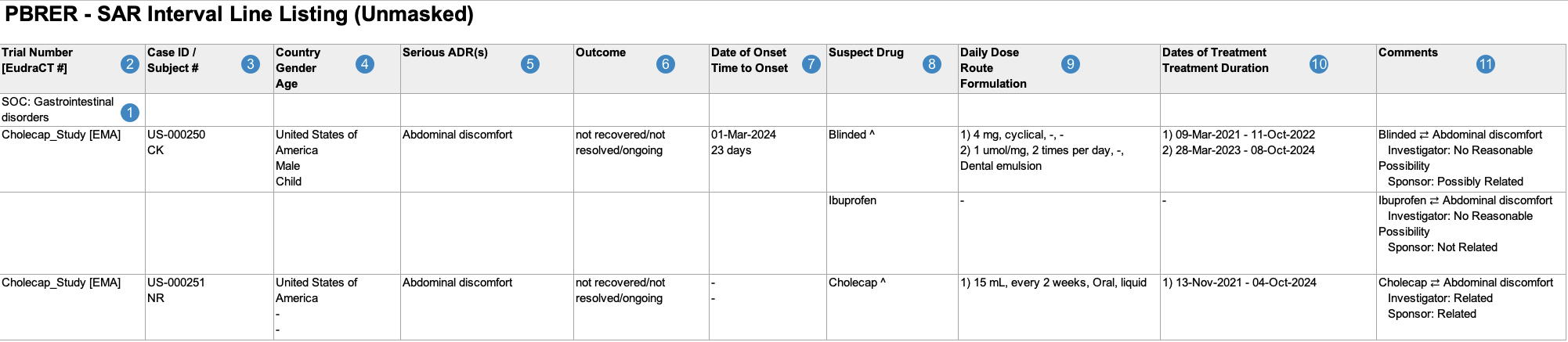
### Interval Line Listings of Serious Adverse Reactions {#interval-line-listing-sar}
When generating the Interval Line Listings of Serious Adverse Reactions, Vault uses the logic defined by your Admin in the corresponding <a href="/en/gr/883618/#pbrer-views-pbrer-reports"><em>Workbench View</em></a>. By default, this generates report data in the following structure:

<a href="https://platform.veevavault.help/assets/images/workbench-pbrer-sar-line-listing-unmasked-sample.png" data-lightbox="workbench-pbrer-sar-line-listing-unmasked-sample.png" data-title="Sample Workbench PBRER SAR Line Listing, Unmasked" data-alt="Sample Workbench PBRER SAR Line Listing, Unmasked">
  <img class="docimage" src="https://platform.veevavault.help/assets/images/workbench-pbrer-sar-line-listing-unmasked-sample.png" alt="Sample Workbench PBRER SAR Line Listing, Unmasked" style=""  />
</a>

<div class="note-border alert-info">
  <div class="alert alert-info" role="alert">
    <div><i class="far fa-info-circle"></i></div>
    <div class="alert-text">
      <p><strong>Note</strong>: To aid in understanding how Vault maps Interval Line Listings of Serious Adverse Reactions reporting data to PBRER files, the following table includes both descriptions and Vault object and field names.</p>
    </div>
  </div>
</div>


<table>
  <thead>
    <tr>
      <th>Reference Image Number</th>
      <th>PBRER Report Field Name</th>
      <th>Description</th>
    </tr>
  </thead>
  <tbody>
    <tr>
      <td style="text-align: center"><img class="inline" src="https://platform.veevavault.help/assets/images/saf-icon1.png" alt="1" style="" /></td>
      <td>SOC</td>
      <td>
        <p>
            Vault maps the MedDRA System Organ Class (SOC) for the adverse event from the <em>SOC</em> value on the <em>MedDRA</em> record linked to the <em>Case Adverse Event</em>  (via the <em>Event (LLT)</em> field).
        </p>
        <p><code>case_adverse_event__v.event_meddra__v.soc_term__v</code></p>
      </td>
    </tr>
    <tr>
      <td style="text-align: center"><img class="inline" src="https://platform.veevavault.help/assets/images/saf-icon2.png" alt="2" style="" /></td>
      <td>Trial Number [EudraCT#]</td>
      <td>
        <p>
            For <em>Studies</em> registered to a country in the European Union, Vault maps values from the following fields:
        </p>
        <ul>
            <li><strong>Trial Number</strong>: <em>Case</em> > <em>Study Number</em>
                <br><code>case_version__v.study_number__v</code></li>
            <li><strong>EudraCT#</strong>: <em>Case Study Registration</em> > <em>Registration Number</em>
                <br><code>case_study_registration__v.registration_number_value</code>
                <br><code>WHERE country_value__v.agency__v = EMA</code></li>
        </ul>
      </td>
    </tr>
    <tr>
      <td style="text-align: center"><img class="inline" src="https://platform.veevavault.help/assets/images/saf-icon3.png" alt="3" style="" /></td>
      <td>Case ID/ Subject #</td>
      <td>
        <p>
            Vault maps values from the following fields:
        </p>
        <ul>
            <li><strong>Case ID</strong>: <em>Case</em> > <em>UID</em>
                <br><code>case_version__v.uid__v</code></li>
            <li><strong>Subject ID</strong>:  For ICH E2F PBRER submissions, Vault maps the value from the <em>Case</em> > <em>MRN - Investigation</em> field. If this field is blank, Vault maps the value from the <em>Case</em> > <em>Patient Initials</em> field.
                <br><code>IF case_version__v.mrn_investigation_value__v = Blank</code>
                <br><code>SHOW case_version__v.patient_id_value__v</code>
                <br><code>ELSE SHOW case_version__v.mrn_investigation_value__v</code></li>
        </ul>
            <div class="note-border alert-info">
  <div class="alert alert-info" role="alert">
    <div><i class="far fa-info-circle"></i></div>
    <div class="alert-text">
      <p><strong>Note</strong>: Vault hides <em>Subject ID</em> values for CTIS Annual Safety Report submissions.</p>
    </div>
  </div>
</div>


      </td>
    </tr>
    <tr>
      <td style="text-align: center"><img class="inline" src="https://platform.veevavault.help/assets/images/saf-icon4.png" alt="4" style="" /></td>
      <td>Country<br>Gender<br>Age</td>
      <td>
        <p>
            Vault maps values from the following fields:
        </p>
        <ul>
            <li><strong>Country</strong>: <em>Case</em> > <em>Event Country</em>
                <br><code>case_version__v.event_country__v.name__v</code></li>
            <li><strong>Sex</strong>: <em>Case</em> > <em>Patient Sex</em>
                <br><code>case_version__v.gender_value__v.name__v</code></li>
            <li><strong>Age</strong>: <em>Case</em> > <em>Age</em> and <em>Age (unit)</em>
                <br><code>IF case_version__v.age_value__v = BLANK</code>
                <br><code>THEN case_version__v.age_group__v.name__v</code>
                <br><code>ELSE (case_version__v.age_value__v case_version__v.age_unit__v)</code></li>
        </ul>
      </td>
    </tr>
    <tr>
      <td style="text-align: center"><img class="inline" src="https://platform.veevavault.help/assets/images/saf-icon5.png" alt="5" style="" /></td>
      <td>Serious ADR(s)</td>
      <td>
        <p>
            Vault maps the MedDRA Preferred Terms (<em>MedDRA PTs</em>) for each <em>Case Adverse Event</em>, ordered by <em>Case Adverse Event</em> rank.
        </p>
        <p>
            <code>case_adverse_event__v.event_meddra__v.pt_term__v WHERE seriousness__v != null</code>
        </p>
        <p>
            If the <a href="/en/gr/883619/#datasheet-active-date"><em>Datasheet Active Date</em></a> value on the <em>Workbench Report Set</em> is outside of a term's active range, Vault considers that term unexpected and displays an asterisk (*) next to the term, whether masked or unmasked.
        </p>
      </td>
    </tr>
    <tr>
      <td style="text-align: center"><img class="inline" src="https://platform.veevavault.help/assets/images/saf-icon6.png" alt="6" style="" /></td>
      <td>Outcome</td>
      <td>
        <p>
            Vault maps the <em>Outcome</em> value on the <em>Case Adverse Event</em>. If a <em>Case</em> contains multiple <em>Case Adverse Events</em>, Vault populates the most serious outcome, per E2B guidelines.
        </p>
        <p><code>case_adverse_event__v.event_outcome__v.name__v</code></p>
      </td>
    </tr>
    <tr>
      <td style="text-align: center"><img class="inline" src="https://platform.veevavault.help/assets/images/saf-icon7.png" alt="7" style="" /></td>
      <td>Date of Onset<br>Time to Onset</td>
      <td>
        <p>
            Vault maps values from the following fields on the primary <em>Case Adverse Event</em>:
        </p>
        <ul>
            <li><strong>Date of Onset</strong>: <em>Case Adverse Event</em> > <em>Onset</em>, in the format (DD-MMM-YYYY)
                <br><code>case_adverse_event__v.onset_date__v</code>
                <br><code>WHERE primary__v = Yes</code></li>
            <li><strong>Time to Onset</strong>:  <em>Case Assessment</em> > <em> First Dose Latency (number)</em> and <em>First Dose Latency (unit)</em>
                <br><code>case_assessment__v.first_dose_interval_number__v</code>
                <br><code>case_assessment__v.first_dose_interval_unit__v</code>
                <br><code>WHERE case_assessment_v.case_product__v.primary__v = Yes</code>
                <br><code>AND case_assessment_v.case_adverse_event__v.primary__v = Yes</code></li>
        </ul>
      </td>
    </tr>
    <tr>
      <td style="text-align: center"><img class="inline" src="https://platform.veevavault.help/assets/images/saf-icon8.png" alt="8" style="" /></td>
      <td>Suspect Drug</td>
      <td>
        <p>
            Vault maps the <em>Product Names</em> of all <em>Case Products</em> on the <em>Case</em>, ordered by rank. If a <em>Case Product</em> is serious, related, and investigational, Vault appends <code>^</code> to the <em>Case Product</em>'s <em>Name</em>.
        </p>
        <p><code>case_version__v.case_product__v.product_name__v</code></p>
      </td>
    </tr>
    <tr>
      <td style="text-align: center"><img class="inline" src="https://platform.veevavault.help/assets/images/saf-icon9.png" alt="9" style="" /></td>
      <td>Daily Dose<br>Route<br>Formulation</td>
      <td>
        <p>
            Vault populates the daily dose, route, and formulation data for all <em>Case Products</em>. If the <em>Case Product</em> has multiple <em>Dosages</em>, Vault numbers and lists all <em>Dosages</em> in the same cell, ordered by <em>First Administration</em> date. 
        </p>
        <p>    
            Vault maps all relevant <em>Case Product Dosage</em> values in a comma-separated list as follows:
        </p>
        <ul>
            <li><strong>Daily Dose</strong>: 
                <ul>
                    <li><em>Dose (number)</em> and <em>Dose (unit)</em>
                    <br><code>case_product__v.case_product_dosage__v.dose_number__v</code>
                    <br><code>AND dose_unit__v</code></li>
                    <li><em>Frequency (number)</em> and <em>Frequency (unit)</em>
                    <br><code>case_product__v.case_product_dosage__v.frequency_number__v</code>
                    <br><code>AND frequency_unit__v</code></li>
                </ul>
            </li>
            <li><strong>Route</strong>: <em>Patient RoA Text</em>
                <br><code>case_product__v.case_product_dosage__v.patient_adminroute_text__v</code></li>
            <li><strong>Formulation</strong>: <em>Dose Form Text</em>
                <br><code>case_product__v.case_product_dosage__v.dose_form_text__v</code></li>
        </ul>
      </td>
    </tr>
    <tr>
      <td style="text-align: center"><img class="inline" src="https://platform.veevavault.help/assets/images/saf-icon10.png" alt="10" style="" /> </td>
      <td>Dates of Treatment<br>Treatment Duration</td>
      <td>
        <p>
            Vault maps values for each <em>Case Product</em> > <em>Case Product Dosage</em> as follows:
        </p>
        <ul>
            <li><strong>Dates of Treatment</strong>: <em>First Administration</em> to <em>Last Administration</em>, in the format (DD-MMM-YYYY)
                <br><code>(case_product__v.case_product_dosage__v.firstadmin_idate__v)</code>
                <br><code>TO (case_product__v.case_product_dosage__v.lastadmin_idate__v)</code></li>
        </ul>
      </td>
    </tr>
    <tr>
      <td style="text-align: center"><img class="inline" src="https://platform.veevavault.help/assets/images/saf-icon11.png" alt="11" style="" /> </td>
      <td>Comments</td>
      <td>
        <p>
            For each combination of <em>Suspect Drug(s)</em> and <em>Serious ADR(s)</em> listed in the report, Vault populates a unique line in the cell with any <em>Source Type</em>, and <em>Assessment Result</em>  values on the <em>Case Assessment Result</em>. 
        </p>
        <div class="note-border alert-info">
  <div class="alert alert-info" role="alert">
    <div><i class="far fa-info-circle"></i></div>
    <div class="alert-text">
      <p><strong>Note</strong>: Vault maps <em>Assessment Results</em> in the same row as the suspect drug.</p>
    </div>
  </div>
</div>


        <p>    
            The way Vault maps these values depends on which fields are populated:
        </p>
        <ul>
            <li>When the <em>Source Type</em> and <em>Assessment Result (Override)</em>fields are populated (example: "Sponsor: Not Applicable"), Vault maps: 
                <br><code>case_assessment__v.case_assessment_result__v.source_type__v</code>
                <br><code>:case_assessment__v.case_assessment_result__v.assessment_result_override__v</code></li>
            <li>When the <em>Assessment Result (Override)</em> field is not populated and the <em>Source Type</em> and <em>Assessment Result</em> fields are populated (example: "Sponsor: Related"), Vault maps:
                <br><code>case_assessment__v.case_assessment_result__v.source_type__v</code>
                <br><code>:case_assessment__v.case_assessment_result__v.assessment_result__v</code></li>
            <li>When the <em>Source Type</em>field is not populated (example: "[Blank]: Related"), Vault maps:
                <br><code>[Blank]: case_assessment__v.case_assessment_result__v.assessment_result_override__v</code>
                <br>or
                <br><code>[Blank]: case_assessment__v.case_assessment_result__v.assessment_result__v</code></li>
        </ul>
        <p>    
            Vault maps the value in the <em>Reporting Summary</em> field in only the first line in the cell.
        </p>
        <code>case_version__v.reporting_summary__v</code>       
      </td>
    </tr>
  </tbody>
</table>

#### Case Inclusion Criteria {#line-listing-sar-inclusion-criteria}
Vault determines which data to include in the Interval Line Listings of Serious Adverse Reactions based on the following constraining criteria:
* [General PBRER report _Case_ filtering criteria][6]---that is, specific values for:
   * _Drug Roles_
   * _Lifecycle States_
* The [filters defined on the _Workbench Report Set_][3]---that is, specific values for:
   * _Data Period Start_
   * _Data Period End_
   * _Datasheet Active Date_
   * _Aggregate Reporting Group_
* Inclusion criteria specific to the Interval Line Listings of Serious Adverse Reactions:
  * _Serious & Related Adverse Event_: See [investigational _Study Product Role_ relatedness][12]
  * _Case Category_: See the [_Case Report Type_ and _Study Type Inclusion Scenarios_][14] table below

<div class="note-border alert-info">
  <div class="alert alert-info" role="alert">
    <div><i class="far fa-info-circle"></i></div>
    <div class="alert-text">
      <p><strong>Note</strong>: Vault excludes <em>Cases</em> that contain the following field values:</p>
<ul>
    <li>A <em>Lifecycle State</em> value of <em>Nullified</em> or <em>Voided</em></li>
    <li>A <em>Suppress Submission</em> value of <em>Yes</em></li>
</ul>
    </div>
  </div>
</div>


##### Investigational Study Product Role Relatedness {#line-listing-sar-investigational-relatedness}
Vault considers only _Cases_ with at least one (1) serious adverse event that is conservatively related to an investigational _Study Product_. An investigational _Study Product_ is a _Study Product_ that has one (1) of the following _Study Product Roles_:
* _Investigational_
* _Active Comparator_
* _Placebo_
* _Blinded_
* _Unauthorized AxMP_

Vault assumes a product-event pair is conservatively related unless all _Case Assessment Results_ are assessed as unrelated. In addition, in order for a product-event pair to be considered unrelated, the _Case_ must contain:
* At least one (1) _Case Assessment Result_ for the company (Sponsor or MAH)---that is, a _Source Type_ value that maps to E2B Code `2` or `4`
* At least one (1) other _Case Assessment Result_ with a _Source Type_ value that does not map to E2B Code `2` or `4`

#### Case Report Type and Study Type Inclusion Scenarios {#report-study-type-inclusion-scenarios-sar}
Vault considers _Cases_ that include the specified values in either of the following scenarios:

<table>
  <thead>
    <tr>
      <th>Scenario</th>
      <th>Report Type</th>
      <th>Study Type</th>
    </tr>
  </thead>
  <tbody>
    <tr>
      <td>1</td>
      <td>
        <ul>
          <li><em>Study</em></li>
          <li>A <a href="/en/gr/01195/#report-type">custom <em>Report Type</em></a> with an <em>E2B Code</em> of <code>2</code></li>
        </ul>
      </td>
      <td>
        <ul>
          <li><em>Clinical Trial</em></li>
          <li>A <a href="/en/gr/01195/#study-type">custom <em>Study Type</em></a> with an <em>E2B Code</em> of <code>1</code></li>
        </ul>
      </td>
    </tr>
    <tr>
      <td></td>
      <td colspan="2">
        <p><code>case_version_v.report_type__v.controlled_vocabulary__v.e2b_code__v = 2</code></p>
        <p><code>AND</code></p>
        <p><code>case_version__v.study_product_reason__v.controlled_vocabulary__v.e2b_code__v = 1</code></p>
      </td>
    </tr>
    <tr>
      <td>2</td>
      <td>
        <ul>
          <li><em>Study</em></li>
          <li>A <em>custom Report Type</em> with:
            <ul>
              <li>An <em>E2B Code</em> of <code>2</code></li>
              <li>A <em>Literature</em> value of <em>No</em> or blank</li>
            </ul>
          </li>
        </ul>
      </td>
      <td>
        <ul>
          <li>Blank</li>
          <li>A <em>custom Study Type</em> without a valid <em>E2B Code</em></li>
        </ul>
      </td>
    </tr>
    <tr>
      <td></td>
      <td colspan="2">
        <p><code>case_version_v.report_type__v.controlled_vocabulary__v.e2b_code__v = 2</code></p>
        <p><code>AND</code></p>
        <p><code>case_version_v.report_type__v.controlled_vocabulary__v.literature__v ≠ Yes</code></p>
        <p><code>AND</code></p>
        <p><code>case_version_v.study_product_reason_v = blank</code></p>
      </td>
    </tr>
  </tbody>
</table>

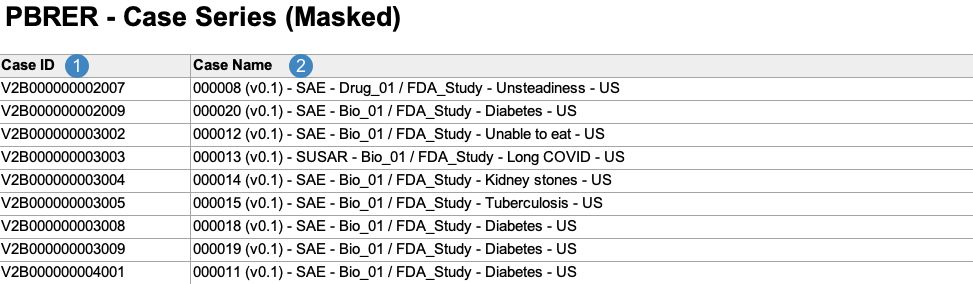
### Case Series Report {#case-series-report}
The Case Series Report acts as a log file for all of the Cases included across all PBRER line listings and tabulations. Vault generates the Case Series Report in the following structure:

<a href="https://platform.veevavault.help/assets/images/workbench-pbrer-case-series-masked-sample.png" data-lightbox="workbench-pbrer-case-series-masked-sample.png" data-title="Sample Workbench PBRER Masked Case Series Report, Masked" data-alt="Sample Workbench PBRER Case Series Report, Masked">
  <img class="docimage" src="https://platform.veevavault.help/assets/images/workbench-pbrer-case-series-masked-sample.png" alt="Sample Workbench PBRER Case Series Report, Masked" style=""  />
</a>

<div class="note-border alert-info">
  <div class="alert alert-info" role="alert">
    <div><i class="far fa-info-circle"></i></div>
    <div class="alert-text">
      <p><strong>Note</strong>: To aid in understanding how Vault maps Case Series Report data to PBRER files, the following table includes both descriptions and Vault object and field names.</p>
    </div>
  </div>
</div>


<table>
  <thead>
    <tr>
      <th>Reference Image Number</th>
      <th>PBRER Report Field Name</th>
      <th>Description</th>
    </tr>
  </thead>
  <tbody>
    <tr>
      <td style="text-align: center"><img class="inline" src="https://platform.veevavault.help/assets/images/saf-icon1.png" alt="1" style="" /></td>
      <td>Case ID</td>
      <td>
        <p>
            Vault maps the <em>Case ID</em> on the <em>Case</em>.
        </p>
        <p><code>case_version__v.id</code></p>
      </td>
    </tr>
    <tr>
      <td style="text-align: center"><img class="inline" src="https://platform.veevavault.help/assets/images/saf-icon2.png" alt="2" style="" /></td>
      <td>Case Name</td>
      <td>
        <p>
            Vault maps the <em>Name</em> on the <em>Case</em>.
        </p>
        <p><code>case_version__v.name__v</code></p>
      </td>
    </tr>
</tbody>
</table>

<div class="note-border alert-info">
  <div class="alert alert-info" role="alert">
    <div><i class="far fa-info-circle"></i></div>
    <div class="alert-text">
      <p><strong>Note</strong>: Vault excludes <em>Cases</em> that contain the following field values:</p>
<ul>
    <li>A <em>Lifecycle State</em> value of <em>Nullified</em> or <em>Voided</em></li>
    <li>A <em>Suppress Submission</em> value of <em>Yes</em></li>
</ul>
    </div>
  </div>
</div>


### Open Cases Report {#open-cases-report}
The Open Cases Report is an operational report intended to help you identify open _Cases_ that may need to be closed before PBRER submission. It contains a log of all _Cases_ that would be included in at least one PBRER tabulation were they in the _Closed_, _Approved_, or _Superseded_ lifecycle state.

Vault generates the Open Cases Report in the following structure:

<a href="https://platform.veevavault.help/assets/images/workbench-pbrer-open-cases-masked-sample.png" data-lightbox="workbench-pbrer-open-cases-masked-sample.png" data-title="Sample Workbench PBRER Open Cases Report, Masked" data-alt="Sample Workbench PBRER Open Cases Report, Masked">
  <img class="docimage" src="https://platform.veevavault.help/assets/images/workbench-pbrer-open-cases-masked-sample.png" alt="Sample Workbench PBRER Open Cases Report, Masked" style=""  />
</a>

<div class="note-border alert-info">
  <div class="alert alert-info" role="alert">
    <div><i class="far fa-info-circle"></i></div>
    <div class="alert-text">
      <p><strong>Note</strong>: To aid in understanding how Vault maps Open Cases Report data to PBRER files, the following table includes both descriptions and Vault object and field names.</p>
    </div>
  </div>
</div>


<table>
  <thead>
    <tr>
      <th>Reference Image Number</th>
      <th>PBRER Report Field Name</th>
      <th>Description</th>
    </tr>
  </thead>
  <tbody>
    <tr>
      <td style="text-align: center"><img class="inline" src="https://platform.veevavault.help/assets/images/saf-icon1.png" alt="1" style="" /></td>
      <td>Trial Number [EudraCT#]</td>
      <td>
        <p>
            For <em>Studies</em> registered to a country in the European Union, Vault maps values from the following fields:
        </p>
        <ul>
            <li><strong>Trial Number</strong>: <em>Case</em> > <em>Study Number</em>
                <br><code>case_version__v.study_number__v</code></li>
            <li><strong>EudraCT#</strong>: <em>Case Study Registration</em> > <em>Registration Number</em>
                <br><code>case_study_registration__v.registration_number_value</code>
                <br><code>WHERE country_value__v.agency__v = EMA</code></li>
        </ul>
      </td>
    </tr>
    <tr>
      <td style="text-align: center"><img class="inline" src="https://platform.veevavault.help/assets/images/saf-icon2.png" alt="2" style="" /></td>
      <td>Case Name</td>
      <td>
        <p>
            Vault maps the <em>Name</em> on the <em>Case</em>.
        </p>
        <p><code>case_version__v.name__v</code></p>
      </td>
    </tr>
    <tr>
      <td style="text-align: center"><img class="inline" src="https://platform.veevavault.help/assets/images/saf-icon3.png" alt="3" style="" /></td>
      <td>Receipt / New Info Date</td>
      <td>
        <p>
            Vault maps the <em>New Info Date</em> value from the <em>Case</em> (or <em>Receipt</em> field value, if the <em>New Info Date</em> field is blank).
        </p>
        <p><code>case_version__v.name__v</code>
        <br><code>OR case_version__v.new_info_date__v</code></p>
      </td>
    </tr>
    <tr>
      <td style="text-align: center"><img class="inline" src="https://platform.veevavault.help/assets/images/saf-icon4.png" alt="4" style="" /></td>
      <td>Locked By User</td>
      <td>
        <p>
            Vault maps the <em>Name</em> value of the <em>Locked By</em> user on the <em>Case</em>.
        </p>
        <p><code>case_version__v.locked_by_user__v.name__v</code></p>
      </td>
    </tr>
    <tr>
      <td style="text-align: center"><img class="inline" src="https://platform.veevavault.help/assets/images/saf-icon5.png" alt="5" style="" /></td>
      <td>Locked By Department</td>
      <td>
        <p>
            Vault maps the <em>Department</em> value of the <em>Locked By</em> user on the <em>Case</em>.
        </p>
        <p><code>case_version__v.locked_by_user__v.department__v</code></p>
      </td>
    </tr>
    <tr>
      <td style="text-align: center"><img class="inline" src="https://platform.veevavault.help/assets/images/saf-icon6.png" alt="6" style="" /></td>
      <td>Case Lifecycle State</td>
      <td>
        <p>
            Vault populates <code>Open</code> or <code>Closed</code>, based on the lifecycle state of the <em>Case</em>.
        </p>
        <p><code>IF case_version__v.state__v = closed__v, approved__v, superseded__v</code>
        <br><code>THEN "Closed"</code>
        <br><code>ELSE "Open"</code></p>
      </td>
    </tr>
    <tr>
      <td style="text-align: center"><img class="inline" src="https://platform.veevavault.help/assets/images/saf-icon7.png" alt="7" style="" /></td>
      <td>Report Type</td>
      <td>
        <p>
            Vault maps the <em>Report Type</em> value on the <em>Case</em>.
        </p>
        <p><code>case_version__v.report_type__v</code></p>
      </td>
    </tr>
    <tr>
      <td style="text-align: center"><img class="inline" src="https://platform.veevavault.help/assets/images/saf-icon8.png" alt="8" style="" /></td>
      <td>Primary Product</td>
      <td>
        <p>
            Vault maps the name of the primary <em>Case Product</em> on the <em>Case</em>.
        </p>
        <p><code>case_version__v.case_product__v.product_name__v</code>
        <br><code>WHERE primary__v = Yes</code></p>
      </td>
    </tr>
    <tr>
      <td style="text-align: center"><img class="inline" src="https://platform.veevavault.help/assets/images/saf-icon9.png" alt="9" style="" /></td>
      <td>Primary Event PT</td>
      <td>
        <p>
            Vault maps the MedDRA Preferred Term (<em>MedDRA PT</em>) for the primary <em>Case Adverse Event</em>. 
        </p>
        <p><code>case_adverse_event__v.event_meddra__v.pt_term__v</code>
        <br><code>WHERE primary__v = Yes</code></p>
      </td>
    </tr>
    <tr>
      <td style="text-align: center"><img class="inline" src="https://platform.veevavault.help/assets/images/saf-icon10.png" alt="10" style="" /> </td>
      <td>Seriousness</td>
      <td>
        <p>
            Vault maps whether the <em>Case</em>  is serious.
        </p>
        <p><code>case_version__v.serious__v</code></p>
      </td>
    </tr>
  </tbody>
</table>

#### Case Inclusion Criteria {#open-cases-inclusion-criteria}
Vault determines which data to include in the Open Cases Report based on the following constraining criteria:
* [General PBRER report _Case_ filtering criteria][6]---that is, specific values for:
   * _Drug Roles_
   * _Lifecycle States_   
   * _Report Type_ and _Study Type_
* The [filters defined on the _Workbench Report Set_][3]---that is, specific values for:
   * _Data Period End_
   * _Aggregate Reporting Group_

<div class="note-border alert-info">
  <div class="alert alert-info" role="alert">
    <div><i class="far fa-info-circle"></i></div>
    <div class="alert-text">
      <p><strong>Note</strong>: Unlike the other PBRER reports, the Open Cases Report includes <em>Cases</em> with any open <em>Lifecycle State</em> value. However, it still excludes <em>Cases</em> that contain the following field values:</p>
<ul>
    <li>A <em>Lifecycle State</em> value of <em>Nullified</em> or <em>Voided</em></li>
    <li>A <em>Suppress Submission</em> value of <em>Yes</em></li>
</ul>
    </div>
  </div>
</div>


[1]: #create-workbench-report-set
[2]: #specify-workbench-report-set-filters
[3]: #filter-section-fields
[4]: #generate-run-workbench-report-set
[5]: #table-generation-data-mapping
[6]: #inclusion-criteria-for-all

[8]: #summary-tabulation-adr
[9]: #cumulative-tabulation-sae
[10]: #interval-line-listing-sar
[11]: #line-listing-sar-inclusion-criteria
[12]: #line-listing-sar-investigational-relatedness

[13]: #report-study-type-inclusion-scenarios-sae
[14]: #report-study-type-inclusion-scenarios-sar

[19]: #case-series-report
[20]: #open-cases-report
[21]: #open-cases-inclusion-criteria
[22]: #data-period-start
[23]: #datasheet-active-date
[24]: #aggregate-reporting-group
[25]: #sae-tab-count