# ICSR Transmissions Overview

You can transmit Individual Case Safety Reports (ICSRs) to trading partners or regulatory authorities using any of the following supplied [_Transmission_][2] types. Preconfigured workflows support tracking transmissions outside of your Vault and [sending transmissions electronically or manually][3].

## Prerequisites

While Vault provides support for <a href="/en/lr/01245/">ICSR submissions to standard agencies</a>, depending on your reporting requirements, your Admin may need to configure the following for each additional reporting destination (agency or partner):

* <a href="/en/lr/01202/">Transmission Profile</a>
* <a href="/en/lr/703946/">AS2 Connection</a>
* <a href="/en/lr/01256/">Reporting Rules</a>
* <a href="/en/lr/01254/">Partner Distribution Lists</a> (_Distributions_ only)

To submit Clinical Trial Cases with the Spontaneous Report Type in EMA E2B(R3) reports, your Admin must <a href="/en/lr/01388/">enable EMA Clinical Trial Submissions: Non-Study Suspect Products</a>.

## ICSR Transmission Types {#types}

Vault provides the following ICSR Transmission types:

* **Submissions**: Use _Submissions_ to send ICSRs to regulatory authorities, including the <a href="/en/lr/01245/">standard agencies supported by Vault</a>, and custom agencies.
* **Distributions**: Use _Distributions_ to share ICSRs with non-regulatory authorities, such as a partner, site, or market authorization holder.
* **Early Notifications**: Use _Early Notifications_ to send ICSRs to partners and agencies with which you have an agreement to share source documents or initial _Case_ information before a _Case_ reaches the _Approval_ state.

## ICSR Transmission Methods {#methods}

Each ICSR _Transmission_ uses the _Transmission Method_ specified in the associated _Transmission Profile_, including the following methods:

* <a href="/en/lr/01266/">AS2 gateway</a>
* <a href="/en/lr/01267/">Email</a>
* <a href="/en/lr/01268/">Manual</a>

## ICSR Transmission Generation {#generation}

Vault generates an ICSR _Transmission_ for a _Case_ when either the [_Evaluate Reporting Obligations_][0] action or the [_Evaluate Early Notification Obligations_][1] action runs on a _Case_. If required, you can also <a href="/en/lr/1022564/">create an ICSR _Transmission_ manually</a>.

### Evaluate Reporting Obligations {#ero}

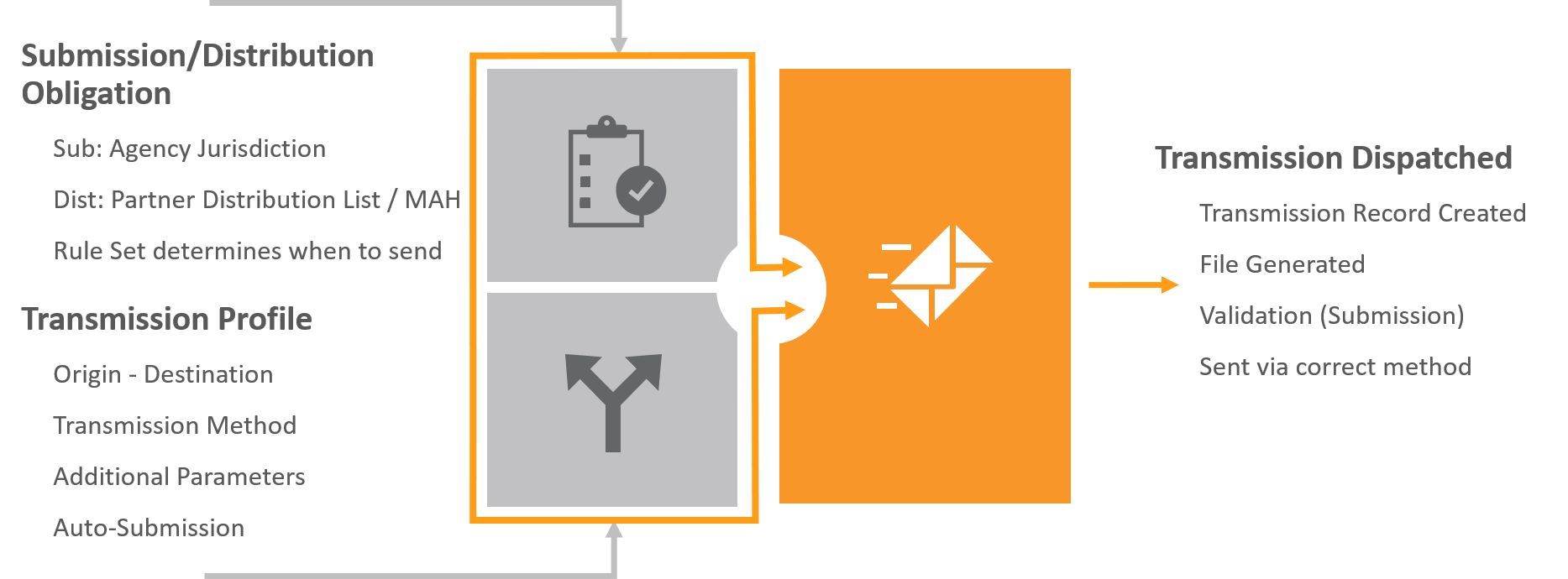
The _Evaluate Reporting Obligations_ action generates ICSR _Transmissions_ and runs when a _Case_ moves to the _Approved_ state. When this action runs, Vault does the following:

* Checks if the _Case_ requires reporting to agencies or other organizations, based on whether it matches a <a href="/en/lr/01256/">reporting rule</a> and _Transmission Profile_ for a reporting destination.
* Maps any missing <a href="/en/lr/01216/#add-a-study-registration">_Study Registrations_</a> from the _Study_ library to the _Case_.
* Evaluates reporting obligations on all _Case_ data modifications, including for all subsequent evaluations.

<a href="https://platform.veevavault.help/assets/images/saf-transmission-generation.png" data-lightbox="saf-transmission-generation.png" data-title="How Transmissions are Generated" data-alt="Transmission Generation">
  <img class="docimage" src="https://platform.veevavault.help/assets/images/saf-transmission-generation.png" alt="Transmission Generation" style="max-width: 75%;"  />
</a>

If configured by your Admin, <a href="/en/lr/01260/">auto-submissions</a> may run from the _Case_ level as part of case processing workflow. You can also <a href="/en/lr/1022564/">manually create</a> _Submissions_ and _Distributions_.

### Evaluate Early Notification Obligations {#eeno}

If you have an agreement with a partner or agency to share the details of a _Case_ before it has reached the _Approved_ state, you can run the _Evaluate Early Notification Obligations_ action on the _Case_. When this action runs, Vault performs the same actions as for _Submissions_ and _Distributions_ described above with the following exceptions:

* Vault considers a _Case_ as eligible for early notification for early reporting to a partner or agency if it matches a reporting rule that contains an  <a href="/en/lr/01250/#early-notification">_Early Notification_ reporting rule parameter</a>.
* Vault ignores reporting rules that do not contain an _Early Notification_ reporting rule parameter.
* Vault does not set the _Due Date_ on _Early Notifications_.


<div class="note-border alert-info">
  <div class="alert alert-info" role="alert">
    <div><i class="far fa-info-circle"></i></div>
    <div class="alert-text">
      <p><strong>Note</strong>: 
If required, your Admin can <a href="/en/lr/740208/#en-on-case-promo">configure</a> your Vault to evaluate early notification obligations when you promote a <em>Case</em>.</p>
    </div>
  </div>
</div>


### Regenerate Vault-Created Transmissions

To prevent duplicate [_Transmissions_][2], if _Case_ details are changed, Vault regenerates a _Transmission_ only if one does not already exist for the same <a href="/en/lr/01202/">Transmission Profile</a>.

To regenerate a _Transmission_ to replace one that already exists, move the _Transmission_ to _Inactive_, and then trigger the [**Evaluate Reporting Obligations**][0] action (for _Submissions_ and _Distributions_) or the [**Evaluate Early Notification Obligations**][1] action (for _Early Notifications_).

### Vault Creation of Masked Distributions {#vault-created-masked-distributions}

For _Cases_ linked to a _Study_ or _Product Family_ with a <a href="/en/lr/01254/#create-a-partner-distribution-list">Partner Distribution List</a> set up with content protection, when the _Case_ enters the _Approved_ state, Vault generates <a href="/en/lr/01225/">_Distributions_ with data masking</a>.

The name of the generated _Distribution_ includes a prefix that identifies the masking option:

* **Mask PII**: _Distributions_ generated with _Patient Content Protection_ set to _Mask PII_.
* **Mask E2B (Includes PII)**: _Distributions_ generated with _Patient Content Protection_ set to _Mask E2B (Includes PII)_.
* **Blinded**: _Distribution_ generated with _Study Content Protection_ set to _Mask Unblinded Content_.

### Vault Creation of Masked Early Notifications

For _Cases_ linked to a _Study_ or _Product Family_ with a reporting rule with content protection, when the _Case_ enters the appropriate state, Vault generates <a href="/en/lr/01225/">_Early Notifications_ with data masking</a>.

The name of the generated _Early Notification_ file includes a prefix that identifies the masking option:

* **Mask PII**: _Early Notification_ files generated with _Patient Content Protection_ set to _Mask PII_.
* **Mask E2B (Includes PII)**: _Early Notification_ files generated with _Patient Content Protection_ set to _Mask E2B (Includes PII)_.
* **Blinded**: _Early Notification_ files generated with _Study Content Protection_ set to _Mask Unblinded Content_.

## Logically Delete Non-Submittable Transmissions on Subsequent Evaluations

If your Admin has enabled <a href="/en/lr/01327/">logical deletion of non-submittable _Transmissions_</a>, Vault prevents over-reporting of _Cases_ without having to manually remove or update _Transmissions_. Whenever you rerun the _Evaluate Reporting Obligations_ action on a global _Case_ or _Localized Case_ for a _Localization_ with a blank _Assessment Generation_ method, Vault does the following for _Transmissions_ generated by the <a href="/en/lr/01256/">ICSR Reporting Rule Engine</a>:

* Generates _Transmissions_ for any submittable reporting obligations not previously created by the reporting rules engine.
    * To prevent duplication of Rule Engine-created _Transmissions_, for all destinations except the FDA, Vault considers all _Transmission Profile_ and _Destination_ pairs. For the FDA, Vault considers _Transmission Profiles_ within a _Registration Type_ (_Investigational_ or _Marketing_) and _Destination_ pairs. CDER and CBER are considered _Marketing_ transmission profiles, while CDER Study, CBER Study, FDA Study, and CDER IND Exempt are considered _Investigational_ transmission profiles.
* Updates any previously created _Transmissions_ that are no longer submittable to _Deleted_.
    * This change does not apply to _Transmissions_ in the _Completed_, _E2B ACK Accepted_, and _E2B ACK Warning_ states.
* Updates the _Due Dates_ on all submittable _Transmissions_.
* Updates the _Auto-Submit_ field.
* Adds a new version of any previously created _Transmission Creation Message_, appending details of whether any of the reporting rules passed or if all the rules failed.


<div class="note-border alert-info">
  <div class="alert alert-info" role="alert">
    <div><i class="far fa-info-circle"></i></div>
    <div class="alert-text">
      <p><strong>Note</strong>: 
This  does not apply to <em>Localized Cases</em> that contain a <em>Localization</em> with an <em>Assessment Generation</em> method of <em>Case Product Registration</em>. For these <em>Cases</em>, unused <em>Submissions</em> move to the <em>Deleted</em> state by the <em>Generate Local Reporting Details</em> action. For more information on Submission Generation and Linking for PMDA Localized Cases, see <a href="/en/lr/696896/#pmda-localized-case-submission-generation">Report to the PMDA</a>.</p>
    </div>
  </div>
</div>


If this feature is not enabled in your Vault, Vault generates any newly submittable _Transmissions_, but does not update any previously generated _Transmissions_. You must manually update _Due Dates_ and delete any _Transmissions_ that no longer meet reporting obligations

[0]: #ero
[1]: #eeno
[2]: #types
[3]: #methods
[4]: #generation
