# Create DSUR Aggregate Reports

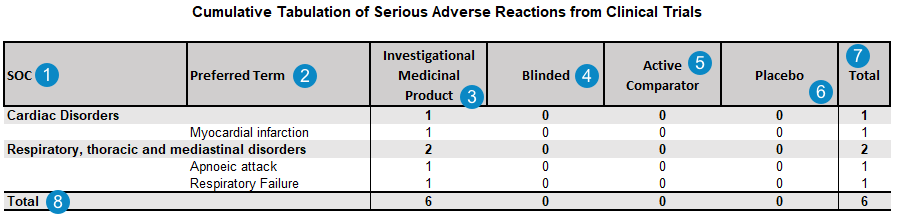
Safety provides Development Safety Update Report (DSUR) authoring and table generation capabilities, including region-specific table requirements for EMA and FDA submissions. You can generate DSUR reports in different submission formats that meet the applicable ICH E2F or EMA regulatory guidelines.

The following table describes the DSUR tabulations that Vault generates: 

<table>
    <thead>
        <tr>
            <th>Tabulation</th>
            <th>Generated by Default?</th>
            <th>Masking Support?</th>
        </tr>
    </thead>
    <tbody>
        <tr>
            <td><a href="#cumulative-tabulation-serious-ae">Cumulative Tabulation of Serious Adverse Events from Clinical Trials</a></td>
            <td>Yes</td>
            <td>Yes</td>
        </tr>
        <tr>
            <td><a href="#interval-line-listings-serious-ar">Interval Line Listings of Serious Adverse Reactions</a></td>
            <td>Yes</td>
            <td>Yes</td>
        </tr>
        <tr>
            <td><a href="#appendix-sar">Appendix: Cumulative Summary Tabulation of Serious Adverse Reactions From Clinical Trials</a></td>
            <td>No</td>
            <td>Yes</td>
        </tr>
        <tr>
            <td><a href="#appendix-death">Appendix: List of Subjects Who Died During the Reporting Period</a></td>
            <td>No</td>
            <td>Yes</td>
        </tr>
    </tbody>
</table>

<div class="note-border alert-info">
  <div class="alert alert-info" role="alert">
    <div><i class="far fa-info-circle"></i></div>
    <div class="alert-text">
      <p><strong>Note</strong>: An Admin can configure custom <a href="/en/lr/01178/">DSUR report templates</a> for your organization.</p>
    </div>
  </div>
</div>


## Prerequisites

Consider the following prerequisites before you generate DSUR tables:

* You must be assigned permissions to view and prepare aggregate reports. Typically, these permissions are reserved for the Safety Writer and Head of Safety roles.
* Your Admin must have already configured:
  * <a href="/en/lr/01179/">_Reporting Families_</a>: To identify the _Products_ and _Studies_ to include in reports
  * <a href="/en/lr/01216/#add-a-study-product">_Study Products_</a>: To generate table data from study _Cases_
  * <a href="/en/lr/01427/">Masked Aggregate Reports and DSUR Appendices</a>
* Once a study enters the _End of Study Reconciliation_ state for unblinding, each _Case_ must be unblinded prior to table generation. For _Studies_ without _Study Arms_, you must unblind each suspect product before you can unblind the _Case_. For _Studies_ with _Study Arms_, you can directly unblind the _Case_ without having to unblind individual products. <a href="/en/lr/01176/">Manage Case Blinding</a> provides more information.
* Depending on your business process, your Admin may configure:
  * A <a href="/en/lr/01198/#datasheet-types">_Datasheet_</a> for each _Study Product_, _Study_, or _Case Product_ with a list of expected adverse events for the _Reporting Family_. To mark unexpected terms each unexpected adverse event with an asterisk (*), this may include:
    * The study product _Datasheet_ for the _Study Product_ that is listed in the DSUR _Reporting Family_.
    * The core _Datasheet_ for the _Study_ that is listed in the DSUR _Reporting Family_.
    * The core _Datasheet_ for the primary investigational _Study Product_ that is listed in the DSUR _Reporting Family_.
  * <a href="/en/lr/01416/">Criteria Page for Aggregate Reports</a>: Adds a tab at the beginning of aggregate report documents detailing the criteria used to generate the report.
  * <a href="/en/lr/01381/">DSUR and PBRER Investigational Product Causality</a>: To consider only causal assessments related to investigational products when generating DSURs.
  * <a href="/en/lr/01418/">DSUR and PBRER Summary Totals and Separate Log Files</a>:
    * To display totals for each SOC and PT as well as a grand total on Cumulative Tabulation of Serious Adverse Events from Clinical Trials and the Summary Tabulation of Adverse Drug Reactions (ADRs) from Postmarketing Sources.
    * To generate log files as separate files using the _Log_ document classification type.
  * <a href="/en/lr/806959/">Auxiliary Medicinal Product (AxMP) Support</a>: To generate DSUR reports for EMA submission with unauthorized AxMPs.

## <a id="create-dsur"></a>Create a DSUR Aggregate Report

Create a DSUR Aggregate Report and specify the report settings.

### Add a DSUR

1. Navigate to **Aggregate Reports > DSUR**.
2. Select **Create**.
3. Complete the [fields][6] on the _Create DSUR_ page.
4. Select **Save**.

**Result**

The DSUR record enters the _Pending_ state. Vault assigns a task to users in the Safety Writer role to review the report details. 

#### <a id="dsur-fields"></a>DSUR Fields 

The following fields may be available:


<table>
    <thead>
        <tr>
            <th>Field</th>
            <th>Description</th>
        </tr>
    </thead>
    <tbody>
    
    
    <tr>
        <td>Product Family (Required)</td>
        <td><p>Select the Reporting Family configured for aggregate reporting. The Reporting Family defines which Cases are included in the report:</p>
   <ul>
    <li>All Cases with a Product in the Reporting Family</li>
    <li>All Cases with a Study in the Reporting Family</li>
    <li>All Cases with a blinded Study for a Product in the Reporting Family</li>
</ul>
   <div class="note-border alert-info">
     <div class="alert alert-info" role="alert">
       <div><i class="far fa-info-circle"></i></div>
       <div class="alert-text">
         <strong>Note</strong>: The Reporting Family object type should be Product Family.
       </div>
     </div>
   </div>

            
            To learn more, see <a href="/en/lr/01179/">Configure Aggregate Reporting Families</a>.
            </td>
    </tr>


    <tr>
        <td>Organization</td>
        <td>Vault populates this field with the Organization on the selected Reporting Family.
            </td>
    </tr>


    <tr>
        <td>Data Period Start (Required)</td>
        <td><p>Enter the start date for the reporting period.</p> <p>Vault uses the Cases within the reporting period to generate the table data. Cases are included when the date corresponding to the <strong>Filter Case By</strong> setting is within the reporting period.</p> <p>Cumulative reports do not consider the start date. The data period contains all Cases up to the <strong>Data Period End Date</strong>.</p>

            
            To learn more, see <a href="/en/lr/01127/">How Aggregate Reports Filter by Data Period</a>.
            </td>
    </tr>


    <tr>
        <td>Data Period End (Required)</td>
        <td><p>Enter the end date for the reporting period.</p>

            
            To learn more, see <a href="/en/lr/01127/">How Aggregate Reports Filter by Data Period</a>.
            </td>
    </tr>


    <tr>
        <td>Filter Case By</td>
        <td><p>To customize how Vault filters Cases within the specified date range, select an option:</p> <ul>
    <li><strong>Case Receipt Date / New Info Date</strong>: The latest date when the source provided information, from the most recent available date in the <em>Receipt Date</em> and <em>New Info Date</em> fields.</li>
    <li><strong>Case Approval Date</strong>: The date when the <em>Case</em> moved into the <em>Approved</em> state. If the <em>Case</em> was revised for a non-significant follow-up, the most recent approval date is used.</li>
</ul> <p>If this field is blank, Vault uses the <em>Case Receipt Date/New Info Date</em>.</p>

            </td>
    </tr>


    <tr>
        <td>Include Criteria Page on Documents</td>
        <td><p>Select the checkbox to add a tab at the beginning of the aggregate report document detailing the criteria used to generate the report.</p> <p>When selected, the criteria page summarizes the following:</p> <ul>
    <li>Report Parameters (including, the Document Name and Organization)</li>
    <li>Filter Parameters (for example, the Product Family, report period start and end date, and States to Include)</li>
    <li>Output Parameters (for example, Indicate Unexpected Terms and any additional fields displayed)</li>
    <li>Legend (for example, an asterisk (*) indicates an Unexpected Event)</li>
</ul>

            </td>
    </tr>


    <tr>
        <td>States to Include (Required)</td>
        <td><a id="states-to-include"></a>
 <p>Select the states that Cases must be in to be included in the report.</p>
 <p>By default, only Cases in the <strong>Approved</strong>, <strong>Closed</strong>, <strong>Superseded</strong>, and <strong>Medical Review</strong> states are included. Although <strong>Superseded</strong> is not listed as an option, it is included within the <strong>Closed</strong> state. Only system-provided states in the <strong>Case Processing</strong> lifecycle are supported.</p>
   <div class="note-border alert-info">
     <div class="alert alert-info" role="alert">
       <div><i class="far fa-info-circle"></i></div>
       <div class="alert-text">
         <strong>Note</strong>: If the latest Case version within the aggregate reporting period is in the <strong>Nullified</strong> or <strong>Voided</strong> state or in a lifecycle state assigned to the <strong>Deleted</strong> state type, the Case is excluded from the aggregate report.
       </div>
     </div>
   </div>

            </td>
    </tr>


    <tr>
        <td>Drug Roles to Include <a id="drug-roles-to-include"></a></td>
        <td>Select one or more Drug Roles from the dropdown list to include in the following tabulations: <ul>
    <li>Interval Line Listings of Serious Adverse Reactions</li>
    <li>List of Subjects Who Died During the Reporting Period</li>
    <li>Cumulative Tabulation of Serious Adverse Events From Clinical Trials</li>
    <li>Cumulative Summary Tabulation of Serious Adverse Reactions From Clinical Trials</li>
</ul> <p>The Suspect and Interacting Drug Roles are selected by default for DSURs created with the 23R3 release or later. For DSURs created from prior releases, update the field to specify or revise which Drug Roles to include in the report.</p>

            </td>
    </tr>


    <tr>
        <td>Documents to Generate</td>
        <td>You can select which documents to generate. The following options are available: <ul>
  <li>Interval Line Listings of Serious Adverse Reactions</li>
  <li>Cumulative Tabulation of Serious Adverse Events from Clinical Trials</li>
  <li>Cumulative Tabulation of Serious Adverse Reactions</li>
  <li>List of Subjects Who Died During the Reporting Period</li>
</ul> <p>If you don't specify this field, by default Vault generates the following documents:</p> <ul>
 <li>Interval Line Listings of Serious Adverse Reactions</li>
 <li>Cumulative Tabulation of Serious Adverse Events from Clinical Trials</li>
</ul> <p>By default, the documents are unmasked unless you select the <strong>Generate Masked Documents</strong> option. Depending on when your Vault was originally deployed, an Admin may need to add this field to appear on the layout.</p>

            </td>
    </tr>


    <tr>
        <td>Generate Masked Documents</td>
        <td><p>Select this option to generate a masked copy of the following tables for masked distributions, depending on the tables selected in the <strong>Documents to Generate</strong> field:</p> <ul>
  <li>Cumulative Tabulation of Serious Adverse Events from Clinical Trials</li>
  <li>Interval Line Listings of Serious Adverse Reactions (from Clinical Trials)</li>
  <li>Appendix: Cumulative Summary Tabulation of Serious Adverse Reactions From Clinical Trials</li>
  <li>Appendix: List of Subjects Who Died During the Reporting Period</li>
</ul> <p>Depending on when your Vault was originally deployed, an Admin may need to add this field to appear on the layout.</p>

            
            To learn more, see <a href="/en/lr/01128/">Generate Masked Aggregate Tabulations (CIOMS II, PBRER and DSUR)</a>.
            </td>
    </tr>


    <tr>
        <td>Indicate Unexpected Term</td>
        <td><p>Select <strong>Yes</strong> to display an asterisk beside each <a href="#mark-unexpected-terms">unexpected adverse event term</a> in the following reports:</p> <ul>
    <li>Interval Line Listings of Serious Adverse Reactions (masked and unmasked)</li>
    <li>Appendix: Cumulative Summary Tabulation of Serious Adverse Reactions From Clinical Trials (masked and unmasked)</li>
</ul>

            </td>
    </tr>


    <tr>
        <td>Datasheet</td>
        <td><p>This field works alongside the <strong>Indicate Unexpected Term</strong> setting for evaluating approved terms in Product and Study Product Datasheets.</p> <p>For DSUR and PBRER, Vault always uses <strong>Use Approved Version at the beginning of the reporting period</strong>, including when this field is left blank. This setting means that the aggregate report <strong>Start Date</strong> must be within a term's active range to be considered Expected.</p>

            
            To learn more, see <a href="/en/lr/01198/">Manage Datasheets and Auto-Expectedness</a>.
            </td>
    </tr>


    <tr>
        <td><a id="submission-format"></a>Submission Format</td>
        <td><p>This field value defaults to <em>ICH E2F DSUR</em>, which generates the standard report. Select <strong>CTIS Annual Safety Report</strong> to include <a href="#axmps">unauthorized Auxiliary Medicinal Products (AxMPs)</a> in the Interval Line Listings of Serious Adverse Reactions and to hide <em>Subject IDs</em> in the following reports:</p> <ul>
    <li>Interval Line Listings of Serious Adverse Reactions</li>
    <li>Appendix: Cumulative Summary Tabulation of Serious Adverse Reactions From Clinical Trials</li>
</ul>

            </td>
    </tr>


    </tbody>
</table>

##### <a id="mark-unexpected-terms"></a>Mark Unexpected Terms in DSUR Reports

You can use the _Indicate Unexpected Term_ field on a DSUR so that when certain tabulations are generated, Vault marks each unexpected adverse event with an asterisk (*) in the following DSUR reports:

* Interval Line Listings of Serious Adverse Reactions (masked and unmasked)
* Appendix: Cumulative Summary Tabulation of Serious Adverse Reactions From Clinical Trials (masked and unmasked)

<div class="note-border alert-info">
  <div class="alert alert-info" role="alert">
    <div><i class="far fa-info-circle"></i></div>
    <div class="alert-text">
      <p><strong>Note</strong>: Because the DSUR references Datasheets, not Case Assessments, to identify unexpected events, if the <em>Indicate Unexpected Term</em> field value is <em>Yes</em> and no Datasheets are configured, all adverse events are marked as unexpected.</p>
    </div>
  </div>
</div>


The Datasheet can specify the Active Date Start and, optionally, an Active Date End, which indicates when a term is approved as expected for the Product. If configured, The DSUR Start Date must be within a term's active range to be considered expected. For more information about how to define an active range for expectedness in aggregate reports, see <a href="/en/lr/01198/#active-range-aggregates">Manage Datasheets and Auto-Expectedness</a>. 

### Generate DSUR Tabulations

Review and verify the report settings. Once you have confirmed the report details are correct, use the <a href="/en/lr/01124/">Generate Aggregate Report Tabulations</a> action to generate DSUR report tables. 

## DSUR Table Generation Data Mapping

Vault populates aggregate report tables using Cases within the reporting period specified on the [DSUR][1], and the reporting family members configured on the associated <a href="/en/lr/01179/">Reporting Family</a>.

The following sections describe how Vault generates DSUR tabulations:

* [Cumulative Tabulation of Serious Adverse Events from Clinical Trials][4]
* [Interval Line Listings of Serious Adverse Reactions][5]
* [Appendix: Cumulative Summary Tabulation of Serious Adverse Reactions From Clinical Trials][2]
* [Appendix: List of Subjects Who Died During the Reporting Period][3]

<div class="note-border alert-info">
  <div class="alert alert-info" role="alert">
    <div><i class="far fa-info-circle"></i></div>
    <div class="alert-text">
      <p><strong>Note</strong>: For blinded studies, Vault populates blinded product information as <code class="language-plaintext highlighter-rouge">Blinded</code> in the generated tables.</p>
    </div>
  </div>
</div>


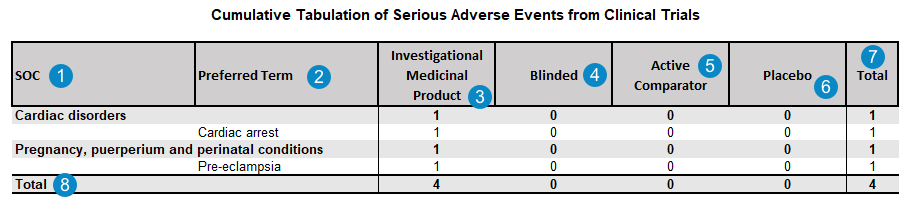
### <a id="cumulative-tabulation-serious-ae"></a>Cumulative Tabulation of Serious Adverse Events From Clinical Trials

Vault generates the Cumulative Tabulation of Serious Adverse Events From Clinical Trials by default for DSUR Aggregate Reports. 

<a href="https://platform.veevavault.help/assets/images/saf-cumulative-ae-by-study-table.png" data-lightbox="saf-cumulative-ae-by-study-table.png" data-title="" data-alt="Cumulative Tabulation of Serious Adverse Events From Clinical Trials">
  <img class="docimage" src="https://platform.veevavault.help/assets/images/saf-cumulative-ae-by-study-table.png" alt="Cumulative Tabulation of Serious Adverse Events From Clinical Trials" style=""  />
</a>

#### Table Constraints

For Vault to consider a _Case_ for the report, the _Case_ (created from an _Inbox Item_ or imported _Case_) must have a _Case Product_ set to _Primary_. Vault filters _Cases_ to include in the Cumulative Tabulation of Serious Adverse Events From Clinical Trials using the following constraints:

##### <a id="not-supressed"></a>Case Not Suppressed

The Case <strong>Suppress Submission</strong> field must be set to <strong>No</strong> or blank (not suppressed).
<br>`case_version__v.suppress_submission__v ≠ Yes`

##### <a id="case-report-and-study-type"></a>Case Report and Study Type

To filter study cases, the system looks at the Case **Report Type** and **Study Type** fields. A Case is included when it matches one of the following scenarios:

<table>
    <tr>
        <th>Scenario</th>
        <th>Report Type</th>
        <th>Study Type</th>
    </tr>
    <tr>
        <td rowspan="2">1</td>
        <td><ul>
                <li>Study</li>
                <li>A <a href="/en/lr/01195/#report-type">custom Report Type</a> with an E2B Code of <code>2</code></li>
            </ul>
        </td>
        <td><ul>
            <li>Clinical Trial</li>
            <li>A <a href="/en/lr/01195/#study-type">custom Study Type</a> with an E2B Code of <code>1</code></li>
        </ul></td>
    </tr>
    <tr>
        <td colspan="2"><code>case_version_v.report_type__v.controlled_vocabulary__v.<br>e2b_code__v = 2
        <br>AND case_version__v.study_product_reason__v.controlled_vocabulary__v.<br>e2b_code__v = 1</code></td>
    </tr>
    <tr>
        <td rowspan="2">2</td>
        <td><ul>
                <li>Study</li>
                <li>A <a href="/en/lr/01195/#report-type">custom Report Type</a>  with:
                    <ol>
                        <li>The E2B Code field set to <code>2</code></li>
                        <li>The Literature field set to No or Blank</li>
                    </ol>
                </li>
            </ul>
        </td>
        <td><ul>
            <li>Blank</li>
            <li>A <a href="/en/lr/01195/#study-type">custom Study Type</a> without a valid E2B Code</li>
        </ul></td>
    </tr>
    <tr>
        <td colspan="2"><code>case_version_v.report_type__v.controlled_vocabulary__v.<br>e2b_code__v = 2
        <br>AND case_version_v.report_type__v.controlled_vocabulary__v.<br>literature__v ≠ Yes <br>AND case_version__v.study_product_reason__v = blank</code></td>
    </tr>
</table>

##### <a id="case-lifecycle-state-in-aggregate-states-to-include"></a>Case Lifecycle State in Aggregate States to Include

The latest Case version within the reporting period must be in a state specified in the <a href="#states-to-include">States to Include</a> field on the DSUR.

`case_version__v.state__v CONTAINS dsur__v.states_to_include__v`

Note the following considerations:

* Cases in the following states are omitted:
  * Nullified (`nullified_state__v`)
  * Voided (`voided_state__v`)
<div class="note-border alert-info">
  <div class="alert alert-info" role="alert">
    <div><i class="far fa-info-circle"></i></div>
    <div class="alert-text">
      <p><strong>Note</strong>: You cannot select these states in the <strong>States to Include</strong> field. These states are always omitted.</p>
    </div>
  </div>
</div>


* If the Case is in a Lifecycle State assigned a <a href="/en/lr/56431/">State Type</a> of "Deleted", the Case is omitted.
* When evaluating the **States to Include** field, the system evaluates Cases in the Superseded (`superseded_state__v`) state as Closed (`closed_state__v`).


##### <a id="case-data-in-cumulative-reporting-period"></a>Case Data in Cumulative Reporting Period

The date must be within the aggregate report cumulative reporting period (Product IBD to Data Period End). <a href="/en/lr/01127/">How Aggregate Reports Filter by Data Period</a> provides more information.

<code><em>DATE</em> ≤ dsur__v.data_period_end__v</code>

where _DATE_ depends on the option selected in the DSUR **Filter Case By** (`dsur__v.filter_cases_by__v`) field:

* When **Approval Date**: `case_version__v.approval_date__v`
* When blank or **Receipt Date / New Info Date** (Default):
  * If the Case New Info Date (`new_info_date__v`) is blank, the Receipt Date is used: `case_version__v.receipt_date__v`
  * Otherwise, the New Info Date is used: `case_version__v.new_info_date__v`

If there are multiple versions of the Case within the reporting period, only the most recent Case version within the reporting period is listed.

##### <a id="serious-case-adverse-event-1"></a>Serious Case Adverse Event

The _Seriousness_ field on the _Case_ contains a value (is not blank).

`case_version__v.seriousness__v ≠ BLANK`

If your Admin has enabled <a href="/en/lr/01381/">DSUR and PBRER Investigational Product Causality</a>:

* The _Study Product_ must be blinded or have a _Study Product Role_ of _Investigational_, _Placebo_, or _Active Comparator_.
* Vault considers the <a href="/en/lr/840364/">causality of investigational products</a> when determining the appropriate column for case counting in the Serious Adverse Events (SAE) tabulation.


##### <a id="study-member-of-reporting-family"></a>Study Member of Reporting Family

The **Study** field links to a Study record that meets any of the following criteria:

* A member of the <a href="/en/lr/01179/">Reporting Family</a><br/>
  <code>case_version__v.study__v CONTAINS<br>
  reporting_family__v.reporting_family_member__v.study__v</code>
* Contains a Product that matches a <a href="/en/lr/01179/">Product Reporting Family Member</a><br/>
  <code>case_version__v.product__v CONTAINS<br>
  reporting_family__v.reporting_family_member__v.product__v</code>
* Contains a Blinded Study Product that matches a <a href="/en/lr/01179/">Product Reporting Family Member</a><br/>
  <code>case_version__v.study__v CONTAINS<br>
  reporting_family__v.reporting_family_member__v.products__v.study_product__v.study__v WHERE (case.blinded = Yes OR study.blinded = YES)</code>

<div class="note-border alert-info">
  <div class="alert alert-info" role="alert">
    <div><i class="far fa-info-circle"></i></div>
    <div class="alert-text">
      <p><strong>Note</strong>: To ensure Blind Protection, unblinded Cases are counted as blinded until End of Study Reconciliation unblinding is complete for each Case.</p>
    </div>
  </div>
</div>


##### <a id="unmasked"></a>Unmasked Documents

If the <a href="/en/lr/01179/">Reporting Family</a> includes only Products (no Studies), the report excludes Cases for which the Study's Product is not in the Reporting Family.

#### Table Mapping

The following table describes how Vault maps data to populate the Cumulative Tabulation of Serious Adverse Events From Clinical Trials:

<table>
    <thead>
        <tr>
            <th>Number</th>
            <th>Name</th>
            <th>Description</th>
        </tr>
    </thead>
    <tbody>
         <tr>
            <td style="text-align: center"><img class="inline" src="https://platform.veevavault.help/assets/images/saf-icon1.png" alt="1" style="" /></td>
            <td>SOC</td>
            <td>The MedDRA System Organ Class (SOC) for the adverse event.<br>
            <code>case_adverse_event__v.event_meddra__v.soc_term__v</code></td>
        </tr>
        <tr>
            <td style="text-align: center"><img class="inline" src="https://platform.veevavault.help/assets/images/saf-icon2.png" alt="2" style="" /></td>
            <td>Preferred Term</td>
            <td>The MedDRA Preferred Term (PT) for each adverse event, grouped by the MedDRA SOC.<br>
            <code>case_adverse_event__v.event_meddra__v.pt_term__v</code>
            <div class="note-border alert-info">
  <div class="alert alert-info" role="alert">
    <div><i class="far fa-info-circle"></i></div>
    <div class="alert-text">
      <p><strong>Note</strong>: Contact Veeva Support to request PT Aggregation in periodic reports, which counts only unique instances of Preferred Terms (PT) in summary tabulations. Once this feature is enabled, when a Case contains multiple Case Adverse Events coded under the same MedDRA Preferred Term (PT), the report counts a single PT event instead of multiple events.</p>
    </div>
  </div>
</div>

</td>
        </tr>
        <tr>
           <td style="text-align: center"><img class="inline" src="https://platform.veevavault.help/assets/images/saf-icon3.png" alt="3" style="" /></td>
            <td>Investigational Medicinal Product</td>
            <td>
                <p>
                    The total number of adverse events with suspect investigational products.
                </p>
                <p>
                    <code>
                        COUNT IF 
                        <br>case_version__v.case_product__v.primary__v == Yes<a href="#omit-primary-product-1"><sup>1</sup></a>
                        <br>AND case_product__v.study_product__v ≠ Blank 
                        <br>AND case_product__v.study_product__v.study_product_role__v == lead_agent__v (Investigational)
                        <br>AND case_product__v.drug_role__v CONTAINS dsur__v.drug_roles_to_include__v
                    </code>
                </p>
            </td>
        </tr>
        <tr>
            <td style="text-align: center"><img class="inline" src="https://platform.veevavault.help/assets/images/saf-icon4.png" alt="4" style="" /></td>
            <td>Blinded</td>
            <td>
                <p>
                    The total number of adverse events with suspect blinded products.
                </p>
                <p>
                    <code>
                        COUNT IF
                        <br>case_version__v.case_product__v.primary__v == Yes<a href="#omit-primary-product-1"><sup>1</sup></a>
                        <br>AND case_version__v.case_product__v.study_product__v == Blank
                        <br>AND case_product__v.drug_role__v CONTAINS dsur__v.drug_roles_to_include__v
                    </code>
                </p>
            </td>
        </tr>
        <tr>
            <td style="text-align: center"><img class="inline" src="https://platform.veevavault.help/assets/images/saf-icon5.png" alt="5" style="" /></td>
            <td><a id="active-comparator-sae"></a>Active Comparator</td>
            <td>
                <p>
                    The total number of adverse events with suspect active comparators.
                </p>
                <p>
                    <code>
                        COUNT IF 
                        <br>case_version__v.case_product__v.primary__v == Yes<a href="#omit-primary-product-1"><sup>1</sup></a>
                        <br>AND case_product__v.study_product__v ≠ Blank 
                        <br>AND case_product__v.study_product__v.study_product_role__v == active_comparator__v
                        <br>AND case_product__v.drug_role__v CONTAINS dsur__v.drug_roles_to_include__v
                    </code>
                </p>
            </td>
        </tr>
        <tr>
            <td style="text-align: center"><img class="inline" src="https://platform.veevavault.help/assets/images/saf-icon6.png" alt="6" style="" /></td>
            <td>Placebo</td>
            <td>
                <p>
                    The total number of adverse events with suspect placebos.
                </p>
                <p>
                    <code>
                        COUNT IF 
                        <br>case_version__v.case_product__v.primary__v == Yes<a href="#omit-primary-product-1"><sup>1</sup></a>
                        <br>AND case_product__v.study_product__v ≠ Blank
                        <br>AND case_product__v.study_product__v.study_product_role__v == placebo__v
                        <br>AND case_product__v.drug_role__v CONTAINS dsur__v.drug_roles_to_include__v
                    </code>
                </p>
            </td>
        </tr>
        <tr>
            <td style="text-align: center"><img class="inline" src="https://platform.veevavault.help/assets/images/saf-icon7.png" alt="7" style="" /></td>
            <td>Total</td>
            <td>The sum of the Investigational Medicinal Product, Blinded, Active Comparator, and Placebo SAE occurrences for each SOC and Preferred Term.</td>
        </tr>
        <tr>
            <td style="text-align: center"><img class="inline" src="https://platform.veevavault.help/assets/images/saf-icon8.png" alt="8" style="" /></td>
            <td>Total</td>
            <td>The total number of SAE occurrences for each of the Investigational Medicinal Product, Blinded, Active Comparator, and Placebo categories.</td>
        </tr>
    </tbody>
    <tfoot>
        <tr>
            <td colspan="3">
                <a id="omit-primary-product-1"></a>
                1. If the <strong><a href="/en/lr/01381/">DSUR and PBRER Investigational Product Causality</a></strong> feature is enabled in your Vault, <code>case_version__v.case_product__v.primary__v == Yes</code> is omitted.
            </td>
        </tr>
    </tfoot>
</table>


If the **DSUR and PBRER Summary Totals and Separate Log Files** feature is enabled in your Vault, the Cases in the report are listed in a separate log file once the system generates the report.

If the **DSUR and PBRER Summary Totals and Separate Log Files** feature is not enabled in your Vault, the Cases in the report are listed in a separate table as part of the report:

<a href="https://platform.veevavault.help/assets/images/saf-case-listing-table.png" data-lightbox="saf-case-listing-table.png" data-title="" data-alt="Case Listing Table">
  <img class="docimage" src="https://platform.veevavault.help/assets/images/saf-case-listing-table.png" alt="Case Listing Table" style="max-width: 75%;"  />
</a>


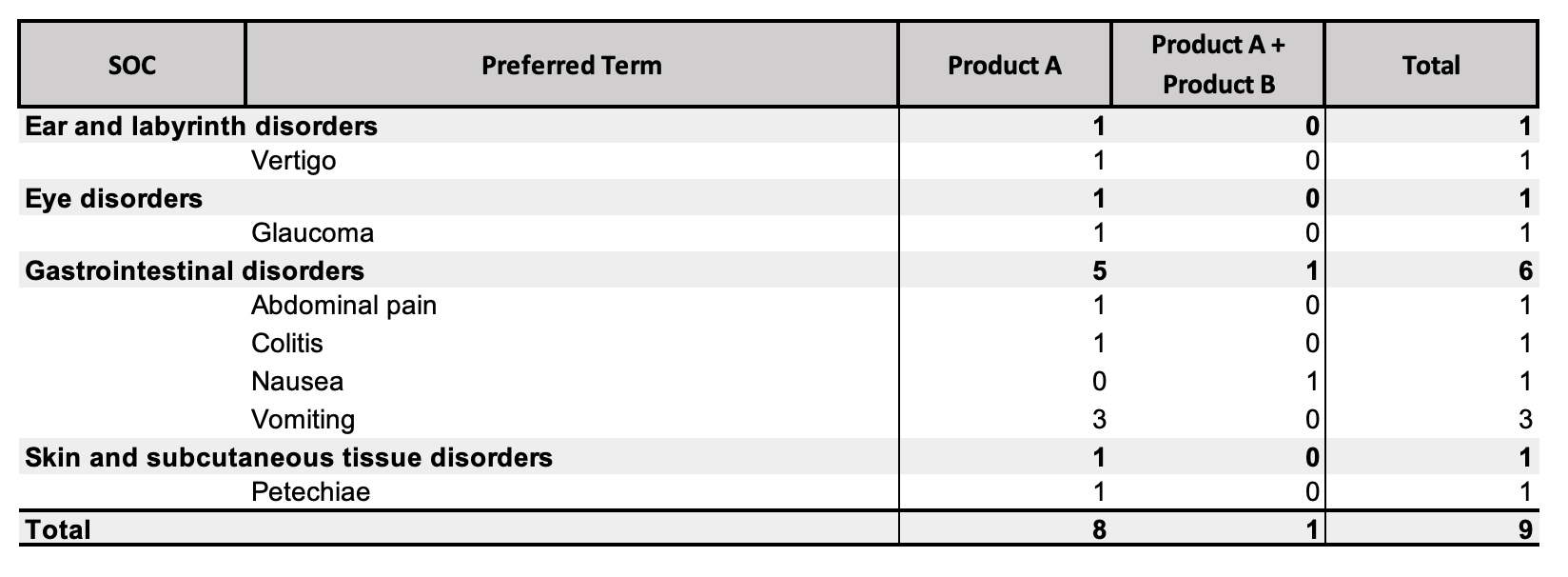
 The Investigational Medicinal Products (IMP) Breakdown table contains a breakdown of the _Products_ that appear in the Investigational Medicinal Products column in the main table.
<a href="https://platform.veevavault.help/assets/images/saf-investigational-medicinal-products-breakdown.png" data-lightbox="saf-investigational-medicinal-products-breakdown.png" data-title="" data-alt="Investigational Medicinal Products Breakdown">
  <img class="docimage" src="https://platform.veevavault.help/assets/images/saf-investigational-medicinal-products-breakdown.png" alt="Investigational Medicinal Products Breakdown" style="max-width: 75%;"  />
</a>

The IMP Breakdown table considers only _Cases_ that contain Investigational Product roles and _Products_ that are in the _Reporting Family_. The IMP Breakdown table contains a column for each combination of _Products_ that appear in the _Cases_ included on the main report. Up to a maximum of ten (10) combinations are supported. The sum of these totals corresponds with the total _Adverse Event_ count for the Investigational Medicinal Product on the main report.


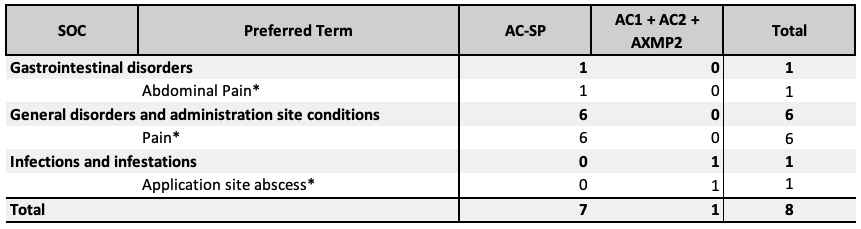
The Active Comparator Breakdown table contains a breakdown of the adverse events with active comparators that appear in the [Active Comparator][9] column in the main table.
<a href="https://platform.veevavault.help/assets/images/saf-active-comparator-breakdown.png" data-lightbox="saf-active-comparator-breakdown.png" data-title="" data-alt="Active Comparator Breakdown">
  <img class="docimage" src="https://platform.veevavault.help/assets/images/saf-active-comparator-breakdown.png" alt="Active Comparator Breakdown" style="max-width: 75%;"  />
</a>

The Active Comparator Breakdown table contains a column for each combination of active comparators that appear in the _Cases_ on the main report. The sum of these totals corresponds with the total _Adverse Event_ count for the Active Comparator on the main report.

### <a id="interval-line-listings-serious-ar"></a>Interval Line Listings of Serious Adverse Reactions

Vault generates the Serious Adverse Reactions from Clinical Trials Line Listings by default for all DSUR Aggregate Reports.
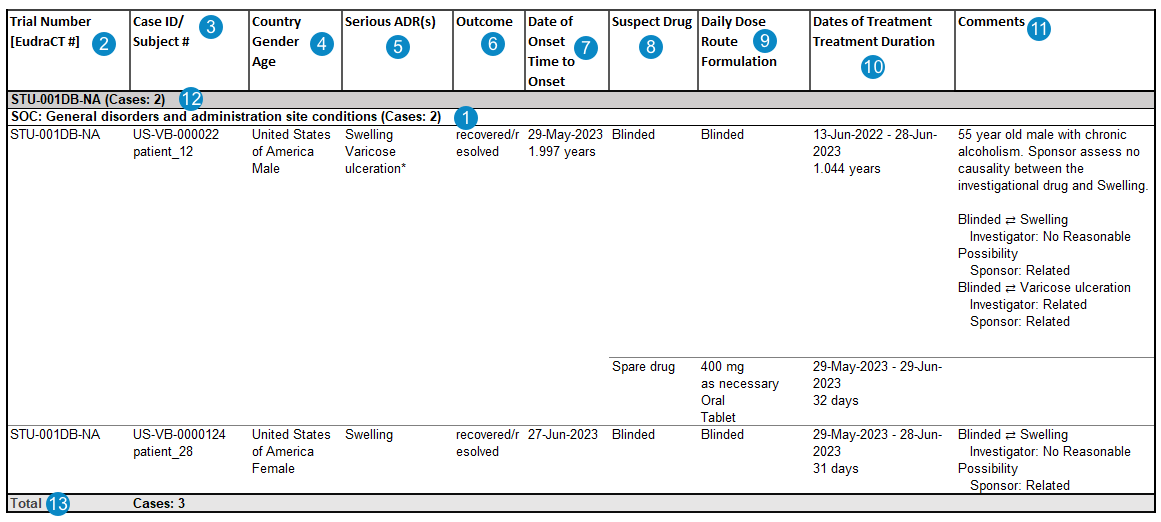
<a href="https://platform.veevavault.help/assets/images/saf-interval-line-listing-sar.png" data-lightbox="saf-interval-line-listing-sar.png" data-title="" data-alt="Interval Line Listing Table">
  <img class="docimage" src="https://platform.veevavault.help/assets/images/saf-interval-line-listing-sar.png" alt="Interval Line Listing Table" style=""  />
</a>

#### Table Constraints

Vault filters Cases to include in the Interval Line Listings of Serious Adverse Reactions using the following constraints:

##### <a id="not-supressed"></a>Case Not Suppressed

The Case <strong>Suppress Submission</strong> field must be set to <strong>No</strong> or blank (not suppressed).
<br>`case_version__v.suppress_submission__v ≠ Yes`

##### <a id="study-member-of-reporting-family"></a>Study Member of Reporting Family

The **Study** field links to a Study record that meets any of the following criteria:

* A member of the <a href="/en/lr/01179/">Reporting Family</a><br/>
  <code>case_version__v.study__v CONTAINS<br>
  reporting_family__v.reporting_family_member__v.study__v</code>
* Contains a Product that matches a <a href="/en/lr/01179/">Product Reporting Family Member</a><br/>
  <code>case_version__v.product__v CONTAINS<br>
  reporting_family__v.reporting_family_member__v.product__v</code>
* Contains a Blinded Study Product that matches a <a href="/en/lr/01179/">Product Reporting Family Member</a><br/>
  <code>case_version__v.study__v CONTAINS<br>
  reporting_family__v.reporting_family_member__v.products__v.study_product__v.study__v WHERE (case.blinded = Yes OR study.blinded = YES)</code>

##### <a id="unmasked"></a>Unmasked Documents

If the <a href="/en/lr/01179/">Reporting Family</a> includes only Products (no Studies), the report excludes Cases for which the Study's Product is not in the Reporting Family.

##### <a id="case-report-and-study-type"></a>Case Report and Study Type

To filter study cases, the system looks at the Case **Report Type** and **Study Type** fields. A Case is included when it matches one of the following scenarios:

<table>
    <tr>
        <th>Scenario</th>
        <th>Report Type</th>
        <th>Study Type</th>
    </tr>
    <tr>
        <td rowspan="2">1</td>
        <td><ul>
                <li>Study</li>
                <li>A <a href="/en/lr/01195/#report-type">custom Report Type</a> with an E2B Code of <code>2</code></li>
            </ul>
        </td>
        <td><ul>
            <li>Clinical Trial</li>
            <li>A <a href="/en/lr/01195/#study-type">custom Study Type</a> with an E2B Code of <code>1</code></li>
        </ul></td>
    </tr>
    <tr>
        <td colspan="2"><code>case_version_v.report_type__v.controlled_vocabulary__v.<br>e2b_code__v = 2
        <br>AND case_version__v.study_product_reason__v.controlled_vocabulary__v.<br>e2b_code__v = 1</code></td>
    </tr>
    <tr>
        <td rowspan="2">2</td>
        <td><ul>
                <li>Study</li>
                <li>A <a href="/en/lr/01195/#report-type">custom Report Type</a>  with:
                    <ol>
                        <li>The E2B Code field set to <code>2</code></li>
                        <li>The Literature field set to No or Blank</li>
                    </ol>
                </li>
            </ul>
        </td>
        <td><ul>
            <li>Blank</li>
            <li>A <a href="/en/lr/01195/#study-type">custom Study Type</a> without a valid E2B Code</li>
        </ul></td>
    </tr>
    <tr>
        <td colspan="2"><code>case_version_v.report_type__v.controlled_vocabulary__v.<br>e2b_code__v = 2
        <br>AND case_version_v.report_type__v.controlled_vocabulary__v.<br>literature__v ≠ Yes <br>AND case_version__v.study_product_reason__v = blank</code></td>
    </tr>
</table>

##### <a id="case-date-in-interval-reporting-period"></a>Case Date in Interval Reporting Period

The date must be within the aggregate report interval reporting period (Data Period Start to Data Period End). <a href="/en/lr/01127/">How Aggregate Reports Filter by Data Period</a> provides more information.

<code><em>DATE</em> ≥ dsur__v.data_period_start__v AND<br>
<em>DATE</em> ≤ dsur__v.data_period_end__v</code>

where _DATE_ depends on the option selected in the DSUR **Filter Cases By** (`dsur__v.filter_cases_by__v`) field:

* When **Approval Date**: `case_version__v.approval_date__v`

* When blank or **Receipt Date / New Info Date** (Default):
  * If the Case New Info Date (`new_info_date__v`) is blank, the Receipt Date is used: `case_version__v.receipt_date__v`
  * Otherwise, the New Info Date is used: `case_version__v.new_info_date__v`

If there are multiple versions of the Case within the reporting period, only the most recent Case version within the reporting period is listed.


##### <a id="serious-case-adverse-event-2"></a>Serious Case Adverse Event

The _Seriousness_ field on the _Case_ contains a value (is not blank).

`case_version__v.seriousness__v ≠ BLANK`

If your Admin has enabled <a href="/en/lr/01381/">DSUR and PBRER Investigational Product Causality</a>, the report considers only _Case Adverse Events_ where the _Causality Established_ field on the _Case Assessment Result_ is set to either _Yes_ or blank (unknown) for any _Study Product_ on the _Case_. The _Study Product_ must be blinded or have a _Study Product Role_ of _Investigational_, _Placebo_, and _Active Comparator_.


##### <a id="causality-established-is-yes-or-blank-on-any-case-assessment-1"></a>Causality Established is Yes or Blank on Any Case Assessment

The _Causality Established_ field must be either _Yes_ or blank (unknown) on any _Case Assessment Result_ to consider the _Case_.

`case_assessment_result.causality_established = (Yes OR Blank)`

Vault excludes _Cases_ from this report if all serious _Case Adverse Events_ are assessed as unrelated. That is, if all serious _Case Adverse Events_ are linked with at least two (2) _Case Assessment Results_ with the _Causality Established_ field set to _No_, where:

* One (1) _Case Assessment Result_ is for the company (Sponsor or MAH). That is, the _Source Type_ maps to E2B Code `2` or `4`.
* One (1) other _Case Assessment Result_ where the _Source Type_ does not map to E2B Code `2` or `4`.

If your Admin has enabled <a href="/en/lr/01381/">DSUR and PBRER Investigational Product Causality</a>, the report considers only _Cases_ where the _Study Product_ is blinded or has a _Study Product Role_ of _Investigational_, _Placebo_, or _Active Comparator_.


##### <a id="case-lifecycle-state-in-aggregate-states-to-include"></a>Case Lifecycle State in Aggregate States to Include

The latest Case version within the reporting period must be in a state specified in the <a href="#states-to-include">States to Include</a> field on the DSUR.

`case_version__v.state__v CONTAINS dsur__v.states_to_include__v`

Note the following considerations:

* Cases in the following states are omitted:
  * Nullified (`nullified_state__v`)
  * Voided (`voided_state__v`)
<div class="note-border alert-info">
  <div class="alert alert-info" role="alert">
    <div><i class="far fa-info-circle"></i></div>
    <div class="alert-text">
      <p><strong>Note</strong>: You cannot select these states in the <strong>States to Include</strong> field. These states are always omitted.</p>
    </div>
  </div>
</div>


* If the Case is in a Lifecycle State assigned a <a href="/en/lr/56431/">State Type</a> of "Deleted", the Case is omitted.
* When evaluating the **States to Include** field, the system evaluates Cases in the Superseded (`superseded_state__v`) state as Closed (`closed_state__v`).


##### <a id="case-product-drug-roles-to-include"></a>Case Product in Drug Roles to Include

Only include Case Products in the listing where the Drug Role matches one of the Drug Roles specified on the <a href="#drug-roles-to-include">Drug Roles to Include</a> field on the DSUR.

`case_product__v.drug_role__v CONTAINS dsur__v.drug_roles_to_include__v`


##### <a id="axmps"></a>Include Unauthorized AxMPs

If you selected _CTIS Annual Safety Report_ in the <a href="#submission-format">_Submission Format_</a> field on the DSUR, Vault includes unauthorized AxMPs, which are determined by the following criteria:

* [The _Seriousness_ field of the _Case_ is populated][7].
* One (1) or more _Products_ is an unauthorized AxMP, as determined by the following field values:
  * One (1) or more _Study Products_ has a _Study Product Role_ of _Auxiliary_. 
  * The _Study Product_ or one (1) or more _Study Product Countries_ have an _Auxiliary Medicinal Product Status_ of _Not Authorized_.
* For one (1) or more of the unauthorized AxMP _Products_, the [_Causality Established_ field is _Yes_ or blank][8] (unknown) on any _Case Assessment_.

#### Table Mapping

The following table describes how Vault maps data to populate the Interval Line Listings of Serious Adverse Reactions:

<table>
      <tr>
         <th>Number</th>
         <th>Name</th>
         <th>Description</th>
      </tr>
      <tr>
         <td style="text-align: center"><img class="inline" src="https://platform.veevavault.help/assets/images/saf-icon1.png" alt="1" style="" /> </td>
         <td>SOC & Case Total</td>
         <td>
            <p>
               The MedDRA System Organ Class (SOC) for the adverse event.<br>
               <code>case_adverse_event__v.event_meddra__v.soc_term__v</code>
         </p>
         <p>
            The total number of unique Cases listed under the SOC for the Trial is shown in parentheses.
         </p>
         </td>
      </tr>
      <tr>
         <td style="text-align: center"><img class="inline" src="https://platform.veevavault.help/assets/images/saf-icon2.png" alt="2" style="" /> </td>
         <td>Trial Number [EudraCT#]</td>
         <td>For studies registered to a country in the European Union, values are mapped from the following fields:
            <ul>
               <li>
                  <strong>Trial Number</strong>: Case > Study Number<br>
                  <code>case_version__v.study_number__v</code>
               </li>
               <li>
                  <strong>EudraCT#</strong>: Case Study Registration > Registration Number<br>
                  <code>case_study_registration__v.registration_number_value
                        <br>where country_value__v.agency__v = EMA</code>
               </li>
            </ul>
         </td>
      </tr>
      <tr>
         <td style="text-align: center"><img class="inline" src="https://platform.veevavault.help/assets/images/saf-icon3.png" alt="3" style="" /> </td>
         <td>Case ID/ Subject #</td>
         <td>Values from the following fields:
            <ul>
               <li>
                  <strong>Case ID</strong>: Case > UID<br>
                  <code>case_version__v.uid__v</code>
               </li>
               <li>
                  <strong>Subject ID</strong>: For ICH E2F DSUR submissions, Vault first attempts to map a value from the Case > MRN - Investigation field, but if this field is blank then the value is mapped from the Case > Patient Initials field.<br>
                  <code>IF case_version__v.mrn_investigation_value__v = Blank 
                  <br>SHOW case_version__v.patient_id_value__v 
                  <br>ELSE SHOW case_version__v.mrn_investigation_value__v</code>
               </li>
            </ul>
         <div class="note-border alert-info">
  <div class="alert alert-info" role="alert">
    <div><i class="far fa-info-circle"></i></div>
    <div class="alert-text">
      <p><strong>Note</strong>: Vault hides Subject ID values for CTIS Annual Safety Report submissions.</p>
    </div>
  </div>
</div>


         </td>
      </tr>
      <tr>
         <td style="text-align: center"><img class="inline" src="https://platform.veevavault.help/assets/images/saf-icon4.png" alt="4" style="" /> </td>
         <td>Country, Gender, Age</td>
         <td>Values from the following fields:
            <ul>
               <li>
                  <strong>Country</strong>: Case > Event Country<br>
                  <code>case_version__v.event_country__v.name__v</code>
               </li>
               <li>
                  <strong>Sex</strong>: Case > Patient Sex<br>
                  <code>case_version__v.gender_value__v.name__v</code>
               </li>
               <li>
                  <strong>Age</strong>: Case > Age and Age (unit)
                  <br>Vault automatically calculates the age to the closest full number in years<br>
                  <code>(case_version__v.age_value__v case_version__v.age_unit__v) 
                     <br>OR 
                     <br>(case_version__v.age_normalized_year__v case_version__v.age_unit__v)</code>
               </li>
            </ul>
         </td>
      </tr>
      <tr>
         <td style="text-align: center"><img class="inline" src="https://platform.veevavault.help/assets/images/saf-icon5.png" alt="5" style="" /> </td>
         <td>Serious ADR(s)</td>
         <td>
            <p>The MedDRA Preferred Term for the serious adverse event.</p>
            <code>case_adverse_event__v.event_meddra__v.pt_term__v
            <br>where seriousness__v != null</code>
            <p>The primary adverse event is listed first.</p>
         </td>
      </tr>
      <tr>
         <td style="text-align: center"><img class="inline" src="https://platform.veevavault.help/assets/images/saf-icon6.png" alt="6" style="" /> </td>
         <td>Outcome</td>
         <td>The value selected in the Case Adverse Event <strong>Outcome</strong> field. If there are multiple Case Adverse Event records on a Case, Vault populates the most serious outcome, per E2B guidelines.<br>
            <code>case_adverse_event__v.event_outcomes__v.name__v
         <br>where seriousness__v != null</code>
         </td>
      </tr>
      <tr>
         <td style="text-align: center"><img class="inline" src="https://platform.veevavault.help/assets/images/saf-icon7.png" alt="7" style="" /></td>
         <td>Date of Onset, Time to Onset</td>
         <td>Values are mapped for the primary Case Adverse Event as follows:
            <ul>
               <li>
                  <strong>Date of Onset</strong>: Case Adverse Event > Onset in the format (DD-MMM-YYYY)<br>
                  <code>case_adverse_event__v.onset_date__v 
                     <br>where primary__v = Yes</code>
               </li>
               <li>
                  <strong>Time to Onset</strong>: Case Assessment > First Dose Latency (number) and First Dose Latency (unit)
                  <code>case_assessment__v.first_dose_interval_number__v <br>case_assessment__v.first_dose_interval_unit__v <br>
where case_assessment_v.case_product__v.primary__v = Yes <br>AND 
               case_assessment_v.case_adverse_event__v.primary__v = Yes</code>
               </li>
            </ul>
         </td>
      </tr>
      <tr>
         <td style="text-align: center"><img class="inline" src="https://platform.veevavault.help/assets/images/saf-icon8.png" alt="8" style="" /> </td>
         <td>Suspect Drug</td>
         <td>
            The name of the primary Case Product.<br>
            While the product is blinded, the value is <strong>Blinded</strong>.
            If the product is unblinded, the unblinded version of the Interval Line Listings displays the name of the primary Case Product.
            On the blinded version of the Interval Line Listings, the value remains <strong>Blinded</strong>.
            <p>
               First row (Primary Case Product): 
            </p>
            <code>
               IF [case_version__v.case_product__v.primary__v = Yes<br>
               AND case_version__v.case_product__v. product_type__v = Study Product<br>
               AND case_version__v.case_product__v.study_product__v = Blank]<br>
               THEN "Blinded"<br>
               ELSE case_version__v.case_product__v.product_name__v<br>
               where primary__v = Yes
            </code>
            <p>
               Subsequent rows (non-Primary Case Products):
            </p>
            <code>
               IF [case_version__v.case_product__v.primary__v != Yes<br>
               AND case_version__v.case_product__v. product_type__v = Study Product<br>
               AND case_version__v.case_product__v.study_product__v = Blank]<br>
               THEN "Blinded"<br>
               ELSE case_version__v.case_product__v.product_name__v<br>
               where primary__v != Yes
            </code>
         </td>
      </tr>
      <tr>
         <td style="text-align: center"><img class="inline" src="https://platform.veevavault.help/assets/images/saf-icon9.png" alt="9" style="" /> </td>
         <td>Daily Dose, Route, Formulation</td>
         <td>
            <p>If the primary Case Product is blinded, the value is <strong>Blinded</strong>.</p>
            <p>
               First row  (Primary Case Product):
            </p>
            <code>
               IF (case_product__v.primary__v = Yes)<br>
               AND case_version__v.case_product__v. product_type__v = Study Product<br>
               AND (case_version__v.case_product__v.study_product__v = Blank)<br>
               THEN "Blinded"
            </code>
            <p>
               Subsequent rows (non-Primary Case Products):
            </p>
            <code>
               IF [case_version__v.case_product__v.primary__v != Yes<br>
               AND case_version__v.case_product__v. product_type__v = Study Product<br>
               AND case_version__v.case_product__v.study_product__v = Blank]<br>
               THEN "Blinded"
            </code>
            <p>If the primary Case Product is not blinded, values are mapped from the primary Case Product > Case Product Dosage as follows:</p>
            <ul>
               <li>
                  <strong>Daily Dose</strong>: Values are mapped from the following fields:
                  <ol>
                     <li>Dose (number) and Dose (unit)<br/>
                     <code>case_product__v.case_product_dosage__v.dose_number__v <br>AND dose_unit__v</code></li>
                     <li>Frequency (number) and Frequency (unit)<br/>
                     <code>case_product__v.case_product_dosage__v.frequency_number__v <br>AND frequency_unit__v</code></li>
                  </ol>
               </li>
               <li><strong>Route</strong>: Patient RoA Text
               <code>case_product__v.case_product_dosage__v.patient_adminroute_text__v</code></li>
               <li><strong>Formulation</strong>: Dose Form Text
                <code>case_product__v.case_product_dosage__v.dose_form_text__v</code></li>
            </ul>
            <p>If there are multiple Dosages under the primary Case Product, values from each Dosage record are displayed in a line-separated list.</p>
         </td>
      </tr>
      <tr>
         <td style="text-align: center"><img class="inline" src="https://platform.veevavault.help/assets/images/saf-icon10.png" alt="10" style="" /> </td>
         <td>Dates of Treatment, Treatment Duration</td>
         <td>
            Values are mapped from the primary Case Product > Case Product Dosage object as follows:
            <ul>
               <li>
                  <strong>Dates of Treatment</strong>: First Administration to Last Administration in the format (DD-MMM-YYYY)
                  <code>(case_product__v.case_product_dosage__v.firstadmin_idate__v) <br>to
(case_product__v.case_product_dosage__v.lastadmin_idate__v)</code>
               </li>
               <li>
                  <strong>Treatment Duration</strong>: Duration (number) and Duration (unit)
                  <code>(case_product__v.case_product_dosage__v.duration_number__v)<br> 
(case_product__v.case_product_dosage__v.duration_unit__v)</code>
               </li>
            </ul>
         </td>
      </tr>
      <tr>
         <td style="text-align: center"><img class="inline" src="https://platform.veevavault.help/assets/images/saf-icon11.png" alt="11" style="" /> </td>
         <td>
             <a id="sar-comments-column"></a>
             Comments
         </td>
         
             <td>
               Values from the following fields:
            <ul>
               <li>
                  Any text entered in the <strong>Case Reporting Summary</strong> field.<br>
                  <code>case_version__v.reporting_summary__v</code>
               </li>
               <li>
                  Any Case Assessment Result Source Type and Assessment Result for the combination of Suspect Drug(s) and Serious ADR(s) listed in the report, with the fields mapped as follows:
                  <ul>
                     <li>
                         When the <strong>Source Type</strong> and the <strong>Assessment Result (Override)</strong> fields are populated:
                         <br>
                         <code>case_assessment__v.case_assessment_result__v.source_type__v:<br>case_assessment__v.case_assessment_result__v.assessment_result_override__v</code>
                         <br>
                         Example: "Sponsor: Not Applicable"
                     </li>
                     <li>
                         When the <strong>Assessment Result (Override)</strong> field is not populated and the <strong>Source Type</strong> and the <strong>Assessment Result</strong> fields are populated:
                         <br>
                         <code>case_assessment__v.case_assessment_result__v.source_type__v:<br>case_assessment__v.case_assessment_result__v.assessment_result__v</code>
                         <br>
                         Example: "Sponsor: Related"
                     </li>
                     <li>
                         When the <strong>Source Type</strong> field is not populated:
                         <br>
                         <code>[Blank]: case_assessment__v.case_assessment_result__v.assessment_result_override__v</code>
                         <br>or<br>
                         <code>[Blank]: case_assessment__v.case_assessment_result__v.assessment_result__v</code>
                         <br>
                         Example: "[Blank]: Related"
                     </li>
                  </ul>
               </li>
               <li>
                  Assessment Results are listed in the same row as the suspect drug.
               </li>
            </ul>
         </td>
      </tr>
      <tr>
         <td style="text-align: center"><img class="inline" src="https://platform.veevavault.help/assets/images/saf-icon12.png" alt="12" style="" /> </td>
         <td>Trial Number & Case Total</td>
         <td>
            <p>
               The Trial Number only (excluding the EudraCT#). See row <img class="inline" src="https://platform.veevavault.help/assets/images/saf-icon2.png" alt="2" style="" /> for details. For reports that include multiple trials, this row organizes data under each trial included in the line listings.
            </p>
            <p>
               The total number of distinct Cases listed under the Trial in the report is shown in parentheses.
            </p>
         </td>
      </tr>
      <tr>
         <td style="text-align: center"><img class="inline" src="https://platform.veevavault.help/assets/images/saf-icon13.png" alt="13" style="" /> </td>
         <td>Total</td>
         <td>
            The total number of distinct Cases across all Trials in the report.
         </td>
      </tr>
</table>

### <a id="appendix-sar"></a>Appendix: Cumulative Summary Tabulation of Serious Adverse Reactions From Clinical Trials

To generate the Cumulative Summary Tabulation of Serious Adverse Reactions table for a DSUR report, select this table in the **Documents to Generate** field on the DSUR Aggregate Report record.

<a href="https://platform.veevavault.help/assets/images/saf-serious-adverse-reactions.png" data-lightbox="saf-serious-adverse-reactions.png" data-title="" data-alt="DSUR Appendix Cumulative Summary Tabulation of Serious Adverse Reactions">
  <img class="docimage" src="https://platform.veevavault.help/assets/images/saf-serious-adverse-reactions.png" alt="DSUR Appendix Cumulative Summary Tabulation of Serious Adverse Reactions" style=""  />
</a>

<div class="note-border alert-info">
  <div class="alert alert-info" role="alert">
    <div><i class="far fa-info-circle"></i></div>
    <div class="alert-text">
      <p><strong>Note</strong>: The Cumulative Summary Tabulation of Serious Adverse Reactions From Clinical Trials appendix tabulation does not list data about treatment arms or identify unexpected adverse reactions.</p>
    </div>
  </div>
</div>


#### Table Constraints

For Vault to consider a _Case_ for the report, the _Case_ (created from an _Inbox Item_ or imported _Case_) must have a _Case Product_ set to _Primary_. Vault filters _Cases_ to include in the Cumulative Summary Tabulation of Serious Adverse Reactions From Clinical Trials using the following constraints:

##### <a id="not-supressed"></a>Case Not Suppressed

The Case <strong>Suppress Submission</strong> field must be set to <strong>No</strong> or blank (not suppressed).
<br>`case_version__v.suppress_submission__v ≠ Yes`

##### <a id="case-report-and-study-type"></a>Case Report and Study Type

To filter study cases, the system looks at the Case **Report Type** and **Study Type** fields. A Case is included when it matches one of the following scenarios:

<table>
    <tr>
        <th>Scenario</th>
        <th>Report Type</th>
        <th>Study Type</th>
    </tr>
    <tr>
        <td rowspan="2">1</td>
        <td><ul>
                <li>Study</li>
                <li>A <a href="/en/lr/01195/#report-type">custom Report Type</a> with an E2B Code of <code>2</code></li>
            </ul>
        </td>
        <td><ul>
            <li>Clinical Trial</li>
            <li>A <a href="/en/lr/01195/#study-type">custom Study Type</a> with an E2B Code of <code>1</code></li>
        </ul></td>
    </tr>
    <tr>
        <td colspan="2"><code>case_version_v.report_type__v.controlled_vocabulary__v.<br>e2b_code__v = 2
        <br>AND case_version__v.study_product_reason__v.controlled_vocabulary__v.<br>e2b_code__v = 1</code></td>
    </tr>
    <tr>
        <td rowspan="2">2</td>
        <td><ul>
                <li>Study</li>
                <li>A <a href="/en/lr/01195/#report-type">custom Report Type</a>  with:
                    <ol>
                        <li>The E2B Code field set to <code>2</code></li>
                        <li>The Literature field set to No or Blank</li>
                    </ol>
                </li>
            </ul>
        </td>
        <td><ul>
            <li>Blank</li>
            <li>A <a href="/en/lr/01195/#study-type">custom Study Type</a> without a valid E2B Code</li>
        </ul></td>
    </tr>
    <tr>
        <td colspan="2"><code>case_version_v.report_type__v.controlled_vocabulary__v.<br>e2b_code__v = 2
        <br>AND case_version_v.report_type__v.controlled_vocabulary__v.<br>literature__v ≠ Yes <br>AND case_version__v.study_product_reason__v = blank</code></td>
    </tr>
</table>

##### <a id="case-lifecycle-state-in-aggregate-states-to-include"></a>Case Lifecycle State in Aggregate States to Include

The latest Case version within the reporting period must be in a state specified in the <a href="#states-to-include">States to Include</a> field on the DSUR.

`case_version__v.state__v CONTAINS dsur__v.states_to_include__v`

Note the following considerations:

* Cases in the following states are omitted:
  * Nullified (`nullified_state__v`)
  * Voided (`voided_state__v`)
<div class="note-border alert-info">
  <div class="alert alert-info" role="alert">
    <div><i class="far fa-info-circle"></i></div>
    <div class="alert-text">
      <p><strong>Note</strong>: You cannot select these states in the <strong>States to Include</strong> field. These states are always omitted.</p>
    </div>
  </div>
</div>


* If the Case is in a Lifecycle State assigned a <a href="/en/lr/56431/">State Type</a> of "Deleted", the Case is omitted.
* When evaluating the **States to Include** field, the system evaluates Cases in the Superseded (`superseded_state__v`) state as Closed (`closed_state__v`).


##### <a id="case-data-in-cumulative-reporting-period"></a>Case Data in Cumulative Reporting Period

The date must be within the aggregate report cumulative reporting period (Product IBD to Data Period End). <a href="/en/lr/01127/">How Aggregate Reports Filter by Data Period</a> provides more information.

<code><em>DATE</em> ≤ dsur__v.data_period_end__v</code>

where _DATE_ depends on the option selected in the DSUR **Filter Case By** (`dsur__v.filter_cases_by__v`) field:

* When **Approval Date**: `case_version__v.approval_date__v`
* When blank or **Receipt Date / New Info Date** (Default):
  * If the Case New Info Date (`new_info_date__v`) is blank, the Receipt Date is used: `case_version__v.receipt_date__v`
  * Otherwise, the New Info Date is used: `case_version__v.new_info_date__v`

If there are multiple versions of the Case within the reporting period, only the most recent Case version within the reporting period is listed.

##### <a id="serious-case-adverse-event-3"></a>Serious Case Adverse Event

The _Seriousness_ field on the _Case_ contains a value (is not blank).

`case_version__v.seriousness__v ≠ BLANK`

If your Admin has enabled <a href="/en/lr/01381/">DSUR and PBRER Investigational Product Causality</a>, the report considers only _Case Adverse Events_ where the _Causality Established_ field on the _Case Assessment Result_ is set to either _Yes_ or blank (unknown) for any _Study Product_ on the _Case_. The _Study Product_ must be blinded or have a _Study Product Role_ of _Investigational_, _Placebo_, and _Active Comparator_.


##### <a id="causality-established-is-yes-or-blank-on-any-case-assessment-2"></a>Causality Established is Yes or Blank on Any Case Assessment

The _Causality Established_ field must be either _Yes_ or blank (unknown) on any _Case Assessment Result_ to consider the _Case_.

`case_assessment_result.causality_established = (Yes OR Blank)`

If your Admin has enabled <a href="/en/lr/01381/">DSUR and PBRER Investigational Product Causality</a>, the report considers only _Cases_ where the _Study Product_ is blinded or has a _Study Product Role_ of _Investigational_, _Placebo_, or _Active Comparator_.

##### <a id="study-or-substance-reporting-family-member"></a>Study or Substance Reporting Family Member

One of the following conditions must be met:

* The **Study** field links to a Study record that is either:
  * A member of the <a href="/en/lr/01179/">Reporting Family</a><br>OR
  * Contains a Study Product for a Product that is a member of the <a href="/en/lr/01179/">Reporting Family</a>
* A Case Product links to a preconfigured Substance that is a member of the <a href="/en/lr/01179/">Reporting Family</a>.

<code>case_version__vr.study__v CONTAINS<br>
(reporting_family__vr.reporting_family_member__vr.products__vr.study_product__vr.study__v<br>
OR reporting_family__vr.reporting_family_member__vr.study__v)<br>
OR<br>
WHERE reporting_family_v.substance__v.substance_v is not BLANK<br>
AND reporting_family_v.substance__v.substance_v = case_product__v.product__v.product_substance__v<br>
AND case_version__v.report_type__v = study</code>

#### Table Mapping

The following table describes how Vault generates the Cumulative Summary Tabulation of Serious Adverse Reactions From Clinical Trials:

<table>
    <thead>
        <tr>
            <th>Number</th>
            <th>Report Field</th>
            <th>Logic</th>
        </tr>
    </thead>
    <tbody>
         <tr>
            <td style="text-align: center"><img class="inline" src="https://platform.veevavault.help/assets/images/saf-icon1.png" alt="1" style="" /></td>
            <td>SOC</td>
            <td>The MedDRA System Organ Class (SOC) for the adverse event.<br>
            <code>case_adverse_event__v.event_meddra__v.soc_term__v</code></td>
        </tr>
        <tr>
            <td style="text-align: center"><img class="inline" src="https://platform.veevavault.help/assets/images/saf-icon2.png" alt="2" style="" /></td>
            <td>Preferred Term</td>
            <td><p>The MedDRA Preferred Term (PT) for the adverse event. All qualifying Case Adverse Events are listed by MedDRA PT, grouped by the MedDRA SOC.</p><br>
                <code>case_adverse_event__v.event_meddra__v.pt_term__v</code><br>
                <p>Vault evaluates each Case Adverse Event relatedness for each Study Product before listing the event in this report. If at least one Study Product is assessed as related to the Case Adverse Event (or blank/unknown), the event is listed.</p>
            <div class="note-border alert-info">
  <div class="alert alert-info" role="alert">
    <div><i class="far fa-info-circle"></i></div>
    <div class="alert-text">
      <p><strong>Note</strong>: Contact Veeva Support to request PT Aggregation in periodic reports, which counts only unique instances of Preferred Terms (PT) in summary tabulations. Once this feature is enabled, when a Case contains multiple Case Adverse Events coded under the same MedDRA Preferred Term (PT), the report counts a single PT event instead of multiple events.</p>
    </div>
  </div>
</div>


                <p>A Case Adverse Event is excluded from this report when two or more Case Assessment Results for the event and study product have <strong>Causality Established</strong> set to <strong>No</strong>, where:</p>
                <ul>
                    <li>One Case Assessment Result is for the company ("Sponsor" or "MAH"). That is, the <strong>Source Type</strong> maps to E2B Code <code>2</code> or <code>4</code>.</li>
                    <li>One other Case Assessment Result where the <strong>Source Type</strong> does not map to E2B Code <code>2</code> or <code>4</code>.</li>
                </ul>
                <code>EXCLUDE IF:<br> case_assessment_result__v.causality_established = No<br>
    FOR <br>Sponsor (source_type__v.controlled_vocabulary__v.e2b_code__v = 2 OR 4)<br>
    AND Reporter (source_type__v.controlled_vocabulary__v.e2b_code__v ≠ 2 OR 4)</code>
            </td>
        </tr>
        <tr>
           <td style="text-align: center"><img class="inline" src="https://platform.veevavault.help/assets/images/saf-icon3.png" alt="3" style="" /></td>
            <td>Investigational Medicinal Product</td>
            <td>
                <p>
                    The total number of adverse events with a primary suspect Study Case Product and the <strong>Study Product Role</strong> field set to <strong>Investigational</strong> on the associated Study Product record.
                </p>
                <p>
                    <code>
                        COUNT IF 
                        <br>case_version__v.case_product__v.primary__v = Yes<a href="#omit-primary-product-2"><sup>1</sup></a>
                        <br>AND case_product__v.study_product__v ≠ Blank
                        <br>AND case_product__v.study_product__v.study_product_role__v = lead_agent__v
                        <br>AND case_product__v.drug_role__v CONTAINS dsur__v.drug_roles_to_include__v
                    </code>
                </p>
            </td>
        </tr>
        <tr>
            <td style="text-align: center"><img class="inline" src="https://platform.veevavault.help/assets/images/saf-icon4.png" alt="4" style="" /></td>
            <td>Blinded</td>
            <td>
                <p>
                    The total number of adverse events with a blinded primary suspect Study Case Product.
                </p>
                <p>
                    <code>
                        COUNT IF:
                        <br>case_version__v.case_product__v.primary__v = Yes<a href="#omit-primary-product-2"><sup>1</sup></a>
                        <br>AND case_version__v.case_product__v.study_product__v = Blank
                        <br>AND case_product__v.drug_role__v CONTAINS dsur__v.drug_roles_to_include__v
                    </code>
                </p>
            </td>
        </tr>
        <tr>
            <td style="text-align: center"><img class="inline" src="https://platform.veevavault.help/assets/images/saf-icon5.png" alt="5" style="" /></td>
            <td><a id="active-comparator-sar"></a>Active Comparator</td>
            <td>
                <p>
                    The total number of adverse events with a primary suspect Study Case Product and the <strong>Study Product Role</strong> field set to <strong>Active Comparator</strong> on the associated Study Product record.
                </p>
                <p>
                    <code>
                        COUNT IF 
                        <br>case_version__v.case_product__v.primary__v = Yes<a href="#omit-primary-product-2"><sup>1</sup></a>
                        <br>AND case_product__v.study_product__v ≠ Blank
                        <br>AND case_product__v.study_product__v.study_product_role__v = active_comparator__v
                        <br>AND case_product__v.drug_role__v CONTAINS dsur__v.drug_roles_to_include__v
                    </code>
                </p>
            </td>
        </tr>
        <tr>
            <td style="text-align: center"><img class="inline" src="https://platform.veevavault.help/assets/images/saf-icon6.png" alt="6" style="" /></td>
            <td>Placebo</td>
            <td>
                <p>
                    The total number of adverse events with a primary suspect Study Case Product and the <strong>Study Product Role</strong> field set to <strong>Placebo</strong> on the associated Study Product record.
                </p>
                <p>
                    <code>
                        COUNT IF 
                        <br>case_version__v.case_product__v.primary__v = Yes<a href="#omit-primary-product-2"><sup>1</sup></a>
                        <br>AND case_product__v.study_product__v ≠ Blank
                        <br>AND case_product__v.study_product__v.study_product_role__v = placebo__v
                        <br>AND case_product__v.drug_role__v CONTAINS dsur__v.drug_roles_to_include__v
                    </code>
                </p>
            </td>
        </tr>
        <tr>
            <td style="text-align: center"><img class="inline" src="https://platform.veevavault.help/assets/images/saf-icon7.png" alt="7" style="" /></td>
            <td>Total</td>
            <td>The sum of the Investigational Medicinal Product, Blinded, Active Comparator, and Placebo SAR occurrences for each SOC and Preferred Term.</td>
        </tr>
        <tr>
            <td style="text-align: center"><img class="inline" src="https://platform.veevavault.help/assets/images/saf-icon8.png" alt="8" style="" /></td>
            <td>Total</td>
            <td>The total number of SAR occurrences for each of the Investigational Medicinal Product, Blinded, Active Comparator, and Placebo categories.</td>
        </tr>
    </tbody>
    <tfoot>
        <tr>
            <td colspan="3">
                <a id="omit-primary-product-2"></a>
                1. If the <strong><a href="/en/lr/01381/">DSUR and PBRER Investigational Product Causality</a></strong> feature is enabled in your Vault, <code>case_version__v.case_product__v.primary__v == Yes</code> is omitted.
            </td>
        </tr>
    </tfoot>
</table>


If the **DSUR and PBRER Summary Totals and Separate Log Files** feature is enabled in your Vault, the Cases in the report are listed in a separate log file once the system generates the report.

If the **DSUR and PBRER Summary Totals and Separate Log Files** feature is not enabled in your Vault, the Cases in the report are listed in a separate table as part of the report:

<a href="https://platform.veevavault.help/assets/images/saf-case-listing-table.png" data-lightbox="saf-case-listing-table.png" data-title="" data-alt="Case Listing Table">
  <img class="docimage" src="https://platform.veevavault.help/assets/images/saf-case-listing-table.png" alt="Case Listing Table" style="max-width: 75%;"  />
</a>


 The Investigational Medicinal Products (IMP) Breakdown table contains a breakdown of the _Products_ that appear in the Investigational Medicinal Products column in the main table.

<a href="https://platform.veevavault.help/assets/images/saf-investigational-medicinal-products-breakdown.png" data-lightbox="saf-investigational-medicinal-products-breakdown.png" data-title="" data-alt="Investigational Medicinal Products Breakdown">
  <img class="docimage" src="https://platform.veevavault.help/assets/images/saf-investigational-medicinal-products-breakdown.png" alt="Investigational Medicinal Products Breakdown" style="max-width: 75%;"  />
</a>

The IMP Breakdown table considers only _Cases_ that contain Investigational Product roles and _Products_ that are in the _Reporting Family_. The IMP Breakdown table contains a column for each combination of _Products_ that appear in the _Cases_ included on the main report. Up to a maximum of ten (10) combinations are supported. The sum of these totals corresponds with the total _Adverse Event_ count for the Investigational Medicinal Product on the main report.


The Active Comparator Breakdown table contains a breakdown of the adverse events with active comparators that appear in the [Active Comparator][10] column in the main table.

<a href="https://platform.veevavault.help/assets/images/saf-active-comparator-breakdown.png" data-lightbox="saf-active-comparator-breakdown.png" data-title="" data-alt="Active Comparator Breakdown">
  <img class="docimage" src="https://platform.veevavault.help/assets/images/saf-active-comparator-breakdown.png" alt="Active Comparator Breakdown" style="max-width: 75%;"  />
</a>

The Active Comparator Breakdown table contains a column for each combination of active comparators that appear in the _Cases_ on the main report. The sum of these totals corresponds with the total _Adverse Event_ count for the Active Comparator on the main report.

### <a id="appendix-death"></a>Appendix: List of Subjects Who Died During the Reporting Period

To generate the List of Subjects Who Died During the Reporting Period table for a DSUR report, select this table in the <strong>Documents to Generate</strong> field on the DSUR Aggregate Report record. 

<a href="https://platform.veevavault.help/assets/images/saf-dsur appendix_ list of subjects who died during the reporting period.png" data-lightbox="saf-dsur appendix_ list of subjects who died during the reporting period.png" data-title="" data-alt="DSUR Appendix List of Subjects Who Died During the Reporting Period">
  <img class="docimage" src="https://platform.veevavault.help/assets/images/saf-dsur appendix_ list of subjects who died during the reporting period.png" alt="DSUR Appendix List of Subjects Who Died During the Reporting Period" style="max-width: 75%;"  />
</a>

#### Table Constraints

The following list describes how Vault filters Cases to include the List of Subjects Who Died During the Reporting Period.

##### <a id="not-supressed"></a>Case Not Suppressed

The Case <strong>Suppress Submission</strong> field must be set to <strong>No</strong> or blank (not suppressed).
<br>`case_version__v.suppress_submission__v ≠ Yes`

##### <a id="case-report-and-study-type"></a>Case Report and Study Type

To filter study cases, the system looks at the Case **Report Type** and **Study Type** fields. A Case is included when it matches one of the following scenarios:

<table>
    <tr>
        <th>Scenario</th>
        <th>Report Type</th>
        <th>Study Type</th>
    </tr>
    <tr>
        <td rowspan="2">1</td>
        <td><ul>
                <li>Study</li>
                <li>A <a href="/en/lr/01195/#report-type">custom Report Type</a> with an E2B Code of <code>2</code></li>
            </ul>
        </td>
        <td><ul>
            <li>Clinical Trial</li>
            <li>A <a href="/en/lr/01195/#study-type">custom Study Type</a> with an E2B Code of <code>1</code></li>
        </ul></td>
    </tr>
    <tr>
        <td colspan="2"><code>case_version_v.report_type__v.controlled_vocabulary__v.<br>e2b_code__v = 2
        <br>AND case_version__v.study_product_reason__v.controlled_vocabulary__v.<br>e2b_code__v = 1</code></td>
    </tr>
    <tr>
        <td rowspan="2">2</td>
        <td><ul>
                <li>Study</li>
                <li>A <a href="/en/lr/01195/#report-type">custom Report Type</a>  with:
                    <ol>
                        <li>The E2B Code field set to <code>2</code></li>
                        <li>The Literature field set to No or Blank</li>
                    </ol>
                </li>
            </ul>
        </td>
        <td><ul>
            <li>Blank</li>
            <li>A <a href="/en/lr/01195/#study-type">custom Study Type</a> without a valid E2B Code</li>
        </ul></td>
    </tr>
    <tr>
        <td colspan="2"><code>case_version_v.report_type__v.controlled_vocabulary__v.<br>e2b_code__v = 2
        <br>AND case_version_v.report_type__v.controlled_vocabulary__v.<br>literature__v ≠ Yes <br>AND case_version__v.study_product_reason__v = blank</code></td>
    </tr>
</table>

##### <a id="study-member-of-reporting-family"></a>Study Member of Reporting Family

The **Study** field links to a Study record that meets any of the following criteria:

* A member of the <a href="/en/lr/01179/">Reporting Family</a><br/>
  <code>case_version__v.study__v CONTAINS<br>
  reporting_family__v.reporting_family_member__v.study__v</code>
* Contains a Product that matches a <a href="/en/lr/01179/">Product Reporting Family Member</a><br/>
  <code>case_version__v.product__v CONTAINS<br>
  reporting_family__v.reporting_family_member__v.product__v</code>
* Contains a Blinded Study Product that matches a <a href="/en/lr/01179/">Product Reporting Family Member</a><br/>
  <code>case_version__v.study__v CONTAINS<br>
  reporting_family__v.reporting_family_member__v.products__v.study_product__v.study__v WHERE (case.blinded = Yes OR study.blinded = YES)</code>

##### <a id="unmasked"></a>Unmasked Documents

If the <a href="/en/lr/01179/">Reporting Family</a> includes only Products (no Studies), the report excludes Cases for which the Study's Product is not in the Reporting Family.

##### <a id="case-lifecycle-state-in-aggregate-states-to-include"></a>Case Lifecycle State in Aggregate States to Include

The latest Case version within the reporting period must be in a state specified in the <a href="#states-to-include">States to Include</a> field on the DSUR.

`case_version__v.state__v CONTAINS dsur__v.states_to_include__v`

Note the following considerations:

* Cases in the following states are omitted:
  * Nullified (`nullified_state__v`)
  * Voided (`voided_state__v`)
<div class="note-border alert-info">
  <div class="alert alert-info" role="alert">
    <div><i class="far fa-info-circle"></i></div>
    <div class="alert-text">
      <p><strong>Note</strong>: You cannot select these states in the <strong>States to Include</strong> field. These states are always omitted.</p>
    </div>
  </div>
</div>


* If the Case is in a Lifecycle State assigned a <a href="/en/lr/56431/">State Type</a> of "Deleted", the Case is omitted.
* When evaluating the **States to Include** field, the system evaluates Cases in the Superseded (`superseded_state__v`) state as Closed (`closed_state__v`).


##### <a id="case-indicates-death-occurred"></a>Case Indicates a Death Occurred

One of the following conditions must be met to indicate a death occurred:
* A value in the **Date of Death** field<br>
    `case_version__v.dod_normalized__v ≠ Blank`
* The Case **Seriousness** field contains **Results in Death**<br>
    `case_version__v.seriousness__v = results_in_death__v`
* Any Case Adverse Event **Outcome** field contains **Fatal**<br>
    `case_version__v.case_adverse_event__v.outcome__v = fatal`
* Any Case Adverse Event has a coded event under the MedDRA HLT of 10011907 (Death and Sudden Death)<br>
    `case_adverse_event__v.event_meddra__v.meddra__v.hlt_code__v = 10011907`
* A value in the Case **Autopsy** field<br>
    `case_version__v.autopsy_value__v = ≠ Blank`
* The Case contains a Case Cause of Death record<br>
    `case_version__v.case_cause_of_death__v ≠ 0`

##### <a id="case-date-in-interval-reporting-period"></a>Case Date in Interval Reporting Period

The date must be within the aggregate report interval reporting period (Data Period Start to Data Period End). <a href="/en/lr/01127/">How Aggregate Reports Filter by Data Period</a> provides more information.

<code><em>DATE</em> ≥ dsur__v.data_period_start__v AND<br>
<em>DATE</em> ≤ dsur__v.data_period_end__v</code>

where _DATE_ depends on the option selected in the DSUR **Filter Cases By** (`dsur__v.filter_cases_by__v`) field:

* When **Approval Date**: `case_version__v.approval_date__v`

* When blank or **Receipt Date / New Info Date** (Default):
  * If the Case New Info Date (`new_info_date__v`) is blank, the Receipt Date is used: `case_version__v.receipt_date__v`
  * Otherwise, the New Info Date is used: `case_version__v.new_info_date__v`

If there are multiple versions of the Case within the reporting period, only the most recent Case version within the reporting period is listed.


##### <a id="case-product-in-drug-roles-to-include"></a>Case Product in Drug Roles to Include

Only include Case Products in the listing where the Drug Role matches one of the Drug Roles specified on the <a href="#drug-roles-to-include">Drug Roles to Include</a> field on the DSUR.

`case_product__v.drug_role__v CONTAINS dsur__v.drug_roles_to_include__v`


#### Table Mapping

The following table describes how Vault generates the List of Subjects Who Died During the Reporting Period:

<table>
    <thead>
        <tr>
            <th>Number</th>
            <th>Name</th>
            <th>Description</th>
        </tr>
    </thead>
    <tbody>
        <tr>
            <td style="text-align: center"><img class="inline" src="https://platform.veevavault.help/assets/images/saf-icon1.png" alt="1" style="" /></td>
            <td>Trial Number <br>[EudraCT#]</td>
            <td>For studies registered to a country in the European Union, values are mapped from the following fields:
            <ul>
               <li>
                  <strong>Trial Number</strong>: Case > Study Number<br>
                  <code>case_version__v.study_number__v</code>
               </li>
               <li>
                  <strong>EudraCT#</strong>: Case Study Registration > Registration Number<br>
                  <code>case_study_registration__v.registration_number_value
                        <br>where country_value__v.agency__v = EMA</code>
               </li>
            </ul>
         </td>
        </tr>
        <tr>
            <td style="text-align: center"><img class="inline" src="https://platform.veevavault.help/assets/images/saf-icon2.png" alt="2" style="" /></td>
            <td>Case ID/ <br>Subject #</td>
             <td>Values from the following fields:
                <ul>
                   <li>
                      <strong>Case ID</strong>: Case > UID<br/>
                      <code>case_version__v.uid__v</code>
                   </li>
                   <li>
                      <strong>Subject ID</strong>: For ICH E2F DSUR submissions, Vault first attempts to map a value from the Case > MRN - Investigation field, but if this field is blank then the value is mapped from the Case > Patient ID field.<br/>
                      <code>IF case_version__v.mrn_investigation_value__v = Blank 
                      <br>SHOW case_version__v.patient_id_value__v 
                      <br>ELSE SHOW case_version__v.mrn_investigation_value__v</code>
                   </li>
                </ul>
            <div class="note-border alert-info">
  <div class="alert alert-info" role="alert">
    <div><i class="far fa-info-circle"></i></div>
    <div class="alert-text">
      <p><strong>Note</strong>: Vault hides Subject ID values for CTIS Annual Safety Report submissions.</p>
    </div>
  </div>
</div>


             </td>
        </tr>
        <tr>
            <td style="text-align: center"><img class="inline" src="https://platform.veevavault.help/assets/images/saf-icon3.png" alt="3" style="" /></td>
            <td>Country <br>Gender <br>Age</td>
         <td>Values from the following fields:
            <ul>
               <li>
                  <strong>Country</strong>: Case > Event Country<br/>
                  <code>case_version__v.event_country__v.name__v</code>
               </li>
               <li>
                  <strong>Sex</strong>: Case > Patient Sex<br/>
                  <code>case_version__v.gender_value__v.name__v</code>
               </li>
               <li>
                  <strong>Age</strong>: Case > Age and Age (unit)
                  <br>Vault automatically calculates the age to the closest full number in years
                  <code>(case_version__v.age_value__v case_version__v.age_unit__v) 
                     <br>OR 
                     <br>(case_version__v.age_normalized_year__v case_version__v.age_unit__v)</code>
               </li>
            </ul>
         </td>
        </tr>
        <tr>
            <td style="text-align: center"><img class="inline" src="https://platform.veevavault.help/assets/images/saf-icon4.png" alt="4" style="" /></td>
            <td>Cause of Death</td>
            <td>
                <p>
                    The MedDRA preferred term (PT) associated with each <em>Cause of Death</em> record on the <em>Case</em>, followed by the reported (verbatim) term enclosed in brackets.
                </p>
                <p>
                    <code>
                        case_cause_of_death__v.cause_of_death_meddra_pt__c<br>
                        (case_cause_of_death__v.name_reported__v)
                    </code>
                </p>
                <p>
                    If the <strong><a href="/en/lr/740208/#dsur-pbrer">Display additional fatal events in Cause of Death on List of Subjects Who Died</a></strong> feature is enabled in your Vault, this column also includes each <em>Adverse Event</em> record on the <em>Case</em> with a <em>Seriousness</em> of <em>Results in Death</em> or an <em>Outcome</em> of <em>fatal</em>, followed by the reported (verbatim) term enclosed in brackets.
                </p>
                <p>
                    <code>
                        case_adverse_event__v.event_meddra__v.pt_term__v (case_adverse_event__v.event_reported__v)<br>
                        WHERE case_adverse_event__v.event_meddra__v.pt_term__v NOT IN [case_cause_of_death__v.cause_of_death_meddra_pt__c]<br>
                        AND (case_adverse_event__v.seriousness__v = results_in_death__v OR case_adverse_event__v.outcome__v = 'fatal')
                    </code>
                </p>
            </td>
        </tr>
        <tr>
            <td style="text-align: center"><img class="inline" src="https://platform.veevavault.help/assets/images/saf-icon5.png" alt="5" style="" /></td>
            <td>Date of Onset <br>Time to Onset</td>
            <td>Values are mapped for the primary Case Adverse Event as follows:
            <ul>
               <li>
                  <strong>Date of Onset</strong>: Case Adverse Event > Onset in the format (<em>DD-MMM-YYYY</em>)
                  <code>case_adverse_event__v.onset_date__v<br>where primary__v = Yes</code>
               </li>
               <li>
                  <strong>Time to Onset</strong>: Case Assessment > First Dose Latency (number) and First Dose Latency (unit)
                  <code>case_assessment__v.first_dose_interval_number__v <br>case_assessment__v.first_dose_interval_unit__v <br>
where case_assessment_v.case_product__v.primary__v = Yes <br>AND 
               case_assessment_v.case_adverse_event__v.primary__v = Yes</code>
               </li>
            </ul>
         </td>
        </tr>
        <tr>
            <td style="text-align: center"><img class="inline" src="https://platform.veevavault.help/assets/images/saf-icon6.png" alt="6" style="" /></td>
            <td>Suspect Drug</td>
            <td>
               The name of the primary Case Product.<br>
               If the product is blinded, the value is <strong>Blinded</strong>. To ensure Blind Protection, unblinded Cases are counted as blinded until End of Study Reconciliation unblinding is complete for each Case.
               <p>
                  First row (Primary Case Product): 
               </p>
               <code>
                  IF [case_version__v.case_product__v.primary__v = Yes<br>
                  AND case_version__v.case_product__v. product_type__v = Study Product<br>
                  AND case_version__v.case_product__v.study_product__v = Blank]<br>
                  THEN "Blinded"<br>
                  ELSE case_version__v.case_product__v.product_name__v<br>
                  where primary__v = Yes
               </code>
               <p>
                  Subsequent rows (non-Primary Case Products):
               </p>
               <code>
                  IF [case_version__v.case_product__v.primary__v != Yes<br>
                  AND case_version__v.case_product__v. product_type__v = Study Product<br>
                  AND case_version__v.case_product__v.study_product__v = Blank]<br>
                  THEN "Blinded"<br>
                  ELSE case_version__v.case_product__v.product_name__v<br>
                  where primary__v != Yes
               </code>
            </td>
        </tr>
        <tr>
            <td style="text-align: center"><img class="inline" src="https://platform.veevavault.help/assets/images/saf-icon7.png" alt="7" style="" /></td>
            <td>Daily Dose <br>Route <br>Formulation</td>
            <td>
               <p>If the primary Case Product is blinded, the value is <strong>Blinded</strong>.</p>
               <p>
                  First row  (Primary Case Product):
               </p>
               <code>
                  IF (case_product__v.primary__v = Yes)<br>
                  AND case_version__v.case_product__v. product_type__v = Study Product<br>
                  AND (case_version__v.case_product__v.study_product__v = Blank)<br>
                  THEN "Blinded"
               </code>
               <p>
                  Subsequent rows (non-Primary Case Products):
               </p>
               <code>
                  IF [case_version__v.case_product__v.primary__v != Yes<br>
                  AND case_version__v.case_product__v. product_type__v = Study Product<br>
                  AND case_version__v.case_product__v.study_product__v = Blank]<br>
                  THEN "Blinded"
               </code>
               <p>If the primary Case Product is not blinded, values are mapped from the primary Case Product > Case Product Dosage as follows:</p>
            <ul>
               <li>
                  <strong>Daily Dose</strong>: Values are mapped from the following fields:
                  <ol type="i">
                     <li>Dose (number) and Dose (unit)<br>
                     <code>case_product__v.case_product_dosage__v.dose_number__v <br>AND dose_unit__v</code></li>
                     <li>Frequency (number) and Frequency (unit)
                     <code>case_product__v.case_product_dosage__v.frequency_number__v <br>AND frequency_unit__v</code></li>
                  </ol>
               </li>
               <li><strong>Route</strong>: Patient RoA Text
               <code>case_product__v.case_product_dosage__v.patient_adminroute_text__v</code></li>
               <li><strong>Formulation</strong>: Dose Text
                <code>case_product__v.case_product_dosage__v.dose_form_text__v</code></li>
            </ul>
            <p>If there are multiple Dosages under the primary Case Product, values from each Dosage record are displayed in a line-separated list.</p>
         </td>
        </tr>
        <tr>
            <td style="text-align: center"><img class="inline" src="https://platform.veevavault.help/assets/images/saf-icon8.png" alt="8" style="" /></td>
            <td>Dates of Treatment <br>Treatment Duration</td>
            <td>
            Values are mapped from the primary Case Product Dosages as follows:
            <ul>
               <li>
                  <strong>Dates of Treatment</strong>: First Administration to Last Administration in the format (DD-MMM-YYYY)
                  <code>(case_product__v.case_product_dosage__v.firstadmin_idate__v) <br>to
(case_product__v.case_product_dosage__v.lastadmin_idate__v)</code>
               </li>
               <li>
                  <strong>Treatment Duration</strong>: Duration (number) and Duration (unit)
                  <code>(case_product__v.case_product_dosage__v.duration_number__v)<br> 
(case_product__v.case_product_dosage__v.duration_unit__v)</code>
               </li>
            </ul>
         </td>
        </tr>
        <tr>
            <td style="text-align: center"><img class="inline" src="https://platform.veevavault.help/assets/images/saf-icon9.png" alt="9" style="" /></td>
            <td>Comments</td>
            <td>
            Any text entered in the Case <strong>Reporting Summary</strong> field.
            <code>case_version__v.reporting_summary__v</code>
         </td>
        </tr>
    </tbody>
</table>

[1]: #create-dsur
[2]: #appendix-sar
[3]: #appendix-death
[4]: #cumulative-tabulation-serious-ae
[5]: #interval-line-listings-serious-ar
[6]: #dsur-fields
[7]: #serious-case-adverse-event-2
[8]: #causality-established-is-yes-or-blank-on-any-case-assessment-1
[9]: #active-comparator-sae
[10]: #active-comparator-sar