 **Primary MedDRA Term** control field with the slider icon.
4. Configure the rest of the object layout as follows:
* Ensure the _Details_ section contains the following fields in the following order:
* _Primary Product Family_
* _Primary MedDRA Term_
* _Most Recent Disposition_
* _Most Recent Disposition Date_
* Ensure the _Product-Event Dispositions_ section contains the following default columns in the following order:
* _Name_
* _Detection Date_
* _Reporting Period_
* _Primary Source_
* _Final Disposition_
* _Final Disposition Date_
* _Investigation Type_
* _Safety Investigation_
* Ensure the _System_ section contains the following fields in the following order:
* _Combination Name_
* _Created By_
* _Created Date_
* _Primary MedDRA Term_
* _Last Modified By_
* _Last Modified Date_
* Ensure the _Documents_ section contains the following columns in the following order:
* _Name_
* _Document Number_
* _Created By_
* _Created Date_
* Ensure there is a _Workflow Timeline_ section
5. Select **Save**.
### Configure the PEC Period Object Layout {#pec-period-object-layout}
To configure the _PEC Period_ object layout:
1. Navigate to **Admin > Configuration > Objects > PEC Period > Layouts > PEC Period Detail Page Layout**.
2. To the _Details_ section, add the **Primary MedDRA Term** control field with the slider icon.
4. Configure the rest of the object layout as follows:
* Ensure the _Details_ section contains the following fields in the following order:
* _Product-Event Combination_
* _Primary Product Family_
* _Primary MedDRA Term_
* _Primary Source_
* _Reporting Period_
* _Investigation Type_
* _Detection Date_
* _Final Disposition_
* _Final Disposition Date_
* _Safety Investigation_
* Ensure the _Documents_ section contains the following columns in the following order:
* _Name_
* _Document Number_
* _Type_
* _Subtype_
* _Classification_
* _Status_
* Ensure there is a _Workflow Timeline_ section
* Ensure the _System_ section contains the following fields in the following order:
* _Created By_
* _Created Date_
* _Last Modified By_
* _Last Modified Date_
5. Select **Save**.
### Configure the Signal Source Object Layout {#signal-source-object-layout}
To configure the _Signal Source_ object layout:
1. Navigate to **Admin > Configuration > Objects > Signal Source > Layouts > Signal Source Detail Page Layout**.
2. Configure the object layout as follows:
* Ensure the _Details_ section contains the _Name_ field
* Ensure the _Product-Event Dispositions_ section contains the following default columns in the following order:
* _Name_
* _Detection Date_
* _Final Disposition_
* _Final Disposition Date_
* _Reporting Period_
* _Safety Investigation_
* _Investigation Type_
* _Primary Product Family_
* Ensure there is a _Workflow Timeline_ section
* Ensure the _System_ section contains the following fields in the following order:
* _Created By_
* _Created Date_
* _Last Modified By_
* _Last Modified Date_
3. Select **Save**.
### Configure the Safety Investigation Object Layout {#safety-investigation-object-layout}
To configure the _Safety Investigation_ object layout:
1. Navigate to **Admin > Configuration > Objects > Safety Investigation > Layouts > Safety Investigation Detail Page Layout**.
2. Configure the object layout as follows:
* Ensure the _Details_ section contains the following fields in the following order:
* _Product Family_
* _Primary Source_
* _Start Date_
* _Detection Date_
* _Priority_
* _Validation Outcome_
* _Validation Outcome Date_
* _Final Disposition_
* _Final Disposition Date_
* Ensure there is a _Workflow Timeline_ section
* Ensure the _Product-Event Dispositions_ section contains the following default columns in the following order:
* _Name_
* _Detection Date_
* _Final Disposition_
* _Final Disposition Date_
* _Reporting Period_
* _Safety Investigation_
* _Investigation Type_
* _Primary Product Family_
* Ensure the _Summary of Key Data_ section includes the _Summary of Key Data_ field
* Ensure the _Documents_ section contains the following columns in the following order:
* _Name_
* _Document Number_
* _Type_
* _Subtype_
* _Classification_
* _Status_
* Ensure the _System_ section contains the following fields in the following order:
* _Created By_
* _Created Date_
* _Last Modified By_
* _Last Modified Date_
3. Select **Save**.
### Configure the Safety Investigation Reporting Period Object Layout {#safety-investigation-reporting-period-object-layout}
To configure the _Safety Investigation Reporting Period_ object layout:
1. Navigate to **Admin > Configuration > Objects > Signal Reporting Period > Layouts > Safety Investigation Reporting Period Detail Page Layout**.
2. Configure the object layout as follows:
* Ensure the _Details_ section contains the following fields in the following order:
* _Name_
* _Product Family_
* _Start Date_
* _End Date_
* Ensure the _Product-Event Dispositions_ section contains the following default columns in the following order:
* _Name_
* _Detection Date_
* _Final Disposition_
* _Final Disposition Date_
* _Reporting Period_
* _Safety Investigation_
* _Investigation Type_
* _Primary Product Family_
* Ensure the _Safety Investigations_ section contains the following default columns in the following order:
* _Name_
* _Detection Date_
* _Final Disposition_
* _Final Disposition Date_
* _Product Family_
* _Reporting Period_
* _Validation Outcome_
* Ensure there is a _Workflow Timeline_ section
* Ensure the _System_ section contains the following fields in the following order:
* _Created By_
* _Created Date_
* _Last Modified By_
* _Last Modified Date_
3. Select **Save**.
## Configure the Reporting Period Field {#reporting-period-field}
To configure the _Reporting Period_ field on the _Safety Investigation_ object:
1. Navigate to **Admin > Configuration > Objects > Safety Investigation > Fields**.
2. Select **Reporting Period**.
3. Select **Edit**.
4. Clear the **Display in default lists and hovercards** checkbox.
5. Select **Save**.
## Configure Object Workflows {#object-workflows}
Configure signal management object workflows. Use these steps as a starting point, but configure your workflows according to your business processes:
* [_Safety Investigation Workflow_][9]
* [_Evaluate Disposition Workflow_][10]
### Create the Safety Investigation Workflow {#safety-investigation-workflow}
To create the _Safety Investigation Workflow_:
1. Navigate to **Admin > Configuration > Workflows**.
2. Select **Create**.
3. In the _Create Workflow_ window, select **Object Workflow**.
4. Select **Continue**.
5. On the _Create Workflow_ page, populate the fields as follows:
* **Label**: Enter `Safety Investigation Workflow`
* **Lifecycle**: Select **Safety Investigation Lifecycle**
6. Select **Save**.
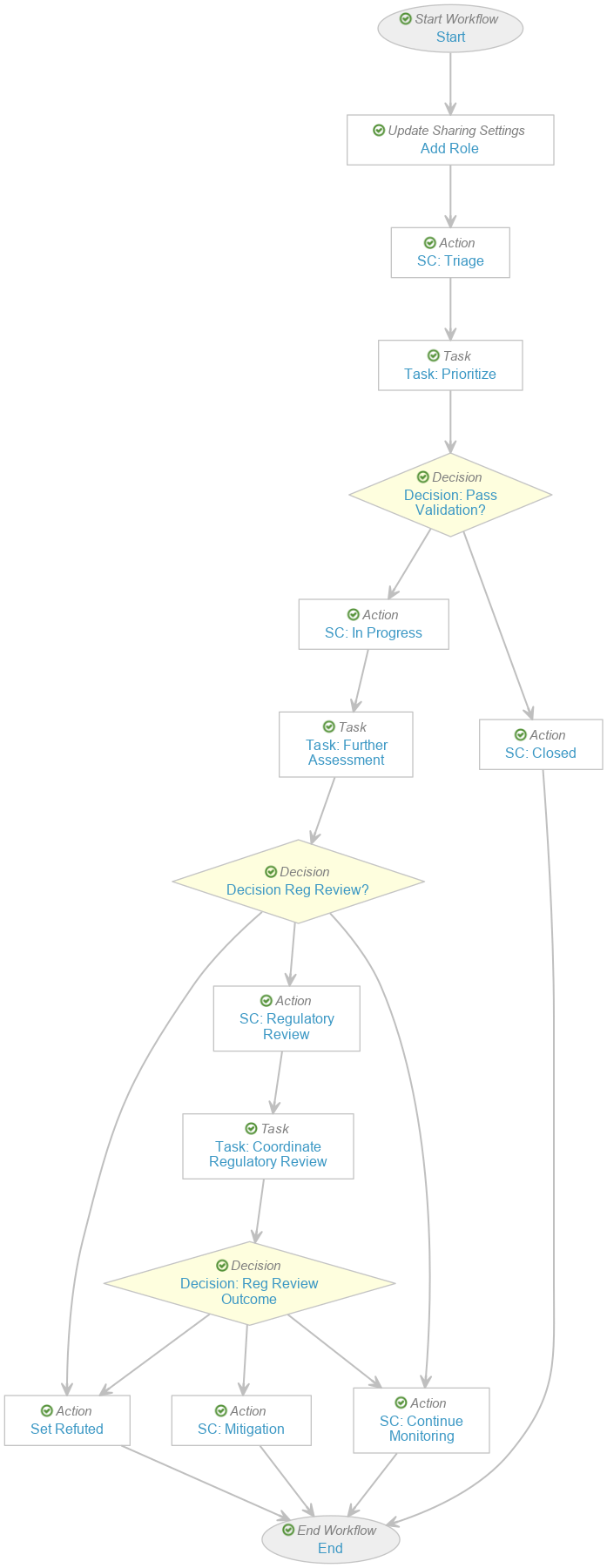
7. In the _Workflow Steps_ section, configure the workflow to include the following steps:
* _Start_ start step
* _Add Role_ update sharing settings step
* _SC: Triage_ state change action step
* _Task: Prioritize_ task step
* _Decision: Pass Validation?_ decision step
* _SC: In Progress_ state change action step
* _Task: Further Assessment_ task step
* _Decision: Reg Review?_ decision step
* _Set Refuted_ action step
* _SC: Regulatory Review_ state change action step
* _Task: Coordinate Regulatory Review_ task step
* _Decision: Reg Review Outcome_ decision step
* _SC: Mitigation_ state change action step
* _SC: Continue Monitoring_ state change action step
* _SC: Closed_ state change action step
* _End_ end step
8. In the **Status** field, select **Make configuration active**.
### Create the Evaluate Disposition Workflow {#evaluate-disposition-workflow}
To create the _Evaluate Disposition Workflow_:
1. Navigate to **Admin > Configuration > Workflows**.
2. Select **Create**.
3. In the _Create Workflow_ window, select **Object Workflow**.
4. Select **Continue**.
5. On the _Create Workflow_ page, populate the fields as follows:
* **Label**: Enter `Evaluate Disposition Workflow`
* **Lifecycle**: Select **Product-Event Disposition Lifecycle**
6. Select **Save**.
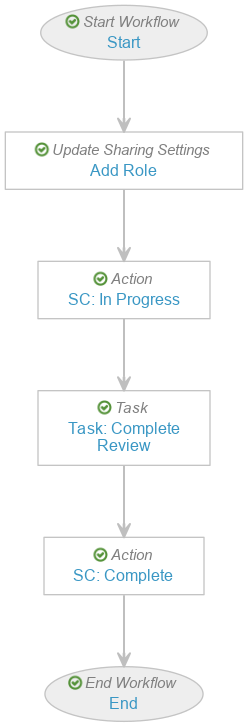
7. In the _Workflow Steps_ section, configure the workflow to include the following steps:
* _Start_ start step
* _Add Role_ update sharing settings step
* _SC: In Progress_ state change action step
* _Task: Complete Review_ task step
* _SC: Complete_ state change action step
* _End_ end step
8. In the **Status** field, select **Make configuration active**.
**Primary MedDRA Term** control field with the slider icon.
4. Configure the rest of the object layout as follows:
* Ensure the _Details_ section contains the following fields in the following order:
* _Primary Product Family_
* _Primary MedDRA Term_
* _Most Recent Disposition_
* _Most Recent Disposition Date_
* Ensure the _Product-Event Dispositions_ section contains the following default columns in the following order:
* _Name_
* _Detection Date_
* _Reporting Period_
* _Primary Source_
* _Final Disposition_
* _Final Disposition Date_
* _Investigation Type_
* _Safety Investigation_
* Ensure the _System_ section contains the following fields in the following order:
* _Combination Name_
* _Created By_
* _Created Date_
* _Primary MedDRA Term_
* _Last Modified By_
* _Last Modified Date_
* Ensure the _Documents_ section contains the following columns in the following order:
* _Name_
* _Document Number_
* _Created By_
* _Created Date_
* Ensure there is a _Workflow Timeline_ section
5. Select **Save**.
### Configure the PEC Period Object Layout {#pec-period-object-layout}
To configure the _PEC Period_ object layout:
1. Navigate to **Admin > Configuration > Objects > PEC Period > Layouts > PEC Period Detail Page Layout**.
2. To the _Details_ section, add the **Primary MedDRA Term** control field with the slider icon.
4. Configure the rest of the object layout as follows:
* Ensure the _Details_ section contains the following fields in the following order:
* _Product-Event Combination_
* _Primary Product Family_
* _Primary MedDRA Term_
* _Primary Source_
* _Reporting Period_
* _Investigation Type_
* _Detection Date_
* _Final Disposition_
* _Final Disposition Date_
* _Safety Investigation_
* Ensure the _Documents_ section contains the following columns in the following order:
* _Name_
* _Document Number_
* _Type_
* _Subtype_
* _Classification_
* _Status_
* Ensure there is a _Workflow Timeline_ section
* Ensure the _System_ section contains the following fields in the following order:
* _Created By_
* _Created Date_
* _Last Modified By_
* _Last Modified Date_
5. Select **Save**.
### Configure the Signal Source Object Layout {#signal-source-object-layout}
To configure the _Signal Source_ object layout:
1. Navigate to **Admin > Configuration > Objects > Signal Source > Layouts > Signal Source Detail Page Layout**.
2. Configure the object layout as follows:
* Ensure the _Details_ section contains the _Name_ field
* Ensure the _Product-Event Dispositions_ section contains the following default columns in the following order:
* _Name_
* _Detection Date_
* _Final Disposition_
* _Final Disposition Date_
* _Reporting Period_
* _Safety Investigation_
* _Investigation Type_
* _Primary Product Family_
* Ensure there is a _Workflow Timeline_ section
* Ensure the _System_ section contains the following fields in the following order:
* _Created By_
* _Created Date_
* _Last Modified By_
* _Last Modified Date_
3. Select **Save**.
### Configure the Safety Investigation Object Layout {#safety-investigation-object-layout}
To configure the _Safety Investigation_ object layout:
1. Navigate to **Admin > Configuration > Objects > Safety Investigation > Layouts > Safety Investigation Detail Page Layout**.
2. Configure the object layout as follows:
* Ensure the _Details_ section contains the following fields in the following order:
* _Product Family_
* _Primary Source_
* _Start Date_
* _Detection Date_
* _Priority_
* _Validation Outcome_
* _Validation Outcome Date_
* _Final Disposition_
* _Final Disposition Date_
* Ensure there is a _Workflow Timeline_ section
* Ensure the _Product-Event Dispositions_ section contains the following default columns in the following order:
* _Name_
* _Detection Date_
* _Final Disposition_
* _Final Disposition Date_
* _Reporting Period_
* _Safety Investigation_
* _Investigation Type_
* _Primary Product Family_
* Ensure the _Summary of Key Data_ section includes the _Summary of Key Data_ field
* Ensure the _Documents_ section contains the following columns in the following order:
* _Name_
* _Document Number_
* _Type_
* _Subtype_
* _Classification_
* _Status_
* Ensure the _System_ section contains the following fields in the following order:
* _Created By_
* _Created Date_
* _Last Modified By_
* _Last Modified Date_
3. Select **Save**.
### Configure the Safety Investigation Reporting Period Object Layout {#safety-investigation-reporting-period-object-layout}
To configure the _Safety Investigation Reporting Period_ object layout:
1. Navigate to **Admin > Configuration > Objects > Signal Reporting Period > Layouts > Safety Investigation Reporting Period Detail Page Layout**.
2. Configure the object layout as follows:
* Ensure the _Details_ section contains the following fields in the following order:
* _Name_
* _Product Family_
* _Start Date_
* _End Date_
* Ensure the _Product-Event Dispositions_ section contains the following default columns in the following order:
* _Name_
* _Detection Date_
* _Final Disposition_
* _Final Disposition Date_
* _Reporting Period_
* _Safety Investigation_
* _Investigation Type_
* _Primary Product Family_
* Ensure the _Safety Investigations_ section contains the following default columns in the following order:
* _Name_
* _Detection Date_
* _Final Disposition_
* _Final Disposition Date_
* _Product Family_
* _Reporting Period_
* _Validation Outcome_
* Ensure there is a _Workflow Timeline_ section
* Ensure the _System_ section contains the following fields in the following order:
* _Created By_
* _Created Date_
* _Last Modified By_
* _Last Modified Date_
3. Select **Save**.
## Configure the Reporting Period Field {#reporting-period-field}
To configure the _Reporting Period_ field on the _Safety Investigation_ object:
1. Navigate to **Admin > Configuration > Objects > Safety Investigation > Fields**.
2. Select **Reporting Period**.
3. Select **Edit**.
4. Clear the **Display in default lists and hovercards** checkbox.
5. Select **Save**.
## Configure Object Workflows {#object-workflows}
Configure signal management object workflows. Use these steps as a starting point, but configure your workflows according to your business processes:
* [_Safety Investigation Workflow_][9]
* [_Evaluate Disposition Workflow_][10]
### Create the Safety Investigation Workflow {#safety-investigation-workflow}
To create the _Safety Investigation Workflow_:
1. Navigate to **Admin > Configuration > Workflows**.
2. Select **Create**.
3. In the _Create Workflow_ window, select **Object Workflow**.
4. Select **Continue**.
5. On the _Create Workflow_ page, populate the fields as follows:
* **Label**: Enter `Safety Investigation Workflow`
* **Lifecycle**: Select **Safety Investigation Lifecycle**
6. Select **Save**.
7. In the _Workflow Steps_ section, configure the workflow to include the following steps:
* _Start_ start step
* _Add Role_ update sharing settings step
* _SC: Triage_ state change action step
* _Task: Prioritize_ task step
* _Decision: Pass Validation?_ decision step
* _SC: In Progress_ state change action step
* _Task: Further Assessment_ task step
* _Decision: Reg Review?_ decision step
* _Set Refuted_ action step
* _SC: Regulatory Review_ state change action step
* _Task: Coordinate Regulatory Review_ task step
* _Decision: Reg Review Outcome_ decision step
* _SC: Mitigation_ state change action step
* _SC: Continue Monitoring_ state change action step
* _SC: Closed_ state change action step
* _End_ end step
8. In the **Status** field, select **Make configuration active**.
### Create the Evaluate Disposition Workflow {#evaluate-disposition-workflow}
To create the _Evaluate Disposition Workflow_:
1. Navigate to **Admin > Configuration > Workflows**.
2. Select **Create**.
3. In the _Create Workflow_ window, select **Object Workflow**.
4. Select **Continue**.
5. On the _Create Workflow_ page, populate the fields as follows:
* **Label**: Enter `Evaluate Disposition Workflow`
* **Lifecycle**: Select **Product-Event Disposition Lifecycle**
6. Select **Save**.
7. In the _Workflow Steps_ section, configure the workflow to include the following steps:
* _Start_ start step
* _Add Role_ update sharing settings step
* _SC: In Progress_ state change action step
* _Task: Complete Review_ task step
* _SC: Complete_ state change action step
* _End_ end step
8. In the **Status** field, select **Make configuration active**.
 ## Configure Object Lifecycles {#object-lifecycles}
To configure signal management object lifecycles:
* [Configure actions on the _Safety Investigation Lifecycle_][12]
* [Configure actions on the _Product-Event Disposition Lifecycle_][13]
* [Configure a _Safety Investigation_ _Lifecycle Stage Group_][14]
### Configure Actions on the Safety Investigation Lifecycle {#safety-investigation-lifecycle}
To update the _Safety Investigation Lifecycle_ object lifecycle to support the _Safety Investigation Workflow_, create the following:
## Configure Object Lifecycles {#object-lifecycles}
To configure signal management object lifecycles:
* [Configure actions on the _Safety Investigation Lifecycle_][12]
* [Configure actions on the _Product-Event Disposition Lifecycle_][13]
* [Configure a _Safety Investigation_ _Lifecycle Stage Group_][14]
### Configure Actions on the Safety Investigation Lifecycle {#safety-investigation-lifecycle}
To update the _Safety Investigation Lifecycle_ object lifecycle to support the _Safety Investigation Workflow_, create the following:
| Lifecycle State | Type | Configuration |
|---|---|---|
| Open | User action |
|
| Monitoring | User action |
|
| Closed | Entry criteria |
|
| Lifecycle State | Type | Configuration |
|---|---|---|
| Active | User action |
|
| Complete | Entry criteria |
|
| Entry action |
|