# Enable Auto-Calculation Override

Learn how to enable the auto-calculation override option for system-calculated fields.

## About the Feature

Support for Auto-Calculation Override was added to Veeva Safety in 22R2. This feature allows you to override system auto-calculations for certain fields with manual data entry. 

Vaults created in 22R2 or later include the necessary configuration by default, while Vaults originally deployed earlier than 22R2 must have the configuration upgrades described on this page to enable this feature.

Once you have completed the configuration steps on this page, see <a href="/en/lr/01155/">Manage Auto-Calculation Override</a> for more information.

## Configure the Safety Application Settings

You must select the **Allow manual override of auto-calculated fields** checkbox on the _Safety General Settings_ page. 

## Replace Standard Case Fields With Control Fields

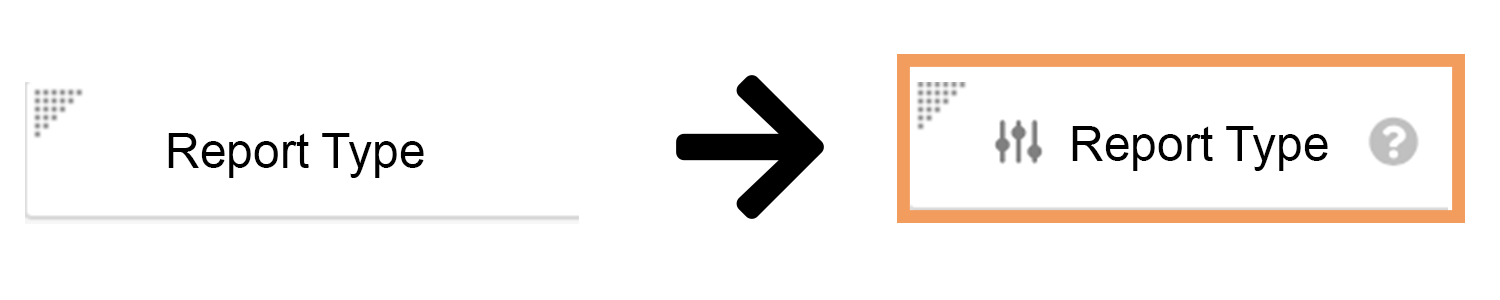
You must replace all the standard fields used in auto-calculation as well as the fields that are auto-calculated with their respective control fields. Control fields are denoted by a **Slider** (<img class="inline" src="https://platform.veevavault.help/assets/images/saf-app-control.png" alt="slider" style="" />) icon.

<a href="https://platform.veevavault.help/assets/images/saf-21r2-field-to-ac.png" data-lightbox="saf-21r2-field-to-ac.png" data-title="Standard Field vs. Control Field" data-alt="Standard Field vs. Control Field">
  <img class="docimage" src="https://platform.veevavault.help/assets/images/saf-21r2-field-to-ac.png" alt="Standard Field vs. Control Field" style="max-width: 60%;"  />
</a>

Navigate to **Admin > Configuration > Objects**. Then, use the following table to ensure the standard fields have been replaced with their control field versions: 

<table>
        <thead>
            <tr>
                <th>Object > Layout</th>
                <th>Section</th>
                <th>Standard Field <i class="fas fa-arrow-right"></i> Control Field</th>
            </tr>
        </thead>
        <tbody>
            <tr>
                <td rowspan="5"><em>Case</em> > Case Page Layout</td>
                <td >Details</td>
                <td><em>Receipt Date</em> <i class="fas fa-arrow-right"></i> <img class="inline" src="https://platform.veevavault.help/assets/images/saf-app-control.png" alt="Slider" style="" /> <em>Receipt Date</em></td>
            </tr>
            <tr>
              <td rowspan="4">Patient</td>
              <td><em>Age at Onset</em> <i class="fas fa-arrow-right"></i> <img class="inline" src="https://platform.veevavault.help/assets/images/saf-app-control.png" alt="Slider" style="" /> <em>Age at Onset</em></td>
            </tr>
            <tr>
              <td><em>Age Group</em> <i class="fas fa-arrow-right"></i> <img class="inline" src="https://platform.veevavault.help/assets/images/saf-app-control.png" alt="Slider" style="" /> <em>Age Group</em></td>
            </tr>
            <tr>
              <td><em>Age at Vaccination (number)</em> and <em>Age at Vaccination (unit)</em> <i class="fas fa-arrow-right"></i> <img class="inline" src="https://platform.veevavault.help/assets/images/saf-app-control.png" alt="Slider" style="" /> <em>Age at Vaccination</em></td>
            </tr>
            <tr>
              <td><em>Date of Birth</em> <i class="fas fa-arrow-right"></i> <img class="inline" src="https://platform.veevavault.help/assets/images/saf-app-control.png" alt="Slider" style="" /> <em>Date of Birth</em></td>
            </tr>
            <tr>
                <td rowspan="2"><em>Case</em> > Parental Case Detail Page Layout </td>
                <td rowspan="2">Parent</td>
                <td><em>Age at Vaccination (number)</em> and <em>Age at Vaccination (unit)</em> <i class="fas fa-arrow-right"></i> <img class="inline" src="https://platform.veevavault.help/assets/images/saf-app-control.png" alt="Slider" style="" /> <em>Age at Vaccination</em></td>
            </tr>
            <tr>
                <td><em>Age</em> and <em>Age (unit)</em> <i class="fas fa-arrow-right"></i> <img class="inline" src="https://platform.veevavault.help/assets/images/saf-app-control.png" alt="Slider" style="" /> <em>Age of Parent</em></td>
            </tr>
            <tr>
              <td rowspan="2"><em>Case Drug History</em> > Case Drug History Detail Page Layout</td>
              <td rowspan="2">Details</td>
              <td><em>Age at Vaccination (number)</em> and <em>Age at Vaccination (unit)</em> <i class="fas fa-arrow-right"></i> <img class="inline" src="https://platform.veevavault.help/assets/images/saf-app-control.png" alt="Slider" style="" /> <em>Age at Vaccination</em></td>
            </tr>
            <tr>
              <td><em>Start Date</em> <i class="fas fa-arrow-right"></i> <img class="inline" src="https://platform.veevavault.help/assets/images/saf-app-control.png" alt="Slider" style="" /> <em>Start Date</em></td>
            </tr>
            <tr>
              <td rowspan="3"><em>Case Adverse Event</em> > Case Adverse Event Detail Page Layout</td>
              <td rowspan="3">Details</td>
              <td><em>Duration</em> <i class="fas fa-arrow-right"></i> <img class="inline" src="https://platform.veevavault.help/assets/images/saf-app-control.png" alt="Slider" style="" /> <em>Duration</em></td>
            </tr>
            <tr>
              <td><em>Onset</em> and <em>Onset (reason omitted)</em> <i class="fas fa-arrow-right"></i> <img class="inline" src="https://platform.veevavault.help/assets/images/saf-app-control.png" alt="Slider" style="" /> <em>Onset</em></td>
            </tr>
              <tr>
              <td><em>Cessation</em> and <em>Cessation (reason omitted)</em> <i class="fas fa-arrow-right"></i> <img class="inline" src="https://platform.veevavault.help/assets/images/saf-app-control.png" alt="Slider" style="" /> <em>Cessation</em></td>
            </tr>
            <tr>
                <td><em>Case Product</em> > 
                  <ul>
                    <li>Biologic Page Layout</li>
                    <li>Case Product Detail Page Layout</li>
                    <li>Drug Page Layout</li>
                    <li>External Product Page Layout</li>
                    <li>Study Product Page Layout</li>
                    <li>Vaccine Detail Page Layout</li>
                  </ul>
                </td>
                <td>Details</td>
                <td><em>Cumulative Dose</em> and <em>Cumulative Dose (unit)</em> <i class="fas fa-arrow-right"></i> <img class="inline" src="https://platform.veevavault.help/assets/images/saf-app-control.png" alt="Slider" style="" /> <em>Cumulative Dose</em></td>
            </tr>
            <tr>
                <td rowspan="2"><em>Case Assessment</em> > Case Assessment Detail Page Layout</td>
                <td rowspan="2">Details</td>
                <td><em>First Dose Latency (number)</em> and <em>First Dose Latency (unit)</em> <i class="fas fa-arrow-right"></i> <img class="inline" src="https://platform.veevavault.help/assets/images/saf-app-control.png" alt="Slider" style="" /> <em>First Dose Latency</em></td>
            </tr>
            <tr>
                <td><em>Last Dose Latency (number)</em> and <em>Last Dose Latency (unit)</em> <i class="fas fa-arrow-right"></i> <img class="inline" src="https://platform.veevavault.help/assets/images/saf-app-control.png" alt="Slider" style="" /> <em>Last Dose Latency</em></td>
            </tr>
        </tbody>
</table>

## Grant Permissions

To grant edit permissions to the auto-calculation checkbox (_Status_ fields) for all relevant users: 
1. Navigate to **Admin > Users & Groups > Permission Sets**.
2. Select the relevant permission set.
3. Select the **Objects** tab.  
4. Under the _Object Field Permissions_ section, grant **Edit** permissions to the following fields:
<table>
  <thead>
      <tr>
        <th>Object</th>
        <th>Field</th>
      </tr>
  </thead>
    <tbody>
      <tr>
        <td rowspan="3"><em>Case</em></td>
        <td><em>Age at Onset (Status)</em></td>
      </tr>
      <tr>
        <td><em>Age Group (Status)</em></td>
      </tr>
      <tr>
        <td><em>Age at Vaccination (Status)</em></td>
      </tr>
      <tr>
        <td><em>Case Drug History</em></td>
        <td><em>Age at Vaccination (Status)</em></td>
      </tr>
      <tr>
        <td><em>Case Adverse Event</em></td>
        <td><em>Duration (Status)</em></td>
      </tr>
      <tr>
        <td><em>Case Product Dosage</em></td>
        <td><em>Duration (Status)</em></td>
      </tr>
      <tr>
        <td><em>Case Product</em></td>
        <td><em>Cumulative Dose (Status)</em></td>
      </tr>
      <tr>
        <td rowspan="2"><em>Case Assessment</em></td>
        <td><em>First Dose Latency (Status)</em></td>
      </tr>
      <tr>
        <td><em>Last Dose Latency (Status)</em></td>
      </tr>
    </tbody>
</table>