# About the Security Settings Page
The **Security Settings** page (**Admin > Settings > Security Settings**) allows you to view information about the Vault. You must have a security profile that grants the **Security Settings**: **Edit** permission in order to modify this.
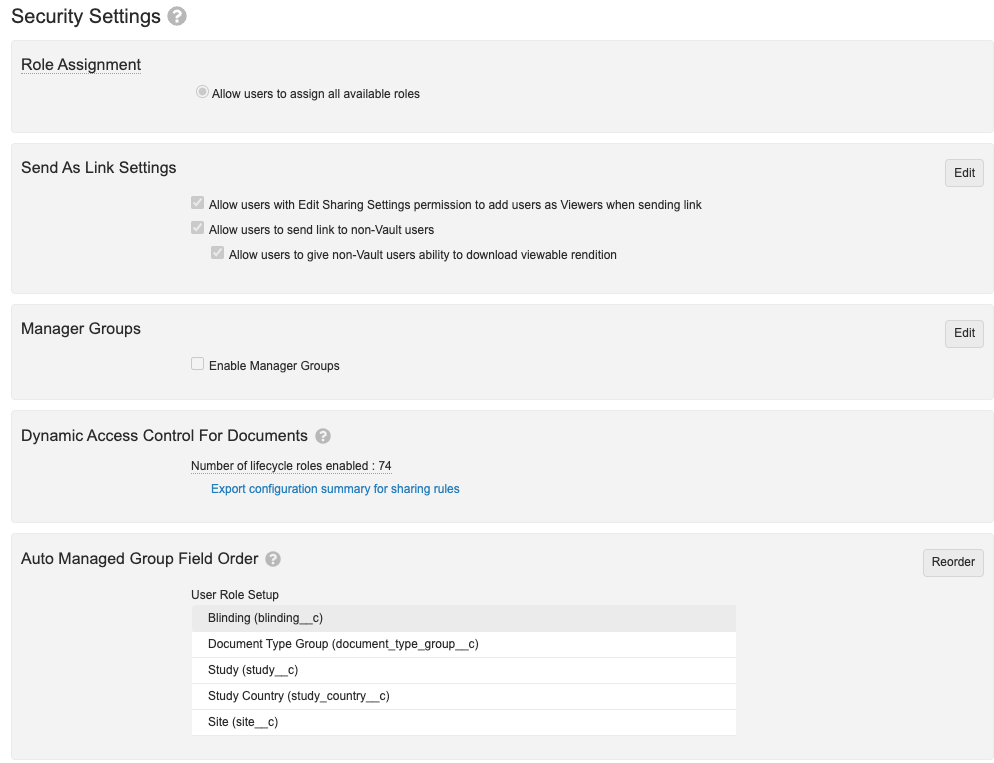 The page includes the following settings:
* **Administrator Access**: Enable or disable "strict security mode" for Admins.
* **Role Assignment**: Define how Vault allows users to be assigned to specific roles.
* **Send as Link Settings**: Modify settings related to the **Send as Link** feature.
* **Enable User Role Constraints**: This setting supports large or global implementations of Dynamic Access Control, specifically to delegate maintenance of _User Role Setup_ records to local users. See Configuring User Role Constraints.
* **Manager Groups**: Creates system-managed groups that include each user's direct manager. See Creating & Managing Groups for details. When this is enabled, you can access the following subsetting:
* **Include Manager Groups when selecting workflow participants**: When workflow initiators begin a workflow or when users reassign a task, manager groups appear in the workflow participant selectors.
* **Dynamic Access Control For Documents**: There are no editable settings in this section; it displays the number of lifecycle roles enabled and allows you to export a configuration summary for sharing roles.
* **Auto Managed Group Field Order**: Allows you to control how Vault names Auto Managed groups for DAC. See About Dynamic Access Control for Documents and Configuring Matching Sharing Rules for Objects for details.
The page includes the following settings:
* **Administrator Access**: Enable or disable "strict security mode" for Admins.
* **Role Assignment**: Define how Vault allows users to be assigned to specific roles.
* **Send as Link Settings**: Modify settings related to the **Send as Link** feature.
* **Enable User Role Constraints**: This setting supports large or global implementations of Dynamic Access Control, specifically to delegate maintenance of _User Role Setup_ records to local users. See Configuring User Role Constraints.
* **Manager Groups**: Creates system-managed groups that include each user's direct manager. See Creating & Managing Groups for details. When this is enabled, you can access the following subsetting:
* **Include Manager Groups when selecting workflow participants**: When workflow initiators begin a workflow or when users reassign a task, manager groups appear in the workflow participant selectors.
* **Dynamic Access Control For Documents**: There are no editable settings in this section; it displays the number of lifecycle roles enabled and allows you to export a configuration summary for sharing roles.
* **Auto Managed Group Field Order**: Allows you to control how Vault names Auto Managed groups for DAC. See About Dynamic Access Control for Documents and Configuring Matching Sharing Rules for Objects for details.