# Enable Risk Management

With the 24R3 release, SafetyDocs allows you to track the authoring, approval, and distribution of global and local risk management plans (RMPs) and additional risk minimization measures (aRMMs), as well as categorize and track identified risks with measures to be taken globally and by market.

After you have configured this feature, see the following articles for more information:

* <a href="/en/lr/805707/">Configure Countries for Local Risk Management Plans</a>
* <a href="/en/lr/798948/">Risk Management Overview</a>

## 25R1 Update: Risk Management Enhancements

With the 25R1 release, SafetyDocs introduces the ability to [set the _Name_ field to a system-managed value][10] for the following objects:
* _RMP Core Implementation Strategy_ 
* _RMP Local Implementation Strategy_

## Overview

To configure risk management in your Vault:

* [Configure security][1]
* [Configure objects][2]
* [Configure document workflows][12]
* [Configure the _Master Risk Lifecycle_ document lifecycle][16]

## Configure Security {#security}

To configure risk management <a href="/en/lr/45887/">security</a>:

* <a href="/en/lr/23647/#copy_permission_set">Create a copy</a> of the standard _Risk Actions_ permission set
* Create a <a href="/en/lr/23647/#how-to-create-new-profiles">security profile</a> with the label `Risk Management`
* Create a <a href="/en/lr/3200/#how-to-create-custom-groups">group</a> with the label `Risk Users` and add the following security profiles<sup>1</sup> as included security profiles:
    * **Risk Management**
    * **All SafetyDocs**
    * **All Case & All SafetyDocs**

 <div class="note-border alert-info">
  <div class="alert alert-info" role="alert">
    <div><i class="far fa-info-circle"></i></div>
    <div class="alert-text">
      <p><strong>Note</strong>: 1. If your Vault does not contain custom security profiles for <em>All SafetyDocs</em> and <em>All Case &amp; All SafetyDocs</em>, <a href="/en/lr/23647/#how-to-create-new-profiles">create these security profiles</a>.</p>
    </div>
  </div>
</div>


## Configure Objects {#objects}

To configure objects:

* [Configure the _RMP Risk Measure_ default object type and _Name_][3]
* [Configure object layouts][4]
* [Configure object lifecycles][7]
* [Optional: Update object record naming conventions][10]

### Configure the RMP Risk Measure Default Object Type & Name {#rmp-risk-measure-object}

To set the default object type for the _RMP Risk Measure_ object:

1. Navigate to **Admin > Configuration > Objects > RMP Risk Measure**.
2. Select **Edit**.
3. In the _Options_ section, from the **Default Object Type** drop-down, select **Core Risk Measure**.
4. Select **Save**.
5. Navigate to the **Fields** tab and select the **Name** field.
6. Select **Edit**.
7. In the **Value Format** field, enter the following formula: \
   `{measure_category__v} - {measure_sub_category__v} - v{version__v} {market__vr.abbreviation_2__v} - {#}`
8. Select **Save**.

<div class="note-border alert-info">
  <div class="alert alert-info" role="alert">
    <div><i class="far fa-info-circle"></i></div>
    <div class="alert-text">
      <p><strong>Note</strong>: The <code class="language-plaintext highlighter-rouge">{#}</code> in the formula provided in step 7 above is required to ensure the record name is unique. Failure to include this may result in unexpected failures in your Vault.</p>
    </div>
  </div>
</div>


### Configure Object Layouts {#object-layouts}

To configure object layouts to support risk management:

* [Configure object layouts for all risk management objects][5]
* [Add the _RMP Required_ field to the _Country_ object][6]

#### Configure the Object Layouts for All Risk Management Objects {#risk-management-object-layouts}

To support risk management, configure the following object layouts using the process below:
- _Core Risk Management Plan_
- _Core Risk Management Plan Version_
- _Local Risk Management Plan_
- _Local Risk Management Plan Version_
- _RMP Risk_
- _Local RMP Risk_
- _RMP Core Implementation Strategy_
- _RMP Local Implementation Strategy_
- _RMP Risk Measure_ object types:
  - _Core Risk Measure_ 
  - _Local Risk Measure_
- _RMP Risk Measure Tracking_

To configure an object layout:

1. <a href="/en/lr/26387/#save-as-layout">Copy</a> the standard object layout.
2. (Optional) <a href="/en/lr/26387/#configuring-object-layouts">Configure the custom object layout</a> to your organization's requirements.
3. <a href="/en/lr/26387/#set-a-default-layout">Set the custom layout as the default</a>.

#### Add the RMP Required Field to the Country Object {#country-object}

To the _Country_ object layout, <a href="/en/lr/26387/#how-to-add-object-fields">add</a> the **RMP Required** field.

### Configure Object Lifecycles {#object-lifecycles}

To configure risk management <a href="/en/lr/30683/">object lifecycles</a>:

* [Configure the _Complete_ state type][8]
* [Configure user and entry actions][9]

#### Configure the Complete State Type {#complete-state-type}

To set the _Complete_ <a href="/en/lr/30683/#state-type">state type</a> for each of the risk management object lifecycles in the table below:

1. Navigate to **Admin > Configuration > Object Lifecycles** and select an object lifecycle from the table below.
2. In the _State Types_ section, select the **Complete State**.
3. Select **Edit**.
4. From the **State** drop-down, select the state that corresponds to the object lifecycle shown in the table below.
5. Select **Save**.

<table>
    <thead>
        <tr>
            <th>Object Lifecycle</th>
            <th>Complete State</th>
        </tr>
    </thead>
    <tbody>
        <tr>
            <td><em>Core RMP Lifecycle</em></td>
            <td><em>Effective</em></td>
        </tr>
        <tr>
            <td><em>Core RMP Version Lifecycle</em></td>
            <td><em>Complete</em></td>
        </tr>
        <tr>
            <td><em>Local RMP Lifecycle</em></td>
            <td><em>Effective</em></td>
        </tr>
        <tr>
            <td><em>Local RMP Version Lifecycle</em></td>
            <td><em>Complete</em></td>
        </tr>
        <tr>
            <td><em>RMP Core Implementation Strategy LC</em></td>
            <td><em>Approved</em></td>
        </tr>
        <tr>
            <td><em>RMP Local Implementation Strategy LC</em></td>
            <td><em>Approved</em></td>
        </tr>
        <tr>
            <td><em>RMP Risk Measure Lifecycle</em></td>
            <td><em>Complete</em></td>
        </tr>
        <tr>
            <td><em>RMP Risk Measure Tracking Lifecycle</em></td>
            <td><em>Complete</em></td>
        </tr>
    </tbody>
</table>


#### Configure User & Entry Actions {#configure-object-lifecycle-actions}

Add the <a href="/en/lr/59885/#define-actions">user actions</a> and <a href="/en/lr/59885/#define-entry-action">entry actions</a> for each of the risk management object lifecycles and states as follows:

<table>
    <thead>
        <tr>
            <th>
                Object Lifecycle
            </th>
            <th>
                State
            </th>
            <th>
                User Actions
            </th>
            <th>
                Entry Actions
            </th>
        </tr>
    </thead>
    <tbody>
        <tr>
            <td rowspan="2" ><em>Core RMP Lifecycle</em></td>
            <td><em>Planned</em></td>
            <td>Always allow the following actions:
            <ul>
            <li><strong>Change State to Effective</strong></li>
            </ul>
            </td>
            <td>
            N/A
            </td>
        </tr>
        <tr>
            <td>
            <em>Effective</em>
            </td>
            <td>
            Always allow the following actions:
            <ul>
            <li><strong>Change State to Historical</strong></li>
            </ul>
            </td>
            <td>
            N/A
            </td>
        </tr>
        <tr>
            <td rowspan="2" ><em>Core RMP Version Lifecycle</em></td>
            <td><em>Planned</em></td>
            <td>Always allow the following actions:
            <ul>
                <li><strong>Change State to Complete</strong></li>
            </ul>
            </td>
            <td>
            N/A
           </td>
        </tr>
        <tr>
            <td><em>Complete</em></td>
            <td>Always allow the following actions:
                <ul>
                <li><strong>Copy to New Version</strong></li>
                <li><strong>Change State to Obsolete</strong></li>
                </ul>
            </td>
            <td>Always perform actions:
            <ul>
                <li><strong>Create Local RMPs</strong></li>
                <li><strong>Update Related Record Field</strong>:</li>
                    <ul>
                    <li><strong>Related Object</strong>: Core Risk Management Plan</li>
                    <li><strong>Fields</strong>: Effective Version</li>
                    <li><strong>Set to Value</strong>: <code>version__v</code></li> 
                    </ul>
            </ul>
           </td>
        </tr>
        <tr>
            <td rowspan="2" ><em>Local RMP Lifecycle</em></td>
            <td><em>Planned</em></td>
            <td>Always allow the following actions:
                <ul>
                    <li><strong>Change State to Effective</strong></li>
                    <li><strong>Change State to Not Applicable</strong></li>
                </ul>
            </td>
            <td>
            N/A
            </td>
        </tr>
        <tr>
            <td><em>Effective</em></td>
            <td>
                Always allow the following actions:
                <ul>
                    <li><strong>Change State to Historical</strong></li>
                </ul>
            </td>
            <td>
                N/A
            </td>
        </tr>
        <tr>
            <td rowspan="3" ><em>Local RMP Version Lifecycle</em></td>
            <td><em>Planned</em></td>
            <td>Always allow the following actions:
                <ul>
                <li><strong>Change State to In Progress</strong></li>
                <li><strong>Change State to Not Applicable</strong></li>
                </ul>
            </td>
            <td>
                N/A
            </td>
        </tr>
        <tr>
            <td><em>In Progress</em></td>
            <td>Always allow the following actions:
                <ul>
                    <li><strong>Change State to Complete</strong></li>
                </ul>
            </td>
            <td>Always perform actions:
                <ul>
                    <li><strong>Create Local RMP Data from Core</strong></li>
                </ul>
            </td>
        </tr>
        <tr>
            <td><em>Complete</em></td>
            <td>Always allow the following actions:
                <ul>
                    <li><strong>Change State to Obsolete</strong></li>
                </ul>
            </td>
            <td>Always perform actions:
                <ul>
                    <li><strong>Update Related Record Field:</strong></li> 
                    <ul>
                        <li><strong>Related Object:</strong> Local Risk Management Plan</li>
                        <li><strong>Fields:</strong> Effective Version</li>
                        <li><strong>Set to Value:</strong> <code>version__v</code></li> 
                    </ul>
                </ul>
            </td>
        </tr>
        <tr>
            <td rowspan="3" ><em>RMP Core Implementation Strategy LC</em></td>
            <td><em>Planned</em></td>
            <td>Always allow the following actions:
                <ul>
                    <li><strong>Change State to In Development</strong></li>
                </ul>
            </td>
            <td>
               N/A
            </td>
        </tr>
        <tr>
            <td><em>In Development</em></td>
           <td>
            Always allow the following actions:
                <ul>
                    <li><strong>Change State to Approved</strong></li>
                </ul>
            </td>
            <td>
                N/A
            </td>
        </tr>
        <tr>
            <td><em>Approved</em></td>
            <td>Always perform actions:
                <ul>
                    <li><strong>Copy to New Version </strong></li>
                    <li><strong> Change State to Superseded</strong></li>
                </ul>
            </td>
            <td>Always perform actions:
                <ul>
                    <li><strong>Supersede Previous Version</strong></li>
                    <li><strong>Create Local Implementations</strong></li>
                </ul>
            </td>
        </tr>
        <tr>
            <td rowspan="3" ><em>RMP Local Implementation Strategy LC</em></td>
            <td><em>Planned</em></td>
            <td>Always allow the following actions:
                <ul>
                    <li><strong>Change State to In Development</strong></li>
                    <li><strong>Change State to Not Applicable</strong></li>
                </ul>
            </td>
            <td>
                N/A
            </td>
        </tr>
        <tr>
            <td><em>In Development</em></td>
            <td>Always allow the following actions:
                <ul>
                    <li><strong>Change State to Approved</strong></li>
                </ul>
            </td>
            <td>
                N/A
            </td>
        </tr>
        <tr>
            <td><em>Approved</em></td>
            <td>Always allow the following actions:
                <ul>
                    <li><strong>Change State to Superseded</strong></li>
                </ul>
            </td>
            <td>Always perform actions:
                <ul>
                    <li><strong>Supersede Previous Version</strong></li>
                </ul>
            </td>
        </tr>
        <tr>
            <td rowspan="3" ><em>RMP Risk Measure Lifecycle</em></td>
            <td><em>Planned</em></td>
            <td>
                Always allow the following actions:
                <ul>
                    <li><strong>Change State to In Progress</strong></li>
                </ul>
            </td>
            <td>
                N/A
            </td>
        </tr>
        <tr>
            <td><em>In Progress</em></td>
            <td>
                Always allow the following actions:
                <ul>
                    <li><strong>Change State to Complete</strong></li>
                </ul>
            </td>
            <td>
                N/A
            </td>
        </tr>
        <tr>
            <td><em>Complete</em></td>
            <td>
                Always allow the following actions:
                <ul>
                    <li><strong>Change State to Obsolete</strong></li>
                </ul>
            </td>
            <td>
                N/A
            </td>
        </tr>
        <tr>
            <td><em>RMP Risk Measure Tracking Lifecycle</em></td>
            <td><em>Targeted</em></td>
            <td>Always allow the following actions:
                <ul>
                    <li><strong>Change State to Complete</strong></li>
                    <li><strong>Change State to Cancelled</strong></li>
                </ul>
            </td>
            <td>
                N/A
            </td>
        </tr>
    </tbody>
</table>

### Optional: Update Object Record Naming Conventions {#object-record-naming-conventions}

To configure object record naming conventions for the _RMP Core Implementation Strategy_ object or the _RMP Local Implementation Strategy_ object, <a href="/en/lr/30986/#how-to-configure-system-managed-object-record-names">configure</a> the _Name_ field as a system-managed value.

## Configure Document Workflows {#document-workflows}

Configure the following <a href="/en/lr/50498/">document workflows</a>:

* [_Authoring - Risk_][13]
* [_Review - Risk_][14]
* [_Approval - Risk_][15]

### Configure the Authoring - Risk Workflow {#authoring-risk-workflow}

To create a risk authoring workflow:

1. Navigate to **Admin > Configuration > Workflows**.
2. Select **Create**. 
3. In the _Create Workflow_ window, select **Document Workflow**.
4. Select **Continue**.
5. On the _Create Workflow_ page, populate the fields as follows:
    * **Label**: Enter `Authoring - Risk`
    * **Lifecycle**: Select **Master Risk Lifecycle**
    * In the _Options_ section, select the **Workflow cancellation comment** checkbox
6. Select **Save**.
7. In the _Workflow Steps_ section, configure the workflow to include the steps defined in the following table.
8. In the **Status** field, select **Make configuration active**.

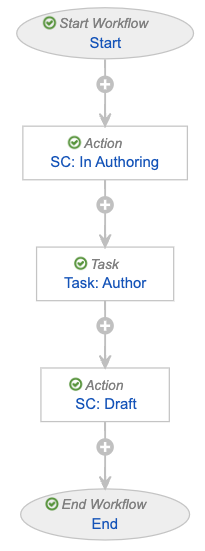
<a href="https://platform.veevavault.help/assets/images/saf-risk-workflow-authoring.png" data-lightbox="saf-risk-workflow-authoring.png" data-title="Workflow: Authoring - Risk" data-alt="Workflow: Authoring - Risk">
  <img class="docimage" src="https://platform.veevavault.help/assets/images/saf-risk-workflow-authoring.png" alt="Workflow: Authoring - Risk" style=""  />
</a>

<table>
    <thead>
        <tr>
            <th>Step Type</th>
            <th>Step Label</th>
            <th>Next Steps</th>
            <th>Step Settings</th>
        </tr>
    </thead>
    <tbody>
        <tr>
            <td><a href="/en/lr/50498/#start">Start step</a></td>
            <td><code>Start</code></td>
            <td><em>SC: In Authoring</em></td>
            <td>
                <p><strong>Start Options</strong></p>
                <ul>
                    <li><strong>Control 1</strong>: Instructions
                        <ul>
                            <li>Please select the authors and due date.</li>
                        </ul>
                    </li>
                    <li><strong>Control 2</strong>: Participants
                        <ul>
                            <li><strong>Participants</strong>: Authors</li>
                            <li><strong>Add Participants</strong>: Allow workflow initiator to select participants</li>
                        </ul>
                    </li>
                    <li><strong>Control 3</strong>: Date
                        <ul>
                            <li><strong>Label</strong>: Due Date</li>
                            <li><strong>Default Value</strong>: <code>today()+days(7)</code></li>
                            <li><strong>Set workflow due date</strong></li>
                        </ul>
                    </li>
                </ul>
            </td>
        </tr>
        <tr>
            <td>State change <a href="/en/lr/50498/#how-to-define-an-action-step">action step</a></td>
            <td><code>SC: In Authoring</code></td>
            <td><em>Task: Author</em></td>
            <td>
                <p><strong>Rules</strong></p>
                <p>Always: <strong>Change State</strong> to <strong>In Authoring</strong></p>
            </td>
        </tr>
        <tr>
            <td><a href="/en/lr/50498/#document_task_steps">Task step</a></td>
            <td><code>Task: Author</code></td>
            <td><em>SC: Draft</em></td>
            <td>
                <p><strong>Task Options</strong></p>
                <ul>
                    <li><strong>Task Label</strong>: Author Document</li>
                    <li><strong>Assign Task To</strong>: Authors
                        <ul>
                        <li>Allow workflow initiator to select assign to all or make available</li> 
                        </ul>
                    </li>
                    <li><strong>Instructions</strong>: Please author the document.</li>
                    <li><strong>Task Requirement</strong>: Required</li>
                </ul>
                <p><strong>Due Date</strong></p>
                <ul>
                    <li><strong>Due Date</strong>: Due Date + 0 Days</li>
                </ul>
                <p><strong>Update Sharing Settings</strong></p>
                <ul>
                    <li><strong>Update Role on Event</strong>:
                        <ul>
                            <li>Task Assignment > Add > Editor</li>
                            <li>Task Reassignment From > Remove > Editor</li>
                            <li>Task Cancellation > Remove > Editor</li> 
                        </ul>
                    </li> 
                </ul>
            </td>
        </tr>
        <tr>
            <td>State change <a href="/en/lr/50498/#how-to-define-an-action-step">action step</a></td>
            <td><code>SC: Draft</code></td>
            <td><em>End</em></td>
            <td>
                <p><strong>Rules</strong></p>
                <p>Always: <strong>Change State</strong> to <strong>Draft</strong></p>
            </td>
        </tr>
        <tr>
            <td><a href="/en/lr/50498/#how-to-define-an-end-workflow-step">End step</a></td>
            <td><code>End</code></td>
            <td>N/A</td>
            <td><strong>End Type</strong>: End Workflow</td>
        </tr>
    </tbody>
</table>


### Configure the Review - Risk Workflow {#review-risk-workflow}

To create a risk review workflow:

1. Navigate to **Admin > Configuration > Workflows**.
2. Select **Create**. 
3. In the _Create Workflow_ window, select **Document Workflow**.
4. Select **Continue**.
5. On the _Create Workflow_ page, populate the fields as follows:
    * **Label**: Enter `Review - Risk`
    * **Lifecycle**: Select **Master Risk Lifecycle**
    * In the _Options_ section, select the **Workflow cancellation comment** checkbox
6. Select **Save**.
7. In the _Workflow Steps_ section, configure the workflow to include the steps defined in the following table.
8. In the **Status** field, select **Make configuration active**.

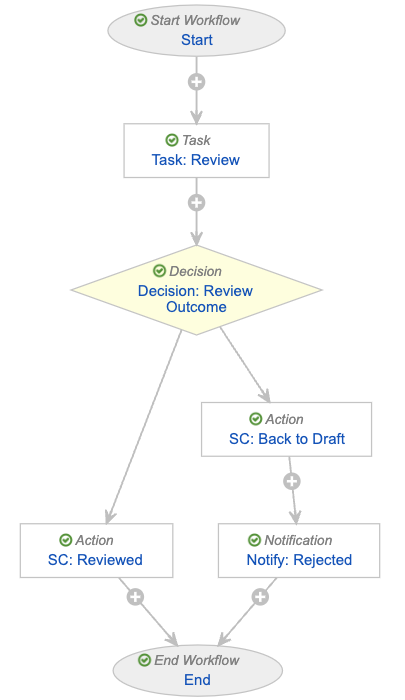
<a href="https://platform.veevavault.help/assets/images/saf-risk-workflow-review.png" data-lightbox="saf-risk-workflow-review.png" data-title="Workflow: Review - Risk" data-alt="Workflow: Review - Risk">
  <img class="docimage" src="https://platform.veevavault.help/assets/images/saf-risk-workflow-review.png" alt="Workflow: Review - Risk" style=""  />
</a>

<table>
    <thead>
        <tr>
            <th>Step Type</th>
            <th>Step Label</th>
            <th>Next Steps</th>
            <th>Step Settings</th>
        </tr>
    </thead>
    <tbody>
        <tr>
            <td><a href="/en/lr/50498/#start">Start step</a></td>
            <td><code>Start</code></td>
            <td><em>Task: Review</em></td>
            <td>
                <p><strong>Start Options</strong></p>
                <ul>
                    <li><strong>Control 1</strong>: Instructions
                        <ul>
                            <li>Please select the reviewers and due date.</li>
                        </ul>
                    </li>
                    <li><strong>Control 2</strong>: Participants
                        <ul>
                            <li><strong>Participants</strong>: Reviewers</li>
                            <li><strong>Add Participants</strong>: Allow workflow initiator to select participants</li>
                        </ul>
                    </li>
                    <li><strong>Control 3</strong>: Date
                        <ul>
                            <li><strong>Label</strong>: Due Date</li>
                            <li><strong>Default Value</strong>: <code>today()+days(7)</code></li>
                        </ul>
                    </li>
                </ul>
            </td>
        </tr>
        <tr>
            <td><a href="/en/lr/50498/#document_task_steps">Task step</a></td>
            <td><code>Task: Review</code></td>
            <td><em>Decision: Review Outcome</em></td>
            <td>
                <p><strong>Task Options</strong></p>
                <ul>
                    <li><strong>Task Label</strong>: Review Document(s)</li>
                    <li><strong>Assign Task To</strong>: Reviewers
                        <ul>
                        <li>Allow workflow initiator to select assign to all or make available</li> 
                        </ul>
                    </li>
                    <li><strong>Instructions</strong>: Please review these documents and specify if they are ready for approval.</li>
                    <li><strong>Task Requirement</strong>: Required</li>
                </ul>
                <p><strong>Due Date</strong></p>
                <ul>
                    <li><strong>Due Date</strong>: Due Date + 0 Days</li>
                </ul>
                <p><strong>Update Sharing Settings</strong></p>
                <ul>
                    <li><strong>Update Role on Event</strong>:
                        <ul>
                            <li>Task Assignment > Add > Reviewer</li>
                            <li>Task Reassignment From > Remove > Reviewer</li>
                            <li>Task Cancellation > Remove > Reviewer</li> 
                        </ul>
                    </li> 
                </ul>
                <p><strong>Prompts</strong></p>
                <ul>
                    <li><strong>Prompt for Verdicts</strong>:
                        <ul>
                            <li><strong>Multiple Verdicts: One Verdict for each item</strong></li>
                        </ul>
                    </li> 
                </ul>
                <p><strong>Verdicts</strong></p>
                <ul>
                    <li><strong>Verdict Label</strong>: Reviewed, Ready for Approval
                        <ul>
                            <li><strong>Prompt for Comments</strong>: Comments</li>
                        </ul>
                    </li> 
                </ul>
                <ul>
                    <li><strong>Verdict Label</strong>: Rejected, Back to Draft
                        <ul>
                            <li><strong>Prompt for Comments</strong>: Reason for rejection</li>
                            <li><strong>Required</strong>: Yes</li>
                        </ul>
                    </li> 
                </ul>
                <p><strong>Notification</strong></p>
                <ul>
                    <li><strong>Notification Template</strong>: Multi-document Workflow Review Task</li> 
                </ul>
            </td>
        </tr>
        <tr>
            <td><a href="/en/lr/50498/#decision">Decision step</a></td>
            <td><code>Decision: Review Outcome</code></td>
            <td>Determined by the step rules</td>
            <td>
                <p><strong>Rules</strong></p>
                <ul>
                    <li><strong>Rule 1</strong>
                        <ul>
                            <li><strong>Condition Type</strong>: All conditions are met</li>
                            <li><strong>If</strong>: Task > Task: Review > all labels equal > Reviewed, Ready for Approval</li>
                            <li><strong>then</strong>: SC: Reviewed</li>
                        </ul>
                    </li> 
                    <li><strong>Else</strong>
                        <ul>
                            <li><strong>then</strong>: SC: Back to Draft</li>
                        </ul>
                    </li> 
                </ul>
            </td>
        </tr>
        <tr>
            <td>State change <a href="/en/lr/50498/#how-to-define-an-action-step">action step</a></td>
            <td><code>SC: Reviewed</code></td>
            <td><em>End</em></td>
            <td>
                <p><strong>Rules</strong></p>
                <p>Always: <strong>Change State</strong> to <strong>Reviewed</strong></p>
            </td>
        </tr>
        <tr>
            <td>State change <a href="/en/lr/50498/#how-to-define-an-action-step">action step</a></td>
            <td><code>SC: Back to Draft</code></td>
            <td><em>Notify: Rejected</em></td>
            <td>
                <p><strong>Rules</strong></p>
                <p>Always: <strong>Change State</strong> to <strong>Draft</strong></p>
            </td>
        </tr>
        <tr>
            <td><a href="/en/lr/50498/#how-to-define-a-notification-step">Notification step</a></td>
            <td><code>Notify: Rejected</code></td>
            <td><em>End</em></td>
            <td>
                <p><strong>Notification Options</strong></p>
                <ul>
                    <li><strong>Notification Template</strong>: Multi-document Workflow Rejected</li>
                    <li><strong>Recipient</strong>: Workflow Owner</li>
                    <li><strong>Include verdicts and comments from previous tasks</strong></li>
                    <li><strong>Select Tasks</strong>: Task: Review</li>
                </ul>
            </td>
        </tr>
        <tr>
            <td><a href="/en/lr/50498/#how-to-define-an-end-workflow-step">End step</a></td>
            <td><code>End</code></td>
            <td>N/A</td>
            <td><strong>End Type</strong>: End Workflow</td>
        </tr>
    </tbody>
</table>


### Configure the Approval - Risk Workflow {#approval-risk-workflow}


To create a risk approval workflow:

1. Navigate to **Admin > Configuration > Workflows**.
2. Select **Create**. 
3. In the _Create Workflow_ window, select **Document Workflow**.
4. Select **Continue**.
5. On the _Create Workflow_ page, populate the fields as follows:
    * **Label**: Enter `Approval - Risk`
    * **Lifecycle**: Select **Master Risk Lifecycle**
    * In the _Options_ section, select the **Workflow cancellation comment** checkbox
6. Select **Save**.
7. In the _Workflow Steps_ section, configure the workflow to include the steps defined in the following table.
8. In the **Status** field, select **Make configuration active**.

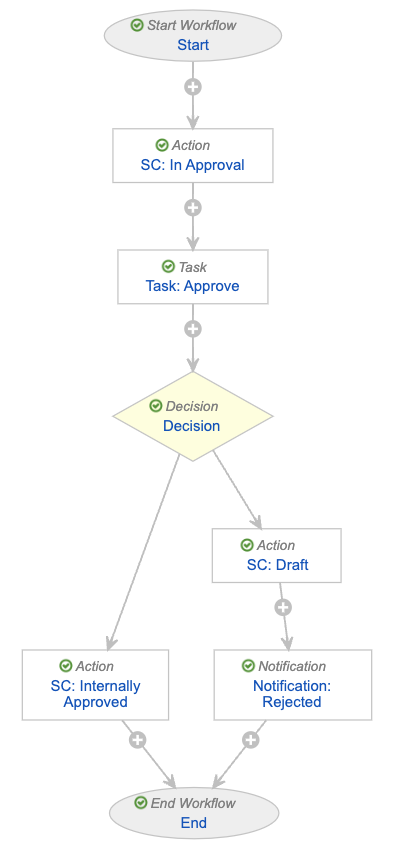
<a href="https://platform.veevavault.help/assets/images/saf-risk-workflow-approval.png" data-lightbox="saf-risk-workflow-approval.png" data-title="Workflow: Approval - Risk" data-alt="Workflow: Approval - Risk">
  <img class="docimage" src="https://platform.veevavault.help/assets/images/saf-risk-workflow-approval.png" alt="Workflow: Approval - Risk" style=""  />
</a>

<table>
    <thead>
        <tr>
            <th>Step Type</th>
            <th>Step Label</th>
            <th>Next Steps</th>
            <th>Step Settings</th>
        </tr>
    </thead>
    <tbody>
        <tr>
            <td><a href="/en/lr/50498/#start">Start step</a></td>
            <td><code>Start</code></td>
            <td><em>SC: In Approval</em></td>
            <td>
                <p><strong>Start Options</strong></p>
                <ul>
                    <li><strong>Control 1</strong>: Instructions
                        <ul>
                            <li>Please select the approvers and due date.</li>
                        </ul>
                    </li>
                    <li><strong>Control 2</strong>: Participants
                        <ul>
                            <li><strong>Participants</strong>: Approvers</li>
                            <li><strong>Add Participants</strong>: Allow workflow initiator to select participants</li>
                        </ul>
                    </li>
                    <li><strong>Control 3</strong>: Date
                        <ul>
                            <li><strong>Label</strong>: Due Date</li>
                            <li><strong>Default Value</strong>: <code>today()+days(7)</code></li>
                            <li><strong>Set workflow due date</strong></li>
                        </ul>
                    </li>
                </ul>
            </td>
        </tr>
        <tr>
            <td>State change <a href="/en/lr/50498/#how-to-define-an-action-step">action step</a></td>
            <td><code>SC: In Approval</code></td>
            <td><em>Task: Approve</em></td>
            <td>
                <p><strong>Rules</strong></p>
                <p>Always: <strong>Change State</strong> to <strong>In Approval</strong></p>
            </td>
        </tr>
        <tr>
            <td><a href="/en/lr/50498/#document_task_steps">Task step</a></td>
            <td><code>Task: Approve</code></td>
            <td><em>Decision</em></td>
            <td>
                <p><strong>Task Options</strong></p>
                <ul>
                    <li><strong>Task Label</strong>: Approve Document(s)</li>
                    <li><strong>Assign Task To</strong>: Approvers
                        <ul>
                        <li>Allow workflow initiator to select assign to all or make available</li> 
                        </ul>
                    </li>
                    <li><strong>Instructions</strong>: Please review and approve documents. If approved, they move to the <em>Internally Approved</em> state.</li>
                    <li><strong>Task Requirement</strong>: Required</li>
                </ul>
                <p><strong>Due Date</strong></p>
                <ul>
                    <li><strong>Due Date</strong>: Due Date + 0 Days</li>
                </ul>
                <p><strong>Update Sharing Settings</strong></p>
                <ul>
                    <li><strong>Update Role on Event</strong>:
                        <ul>
                            <li>Task Assignment > Add > Approver</li>
                            <li>Task Reassignment From > Remove > Approver</li>
                            <li>Task Cancellation > Remove > Approver</li> 
                        </ul>
                    </li> 
                </ul>
                <p><strong>Prompts</strong></p>
                <ul>
                    <li><strong>Prompt for Verdicts</strong>:
                        <ul>
                            <li><strong>Multiple Verdicts: One Verdict for each item</strong></li>
                        </ul>
                    </li> 
                </ul>
                <p><strong>Verdicts</strong></p>
                <ul>
                    <li><strong>Verdict Label</strong>: Approved
                        <ul>
                            <li><strong>Prompt for Comments</strong>: Comments</li>
                            <li><strong>eSignature</strong>:
                                <ul>
                                    <li><strong>Instructions</strong>: Please provide an eSignature</li>
                                    <li><strong>Manifest eSignature on document</strong></li>
                                </ul>
                            </li>
                        </ul>
                    </li> 
                </ul>
                <ul>
                    <li><strong>Verdict Label</strong>: Rejected, Back to Draft
                        <ul>
                            <li><strong>Prompt for Comments</strong>: Reason for rejection</li>
                            <li><strong>Required</strong>: Yes</li>
                        </ul>
                    </li> 
                </ul>
                <p><strong>Notification</strong></p>
                <ul>
                    <li><strong>Notification Template</strong>: Multi-document Workflow Review Task</li> 
                </ul>
            </td>
        </tr>
        <tr>
            <td><a href="/en/lr/50498/#decision">Decision step</a></td>
            <td><code>Decision</code></td>
            <td>Determined by the step rules</td>
            <td>
                <p><strong>Rules</strong></p>
                <ul>
                    <li><strong>Rule 1</strong>
                        <ul>
                            <li><strong>Condition Type</strong>: All conditions are met</li>
                            <li><strong>If</strong>: Task > Task: Approve > all labels equal > Approved</li>
                            <li><strong>then</strong>: SC: Internally Approved</li>
                        </ul>
                    </li> 
                    <li><strong>Else</strong>
                        <ul>
                            <li><strong>then</strong>: SC: Draft</li>
                        </ul>
                    </li> 
                </ul>
            </td>
        </tr>
        <tr>
            <td>State change <a href="/en/lr/50498/#how-to-define-an-action-step">action step</a></td>
            <td><code>SC: Internally Approved</code></td>
            <td><em>End</em></td>
            <td>
                <p><strong>Rules</strong></p>
                <p>Always: <strong>Change State</strong> to <strong>Internally Approved</strong></p>
            </td>
        </tr>
        <tr>
            <td>State change <a href="/en/lr/50498/#how-to-define-an-action-step">action step</a></td>
            <td><code>SC: Draft</code></td>
            <td><em>Notification: Rejected</em></td>
            <td>
                <p><strong>Rules</strong></p>
                <p>Always:</p>
                <ul>
                    <li><strong>Change State</strong> to <strong>Draft</strong></li>
                    <li><strong>Remove eSignatures from items</strong> for <strong>Task: Approve</strong> with verdicts <strong>Approved</strong></li>
                </ul>
            </td>
        </tr>
        <tr>
            <td><a href="/en/lr/50498/#how-to-define-a-notification-step">Notification step</a></td>
            <td><code>Notification: Rejected</code></td>
            <td><em>End</em></td>
            <td>
                <p><strong>Notification Options</strong></p>
                <ul>
                    <li><strong>Notification Template</strong>: Multi-document Workflow Rejected</li>
                    <li><strong>Recipient</strong>: Workflow Owner</li>
                    <li><strong>Include verdicts and comments from previous tasks</strong></li>
                    <li><strong>Select Tasks</strong>: Task: Approve</li>
                </ul>
            </td>
        </tr>
        <tr>
            <td><a href="/en/lr/50498/#how-to-define-an-end-workflow-step">End step</a></td>
            <td><code>End</code></td>
            <td>N/A</td>
            <td><strong>End Type</strong>: End Workflow</td>
        </tr>
    </tbody>
</table>

## Configure the Master Risk Lifecycle Document Lifecycle {#document-lifecycle}

To configure the _Master Risk Lifecycle_ <a href="/en/lr/2306/">document lifecycle</a>:

* [Configure security settings][17]
* [Configure the _Editor_ role][29]
* [Configure user and entry actions][30]

### Configure Security Settings {#security-settings}

Update <a href="/en/lr/2572/#view">document lifecycle state security settings</a> for the following states on the _Master Risk Lifecycle_:

* [_Draft_][18]
* [_In Authoring_][19]
* [_In Review_][20]
* [_Reviewed_][21]
* [_In Approval_][22]
* [_Internally Approved_][23]
* [_Approved for Use_][24]
* [_Current in Use_][25]
* [_Superseded_][26]
* [_Historical_][27]
* [_Planned_][28]

<div class="note-border alert-info">
  <div class="alert alert-info" role="alert">
    <div><i class="far fa-info-circle"></i></div>
    <div class="alert-text">
      <p><strong>Note</strong>: We recommend these security settings based on the workflow and lifecycle configurations provided in this article. Depending on your business processes, you may require different settings.</p>
    </div>
  </div>
</div>


#### Configure Draft State Security Settings {#security-settings-draft}

Update lifecycle state security settings on the _Draft_ state of the _Master Risk Lifecycle_ as follows:

| Role | Security Settings
| ---  | ---
| _Owner_ | {::nomarkdown}<ul><li>View Document</li><li>View Content</li><li>Edit Fields</li><li>Edit Relationships</li><li>Edit Sharing Settings</li><li>Annotate</li><li>Create Anchors</li><li>Download Source</li><li>Edit Document</li><li>Manage Viewable Rendition</li><li>Change Owner</li></ul>{:/} |
| _Coordinator_ | {::nomarkdown}<ul><li>View Document</li><li>View Content</li><li>Edit Fields</li><li>Edit Relationships</li><li>Edit Sharing Settings</li></ul>{:/} |
| _Editor_ | {::nomarkdown}<ul><li>View Document</li><li>View Content</li><li>Edit Fields</li><li>Edit Relationships</li><li>Edit Sharing Settings</li><li>Annotate</li><li>Create Anchors</li><li>Download Source</li><li>Edit Document</li></ul>{:/} |
| _Viewer_ | {::nomarkdown}<ul><li>View Document</li><li>View Content</li><li>Annotate</li></ul>{:/} |
| _Reviewer_ | {::nomarkdown}<ul><li>View Document</li><li>View Content</li><li>Annotate</li></ul>{:/} |
| _Approver_ | {::nomarkdown}<ul><li>View Document</li><li>View Content</li><li>Annotate</li></ul>{:/} |

#### Configure In Authoring State Security Settings {#security-settings-in-authoring}

Update lifecycle state security settings on the _In Authoring_ state of the _Master Risk Lifecycle_ as follows:

| Role | Security Settings
| ---  | ---
| _Owner_ | {::nomarkdown}<ul><li>View Document</li><li>View Content</li><li>Edit Fields</li><li>Edit Relationships</li><li>Edit Sharing Settings</li><li>Annotate</li><li>Download Source</li><li>Edit Document</li></ul>{:/} |
| _Coordinator_ | {::nomarkdown}<ul><li>View Document</li><li>View Content</li></ul>{:/} |
| _Editor_ | {::nomarkdown}<ul><li>View Document</li><li>View Content</li><li>Edit Fields</li><li>Edit Sharing Settings</li><li>Annotate</li><li>Download Source</li><li>Edit Document</li></ul>{:/} |
| _Viewer_ | {::nomarkdown}<ul><li>View Document</li><li>View Content</li></ul>{:/} |
| _Reviewer_ | {::nomarkdown}<ul><li>View Document</li><li>View Content</li><li>Annotate</li></ul>{:/} |
| _Approver_ | {::nomarkdown}<ul><li>View Document</li><li>View Content</li><li>Annotate</li></ul>{:/} |

#### Configure In Review State Security Settings {#security-settings-in-review}

Update lifecycle state security settings on the _In Review_ state of the _Master Risk Lifecycle_ as follows:

| Role | Security Settings
| ---  | ---
| _Owner_ | {::nomarkdown}<ul><li>View Document</li><li>View Content</li><li>Edit Sharing Settings</li><li>Annotate</li><li>Download Source</li><li>Change Coordinator</li></ul>{:/} |
| _Coordinator_ | {::nomarkdown}<ul><li>View Document</li><li>View Content</li></ul>{:/} |
| _Editor_ | {::nomarkdown}<ul><li>View Document</li><li>View Content</li><li>Edit Sharing Settings</li><li>Annotate</li><li>Download Source</li></ul>{:/} |
| _Viewer_ | {::nomarkdown}<ul><li>View Document</li><li>View Content</li></ul>{:/} |
| _Reviewer_ | {::nomarkdown}<ul><li>View Document</li><li>View Content</li><li>Annotate</li><li>Download Source</li></ul>{:/} |
| _Approver_ | {::nomarkdown}<ul><li>View Document</li><li>View Content</li><li>Annotate</li><li>Download Source</li></ul>{:/} |

#### Configure Reviewed State Security Settings {#security-settings-reviewed}

Update lifecycle state security settings on the _Reviewed_ state of the _Master Risk Lifecycle_ as follows:

| Role | Security Settings
| ---  | ---
| _Owner_ | {::nomarkdown}<ul><li>View Document</li><li>View Content</li><li>Edit Sharing Settings</li><li>Change Owner</li></ul>{:/} |
| _Coordinator_ | {::nomarkdown}<ul><li>View Document</li><li>View Content</li></ul>{:/} |
| _Editor_ | {::nomarkdown}<ul><li>View Document</li><li>View Content</li></ul>{:/} |
| _Viewer_ | {::nomarkdown}<ul><li>View Document</li><li>View Content</li></ul>{:/} |
| _Reviewer_ | {::nomarkdown}<ul><li>View Document</li><li>View Content</li></ul>{:/} |
| _Approver_ | {::nomarkdown}<ul><li>View Document</li><li>View Content</li></ul>{:/} |

#### Configure In Approval State Security Settings {#security-settings-in-approval}

Update lifecycle state security settings on the _In Approval_ state of the _Master Risk Lifecycle_ as follows:

| Role | Security Settings
| ---  | ---
| _Owner_ | {::nomarkdown}<ul><li>View Document</li><li>View Content</li><li>Edit Sharing Settings</li><li>Annotate</li><li>Change Owner</li></ul>{:/} |
| _Coordinator_ | {::nomarkdown}<ul><li>View Document</li><li>View Content</li></ul>{:/} |
| _Editor_ | {::nomarkdown}<ul><li>View Document</li><li>View Content</li></ul>{:/} |
| _Viewer_ | {::nomarkdown}<ul><li>View Document</li><li>View Content</li></ul>{:/} |
| _Consumer_ | {::nomarkdown}<ul><li>View Document</li><li>View Content</li></ul>{:/} |
| _Reviewer_ | {::nomarkdown}<ul><li>View Document</li><li>View Content</li><li>Annotate</li></ul>{:/} |
| _Approver_ | {::nomarkdown}<ul><li>View Document</li><li>View Content</li></ul>{:/} |

#### Configure Internally Approved State Security Settings {#security-settings-internally-approved}

Update lifecycle state security settings on the _Internally Approved_ state of the _Master Risk Lifecycle_ as follows:

| Role | Security Settings
| ---  | ---
| _Owner_ | {::nomarkdown}<ul><li>View Document</li><li>View Content</li><li>Edit Sharing Settings</li><li>Version</li><li>Change Owner</li></ul>{:/} |
| _Coordinator_ | {::nomarkdown}<ul><li>View Document</li><li>View Content</li></ul>{:/} |
| _Editor_ | {::nomarkdown}<ul><li>View Document</li><li>View Content</li><li>Version</li></ul>{:/} |
| _Viewer_ | {::nomarkdown}<ul><li>View Document</li><li>View Content</li></ul>{:/} |
| _Consumer_ | {::nomarkdown}<ul><li>View Document</li><li>View Content</li></ul>{:/} |
| _Reviewer_ | {::nomarkdown}<ul><li>View Document</li><li>View Content</li></ul>{:/} |
| _Approver_ | {::nomarkdown}<ul><li>View Document</li><li>View Content</li></ul>{:/} |

#### Configure Approved for Use State Security Settings {#security-settings-approved-for-use}

Update lifecycle state security settings on the _Approved for Use_ state of the _Master Risk Lifecycle_ as follows:

| Role | Security Settings
| ---  | ---
| _Owner_ | {::nomarkdown}<ul><li>View Document</li><li>View Content</li><li>Edit Sharing Settings</li><li>Version</li><li>Change Owner</li></ul>{:/} |
| _Coordinator_ | {::nomarkdown}<ul><li>View Document</li><li>View Content</li></ul>{:/} |
| _Editor_ | {::nomarkdown}<ul><li>View Document</li><li>View Content</li><li>Version</li></ul>{:/} |
| _Viewer_ | {::nomarkdown}<ul><li>View Document</li><li>View Content</li></ul>{:/} |
| _Consumer_ | {::nomarkdown}<ul><li>View Document</li><li>View Content</li></ul>{:/} |
| _Approver_ | {::nomarkdown}<ul><li>View Document</li><li>View Content</li></ul>{:/} |

#### Configure Current in Use State Security Settings {#security-settings-current-in-use}

Update lifecycle state security settings on the _Current in Use_ state of the _Master Risk Lifecycle_ as follows:

| Role | Security Settings
| ---  | ---
| _Owner_ | {::nomarkdown}<ul><li>View Document</li><li>View Content</li><li>Edit Sharing Settings</li><li>Download Source</li><li>Change Owner</li></ul>{:/} |
| _Coordinator_ | {::nomarkdown}<ul><li>View Document</li><li>View Content</li></ul>{:/} |
| _Editor_ | {::nomarkdown}<ul><li>View Document</li><li>View Content</li><li>Download Source</li></ul>{:/} |
| _Viewer_ | {::nomarkdown}<ul><li>View Document</li><li>View Content</li><li>Download Source</li></ul>{:/} |
| _Consumer_ | {::nomarkdown}<ul><li>View Document</li><li>View Content</li><li>Download Source</li></ul>{:/} |
| _Reviewer_ | {::nomarkdown}<ul><li>View Document</li><li>View Content</li><li>Download Source</li></ul>{:/} |
| _Approver_ | {::nomarkdown}<ul><li>View Document</li><li>View Content</li><li>Download Source</li></ul>{:/} |

#### Configure Superseded State Security Settings {#security-settings-superseded}

Update lifecycle state security settings on the _Superseded_ state of the _Master Risk Lifecycle_ as follows:

| Role | Security Settings
| ---  | ---
| _Owner_ | {::nomarkdown}<ul><li>View Document</li><li>View Content</li><li>Edit Sharing Settings</li><li>Change Owner</li></ul>{:/} |
| _Coordinator_ | {::nomarkdown}<ul><li>View Document</li><li>View Content</li></ul>{:/} |
| _Editor_ | {::nomarkdown}<ul><li>View Document</li><li>View Content</li></ul>{:/} |
| _Viewer_ | {::nomarkdown}<ul><li>View Document</li><li>View Content</li></ul>{:/} |
| _Reviewer_ | {::nomarkdown}<ul><li>View Document</li><li>View Content</li></ul>{:/} |
| _Approver_ | {::nomarkdown}<ul><li>View Document</li><li>View Content</li></ul>{:/} |

#### Configure Historical State Security Settings {#security-settings-historical}

Update lifecycle state security settings on the _Historical_ state of the _Master Risk Lifecycle_ as follows:

| Role | Security Settings
| ---  | ---
| _Owner_ | {::nomarkdown}<ul><li>View Document</li><li>View Content</li><li>Edit Sharing Settings</li><li>Download Source</li><li>Change Owner</li></ul>{:/} |
| _Coordinator_ | {::nomarkdown}<ul><li>View Document</li><li>View Content</li></ul>{:/} |
| _Editor_ | {::nomarkdown}<ul><li>View Document</li><li>View Content</li><li>Download Source</li></ul>{:/} |
| _Viewer_ | {::nomarkdown}<ul><li>View Document</li><li>View Content</li></ul>{:/} |

#### Configure Planned State Security Settings {#security-settings-planned}

Update lifecycle state security settings on the _Planned_ state of the _Master Risk Lifecycle_ as follows:

| Role | Security Settings
| ---  | ---
| _Owner_ | {::nomarkdown}<ul><li>View Document</li><li>View Content</li><li>Edit Fields</li><li>Edit Sharing Settings</li><li>Annotate</li><li>Create Anchors</li><li>Download Source</li><li>Manage Viewable Rendition</li><li>Reclassify</li><li>Change Owner</li></ul>{:/} |
| _Coordinator_ | {::nomarkdown}<ul><li>View Document</li><li>View Content</li><li>Edit Sharing Settings</li><li>Annotate</li><li>Create Anchors</li></ul>{:/} |
| _Editor_ | {::nomarkdown}<ul><li>View Document</li><li>View Content</li><li>Edit Fields</li><li>Edit Sharing Settings</li><li>Annotate</li><li>Create Anchors</li><li>Download Source</li></ul>{:/} |

### Configure the Editor Role {#editor-lifecycle-role}

To configure the _Editor_ role on the _Master Risk Lifecycle_:

1. From the **Master Risk Lifecycle**, select the **Roles** tab.
2. Select the **Editor** role.
3. Select **Edit**.
4. In the _Options_ section under **Add Default Users When**, select the **Creating a document** checkbox.
5. Select **Save**.
6. To <a href="/en/lr/6572/#defineAllowed">define allowed and default users</a>, add the **Risk Users** group, then select the **Default User** checkbox.

### Configure User & Entry Actions {#document-lifecycle-actions}

Create <a href="/en/lr/12399/#create">entry actions</a> and <a href="/en/lr/12339/#create">user actions</a> on the following states of the _Master Risk Lifecycle_:

<table>
    <thead>
        <tr>
            <th>State</th>
            <th>User Actions</th>
            <th>Entry Actions</th>
        </tr>
    </thead>
    <tbody>
        <tr>
            <td><em>Planned</em></td>
            <td>Always allow the following actions:
                <ul>
                    <li>Change State to Draft</li>
                </ul>
            </td>
            <td>N/A</td>
        </tr>
        <tr>
            <td><em>Draft</em></td>
            <td>Always allow the following actions:
                <ul>
                    <li>Workflow > Authoring - Risk<br><strong>Action Label</strong>: Author Risk Documents</li>
                    <li>Workflow > Review - Risk<br><strong>Action Label</strong>: Review Risk Documents</li>
                    <li>Workflow > Approval - Risk<br><strong>Action Label</strong>: Approve Risk Documents</li>
                </ul>
            </td>
            <td>N/A</td>
        </tr>
        <tr>
            <td><em>Reviewed</em></td>
            <td>Always allow the following actions:
                <ul>
                    <li>Workflow > Approval - Risk<br><strong>Action Label</strong>: Approve Risk Documents</li>
                </ul>
            </td>
            <td>N/A</td>
        </tr>
        <tr>
            <td><em>Internally Approved</em></td>
            <td>Always allow the following actions:
                <ul>
                    <li>Change State to Approved for Use</li>
                </ul>
            </td>
            <td>Always perform actions:
                <ul>
                    <li>Set new major version</li>
                    <li>Set previous steady state to superseded</li>
                </ul>
            </td>
        </tr>
        <tr>
            <td><em>Approved for Use</em></td>
            <td>Always allow the following actions:
                <ul>
                    <li>Change State to Current in Use</li>
                </ul>
           </td>
           <td>N/A</td>
        </tr>
        <tr>
            <td><em>Current in Use</em></td>
            <td>Always allow the following actions:
                <ul>
                    <li>Change State to Historical</li>
                </ul>
            </td>
            <td>N/A</td>
        </tr>
    </tbody>
</table>


[1]: #security
[2]: #objects
[3]: #rmp-risk-measure-object
[4]: #object-layouts
[5]: #risk-management-object-layouts
[6]: #country-object
[7]: #object-lifecycles
[8]: #complete-state-type
[9]: #configure-object-lifecycle-actions
[10]: #object-record-naming-conventions
[12]: #document-workflows
[13]: #authoring-risk-workflow
[14]: #review-risk-workflow
[15]: #approval-risk-workflow
[16]: #document-lifecycle
[17]: #security-settings
[18]: #security-settings-draft
[19]: #security-settings-in-authoring
[20]: #security-settings-in-review
[21]: #security-settings-reviewed
[22]: #security-settings-in-approval
[23]: #security-settings-internally-approved
[24]: #security-settings-approved-for-use
[25]: #security-settings-current-in-use
[26]: #security-settings-superseded
[27]: #security-settings-historical
[28]: #security-settings-planned
[29]: #editor-lifecycle-role
[30]: #document-lifecycle-actions