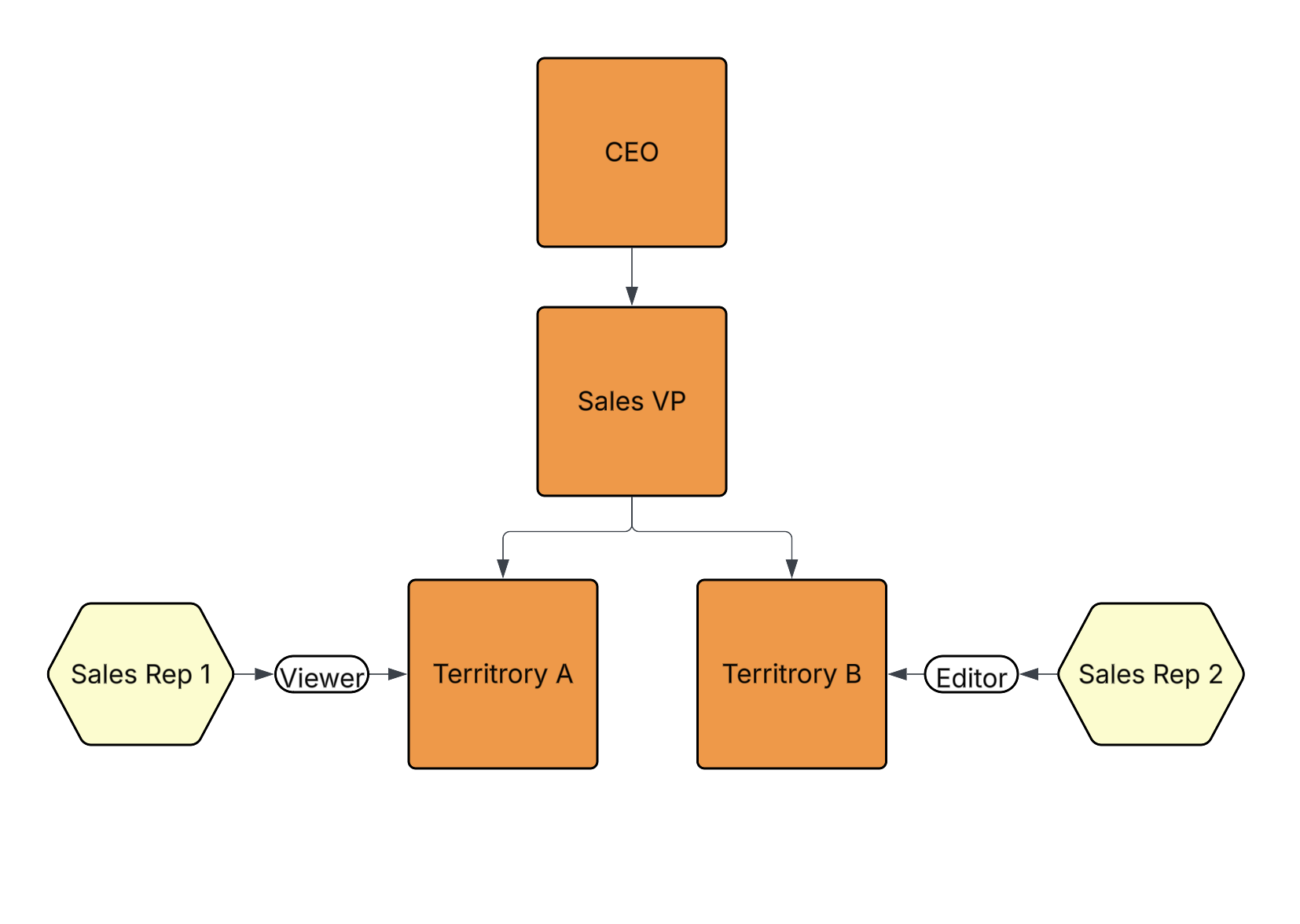
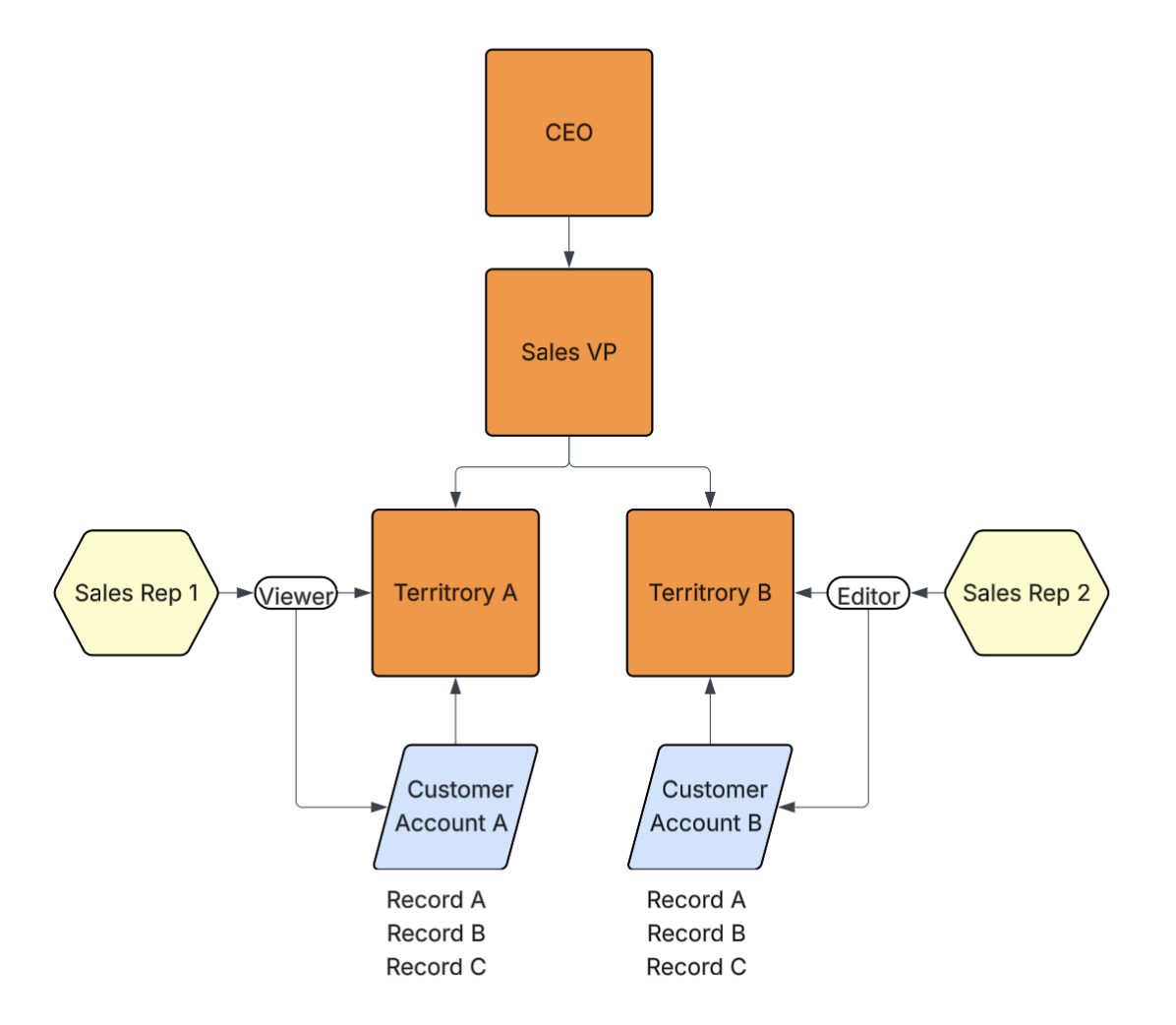
 Customer accounts (object records) are also assigned to the _Territory A_ and _Territory B_ nodes. Once a user is assigned into a security tree via a node, they gain the specified application role access to records assigned to the same node, or any child nodes. In the diagram below, _Sales Rep 1_ is granted _Viewer_ access to customer accounts assigned to _Territory A_, and _Sales Rep 2_ is granted _Editor_ access for customer accounts assigned to _Territory B_.
Users assigned to the _CEO_ node receive similar access to customer accounts assigned to the _CEO_ node in addition to customer accounts assigned to the _Sales VP_, _Territory A_, and _Territory B_ nodes. The same behavior applies to the _Sales VP_ node, but users assigned to this node will not have access to customer accounts assigned to the _CEO_ node.
Customer accounts (object records) are also assigned to the _Territory A_ and _Territory B_ nodes. Once a user is assigned into a security tree via a node, they gain the specified application role access to records assigned to the same node, or any child nodes. In the diagram below, _Sales Rep 1_ is granted _Viewer_ access to customer accounts assigned to _Territory A_, and _Sales Rep 2_ is granted _Editor_ access for customer accounts assigned to _Territory B_.
Users assigned to the _CEO_ node receive similar access to customer accounts assigned to the _CEO_ node in addition to customer accounts assigned to the _Sales VP_, _Territory A_, and _Territory B_ nodes. The same behavior applies to the _Sales VP_ node, but users assigned to this node will not have access to customer accounts assigned to the _CEO_ node.
 You can use _Security Tree_-class objects in conjunction with existing security controls on an object or object records, such as custom sharing rules, matching sharing rules, manual assignments, and **Atomic Security**.
## Configuring a Security Tree {#configuring-security-tree}
When creating a custom object, select _Security Tree_ as the object class. There are two (2) additional fields specific to only the _Security Tree_ object class:
* **User Tree Assignment Object Name**: This name is assigned to the automatically generated object with the [_User Tree Assignment_][1] object class applied. Once created, you cannot change this name. However, you can modify the label and plural label. This field is required.
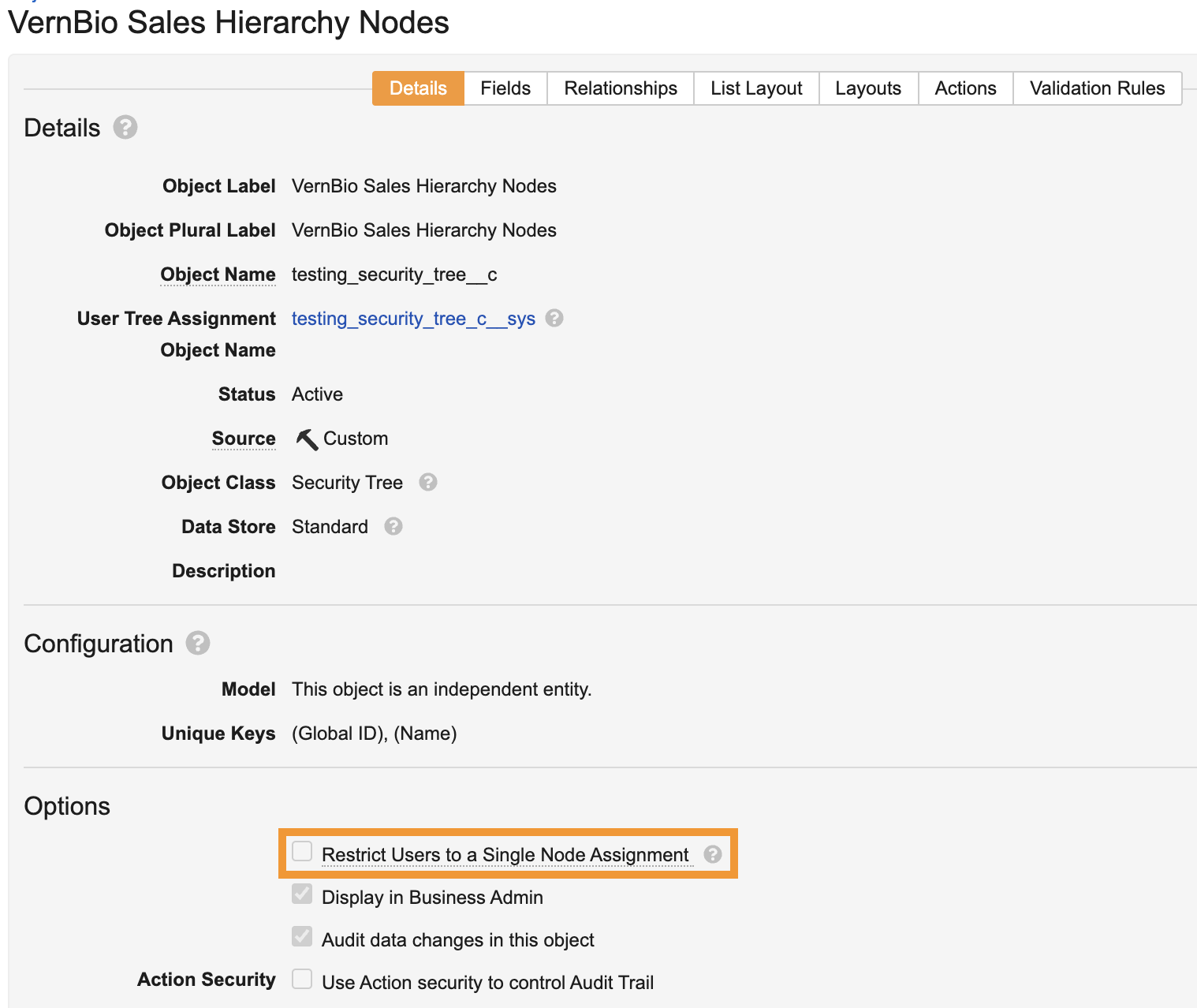
* **Restrict Users to a Single Node Assignment**: Allows you to restrict users to one (1) node within the security tree. Enabling this field allows you to leverage the [_User Reference Assignment_][4] field to automatically assign object records to the _Security Tree_. This field is optional.
Once saved, Vault creates a raw object with the _User Tree Assignment_ object class applied to capture application role assignments for users within the _Security Tree_.
Once the _Security Tree_-class object is created, you can secure additional objects and their records within your security tree. When you create or edit a custom object, the _Details_ tab contains a _Security Tree Object_ field that displays all _Security Tree_-class objects in your Vault. Select a _Security Tree_ and then enter a **Tree Assignment Object Name**.
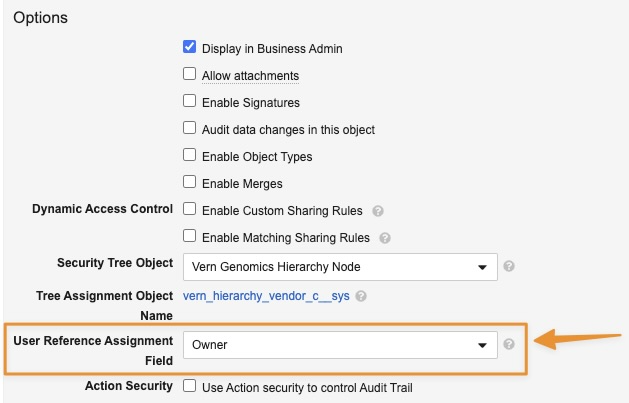
Once you save the secured object, Vault creates the raw object with the [_Secured Record Tree Assignment_][2] object class applied and the name you entered. This object allows you to provide users record-level access via the _Security Tree_. In addition, if [_Restrict Users to a Single Node Assignment_][3] is enabled on the selected security tree, the [_User Reference Assignment_][4] drop-down becomes available in the secured object's _Details_ section.
Objects with the _User Tree Assignment_ or _Secured Record Tree Assignment_ class are system-managed and cannot be created in Vault.
You can use _Security Tree_-class objects in conjunction with existing security controls on an object or object records, such as custom sharing rules, matching sharing rules, manual assignments, and **Atomic Security**.
## Configuring a Security Tree {#configuring-security-tree}
When creating a custom object, select _Security Tree_ as the object class. There are two (2) additional fields specific to only the _Security Tree_ object class:
* **User Tree Assignment Object Name**: This name is assigned to the automatically generated object with the [_User Tree Assignment_][1] object class applied. Once created, you cannot change this name. However, you can modify the label and plural label. This field is required.
* **Restrict Users to a Single Node Assignment**: Allows you to restrict users to one (1) node within the security tree. Enabling this field allows you to leverage the [_User Reference Assignment_][4] field to automatically assign object records to the _Security Tree_. This field is optional.
Once saved, Vault creates a raw object with the _User Tree Assignment_ object class applied to capture application role assignments for users within the _Security Tree_.
Once the _Security Tree_-class object is created, you can secure additional objects and their records within your security tree. When you create or edit a custom object, the _Details_ tab contains a _Security Tree Object_ field that displays all _Security Tree_-class objects in your Vault. Select a _Security Tree_ and then enter a **Tree Assignment Object Name**.
Once you save the secured object, Vault creates the raw object with the [_Secured Record Tree Assignment_][2] object class applied and the name you entered. This object allows you to provide users record-level access via the _Security Tree_. In addition, if [_Restrict Users to a Single Node Assignment_][3] is enabled on the selected security tree, the [_User Reference Assignment_][4] drop-down becomes available in the secured object's _Details_ section.
Objects with the _User Tree Assignment_ or _Secured Record Tree Assignment_ class are system-managed and cannot be created in Vault.
Note: The Security Tree Object field may not be available on certain standard objects based on application preferences.
Note: User Tree Assignment-class objects created after 25R2.3 will not contain the criteria VQL used to constrain these records to the Owner, Editor, Viewer roles. You must manually remove the VQL constraint on User Tree Assignment-class objects created prior to 25R2.3.
 ### Deleting a Security Tree {#delete-security-tree}
Deleting a _Security Tree_-class object deletes any corresponding objects with the _User Tree Assignment_ or _Secured Record Tree Assignment_ object class applied. If records exist on the _User Tree Assignment_-class or _Secured Record Tree Assignment_-class object, you must delete those records before deleting the security tree. This same behavior applies to removing a security tree from a secured object.
### Deleting a Security Tree Assignment {#delete-security-tree-assignment}
Deleting a user from a node removes the user's access to any records on the node and its child nodes. Deleting a record from a node only removes the user's access and visibility to the record on that node.
However, deleting a user or record from a node does not impact additional security configured on the record. For example, if Mike Reviewer has access to Record 1 on the _Vendor Record_ node through custom sharing rules, the user does not lose custom sharing rule access if the record is deleted from the node.
## Static Assignments {#static-tree-assignment}
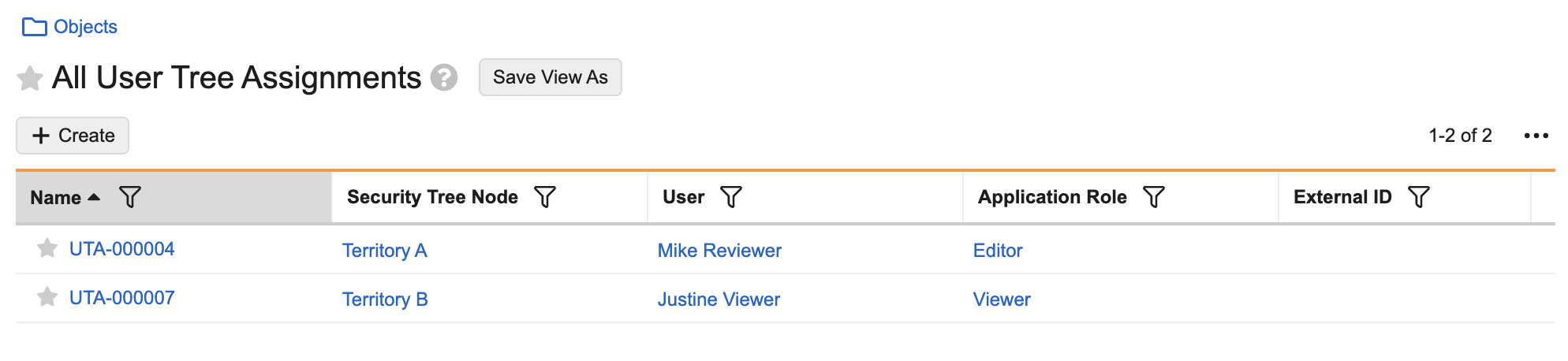
A static assignment refers to manually assigning a user to a _Security Tree Node_ through the _User Tree Assignment_-class object or assigning a record to a node through the _Secured Record Tree Assignment_-class object. Records created on objects with these classes applied store the static assignments within the _Security Tree_.
### Deleting a Security Tree {#delete-security-tree}
Deleting a _Security Tree_-class object deletes any corresponding objects with the _User Tree Assignment_ or _Secured Record Tree Assignment_ object class applied. If records exist on the _User Tree Assignment_-class or _Secured Record Tree Assignment_-class object, you must delete those records before deleting the security tree. This same behavior applies to removing a security tree from a secured object.
### Deleting a Security Tree Assignment {#delete-security-tree-assignment}
Deleting a user from a node removes the user's access to any records on the node and its child nodes. Deleting a record from a node only removes the user's access and visibility to the record on that node.
However, deleting a user or record from a node does not impact additional security configured on the record. For example, if Mike Reviewer has access to Record 1 on the _Vendor Record_ node through custom sharing rules, the user does not lose custom sharing rule access if the record is deleted from the node.
## Static Assignments {#static-tree-assignment}
A static assignment refers to manually assigning a user to a _Security Tree Node_ through the _User Tree Assignment_-class object or assigning a record to a node through the _Secured Record Tree Assignment_-class object. Records created on objects with these classes applied store the static assignments within the _Security Tree_.
Note: If an application role used in a security tree is made inactive, assignment of the role will cease and it will no longer be available for selection in User Tree Assignment-class records.
 ### Secured Record Tree Assignment {#secured-record-tree-assignment}
Objects with a _Secured Record Tree Assignment_ object class allow you to assign object records to a _Security Tree_. Objects with this class are available only if you secured an object by selecting a security tree on the object's Details tab. To use this object to assign an object record to a _Security Tree Node_:
1. Create a record on the secured object.
2. Create a record on the _Secured Record Tree Assignment_-class object.
3. Select the status as **Active** or **Inactive**.
4. Optional: Select a **Security Tree Node**. Although this field is optional, you must select a **Security Tree Node** to assign the record to it.
5. Optional: Select a **Secured Record**. This field populates all records created on the secured object.
6. Optional: Select an **External ID**.
7. Click **Save**.
The object record is now assigned to the _Security Tree Node_. Any users assigned to this node will gain access to the record based on their assigned application role.
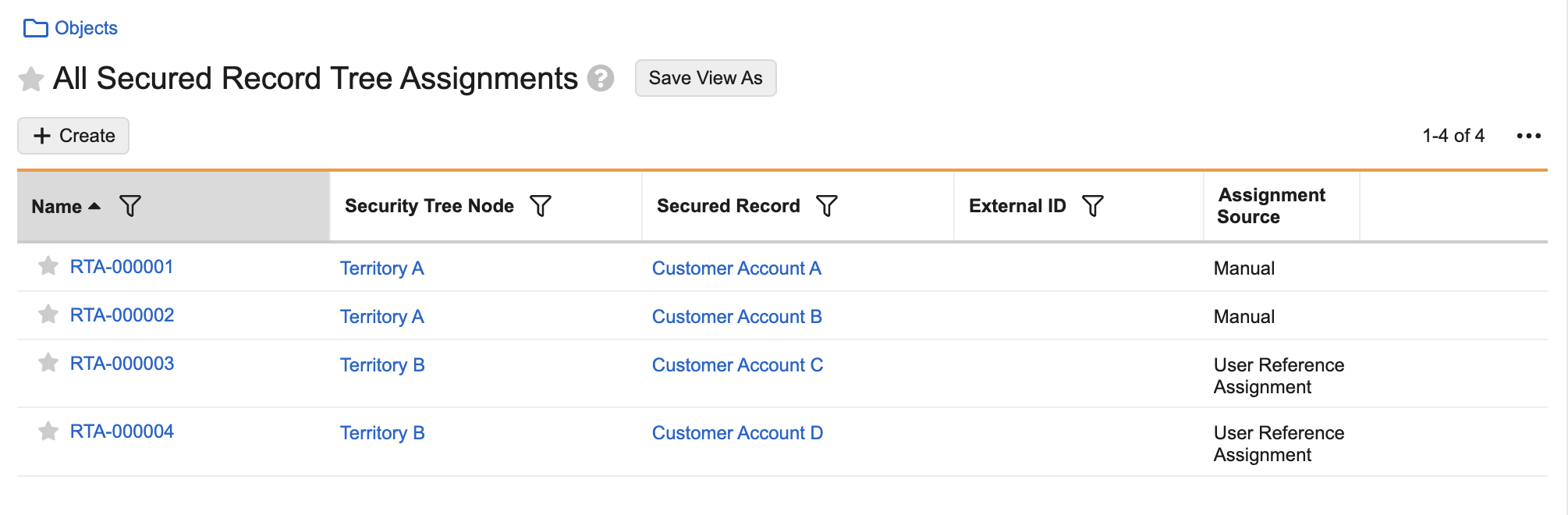
In the image below, object records _Customer Account A_ and _Customer Account B_ are assigned to the _Territory A_ node and _Customer Account C_ and _Customer Account B_ are assigned to the _Territory B_ node.
### Secured Record Tree Assignment {#secured-record-tree-assignment}
Objects with a _Secured Record Tree Assignment_ object class allow you to assign object records to a _Security Tree_. Objects with this class are available only if you secured an object by selecting a security tree on the object's Details tab. To use this object to assign an object record to a _Security Tree Node_:
1. Create a record on the secured object.
2. Create a record on the _Secured Record Tree Assignment_-class object.
3. Select the status as **Active** or **Inactive**.
4. Optional: Select a **Security Tree Node**. Although this field is optional, you must select a **Security Tree Node** to assign the record to it.
5. Optional: Select a **Secured Record**. This field populates all records created on the secured object.
6. Optional: Select an **External ID**.
7. Click **Save**.
The object record is now assigned to the _Security Tree Node_. Any users assigned to this node will gain access to the record based on their assigned application role.
In the image below, object records _Customer Account A_ and _Customer Account B_ are assigned to the _Territory A_ node and _Customer Account C_ and _Customer Account B_ are assigned to the _Territory B_ node.
 ### Single User Tree Assignment {#single-user-tree-assignment}
A single user assignment refers to restricting a user to only one node in the _Security Tree_. You must enable _Restrict Users to a Single Node Assignment_ on the _Security Tree_-class object to use this functionality. Once enabled, you can use the _User Reference Assignment_ field when securing an object by a _Security Tree_.
If the _User Reference Assignment_ field on a secured object contains a value, you cannot clear this checkbox.
This setting is available only if no static assignments exist for users on the _Security Tree_.
### Single User Tree Assignment {#single-user-tree-assignment}
A single user assignment refers to restricting a user to only one node in the _Security Tree_. You must enable _Restrict Users to a Single Node Assignment_ on the _Security Tree_-class object to use this functionality. Once enabled, you can use the _User Reference Assignment_ field when securing an object by a _Security Tree_.
If the _User Reference Assignment_ field on a secured object contains a value, you cannot clear this checkbox.
This setting is available only if no static assignments exist for users on the _Security Tree_.
 ### User Reference Assignment {#user-reference-tree-assignment}
A user reference assignment refers to automatically assigning records to a _Security Tree_ based on an existing static user assignment. When creating a secured object, you can select any user reference field on the secured object from the _User Reference Assignment_ drop-down. Then, when you create a record on the secured object, you can select a user from the user reference field. Once the record is saved, Vault automatically assigns the object record to the selected user's node.
If the selected user is not assigned to a node, Vault creates the record but the assignment does not occur. In this case, the record is not visible to the user in Vault.
User reference assignment applies to future records and not existing ones. In addition, previous record assignments created through user reference assignment are not impacted. However, it is recommended to remove users from these assignments so that previous application role access is removed on records prior to selecting a new user reference assignment field.
### User Reference Assignment {#user-reference-tree-assignment}
A user reference assignment refers to automatically assigning records to a _Security Tree_ based on an existing static user assignment. When creating a secured object, you can select any user reference field on the secured object from the _User Reference Assignment_ drop-down. Then, when you create a record on the secured object, you can select a user from the user reference field. Once the record is saved, Vault automatically assigns the object record to the selected user's node.
If the selected user is not assigned to a node, Vault creates the record but the assignment does not occur. In this case, the record is not visible to the user in Vault.
User reference assignment applies to future records and not existing ones. In addition, previous record assignments created through user reference assignment are not impacted. However, it is recommended to remove users from these assignments so that previous application role access is removed on records prior to selecting a new user reference assignment field.
 ## Limits {#security-tree-limitations}
The following limits apply to objects with a _Security Tree_ object class:
* Up to one node without a parent, or root node, is allowed per _Security Tree_.
* Up to ten levels of parent node-child node relationship allowed.
* Up to 50,000 nodes are allowed per _Security Tree_.
* Up to 70 objects can be secured by a _Security Tree_.
* You can assign a single user to 100 nodes in a _Security Tree_.
* You can assign a single object record to 200 nodes in a _Security Tree_.
* You cannot select the _Security Tree_ object class if _Replicate sharing settings from parent object_ is enabled on the object.
* If a parent object is secured by a _Security Tree_, you cannot modify _Security Tree_ configurations on the child object if _Replicate sharing settings from parent object_ is enabled.
* Object types are not supported.
* Only standard data store is supported.
* You cannot create custom fields or enable object lifecycles on _User Tree Assignment_-class objects and _Secured Record Tree Assignment_-class objects.
[0]: #static-tree-assignment
[1]: #user-tree-assignment
[2]: #secured-record-tree-assignment
[3]: #single-user-tree-assignment
[4]: #user-reference-tree-assignment
[5]: #secured-record-lifecycle
## Limits {#security-tree-limitations}
The following limits apply to objects with a _Security Tree_ object class:
* Up to one node without a parent, or root node, is allowed per _Security Tree_.
* Up to ten levels of parent node-child node relationship allowed.
* Up to 50,000 nodes are allowed per _Security Tree_.
* Up to 70 objects can be secured by a _Security Tree_.
* You can assign a single user to 100 nodes in a _Security Tree_.
* You can assign a single object record to 200 nodes in a _Security Tree_.
* You cannot select the _Security Tree_ object class if _Replicate sharing settings from parent object_ is enabled on the object.
* If a parent object is secured by a _Security Tree_, you cannot modify _Security Tree_ configurations on the child object if _Replicate sharing settings from parent object_ is enabled.
* Object types are not supported.
* Only standard data store is supported.
* You cannot create custom fields or enable object lifecycles on _User Tree Assignment_-class objects and _Secured Record Tree Assignment_-class objects.
[0]: #static-tree-assignment
[1]: #user-tree-assignment
[2]: #secured-record-tree-assignment
[3]: #single-user-tree-assignment
[4]: #user-reference-tree-assignment
[5]: #secured-record-lifecycle