
Note: If the Default Localization field is blank, Vault automatically refers to the Language field to determine the language for the picklist field values.

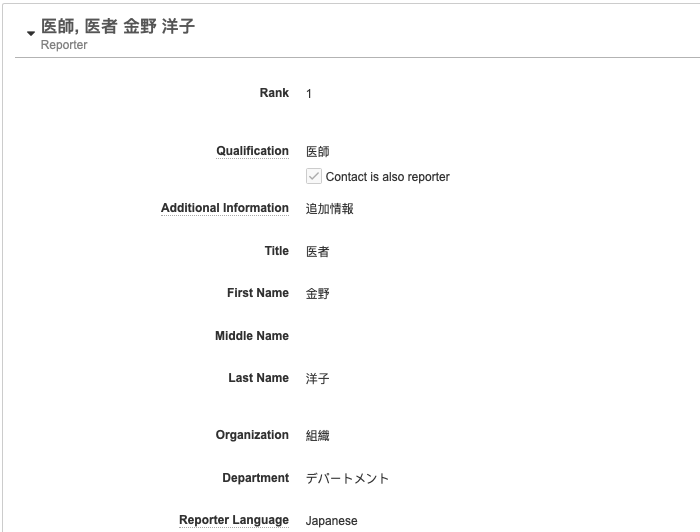 See Create an Inbox Item Manually for more information on creating inbox items.
## Localization Scope
When processing domestic _Cases_, Vault includes dual-entry fields so you can perform data entry in both the reporter's local language and English at the same time. By default, text, picklist, and object fields are available for dual-language entry. However, your Admin can configure _Localization Scope_ to limit dual-language entry to _Narratives_, _Company Comments_, or both.
E2B file export respects the _Localization Scope_ setting. For example, if the _Localization Scope_ is _Narrative_, only the localized narrative content is exported on E2B files. All other fields are English only.
Vault also considers _Localization Scope_ before generating _Parent Information_ for domestic _Cases_. If the _Localization Scope_ is _Narratives_, _Company Comments_, or both, Vault does not generate domestic _Parent Information_.
### Manual Text Translation
You can manually translate text fields during intake. For each text field that supports dual language intake, there are two fields:
1. In the first field, enter the information in the language the adverse event was reported in.
2. In the **English** (
See Create an Inbox Item Manually for more information on creating inbox items.
## Localization Scope
When processing domestic _Cases_, Vault includes dual-entry fields so you can perform data entry in both the reporter's local language and English at the same time. By default, text, picklist, and object fields are available for dual-language entry. However, your Admin can configure _Localization Scope_ to limit dual-language entry to _Narratives_, _Company Comments_, or both.
E2B file export respects the _Localization Scope_ setting. For example, if the _Localization Scope_ is _Narrative_, only the localized narrative content is exported on E2B files. All other fields are English only.
Vault also considers _Localization Scope_ before generating _Parent Information_ for domestic _Cases_. If the _Localization Scope_ is _Narratives_, _Company Comments_, or both, Vault does not generate domestic _Parent Information_.
### Manual Text Translation
You can manually translate text fields during intake. For each text field that supports dual language intake, there are two fields:
1. In the first field, enter the information in the language the adverse event was reported in.
2. In the **English** ( ) field, enter the English translation.
### Code Multilingual MedDRA Terms
You can enter MedDRA terms in the reported language of the Case. For more information about how to code multilingual MedDRA terms, see Code MedDRA Terms.
## Domestic State Code Mapping {#domestic-state-code}
For domestic _Cases_ originating in a country, such as Spain or Italy, where the state code is required in submissions to a specific agency, such as the EMA, Vault provides a configurable _Country State/Province_ library with _Domestic State Codes_. If configured by your Admin, upon initial or follow-up domestic _Case_ creation, Vault selects the _Use Domestic State Code_ checkbox on the primary Reporter-type _Localized Case Contact_. This includes when a follow-up domestic _Inbox Item_ is merged into or promoted to a follow-up for an initial global _Case_. When the _Use Domestic State Code_ checkbox is selected, during E2B(R3) import and export, Vault attempts to map the _State/Province_ value on the _Case Contact_ to a _Country State/Province_ record.
On import, Vault selects the _Use Domestic State Code_ checkbox on the primary Reporter-type _Localized Case Contact_ and clears the value in the _State/Province_ field.
On export, Vault populates the C.2.r.2.5 Reporter's State or Province data element on EMA E2B(R3) files as follows:
* For countries within the jurisdiction of the EMA:
* For primary Reporter-type _Case Contacts_ on global _Cases_ and primary Reporter-type _Localized Case Contacts_ on _Localized Cases_ with the _Use Domestic State Code_ checkbox selected, Vault maps the _State/Province_ to a _Country State/Province_ record. If the record includes a _Domestic State Code_, Vault exports the code. Otherwise, Vault exports the _Name_ of the _Country State/Province_ record.
* For non-primary Reporter-type _Case Contacts_ on global _Cases_ and non-primary Reporter-type _Localized Case Contacts_ on _Localized Cases_ with the _Use Domestic State Code_ checkbox selected, Vault exports the _Name_ of the _Country State/Province_ record.
* For countries outside the jurisdiction of the EMA:
* For all primary and non-primary Reporter-type _Case Contacts_ on global _Cases_ and Reporter-type _Localized Case Contacts_ on _Localized Cases_ with the _Use Domestic State Code_ checkbox selected, Vault exports the _Name_ of the _Country State/Province_ record.
In all of the above scenarios, if a _Country State/Province_ record is not available or the _Use Domestic State Code_ checkbox on the _Localized Case Contact_ is clear, Vault exports the _State/Province_ value on the _Case Contact_ or _Localized Case Contact_.
## Text Field Mapping on Case Promotion
When a Domestic Case is created upon Case promotion, the Inbox Item local text fields (that have data entered in their native language) are mapped to the corresponding local text fields on the Domestic Case in the same language.
The following table describes how Vault maps Inbox Item local text fields to the local text fields on the Domestic Case:
) field, enter the English translation.
### Code Multilingual MedDRA Terms
You can enter MedDRA terms in the reported language of the Case. For more information about how to code multilingual MedDRA terms, see Code MedDRA Terms.
## Domestic State Code Mapping {#domestic-state-code}
For domestic _Cases_ originating in a country, such as Spain or Italy, where the state code is required in submissions to a specific agency, such as the EMA, Vault provides a configurable _Country State/Province_ library with _Domestic State Codes_. If configured by your Admin, upon initial or follow-up domestic _Case_ creation, Vault selects the _Use Domestic State Code_ checkbox on the primary Reporter-type _Localized Case Contact_. This includes when a follow-up domestic _Inbox Item_ is merged into or promoted to a follow-up for an initial global _Case_. When the _Use Domestic State Code_ checkbox is selected, during E2B(R3) import and export, Vault attempts to map the _State/Province_ value on the _Case Contact_ to a _Country State/Province_ record.
On import, Vault selects the _Use Domestic State Code_ checkbox on the primary Reporter-type _Localized Case Contact_ and clears the value in the _State/Province_ field.
On export, Vault populates the C.2.r.2.5 Reporter's State or Province data element on EMA E2B(R3) files as follows:
* For countries within the jurisdiction of the EMA:
* For primary Reporter-type _Case Contacts_ on global _Cases_ and primary Reporter-type _Localized Case Contacts_ on _Localized Cases_ with the _Use Domestic State Code_ checkbox selected, Vault maps the _State/Province_ to a _Country State/Province_ record. If the record includes a _Domestic State Code_, Vault exports the code. Otherwise, Vault exports the _Name_ of the _Country State/Province_ record.
* For non-primary Reporter-type _Case Contacts_ on global _Cases_ and non-primary Reporter-type _Localized Case Contacts_ on _Localized Cases_ with the _Use Domestic State Code_ checkbox selected, Vault exports the _Name_ of the _Country State/Province_ record.
* For countries outside the jurisdiction of the EMA:
* For all primary and non-primary Reporter-type _Case Contacts_ on global _Cases_ and Reporter-type _Localized Case Contacts_ on _Localized Cases_ with the _Use Domestic State Code_ checkbox selected, Vault exports the _Name_ of the _Country State/Province_ record.
In all of the above scenarios, if a _Country State/Province_ record is not available or the _Use Domestic State Code_ checkbox on the _Localized Case Contact_ is clear, Vault exports the _State/Province_ value on the _Case Contact_ or _Localized Case Contact_.
## Text Field Mapping on Case Promotion
When a Domestic Case is created upon Case promotion, the Inbox Item local text fields (that have data entered in their native language) are mapped to the corresponding local text fields on the Domestic Case in the same language.
The following table describes how Vault maps Inbox Item local text fields to the local text fields on the Domestic Case:
| Inbox Item | Domestic Case | ||
|---|---|---|---|
| Section | Field | Object | Field |
| Awareness Details | Reporter's Comments (Native) | Localized Case | Reporter's Comments |
| Awareness Details | Reporter's Comments (English) | Case Version | Reporter's Comments |
| Contacts > Contact | Additional Information (Native) | Localized Case Contact | Additional Information |
| Contacts > Contact | Additional Information (English) | Case Contact | Additional Information |
| Contacts > Contact | Organization (Native) | Localized Case Contact | Organization |
| Contacts > Contact | Organization (English) | Case Contact | Organization |
| Contacts > Contact | Department (Native) | Localized Case Contact | Department |
| Contacts > Contact | Department (English) | Case Contact | Department |
| Contacts > Reporter (primary) | State/Province | Case Contact > Reporter | State/Province |
| Products > Case Product | Product (Native) | Localized Case Product | Product (Reported) |
| Products > Case Product | Product (English) | Case Product | Product (Reported) |
| Products > Case Product | Indication (Native) | Localized Case Product Indication | Name (Reported) |
| Products > Case Product | Indication (English) | Case Product Indication | Name (Reported) |
| Products > Case Product > Dosage | Dose Text (Native) | Localized Case Product Dosage | Dose Text |
| Products > Case Product > Dosage | Dose Text (English) | Case Product Dosage | Dose Text |
| Events > Medical Event > Medical History & Concurrent Conditions | Event (Native) | Localized Case Medical History | Name (Reported) |
| Events > Medical Event > Medical History & Concurrent Conditions | Event (English) | Case Medical History | Name (Reported) |
field translations are mapped to the Global Case. The field values in the local language are not copied over to the Global Case.
The following table describes how Vault maps text fields with local and English values on Case promotion:
| Inbox Item | Case | ||
|---|---|---|---|
| Section | Field |
Object | Field |
| Details | Reporter Comments | Case (Narrative) | Reporters Comments |
| Case Contact | Additional Information | Case Contact | Additional Information |
| Case Contact | Organization | Case Contact | Organization |
| Case Contact | Department | Case Contact | Department |
| Product | Product (Reported) | Case Product | Product (Reported) |
| Product > Dosage | Dose Form (Custom)* | Case Product Dosage | Dose Form |
| Product > Dosage | Patient RoA (Custom)* | Case Product Dosage | Patient RoA |
| Product > Dosage | Dose Text | Case Product Dosage | Dose Text |
| *Text translations are only available when entering custom Dose Forms or Patient RoAs. Translations for standard system-provided Dose Forms and Patient RoA values are automatically mapped upon Case promotion. | |||
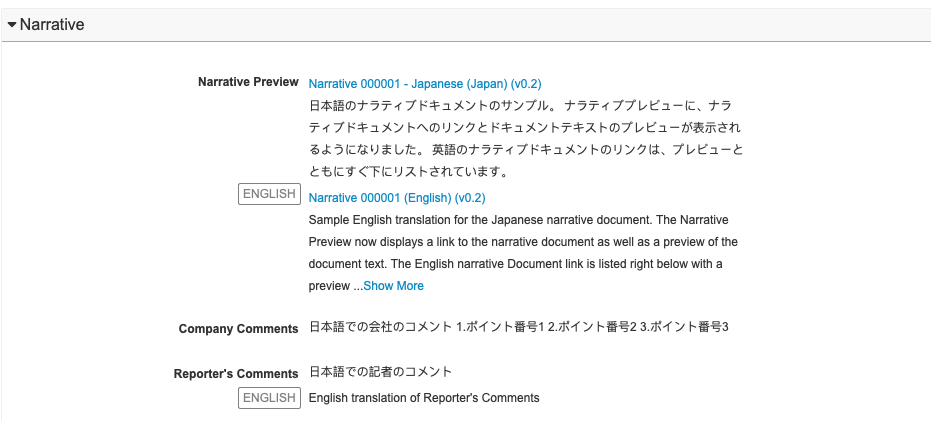
Note: You cannot edit the narrative previews in this section.
 ### PMDA-Specific Sections
The following related sections are available only for processing Cases that may be reportable to the PMDA:
* Case Product Registrations
* Local Reporting Details
* PMDA Reportable Products
* Case Comments
For information on these sections, see Complete Intake and Process Cases for the PMDA.
### PMDA-Specific Sections
The following related sections are available only for processing Cases that may be reportable to the PMDA:
* Case Product Registrations
* Local Reporting Details
* PMDA Reportable Products
* Case Comments
For information on these sections, see Complete Intake and Process Cases for the PMDA.