Safety supports dual language intake for entering cases that are received in a non-English language but require reporting in English. This article covers this intake scenario only. For localized (non-English) submissions, see Prepare a Localized Case. When you promote an Inbox Item with local data to a Case, Vault generates a Case in the local language and maps the relevant field values to the Cases. For example, the EMA requires ICSR submissions in English. If an adverse event that occurred in Germany is reported in German. Intake users can enter data in the source language (German) while entering the corresponding English translations in the text fields on the Inbox Item. Upon promotion, Vault maps the data to create a global Case which can be used for English submissions.
Note: When processing Cases that may be reportable to the PMDA, see Complete Intake and Process Cases for the PMDA for regionally specific features in Veeva Safety.
Prerequisites
Your Admin must enable local language to English intake and, if applicable, enable the auto-translation framework.
Send Translation Requests Through the Auto-Translation Framework
If your Admin has configured the Auto-Translation Framework, you can send all localized Inbox Item text fields to Amazon Translate for translation to English. Although Inbox Items do not display all imported Case fields, all localized text fields with values are sent for translation, unless excluded by your Admin’s configuration. For manually created Inbox Items, Vault only sends supported fields for translation. You can review returned translations on the Inbox Item or after Case promotion.
You can manually send a translation request by navigating to the Inbox Item and selecting the Translate Inbox Item action from the All Actions menu, which moves the record to the Translation Requested state. Upon receiving a third-party translation, Vault automatically imports and applies the translation, then moves the Inbox Item to the Translation Verification state. Vault does not verify the quality of the translation.
Considerations for Translation Requests
- If you modify Inbox Items in the Translation Requested state, Vault updates those values upon receiving translations.
- If the length of the translated text exceeds the character limit of any text field, Vault truncates the text to that field’s maximum length and displays a notification message indicating which fields are truncated.
- The translation must be returned within 60 minutes or the task expires. Vault displays a notification message for failed translation requests.
Translation Notifications
Depending on your Admin’s configuration, Vault may send translation notification messages in the following scenarios:
- When a translation error occurs, Vault notifies the user who sent the Inbox Item for translation and moves the Inbox Item to the Translation Error state. A translation error can occur if the translation is not returned to Vault within 60 minutes or if the translation service goes offline during the translation.
- When a translation is complete and pending verification, Vault notifies the user who sent the Inbox Item for translation.
Display Localized Field Labels
You can view fields in Vault in your preferred language by selecting a language from your User Profile. When you change this setting, all field labels and picklist values in Vault will display in the selected language. The Default Localization field determines the language in Object Reference fields, such as Report Type.

Note: If the Default Localization field is blank, Vault automatically refers to the Language field to determine the language for the picklist field values.
Configuring the above settings allows you to perform localized manual intake with Inbox Items.
Show Dual Entry Fields
When an Inbox Item has a a non-global Localization, you can perform local language to English translation. To include local intake fields, update the Localization field of the Inbox Item to specify the language in which the adverse event was reported. For Localizations with a Localization Scope limited to Narratives or Company Comments, dual-entry fields appear only after you promote an Inbox Item to a Case.
Local Intake Fields with English Translations
The following sections provide more information about how Vault translates Inbox Item fields during intake:
Translate Text Fields
You can manually translate text fields during intake. For each text field that supports dual language intake, there are two fields:
- In the first field, enter the information in the language in which the adverse event was reported.
- In the English (
 ) field, enter the English translation.
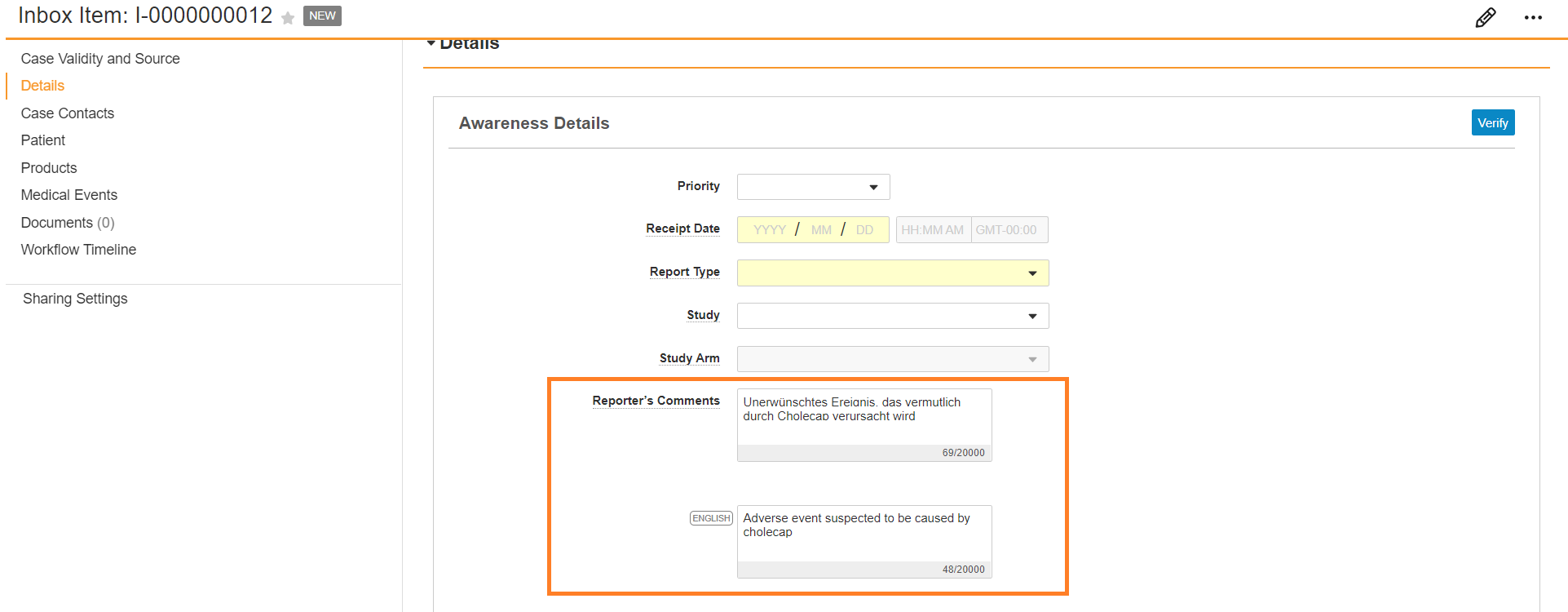
Text Field Mapping and Translation on Case Promotion
On Case promotion, only the English () field translations map to the global Case. Vault does not copy field values in the local language to the global Case.
Note: Auto-Translation Framework does not support narrative or document translation.
Visible Inbox Item Fields
The following table shows Inbox Item fields that are available for translation and describes how Vault maps text fields with local and English values on Case promotion:
| Inbox Item | Case | ||
|---|---|---|---|
| Section | English () Field |
Object | Field |
| Awareness Details | Reporter's Comments | Case (Narrative) | Reporters Comments |
| Contacts | Additional Information | Details | Additional Information |
| Contacts | Organization | Details | Organization |
| Contacts | Department | Details | Department |
| Contacts | State/Province | Address | State/Province |
| Product | Product (Reported) | Case Product | Product (Reported) |
| Product | Indication (Reported) | Case Product | Indication |
| Product > Dosage | Dose Form (Custom)* | Case Product Dosage | Dose Form |
| Product > Dosage | Patient RoA (Custom)* | Case Product Dosage | Patient RoA |
| Product > Dosage | Dose Text | Case Product Dosage | Dose Text |
| Product History | Drug (Reported) | Drug History | Drug (Reported) |
| Events | Event (Reported) | Adverse Event | Event (Reported) |
| *Text translations are only available when entering custom Dose Forms or Patient RoAs. Translations for standard system-provided Dose Forms and Patient RoA values are automatically mapped upon Case promotion. | |||
Imported Case Text Fields Eligible for Auto-Translation
The following text fields may be included in translation requests. While not all of these fields are displayed or editable on Inbox Items, all translated English values copy to the Case after promotion.
- Case fields:
- Medical History Text
- Reporter’s Comments
- Company Comments
- CIOMS Remarks
- Reporting Summary
- Study Name
- Study Name (continued)
- Case Adverse Event fields:
- Event (Reported)
- Case Assessment Result fields:
- Method (Text)
- Result (Text)
- Source (Text)
- Case Cause of Death fields:
- Name (Reported)
- Case Contact fields:
- City
- Department
- Facility
- First Name
- Last Name
- Middle Name
- Organization
- State / Province
- Street
- Street Line 2
- Title
- Case Drug History fields:
- Drug (Reported)
- Drug (Coded)
- Case Identifier fields:
- Source (not available for translation when imported through E2B)
- Case Medical History fields:
- Condition / Procedure (Reported)
- Comments
- Case Product fields:
- Other Additional Information
- Product (Reported)
- Case Product Dosage fields:
- Dose Text
- Dose (Unit Text)
- Parent RoA Text
- Patient RoA Text
- Case Product Indication fields:
- Name (Reported)
- Case Product Substance fields:
- Name
- Case Case Test Result fields:
- Comments
- Result (Text)
- Test Name (Reported)
Picklist and Object Field Translations
Any standard and system-managed picklists and object lookup fields are shown in the value selected in the Default Localization field on your user profile. Vault does not automatically translate custom picklists and object records:
- Controlled Vocabularies
- Route of Administrations
- Dose Forms
- Units of Measurement
- Reasons Omitted
Event MedDRA Translations
The Event field on Adverse Events includes MedDRA details that may automatically translate coded MedDRA terms in the applicable language.