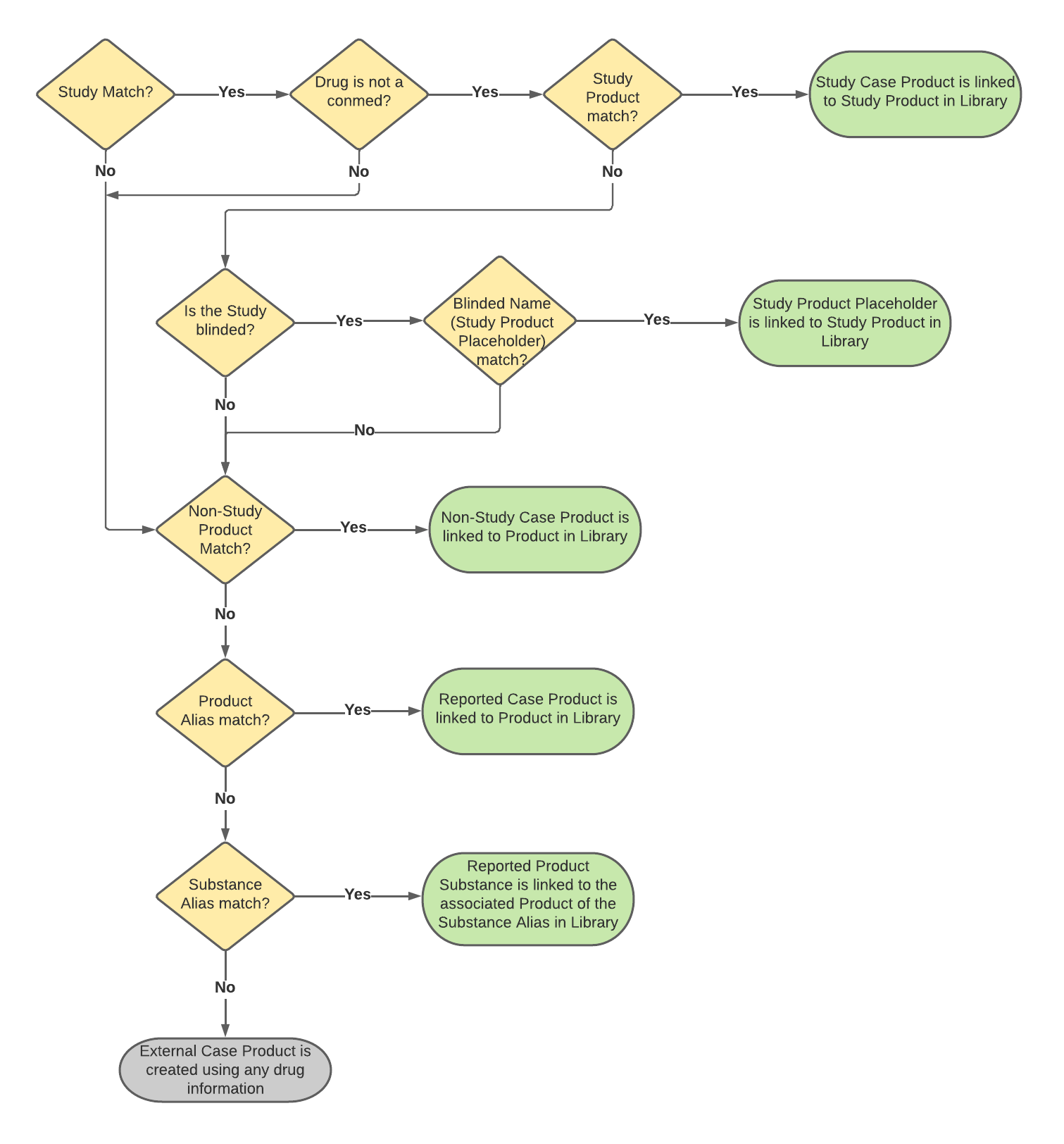
 ## Study Matching {#study-matching}
Vault matches _Studies_ and _Study Registrations_ using the following scenarios in priority order:
* **Scenario 1**: For E2B(R3) and JSON, if the E2B or JSON file contains at least one valid _Study Registration_, Vault matches the _Study_ using the _Registration Number_ and _Country_ on _Study Registrations_.
* **E2B(R3)**: _Study Registration_ must contain valid C.5.1.r.1 Study Registration Number and C.5.1.r.2 Study Registration Country values.
* **JSON**: _Study Registration_ must contain _Registration_ (`registration_number__v`) and _Country_ (`country__v`) fields.
* **Scenario 2**: For E2B(R3), E2B(R2), and JSON, Vault matches the _Study_ using the _Study Number_.
* **Scenario 3**: For E2B(R3) and E2B(R2), Vault matches the _Study_ using the _Study Number Alias_.
The _Study_ record must contain all registrations contained in an E2B(R3) file for Vault to consider it a match. Vault does not match if any E2B C.5.1.r.1 Study Registration Number or C.5.1.r.2 Study Registration Country conflict with the _Registration Numbers_ and _Countries_ values of the _Study_ in your Vault. For E2B(R3) imports, if multiple _Studies_ contain a matching _Study Registration_, Vault uses C.5.3 Study Number to find the correct _Study_. If the C.5.3 Study Number value does not match any _Study_ in your library, Vault does not match any _Studies_ and the E2B notification logs a warning.
The following table describes Vault's matching logic:
## Study Matching {#study-matching}
Vault matches _Studies_ and _Study Registrations_ using the following scenarios in priority order:
* **Scenario 1**: For E2B(R3) and JSON, if the E2B or JSON file contains at least one valid _Study Registration_, Vault matches the _Study_ using the _Registration Number_ and _Country_ on _Study Registrations_.
* **E2B(R3)**: _Study Registration_ must contain valid C.5.1.r.1 Study Registration Number and C.5.1.r.2 Study Registration Country values.
* **JSON**: _Study Registration_ must contain _Registration_ (`registration_number__v`) and _Country_ (`country__v`) fields.
* **Scenario 2**: For E2B(R3), E2B(R2), and JSON, Vault matches the _Study_ using the _Study Number_.
* **Scenario 3**: For E2B(R3) and E2B(R2), Vault matches the _Study_ using the _Study Number Alias_.
The _Study_ record must contain all registrations contained in an E2B(R3) file for Vault to consider it a match. Vault does not match if any E2B C.5.1.r.1 Study Registration Number or C.5.1.r.2 Study Registration Country conflict with the _Registration Numbers_ and _Countries_ values of the _Study_ in your Vault. For E2B(R3) imports, if multiple _Studies_ contain a matching _Study Registration_, Vault uses C.5.3 Study Number to find the correct _Study_. If the C.5.3 Study Number value does not match any _Study_ in your library, Vault does not match any _Studies_ and the E2B notification logs a warning.
The following table describes Vault's matching logic:
| Scenario | Matching | Result | ||||
|---|---|---|---|---|---|---|
| E2B(R3) | E2B(R2) | JSON | Vault Object | Vault Field | ||
| 1 | C.5.1.r.1 | N/A | registration_number__v |
Study > Study Registration | Registration Number (registration_number__v) |
|
| C.5.1.r.2 | N/A | country__v |
Study > Study Registration | Country (country__v) |
||
| 2 | C.5.3 | A.2.3.2 | name__v |
Study | Name (name__v) |
|
| 3 | C.5.3 | A.2.3.2 | N/A |
Study Number Alias | Name (name__v) |
|
| Scenario | Matching | Result | ||||
|---|---|---|---|---|---|---|
| E2B(R3) | E2B(R2) | JSON | Vault Object | Vault Field | ||
| 1 | G.k.2.1.1b | N/A | mpid__v |
Study Product > Product Registration | MPID (mpid__v) |
|
| 2 | G.k.2.1.2b | N/A | phpid__v |
Study Product > Product Registration | PhPID (phpid__v) |
|
| 3 | G.k.2.3.r.2b | N/A | term_id__v |
Study Product > (all) Study Product Substances | Substance TermID (term_id__v) |
|
| 4 | G.k.3.1 | B.4.k.4.1 | registration_number__v |
Study Product > Product Registration | Registration Number (registration_number__v) |
|
| 5 | G.k.2.2 | N/A | name__v |
Study Product | Name (name__v) |
|
| Scenario | Matching | Result | ||||
|---|---|---|---|---|---|---|
| E2B(R3) | E2B(R2) | JSON | Vault Object | Vault Field | ||
| 1 | G.k.2.1.1b | N/A | mpid__v |
Product > Product Registration | MPID (mpid__v) |
|
| 2 | G.k.2.1.2b | N/A | phpid__v |
Product > Product Registration | PhPID (phpid__v) |
|
| 3 | G.k.3.1 | B.4.k.4.1 | registration_number_v |
Product > Product Registration | Registration Number (registration_number_v) |
|
| 4 | G.k.2.2 | B.4.k.2.1 | name__v |
Product | Name (name__v) |
|
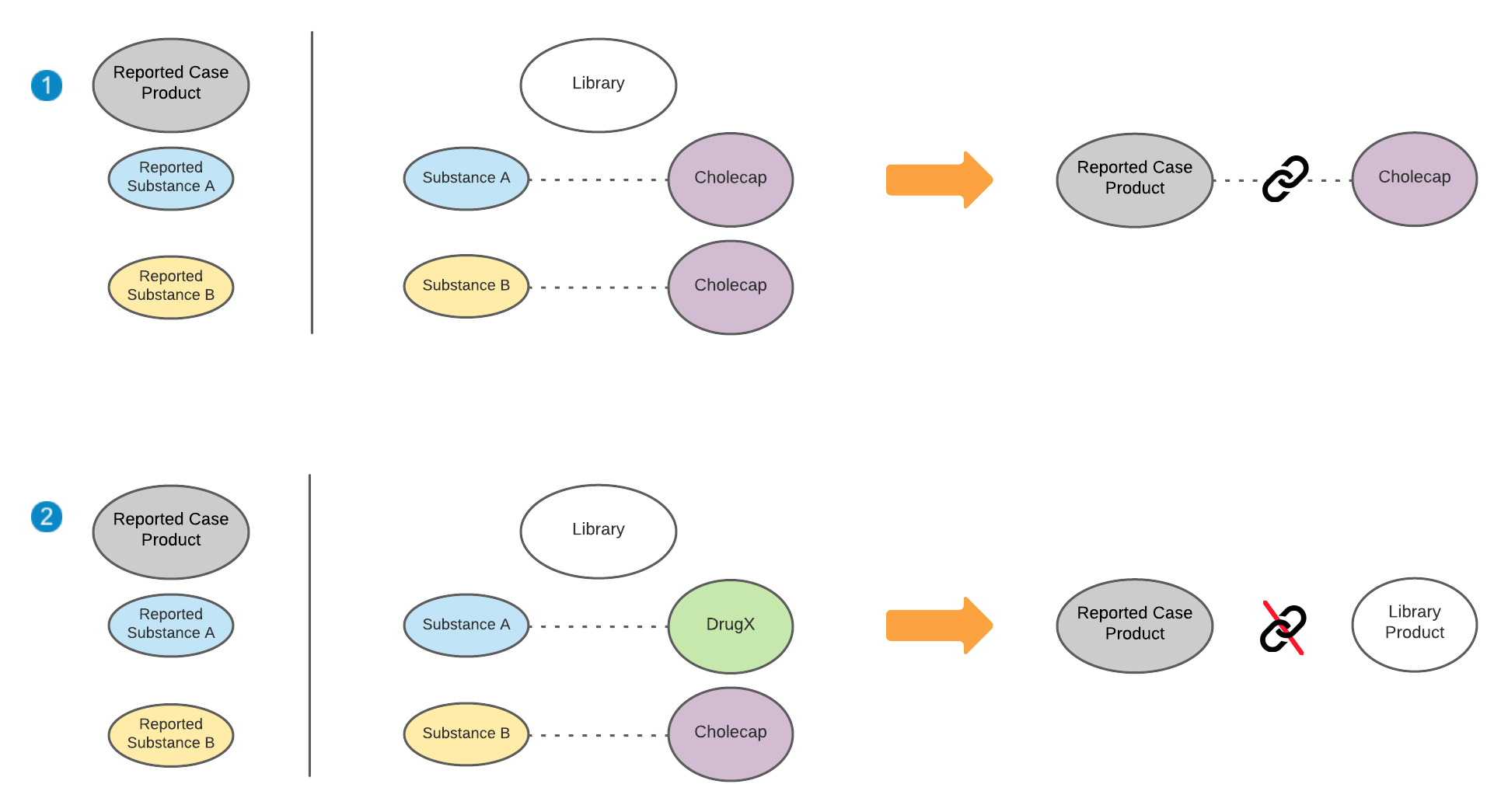 When your Admin updates or creates a new _Product Registration_, Vault adds the _Registration Name_ (_Trade Name_) as a new _Product Alias_, if it does not already exist.
## Study Product Blinded Name Matching {#blinded}
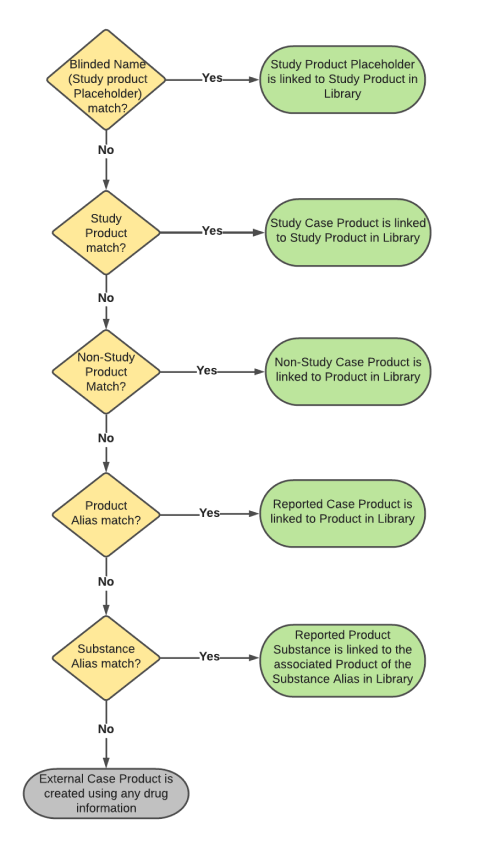
Vault matches blinded _Study Products_. For E2B(R3) or JSON files containing a blinded _Study_, Vault first attempts to match the _Blinded Name_ (_Study Product Placeholder_) on the _Study Product_. If no match is found or if the _Blinded Name_ is blank, Vault attempts to match the _Study Product_, followed by the _Company Product_, and then the aliases. Vault assigns the _Rank_ of _1_ (primary) to the _Blinded Name_ of the first matching _Study Product_.
The following diagram shows how Vault performs _Blinded Name_ (_Study Product Placeholder_) matching for an E2B or JSON with blinded _Studies_:
When your Admin updates or creates a new _Product Registration_, Vault adds the _Registration Name_ (_Trade Name_) as a new _Product Alias_, if it does not already exist.
## Study Product Blinded Name Matching {#blinded}
Vault matches blinded _Study Products_. For E2B(R3) or JSON files containing a blinded _Study_, Vault first attempts to match the _Blinded Name_ (_Study Product Placeholder_) on the _Study Product_. If no match is found or if the _Blinded Name_ is blank, Vault attempts to match the _Study Product_, followed by the _Company Product_, and then the aliases. Vault assigns the _Rank_ of _1_ (primary) to the _Blinded Name_ of the first matching _Study Product_.
The following diagram shows how Vault performs _Blinded Name_ (_Study Product Placeholder_) matching for an E2B or JSON with blinded _Studies_:
 ## Company Product Match Verification {#company-product-match-verification}
When configured by your Admin, Vault considers advanced criteria when matching products on generated _Inbox Items_. Vault populates the following fields for each evaluated company product to indicate the confidence assessment and match criteria:
* **Product Match Confidence**: Indicates the confidence score of the match:
* _1 - Exact Match (ID Match)_
* _2 - Confident Match_
* _3 - Likely Match_
* _4 - Unlikely Match_
* _5 - Unknown_
* _6 - No ID or Name Match_
* **Product Match Criteria**: Indicates which fields Vault evaluated to identify a match:
* _Country_
* _Dose Form_
* _Route of Administration_
If Vault does not identify a match within the intake settings defined by your Admin, the _Company Product_ field remains blank. You can override the assigned value if the confidence criteria are not met.
During matching, Vault prioritizes active _Product Registrations_ and populates a _Product Match Confidence_ based on your Admin's configured confidence criteria. However, when the best match is a deprecated _Product Registration_, Vault populates _4-Unlikely Match_ as the _Product Match Confidence_, regardless of other criteria.
## Company Product Match Verification {#company-product-match-verification}
When configured by your Admin, Vault considers advanced criteria when matching products on generated _Inbox Items_. Vault populates the following fields for each evaluated company product to indicate the confidence assessment and match criteria:
* **Product Match Confidence**: Indicates the confidence score of the match:
* _1 - Exact Match (ID Match)_
* _2 - Confident Match_
* _3 - Likely Match_
* _4 - Unlikely Match_
* _5 - Unknown_
* _6 - No ID or Name Match_
* **Product Match Criteria**: Indicates which fields Vault evaluated to identify a match:
* _Country_
* _Dose Form_
* _Route of Administration_
If Vault does not identify a match within the intake settings defined by your Admin, the _Company Product_ field remains blank. You can override the assigned value if the confidence criteria are not met.
During matching, Vault prioritizes active _Product Registrations_ and populates a _Product Match Confidence_ based on your Admin's configured confidence criteria. However, when the best match is a deprecated _Product Registration_, Vault populates _4-Unlikely Match_ as the _Product Match Confidence_, regardless of other criteria.
Note: Advanced company product match verification does not apply to Study Products.