# CIOMS I Generation Data Mapping

Learn how Vault generates the CIOMS I form from a _Case_. For information on how Vault generates a localized CIOMS I form for _Localized Cases_ reportable to China, see <a href="/en/lr/933063/">CIOMS I (Chinese) Generation Data Mapping</a>.

The following list describes how Vault handles certain data while generating a CIOMS I form:

* For events, diagnoses, indications, test names, and medical conditions, Vault always populates the MedDRA Lowest Level Term (LLT) when there is a coded value available. If there is no MedDRA term available, the reported term is used.

<div class="note-border alert-info">
  <div class="alert alert-info" role="alert">
    <div><i class="far fa-info-circle"></i></div>
    <div class="alert-text">
      <p><strong>Note</strong>: Your Admin can configure your Vault to populate the MedDRA Preferred Term (PT) for adverse events instead of the LLT. See <a href="/en/lr/01403/">Enable Export Product (Reported) to CIOMS I and FDA 3500A</a> for details on setting the default value for export.</p>
    </div>
  </div>
</div>


* Dates are populated using the format `dd-mmm-yyyy`. Blank dates are populated as dashes (-\-\-).
* Certain fields may be masked, depending on the blinding settings on the Case or masking settings on the Distribution. <a href="/en/lr/01225/">Generate Masked Distributions</a> describes the fields that may be masked.
* Open-label Products within blinded Studies may be unmasked, depending on your Admin's configuration of <a href="/en/lr/01406/">Show Unmasked Open-Label Products on Blinded Forms</a>

### Optional Configuration

To evaluate Case Products with the Drug Role of Drug Not Administered as suspect, your Admin must have <a href="/en/lr/01294/">enabled Extend Definition of Suspect to Drug Not Administered</a>. Otherwise, Vault evaluates only Case Products with the Suspect or Interacting Drug Role as suspect.

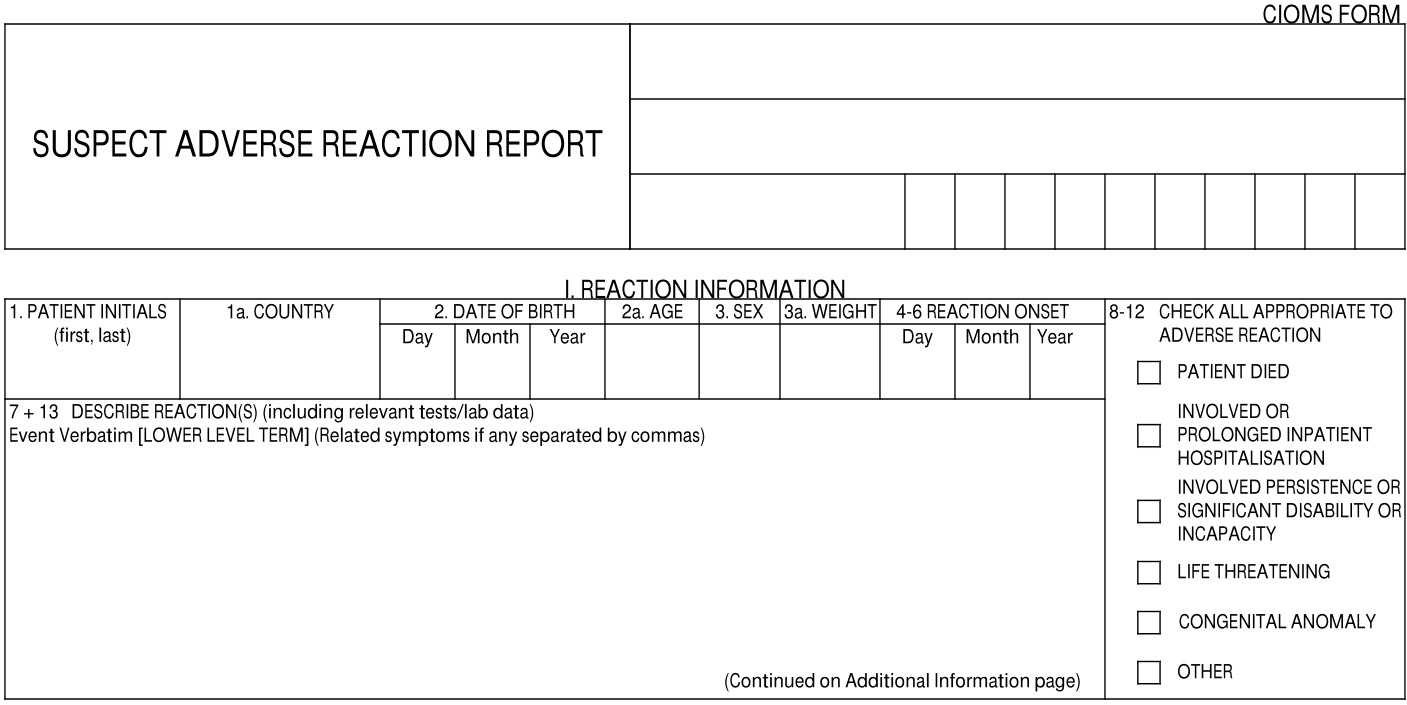
## I. Reaction Information

<a href="https://platform.veevavault.help/assets/images/saf-cioms-1-reaction-information.png" data-lightbox="saf-cioms-1-reaction-information.png" data-title="" data-alt="I. Reaction Information Section">
  <img class="docimage" src="https://platform.veevavault.help/assets/images/saf-cioms-1-reaction-information.png" alt="I. Reaction Information Section" style="max-width: 70%;"  />
</a>

<table>
    <thead>
        <tr>
            <th>CIOMS I Field</th>
            <th>Populated Value</th>
        </tr>
    </thead>
    <tbody>
        <tr>
            <td>1 Patient Initials</td>
            <td>The value entered in the <strong>Patient Initials / ID</strong> field on the Case.</td>
        </tr>
        <tr>
            <td>1a. Country</td>
            <td><p>The two-letter country code and name of the country is populated based on one (1) of the following fields, ordered by priority:</p>
            <ol>
                    <li><strong>Event Country</strong> on the Case</li>
                    <li><strong>Event Country</strong> on the primary Case Adverse Event</li>
                    <li><strong>Country</strong> on the primary Reporter-type Case Contact</li>
                    <li><strong>Reporter Country</strong> on the Case</li>
                </ol>
                <p>If none of these fields are populated, no value is exported.</p>
                </td>
        </tr>
        <tr>
            <td>2. Date of Birth</td>
            <td>The date entered in the <strong>Date of Birth</strong> field on the Case.</td>
        </tr>
        <tr>
            <td>2a. Age</td>
            <td><p>This value is mapped from one of the following Case fields, ordered by priority:</p>
                <ol>
                    <li><strong>Age (normalized)</strong></li>
                    <li><strong>Age (value and unit)</strong></li>
                    <li><strong>Age Group</strong></li>
                </ol>
            </td>
        </tr>
        <tr>
            <td>3. Sex</td>
            <td>The value from the <em>Sex</em> field on the <em>Case</em>. </td>
        </tr>
        <tr>
            <td>3a. Weight</td>
            <td><p>This value is mapped from one of the following Case fields, ordered by priority:</p>
                <ol>
                    <li><strong>Weight (normalized)</strong></li>
                    <li><strong>Weight (value and unit)</strong></li>
                </ol></td>
        </tr>
        <tr>
            <td>4-6 Reaction Onset</td>
            <td><p>The earliest Onset Date for any Case Adverse Event associated with the Case version.</p>
                <p>This field is masked if the <strong>Onset (reason omitted)</strong> field on the <a href="/en/lr/01287/#ae-section">Case Adverse Event</a> is "Masked".</p></td>
        </tr>
        <tr>
            <td>7 + 13 Describe Reaction(s)</td>
            <td><p>This field is populated with the following information:</p>
                <ul>
                    <li>Text from the <em>Narrative</em> on the <em>Case</em>.</li>
                    <li>Any text from the <em>Company Comments</em> field. If the narrative text overflows onto additional pages, the company comments will also appear on the overflow pages.</li>
                    <li>The following data is populated for each Case Test Result record, ordered alphabetically and by date:
                        <ul>
                            <li>[<strong>Test Name (MedDRA)</strong> <em>and</em> <strong>Test Name (Reported)</strong>],</li>
                            <li><strong>Test Date</strong>,</li>
                            <li>[<strong>Result (Code)</strong> <em>or</em> <strong>Test Result Qualifier</strong> + <strong>Result (Value)</strong> + <strong>Result (Unit)</strong> <em>or</em> <strong>Result (Unit) Text</strong>],</li>
                            <li><strong>Result (Text)</strong>,</li>
                            <li>(<strong>Normal Low Value</strong> - <strong>Normal High Value</strong>) <strong>Result (Unit)</strong> <em>or</em> <strong>Result (Unit) Text</strong>,</li>
                            <li><strong>Result (Text)</strong>,</li>
                            <li><strong>Comments</strong></li>
                        </ul>
                    </li>
                    <li>The following data is populated for each Case Adverse Event:
                         <strong>Event (Reported) - English</strong> [<strong>Event (MedDRA)</strong>], Seriousness: <strong>Seriousness</strong>, Outcome: <strong>Outcome</strong>
                        <div class="note-border alert-info">
  <div class="alert alert-info" role="alert">
    <div><i class="far fa-info-circle"></i></div>
    <div class="alert-text">
      <p><strong>Note</strong>: If the <strong>Event (Reported) - English</strong> field is not available, Vault uses the <strong>Event (Reported)</strong> field instead.
                        If both the reported event and MedDRA event are unavailable, a Case Adverse Event is not added to the form.
                        Also, when multiple seriousness criteria are entered, only the most serious value is populated.</p>
    </div>
  </div>
</div>


                    </li>
                    <li>If the adverse event resulted in death, the following information is populated from each Case Cause of Death record:
                        <ul>
                            <li>Reported Causes of Death: [<strong>Cause (MedDRA)</strong> <em>or</em> <strong>Cause (Reported)</strong>]</li>
                            <li>Autopsy-Determined Cause of Death: [<strong>Cause (MedDRA)</strong> <em>or</em> <strong>Cause (Reported)</strong>]</li>
                        </ul>
                    </li>
                </ul>
            </td>
        </tr>
        <tr>
            <td>8-12 Check All</td>
            <td><p>The appropriate checkboxes are selected, based on the <strong>Seriousness</strong> criteria for each Adverse Event associated with the Case.</p>
                <p>If there are multiple <strong>Seriousness</strong> values selected for a Case Adverse Event, Vault populates the checkbox corresponding to the most severe value, according to the following order (from most severe to least):</p>
                <ol>
                    <li><strong>Results in death</strong></li>
                    <li><strong>Life threatening</strong></li>
                    <li><strong>Caused / prolonged hospitalization</strong></li>
                    <li><strong>Disabling / incapacitating</strong></li>
                    <li><strong>Congenital anomaly / birth defect</strong></li>
                    <li><strong>Other medically important condition</strong> or <strong>Required Intervention to Prevent Permanent Impairment/Damage (Devices)</strong></li>
                </ol>
            </td>
        </tr>
    </tbody>
</table>

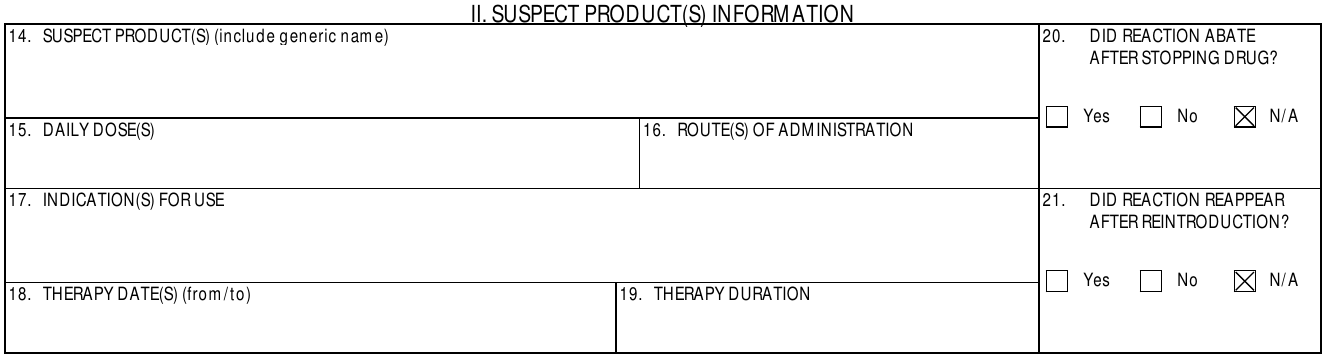
## II. Suspect Product(s) Information

<a href="https://platform.veevavault.help/assets/images/saf-cioms-1-suspect-products-information.png" data-lightbox="saf-cioms-1-suspect-products-information.png" data-title="" data-alt="II. Suspect Product(s) Section">
  <img class="docimage" src="https://platform.veevavault.help/assets/images/saf-cioms-1-suspect-products-information.png" alt="II. Suspect Product(s) Section" style="max-width: 70%;"  />
</a>

<table>
    <thead>
        <tr>
            <th>CIOMS I Field</th>
            <th>Populated Value</th>
        </tr>
    </thead>
    <tbody>
        <tr>
            <td><a id="suspect-products"></a>14. Suspect Product(s)</td>
            <td><p>Vault populates this information for <em>Case Products</em> with an <a href="/en/lr/01169/#drug-role">eligible <em>Drug Role</em></a>:</p> 
                <ul>
                    <li><strong>Name</strong>: By default, if a <em>Product (Reported)</em> value exists on the <em>Case Product</em>, Vault maps that value. Otherwise, Vault maps the <em>Product (Coded)</em> value. If the associated <em>Product</em> record includes a <a href="/en/lr/01215/#generic-name"><em>Generic Name</em></a>, Vault appends the value in parentheses after the name.
                    
                    <div class="note-border alert-info">
  <div class="alert alert-info" role="alert">
    <div><i class="far fa-info-circle"></i></div>
    <div class="alert-text">
      <p><strong>Note</strong>: Your Admin can configure your Vault to export the <em>Product (Coded)</em> value by default. See <a href="/en/lr/01403/">Enable Export Product (Reported) to CIOMS I and FDA 3500A</a> for details.</p>
    </div>
  </div>
</div>

</li>
                    <li><strong>Batch/Lot #</strong>: The <em>Batch/Lot Number</em> on the associated <em>Case Product Dosage</em>.</li>
                    <li>Either <strong>MPID</strong>: <em>MPID</em> or <strong>PHPID</strong>: <em>PHPID</em></li>
                </ul>
                </td>
        </tr>
        <tr>
            <td>15. Daily Doses</td>
            <td>The values and units in the <strong>Dose</strong>, <strong>Frequency</strong>, and <strong>Dose Text</strong> fields on the primary Case Product Dosage.</td>
        </tr>
        <tr>
            <td>16. Route(s) of Administration</td>
            <td>The value entered in either the <strong>Patient RoA</strong> or <strong>Patient RoA (Reported)</strong> field on the associated Case Product Dosage.
                <p>For parent-child cases, the routes of administration are listed for both the patient (child) and the parent.</p></td>
        </tr>
        <tr>
            <td>17. Indication(s) for Use</td>
            <td>The value entered in either the <strong>Name (MedDRA)</strong> or <strong>Indication (Reported)</strong> field on the associated Case Product Indication record.</td>
        </tr>
        <tr>
            <td><a id="dechallenge"></a>18. Therapy Date(s)</td>
            <td><p>This field is populated with the following fields for each associated Case Product Dosage record:</p>
                <p>[<strong>First Admin Date</strong> <em>or</em> --- <em>or</em> unk] to [<strong>Last Admin Date</strong> <em>or</em> --- <em>or</em> unk]</p></td>
        </tr>
        <tr>
            <td>19. Therapy Duration</td>
            <td><p>The value and unit entered in the <strong>Duration</strong> field on the associated Case Product Dosage record.</p>
                <p>Vault updates the Duration field value to "Ongoing" if any of the following values are in the <strong>Action(s) Taken</strong> field:</p>
                    <ul>
                        <li>Dose Reduced</li>
                        <li>Dose Increased</li>
                        <li>Dose Not Changed</li>
                    </ul>
            </td>
        </tr>
        <tr>
            <td>20. Did Reaction Abate After Stopping Drug?</td>
            <td>Vault uses the following fields to calculate whether a dechallenge test occurred and populate the appropriate checkbox:
                <ul>
                    <li><strong>Action Taken</strong> on the primary Case Product</li>
                    <li><strong>Outcome</strong> on the primary Case Adverse Event</li>
                </ul>
                <p>The following table outlines how different values in these fields populate this field on the CIOMS I form:</p>
                <table>
                    <thead>
                        <tr>
                            <th>Action Taken (G.k.8)</th>
                            <th>E2B Code*</th>
                            <th>Outcome (E.i.7)</th>
                            <th>CIOMS I II.20 Box</th>
                        </tr>
                    </thead>
                    <tbody>
                        <tr>
                            <td>Drug Withdrawn<br>Dose Reduced</td>
                            <td>1<br>2</td>
                            <td>Recovered/Resolved<br>Recovering/Resolving<br>Recovered/Resolved with Sequalea</td>
                            <td><strong>Yes</strong></td>
                        </tr>
                        <tr>
                            <td>Drug Withdrawn<br>Dose Reduced</td>
                            <td>1<br>2</td>
                            <td>Not Recovered<br>Not Resolved<br>Ongoing<br>Fatal</td>
                            <td><strong>No</strong></td>
                        </tr>
                        <tr>
                            <td>Drug Withdrawn
                             Dose Reduced</td>
                            <td>1<br>2</td>
                            <td>Unknown (blank)</td>
                            <td><strong>(blank)</strong></td>
                        </tr>
                        <tr>
                            <td>Dose Increased<br>Dose Not Changed<br>Not Applicable</td>
                            <td>3<br>4<br>9</td>
                            <td>Any</td>
                            <td><strong>N/A</strong></td>
                        </tr>
                        <tr>
                            <td>Unknown</td>
                            <td>0</td>
                            <td>Any</td>
                            <td><strong>(blank)</strong></td>
                        </tr>
                        <tr>
                            <td colspan="3">Any other condition</td>
                            <td>(blank)</td>
                        </tr>
                    </tbody>
                    <tfoot>
                        <tr>
                            <td colspan="4">*Includes custom <a href="/en/lr/01195/#action-taken">Action Taken Controlled Vocabulary</a> records</td>
                        </tr>
                    </tfoot>
                </table>
            </td>
        </tr>
        <tr>
            <td>21. Did Reaction Reappear After Reintroduction?</td>
            <td>Vault uses the <strong>Reaction Recurrence</strong> field on the primary Case Assessment to determine whether a rechallenge test occurred and populate the appropriate checkbox.
            <ul>
                <li>If the <strong>Reaction Recurrence</strong> field is set to <strong>yes – yes (rechallenge was done, reaction recurred)</strong>, then the <strong>Yes</strong> checkbox is selected.</li>
                    <li>If the <strong>Reaction Recurrence</strong> field is set to <strong>yes - no (rechallenge was done, reaction did not recur)</strong>, then the <strong>No</strong> checkbox is selected.</li>
                    <li>If the <strong>Reaction Recurrence</strong> field is set to any of the following options, then the <strong>N/A</strong> checkbox is selected:
                    <ul>
                    <li><strong>yes - unk (rechallenge was done, outcome unknown)</strong></li>
                    <li><strong>no - n/a (no rechallenge was done, recurrance is not applicable)</strong></li>
                    <li>The field is left blank</li>
                </ul></li>
                </ul>
            </td>
        </tr>
    </tbody>
</table>

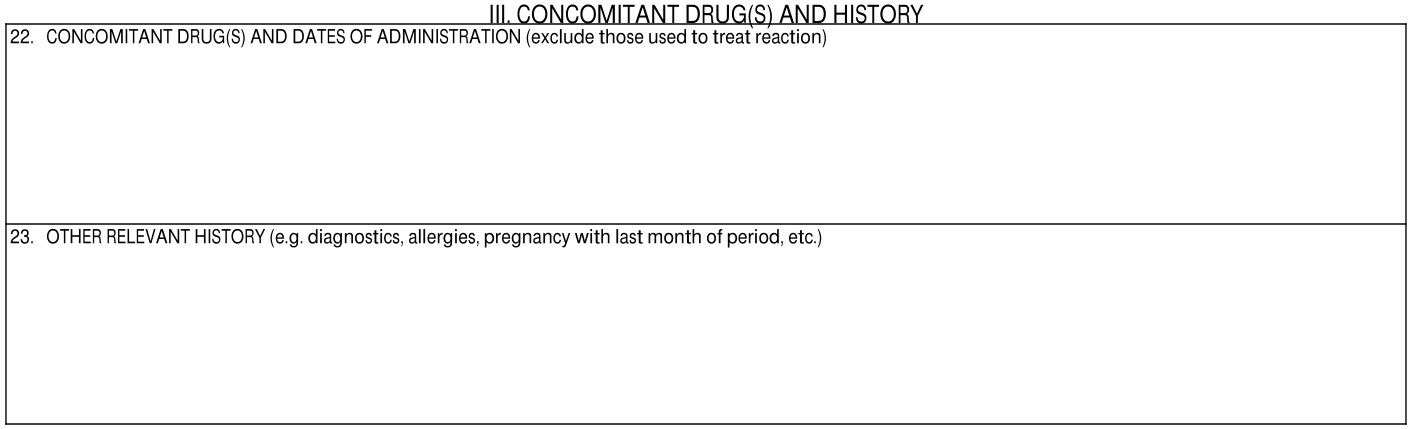
## III. Concomitant Drug(s) and History

<a href="https://platform.veevavault.help/assets/images/saf-cioms-1-concomitant-drugs-and-history.png" data-lightbox="saf-cioms-1-concomitant-drugs-and-history.png" data-title="" data-alt="III. Concomitant Drug(s) and History Section">
  <img class="docimage" src="https://platform.veevavault.help/assets/images/saf-cioms-1-concomitant-drugs-and-history.png" alt="III. Concomitant Drug(s) and History Section" style="max-width: 70%;"  />
</a>

<table>
    <thead>
        <tr>
            <th>CIOMS I Field</th>
            <th>Populated Value</th>
        </tr>
    </thead>
    <tbody>
        <tr>
            <td>22. Concomitant Drug(s) and Dates of Administration</td>
            <td><p>The following information is repeated for each associated Case Product record, populated from the following fields:</p>
                <ul>
                    <li>[<strong>Product (Coded)</strong> (<code>product_name__v</code>) if the field is populated, else <strong>Product (Reported)</strong> (<code>product_reported__v</code>)],</li>
                    <li>[<strong>First Admin Date</strong> <em>or</em> --- <em>or</em> unk] to [<strong>Last Admin Date</strong> <em>or</em> --- <em>or</em> unk] (<strong>Duration</strong>) <strong>Action(s) Taken</strong>,</li>
                    <li>[<strong>Dose</strong> <em>or</em> <strong>Dose Text</strong>] + <strong>Frequency</strong>,</li>
                    <li><strong>Indication</strong></li>
                </ul></td>
        </tr>
        <tr>
            <td>23. Other Relevant History</td>
            <td><p>The following information is populated:</p>
                <ul>
                    <li>For each Case Medical History record:
                        <ul>
                            <li><strong>Disease / Surgical Procedure (MedDRA)</strong>,</li>
                            <li>[<strong>Start Date</strong> <em>or</em> ---] to [<strong>End Date</strong> <em>or</em> --- <em>or</em> <strong>Continuing</strong>],</li>
                            <li><strong>Comments</strong></li>
                        </ul>
                    </li>
                    <li>Any text entered in the <strong>Medical History Text</strong> field on the Case is populated after listing each medical history line item.</li>
                    <li>For each Case Drug History record:
                        <ul>
                            <li><strong>Drug Coded Name</strong>,</li>
                            <li>[<strong>Start Date</strong> <em>or</em> ---] to [<strong>End Date</strong> <em>or</em> ---],</li>
                            <li><strong>Indication MedDRA</strong></li>
                        </ul>
                    </li>
                </ul>
            </td>
        </tr>
    </tbody>
</table>

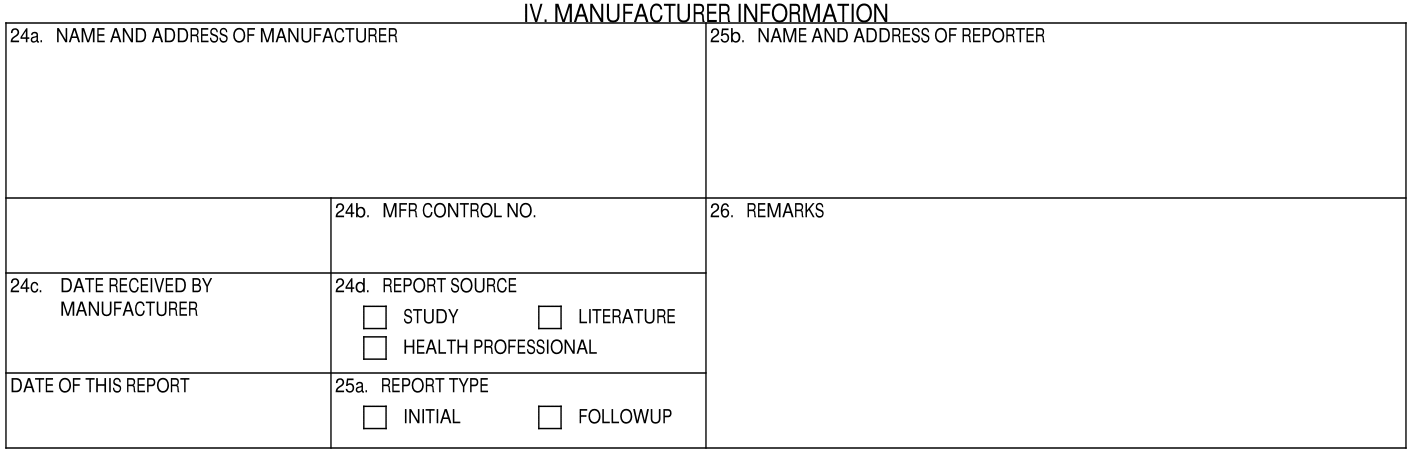
## IV. Manufacturer Information

<a href="https://platform.veevavault.help/assets/images/saf-cioms-1-manufacturer-information.png" data-lightbox="saf-cioms-1-manufacturer-information.png" data-title="" data-alt="IV. Manufacturer Information Section">
  <img class="docimage" src="https://platform.veevavault.help/assets/images/saf-cioms-1-manufacturer-information.png" alt="IV. Manufacturer Information Section" style="max-width: 70%;"  />
</a>

<table>
    <thead>
        <tr>
            <th>CIOMS I Field</th>
            <th>Populated Value</th>
        </tr>
    </thead>
    <tbody>
        <tr>
            <td>24a. Name and Address of Manufacturer</td>
            <td>
                <p>The contact information is populated from the user selected in the <strong>Sender User</strong> field on the associated <a href="/en/lr/01264/">ICSR <em>Transmission</em></a>.</p>
                <p>When generating a form preview from the Case, the contact information is populated with the contact details for the Case Organization.</p>
            </td>
        </tr>
        <tr>
            <td>24b. MFR Control No.</td>
            <td>The value from the <strong>UID</strong> field on the Case.</td>
        </tr>
        <tr>
            <td>24c. Date Received by Manufacturer</td>
              <td>Initial Cases: The date is mapped from the Case <strong>New Info Date</strong> field. If the New Info Date is not populated, the date is mapped from the Case <strong>Receipt Date</strong> field.
                  A Case is considered initial when it meets one of the following conditions:
                            <ol>
                                <li>For a report generated from a Transmission, the <strong>Transmission Reason</strong> field value <em>must</em> map to E2B Code <code>I</code> (Initial)</li>
                                <li>For a report preview generated from a Case, the Version must be less than or equal to 1.0</li>
                            </ol>
                   Follow-Up: The date is mapped from the Case <strong>New Info Date</strong> field.
                      A Case is considered follow-up when it meets one of the following conditions:
                            <ol>
                                <li>For a report generated from a Transmission, the <strong>Transmission Reason</strong> field value must <em>not</em> map to E2B Code <code>I</code></li>
                                <li>For a report preview generated from a Case, the Version must be greater than 1.0</li>
                            </ol>
                </td>
        </tr>
        <tr>
            <td>24d. Report Source</td>
            <td>Vault selects Report Source checkboxes as follows:
                <ul>
                    <li><strong>Study</strong>: Checked when the <em>Report Type</em> of the <em>Case</em> corresponds to a <a href="/en/lr/01195/#report-type"><em>Report Type</em> controlled vocabulary</a> with <em>E2B Code</em> <code>2</code>. In the standard  Vault template, this includes:
                                <ul>
                                    <li><em>Study</em></li>
                                    <li><em>Literature (Study)</em></li>
                                </ul></li>
                    <li><strong>Literature</strong>: Checked when the <em>Report Type</em> of the <em>Case</em> corresponds to a <a href="/en/lr/01195/#report-type"><em>Report Type</em> controlled vocabulary</a> with <em>Yes</em> in the <em>Literature</em> field. In the standard  Vault template, this includes:
                                <ul>
                                    <li><em>Literature (Spontaneous)</em></li>
                                    <li><em>Literature (Study)</em></li>
                                </ul></li>
                    <li><strong>Health Professional</strong>: Checked when the <em>Qualification</em> of the primary <em>Reporter</em>-type <em>Case Contact</em> corresponds to a <a href="/en/lr/01195/#qualification"><em>Qualification</em> controlled vocabulary</a> with <em>Yes</em> in the <em>Qualified HCP</em> field. In the standard  Vault template, this includes:
                                    <ul>
                                        <li><em>Dentist</em></li>
                                        <li><em>Pharmacist</em></li>
                                        <li><em>Physician</em></li>
                                        <li><em>Physician Assistant</em></li>
                                        <li><em>Nurse</em></li>
                                        <li><em>Nurse Practitioner</em></li>
                                        <li><em>Other health professional</em></li>
                                    </ul></li></ul></td>
        </tr>
        <tr>
            <td>25a. Report Type</td>
            <td><p>The appropriate checkbox is selected, depending on whether the Case is initial or follow-up.</p>
                <p>The Report Type is determined with the following logic:
                    <ol>
                        <li>If a Transmission record exists for the Case and a value is populated in the <strong>Transmission Reason</strong> field:
                            <ol>
                                <li>If the Transmission Reason is Initial, the Report Type field is set to Initial.</li>
                                <li>If the Transmission Reason is populated with any other value, the Report Type field is set to Follow-Up.</li>
                            </ol>
                        </li>
                        <li>If there is no Transmission record associated with the Case:
                            <ol>
                                <li>If the Case New Info Date is <em>less than or equal to</em> the Case Receipt Date, the Report Type field is set to Initial.</li>
                                <li>If the Case New Info Date is <em>greater than</em> the Case Receipt Date, the Report Type field is set to Follow-Up.</li>
                            </ol>
                        </li>
                    </ol>
                </p>
            </td>
        </tr>
        <tr>
            <td><a id="25b"></a>25b. Name and Address of Reporter</td>
            <td>Unless <a href="/en/lr/01213/#exclude-reporter-cioms">excluded</a> for a specific partner, Vault populates the name and address of the primary <em>Case Reporter</em>.</td>
        </tr>
        <tr>
            <td>Date of This Report</td>
            <td>The date when the report was generated, according to the Vault's Timezone.</td>
        </tr>
        <tr>
            <td>26. Remarks</td>
            <td>The text entered in the <strong>CIOMS Remarks</strong> field on the Case.</td>
        </tr>
    </tbody>
</table>

## Footer

The left-side of the CIOMS I footer is timestamped with the date and time when the form was generated, according to the Vault's Timezone.

The right-side of the footer is populated with the Case UID, appended with the value in the **Follow-up Number** field on the associated <a href="/en/lr/01264/">ICSR _Transmission_</a>.

The follow-up number will be appended when present on the Transmission, even when the Case type is not a Follow-Up Case.

## <a id="overflow-pages"></a>Additional (Overflow) Pages

When Vault generates the CIOMS I form, any text that exceeds field character limits is overflowed to additional pages. The indicator "(...)" and/or "(Continued)" is appended to any field or section that continues on additional pages. Any text on the additional pages is identified with the relevant section and field. Any Case Assessment Results associated with the Case are also listed in the additional pages.

### Assessment Results in Overflow Pages

Any Case Assessment Results associated with the Case are listed in the additional pages. For example:

* Cholecap⇄Yellow Fever, Healthcare Professional, EU Method of Assessment, Reasonable Possibility
* *****⇄Yellow Fever, Sponsor, EU Method of Assessment, Reasonable Possibility

Each record is listed in the following format:

<a href="https://platform.veevavault.help/assets/images/saf-case-assessment-section-cioms.png" data-lightbox="saf-case-assessment-section-cioms.png" data-title="CIOMS Case Assessment Results Section " data-alt="Case Assessment Results Section CIOMS">
  <img class="docimage" src="https://platform.veevavault.help/assets/images/saf-case-assessment-section-cioms.png" alt="Case Assessment Results Section CIOMS" style="max-width: 70%;"  />
</a>

For unblinded double-blinded Studies, if there is a specified value in the <a href="/en/lr/01287/#case-assessment-result">Assessment Result (Override)</a> field, Vault uses this value instead of the **Assessment Result** value for unmasked CIOMS I Transmissions and previews. An administrator must <a href="/en/lr/01180/">perform configurations</a> and contact Veeva Support to request this feature be made available in your Vault.

<div class="note-border alert-info">
  <div class="alert alert-info" role="alert">
    <div><i class="far fa-info-circle"></i></div>
    <div class="alert-text">
      <p><strong>Note</strong>: There is a limitation where if there is a specified value in the Assessment Result (Override) field, Vault will always generate the masked version of aggregate reports. This limitation will be addressed in a future release.</p>
    </div>
  </div>
</div>


***Product Name Mapping**

The way Vault maps the Product name during report generation depends on the Product blinding settings:

* For non-Study Cases, open-label Study Cases, and open-label Products within blinded Studies, the Product name is mapped from the **Name** (`product_name_v`) field on the **Case Product** record.
<div class="note-border alert-info">
  <div class="alert alert-info" role="alert">
    <div><i class="far fa-info-circle"></i></div>
    <div class="alert-text">
      <p><strong>Note</strong>: Your Admin must configure unmasked export of open-label Products within blinded Studies. If this feature is not turned on, open-label Products within blinded Studies are mapped as described in the next bullet.</p>
    </div>
  </div>
</div>


* For blinded Study Cases, Vault uses the following logic to map the Product name for blinded Products:

<table>
    <thead>
        <tr>
            <th colspan="2">Criteria (Inputs)</th>
            <th colspan="3">Form Generation</th>
        </tr>
        <tr>
            <th>Does the Study Have Arms? (study_has_arms_v)</th>
            <th>Is the Case Blinded? (blinded_v)</th>
            <th>Document Masking</th>
            <th>Product Name Mapping</th>
            <th>Example</th>
        </tr>
    </thead>
    <tbody>
        <tr>
            <td>No</td>
            <td>No</td>
            <td>Unblinded</td>
            <td>Case Product > <strong>Name</strong> (<code>product_name_v</code>)</td>
            <td>Cholecap</td>
        </tr>
        <tr>
            <td>No</td>
            <td>No</td>
            <td>Blinded</td>
            <td>*****</td>
            <td>*****</td>
        </tr>
        <tr>
            <td>No</td>
            <td>Yes or Blank</td>
            <td>Unblinded</td>
            <td>N/A: Document not generated</td>
            <td></td>
        </tr>
        <tr>
            <td>No</td>
            <td>Yes or Blank</td>
            <td>Blinded</td>
            <td>*****</td>
            <td>*****</td>
        </tr>
        <tr>
            <td>Yes</td>
            <td>No</td>
            <td>Unblinded</td>
            <td>Case Product > <strong>Name</strong> (<code>product_name_v</code>)</td>
            <td>Cholecap</td>
        </tr>
        <tr>
            <td>Yes</td>
            <td>No</td>
            <td>Blinded</td>
            <td>Case Product > <strong>Blinded Name (Placeholder)</strong> (<code>study_product_placeholder__v</code>)</td>
            <td>Cholecap vs. Placebo</td>
        </tr>
        <tr>
            <td>Yes</td>
            <td>Yes or Blank</td>
            <td>Unblinded</td>
            <td>N/A: Document not generated</td>
            <td></td>
        </tr>
        <tr>
            <td>Yes</td>
            <td>Yes or Blank</td>
            <td>Blinded</td>
            <td>Case Product > <strong>Blinded Name (Placeholder)</strong> (<code>study_product_placeholder__v</code>)</td>
            <td>Cholecap vs. Placebo</td>
        </tr>
    </tbody>
</table>