You can transmit Individual Case Safety Reports (ICSRs) to trading partners or regulatory authorities using any of the following supplied Transmission types. Preconfigured workflows support tracking transmissions outside of your Vault and sending transmissions electronically or manually.
Prerequisites
While Vault provides support for ICSR submissions to standard agencies, depending on your reporting requirements, your Admin may need to configure the following for each additional reporting destination (agency or partner):
- Transmission Profile
- AS2 Connection
- Reporting Rules
- Partner Distribution Lists (Distributions only)
To submit Clinical Trial Cases with the Spontaneous Report Type in EMA E2B(R3) reports, your Admin must enable EMA Clinical Trial Submissions: Non-Study Suspect Products.
ICSR Transmission Types
Vault provides the following ICSR Transmission types:
- Submissions: Use Submissions to send ICSRs to regulatory authorities, including the standard agencies supported by Vault, and custom agencies.
- Distributions: Use Distributions to share ICSRs with non-regulatory authorities, such as a partner, site, or market authorization holder.
- Early Notifications: Use Early Notifications to send ICSRs to partners and agencies with which you have an agreement to share source documents or initial Case information before a Case reaches the Approval state.
ICSR Transmission Methods
Each ICSR Transmission uses the Transmission Method specified in the associated Transmission Profile, including the following methods:
ICSR Transmission Generation
Vault generates an ICSR Transmission for a Case when either the Re-evaluate Submissions / Distributions action or the Evaluate Early Notification Obligations action runs on a Case. If required, you can also create an ICSR Transmission manually.
Re-evaluate Submissions / Distributions
The Re-evaluate Submissions / Distributions action generates ICSR Transmissions and runs when a Case moves to the Approved state. When this action runs, Vault does the following:
- Checks if the Case requires reporting to agencies or other organizations, based on whether it matches a reporting rule and Transmission Profile for a reporting destination.
- Maps any missing Study Registrations from the Study library to the Case.
- Evaluates reporting obligations on all Case data modifications, including for all subsequent evaluations.
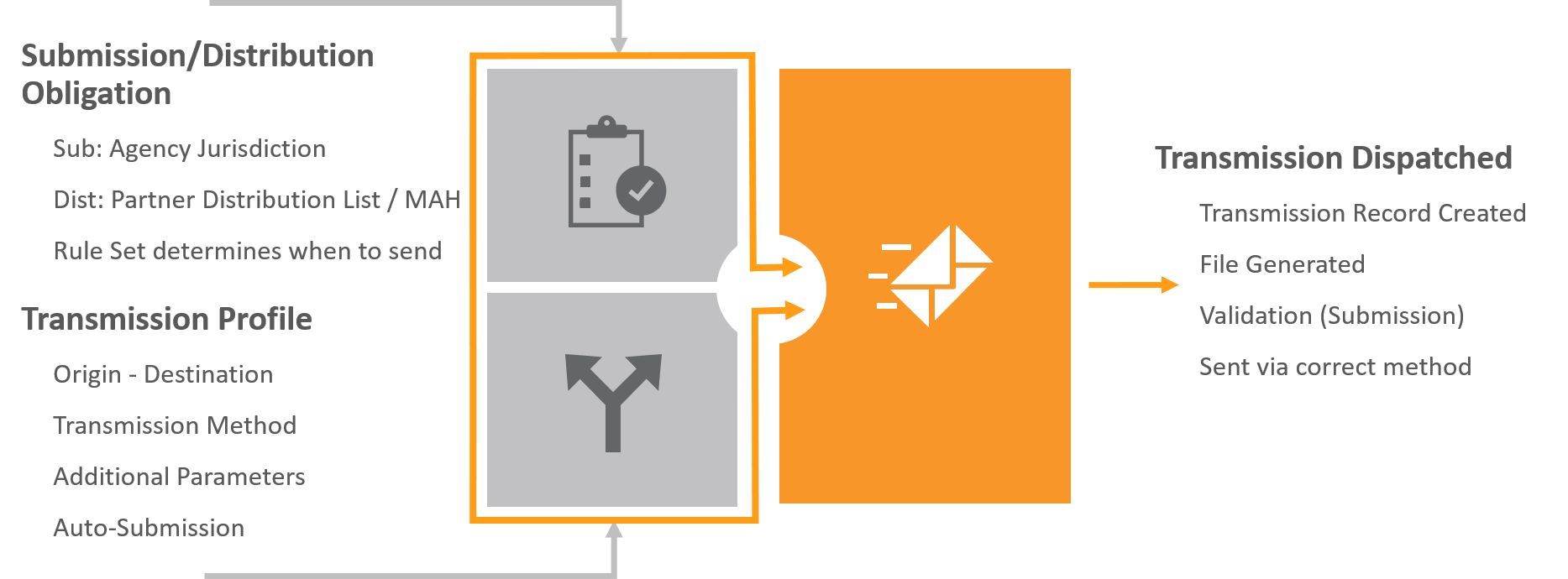
If configured by your Admin, auto-submissions may run from the Case level as part of case processing workflow. You can also manually create Submissions and Distributions.
Evaluate Early Notification Obligations
If you have an agreement with a partner or agency to share the details of a Case before it has reached the Approved state, you can run the Evaluate Early Notification Obligations action on the Case. When this action runs, Vault performs the same actions as for Submissions and Distributions described above with the following exceptions:
- Vault considers a Case as eligible for early notification for early reporting to a partner or agency if it matches a reporting rule that contains an Early Notification reporting rule parameter.
- Vault ignores reporting rules that do not contain an Early Notification reporting rule parameter.
- Vault does not set the Due Date on Early Notifications.
Note: If required, your Admin can configure your Vault to evaluate early notification obligations when you promote a Case.
Regenerate Vault-Created Transmissions
To prevent duplicate Transmissions, if Case details are changed, Vault regenerates a Transmission only if one does not already exist for the same Transmission Profile.
To regenerate a Transmission to replace one that already exists, move the Transmission to Inactive, and then trigger the Re-evaluate Submissions / Distributions action (for Submissions and Distributions) or the Evaluate Early Notification Obligations action (for Early Notifications).
Vault Creation of Masked Distributions
For Cases linked to a Study or Product Family with a Partner Distribution List set up with content protection, when the Case enters the Approved state, Vault generates Distributions with data masking.
The name of the generated Distribution includes a prefix that identifies the masking option:
- Mask PII: Distributions generated with Patient Content Protection set to Mask PII.
- Mask E2B (Includes PII): Distributions generated with Patient Content Protection set to Mask E2B (Includes PII).
- Blinded: Distribution generated with Study Content Protection set to Mask Unblinded Content.
Vault Creation of Masked Early Notifications
For Cases linked to a Study or Product Family with a reporting rule with content protection, when the Case enters the appropriate state, Vault generates Early Notifications with data masking.
The name of the generated Early Notification file includes a prefix that identifies the masking option:
- Mask PII: Early Notification files generated with Patient Content Protection set to Mask PII.
- Mask E2B (Includes PII): Early Notification files generated with Patient Content Protection set to Mask E2B (Includes PII).
- Blinded: Early Notification files generated with Study Content Protection set to Mask Unblinded Content.
Logically Delete Non-Submittable Transmissions on Subsequent Evaluations
If your Admin has enabled logical deletion of non-submittable Transmissions, Vault prevents over-reporting of Cases without having to manually remove or update Transmissions. Whenever you rerun the Re-evaluate Submissions / Distributions action on a global Case or Localized Case for a Localization with a blank Assessment Generation method, Vault does the following for Transmissions generated by the ICSR Reporting Rule Engine:
- Generates Transmissions for any submittable reporting obligations not previously created by the reporting rules engine.
- To prevent duplication of Rule Engine-created Transmissions, for all destinations except the FDA, Vault considers all Transmission Profile and Destination pairs. For the FDA, Vault considers Transmission Profiles within a Registration Type (Investigational or Marketing) and Destination pairs. CDER and CBER are considered Marketing transmission profiles, while CDER Study, CBER Study, FDA Study, and CDER IND Exempt are considered Investigational transmission profiles.
- Updates any previously created Transmissions that are no longer submittable to Deleted.
- This change does not apply to Transmissions in the Completed, ACK Accepted, and ACK Warning states.
- Updates the Due Dates on all submittable Transmissions.
- Updates the Auto-Submit field.
- Adds a new version of any previously created Transmission Creation Message, appending details of whether any of the reporting rules passed or if all the rules failed.
Note: This does not apply to Localized Cases that contain a Localization with an Assessment Generation method of Case Product Registration. For these Cases, unused Submissions move to the Deleted state by the Generate Local Reporting Details action. For more information on Submission Generation and Linking for PMDA Localized Cases, see Report to the PMDA.
If this feature is not enabled in your Vault, Vault generates any newly submittable Transmissions, but does not update any previously generated Transmissions. You must manually update Due Dates and delete any Transmissions that no longer meet reporting obligations