# Complete Intake and Process Cases for the PMDA

Vault supports the intake and processing of postmarketing and investigational drug cases that originate within and outside of Japan. This includes the following features:

* [Text translation][7] through automation or dual-entry fields
* [Code terms][8] using industry-standard dictionaries
* [Capture of data points][9] specific to PMDA reporting, including clinical trial requirements for foreign cases
* <a href="/en/lr/735519/">Import of PMDA E2B(R3) files to _Inbox Items_ for creating Japan _Domestic Cases_</a>
* Calculation of reportable [product registrations][10], [localized assessments, and due dates][11], including when products are registered under [multiple Marketing Authorization Holders (MAHs)][16]
* Generation of [local reporting details, comments, and transmissions][12]
* [Calculation of Japan reportability][14]

For information on configuring all available capabilities on this page, see <a href="/en/lr/693942/#prerequisites">PMDA Overview and Profile Setup</a>.

## Japan Case Intake

Vault supports the intake of drug cases reportable to Japan through _Inbox Items_. For general information on this topic, see <a href="/en/lr/01137/">Perform Local Language to English Intake</a>.

You can complete intake for the following types of cases:

* **Domestic Cases:** Cases reported from within Japan
  * To create a _Domestic Case_ for Japan, set the _Inbox Item Localization_ field to "Japanese (Japan)".
* **Localized Cases:** Foreign cases reported from outside of Japan
  * After the global _Case_ is approved, Vault generates a _Localized Case_ for Japan when the _Case_ includes a _Case Product Registration_ that is reportable to the PMDA.

For PMDA <a href="/en/lr/696904/">special report classifications</a>, you can identify _Safety Measure_ and _Research Reports_ on _Inbox Items_.

Vault also supports importing PMDA E2B(R3) files to create _Inbox Items_ for Japan domestic _Cases_, including merging to an in-flight _Case_ and promoting to a follow-up _Case_ through the _Inbox Item to Case Compare_ page. For more information, see <a href="/en/lr/735519/">PMDA E2B(R3) Case Import</a>.

<div class="note-border alert-info">
  <div class="alert alert-info" role="alert">
    <div><i class="far fa-info-circle"></i></div>
    <div class="alert-text">
      <p><strong>Note</strong>: Although Vault supports the PMDA E2B(R3) data elements in section J2, these fields are not available on the <em>Inbox Item</em> during manual creation. You must enter the required data after promoting the <em>Inbox Item</em> to a <em>Case</em>.</p>
    </div>
  </div>
</div>


## Translating Inbox Items and Cases {#translation-methods}

When you save an _Inbox Item_ with the _Localization_ field set to _Japanese (Japan)_, you can use the <a href="/en/lr/01137/#local-intake-fields-with-english-translations">local intake fields</a> to enter information in both Japanese and English. These dual-entry fields also appear on the Japan domestic _Case_ after promotion.

For foreign cases, enter details in Japanese on the _Localized Case_.

If your Admin has set up the <a href="/en/lr/01137/#send-translation-requests-through-the-auto-translation-framework">Auto-Translation Framework</a>, you can send all localized text fields for _Inbox Items_ or _Cases_ to Amazon Translate for translation into English.

## Code Inbox Item and Case Terms {#coding-methods}

Vault supports Japanese coding of terms on _Inbox Items_ and _Cases_ using industry-standard dictionaries, as follows:

* Code medical terms for symptoms, diseases, indicators, and adverse events using the multilingual Medical Dictionary for Regulatory Activities (MedDRA). For more information about the multilingual _MedDRA Browser_, see <a href="/en/lr/01164/#multilingual-meddra">Code MedDRA Terms</a>.
  * This includes both current and <a href="/en/lr/01301/#meddra-j-currency">MedDRA/J current</a> terms, enabling coding different English terms that translate to the same Japanese characters
  * The MedDRA language is set based on the **Localization** field
* Code external products using the Japan Drug Dictionary (JDD). For more information, see <a href="/en/lr/01163/">Code Japan Drug Dictionary Products</a>.
* Code external products or add drug history to the Case using the WHODrug Dictionary. For more information, see <a href="/en/lr/01165/">Code WHODrug Products</a>.

### Cross-Referencing JDrug and WHO Drug Codes

Vault also supports cross-referencing JDrug and WHODrug codes during case processing using the WHODrug Cross Reference Tool (CRT) Japan. This eliminates manual code entry in the following instances:

* Adding the applicable WHODrug code when processing a Japan domestic _Case_ with an _External Product_ coded using a JDrug code.
* Adding the applicable JDrug code when processing a Japan foreign _Localized Case_ with an _External Product_ coded using a WHODrug code.

For more information on using this feature, see <a href="/en/lr/01163/">Code Japan Drug Dictionary Products</a> and <a href="/en/lr/01165/">Code WHODrug Products</a>.

## Case Processing Overview {#data-capture}

After you promote an _Inbox Item_ to a domestic _Case_ or Vault generates a _Localized Case_, you can complete additional data entry, medical review, and _Case_ validation.

Domestic _Cases_ and _Localized Cases_ support <a href="/en/lr/872016/">region-specific fields</a> for reporting to the PMDA. For general information on domestic _Cases_, see <a href="/en/lr/01168/">Prepare a Domestic Case</a>. For general information on Localized Cases, see <a href="/en/lr/01290/">Prepare a Localized Case</a>.

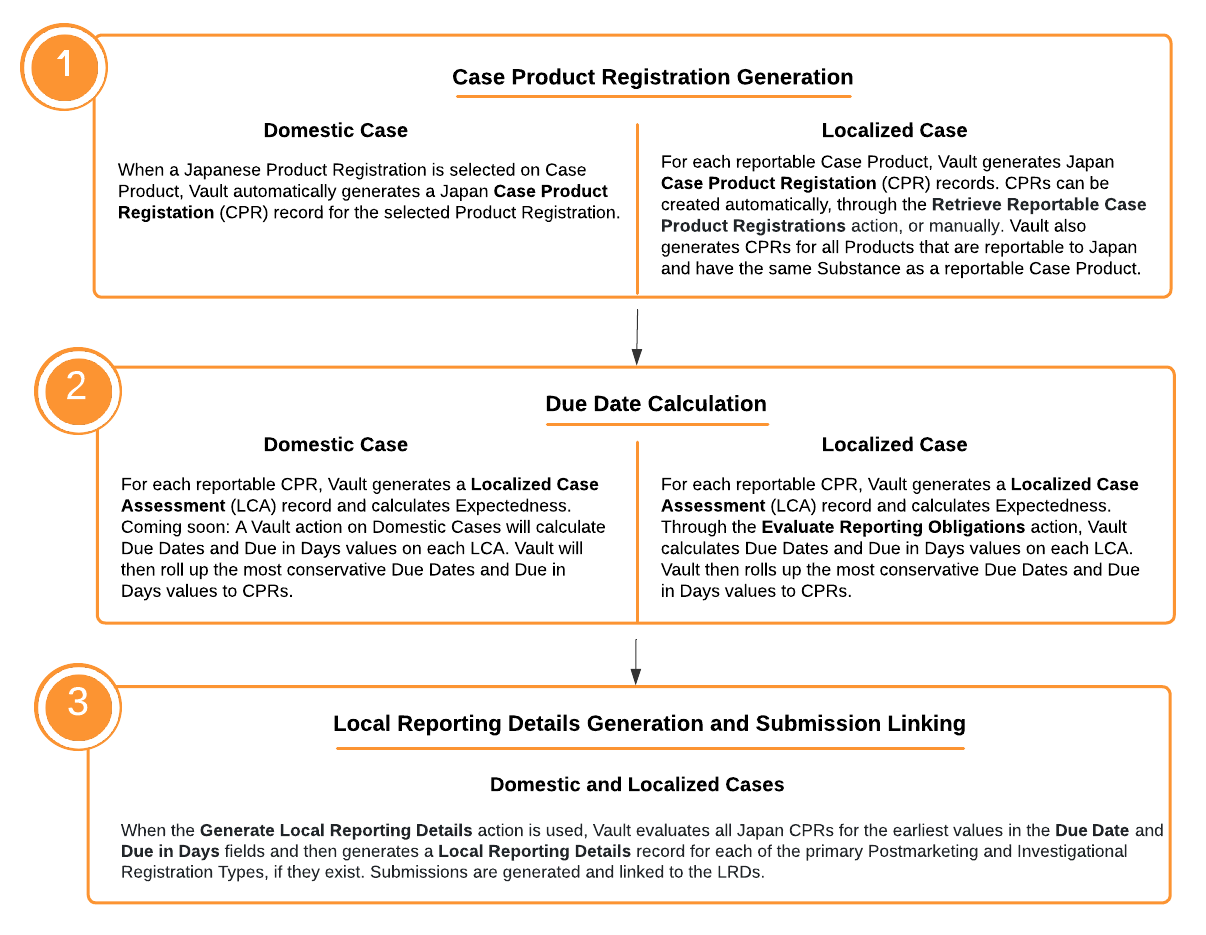
The following diagram highlights the major Case processing steps that enable Vault to determine reporting requirements for the PMDA.

<a href="https://platform.veevavault.help/assets/images/saf-pmda-overview.png" data-lightbox="saf-pmda-overview.png" data-title="Overview of PMDA Case Processing Key Steps" data-alt="Key Steps for PMDA Case Processing">
  <img class="docimage" src="https://platform.veevavault.help/assets/images/saf-pmda-overview.png" alt="Key Steps for PMDA Case Processing" style="width: 80%;"  />
</a>

### Calculate Japan Reportability {#calc-japan-reportability}

The _Calculate Japan Reportability_ action on Japan _Localized Cases_ generates _[Case Product Registration][10]_ records, <a href="/en/lr/01290/#evaluate-reporting-obligations-for-localized-transmissions">evaluates their reporting obligations</a>, and creates the associated _[Local Reporting Details][12]_ records and <a href="/en/lr/891324/#submissions--distributions-section">Submissions</a>.

## Case Product Registration Section {#cpr-section}

The _Case Product Registration_ section captures Japan _Case Product Registrations_. For both domestic _Cases_ and _Localized Cases_, during _Case Product Registration_ record creation, details are mapped from the Japan _Product Registration_ when available. See the sections below for information on when Vault generates records for <a href="#domestic-gen">Domestic Cases</a> and <a href="#localized-gen">Localized Cases</a>. For information on the available _Case Product Registration fields_, see <a href="/en/lr/872016/#pmda-cpr-fields">PMDA Case Field Reference</a>.

When a _Product_ includes PMDA registrations for [multiple Marketing Authorization Holders (MAHs)][16], Vault generates _Case Product Registrations_ for each MAH based on _Registration Holder/Applicant_ values on _Product Registrations_. Vault then maps the _Registration Holder/Applicant_ value to related _Local Reporting Details_ records.

When you [delete _Case Product Registrations_][15], Vault cascades deletions to associated localized records and clear references in related records.

### Domestic Case Product Registration Generation {#domestic-gen}

On domestic _Cases_ for Japan, when a PMDA _Product Registration_ is selected for the _Case Product_, Vault populates _Case Product Registrations_ and the associated _Case Assessments_. Vault generates _Case Product Registrations_ and _Case Assessments_ in the following scenarios:

* Upon _Case_ promotion if a PMDA _Product Registration_ exists on the _Inbox Item_
* Upon using the _Re-generate Domestic Case_ action
* Upon adding a _Case Product_ with a PMDA _Product Registration_ with an <a href="/en/lr/01169/#drug-roles-considered">eligible _Drug Role_</a>
* Upon changing the _Product Registration_ of an existing _Case Product_ with an <a href="/en/lr/01169/#drug-roles-considered">eligible _Drug Role_</a> from a blank or non-PMDA _Product Registration_ to a PMDA _Product Registration_
* Upon changing the PMDA _Product Registration_ of an existing _Case Product_ with an <a href="/en/lr/01169/#drug-roles-considered">eligible _Drug Role_</a> to a different PMDA _Product Registration_
* Upon using the _Evaluate Regulatory Conformance_ action

Vault deletes _Case Product Registrations_ and associated _Case Assessments_ upon changing the _Product Registration_ of an existing _Case Product_ with an <a href="/en/lr/01169/#drug-roles-considered">eligible _Drug Role_</a> from a PMDA _Product Registration_ to either a non-PMDA _Product Registration_ or to blank. If your Admin has enabled <a href="/en/lr/691317/">Isolate Blinded Clinical Trial Information</a> in your Vault, Vault deletes _Case Product Registrations_ in this scenario only when the _Blinding Type_ is not _Blinded_.

### Localized Case Product Registration Generation {#localized-gen}

Depending on your Admin's configuration, Vault may generate _Case Product Registrations_ upon _Localized Case_ creation. To manually generate _Case Product Registrations_, from the **All Actions** menu, select **Retrieve Reportable Case Product Registrations**. When you run this action, Vault: 
* Deletes both Vault-generated and manually created _Case Product Registrations_
* Generates new _Case Product Registrations_ based on the latest _Case Product_ updates
    * For _Products_ with _Product Registrations_ for multiple MAHs, Vault generates:    
        * _Case Product Registrations_ for all investigational registrations, regardless of the _Registration Holder/Applicant_
        * One _Case Product Registration_ for the [applicable postmarketing registration][2] for each MAH, and one for the applicable postmarketing registration across all _Product Registrations_ with an unspecified _Registration Holder/Applicant_
    * If your Admin has <a href="/en/lr/1004865/">enabled _Device Constituent Case Assessments_</a>, Vault creates _Case Product Registrations_ for:
      * Standalone devices
      * Each constituent device or drug of a combination product
* Clears the _Primary Case Product Registration_ field on _Local Reporting Details_
* For _Cases_ related to an <a href="/en/lr/01215/#unknown-formulation-products">unknown formulation _Product_</a>, Vault generates _Localized Case Product Registrations_ for each _Product Registration_ within the _Product Family_ that is related to the unknown formulation _Product_

For blinded _Study Products_, Vault generates _Case Product Registrations_ using the following priority:

* The primary blinded investigational product identified on the _Study Product Placeholder_ record
* The earliest created _Study Product_ with a _Study Product Role_ of _Investigational_ that is associated with the _Study Product Placeholder_ record
* The earliest created _Study Arm Product_ with an associated _Study Product_ that has a _Study Product Role_ of _Investigational_

When populating reportable _Case Product Registrations_, Vault evaluates all reporting obligations in the following instances:

* [Marketing Registrations (General Reporting)][2]
* [Marketing Registrations (Cross Reporting)][4]
* [Investigational Registrations (General Reporting)][5]
* [Investigational Registrations (Cross Reporting)][6]
* A product reportable to the PMDA includes the same substance as a suspect or interacting _Case Product_ on the _Localized Case_ (see both Cross Reporting scenarios linked above)
* <a href="/en/lr/696896/#blinded-study-prod-reporting">A blinded _Study Product_ is reportable to the PMDA</a>

Vault considers existing _Case Product Registrations_ not reportable and removes them from domestic _Cases_ or _Localized Cases_ in the following instances:

* The _Drug Role_ of the associated _Case Product_ is no longer _Suspect_, _Interacting_, or _Drug Not Administered_.
  * If your Admin has enabled <a href="/en/lr/691317/">Isolate Blinded Clinical Trial Information</a> in your Vault, Vault deletes _Case Product Registrations_ in this scenario only when the _Blinding Type_ is not _Blinded_.
* The _Product_ or _Product Registration_ associated with the _Case Product_ or _Study Product_ was deleted, inactivated, or deprecated.

#### Marketing Registrations (General Reporting) {#mkt-reg-gen-rpt}

Vault generates one marketing _Case Product Registration_ when the Japanese _Registration Category_ is _Marketing_ and the following details from the _Localized Case Product_ match a _Case Product Registration_:

* _Dose Form_, _Strength Number_, and _Strength Unit_ \
  If the above don't all match, Vault matches on _Dose Form_ alone.
* The PMDA _Product Registration_ is set up as the default registration

If there are multiple matches, Vault selects the PMDA _Product Registration_ with a matching _Dose Form_ and the earliest _Created Date_.

When the related _Product_ includes _Product Registrations_ for multiple _Registration Holder/Applicants_, Vault generates a postmarketing _Case Product Registration_ for each _Registration Holder/Applicant_. If that _Product_ also includes _Product Registrations_ with no _Registration Holder/Applicant_ value, Vault generates one postmarketing _Case Product Registration_ using the same selection criteria.

#### Marketing Registrations (Cross Reporting) {#mkt-reg-crs-rpt}

If Vault did not create a [marketing _Case Product Registration_ for general reporting][2], then Vault generates the following _Case Product Registrations_ for each _Case Product_ for cross reporting:

* One _Case Product Registration_ from the marketing _Product Registrations_ for the _Case Product_ using the same selection criteria as for Marketing Registrations (General Reporting).
* For the <a href="/en/lr/01247/#exact">exact _Substance_-matched</a> cross-reportable _Products_, a _Case Product Registration_ for one registration per exact matching cross-reportable _Product_ using the same selection criteria as for Marketing Registrations (General Reporting).
* If there are no exact _Substance_-matched cross-reportable _Products_, then for each <a href="/en/lr/01247/#partial">partial _Substance_-matched</a> cross-reportable _Product_, Vault generates a _Case Product Registration_ for one registration per partial matching cross-reportable _Product_ using the same selection criteria as for Marketing Registrations (General Reporting).

As with general reporting, during cross reporting Vault generates a postmarketing _Case Product Registration_ for each applicable MAH, based on _Registration Holder/Applicant_ values, including one across all postmarketing _Product Registrations_ with no _Registration Holder/Applicant_ value.

#### Investigational Registrations (General Reporting) {#inv-reg-gen-rpt}

The Japanese _Registration Category_ is _Investigational_.

If there are multiple matches, Vault adds them all to the _Localized Case_.

#### Investigational Registrations (Cross Reporting) {#inv-reg-crs-rpt}

For investigational registrations with the PMDA, Vault generates a _Case Product Registration_ for cross reporting if it is a _Product Registration_ for a _Product_ on the _Case_ or a _Product Registration_ for a cross-reportable _Product_ with <a href="/en/lr/01247/#exact">exact matching _Substances_</a>.

## Local Reporting Details Section {#lrd-section}

If your Admin has <a href="/en/lr/01446/">enabled the PMDA Local Reporting Details Generation and Submission Linking feature</a>, you can select the **Generate Local Reporting Details** action in the **All Actions** menu on Japan domestic _Cases_ and _Localized Cases_. For all Japan _Case Product Registrations_ with _Due Date_ and _Due in Days_ values, Vault generates a _Local Reporting Details_ record for each of the primary postmarketing and investigational <a href="/en/lr/872016/#registration-type">_Registration Types_</a>, if they exist on the Case. When _Products_ include [multiple MAHs][16], Vault generates _Local Reporting Details_ and related records for each MAH. For information on the available _Local Reporting Details_ fields, see <a href="/en/lr/872016/#pmda-lrd-fields">PMDA Case Field Reference</a>.

Vault determines the primary _Case Product Registration_ using the following priority order:

1. The earliest _Due Date_ for each _Registration Type_.
2. If there are multiple registrations for a _Registration Type_ with the same _Due Date_, Vault evaluates the highest _Rank_. Additional evaluation depends on the _Registration Type_:
   * **Postmarketing:** If there are multiple registrations with the same _Rank_, Vault evaluates the earliest _Created Date_.
   * **Investigational:** If there are multiple registrations with the same _Rank_, Vault evaluates the _Case Product Registration_ linked to a _Study Product_ or _Product_ on the _Case_. If there are still multiple, Vault evaluates the earliest _Created Date_.

In addition to generating _Local Reporting Details_ records, the _Generate Local Reporting Details_ action generates records as follows:

* [_PMDA Reportable Products_][3]
* [_Case Comments_][1]
* <a href="/en/lr/696896/#pmda-localized-case-submission-generation">_Submissions_</a>

Vault considers _Case Product Registrations_ without _Due Date_ or _Due in Days_ values to be not reportable.

<div class="note-border alert-info">
  <div class="alert alert-info" role="alert">
    <div><i class="far fa-info-circle"></i></div>
    <div class="alert-text">
      <p><strong>Note</strong>:  If your Admin has configured <a href="/en/lr/691317/">Isolate Blinded Clinical Trial Information</a> in your Vault, the following occurs when you run the <em>Generate Local Reporting Details</em> action. If a <em>Case</em> is unblinded and includes unblinded and blinded <em>Case Product Registrations</em>, Vault sets the unblinded <em>Case Product Registration</em> on the related <em>Local Reporting Details</em> record. In addition, Vault generates one <a href="#reportable-products"><em>PMDA Reportable Products</em></a> record for each of the unblinded <em>Case Product Registrations</em>.</p>
    </div>
  </div>
</div>


### Local Reporting Details by MAH {#lrd-mah}

When _Case Products_ reference _Products_ with _Product Registrations_ for multiple _Registration Holder/Applicants_, Vault considers the _Registration Holder/Applicant_ on _Case Product Registrations_ when generating _Local Reporting Details_ records. Vault considers all _Product Registrations_ with a common _Registration Holder/Applicant_ as a group, including grouping all _Product Registrations_ without a _Registration Holder/Applicant_ value. For each group, Vault generates _Local Reporting Details_ and the related _PMDA Reportable Products_, _Case Comments_, and _Submission_ records for the primary postmarketing and investigational _Product Registrations_.

## PMDA Reportable Products Section {#reportable-products}

To generate the _PMDA Reportable Products_ section, which includes _Local Reporting Details/Product Join_ object records, from the **All Actions** menu, select **Generate Local Reporting Details**. _Local Reporting Details/Product Join_ records associate _Local Reporting Details_ records with the reportable _Products_ of the _Case Product_ or _Case Product Registration_. For information on the available _PMDA Reportable Products_ fields, see <a href="/en/lr/872016/#pmda-reportable-prods-fields">PMDA Case Field Reference</a>.

In the _PMDA Reportable Products_ section, _Ranks_ are assigned by _Registration Category_ and _Drug Role_ as follows:

* For Marketing registrations, Vault assigns Rank 1 to the primary _Case Product Registration_ from the _Local Reporting Details_ section. Vault then ranks Other Postmarketing registrations in the following order based on _Drug Role_:
    1. _Suspect_
    2. _Interacting_
    3. _Other_
* For Investigational registrations, Vault assigns Rank 1 to the _Case Product Registration_ with a _Drug Role_ of _Suspect_. Vault then ranks in order based on _Drug Role_, including:
    1. _Suspect_
    2. _Interacting_
    3. _Other_
* For Investigational registrations with the same _Drug Role_, Vault assigns Rank based on the Rank in the _Case Product Registration_ section.

<div class="note-border alert-info">
  <div class="alert alert-info" role="alert">
    <div><i class="far fa-info-circle"></i></div>
    <div class="alert-text">
      <p><strong>Note</strong>: If <em>Local Reporting Details</em> are system-generated, Vault assigns a Rank based on the Rank in the <em>Case Product Registration</em> section.</p>
    </div>
  </div>
</div>


## Case Comments Section {#case-comments}

The **Case Comments** section is generated through the **Generate Local Reporting Details** action and **Localized Case Comment** records are linked to their associated **Local Reporting Details** record. Use the **Case Comments** section to add PMDA (Japan) region-specific comments. For information on the available _Case Comments_ fields, see <a href="/en/lr/872016/#pmda-comments-fields">PMDA Case Field Reference</a>.

## Adverse Events Section {#ae-section}

Each Case Adverse Event from the Global Case is mapped to create Localized Case Adverse Events. For information on the available _Adverse Event_ fields, see <a href="/en/lr/872016/#ae-section">PMDA Case Field Reference</a>.

## Assessments Section {#assessments-section}

Based on your Admin's configuration of the Japan <a href="/en/lr/01194/#assessment-generation">_Localization_</a>, Vault may generate _Localized Case Assessments_ for each _Case Product Registration_. In this scenario, for each _Case Product_ with an <a href="/en/lr/01169/#drug-role">eligible _Drug Role_</a>, Vault generates _Localized Case Assessments_ and calculates _Expectedness_ for each _Case Product Registration_.

With this feature, Vault automatically generates _Localized Case Assessments_ when you add _Case Adverse Events_. When you change the _MedDRA LLT_ on existing _Case Adverse Events_, Vault updates _Localized Case Assessments_ and reevaluates _Expectedness_. If your Admin has <a href="/en/lr/678794/">enabled Datasheet Expectedness by Age and Sex</a>, Vault also reevaluates _Expectedness_ if you change the sex or any age-related field (including _Date of Birth_, _Age at Onset_, or _Age Group_) of the _Case Patient_.

When you update _Localized Case Assessments_, _Localized Case Assessment Results_, or _Localized Case Assessment Expectedness_ on a Japan domestic _Case_, Vault maps the change to the most conservative _Case Assessment_ and its related records on the global _Case_. You can make changes to localized assessments even when the global _Case_ is _Approved_ or _Closed_. This supports accurate and complete assessment evaluation by local Case Processors.

For information on the available _Assessment_ fields, see <a href="/en/lr/872016/#pmda-assessments-fields">PMDA Case Field Reference</a>.

### Evaluate Reporting Obligations for Localized Case Assessments {#evaluate-lca}

Before evaluating general and cross reporting obligations, ensure you have retrieved all the reportable Case Product Registrations. For more information, see <a href="#case-product-registration-section">Case Product Registration Section</a>.

If your Admin has not configured your Vault to generate _Localized Case Assessments_ for _Case Product Registrations_, see <a href="/en/lr/01290/#eval-obs">Prepare a Localized Case</a> for more information.

You can evaluate reporting obligations for _Localized Case Assessments_ in the following ways:

* On a Japan Domestic Case, go to the **All Actions** menu and select **Calculate Due Dates on LCA**.
* On a Japan Localized Case, go to the **All Actions** menu and select **Evaluate Reporting Obligations**.

After running the applicable action to evaluate reporting obligations on the Localized Case, Vault populates the **Due Date** and **Due in Days** fields on each Localized Case Assessment as follows:

* **Due in Days:** Based on the applicable reporting rules.
* **Due Date Calculations:** Depending on your Admin's setting in the **Localization** record's **Localized Due Date Calculation** field. The following options may be configured:
    * If set to **Localized Case - Local Awareness Date**, the Due Date is based on the Local Awareness Date and the Due in Days evaluation. If the Local Awareness Date is blank, Vault uses the New Info Date, if available, or the Receipt Date.
    * If set to **Global Case - New Info Date**, the Due Date is based on the New Info Date and the Due in Days evaluation. If the New Info Date is blank, Vault uses the Receipt Date.

In addition, Vault rolls up the _Due Date_ and _Due in Days_ values to the related <a href="/en/lr/872016/#pmda-cpr-fields">_Case Product Registration_ fields</a>.

Vault does not generate Transmissions through these actions.

#### Standalone Devices and Device Constituents of Combination Products

If your Admin has <a href="/en/lr/1004865/">enabled _Device Constituent Case Assessments_</a>, Vault prioritizes reporting rules as follows:

If there are one or more rules without an <a href="/en/lr/01250/#individual-device-transmission">_Individual Device Transmission_</a> parameter and one or more rules with an _Individual Device Transmission_ parameter for the device _Case Product_ for the same Agency, Vault prioritizes the passing rule with the _Individual Device Transmission_ parameter to create the transmission.

For example, if a standalone device passes both a regular PMDA reporting rule and an _Individual Device Transmission_ reporting rule, Vault creates a transmission for the Individual Device Transmission profile rather than the regular PMDA profile.

## Expectedness

On Japan domestic _Cases_, Vault does not generate _Case Assessment Expectedness_ records for _Case Products_ with registrations that are reportable to the PMDA. Instead, expectedness evaluations appear on _Localized Case Assessments_. At the _Case_-level, Vault evaluates _Expectedness_ using the most reportable evaluation across all non-PMDA _Case Assessment Expectedness_ records and _Localized Case Assessments_ from the Japan _Localized Case_.

When you override the _Expectedness_ or _Expected (status)_ on a _Localized Case Assessment_, Vault maps the update to the global _Case_ for domestic _Cases_, but not for _Localized Cases_.

#### PMDA Follow-Up Information Expectedness Reevaluation {#pmda-fu-expectedness}

Your Admin's configuration of the <a href="/en/lr/740208/#auto-gen-assessments">_Recalculate Post-Market Expectedness on Follow-up_</a> application setting determines when Vault reevaluates the expectedness of adverse events on postmarket _Cases_ that are reportable to the PMDA. This includes when _Inbox Item_ information is merged into an in-flight _Case_ or promoted to a follow-up _Case_.

If the setting is clear, Vault <a href="/en/lr/737264/#follow-up-expectedness">copies and reevaluates expectedness</a> in the same way as for non-PMDA _Cases_.

If the setting is selected:

* On global _Cases_:
  * For all _Case Assessment Expectedness_ records on which the _Expected (status)_ is _Auto Calculated_ or blank, Vault reevaluates expectedness.
  * Vault generates any new or missing _Case Assessment Expectedness_ records for _Case Products_ in _Case Assessments_.
* On domestic _Localized Cases_, for all _Localized Case Assessments_ on which the _Expected (status)_ is _Auto Calculated_ or blank, Vault reevaluates expectedness.

## Case Product Registration Deletion {#cpr-deletion}

When you delete a _Case Product Registration_, Vault deletes _Localized Case Assessments_ and updates _Localized Case Assessment Results_ and _Local Reporting Details_ records that reference the deleted _Case Product Registration_. The following applies to Japan domestic _Cases_ and _Localized Cases_.

### Localized Case Assessment Result Updates

If there is only one _Localized Case Assessment_, Vault deletes it and the associated _Localized Case Assessment Result_.

If the _Localized Case_ includes multiple _Localized Case Assessments_ (LCAs) and any reference another _Case Product Registration_ (CPR) that shares the same _Case Product_ (CP) as the deleted CPR, Vault updates the _Localized Case Assessment Results_ (LCARs) for LCAs that reference the deleted CPR to reference another LCA.

For example, suppose you have:

* CP1 with
  * CPR1 and LCA1
  * CPR2 and LCA2
* LCAR1 with LCA1 in the _Localized Case Assessment_ field

When Vault deletes CPR1 and LCA1, Vault updates the _Localized Case Assessment_ field of LCAR1 to LCA2.

### Local Reporting Details Updates

During _Case Product Registration_ deletion, to update _Local Reporting Details_ records, Vault:

* Clears the _Primary Case Product Registration_ field of any _Local Reporting Details_ records that reference the deleted _Case Product Registration_.
* Deletes any _Local Reporting Details/Product Join_ records that reference the deleted _Case Product Registration_.

### Case Product Deletion Through Follow-Up

If you delete a _Case Product_, when an _Inbox Item_ is merged to an in-flight _Case_ or promoted to a follow-up _Case_ through the _Inbox Item to Case Compare_ page, Vault:

* Deletes all associated _Case Product Registrations_, _Localized Case Assessments_, and _Localized Case Assessment Results_.
* Clears the _Primary Case Product Registration_ field of any _Local Reporting Details_ records that reference the deleted _Case Product Registration_.
* Deletes any _PMDA Reportable Products_ records that reference the deleted _Case Product Registration_.

In Vaults configured to <a href="/en/lr/691317/">isolate blinded clinical trial information</a>, Vault prevents deleting unblinded _Case Products_ on the _Inbox Item to Case Compare_ page. For blinded, open-label, and non-study products, Vault performs the actions listed above when _Case Products_ are deleted.

[1]: #case-comments
[2]: #mkt-reg-gen-rpt
[3]: #reportable-products
[4]: #mkt-reg-crs-rpt
[5]: #inv-reg-gen-rpt
[6]: #inv-reg-crs-rpt
[7]: #translation-methods
[8]: #coding-methods
[9]: #data-capture
[10]: #cpr-section
[11]: #evaluate-lca
[12]: #lrd-section
[13]: #pmda-cpr-fields
[14]: #calc-japan-reportability
[15]: #cpr-deletion
[16]: #lrd-mah
