# Configure Company Product Match Verification
Safety supports advanced product match coding verification. When an intake user imports a structured source file to an _Inbox Item_, Vault performs product matching for _Company Products_ with a _Drug Role_ evaluated as suspect using your configured criteria. Depending on your configuration of this feature, Vault performs this match for just the primary or the first 500 imported _Company Products_ with an applicable _Drug Role_.
Vault verifies whether imported _Inbox Items_ meet the product coding criteria and determines whether to proceed with product matching.
### Prerequisite
You must configure Company Product Match Verification for imported _Company Products_ with a _Drug Role_ evaluated as suspect on _Inbox Items_.
## Must Match and Should Match Confidence Outcomes {#must-match-and-should-match-confidence-outcomes}
When importing a structured source file to create an _Inbox Item_, Vault verifies whether the reported product matches a _Product Registration_. Depending on your configuration, verified values may include _Country_, _Route of Administration_, and _Dose Form_. If the product's _Country Obtained_ value is blank, Vault attempts to match the _Country_ using the primary reporter's _Country_.
Based on your configured _Must Match_ and _Should Match_ fields, Vault checks which reported product details match a _Product Registration_ and populates a _Product Match Confidence_ on the _Inbox Item_ as follows:
* **1-Exact Match**: Any of the following IDs match:
* MPID
* PhPID
* Registration Number
* **2-Confident Match**: All _Must Match_ and _Should Match_ fields contain values, and all those values match a single _Product Registration_.
* **3-Likely Match**: All _Must Match_ fields contain values, and all those values match a single _Product Registration_, but at least one _Should Match_ field is blank.
* **4-Unlikely Match**:
* All _Must Match_ and _Should Match_ fields have values, but at least one _Should Match_ field does not match the _Product Registration_ common to the _Must Match_ fields.
* At least one _Must Match_ field is blank or does not match the _Product Registration_ common to the other fields.
* The best match is a deprecated _Product Registration_.
* **5-Unknown**: There are no configured _Must Match_ or _Should Match_ fields.
* **6-No ID or Name Match**:
* The _Inbox Item_ does not specify any ID (MPID, PhPID, or Registration Number).
* The _Product Name_ on the _Inbox Item_ does not match a _Product_.
## Product Match Verification Diagrams
The diagrams in this section illustrate how Vault Safety determines whether to auto-code the Inbox Item **Company Product**. Review the sections below to learn about successful and unsuccessful Company Product matches.
### Successful Match
The following diagram illustrates a successful _Company Product_ match:
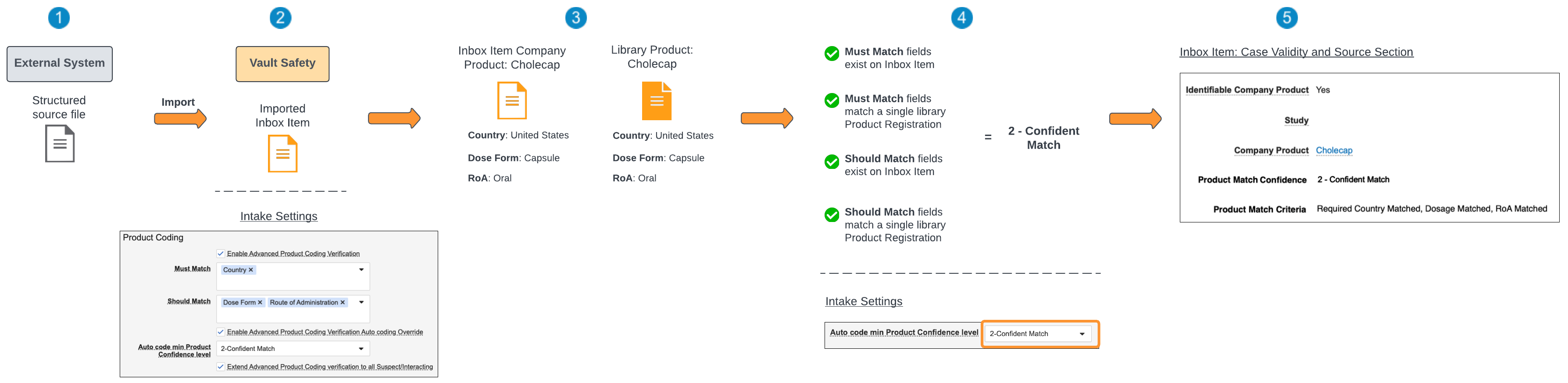
 Import the structured source file from an external system to Vault.
 On the **Admin > Intake Settings** page, the Product Coding criteria are as follows:
* **Must Match**: Country
* **Should Match**: Dose Form and Route of Administration
* **Auto code min Product Confidence level**: 2 - Confident Match
From the [Must Match and Should Match Confidence Outcomes][1], achieving a **2 - Confident Match** requires that all **Must Match** fields and **Should Match** fields exist on the Inbox Item and match a single Product Registration.
On the **Admin > Intake Settings** page, the Product Coding criteria are as follows:
* **Must Match**: Country
* **Should Match**: Dose Form and Route of Administration
* **Auto code min Product Confidence level**: 2 - Confident Match
From the [Must Match and Should Match Confidence Outcomes][1], achieving a **2 - Confident Match** requires that all **Must Match** fields and **Should Match** fields exist on the Inbox Item and match a single Product Registration.
 Vault attempts to match the _Company Product_ on the _Inbox Item_ to a library _Product_ by comparing the registration information.
 Vault determines the **Must Match** and **Should Match** fields exist on the Inbox Item and these fields match a Product Registration in the Product library. The resulting Product Match Confidence is therefore **2 - Confident Match**.
On the **Intake Settings** page, the **Auto code min Product Confidence level** was set to **2 - Confident Match**.
 Since the Vault-determined **Product Match Confidence** met the confidence level threshold set by your Admin, the Inbox Item Company Product can be auto-coded to the library Product.
### Unsuccessful Match
The following diagram illustrates an unsuccessful Company Product match:
Since the Vault-determined **Product Match Confidence** met the confidence level threshold set by your Admin, the Inbox Item Company Product can be auto-coded to the library Product.
### Unsuccessful Match
The following diagram illustrates an unsuccessful Company Product match:
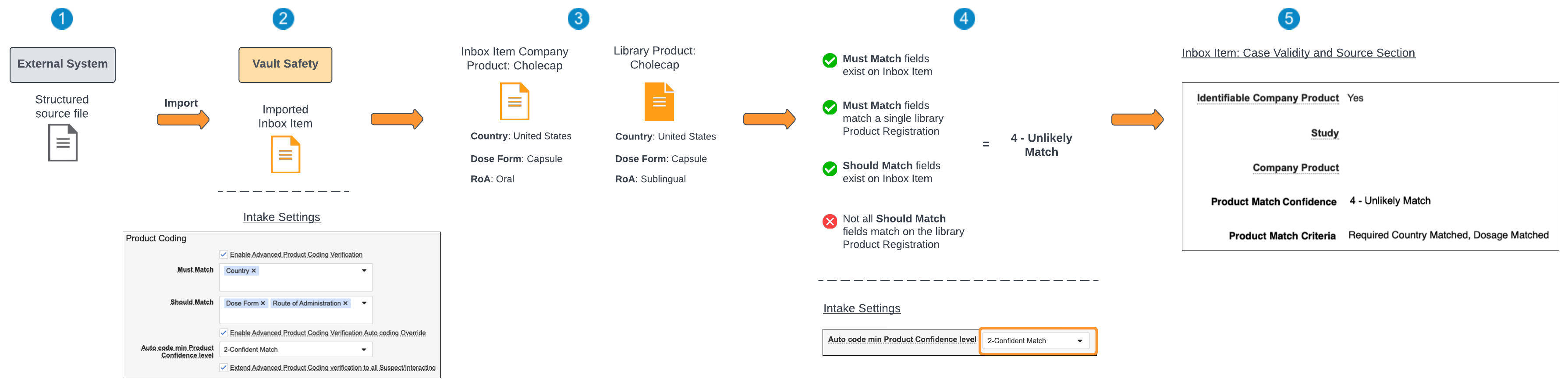 Import the structured source file from an external system to Vault.
On the **Admin > Intake Settings** page, the Product Coding criteria are as follows:
* **Must Match**: Country
* **Should Match**: Dose Form and Route of Administration
* **Auto code min Product Confidence level**: 2 - Confident Match
From the [Must Match and Should Match Confidence Outcomes][1], achieving a **2 - Confident Match** requires that all **Must Match** fields and **Should Match** fields exist on the Inbox Item and match a single Product Registration.
Vault attempts to match the _Company Product_ on the _Inbox Item_ to a library _Product_ by comparing the registration information.
Vault determines the **Must Match** fields (Country) exist on the Inbox Item and match a library Product Registration. However, although all the **Should Match** fields (**Dose Form** and **RoA**) exist on the Inbox Item, one (1) of them (**RoA**) does not match that on the library Product Registration. The resulting Product Match Confidence is therefore **4 - Unlikely Match**.
Import the structured source file from an external system to Vault.
On the **Admin > Intake Settings** page, the Product Coding criteria are as follows:
* **Must Match**: Country
* **Should Match**: Dose Form and Route of Administration
* **Auto code min Product Confidence level**: 2 - Confident Match
From the [Must Match and Should Match Confidence Outcomes][1], achieving a **2 - Confident Match** requires that all **Must Match** fields and **Should Match** fields exist on the Inbox Item and match a single Product Registration.
Vault attempts to match the _Company Product_ on the _Inbox Item_ to a library _Product_ by comparing the registration information.
Vault determines the **Must Match** fields (Country) exist on the Inbox Item and match a library Product Registration. However, although all the **Should Match** fields (**Dose Form** and **RoA**) exist on the Inbox Item, one (1) of them (**RoA**) does not match that on the library Product Registration. The resulting Product Match Confidence is therefore **4 - Unlikely Match**.
On the **Intake Settings** page, the **Auto code min Product Confidence level** was set to **2 - Confident Match**.
Since the Vault-determined **Product Match Confidence** did not meet the confidence level threshold set by your Admin, the Inbox Item **Company Product** field is left blank.
[1]: #must-match-and-should-match-confidence-outcomes