# Reporting Rule Parameter Reference

The _Safety Rules_ in a <a href="/en/lr/01252/">_Safety Rule Set_</a> define the conditions for which a <a href="/en/lr/01264/">_Transmission_</a> is generated. Each _Safety Rule_ has a set of parameters. The parameters must evaluate successfully for the rule to pass.

A _Safety Rule's_ **Priority** defines the order in which Vault attempts to match each reporting rule, which are processed from lowest to highest. To prevent over-reporting, once Vault finds the first matching rule, further rules are not evaluated.

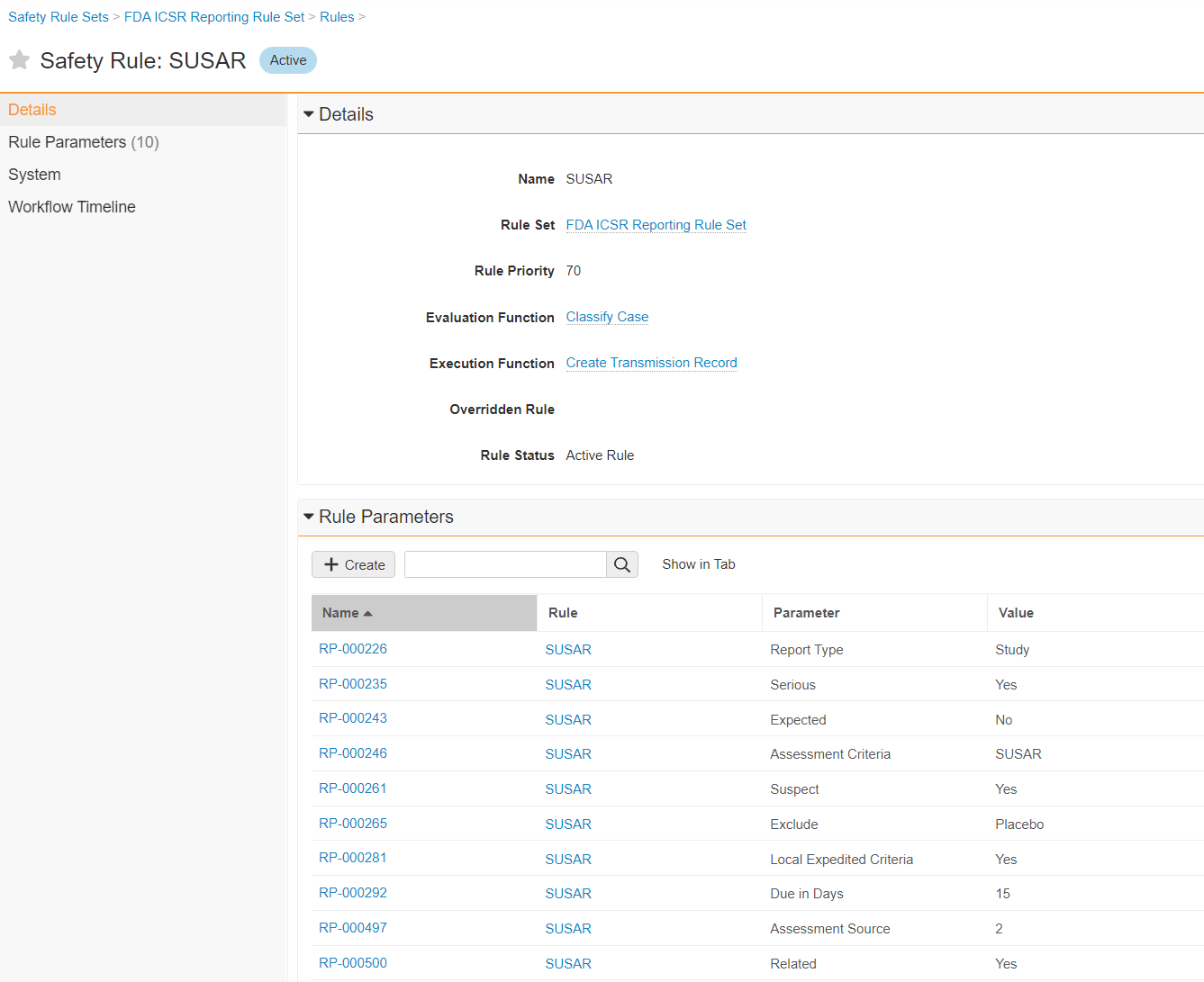
The following image shows an example of a Safety Rule:

<a href="https://platform.veevavault.help/assets/images/saf-safety-rule-example.png" data-lightbox="saf-safety-rule-example.png" data-title="Sample FDA Safety Rule" data-alt="Sample FDA Safety Rule">
  <img class="docimage" src="https://platform.veevavault.help/assets/images/saf-safety-rule-example.png" alt="Sample FDA Safety Rule" style=""  />
</a>

The following sections describe the parameters Vault supports for _Safety Rules_.

## Reporting Rule Parameters

The following table describes the reporting rule parameters that Vault evaluates. The **Type** column identifies whether a parameter is an input or output parameter. Input parameters evaluate _Case_ criteria to find a matching rule. Output parameters control how the _Transmission_ is generated.

<table>
    <thead>
      <tr>
         <th>Parameter</th>
         <th>Type (Input/Output)</th>
         <th>Description</th>
      </tr>
    </thead>
    <tbody>
      <tr>
         <td><strong>Report Type</strong></td>
         <td>Input</td>
         <td>
            <p>The <em>Case</em>'s <strong>Report Type</strong> (<code>report_type__v</code>) classification.</p>
            <p>
                The value must be a Report Type that is configured in the
                <a href="/en/lr/01195/">Controlled Vocabulary</a>. Vault evaluates this parameter for Report Types with the same E2B code.
            </p>
        </td>
      </tr>
      <tr>
         <td><strong>Study Type</strong></td>
         <td>Input</td>
         <td>
            <p>The <em>Case</em>'s <strong>Study Type</strong> (<code>product_usage_reason__v</code>) classification.</p>
            <p>The EMA rule set uses the Study Type parameter to differentiate between clinical trials and other study types.</p>
            <p>
                The value must be a Study Type that is configured in the
                <a href="/en/lr/01195/">Controlled Vocabulary</a>. Vault evaluates this parameter for Study Types with the same E2B code.
            </p>
            <div class="note-border alert-info">
  <div class="alert alert-info" role="alert">
    <div><i class="far fa-info-circle"></i></div>
    <div class="alert-text">
      <p><strong>Note</strong>: If the Study Type value on the <em>Case</em> is left blank, this parameter is regarded as a Clinical Trial.</p>
    </div>
  </div>
</div>


        </td>
      </tr>
      <tr>
         <td><strong><a id="serious"></a>Serious</strong></td>
         <td>Input</td>
         <td>
             Whether a value is populated in the <strong>Seriousness</strong> (<code>seriousness__v</code>) field on the <em>Case Adverse Event</em> associated with the <a href="/en/lr/01249/#most-reportable-cp-ca">Most Reportable Case Product and Case Assessment</a> being evaluated.
         </td>
      </tr>
      <tr>
         <td><strong><a id="life-threatening"></a>Life Threatening</strong></td>
         <td>Input</td>
         <td>
             Whether "Life threatening" is populated in the <strong>Seriousness</strong> (<code>seriousness__v</code>) field on the <em>Case Adverse Event</em> associated with the <a href="/en/lr/01249/#most-reportable-cp-ca">Most Reportable Case Product and Case Assessment</a> being evaluated.
         </td>
      </tr>
      <tr>
         <td><strong><a id="fatal"></a>Fatal</strong></td>
         <td>Input</td>
         <td>
             Whether "Results in death" is populated in the <strong>Seriousness</strong> (<code>seriousness__v</code>) field on the <em>Case Adverse Event</em> associated with the <a href="/en/lr/01249/#most-reportable-cp-ca">Most Reportable Case Product and Case Assessment</a> being evaluated.
         </td>
      </tr>
      <tr>
         <td><strong><a id="expected"></a>Expected</strong></td>
         <td>Input</td>
         <td>
            
            <div class="note-border alert-info">
  <div class="alert alert-info" role="alert">
    <div><i class="far fa-info-circle"></i></div>
    <div class="alert-text">
      <p><strong>Note</strong>: 
            The following text describes Vault behavior during general reporting. For information on cross reporting, see <a href="/en/lr/01247/#cr-eval-of-expectedness-rp">Cross Reporting Evaluation of Expectedness Rule Parameter</a>.</p>

    </div>
  </div>
</div>


            <p>
                When evaluating reporting obligations for global <em>Cases</em>, Vault locates the relevant <em>Case Assessment Expectedness</em> records based on the <a href="/en/lr/01249/#most-reportable-cp-ca">Most Reportable Case Product and Case Assessment</a> being evaluated.
            </p>
            <p>
                Vault uses the following logic to evaluate the appropriate <em>Expectedness</em> records for this parameter.
            </p>
            <h4>Expectedness Evaluation Logic</h4>
            <p>Vault first looks for <em>Expectedness</em> records under the relevant <em>Case Assessment</em>, then executes the following logic depending on whether the <em>Case</em> is part of a <em>Study</em>:</p>

<ul><li><em>Non-Study Cases</em>:
   <ol type="A"><li>Vault first evaluates all <em>Local Datasheets</em> for countries in the jurisdiction of the agency using the following logic:
      <ul><li><em>Expected</em>: If all local <em>Expectedness</em> records are Expected.</li>
      <li><em>Unexpected</em>: When one (1) or more local <em>Expectedness</em> records is Unexpected or blank.</li>
      </ul>
      </li>
      <li>If there are no <em>Local Datasheets</em> within the reporting jurisdiction, the <em>Expected</em> value corresponding to the <em>Product's Core Datasheet</em> is used.</li>
      <li>If there are no <em>Expectedness</em> records, Vault uses the value from the <em>Expected</em> field on the relevant <em>Case Assessment</em>.</li>
      </ol>
      </li>
<li><em>Study Cases</em>:
   <ol type="A"><li>Vault first evaluates all <em>Study Product Datasheets</em> for <em>Study Products</em> in the <em>Case</em> using the following logic:
   <ul><li><em>Expected</em>: If all Study Product <em>Expectedness</em> records are Expected.</li>
   <li><em>Unexpected</em>: When one or more Study Product <em>Expectedness</em> records are Unexpected or blank.</li>
   </ul>
   If there are no <em>Study Product Datasheets</em>, Vault performs the evaluation based on the <em>Study Core Datasheet</em> to set the <em>Expected</em> value.</li>
   <li><p>For Clinical Trial <em>Study Cases</em> only, expectedness evaluation considers <em>Case Adverse Event Onset</em> date by default. For a <em>Case Adverse Event</em> to be considered expected, the <em>Onset</em> date must fall within the active date range for the <em>MedDRA Term</em> on the <em>Datasheet</em>. Dates outside this range are considered unexpected. If there is no <em>Active End Date</em>, the term is considered to be expected to the present day. If there is no <em>Active Start Date</em> or <em>Active End Date</em>, the term is always considered expected. If the <em>Onset</em> date is not available, Vault uses the <em>Receipt Date</em> on the <em>Case</em> for the evaluation.</p>
   <p>If your Admin has enabled <a href="/en/lr/737256/">Agency-Based Auto-Expectedness for Clinical Trial Study Cases</a>, Vault performs expectedness evaluations considering the <em>New Info Date</em> on the <em>Case</em> for <em>Agencies</em> with that configuration. In that scenario, if <em>New Info Date</em> is not available, Vault performs evaluations using the <em>Onset</em> date.</p></li>
   <li>For Postmarket Study Cases only, if there is no Study Datasheet, Vault then looks at all <em>Local Datasheets</em> for countries in the jurisdiction of the agency using the following logic:
   <ul><li><em>Expected</em>: If all local <em>Expectedness</em> records are Expected.</li>
   <li><em>Unexpected</em>: When one or more local <em>Expectedness</em> records are Unexpected or blank.</li>
   </ul> 
   This step does not occur for Clinical Trial <em>Study Cases</em>.</li>
   <li>Otherwise, the <em>Expected</em> value corresponding to the <em>Product's Core Datasheet</em> is used.</li>
   <li>If there are no <em>Expectedness</em> records, Vault uses the value from the <em>Expected</em> field on the relevant <em>Case Assessment</em>.</li>
   </ol>
   </li>
   </ul>
            <p>
                When evaluating reporting obligations for <em>Localized Cases</em>, Vault first considers the <em>Localized Case Assessment Expectedness</em>. If the <em>Expectedness</em> is blank, the global <em>Case</em> logic described above is applied.
            </p>
        </td>
    </tr>
    <tr>
         <td><strong>Suspect</strong> <a id="suspect-parameter"></a></td>
         <td>Input</td>
         <td><p>The <strong>Drug Role</strong> (<code>drug_role__v</code>) field on the relevant <em>Case Product</em>. This parameter is evaluated as follows:</p>
            <ul>
               <li>If set to "Suspect or Drug Not Administered", the parameter is evaluated as "Yes" when the Drug Role is either Suspect, Interacting, or Drug Not Administered.<br>If this parameter is blank, Vault also evaluates with this setting.</li>
               <li>If set to "Yes", the parameter is evaluated as "Yes" when the Drug Role is either Suspect or Interacting.</li>
            </ul>
            
            <div class="note-border alert-info">
  <div class="alert alert-info" role="alert">
    <div><i class="far fa-info-circle"></i></div>
    <div class="alert-text">
      <p><strong>Note</strong>: 
            To use the “Suspect or Drug Not Administered” setting, your Admin must <a href="/en/lr/01294/">enable Extend Definition of Suspect to Drug Not Administered</a>.</p>

    </div>
  </div>
</div>


         </td>
      </tr>
      <tr>
         <td><strong><a id="ae-in-jurisdiction"></a>AE in Jurisdiction</strong></td>
         <td>Input</td>
         <td>
            <p>
                For <em>Submissions</em>: Whether the <em>Agency</em> is assigned jurisdiction over the <em>Country</em> (<code>country_value__v</code>) selected for the <em>Primary Reporter</em>-type <em>Case Contact</em>.
            </p>
            <p>
                You can view the countries in an agency's jurisdiction by going to the <em>Agency</em>-type <em>Organization</em> record in the Business Admin area.
            </p>
            <p>
                For <em>Distributions</em>: Whether the <em>Reporting Family</em> based on the <em>Distribution Jurisdiction</em> is assigned for the <em>Country</em> (<code>country_value__v</code>) selected for the <em>Primary Reporter</em>-type <em>Case Contact</em>.
            </p>
            
            <div class="note-border alert-info">
  <div class="alert alert-info" role="alert">
    <div><i class="far fa-info-circle"></i></div>
    <div class="alert-text">
      <p><strong>Note</strong>: 
            You can modify the default behaviour described above using the <em><a href="#ae-in-jurisdiction-source">AE in Jurisdiction Source</a></em> parameter.</p>

    </div>
  </div>
</div>


         </td>
      </tr>
      <tr>
         <td><strong><a id="ae-in-jurisdiction-source"></a>AE in Jurisdiction Source</strong></td>
         <td>Input</td>
         <td>
            <p>
                Specifies how Vault evaluates the <em><a href="#ae-in-jurisdiction">AE in Jurisdiction</a></em> parameter.
            </p>
            <p>
                Enter one of the following <strong>Parameter Values</strong> in the <strong>Value</strong> field to determine when Vault considers the <em>Case</em> to be in Jurisdiction:
            </p>
            <table>
                <thead>
                    <tr>
                        <th><strong>Parameter Value</strong></th>
                        <th><strong>Criteria for Case to be in Jurisdiction</strong></th>
                    </tr>
                </thead>
                <tbody>
                    <tr>
                        <td><strong><a id="primary-event-country"></a>Primary Event Country</strong></td>
                        <td>
                            <p>
                                The <em>Country</em> of the primary <em>Case Adverse Event</em> matches the jurisdiction <em>Country</em>.
                            </p>
                            <p>
                                Vault extends the result of this evaluation to the other Adverse Events on the <em>Case</em> regardless of their countries.
                            </p>
                        </td>
                    </tr>
                    <tr>
                        <td><strong>Any Event Country</strong></td>
                        <td>
                            Any of the <em>Case Adverse Events</em> has a <em>Country</em> that matches the defined jurisdiction <em>Country</em>.
                        </td>
                    </tr>
                    <tr>
                        <td><strong>Primary Reporter Country</strong></td>
                        <td>
                            <p>The Primary Case Contact with type Reporter has a <em>Country</em> that matches the jurisdiction <em>Country</em>.</p>
                            <div class="note-border alert-info">
  <div class="alert alert-info" role="alert">
    <div><i class="far fa-info-circle"></i></div>
    <div class="alert-text">
      <p><strong>Note</strong>: Vault uses this method to evaluate the <em>AE in Jurisdiction </em>parameter in a rule if the rule does not specify an <em>AE in Jurisdiction Source</em>.</p>
    </div>
  </div>
</div>


                        </td>
                    </tr>
                    <tr>
                        <td><strong>Primary Reporter Country or Any Event Country</strong></td>
                        <td>The <em>Primary Reporter</em> or any Adverse Event has a <em>Country</em> that matches the jurisdiction <em>Country</em>.</td>
                    </tr>
                    <tr>
                        <td><strong>Primary Reporter Country or Primary Event Country</strong></td>
                        <td>
                            The <em>Primary Reporter</em> or the Primary Adverse Event has a <em>Country</em> that matches the jurisdiction <em>Country</em>.
                        </td>
                    </tr>
                    <tr>
                        <td><strong>Primary Reporter Country Otherwise Primary Event Country</strong></td>
                        <td>
                            <ol>
                                <li>
                                    If the <em>Primary Reporter</em> has a specified <em>Country</em>, Vault considers the <em>Case</em> to be in jurisdiction if the <em>Country</em> of the <em>Primary Reporter</em> matches the jurisdiction <em>Country</em>.
                                </li>
                                <li>
                                    If the <em>Primary Reporter</em> does not have a specified <em>Country</em>, Vault uses the <a href="#primary-event-country"><em>Primary Event Country</em></a> evaluation method.
                                </li>
                            </ol>
                        </td>
                    </tr>
                </tbody>
            </table>
         </td>
      </tr>
      <tr>
         <td><strong>Exclude</strong></td>
         <td>Input</td>
         <td>
            <p>Evaluates whether Vault excludes placebos when evaluating suspect <em>Case Products</em> for a Study Case.</p>
            <p>This parameter accepts "Placebo" as an acceptable value.</p>
            <div class="note-border alert-info">
  <div class="alert alert-info" role="alert">
    <div><i class="far fa-info-circle"></i></div>
    <div class="alert-text">
      <p><strong>Note</strong>: Submission rules do not apply to Study Products with a Study Product Role of Placebo. Once unblinding is completed, if all <em>Case Products</em> are placebos, Submissions are not generated.</p>
    </div>
  </div>
</div>


        </td>
      </tr>
      <tr>
         <td><strong><a id="assessment-criteria"></a>Assessment Criteria</strong></td>
         <td>Input</td>
         <td>
             <p>
                Vault evaluates this parameter using the <strong>Assessment Tag</strong> (<code>assessment_tag__v</code>) field value on the <a href="/en/lr/01249/#most-reportable-cp-ca">Most Reportable Case Product and Case Assessment</a> being evaluated.
            </p>
            <p>This parameter accepts "SUSAR" or "SAE" as acceptable values.</p>
            <p>Vault assigns <em>Case</em> and <em>Case Assessment</em> tags. See <a href="/en/lr/01156/">How Vault Assigns Case SUSAR and SAE Tags</a> for more information.</p>
         </td>
      </tr>
      <tr>
         <td><strong><a id="assessment-source"></a>Assessment Source</strong></td>
         <td>Input</td>
         <td>
             <p>
                 Evaluates the Case Assessment Source in relation to the Related rule parameter, to consider the source of a causality assessment. This parameter is evaluated as "True" when both Source Type matches this parameter and the Related parameter is evaluated as "Related".
            </p>
            <p>
                Vault evaluates this parameter using the <a href="/en/lr/01195/">Controlled Vocabulary</a> E2B Code corresponding to the <strong>Source Type</strong> (<code>source_type__v</code>) on the <a href="/en/lr/01249/#most-reportable-cp-ca">Most Reportable Case Product and Case Assessment</a> being evaluated.
            </p>
         </td>
      </tr>
      <tr>
         <td><strong>Device Report Type</strong></td>
         <td>Input</td>
         <td>
            <p>
                The <em>Case</em> <strong>Device Report Type</strong> (<code>device_report_type__v</code>) classification.
                This parameter is used in FDA device reporting rules.
            </p>
            <p>
                This parameter accepts "Public Health Risk" or "Malfunction Only" as acceptable values.
            </p>
         </td>
      </tr>
      <tr>
         <td><strong><a id="downgrade"></a>Downgrade</strong></td>
         <td>Input and Output</td>
         <td>
            <p>
                 Vault uses the Downgrade parameter value to determine whether the seriousness, expectedness, and relatedness of the current <em>Case</em>'s <a href="#mcp-mca-upgrades-downgrades">Most Conservative Product/Assessment (MCP/MCA)</a> are downgraded from the previous <em>Case</em> version. This parameter also determines whether this is an upgrade or downgrade based on the previous transmission's lifecycle state as shown in the following table.
            </p>
            <table>
               <thead>
                  <tr>
                     <th>
                        Downgrade Parameter Value
                     </th>
                     <th>
                        Parameter Evaluation Logic
                     </th>
                  </tr>
               </thead>
               <tbody>
                  <tr>
                     <td>
                        Yes
                     </td>
                     <td>
                        All of the following conditions must apply:
                        <ul>
                           <li>
                              The <em>Case</em> is in the ACK Accepted or Completed Transmission Lifecycle state.
                           </li>
                           <li>
                              The <em>Case</em> was previously submitted to the same <em>Destination</em> and <em>Transmission Profile</em>.
                           </li>
                           <li>
                              The Seriousness/Expectedness/Relatedness of the current <em>Case</em>'s <a href="#mcp-mca-upgrades-downgrades">Most Conservative Product/Assessment (MCP/MCA)</a> is lower on the priority list than the previous <em>Case</em> version submitted to the same <em>Destination</em> and <em>Transmission Profile</em>.
                           </li>
                        </ul>
                     </td>
                  </tr>
                  <tr>
                     <td>
                        All Transmission States
                     </td>
                     <td>
                        All of the following conditions must apply:
                        <ul>
                           <li>
                              The <em>Case</em> is in any Transmission Lifecycle state except <strong>Inactive</strong> or the <strong>Transmission Deleted</strong> state type.
                           </li>
                           <li>
                              The <em>Case</em> was previously submitted to the same <em>Destination</em> and <em>Transmission Profile</em>.
                           </li>
                           <li>
                              The Seriousness/Expectedness/Relatedness of the current <em>Case</em>'s <a href="#mcp-mca-upgrades-downgrades">Most Conservative Product/Assessment (MCP/MCA)</a> is lower on the priority list than the previous <em>Case</em> version submitted to the same <em>Destination</em> and <em>Transmission Profile</em>.
                           </li>
                        </ul>
                     </td>
                  </tr>
                  <tr>
                     <td>
                        No
                     </td>
                     <td>
                        The Seriousness/Expectedness/Relatedness of the current <em>Case</em>'s <a href="#mcp-mca-upgrades-downgrades">Most Conservative Product/Assessment (MCP/MCA)</a> is the same or higher on the priority list than that of the previous <em>Case</em> version submitted to the same <em>Destination</em> and <em>Transmission Profile</em>, regardless of Transmission Lifecycle state.
                     </td>
                  </tr>
               </tbody>
            </table>
            <p>
                This parameter also controls whether Vault populates the <em>Downgraded</em> field on the <a href="/en/lr/1022564/#downgraded"><em>Transmission</em></a>.
            </p>
            <p>
                <div class="note-border alert-info">
  <div class="alert alert-info" role="alert">
    <div><i class="far fa-info-circle"></i></div>
    <div class="alert-text">
      <p><strong>Note</strong>: This parameter is not supported for Localized Case Assessment Due Date calculation.</p>
    </div>
  </div>
</div>


            </p>
         </td>
      </tr>
      <tr>
         <td><strong><a id="downgrade-scenario"></a>Downgrade Scenario</strong></td>
         <td>Input and Output</td>
         <td>
            <p>
                Vault uses the <strong>Downgrade Scenario</strong> parameter value to determine whether the seriousness,
                expectedness, and relatedness of the current <em>Case</em>'s <a href="#mcp-mca-upgrades-downgrades">Most Conservative Product/Assessment (MCP/MCA)</a> are downgraded from the previous <em>Case</em> version. This parameter is similar to the <strong>Downgrade</strong> parameter with the addition that you specify which <a href="#mca-criteria">Most Conservative Assessment (MCA)</a> ranking scenarios Vault considers a downgrade from the previous <em>Case</em> version.
            </p>
            <p>
                <strong>How to Specify a Downgrade Scenario</strong>
            </p>
            <p>
                Enter the <strong>Downgrade Scenario</strong> in the format <code>R<sub>p</sub>-R<sub>c</sub></code>, where
                <code>R<sub>p</sub></code> and <code>R<sub>c</sub></code> are the <a href="#mca-criteria">MCA</a> ranking of the previous and current <em>Case</em> versions respectively. You can define the current and previous MCA rankings as a single number or a range of numbers separated by a comma (,). You can also enter multiple scenarios separated by a semicolon (;). The following table provides an example of each of these options:
            </p>
            <table>
                <tr>
                    <td rowspan="2"><strong>Downgrade Scenario Example (<code>R<sub>p</sub>-R<sub>c</sub></code>)</strong>
                    </td>
                    <td colspan="2"><strong>MCA Ranking</strong>
                    </td>
                </tr>
                <tr>
                    <td><strong>Previous Case Version</strong>
                    </td>
                    <td><strong>Current Case Version</strong>
                    </td>
                </tr>
                <tr>
                    <td>2-3
                    </td>
                    <td>Serious Unexpected Related (SUSAR)
                    </td>
                    <td>Serious Unexpected Unrelated (SU)
                    </td>
                </tr>
                <tr>
                    <td>2,3-4,5
                    </td>
                    <td>Serious Unexpected Related (SUSAR)
                        <br>
                            or
                        <br>
                            Serious Unexpected Unrelated (SU)
                    </td>
                    <td>Serious Expected Related (SESAR)
                        <br>
                            or
                        <br>
                            Serious Expected Unrelated (SE)
                    </td>
                </tr>
                <tr>
                    <td rowspan="3">2-3;4,5-6,7
                    </td>
                    <td>Serious Unexpected Related (SUSAR)
                    </td>
                    <td>Serious Unexpected Unrelated (SU)
                    </td>
                </tr>
                <tr>
                    <td colspan="2">or
                    </td>
                </tr>
                <tr>
                    <td>Serious Expected Related (SESAR)
                        <br>
                            or
                        <br>
                            Serious Expected Unrelated (SE)
                    </td>
                    <td>Non-Serious Unexpected Related (NSUR)
                        <br>
                            or
                        <br>
                            Non-Serious Unexpected Unrelated (NSU)
                    </td>
                </tr>
            </table>
            <p>
                If the MCA rankings of the previous <em>Case</em> version and the current <em>Case</em> version match those specified in this parameter, Vault evaluates this parameter as True and sets the <strong>Downgraded</strong> field on the <em>Transmission</em> to <strong>True</strong> if the rule passes.
            </p>
            <p>
                If you are using the Downgrade Scenario parameter, we strongly recommend you also include a Downgrade parameter to define which <em>Transmission</em> states are considered.
            </p>
            <div class="note-border alert-info">
  <div class="alert alert-info" role="alert">
    <div><i class="far fa-info-circle"></i></div>
    <div class="alert-text">
      <p><strong>Note</strong>: This parameter is not supported for Localized Case Assessment Due Date calculation.</p>
    </div>
  </div>
</div>


         </td>
      </tr>
      <tr>
        <td><a id="transmission-reason"></a><strong>Transmission Reason</strong></td>
        <td>Input and Output</td>
        <td>
          <p>Vault evaluates this parameter using the previous <em>Transmissions</em> to the same reporting destination and sets the <em>Reason</em> (<code>reason__v</code>) field on the <em>Transmission</em>.</p>
          <p>Depending on your Admin's configuration of the <a href="/en/lr/740208/#submissions"><em>Transmission Reason Determination</em> setting</a>, Vault may evaluate <em>Transmissions</em> in all states or only in the <em>E2B ACK Accepted</em> or <em>Completed</em> states.</p>
          <p>When evaluating this parameter, Vault uses the following logic:</p>
          <ul>
            <li>Evaluates as <em>Follow-Up</em> if either of the following conditions are met:
              <ul>
                <li>A previous <em>Case</em> version has a <em>Transmission</em> to the same reporting destination<sup><a href="#tr-note-1">1</a></sup> in an applicable state.</li>
                <li>A previous <em>Case</em> version is of the <em>Imported Case</em> object type and the <em>Imported Case</em> does not have a <em>Transmission</em> to the same reporting destination.</li>
              </ul>
            </li>
            <li>In all other scenarios, evaluates as <em>Initial</em>.</li>
          </ul>
          
          <div class="note-border alert-info">
  <div class="alert alert-info" role="alert">
    <div><i class="far fa-info-circle"></i></div>
    <div class="alert-text">
      <p><strong>Note</strong>: 
          <a id="tr-note-1"></a>1. For <em>Transmissions</em> to the FDA, Vault considers only <em>Transmissions</em> created from a premarket (<em>FDA Study</em>, <em>CDER Study</em>, <em>CBER Study</em>, or <em>CDER IND Exempt</em>), or postmarket (<em>CBER</em>, <em>CDER</em>, or <em>CBER VAERS</em>) <em>Transmission Profile.</em></p>

    </div>
  </div>
</div>


        </td>
      </tr>
      <tr>
        <td><strong>Registration Type</strong></td>
        <td>Input</td>
        <td>
          <p>For Japan <em>Localized Cases</em>, Vault evaluates the <a href="/en/lr/696910/#registration-type"><em>Registration Type</em></a> classification on the <em>Case Product Registration</em> section of the <em>Localized Case Assessment</em>. When evaluating this reporting rule parameter at the global <em>Case</em> level, Vault evaluates the <em>Registration Type</em> of all PMDA <em>Product Registrations</em> in the product library.</p>
          <p>For <em>Cases</em> where the <em>Product</em> being evaluated is a component of a combination product, the <em>Registration Type</em> reporting rule parameter evaluates the registration of the constituent product.</p>
          <p>The value must be a <em>Registration Type</em> that is configured in the <a href="/en/lr/01195/"><em>Controlled Vocabulary</em></a>.</p>
          <p>This parameter is used in PMDA reporting rules only.</p>
        </td>
      </tr>
      <tr>
         <td><strong>Rule Execution Level</strong></td>
         <td>Input</td>
         <td><p>The Rule Execution Level (<code>rule_execution_level__v</code>) for the rule set. This may be set to one of the following values:</p>
            <ul>
               <li>Global Case</li>
               <li>Localized Case</li>
            </ul>
             <p>If set to <strong>Global Case</strong>, the rule set is evaluated when the <strong>Evaluate Reporting Obligations</strong> action is run on the Global Case only.</p>
             <p>If set to <strong>Localized Case</strong>, the rule set is evaluated when the <strong>Evaluate Reporting Obligations</strong> action is run on the Localized Case only.</p>
             <p>If left blank, the rule set is evaluated when the <strong>Evaluate Reporting Obligations action</strong> is run on either the Global or Localized Case.</p>
        </td>
      </tr>
      <tr>
         <td><strong>PMDA Reporting Category</strong></td>
         <td>Input</td>
         <td>
            <p>The <a href="/en/lr/696910/#pmda-cat">PMDA Reporting Category</a> (<code>pmda_reporting_category__v</code>) classification on the <strong>Local Reporting Details</strong> section of a Japan Localized Case.
            </p>
            <p>
                This parameter accepts a comma separated-list of the active values from within the <strong>PMDA Reporting Category</strong> picklist.
            </p>
            <p>
                This parameter applies only when using PMDA ICSR Reporting Rule Set Version 1.0.
            </p>
        </td>
      </tr>
      <tr>
         <td><strong>Infection</strong></td>
         <td>Input</td>
         <td><p>Evaluates whether the Localized Case includes a <a href="/en/lr/696910/#special-ae">Special Adverse Event</a> (<code>special_adverse_event__v</code>) that is set to Infection.</p>
         <p>This parameter is used in PMDA reporting rules and is evaluated only when the rule is run on Localized Cases.</p>
         </td>
      </tr>
      <tr>
         <td><a id="special-report-classification"></a><strong>Special Report Classification</strong></td>
         <td>Input</td>
         <td><p>The <a href="/en/lr/696904/">Special Report Classification</a> (<code>special_report_classification__v</code>) on the <em>Case</em>. The <em>Case</em> may be classified as a <strong>Safety Measure Report</strong> or a <strong>Research Report</strong>.</p>
            <p>This parameter is used in PMDA reporting rules. <strong>Special Report Classification</strong> is an optional field.</p>
            <p>If this parameter is set to "No", the rule is evaluated when the <strong>Special Report Classification</strong> field is blank.</p>
            <p>When evaluating reporting rules, <em>Cases</em> with Special Report Classification values are always excluded unless this parameter is specified in the <em>Safety Rule Set</em>.</p>
            <p>Optionally, contact Veeva Managed Services to have additional options created for this field. This is useful in situations when <em>Cases</em> should be reported to certain destinations only.</p>
         </td>
      </tr>
      <tr>
         <td><strong>Previously Localized</strong></td>
         <td>Input</td>
         <td><p>If this parameter is set to "Yes", the rule evaluates whether a previous version of the <em>Case</em> has a Completed/ACK Accepted Submission to the same agency where the One Last Time (OLT) rule is not evaluated as "True".</p>
            <p>If this parameter is set to "All Transmission States", the rule evaluates if a previous version of the <em>Case</em> has a Submission in any state (except Inactive or a Deleted state type) to the same agency where OLT is not evaluated as "True".</p>
            <p><div class="note-border alert-info">
  <div class="alert alert-info" role="alert">
    <div><i class="far fa-info-circle"></i></div>
    <div class="alert-text">
      <p><strong>Note</strong>: Vault cannot set OLT to <strong>True</strong> on Local Reporting Detail-based Localized Submission records. This is a known limitation that will be addressed in a future release.</p>
    </div>
  </div>
</div>

</p>
         </td>
      </tr>
      <tr>
         <td><strong><a id="related"></a>Related</strong></td>
         <td>Input</td>
         <td>
            <p>
                 Evaluates whether a causality assessment categorized the adverse event as related to the suspect product.
            </p>
            <p>
                Vault evaluates this parameter as "Related" when the <a href="/en/lr/01249/#most-reportable-cp-ca">Most Reportable Case Product and Case Assessment</a> being evaluated contains at least one Case Assessment Result with the <strong>Causality Established</strong> (<code>causality_established__v</code>) field set to "Yes" or blank.
            </p>
         </td>
      </tr>
      <tr>
         <td><a id="previously-submitted"></a><strong>Previously Submitted</strong></td>
         <td>Input</td>
         <td><p>Evaluates whether previous <em>Case</em> versions have been submitted. The logic used by Vault is based on whether the parameter is set to "Yes" or "All Transmission States" as follows:</p>
            <ul>
               <li>Yes:
                  <ul>
                     <li>Vault evaluates all previous <em>Case</em> versions with a <em>Transmission</em> in the "E2B ACK Accepted" or "Completed" state for the same reporting <em>Destination</em> and <em>Transmission Profile</em>.</li>
                     <li>Vault then checks that the Downgrade reporting rule parameter was not evaluated as "Yes".</li>
                     <li>Finally, Vault checks that the most recent <em>Transmission</em> that meets the first two conditions has <strong>Submit one last time</strong> set to "No".</li>
                  </ul></li>
               <li>All Transmission States:
                  <ul>
                     <li>Vault evaluates all previous <em>Case</em> versions with a <em>Transmission</em> in any lifecycle state, except for Inactive or Deleted, for the same reporting <em>Destination</em> and <em>Transmission Profile</em>.</li>
                     <li>Vault checks that the most recent <em>Transmission</em> that meets the above conditions has <strong>Submit one last time</strong> set to "No."</li>
                  </ul></li>
            </ul>
            <p>
               
               <div class="note-border alert-info">
  <div class="alert alert-info" role="alert">
    <div><i class="far fa-info-circle"></i></div>
    <div class="alert-text">
      <p><strong>Note</strong>: 
               This parameter is not supported for Localized Case Assessment Due Date calculation. To use One Last Time Reporting for Japan, do not create a Rule with the Previously Submitted parameter. Instead, <a href="/en/lr/672453/">enable Japan One Last Time Reporting</a> in your Vault.</p>

    </div>
  </div>
</div>


            </p>
         </td>
      </tr>
      <tr>
         <td><strong><a id="upgrade"></a>Upgrade</strong></td>
         <td>Input</td>
         <td>
            <p>
               Vault determines whether the current <em>Case</em>'s seriousness, expectedness, and relatedness are upgraded from the previous <em>Case</em> version depending on the Upgrade parameter value, as shown in the table below.
            </p>
            <table>
               <thead>
                  <tr>
                     <th>
                        Upgrade Parameter Value
                     </th>
                     <th>
                        Parameter Evaluation Logic
                     </th>
                  </tr>
               </thead>
               <tbody>
                  <tr>
                     <td>
                        Yes
                     </td>
                     <td>
                        All of the following conditions must apply:
                        <ul>
                           <li>
                              The <em>Case</em> is in the ACK Accepted or Completed Transmission Lifecycle state.
                           </li>
                           <li>
                              The <em>Case</em> was previously submitted to the same <em>Destination</em> and <em>Transmission Profile</em>.
                           </li>
                           <li>
                              The Seriousness/Expectedness/Relatedness of the current <em>Case</em>'s <a href="#mcp-mca-upgrades-downgrades">Most Conservative Product/Assessment (MCP/MCA)</a> is higher on the priority list than the previous <em>Case</em> version submitted to the same <em>Destination</em> and <em>Transmission Profile</em>.
                           </li>
                        </ul>
                     </td>
                  </tr>
                  <tr>
                     <td>
                        All Transmission States
                     </td>
                     <td>
                        All of the following conditions must apply:
                        <ul>
                           <li>
                              The <em>Case</em> is in any Transmission Lifecycle state except <strong>Inactive</strong> or the <strong>Transmission Deleted</strong> state type.
                           </li>
                           <li>
                              The <em>Case</em> was previously submitted to the same <em>Destination</em> and <em>Transmission Profile</em>.
                           </li>
                           <li>
                              The Seriousness/Expectedness/Relatedness of the current <em>Case</em>'s <a href="#mcp-mca-upgrades-downgrades">Most Conservative Product/Assessment (MCP/MCA)</a> is higher on the priority list than the previous <em>Case</em> version submitted to the same <em>Destination</em> and <em>Transmission Profile</em>.
                           </li>
                        </ul>
                     </td>
                  </tr>
                  <tr>
                     <td>
                        No
                     </td>
                     <td>
                        The Seriousness/Expectedness/Relatedness of the current <em>Case</em>'s <a href="#mcp-mca-upgrades-downgrades">Most Conservative Product/Assessment (MCP/MCA)</a> is the same or lower on the priority list than that of the previous <em>Case</em> version submitted to the same <em>Destination</em> and <em>Transmission Profile</em>, regardless of Transmission Lifecycle state.
                     </td>
                  </tr>
               </tbody>
            </table>
            <div class="note-border alert-info">
  <div class="alert alert-info" role="alert">
    <div><i class="far fa-info-circle"></i></div>
    <div class="alert-text">
      <p><strong>Note</strong>: This parameter is not supported for Localized Case Assessment Due Date calculation.</p>
    </div>
  </div>
</div>


         </td>
      </tr>
      <tr>
         <td><strong><a id="upgrade-scenario"></a>Upgrade Scenario</strong></td>
         <td>Input</td>
         <td>
            <p>
                Vault uses the <strong>Upgrade Scenario</strong> parameter value to determine whether the seriousness, expectedness, and relatedness of the current <em>Case</em>'s <a href="#mcp-mca-upgrades-downgrades">Most Conservative Product/Assessment (MCP/MCA)</a> are upgraded from the previous <em>Case</em> version. This parameter is similar to the <strong>Upgrade</strong> parameter with the addition that you specify which <a href="#mca-criteria">Most Conservative Assessment (MCA)</a> ranking scenarios Vault considers an upgrade from the previous <em>Case</em> version.
            </p>
            <p>
                <strong>How to Specify an Upgrade Scenario</strong>
            </p>
            <p>
                Enter the <strong>Upgrade Scenario</strong> in the format <code>R<sub>p</sub>-R<sub>c</sub></code>, where <code>R<sub>p</sub></code> and <code>R<sub>c</sub></code> are the <a href="#mca-criteria">MCA</a> ranking of the previous and current <em>Case</em> versions respectively. You can define the current and previous MCA rankings as a single number or a range of numbers separated by a comma (,). You can also enter multiple scenarios separated by a semicolon (;). The following table provides an example of each of these options:
            </p>
            <table>
                <tr>
                    <td rowspan="2"><strong>Upgrade Scenario Example (<code>R<sub>p</sub>-R<sub>c</sub></code>)</strong>
                    </td>
                    <td colspan="2"><strong>MCA Ranking</strong>
                    </td>
                </tr>
                <tr>
                    <td><strong>Previous Case Version</strong>
                    </td>
                    <td><strong>Current Case Version</strong>
                    </td>
                </tr>
                <tr>
                    <td>3-2
                    </td>
                    <td>Serious Unexpected Unrelated (SU)
                    </td>
                    <td>Serious Unexpected Related (SUSAR)
                    </td>
                </tr>
                <tr>
                    <td>4,5-2,3
                    </td>
                    <td>Serious Expected Related (SESAR)
                        <br>
                            or
                        <br>
                            Serious Expected Unrelated (SE)
                    </td>
                    <td>Serious Unexpected Related (SUSAR)
                        <br>
                            or
                        <br>
                            Serious Unexpected Unrelated (SU)
                    </td>
                </tr>
                <tr>
                    <td rowspan="3">3-2;6,7-4,5
                    </td>
                    <td>Serious Unexpected Unrelated (SU)
                    </td>
                    <td>Serious Unexpected Related (SUSAR)
                    </td>
                </tr>
                <tr>
                    <td colspan="2">or
                    </td>
                </tr>
                <tr>
                    <td>Non-Serious Unexpected Related (NSUR)
                        <br>
                            or
                        <br>
                            Non-Serious Unexpected Unrelated (NSU)
                    </td>
                    <td>Serious Expected Related (SESAR)
                        <br>
                            or
                        <br>
                            Serious Expected Unrelated (SE)
                    </td>
                </tr>
            </table>
            <p>
                If the MCA rankings of the previous <em>Case</em> version and the current <em>Case</em> version match those specified in this parameter, Vault evaluates this parameter as <strong>True</strong>.
            </p>
            <p>
                If you are using the Downgrade Scenario parameter, we strongly recommend you also include a Downgrade parameter to define which <em>Transmission</em> states are considered.
            </p>
            <div class="note-border alert-info">
  <div class="alert alert-info" role="alert">
    <div><i class="far fa-info-circle"></i></div>
    <div class="alert-text">
      <p><strong>Note</strong>: This parameter is not supported for Localized Case Assessment Due Date calculation.</p>
    </div>
  </div>
</div>


         </td>
      </tr>
      <tr>
         <td><strong><a id="exclude-meddra-query"></a>Exclude MedDRA Query</strong></td>
         <td>Input</td>
         <td>
            <p>
                Evaluates if a <em>Case Adverse Event</em> and its associated Assessments match with terms defined within a <a href="/en/lr/01189/">MedDRA Query (SMQ/CMQ)</a>.
                If an Adverse Event matches then Vault does not consider its Assessments for Reporting Rule evaluation. As a result, if all <em>Case Adverse Events</em> and their associated Assessments match, Vault does not generate a <em>Transmission</em>.
            </p>
            <p>
                The value you enter for this parameter must correspond to an active <code>meddra_query__v</code>.
            </p>
            <p>
                You can define the <strong>Submission Rule Scope</strong> on the referenced MedDRA query to constrain the search to either <strong>Broad</strong> or <strong>Narrow</strong>, as described in the Custom MedDRA Queries section of <a href="/en/lr/01189/#add-a-custom-meddra-query">Use MedDRA Queries</a>.
            </p>
        </td>
      </tr>
      <tr>
         <td><strong><a id="include-meddra-query"></a>Include MedDRA Query</strong></td>
         <td>Input</td>
         <td>
            <p>
                Evaluates if a <em>Case Adverse Event</em> and its associated Assessments match with terms defined within a <a href="/en/lr/01189/">MedDRA Query (SMQ/CMQ)</a>.
                If an Adverse Event matches then Vault will consider its Assessments for Reporting Rule evaluation. As a result, if any <em>Case Adverse Event</em> and its associated Assessments match, Vault may generate a <em>Transmission</em>.
            </p>
            <p>
                The value you enter entered for this parameter must correspond to an active <code>meddra_query__v</code>.
            </p>
            <p>
                You can define the <strong>Submission Rule Scope</strong> on the referenced MedDRA query to constrain the search to either <strong>Broad</strong> or <strong>Narrow</strong>, as described in the Custom MedDRA Queries section of <a href="/en/lr/01189/#add-a-custom-meddra-query">Use MedDRA Queries</a>.
            </p>
        </td>
      </tr>
      <tr>
         <td><strong><a id="reporting-scenario"></a>Reporting Scenario</strong></td>
         <td>N/A</td>
         <td>
            <p>
                 Evaluates the reporting rule for potential <a href="/en/lr/01247/">cross reporting scenarios</a>, if listed in this parameter. If this parameter is left blank, Vault evaluates the <em>Case</em> for <a href="/en/lr/01256/">general reporting</a> only. To use cross reporting, specify one or more cross reporting scenarios. Specify <code>General Reporting</code> along with cross reporting scenarios if the rule should include general reporting too.
            </p>
            <p>
                This parameter accepts the following options:
            </p>
            <ul>
               <li><code>Investigational to Marketing (same agency)</code></li>
               <li><code>Investigational to Marketing (cross agency)</code></li>
               <li><code>Investigational to Investigational (same agency)</code></li>
               <li><code>Investigational to Investigational (cross agency)</code></li>
               <li><code>Marketing to Marketing (cross agency)</code></li>
               <li><code>Marketing to Investigational (cross agency)</code></li>
               <li><code>General Reporting</code><sup>1</sup></li>
            </ul>
            <div class="note-border alert-info">
  <div class="alert alert-info" role="alert">
    <div><i class="far fa-info-circle"></i></div>
    <div class="alert-text">
      <p><strong>Note</strong>: 1. You do not need to specify the <code>General Reporting</code> scenario unless you are pairing it with additional cross reporting scenarios. Vault uses general reporting by default if this parameter is empty.</p>
    </div>
  </div>
</div>


         </td>
      </tr>
      <tr>
         <td><strong><a id="product-rule-parameter"></a>Product</strong></td>
         <td>Input</td>
         <td>
            <p>Restricts the rule to only consider <em>Case Products</em> that contain the defined Product as eligible.</p>
            <p>This parameter accepts a comma-separated list of active Product (<code>product__v</code>) API Names.</p>
            <p>General Reporting:</p>
            <p>This parameter evaluates as "True" when a <em>Case</em> contains a <em>Case Product</em> with a matching <strong>API Name</strong> and a Drug Role of Suspect, Interacting, or Drug Not Administered.</p>
            
            <div class="note-border alert-info">
  <div class="alert alert-info" role="alert">
    <div><i class="far fa-info-circle"></i></div>
    <div class="alert-text">
      <p><strong>Note</strong>: 
            To include <em>Case Products</em> with a Drug Role of Drug Not Administered in this parameter, your Admin must <a href="/en/lr/01294/">enable Extend Definition of Suspect to Drug Not Administered</a>.</p>

    </div>
  </div>
</div>


            <p>Cross Reporting:</p>
            <p>If your Admin has enabled the <a href="/en/lr/740208/#sub-prod-stud">Substitute Product/Study for Cross Reporting</a> application setting, then for X→M cross reporting scenarios, Vault evaluates this parameter as <code>True</code> when the substituted Product's Registration is evaluated for cross reporting. If the setting is not enabled, Vault evaluates this parameter as for General Reporting above.</p>
         </td>
      </tr>
      <tr>
         <td><strong><a id="product-family"></a>Product Family</strong></td>
         <td>Input</td>
         <td>
            <p>
                Restricts the rule to only consider <em>Case Products</em> that contain a product in the defined Product Family as eligible.
            </p>
            <p>
                This parameter accepts a comma-separated list of active Product Family API Names (<code>product_family__v.api_name__v</code>).
            </p>
            <p>
                General Reporting:
            </p>
            <p>
                This parameter evaluates as "True" when a <em>Case</em> contains a <em>Case Product</em> belonging to a Product Family with a matching <strong>API Name</strong> and a Drug Role of Suspect, Interacting, or Drug Not Administered.
            </p>
            
            <div class="note-border alert-info">
  <div class="alert alert-info" role="alert">
    <div><i class="far fa-info-circle"></i></div>
    <div class="alert-text">
      <p><strong>Note</strong>: 
            To include <em>Case Products</em> with a Drug Role of Drug Not Administered in this parameter, your Admin must <a href="/en/lr/01294/">enable Extend Definition of Suspect to Drug Not Administered</a>.</p>

    </div>
  </div>
</div>


            <p>
                Cross Reporting:
            </p>
            <p>
                If your Admin has enabled the <a href="/en/lr/740208/#sub-prod-stud">Substitute Product/Study for Cross Reporting</a> application setting, then for X→M cross reporting scenarios, Vault evaluates the substituted Product's Product Family against this parameter. If the setting is not enabled, Vault evaluates this parameter as for General Reporting above.
            </p>
         </td>
      </tr>
      <tr>
         <td><strong><a id="study-rule-parameter"></a>Study</strong></td>
         <td>Input</td>
         <td>Evaluates whether a <em>Case</em> is associated with a specific <a href="/en/lr/01216/">Study</a>.
            <p>This parameter accepts a comma-separated list of active Study API Names.</p>
            <p>General Reporting:</p>
            <p>This parameter evaluates as "True" when the Study (<code>study__v</code>) selected on the <em>Case</em> has a matching <strong>API Name</strong>.</p>
            <p>Cross Reporting:</p>
            <p>If your Admin has enabled the <a href="/en/lr/740208/#sub-prod-stud">Substitute Product/Study for Cross Reporting</a> application setting, then for X→I cross reporting scenarios, Vault evaluates this parameter as <code>True</code> when the provided Clinical Trial Study's Registration is evaluated for cross reporting. If the setting is not enabled, Vault evaluates this parameter as for General Reporting above.</p>
         </td>
      </tr>
      <tr>
         <td><strong><a id="identifiable-patient"></a>Identifiable Patient Definition</strong></td>
         <td>Input</td>
         <td><p>Evaluates whether the <em>Case</em> has an identifiable patient.</p>
            <p>The following list describes how Vault evaluates this parameter, depending on the value specified for a reporting rule set:</p>
            <ul>
               <li><strong>E2D</strong>: Evaluated as "True" when a patient is identified on a <em>Case</em> with an age, name, sex, or MRN. The following table shows the list of fields Vault evaluates to find an identifiable patient:
                  <table>
                     <thead>
                        <tr>
                           <th>Field</th>
                           <th>Value</th>
                        </tr>
                     </thead>
                     <tbody>
                        <tr>
                           <td>Age Group (<code>age_group__v</code>)</td>
                           <td>Any</td>
                        </tr>
                        <tr>
                           <td>Age (<code>age_value__v</code>) and Age Unit (<code>age_unit__v</code>)</td>
                           <td>Any</td>
                        </tr>
                        <tr>
                           <td>Sex (<code>gender_value__v</code>)</td>
                           <td>Any</td>
                        </tr>
                        <tr>
                           <td>Gender Reason Omitted (<code>gender_reason_omitted__v</code>)</td>
                           <td>MSK</td>
                        </tr>
                        <tr>
                           <td>Patient Initials (<code>patient_id_value__v</code>)</td>
                           <td>Any</td>
                        </tr>
                        <tr>
                           <td>Patient Initials Reason Omitted (<code>patient_id_reason_omitted__v</code>)</td>
                           <td>MSK</td>
                        </tr>
                        <tr>
                           <td>First Name (<code>patient_first_name__v</code>)</td>
                           <td>Any</td>
                        </tr>
                        <tr>
                           <td>First Name Reason Omitted (<code>patient_first_name_reason_omitted__v</code>)</td>
                           <td>MSK</td>
                        </tr>
                        <tr>
                           <td>Middle Name (<code>patient_middle_name__v</code>)</td>
                           <td>Any</td>
                        </tr>
                        <tr>
                           <td>Middle Name Reason Omitted (<code>patient_middle_name_reason_omitted__v</code>)</td>
                           <td>MSK</td>
                        </tr>
                        <tr>
                           <td>Last Name (<code>patient_last_name__v</code>)</td>
                           <td>Any</td>
                        </tr>
                        <tr>
                           <td>Last Name Reason Omitted (<code>patient_last_name_reason_omitted__v</code>)</td>
                           <td>MSK</td>
                        </tr>
                        <tr>
                           <td>Investigation MRN (<code>mrn_investigation_value__v</code>)</td>
                           <td>Any</td>
                        </tr>
                        <tr>
                           <td>Investigation MRN Reason Omitted (<code>mrn_investigation_reason_omitted__v</code>)</td>
                           <td>MSK</td>
                        </tr>
                        <tr>
                           <td>Specialist MRN (<code>mrn_specialist_value__v</code>)</td>
                           <td>Any</td>
                        </tr>
                        <tr>
                           <td>Specialist MRN Reason Omitted (<code>mrn_specialist_reason_omitted__v</code>)</td>
                           <td>MSK</td>
                        </tr>
                        <tr>
                           <td>Hospital MRN (<code>mrn_hospital_value__v</code>)</td>
                           <td>Any</td>
                        </tr>
                        <tr>
                           <td>Hospital MRN Reason Omitted (<code>mrn_hospital_reason_omitted__v</code>)</td>
                           <td>MSK</td>
                        </tr>
                        <tr>
                           <td>GP MRN (<code>mrn_gp_value__v</code>)</td>
                           <td>Any</td>
                        </tr>
                        <tr>
                           <td>GP MRN Reason Omitted (<code>mrn_gp_reason_omitted__v</code>)</td>
                           <td>MSK</td>
                        </tr>
                     </tbody>
                  </table>
               </li>
               <li><strong>E2D or Patient Known to Exist</strong>: Evaluated as "True" when the <strong>Patient Known to Exist</strong> (<code>patient_known_to_exist__v</code>) field or any of the above fields are populated on the <em>Case</em>.</li>
            </ul>
         </td>
      </tr>
      <tr>
         <td><a id="local-expedited-criteria"></a><strong>Local Expedited Criteria</strong></td>
         <td>Output</td>
         <td>
            <p>Controls the <strong><a href="/en/lr/1022564/#expedited">Local Expedited Criteria</a></strong> field on the <em>Transmission</em>. This parameter accepts the following values:
            </p>
            <ul>
               <li><strong>Yes</strong>: Populates "Yes"</li>
               <li><strong>No</strong>: Populates "No"</li>
               <li><strong>Same as Previous</strong>: If there is a previous version of the <em>Case</em> with a <em>Transmission</em> to the same agency in the "Completed" or "E2B ACK Accepted" state, copies the value from the previous <em>Transmission</em>.
               <div class="note-border alert-info">
  <div class="alert alert-info" role="alert">
    <div><i class="far fa-info-circle"></i></div>
    <div class="alert-text">
      <p><strong>Note</strong>: We recommend that you contact Veeva Managed Services if you receive an error when using the Same as Previous option.</p>
    </div>
  </div>
</div>


               </li>
            </ul>
            <p>
               <strong><a id="pmda-localized-cases"></a>PMDA Localized Cases</strong>
            </p>
            <p>
               For PMDA Localized Cases where the <strong>Localization</strong> record's <strong>Assessment Generation</strong> field is set to "Localized Assessments for Case Product Registrations", Vault processes the Local Expedited Criteria reporting rule parameter as follows:
            </p>
            <ul>
               <li>
                  <strong>Yes</strong>: Sets the <strong>Local Expedited Criteria</strong> field on the current <strong>Localized</strong> <strong>Case Assessment</strong> (LCA) record to Yes.
               </li>
               <li>
                  <strong>No</strong>: Sets the <strong>Local Expedited Criteria</strong> field on the current LCA record to No.
               </li>
               <li>
                   <strong>Same as Previous</strong>: The parameter is ignored and the <strong>Local Expedited Criteria</strong> field is not set on the current LCA record.
               </li>
            </ul>
            <p>
               The Rule Engine then uses the value of the Localized Case Assessment <strong>Local Expedited Criteria</strong> field to set the same field on the related <em>Case Product Registrations</em>. For more information, see One Last Time Reporting for Japan (PMDA) in <a href="/en/lr/696896/#japan-olt">Report to the PMDA</a>.
            </p>
         </td>
      </tr>
      <tr>
         <td><strong><a id="due-in-days"></a>Due in Days</strong></td>
         <td>Output</td>
         <td><p>The <a href="/en/lr/1022564/"><em>Transmission</em></a> due date, in days. The earliest <em>Transmission</em> due date is also populated in the <em>Case</em> <strong>Due Date</strong> field.</p>
            <p>For PMDA transmissions, Vault behavior depends on your Admin's configuration of the Japan <strong>Localization</strong> record. See the following considerations:</p>
            <ul>
               <li>If <strong>Assessment Generation</strong> is set to <strong>Localized Assessments for Case Product Registrations</strong>, Due in Days is calculated for and populated on each Localized Case Assessment. For more information on Due in Days and Due Date calculations, see <a href="/en/lr/696910/#evaluate-lca">Complete Intake and Process Cases for the PMDA</a>.</li>
               <li>If <strong>Assessment Generation</strong> is blank, the following considerations apply:
                  <ul>
                     <li>If there is a Previously Submitted version of a <em>Case</em>, the due date is calculated by adding the value of the Local Awareness Date on the Japan local <em>Case</em> and the Due in Days value, and then populated on the <em>Transmission</em>.</li>
                     <li>If there is no Local Awareness Date, the due date is calculated by adding the New Info Date and the Due in Days value, and then populated on the <em>Transmission</em>.</li>
                     <li>The <strong>Due in Days</strong> field value is also used to determine Due in Days for PMDA downgrade reports. If the <strong>Due in Days</strong> field value in the previous <strong>Transmission</strong> record is deleted or not entered when the <em>Transmission</em> record is manually generated, Vault will use 15 days as default.</li></ul></li>
               <li>To avoid deleting or missing an entry in the <strong>Due in Days</strong> field, we recommend that your Admin configures a <a href="/en/lr/46866/">validation rule</a> for the <strong>Due in Days</strong> field to be mandatory.</li>
            </ul>
            <p>
                This parameter accepts a positive whole number value.
            </p>
         </td>
      </tr>
      <tr>
         <td><strong>Due in Days Override</strong></td>
         <td>Output</td>
         <td><p>For inherited rules, you can override the due date from the parent rule.</p>
         <p>For example, if a parent rule calculates Due in Days as 15 days, enter "7" in this field to override the Due in Days value to seven (7) days.</p>
         <p>This parameter accepts a positive whole number value.</p>
         </td>
      </tr>
      <tr>
         <td><strong>Due in Days Adjustment</strong></td>
         <td>Output</td>
         <td><p>For inherited rules, you can adjust the due date from the parent rule.</p>
         <p>For example, if a parent rule calculates Due in Days as 15 days, enter "-3" in this field to override the Due in Days value to 12 days.</p>
         <p>This parameter accepts a positive or negative whole number value.</p>
         </td>
      </tr>
      <tr>
         <td><strong><a id="mask-pii"></a>Mask PII</strong></td>
         <td>Output</td>
         <td>For <em>Submissions</em>, this evaluates if the <em>Case</em> requires <a href="/en/lr/01225/">Personally Identifiable Information (PII) masking</a>. When this parameter passes, Vault populates the <em>Patient Content Protection</em> field of <em>Submissions</em> based on the <em>Value</em> of the <em>Rule Parameter</em> as follows:
            <ul>
               <li>For <em>All</em>, Vault populates <em>Mask PII</em>.</li>
               <li>For <em>Foreign</em>, if the <em>AE in Jurisdiction</em> parameter does not pass, Vault populates <em>Mask PII</em>.</li>
                <li>For <em>All (EU Guidance)</em>, Vault populates <em>Mask PII (EU Guidance)</em>.</li>
               <li>For <em>Foreign (EU Guidance)</em>, if the <em>AE in Jurisdiction</em> parameter does not pass, Vault populates <em>Mask PII (EU Guidance)</em>.</li>
            </ul>
            <div class="note-border alert-info">
  <div class="alert alert-info" role="alert">
    <div><i class="far fa-info-circle"></i></div>
    <div class="alert-text">
      <p><strong>Note</strong>: This parameter does not apply to <em>Distributions</em>.</p>
    </div>
  </div>
</div>


        </td>
      </tr>
      <tr>
         <td><strong><a id="pii-excepts"></a>Exceptions to PII Masking</strong></td>
         <td>Output</td>
         <td><p>For <em>Submissions</em>, this evaluates if a <em>Case</em>  requires <a href="/en/lr/01225/#exceptions-to-patient-content-protection">exceptions to PII masking</a>. This parameter is evaluated only if the <em>Mask PII</em> parameter is in use.</p>
            <p>This parameter accepts a comma-separated list of any of the following picklist values:</p>
            <p><code>blank_fields__v</code>, <code>parent_sex__v</code>, <code>patient_sex__v</code>, <code>null_flavors__v</code></p>
            <p>If a reporting rule specifies this parameter, the <em>Exceptions to Patient Content Protection</em> field is set to the specified values on the <em>Submission</em>.</p>
            <div class="note-border alert-info">
  <div class="alert alert-info" role="alert">
    <div><i class="far fa-info-circle"></i></div>
    <div class="alert-text">
      <p><strong>Note</strong>: This parameter does not apply to <em>Distributions</em>.</p>
    </div>
  </div>
</div>


        </td>
      </tr>
      <tr>
        <td><strong>Transmission Profile Override</strong></td>
        <td>Output</td>
        <td>
          <p>If a reporting rule specifies this parameter and the rule executes resulting in a Submission/Distribution, the <em>Transmission</em> record will have the <em>Transmission Profile</em> populated from the value in the rule parameter. This value will override any defaults selected on Product/Study Registrations or any defaulting logic based on the type of the products selected in the <em>Case</em>.</p>
          <p>
            The parameter accepts the API Name of the appropriate <em>Transmission Profile</em>.
            The value entered must correspond to an active <code>transmission_profile__v</code>.
          </p>
       </td>
      </tr>
      <tr>
        <td><strong>Suppress File Generation</strong></td>
        <td>Input</td>
        <td>If this parameter is set to "Yes", when a <strong>Transmission</strong> record is created that uses this rule, initial file generation is suppressed.</td>
      </tr>
      <tr>
        <td><strong><a id="product-registration-type-parameter"></a>Product Registration Type</strong></td>
        <td>Input</td>
        <td>
         <p>
            Evaluates whether a <em>Case</em> contains a Product of the specified Product Registration Type.
         </p>
         <p>
            This parameter accepts a comma-separated list of active Product Type (<code>product_type__v</code>) names.
         </p>
         <p>
            The acceptable Product Types include the following:
            <ul>
            <li>Drug (<code>drug__v</code>)</li>
            <li>Biologic (<code>biologic__v</code>)</li>
            <li>Device (<code>device__v</code>)</li>
            <li>Vaccine (<code>vaccine__v</code>)</li>
            <li>Combination Product (<code>combination_product__v</code>)</li>
            <li>Cosmetic (<code>cosmetic__v</code>)</li>
            <li>Nutritional (<code>nutritional__v</code>)</li>
            <li>OTC Drug (<code>otc_drug__v</code>)</li>
            <li>OTC Device (<code>otc_device__v</code>)</li>
         </ul></p>
        <p>If a <em>Case</em> contains an <a href="/en/lr/01215/#unknown-formulation-products">unknown formulation <em>Product</em></a>, Vault evaluates all <em>Product Registrations</em> within the related <em>Product Family</em>.</p>
         <p>
            If your Vault contains custom Product Types, these can be added to the Product Registration Type parameter if required.
         </p>
         <p>
            The rule will pass if any Product on the <em>Case</em> has a Product Registration whose <strong>Registered As</strong> field matches one of the specified Product Registration Types within the jurisdiction of the agency destination being evaluated.
         </p>
         <p>
            If this field is left blank, the rule will pass if the <em>Case</em> contains a Product with one of the following Product Types:
         </p>
         <ul>
            <li>Drugs</li>
            <li>Biologics</li>
            <li>Vaccines</li>
            <li>Combination Products</li>
         </ul>
         <p>
            In addition, for Cross Reporting (X→M Scenarios), the parameter will evaluate the Transmission Product Type of the registration which is generating a cross reporting obligation.
         </p>
         <p>
            <div class="note-border alert-info">
  <div class="alert alert-info" role="alert">
    <div><i class="far fa-info-circle"></i></div>
    <div class="alert-text">
      <p><strong>Note</strong>: For Cross Reporting (X→I Scenarios), the Product Registration Type parameter is not supported and so will always pass.</p>
    </div>
  </div>
</div>


         </p>
         <p>
            When evaluating a Distribution, Vault obtains the Transmission Product Type as follows:
         </p>
         <ul>
            <li>If the Distribution is based on a Product, Vault uses the Transmission Product Type from within the Product Reporting Family Member.</li>
            <li>If the Distribution is based on a Product Registration, Vault uses the Transmission Product Type from the linked Registration within the Product Registration Reporting Family Member.</li>
            <li>If the Distribution is based on a Study or Study Registration, the parameter is ignored.</li>
         </ul>
       </td>
      </tr>
        <tr>
            <td><strong><a id="auto-submit-override"></a>Auto-Submit Override</strong></td>
            <td>Output</td>
            <td>
                <p>
                    Overrides the value of the <em>Transmission</em>'s <strong>Auto-Submit</strong> field.
                </p>
                <p>
                    If a rule containing this parameter passes, Vault overrides the Auto-Submit value set by the <em>Transmission Profile</em> and sets the <em>Transmission</em>'s <strong>Auto-Submit</strong> field according to the setting of this parameter, as follows:
                </p>
                <table>
                    <thead>
                        <tr>
                            <th>
                                Auto-Submit Override Setting
                            </th>
                            <th>
                                Auto-Submit Field Value on Transmission
                            </th>
                        </tr>
                    </thead>
                    <tbody>
                        <tr>
                            <td>
                                Yes
                            </td>
                            <td>
                                Yes
                            </td>
                        </tr>
                        <tr>
                            <td>
                                Null
                            </td>
                            <td>
                                The field is left blank
                            </td>
                        </tr>
                    </tbody>
                </table>
                <p>
                    For a Vault-created <a href="/en/lr/01248/">One Last Time</a> (OLT) <em>Transmission</em>, Vault sets the <strong>Auto-Submit</strong> field value to the same value as the previous <em>Transmission</em> (instead of from the <em>Transmission Profile</em>).
                </p>
                <p>
                    For more information about the Auto-Submit feature, see <a href="/en/lr/01260/">Auto-Submissions</a>.
                </p>
            </td>
        </tr>
        <tr>
            <td>
                <strong><a id="transmission-output-template"></a>Transmission Output Template</strong>
            </td>
            <td>
                Output
            </td>
            <td>
                <p>
                    Specifies the <em>Transmissions</em> that Vault generates if the rule passes in addition to the standard <em>Transmission</em>.
                </p>
                <p>
                    This parameter accepts a comma-separated list of active <em>Transmission Output Template</em> API Names (<code>transmission_output_template__v.api_name__v</code>).
                </p>
                <p>
                    For more information on configuring Vault to send multiple <em>Transmissions</em> per passing reporting rule, see <a href="/en/lr/727950/">Manage Transmission Output Templates</a>
                </p>
            </td>
        </tr>
        <tr>
            <td>
                <strong><a id="study-product-role"></a>Study Product Role</strong>
            </td>
            <td>
                Input
            </td>
            <td>
                <p>
                    This parameter accepts a comma-separated list of the active values from within the <em>Study Product Roles</em> picklist and applies to <em>Clinical Trial Study Cases</em> with specified <em>Products</em>.
                </p>
                <p>
                    If you specify one or more <em>Study Product Roles</em> with this parameter, Vault considers only <em>Case Products</em> based on a <em>Study Product</em> with a matching <em>Study Product Role</em> as eligible products.
                </p>
                <p>
                    If a <em><a href="/en/lr/01216/#studies-with-country-specific-investigational-medicinal-products">Study Product Country</a></em> record for a <em>Study Product</em> exists, Vault evaluates this parameter using that record's <em><a href="/en/lr/01216/#study-product-role-override">Study Product Role Override</a></em> value instead of the <em>Study Product</em> <em>Role</em> value on the <em>Case</em> record.
                </p>
                <p>
                    
                    <div class="note-border alert-info">
  <div class="alert alert-info" role="alert">
    <div><i class="far fa-info-circle"></i></div>
    <div class="alert-text">
      <p><strong>Note</strong>: 
                    For Distribution, Partner, and <a href="/en/lr/01301/#mah">MAH</a> evaluation, Vault applies this parameter only when evaluation is based on a <em>Study Registration</em> in the <em>Reporting Family</em>.</p>

    </div>
  </div>
</div>


                </p>
                <p>
                    Use this parameter with the <a href="#axmp-status"><em>Auxiliary Medicinal Product Status</em></a> parameter to <a href="#axmps-as-reportable-products">configure the Rule Engine to consider AxMPs as eligible for reporting</a>.
                </p>
            </td>
        </tr>
        <tr>
            <td>
                <strong><a id="axmp-status"></a>Auxiliary Medicinal Product Status</strong>
            </td>
            <td>
                Input
            </td>
            <td>
                <p>
                    This parameter accepts a comma-separated list of the active values from within the <em>Auxiliary Medicinal Product Status</em> picklist and applies to <em>Clinical Trial Study Cases</em> with specified <em>Products</em>.
                </p>
                <p>
                    If a <em><a href="/en/lr/01216/#studies-with-country-specific-investigational-medicinal-products">Study Product Country</a></em> record for a <em>Study Product</em> exists, the value specified for <em><a href="/en/lr/01216/#axmp-status-override">AxMP Status Override</a></em> overrides this parameter.
                </p>
                <p>
                    Use this parameter with the <em><a href="#study-product-role">Study Product Role</a></em> parameter to <a href="#axmps-as-reportable-products">configure the Rule Engine to consider AxMPs as eligible for reporting</a>.
                </p>
            </td>
        </tr>
        <tr>
            <td>
                <strong><a id="sde-building-blocks"></a>Safety Data Expression Building Blocks</strong>
            </td>
            <td>
                Input
            </td>
            <td>
                <p>
                    With this parameter, you can configure custom reporting rule parameters to evaluate <em>Case</em> data using Rule Engine expressions contained in one or more <em><a href="/en/lr/873418/">Safety Data Expression Building Blocks</a></em>.
                </p>
                <p>
                    This parameter accepts a comma-separated list of the <em>API Names</em> of one or more <em><a href="/en/lr/873418/">Safety Data Expression Building Blocks</a></em>.
                </p>
                <p>
                    If Vault evaluates each referenced building block as <em>True</em>, the rule passes. If Vault evaluates any referenced building block as <em>False</em>, the rule fails.
                </p>
            </td>
        </tr>
        <tr>
            <td>
                <strong><a id="case-data-expression"></a>Case Data - Expression</strong>
            </td>
            <td>
                Input
            </td>
            <td>
                <p>
                    With this parameter, you can configure custom reporting rule parameters to evaluate <em>Case</em> data using a Rule Engine expression.
                </p>
                <p>
                    For the parameter <strong>Value</strong>, enter an <a href="#custom-case-data-reporting-rule-parameters">expression</a> that describes how Vault evaluates the record data of the <em>Case</em> or any of its eligible <em>Case Assessments</em>.
                </p>
                <p>
                    If Vault evaluates the expression as <em>True</em>, the rule passes. If Vault evaluates the expression as <em>False</em>, the rule fails.
                </p>
            </td>
        </tr>
        <tr>
            <td>
                <strong><a id="early-notification"></a>Early Notification</strong>
            </td>
            <td>
                Output
            </td>
            <td>
                <p>
                    This parameter accepts a value of <code>Yes</code>.
                </p>
                <p>
                    If set to <code>Yes</code>, Vault evaluates the rule when running the <a href="/en/lr/01264/#eeno"><em>Evaluate Early Notification Obligations</em></a> action on a <em>Case</em>.
                </p>
                <p>
                    For more information about sending <em>Early Notifications</em> for a <em>Case</em>, see <a href="/en/lr/01264/#types">ICSR Transmissions Overview</a>.
                </p>
                <div class="note-border alert-info">
  <div class="alert alert-info" role="alert">
    <div><i class="far fa-info-circle"></i></div>
    <div class="alert-text">
      <p><strong>Note</strong>: When running the <a href="/en/lr/01264/#ero"><em>Evaluate Reporting Obligations</em></a> action on a <em>Case</em>, Vault does not evaluate any rule with an <em>Early Notification</em> parameter set to <code>Yes</code>.</p>
    </div>
  </div>
</div>


            </td>
        </tr>
        <tr>
            <td>
                <strong><a id="approval-due-in-days"></a>Approval Due in Days</strong>
            </td>
            <td>
                Output
            </td>
            <td>
                <p>
                    Enter a positive, whole number.
                </p>
                <p>
                    When the Rules Engine creates a non-OLT <a href="/en/lr/01264/"><em>Transmission</em></a>, Vault sets <em>Approval Due in Days</em> on the <em>Transmission</em> to the value specified in this parameter. If no <em>Approval Due in Days</em> parameter exists in the rule that triggered <em>Transmission</em> creation, Vault leaves <em>Approval Due in Days</em> on the <em>Transmission</em> blank. For a Vault-created <a href="/en/lr/01248/">OLT</a> <em>Transmission</em>, Vault sets <em>Approval Due in Days</em> to the same value as the previous <em>Transmission</em>.
                </p>
                <p>
                    Vault also <a href="/en/lr/01256/#case-approval-dd-calc">sets the <em>Approval Due Date</em> on the <em>Case</em></a>.
                </p>
            </td>
        </tr>
        <tr>
            <td>
                <strong><a id="individual-device-transmission"></a>Individual Device Transmission</strong>
            </td>
            <td>
                Output
            </td>
            <td>
                <p>This parameter accepts a value of <code>Yes</code>.</p>
                <p>Include this parameter in <em>Safety Rules</em> intended for the evaluation of <a href="/en/lr/1004866/">individual device transmissions</a>.</p>
                <p>If included in a <em>Safety Rule</em>, Vault evaluates every <a href="/en/lr/01214/#combination-product-constituents">device constituent</a> of a <em>Combination Product</em> and every standalone device <em>Case Product </em>against the other <em>Safety Rule Parameters</em> in the rule.</p>
                <p>A passing rule with <em>Individual Device Transmission</em> set to <em>Yes</em> links the passing <em>Case Product</em> to the generated outbound transmission.</p>
                <p>To use this parameter, your Admin must <a href="/en/lr/1004865/">configure</a> your Vault to generate <em>Case Assessments</em> for device constituents.</p>
            </td>
        </tr>
   </tbody>
</table>

### Write Custom Case Data Reporting Rule Parameters {#custom-case-data-reporting-rule-parameters}

When writing the expression for a _[Case Data - Expression][1]_ reporting rule parameter, use the following format:

`VS_LET(var, path_to_validating_records, expression)`

The `path_to_validating_records` tells the Rule Engine where to find the set of records to evaluate relative to the top-level object. The Rule Engine performs the `expression` on each record to obtain a set of pass and fail results.

See the sections below for more details on both parts of the expression.

#### Path to Validating Records

When writing the `path_to_validating_records`, select either the _Case_ record or the _Case_'s eligible _Case Assessment_ records as the beginning of the path to the validating records (the top-level object).

For a _Case Data - Expression_ reporting rule parameter, use one of the following as the top-level object for the `path_to_validating_records` depending on whether the evaluation is for a global or localized _Case_, and whether Vault should perform the expression on _Case_-related data or the eligible _Case Assessment_-related data:

<table>
    <thead>
        <tr>
            <th>
                Global or Localized Case Evaluation
            </th>
            <th>
                Top-Level Object
            </th>
            <th>
                Top-Level Object for <code>path_to_validating_records</code>
            </th>
        </tr>
    </thead>
    <tbody>
        <tr>
            <td rowspan="2">
                Global
            </td>
            <td>
                <em>Case</em> record
            </td>
            <td>
                <code>case_version__v</code>
            </td>
        </tr>
        <tr>
            <td>
                Eligible <em>Case Assessment</em> records<sup>1</sup>
            </td>
            <td>
                <code>eligible_case_assessments__v</code>
            </td>
        </tr>
        <tr>
            <td rowspan="4">
                Localized
            </td>
            <td rowspan="2">
                <em>Case</em> record
            </td>
            <td>
                <code>case_version__v</code>
            </td>
        </tr>
        <tr>
            <td>
                <code>localized_case_version__v</code>
            </td>
        </tr>
        <tr>
            <td rowspan="2">
                Eligible <em>Case Assessment</em> records<sup>1</sup>
            </td>
            <td>
                <code>eligible_case_assessments__v</code>
            </td>
        </tr>
        <tr>
            <td>
                <code>eligible_localized_case_assessments__v</code>
            </td>
        </tr>
    </tbody>
    <tfoot>
        <tr>
            <td colspan="3">1. The <code>eligible_case_assessments__v</code> and <code>eligible_localized_case_assessments__v</code> top-level objects are special instances of the <em>Case Assessment</em> (<code>case_assessment__v</code>) and <em>Localized Case Assessment</em> (<code>localized_case_assessment__v</code>) objects respectively. They contain a list of the eligible <em>Case Assessment</em> records for the <em>Case</em>, as determined by the <a href="/en/lr/01249/">Safety Reporting Rule Engine</a>.</td>
        </tr>
    </tfoot>
</table>

From the top-level object, you can specify the path to the validating records. It is important to use the correct Vault object relationship names when specifying this path. To obtain the relationship names for an object, navigate to **Admin > Configuration > Objects > [object] > Relationships**. To obtain the relationship names for the `eligible_case_assessments__v` and `eligible_localized_case_assessments__v` top-level objects, refer to the _Case Assessment_ (`case_assessment__v`) and _Localized Case Assessment_ (`localized_case_assessment__v`) object relationships respectively.

If the _Safety Rule_ concerns _Case Assessments_, use either `eligible_case_assessments__v` or `eligible_localized_case_assessments__v` as the top-level object, otherwise use either `case_version__v` or `localized_case_version__v` as the top-level object.

The following are example paths to validating records:

* `case_version__v.case_products_case_version__vr` returns all of the _Case Products_ associated with the _Case_.
* `eligible_case_assessments__v.expectedness__vr` returns the value in the _Expectedness_ field of each eligible _Case Assessment_.


#### Case Data Expression

When writing the `expression` for your custom _Case_ data Reporting Rule Parameters, you can use any of the operators and functions in the <a href="/en/lr/52324/">Vault Formula Reference Guide</a> and the Safety-specific functions described in <a href="/en/lr/861364/">Create Formula Expressions</a>.

<div class="note-border alert-info">
  <div class="alert alert-info" role="alert">
    <div><i class="far fa-info-circle"></i></div>
    <div class="alert-text">
      <p><strong>Note</strong>: For Vault to evaluate the rule as either a pass or a fail, the result of the expression must evaluate as either true (the rule passes) or false (the rule fails).</p>
    </div>
  </div>
</div>


#### Custom Case Data Reporting Rule Parameter Examples

The following table describes example expressions using _Case_ record data and data from eligible _Case Assessment_ records:

<table>
    <thead>
        <tr>
            <th>
                Example Case Data Expression
            </th>
            <th>
                Description
            </th>
        </tr>
    </thead>
    <tbody>
        <tr>
            <td>
                <code>VS_LET(ca, eligible_case_assessments__v, ca.expectedness__vr=false)</code>
            </td>
            <td>
                Returns true (the rule passes) if the <em>Expectedness</em> field of each eligible <em>Case Assessment</em> is set to false.
            </td>
        </tr>
        <tr>
            <td>
                <code>VS_LET(ca, eligible_case_assessments__v, VS_ANYOF(ca.case_assessment_results_case_prod_assmt__vr.causality_established__v, LAMBDA(e, e=true)))</code>
            </td>
            <td>
                Returns true if any of the eligible <em>Case Assessments</em> has at least one linked <em>Case Assessment Result</em> where <em>Causality Established</em> is <em>Yes</em>.
            </td>
        </tr>
        <tr>
            <td>
                <code>VS_LET(cp, case_version__v.case_products_case_version__vr, cp.action_taken__vr.api_name__v != "dose_unchanged__v")</code>
            </td>
            <td>
                Returns true if all of the <em>Case Product</em> records on the <em>Case</em> have an <em>Action Taken</em> value other than <em>Dose Not Changed</em>.
            </td>
        </tr>
        <tr>
            <td>
                <code>VS_LET(lrd, localized_case__v.local_reporting_details__vr, lrd.completeness__v != "incomplete__v")</code>
            </td>
            <td>
                Returns true if the <em>Local Reporting Details</em> on the <em>Localized Case</em> has a <em>Completeness</em> value other than <em>Incomplete</em>.
            </td>
        </tr>
 
        <tr>
            <td><code>VS_LET(cv, case_version__v, NOT(VS_ANYOF(cv.transmissions_case_version__vr, LAMBDA(t, t.object_type__vr.api_name__v = 'inbound_transmission__v'  && t.origin__vr.api_name__v = 'ema__v'))))</code></td>
            <td>This example illustrates how to reference an <em>Inbound Transmission</em> in an expression. The expression returns false if the <em>Inbound Transmission</em> on the <em>Case</em> originated from the EMA.</td>
        </tr>
    </tbody>
</table>


#### Troubleshoot Custom Case Data Reporting Rule Parameters

For help troubleshooting _Case_ data expressions, use the _Rule Engine Troubleshooting Report_ as described in <a href="/en/lr/659226/#obtain-the-rule-engine-troubleshooting-report-for-a-case">Troubleshoot Safety Rules</a>.


### <a id="mcp-mca-upgrades-downgrades"></a>Most Conservative Product/Assessment (MCP/MCA) for Upgrades and Downgrades

When evaluating the <a href="#downgrade">Downgrade</a>, <a href="#downgrade-scenario">Downgrade Scenario</a>, <a href="#upgrade">Upgrade</a>, and <a href="#upgrade-scenario">Upgrade Scenario</a> reporting rule parameters, Vault determines the Most Conservative Product (MCP) and Most Conservative Assessment (MCA) for the current and previous _Case_ versions using the criteria described in the following sections.

#### <a id="mcp-criteria"></a> Most Conservative Product Criteria

Vault finds the most conservative _Case Product_ for a region using the following criteria:

<ul>
    <li>For a non-clinical trial <em>Case</em>: Contains a Product Registration for a Country within the jurisdiction of the
        Agency being evaluated by the rule set.</li>
    <li>For a clinical trial <em>Case</em>: Contains a Study Product for a Study registered for a Country within the jurisdiction
        of the Agency being evaluated by the rule set.</li>
    <li>Contains a Drug Role set to Suspect or Interacting.</li>
    <li>Is associated with the most conservative Case Assessment for the region. If one or more <em>Case Products</em> for the
        region are not associated with a Case Assessment, Vault queries all <em>Case Products</em> with <em>Case Assessments</em> to
        identify the most conservative product and assessment.</li>
    <li>For cross reporting, Vault considers only <em>Case Products</em> that are being cross reported to, rather than all
        <em>Case Products</em>.</li>
</ul>

<div class="note-border alert-info">
  <div class="alert alert-info" role="alert">
    <div><i class="far fa-info-circle"></i></div>
    <div class="alert-text">
      <p><strong>Note</strong>: If multiple <em>Case Products</em> match the above criteria, Vault uses the product with the
highest value in the <strong>Rank</strong> field.</p>
    </div>
  </div>
</div>


<div class="note-border alert-info">
  <div class="alert alert-info" role="alert">
    <div><i class="far fa-info-circle"></i></div>
    <div class="alert-text">
      <p><strong>Note</strong>: Device constituents cannot be considered the most conservative product.</p>
    </div>
  </div>
</div>


#### <a id="mca-criteria"></a> Most Conservative Assessment Criteria

The following table outlines how Vault ranks _Case Assessments_ using the above data in the Most Conservative Product Criteria section, from most to least conservative:

<table>
    <thead>
        <tr>
            <th>Summary</th>
            <th>Seriousness</th>
            <th>Expectedness</th>
            <th>Relatedness</th>
            <th>Ranking</th>
        </tr>
    </thead>
    <tbody>
        <tr>
            <td>Fatal/LT <br>SUSAR</td>
            <td>
                <ul>
                    <li>Fatal</li>
                    <li>Life Threatening<sup>1</sup></li>
                </ul>
            </td>
            <td>Unexpected</td>
            <td>Related</td>
            <td>1 (Most Conservative)</td>
        </tr>
        <tr>
            <td>SUSAR</td>
            <td>Serious</td>
            <td>Unexpected</td>
            <td>Related</td>
            <td>2</td>
        </tr>
        <tr>
            <td>SU</td>
            <td>Serious</td>
            <td>Unexpected</td>
            <td>Unrelated</td>
            <td>3</td>
        </tr>
        <tr>
            <td>SESAR</td>
            <td>Serious</td>
            <td>Expected</td>
            <td>Related</td>
            <td>4</td>
        </tr>
        <tr>
            <td>SE</td>
            <td>Serious</td>
            <td>Expected</td>
            <td>Unrelated</td>
            <td>5</td>
        </tr>
        <tr>
            <td>NSUR</td>
            <td>Non-Serious</td>
            <td>Unexpected</td>
            <td>Related</td>
            <td>6</td>
        </tr>
        <tr>
            <td>NSU</td>
            <td>Non-Serious</td>
            <td>Unexpected</td>
            <td>Unrelated</td>
            <td>7</td>
        </tr>
        <tr>
            <td>NSER</td>
            <td>Non-Serious</td>
            <td>Expected</td>
            <td>Related</td>
            <td>8</td>
        </tr>
        <tr>
            <td>NSE</td>
            <td>Non-Serious</td>
            <td>Expected</td>
            <td>Unrelated</td>
            <td>9 (Least Conservative)</td>
        </tr>
    </tbody>
    <tfoot>
        <tr>
            <td colspan="5">1. If a <em>Case</em> contains both a Life Threatening SUSAR and a Fatal SUSAR, the tiebreaker for
                Most Conservative Assessment will be the Fatal SUSAR.
            </td>
        </tr>
    </tfoot>
</table>

Vault considers the most conservative _Case Assessment_ for a region using the following data:

<ul>
    <li>
        <strong><em>Seriousness</em></strong>:
        The Seriousness of the <em>Case Adverse Event</em> associated with the <em>Case Assessment</em>.
    </li>
    <li>
        <strong><em>Expectedness</em></strong>:
        The Expectedness associated with the <em>Case Assessment</em>. Vault calculates <em>Case Assessment Expectedness</em> using <a href="/en/lr/01198/">Datasheets</a>.
        <p>
            Vault uses logic to evaluate the appropriate <strong>Expectedness</strong> records for this parameter,
            as described below:
        </p>
        <p>Vault first looks for <em>Expectedness</em> records under the relevant <em>Case Assessment</em>, then executes the following logic depending on whether the <em>Case</em> is part of a <em>Study</em>:</p>

<ul><li><em>Non-Study Cases</em>:
   <ol type="A"><li>Vault first evaluates all <em>Local Datasheets</em> for countries in the jurisdiction of the agency using the following logic:
      <ul><li><em>Expected</em>: If all local <em>Expectedness</em> records are Expected.</li>
      <li><em>Unexpected</em>: When one (1) or more local <em>Expectedness</em> records is Unexpected or blank.</li>
      </ul>
      </li>
      <li>If there are no <em>Local Datasheets</em> within the reporting jurisdiction, the <em>Expected</em> value corresponding to the <em>Product's Core Datasheet</em> is used.</li>
      <li>If there are no <em>Expectedness</em> records, Vault uses the value from the <em>Expected</em> field on the relevant <em>Case Assessment</em>.</li>
      </ol>
      </li>
<li><em>Study Cases</em>:
   <ol type="A"><li>Vault first evaluates all <em>Study Product Datasheets</em> for <em>Study Products</em> in the <em>Case</em> using the following logic:
   <ul><li><em>Expected</em>: If all Study Product <em>Expectedness</em> records are Expected.</li>
   <li><em>Unexpected</em>: When one or more Study Product <em>Expectedness</em> records are Unexpected or blank.</li>
   </ul>
   If there are no <em>Study Product Datasheets</em>, Vault performs the evaluation based on the <em>Study Core Datasheet</em> to set the <em>Expected</em> value.</li>
   <li><p>For Clinical Trial <em>Study Cases</em> only, expectedness evaluation considers <em>Case Adverse Event Onset</em> date by default. For a <em>Case Adverse Event</em> to be considered expected, the <em>Onset</em> date must fall within the active date range for the <em>MedDRA Term</em> on the <em>Datasheet</em>. Dates outside this range are considered unexpected. If there is no <em>Active End Date</em>, the term is considered to be expected to the present day. If there is no <em>Active Start Date</em> or <em>Active End Date</em>, the term is always considered expected. If the <em>Onset</em> date is not available, Vault uses the <em>Receipt Date</em> on the <em>Case</em> for the evaluation.</p>
   <p>If your Admin has enabled <a href="/en/lr/737256/">Agency-Based Auto-Expectedness for Clinical Trial Study Cases</a>, Vault performs expectedness evaluations considering the <em>New Info Date</em> on the <em>Case</em> for <em>Agencies</em> with that configuration. In that scenario, if <em>New Info Date</em> is not available, Vault performs evaluations using the <em>Onset</em> date.</p></li>
   <li>For Postmarket Study Cases only, if there is no Study Datasheet, Vault then looks at all <em>Local Datasheets</em> for countries in the jurisdiction of the agency using the following logic:
   <ul><li><em>Expected</em>: If all local <em>Expectedness</em> records are Expected.</li>
   <li><em>Unexpected</em>: When one or more local <em>Expectedness</em> records are Unexpected or blank.</li>
   </ul> 
   This step does not occur for Clinical Trial <em>Study Cases</em>.</li>
   <li>Otherwise, the <em>Expected</em> value corresponding to the <em>Product's Core Datasheet</em> is used.</li>
   <li>If there are no <em>Expectedness</em> records, Vault uses the value from the <em>Expected</em> field on the relevant <em>Case Assessment</em>.</li>
   </ol>
   </li>
   </ul>
    </li>
    <li>
        <strong><em>Relatedness</em></strong>:
        The <strong>Causality Established</strong> field on Assessment Results under the <em>Case Assessment</em>. A product and event are considered Related when one or more <em>Case Assessment Results</em> have the <strong>Causality Established</strong> field set to Yes or Blank.
        <div class="note-border alert-info">
  <div class="alert alert-info" role="alert">
    <div><i class="far fa-info-circle"></i></div>
    <div class="alert-text">
      <p><strong>Note</strong>: For rules that use the <strong>Assessment Source</strong> parameter, such as FDA SUSAR reporting rules, to evaluate relatedness, Vault only considers <em>Case Assessment Results</em> with a matching <strong>Source Type</strong> to find the most conservative <em>Case Assessment</em>.</p>
    </div>
  </div>
</div>


    </li>
</ul>

<div class="note-border alert-info">
  <div class="alert alert-info" role="alert">
    <div><i class="far fa-info-circle"></i></div>
    <div class="alert-text">
      <p><strong>Note</strong>: Assessments for device constituents cannot be considered the most conservative
assessment.</p>
    </div>
  </div>
</div>


### <a id="axmps-as-reportable-products"></a>Specify AxMPs as Reportable Products

By default, the Rule Engine does not evaluate <a href="/en/lr/01301/#axmp">AxMPs</a> as eligible for <a href="/en/lr/01256/#submission-rules">general reporting</a>, <a href="/en/lr/01247/">cross reporting</a>, or <a href="/en/lr/01256/#distribution-rules">_Distributions_</a>. To configure the Rule Engine to consider AxMPs as eligible products, use the <a href="#study-product-role">_Study Product Role_</a> and <a href="#axmp-status">_Auxiliary Medicinal Product Status_</a> reporting rule parameters as follows:

<table>
    <thead>
        <tr>
            <th>AxMPs Considered Eligible</th>
            <th>Reporting Rule Parameter Configuration</th>
        </tr>
    </thead>
    <tbody>
        <tr>
            <td>Authorized and Unauthorized AxMPs</td>
            <td>
                <ul>
                    <li><strong>Study Product Role</strong>: <em>Auxiliary</em></li>
                </ul>
            </td>
        </tr>
        <tr>
            <td>Authorized AxMPs</td>
            <td>
                <ul>
                    <li><strong>Study Product Role</strong>: <em>Auxiliary</em></li>
                    <li><strong>Auxiliary Medicinal Product Status</strong>: <em>Authorized</em></li>
                </ul>
            </td>
        </tr>
        <tr>
            <td>Unauthorized AxMPs</td>
            <td>
                <ul>
                    <li><strong>Study Product Role</strong>: <em>Auxiliary</em></li>
                    <li><strong>Auxiliary Medicinal Product Status</strong>: <em>Not Authorized</em></li>
                </ul>
            </td>
        </tr>
    </tbody>
</table>


<div class="note-border alert-info">
  <div class="alert alert-info" role="alert">
    <div><i class="far fa-info-circle"></i></div>
    <div class="alert-text">
      <p><strong>Note</strong>: 
If a <a href="/en/lr/01216/#studies-with-country-specific-investigational-medicinal-products"><em>Study Product Country</em></a> record for a <em>Study Product</em> exists, Vault evaluates the <a href="#study-product-role"><em>Study Product Role</em></a> and <a href="#axmp-status"><em>Auxiliary Medicinal Product Status</em></a> reporting rule parameters using that record’s <em><a href="/en/lr/01216/#study-product-role-override">Study Product Role Override</a></em> and <em><a href="/en/lr/01216/#axmp-status-override">AxMP Status Override</a></em> values respectively.</p>
    </div>
  </div>
</div>


----
[0]: #custom-case-data-reporting-rule-parameters
[1]: #case-data-expression
