# Prepare a Localized Case

To support translations and regional requirements for local submissions, Safety generates _Localized Cases_ based on reporting requirements. When you create a _Submission_ or _Distribution_ for a <a href="/en/lr/01202/#destination">_Destination_</a> organization with a non-global <a href="/en/lr/01213/#localization">_Localization_</a>, Vault generates a _Localized Case_ for the appropriate locale.

When generating _Localized Cases_, Vault also generates and links localized versions of several _Case_ child objects. For example, if a domestic _Case_ includes _Parent Information_, Vault generates a _Localized Parent Information_, mapping all the domestic _Parent Information_ data.

If your Admin has configured the <a href="/en/lr/740208/#domestic-cases">_Auto-set Inbox Item Localization by Reporter Country_</a> setting, for primary _Reporter_ type _Contacts_, if the _Reporter Country_ has a _Localization_ record, Vault populates the _Localization_ field on the _Inbox Item_. When you promote the _Inbox Item_ to a _Case_, it is processed as a <a href="/en/lr/01168/">domestic _Case_</a> and Vault generates a _Localized Case_.


<div class="note-border alert-info">
  <div class="alert alert-info" role="alert">
    <div><i class="far fa-info-circle"></i></div>
    <div class="alert-text">
      <p><strong>Note</strong>: Contact Veeva Support to configure your Vault to consider the <em>Report Type</em> of the <em>Inbox Item</em>, along with the <em>Reporter Country</em>, when populating the <a href="/en/lr/760903/#localization"><em>Localization</em></a> field on the <em>Inbox Item</em>.</p>
    </div>
  </div>
</div>


To support scenarios where a global _Case_ includes multiple documents and literature articles, you can quickly <a href="/en/lr/891324/#generate-docs">generate _Localized Case Documents_</a>. For each reporting destination, your Admin can also configure <a href="/en/lr/826501/#destination-docs">document inclusion</a> in E2B reports.

If your Admin has configured your Vault to isolate blinded Product information on Clinical Trial Study Cases, see <a href="/en/lr/691317/">Isolate Blinded Clinical Trial Information</a> for additional considerations during _Localized Case_ processing.


<div class="note-border alert-info">
  <div class="alert alert-info" role="alert">
    <div><i class="far fa-info-circle"></i></div>
    <div class="alert-text">
      <p><strong>Note</strong>: When processing Cases that may be reportable to the PMDA, see <a href="/en/lr/696910/">Complete Intake and Process Cases for the PMDA</a> for regionally specific features in Veeva Safety.</p>
    </div>
  </div>
</div>


## Important Terms

* **Global**: Global refers to the main operating language of an international company. English is the only language considered global.
* **Locale**: The locale is determined by the country and language of regional agencies that require submissions. For example, Portuguese (Brazil).
* **Localized Case**: A Vault object used to prepare case translations for regional submissions and distributions.

## Prerequisites

In Vaults originally deployed in 21R2 or earlier, your Admin must <a href="/en/lr/01358/">enable localized submissions and translation support</a>.

In addition, your Admin should set up:

* The appropriate <a href="/en/lr/01215/#add-product-registration-details">_Product Registrations_</a> and <a href="/en/lr/01216/#add-a-study-registration">_Study Registrations_</a>.
* A _Transmission Profile_ for a _Destination_ organization with a non-global _Localization_.
* To automatically generate _Localized Cases_, <a href="/en/lr/01253/">Reporting Rules</a>.

<div class="note-border alert-info">
  <div class="alert alert-info" role="alert">
    <div><i class="far fa-info-circle"></i></div>
    <div class="alert-text">
      <p><strong>Note</strong>: Manually setting the <em>Destination</em> on a <em>Transmission</em> to an <em>Organization</em> with a non-global <em>Localization</em> also results in Vault generating a <em>Localized Case</em>.</p>
    </div>
  </div>
</div>


### Optional Configuration

Depending on your business process, your Admin may enable:

* <a href="/en/lr/01294/">Extend Definition of Suspect to Drug Not Administered</a>: Includes _Case Products_ with the _Drug Role_ of _Drug Not Administered_ when generating _Localized Case Assessments_. Otherwise, _Localized Case Assessment_ generation considers only _Case Products_ with the _Drug Role_ of _Suspect_ or _Interacting_.
* <a href="/en/lr/774085/">Localized Cases: Global Narrative Override on Follow-ups</a>: Overrides localized narratives based on related global and domestic _Case_ narratives.
* <a href="/en/lr/826503/">Destination-Specific Case Document Management Improvements</a>: Offers reporting destination-specific attachment control when exporting E2B reports and fast <a href="/en/lr/891324/#generate-docs">generation of _Localized Case Documents_</a>.

### Auto-Translation Framework

In addition to Vault language support, you can <a href="/en/lr/01306/">configure your Vault</a> to connect to Amazon Translate for translation of _Case_ text fields. Depending on your business process, you can set up automatic or manual translation requests.

<div class="note-border alert-info">
  <div class="alert alert-info" role="alert">
    <div><i class="far fa-info-circle"></i></div>
    <div class="alert-text">
      <p><strong>Note</strong>: When using the Auto-Translation Framework, Vault imports the translated text as received. Vault does not perform any quality checks on the content.</p>
    </div>
  </div>
</div>


## About Localized Case Generation

When you create a _Transmission_ (_Submission_ or _Distribution_), the _Localization_ of the _Destination_  determines whether Vault generates a _Localized Case_ and for which locale. Your Admin configures localization requirements using the _Localization_ field on <a href="/en/lr/01213/">_Organization_</a> records in the _Business Admin_ tab collection. When a _Transmission_ specifies a _Destination_ organization with a non-global _Localization_ value, Vault generates a _Localized Case_.

<div class="note-border alert-info">
  <div class="alert alert-info" role="alert">
    <div><i class="far fa-info-circle"></i></div>
    <div class="alert-text">
      <p><strong>Note</strong>: In the standard Vault template, the <em>Localization</em> of the PMDA (Japan) and MFDS (Korea) <em>Organization</em> records includes their respective locales.</p>
    </div>
  </div>
</div>


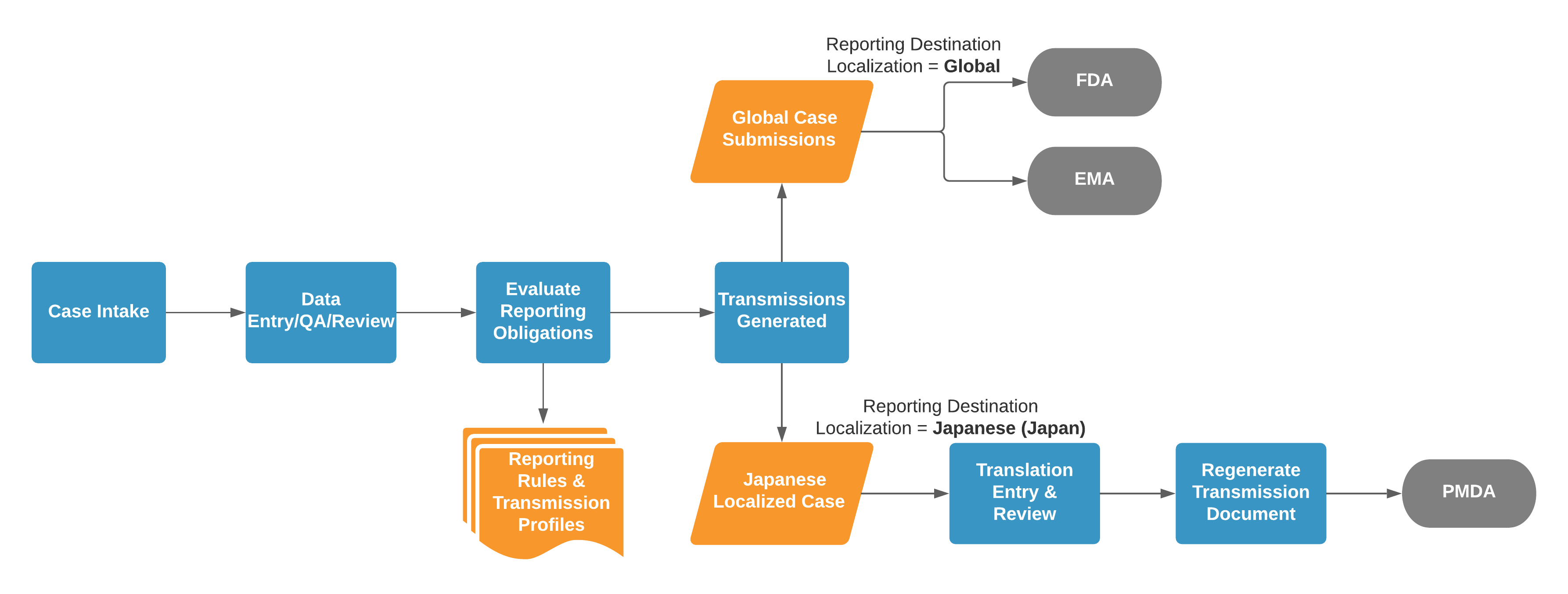
For example, consider the following process illustration where a _Case_ matches global _Transmission Profiles_ for the FDA and EMA, as well as a PMDA (Japan) _Transmission Profile_:

<a href="https://platform.veevavault.help/assets/images/saf-localization-process.png" data-lightbox="saf-localization-process.png" data-title="Example Localized Case Process" data-alt="Example Localized Case Process">
  <img class="docimage" src="https://platform.veevavault.help/assets/images/saf-localization-process.png" alt="Example Localized Case Process" style="max-width: 80%;"  />
</a>

If two (2) _Transmissions_ have the same target language, they both reference the same _Localized Case_. Vault does not generate duplicate _Localized Cases_ with the same language.

Vault checks for localization requirements for both manually and automatically generated _Transmissions_. For automatic generation, the _Case_ must trigger pre-configured reporting rules for a reporting destination.

### How to Generate a Localized Case

Vault generates _Localized Cases_ for the target languages required for submissions following _Transmission_ generation. Generate a _Transmission_ using one of the following methods:
* **Automatic**: Move the _Case_ into the _Approved_ state or run the _Evaluate Reporting Obligations_ action on the _Case_.
* **Manually**: Add an <a href="/en/lr/1022564/">ICSR _Transmission_</a> (_Submission_ or _Distribution_).

Verify the _Transmission_ meets the following criteria:
* **Destination**: Specifies a _Destination_ organization with any non-global _Localization_
* **Transmission Document Type**: Specifies a document type
* **Origin** and **Destination**: Match the _Transmission Profile_.

### Parent Information {#local-parent-info}

When a _Case_ includes a <a href="/en/lr/01149/#about-pregnancy-child-information-and-parent-information-cases">_Parent Information_</a>, Vault also generates _Localized Parent Information_ for each _Localized Case_, mapping all data from and linking to the global _Parent Information_.


<div class="note-border alert-info">
  <div class="alert alert-info" role="alert">
    <div><i class="far fa-info-circle"></i></div>
    <div class="alert-text">
      <p><strong>Note</strong>: Contact Veeva Support to enable deleting localized child and grandchild records when you delete global <em>Case</em> child records. This feature applies to domestic and foreign <em>Localized Cases</em>. Your Admin must then <a href="/en/lr/01396/">configure the Safety General Settings</a>. As of 22R3, this enhancement requires only configuration enablement.</p>
    </div>
  </div>
</div>


## Evaluate Reporting Obligations for Localized Transmissions {#eval-obs}

When _Localized Case_ processing is complete, use the _Evaluate Reporting Obligation_ action to review reporting requirements to a _Localized Case's_ agency and reevaluate the due date. From the **All Actions** menu on a _Localized Case_, select **Evaluate Reporting Obligations**.

Vault searches for a matching reporting rule, and then regenerates and validates _Submissions_.

If Vault finds a matching reporting rule:

* If no _Localized Cases_ are in progress, Vault creates a new _Transmission_.
* If any _Localized Cases_ are in progress, Vault updates the _Transmission_ field values of the _Cases_ with the parameters of the matched reporting rule.

If Vault does not find a matching reporting rule, Vault moves all in-progress _Transmissions_ related to the _Localized Case_ to the _Withdrawn_ state.

A _Transmission_ is in progress when in any of the following states:

* _Active_
* _Error_
* _Pending_
* _Ready for Submission_
* _Ready_
* _Validation Error_


<div class="note-border alert-info">
  <div class="alert alert-info" role="alert">
    <div><i class="far fa-info-circle"></i></div>
    <div class="alert-text">
      <p><strong>Note</strong>: If your Admin has configured your Vault to generate <em>Localized Case Assessments</em>, expectedness, and due dates for each Japan <em>Case Product Registration</em> and <em>Case Adverse Event</em> pair, see <a href="/en/lr/696910/#evaluate-lca">Complete Intake and Process Cases for the PMDA</a> for more information.</p>
    </div>
  </div>
</div>


## Submit to Gateway for Localized Cases {#lc-submit-to-gateway}

To submit _Submissions_ and _Distributions_, after processing a _Localized Case_, from the **All Actions** menu select **Submit to Gateway**.


<div class="note-border alert-info">
  <div class="alert alert-info" role="alert">
    <div><i class="far fa-info-circle"></i></div>
    <div class="alert-text">
      <p><strong>Note</strong>: 
If <a href="/en/lr/740208/#submissions"><em>Regenerate Email Transmissions When Submitting to Gateway</em></a> is turned on, Vault regenerates the <em>Transmission</em> files before sending the <em>Transmission</em>.</p>
    </div>
  </div>
</div>


### Considerations

Be aware of the following _Submit to Gateway_ action considerations:

1. If the _Validation Status_ of the _Submission_ is _Hard Fail_, you cannot run the _Submit to Gateway_ action. Your Admin can <a href="/en/lr/01226/#assign-hard-fail-to-validation-rules">configure the _Result Status Type_ to _Hard Fail_</a> for certain _Validation Criteria_.
2. In Vaults configured with <a href="/en/lr/716226/">Strict Transmission Version Enforcement</a>:
   * Vault does not auto-submit follow-up _Submissions_ before the previous _Submission_ to the same _Destination_ (or _Destination ID_ for the PMDA) and _Transmission Profile_ is in the _ACK Accepted_ or _Completed_ state.
   * If the _Case_ has a previous version with an open _Transmission_ to the same _Destination_ (or _Destination ID_ for the PMDA) and _Transmission Profile_,  Vault asks for confirmation before sending the new _Transmission_.

## Translating Case Data

<div class="note-border alert-info">
  <div class="alert alert-info" role="alert">
    <div><i class="far fa-info-circle"></i></div>
    <div class="alert-text">
      <p><strong>Note</strong>: To ensure data is finalized before translation, we recommend translating <em>Localized Cases</em> after the initial <em>Case</em> moves to the <em>Approved</em> state.</p>
    </div>
  </div>
</div>


Vault maps fields and child records from global _Cases_ to _Localized Cases_ as a starting point for conducting translations. On _Localized Cases_ you can translate text fields and narratives and enter region-specific information. Changes made to _Localized Cases_ do not impact global _Cases_ or narratives.

Vault translates non-text fields such as units of measurement, picklists, and _Controlled Vocabularies_ for <a href="/en/lr/16678/#assigned-anchor">standard supported languages</a>. Vault does not translate fields with data that is transmitted through code in E2B, including MedDRA.

### Narrative Translation

Vault generates narrative documents for the translation of _Localized Cases_, which includes the English narrative that exists for the related _Case_ when you generate the _Localized Case_. You can review these details and access the narrative document in the <a href="/en/lr/891324/#narrative-section">_Narrative_  section</a>. You can override the narrative content on follow-up _Localized Cases_ with the narrative content in the global or domestic _Case_. For more information about how to override localized narratives, see <a href="/en/lr/01167/#localized-narratives">Generate a Case Narrative</a>.

### Supported Languages and Locales

Vault supports a number of languages by default. See <a href="/en/lr/16678/">About Supported Languages</a> for the list of standard supported languages. Locale is determined using a combination of language and country. English is the only language considered global. All other languages generate Localized Case records.

Vault supports generating Localized Cases for many standard languages. If you require additional languages for translations, your administrator can update your Vault configuration to support additional locales.

### Send Translation Requests Through the Auto-Translation Framework

If your organization has set up the Auto-Translation Framework, you can send _Localized Case_ text fields to Amazon Translate for translation.

<div class="note-border alert-info">
  <div class="alert alert-info" role="alert">
    <div><i class="far fa-info-circle"></i></div>
    <div class="alert-text">
      <p><strong>Note</strong>: Narratives and documents are not currently supported through the Auto-Translation Framework.</p>
    </div>
  </div>
</div>


Your Admin can configure the Auto-Translation Framework for:

* **Automated Translation Requests**: Vault sends translation requests upon _Localized Case_ generation.
* **Manual Translation Requests**: You send translation requests after _Localized Case_ generation. From the **All Actions** menu, select **Translate Localized Case**.

For both automated and manual translation requests, after Vault sends the translation request, the _Localized Case_ moves to the _Translation Requested_ state.

Vault automatically applies generated and returned third-party translations to _Localized Cases_. Vault does not verify translation quality, and imports text as received. At this point, the _Localized Case_ moves to the _Translation Verification_ state.

<div class="note-border alert-info">
  <div class="alert alert-info" role="alert">
    <div><i class="far fa-info-circle"></i></div>
    <div class="alert-text">
      <p><strong>Note</strong>: You can also set up the Auto-Translation Framework for intake translation using a non-AWS translation service for custom integrations. Contact <a class="external-link " href="https://support.veeva.com/hc/en-us" target="_blank" rel="noopener">Veeva Support<i class="fa fa-external-link" aria-hidden="true"></i></a> for more information.</p>
    </div>
  </div>
</div>


#### Considerations for Translation Requests

Be aware of the following translation request considerations:

* _Localized Cases_ in the _Translation Requested_ state are editable. If text fields are edited in this state, the updated values are overridden when translations are returned to Vault.
* If the length of translated text exceeds the character limit of any text field, the text is truncated to that field's maximum length. Vault displays a notification message indicating which fields have been truncated.
* The translation must be returned within 60 minutes or the task expires. Vault displays a notification message for failed translation requests.

### Translation Notifications

Depending on your Admin's configuration, Vault may send <a href="/en/lr/01306/#optional-configure-translation-notifications">translation notification messages</a> in the following scenarios:

* When a translation error occurs, Vault notifies the user who sent the _Localized Case_ for translation and moves the _Localized Case_ to the _Translation Error_ state. A translation error can occur if the translation is not returned to Vault within 60 minutes or if the translation service goes offline during the translation.
* When a translation is complete and pending verification, Vault notifies the user who sent the _Localized Case_ for translation.

### Translation Workflow

Refer to your organization's standard operating procedures for details on your organization's translation workflow.


## Generate Localized Case Transmission Documents

After entering translations on a _Localized Case_, you can generate localized _Transmissions_. Navigate to the global _Transmission_ and then from the **All Actions** menu, select **Generate Transmission Document(s)**.

For more information, see <a href="/en/lr/01224/#manually-generate-a-submittable-report">Manually Generate a Submittable Report</a>.

## Manage Localized Follow-Up Cases  {#local-fu-cases}

When you create a follow-up _Case_ for a _Localization_ with _Local_ in the _Localization Type_ field, Vault generates a domestic follow-up _Localized Case_. Vault copies all of the related localized field data and _Localized Case_ records, including foreign _Localized Case_ records, from the previous version to the domestic follow-up _Localized Case_. If you create the follow-up _Case_ from an _Inbox Item_, Vault merges new data from the _Inbox Item_ into the domestic follow-up _Localized Case_. For more information, see <a href="/en/lr/826980/#localized-data">Default Merge Behavior</a>.

Because Vault automatically generates follow-up _Localized Cases_ when global follow-up _Cases_ are created, Vault does not allow edits to follow-up _Localized Cases_ until the associated global follow-up _Case_ has a <a href="/en/lr/01264/">Transmission</a> record. This prevents starting translations before all the information from the global _Case_ has been entered.

### Foreign Localized Case Syncing {#foreign-sync}

When a global follow-up _Case_ is automatically or manually transmitted, Vault performs a one-time data sync from the global _Case_ to the _Localized Case_, as follows:

* New and edited records from the global follow-up _Case_ are copied to the _Localized Case_.
* Deleted records and fields on the global follow-up _Case_ are deleted from the follow-up _Localized Case_.
* Populated text fields on the _Localized Case_ are copied to the follow-up _Localized Case_. If the _Localized Case_ contains blank text fields, these fields are copied from the global follow-up _Case_ to the follow-up _Localized Case_.

<div class="note-border alert-info">
  <div class="alert alert-info" role="alert">
    <div><i class="far fa-info-circle"></i></div>
    <div class="alert-text">
      <p><strong>Note</strong>: If a follow-up <em>Localized Case</em> exists and has a <em>Transmission</em> record, Vault does not sync the data.</p>
    </div>
  </div>
</div>


_Localized Cases_ reportable to China follow [separate syncing behavior][1].

#### Text Field Syncing

To enable text field syncing in your Vault, contact <a class="external-link " href="https://support.veeva.com/hc/en-us" target="_blank" rel="noopener">Veeva Support<i class="fa fa-external-link" aria-hidden="true"></i></a>. When enabled, Vault copies text fields using one (1) of the following options:

* For populated text fields on a _Localized Case_, Vault copies those values to the follow-up _Localized Case_. For blank text fields on a _Localized Case_, Vault copies those values from the global follow-up _Case_ to the follow-up _Localized Case_.
* For all text fields, Vault copies the values from the global follow-up _Case_ to the follow-up _Localized Case_.

Regardless of your Admin's configuration for copying text fields, Vault considers the <a href="/en/lr/01194/#local-scope">_Localization Scope_</a> for the _Localization_ associated with the _Localized Case_. For example, if the _Localization_ for _Japanese (Japan)_ has _Company Comments_ as its _Localization Scope_, Vault syncs only _Company Comments_ field text. If the _Localization Scope_ is blank, Vault syncs all text fields.

### Localized Parent Information Updates

If a follow-up _Case_ includes _Parent Information_, Vault generates or updates the corresponding _Localized Parent Information_ and version. Vault copies all _Localized Parent Information_ from the previous version of the record, if one exists, and all new information from the promoted _Inbox Item_.

## Data Syncing for Localized Cases for China {#china-sync}

When processing _Localized Cases_ that are reportable to China, Vault maps field data from global _Cases_ to foreign and domestic _Localized Cases_ upon creation. Subsequently, Vault syncs global _Case_ field data to _Localized Case_ fields in the following instances:

* During [foreign _Localized Case_ syncing][2]
* Following ad hoc changes to a domestic _Localized Case_
* Following merge to an in-flight or creation of a follow-up _Case_ from the _Inbox Item to Case Compare_ page on a domestic _Localized Case_

For the following fields, Vault syncs data from the global _Case_ to the _Localized Case_ only when the _Localized Case_ field is blank or the coded _Case Product_ has changed:

* <a href="/en/lr/891324/#nmpa-add-cta">_Additional CTA Approval Numbers_</a>
* <a href="/en/lr/891324/#nmpa-cta">_CTA Approval Number(s)_</a>
* <a href="/en/lr/891324/#nmpa-generic-name">_Generic Name_</a>
* <a href="/en/lr/891324/#local-mah">_Local MAH_</a>
* <a href="/en/lr/891324/#local-assess-result">_Localized Assessment Result_</a>
* <a href="/en/lr/891324/#mah-product">_MAH Product_</a>
* <a href="/en/lr/891324/#nmpa-trade-name">_Trade Name_</a>

[1]: #china-sync
[2]: #foreign-sync
