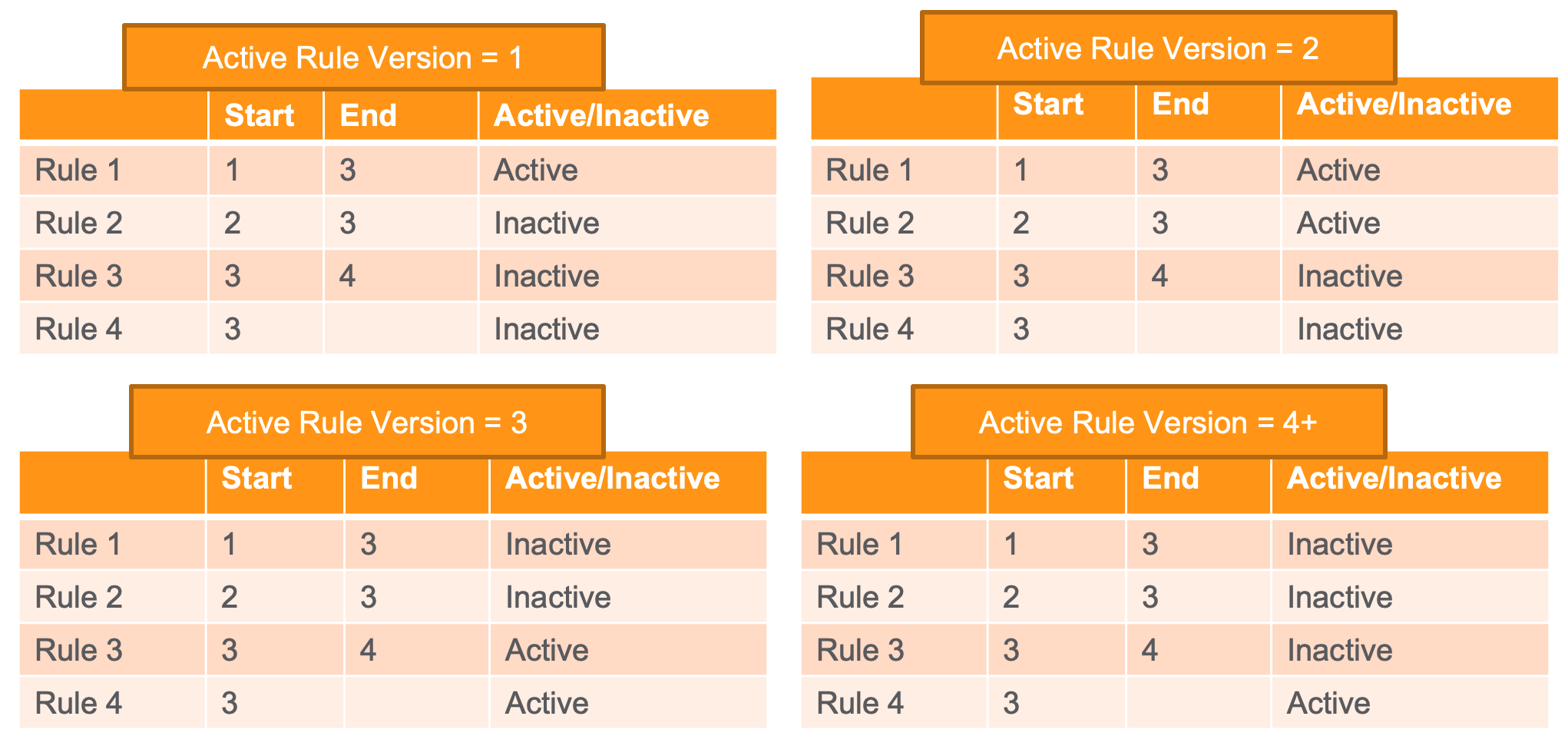
The Active Rule Version on a Safety Rule Set indicates to the Reporting Rules Engine which of the set’s Safety Rules to execute when evaluating a Case. Each Safety Rule has an assigned Safety Rule Version number and Safety Rule Version End number. A Safety Rule is active within a Safety Rule Set if the rule’s Safety Rule Version and Safety Rule Version End meet the following conditions:
- The Safety Rule Version is less than or equal to the set’s Active Rule Version.
- The Safety Rule Version End is greater than the set’s Active Rule Version, or the Safety Rule Version End is blank (unspecified).
The following examples illustrate how Safety Rules become active or inactive depending on the Active Rule Version of the Safety Rule Set:
Recommended Rule Set Versions
The ability to set the Active Rule Version of a standard Safety Rule Set allows you to choose when to adopt new Safety Rules for that set. To adopt the latest reporting rules for the standard Safety Rule Sets, we strongly recommend you use the following versions:
| Safety Rule Set | Version |
|---|---|
| EMA ICSR Reporting Rule Set | 3 |
| FDA ICSR Reporting Rule Set | 4 |
| PMDA ICSR Reporting Rule Set | 3 |
Set the Active Rule Version of a Safety Rule Set
To set the Active Rule Version of a Safety Rule Set:
- Navigate to Business Admin > Objects > Safety Rule Sets.
- Open the Safety Rule Set you want to edit.
- Set the Active Rule Version field to the earliest version that should be made active.
This field accepts a number between 0 and 1,000. - Select Save.