This article clarifies how Vault calculates and populates the following age fields:
- Age (normalized) (
age_normalized_year__v) - Age at Onset (
age_value__v) - Age Group (
age_group__v)
During case processing, optionally, you can turn off auto-calculation at the field level.
By default, Vault uses the Date of Birth (dob_idate__v) on the Case to calculate the following:
- Age (
age_value_v) and Age Unit (age_unit_v) - Age (normalized)
- Age Group
If the Date of Birth is not provided, the Age and Age Unit fields can be populated on the Inbox Item or Case through data entry or import. When provided, Vault calculates Age (normalized) and Age Group based on these values. If an initial Case includes Age and Age Unit values, when a Follow-up Case is created those values are populated from the initial Case.
If the Date of Birth, Age, and Age Unit fields are blank on the Inbox Item, Vault cannot auto-calculate.
Age (Normalized)
Vault calculates the Age (normalized) value of the Case Patient section using the time interval between the following dates:
- The Date of Birth of the Case Patient
- The Event Onset of the Case Adverse Event. If the Event Onset is not available, Vault uses the Receipt Date of the Case.
If there are multiple Case Adverse Events, Vault uses the earliest event to calculate the age. For fetal adverse events, Vault uses the event closest to the birth date. When only partial dates are available, Vault calculates the age using the first day in the month or year entered. For example, if only 2021 is entered, the date 1/1/2021 is used.
If an Age at Onset value and unit exists on a Case (for example, from E2B import), Vault uses this value to populate the Age (normalized), converted to years.
Age at Onset
After calculating Age (normalized), Vault populates the equivalent applicable value as the Age at Onset. Based on the patient’s age and age unit, Vault rounds down and displays the age as follows:
- If the patient is more than two years old, the age displays in years. With rounding down, if the patient’s age at onset is 53 years and nine months, Vault displays 53 years.
- If the patient is less than two years old, the age displays in days or months. With rounding down,
- If the patient’s age at onset is 2.8 days, Vault displays to 2 days.
- If the patient’s age at onset is 50 days, Vault displays 1 month.
Age Group
Based on the Age at Onset, Vault populates the patient’s Age Group as follows:
- Fetus: 0 weeks/days/hours/minutes old
- Neonate: More than 0 to fewer than 4 weeks old
- Infant: 1 month to fewer than 24 months old
- Child: 2 years to fewer than 12 years old
- Adolescent: 12 years to fewer than 18 years old
- Adult: 18 years to fewer than 65 years old
- Elderly: 65 years and older
How to Trigger Auto-Calculation of Age Fields
When you add or update the relevant fields on the Case or the Case Adverse Event, Vault recalculates the Age (normalized).
Once Age at Onset is populated, Vault calculates the Age Group based on this field.
Age (Normalized), Age at Onset, and Age Group Diagrams
The following diagrams show how Vault auto-calculates the Age (normalized), Age at Onset, and the Age Group fields using the date intervals between the patient’s Date of Birth and the Adverse Event Event Onset.
Scenario 1: Age (Normalized) Populates Age at Onset
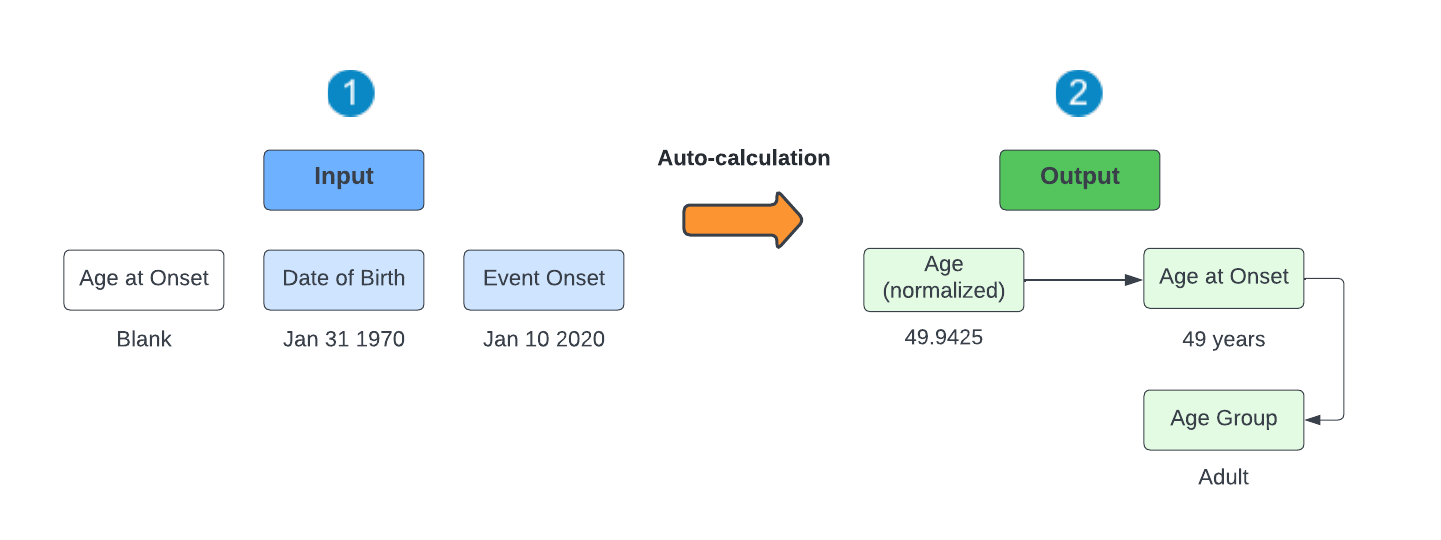
- The Case contains a Date of Birth and Event Onset value but no Age at Onset.
- Vault automatically calculates Age (normalized) and uses this value to populate Age at Onset. Vault then uses the Age at Onset value to calculate Age Group.
Scenario 2: Age at Onset Populates Age (Normalized)
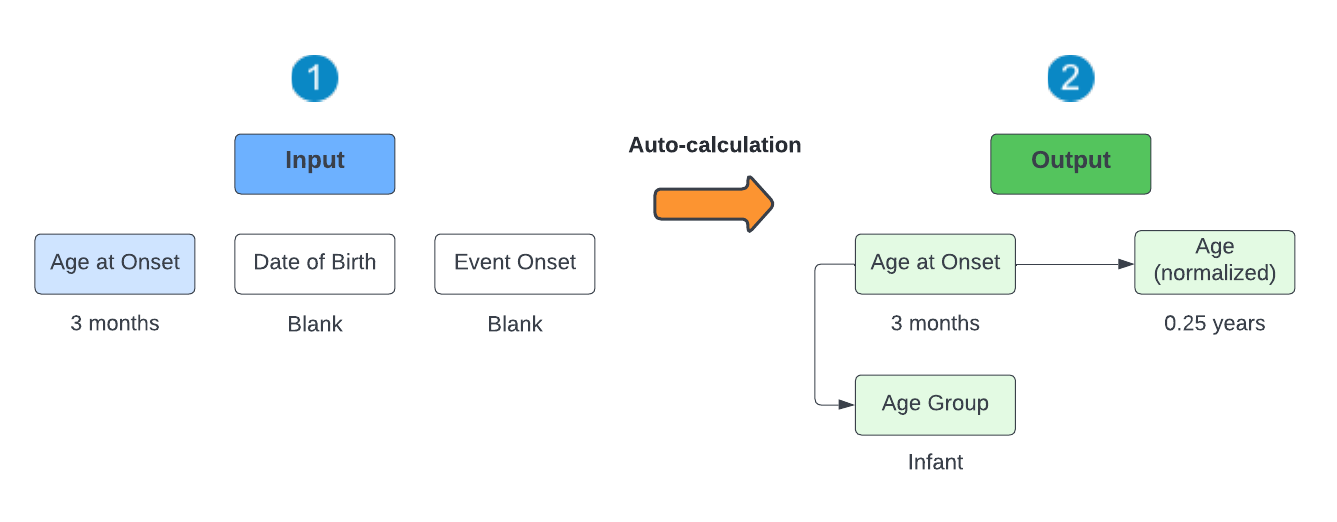
- The Case contains an Age at Onset value (from E2B import) and no Date of Birth or Event Onset value.
- Vault automatically uses the Age at Onset field value to populate Age Group and Age (normalized), converting it into “years” if not already.
Scenario 3: Override Age at Onset
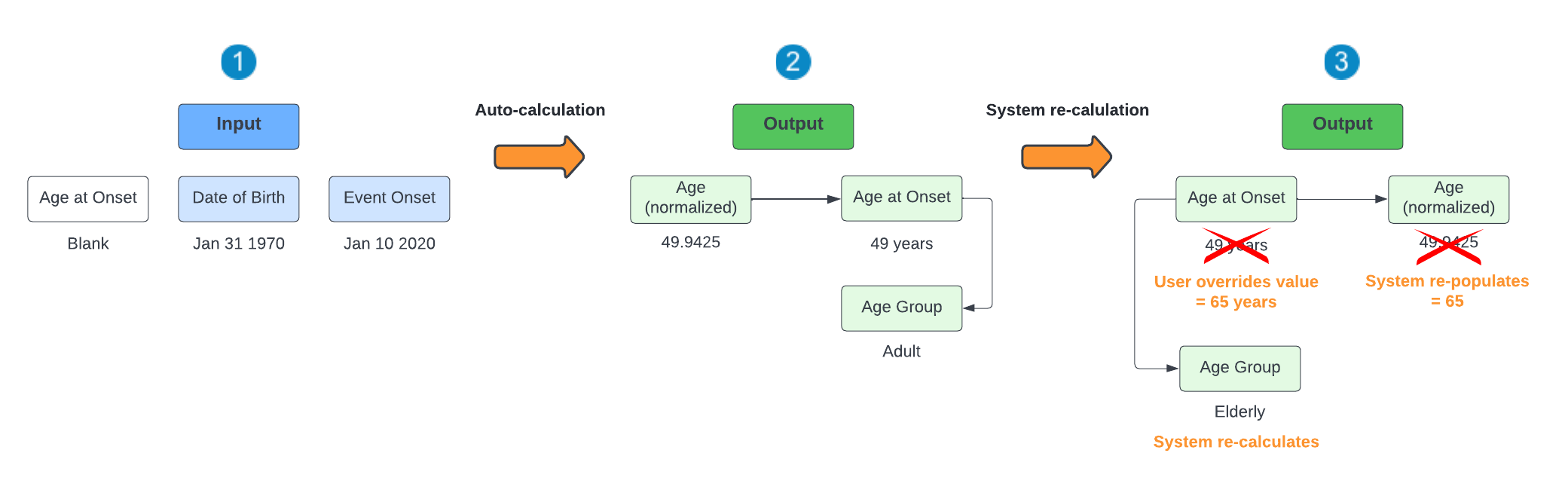
- The Case contains a Date of Birth and Event Onset value but no Age at Onset.
- Vault automatically calculates Age (normalized) and uses this value to populate Age at Onset. Vault then uses the Age at Onset value to calculate Age Group.
- You can override the Age at Onset by manually entering a value in this field. After saving the Case, Vault retains this Age at Onset value and uses it to re-populate Age (normalized) and Age Group.
Scenario 4: Override Age (Normalized)
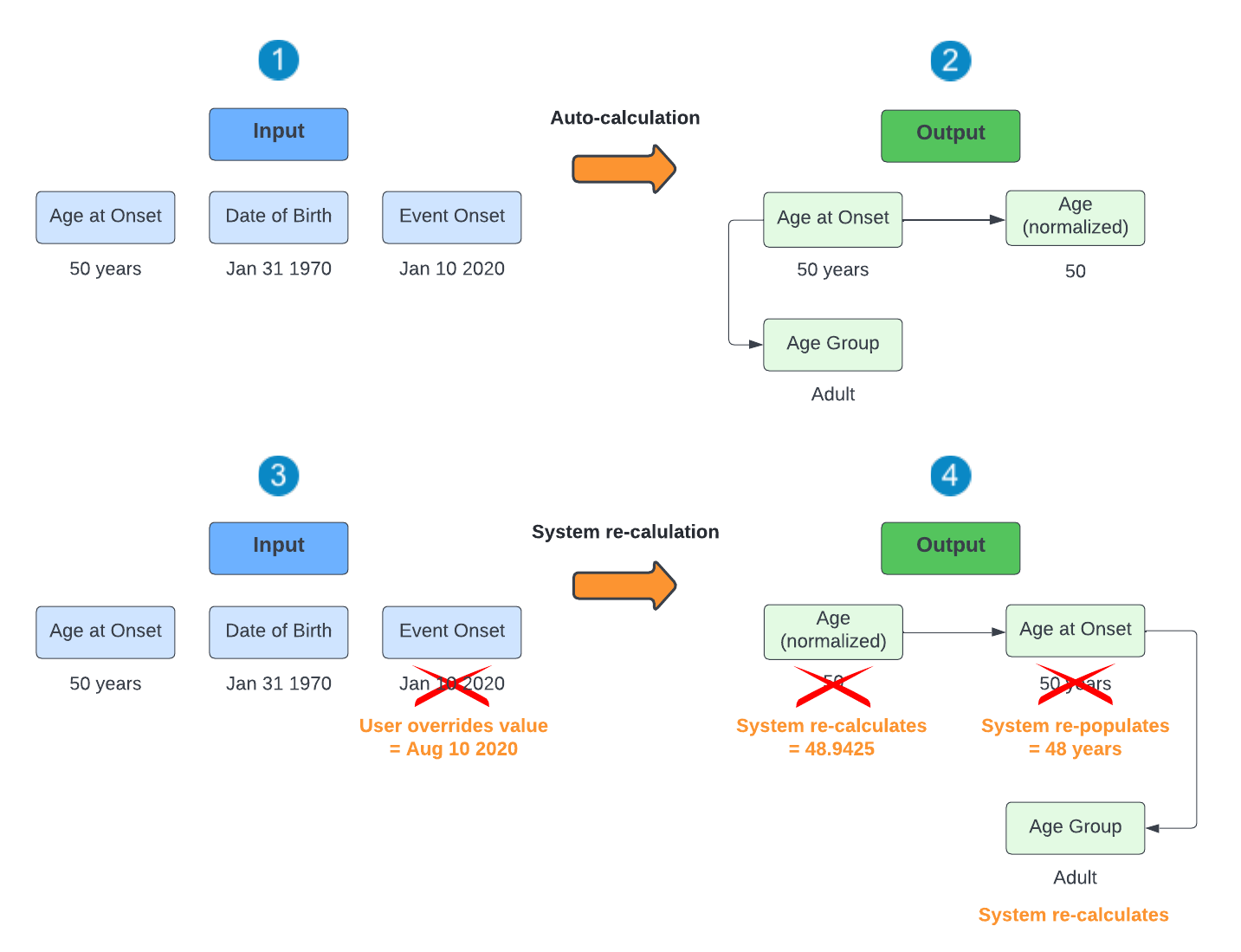
- The Case contains an Age at Onset value (from E2B import) as well as a Date of Birth and Event Onset value.
- Vault automatically uses the Age at Onset field value to populate Age Group and Age (normalized), converting it into “years” if not already.
- You can override the Event Onset by manually entering a value in this field.
- After saving the Case, Vault re-calculates the Age (normalized) field and re-populates the Age at Onset with this value. Vault then uses the Age at Onset value to calculate Age Group. Overriding the Date of Birth value in step 3 also results in Vault re-calculating Age (normalized).