Safety Workbench provides Pharmaceuticals and Medical Devices Agency (PMDA) Postmarket report authoring and table generation capabilities. The Vault Safety PMDA Postmarket report adheres to the PMDA Guide to Electronic Reporting of Adverse Drug Reactions and Infectious Diseases.
The following table summarizes the Workbench PMDA Postmarket tabulations that Safety Workbench generates:
Prerequisites
To generate Workbench PMDA aggregate reports:
- Your Admin must configure the PMDA Postmarket Workbench Report Set
- Your Admin must grant you permissions to view and prepare aggregate reports
- Depending on your business process, your Admin may:
- Configure a Datasheet for each Study Product, Study, or Product with a list of expected adverse events in order to classify adverse events as Listed or Unlisted, and evaluate expectedness date changes in Workbench PMDA reports
- Configure custom Workbench PMDA Postmarket Workbench Report Set templates for your organization
Overview
To generate a Workbench PMDA aggregate report:
- Create a Workbench Report Set to combine the desired PMDA Workbench Report Definitions into a single record.
- Specify the required PMDA filters on the Workbench Report Set.
- Generate then run the PMDA Workbench Reports from the Workbench Report Set.
To learn how Vault maps data to each Workbench PMDA report, see PMDA Table Generation Data Mapping.
Create a PMDA Postmarket Workbench Report Set
To create a PMDA Workbench Report Set:
- Navigate to Workbench > Report Sets.
- Select Create.
- On the Create Workbench Report Set page, enter a name for the report.
- Select Save or Save + Create to save the Workbench Report Set and create another.
- In the Reports to Generate section, add a Workbench Report Definition to the Workbench Report Set for each PMDA report you want to include.
Note: When your Admin configures Workbench PMDA Aggregate Reports, they create a Workbench Report Definition for each unmasked report. If your Workbench Report Set does not contain the expected PMDA reports, contact your Admin for assistance.
Result
Vault sets the lifecycle state of the Workbench Report Set to Draft.
PMDA Postmarket Filter Section Fields
You can specify the following fields for a PMDA Postmarket Workbench Report Set:
| Field | Description |
|---|---|
| Date Filter |
You can run reports with individual date filters, as well as in a report set. Select the date filter(s) from the following:
|
| Case Completed |
Select whether the Case is open or completed from the drop-down menu to filter the report. Consider the following:
|
| Aggregate Reporting Group |
Select an Aggregate Reporting Group from the drop-down, or use the Advanced Search ( Vault considers the following Cases eligible for inclusion in the generated reports:
|
 ) icon to use filters and refine your search.
Generate Workbench PMDA Postmarket Tabulations
Review and verify the report settings. Once you have confirmed the report details are correct, use the Generate Aggregate Report Tabulations action to generate PMDA Postmarket report tables.
PMDA Postmarket Table Generation Data Mapping
Safety Workbench populates aggregate report tables using Cases within the reporting period specified on the PMDA Postmarket report, and the aggregate reporting group configured on the associated Aggregate Reporting Group. The following sections describe how Safety Workbench generates PMDA Postmarket tabulations:
- J-NUPR Line Listing Form 7-2
- J-PSR Cumulative Tabulation of Adverse Events Form 3
- J-PSR Line Listing of Adverse Events Form 4
- Summary Tabulation of Unexpected Adverse Drug Reactions Form 9
- Event Tabulation of Adverse Drug Reactions Form 10
- Event Listing of Adverse Drug Reactions Form 11
J-NUPR Line Listing Form 7-2
Vault generates the J-NUPR Line Listing Form 7-2 by default for PMDA Postmarket aggregate reports.

Table Constraints
Vault filters Cases to include in the J-NUPR Line Listing Form 7-2 using the following constraints:
Case Not Suppressed
The Case Suppress Submission field must be set to No or blank (not suppressed).
case_version__v.suppress_submission__v ≠ Yes
Case Product or Product Registration in Aggregate Reporting Group
A Case must have a Product or Product Registration that is a member of the Aggregate Reporting Group. Vault matches Product Registrations by checking if the Registration Number on the Case Product Registration matches the Registration Number in the Aggregate Reporting Group.
case_version__vr.case_product__v IN aggregate_reporting_group__vr.aggregate_reporting_group_join__vr.product__vcase_version__vr.case_product__v.product_registration__v.registration_number__v IN aggregate_reporting_group__vr.aggregate_reporting_group_join__vr.product_registration__v
Case Data in Interval Reporting Period
The date of a Case must be within the J-NUPR / J-PSR Current Interval Range.
DATE ≥ nupr_jpsr_current_report_interval__v.data_period_start__v AND
DATE ≤ nupr_jpsr_current_report_interval__v.data_period_end__v
WHERE DATE selected is the Local Awareness Date.
If there are multiple versions of the Case within the reporting period, only the most recent Case version within the reporting period is listed.
Case Completed
The latest Case version within the reporting period must be in a lifecycle state (case_version__v.state__v) specified in the Case Completed filter.
Consider the following:
- Cases in the following states are always omitted and cannot be selected in the Case Completed filter:
- Nullified (
nullified_state__v) - Voided (
voided_state__v)
- Nullified (
- The Completed option includes Cases in the following states:
- Approved (
approved_state__v) - Closed (
closed_state__v) - Superseded (
superseded_state__v)
- Approved (
- The Open option includes any Case in a lifecycle state not defined as completed, including any custom lifecycle states.
- If you leave this field blank, the report filters for all Cases regardless of their state.
Localized Case
A Case must have a Japan localized version to be included.
case_version__v.reporter_country__v = Japan
Case Product in Drug Roles to Include
Only include Case Products in the listing where Drug Role is “Suspect” or “Interacting”.
Postmarket Cases
Only include Cases that are considered postmarket.
The case_product_registration__v.registration_type_cv__v E2B code is one of the following: (1, 2, 5, 6, 7)
Special Report Classification
Exclude Cases with a Special Report Classification of “Research Report” or “Safety Measure”.
case_version__v.special_report_classification__v IN (safety_measure_report__v, research_report__v)
Unexpected Adverse Events
Include only events that meet all of the following criteria:
- The event is non-serious (
localized_case_adverse_event__v.seriousness__v = Blank) - The event is Unexpected (
localized_case_assessment__v.expected__v != yes) - The event is related to the product in the report (Causality Established is set to Yes or Blank for at least one Assessment Result)
- The event is reportable (
localized_case_adverse_event__v. special_adverse_event__v != "Non-reportable Event") - The Localized Case Assessment matches the Aggregate Reporting Group by Product or Product Registration Number
Table Mapping
Sorting: Rows are in order of Event (PT) code, then by Adverse Event Onset Date (earliest first). Events with a blank Onset Date are listed last.
| Number | Name | Description |
|---|---|---|
 |
Case # (番号) |
The Case Numbercase_version__v.case_number__v
|
 |
Event (PT) (基本語) | The Localized MedDRA Preferred Term Event in Japanese (from the local MedDRA version) |
 |
MedDRA Code (MedDRAコード) | The MedDRA Preferred Term Code |
 |
Gender (性別) |
The sex on the Case If the field is blank, "不明" (Unknown in Japanese) is displayed. |
 |
Age (年齢) |
The normalized Age (in years) on the Case If age is not populated on the case, the report will display Age Group. If Age Group is not populated, it will display "不明" (Unknown in Japanese). |
 |
Onset Date (副作用等発現 年月日) |
The Onset Date of the Case Adverse Event, as entered in the Date of Onset field on the Case Adverse Event in the format "YYYY年MM月DD日" If the field is blank, "不明" (Unknown in Japanese) is displayed. |
 |
Outcome (転帰) |
The Outcome of the Case Adverse Event The value selected in the Case Adverse Event Outcome field. |
 |
Report Type (報告の 種類) |
The Case Report Type The value selected in the Case Report Type field. |
 |
Remarks (備考) |
Up to three items are displayed in this column:
|
J-PSR Cumulative Tabulation of Adverse Events Form 3
The following image map shows how Vault generates the J-PSR Cumulative Tabulation of Adverse Events Form 3 table.

Table Constraints
Vault filters Cases to include in the J-PSR Cumulative Tabulation of Adverse Events Form 3 using the following constraints:
Case Not Suppressed
The Case Suppress Submission field must be set to No or blank (not suppressed).
case_version__v.suppress_submission__v ≠ Yes
Case Product or Product Registration in Aggregate Reporting Group
A Case must have a Product or Product Registration that is a member of the Aggregate Reporting Group. Vault matches Product Registrations by checking if the Registration Number on the Case Product Registration matches the Registration Number in the Aggregate Reporting Group.
case_version__vr.case_product__v IN aggregate_reporting_group__vr.aggregate_reporting_group_join__vr.product__vcase_version__vr.case_product__v.product_registration__v.registration_number__v IN aggregate_reporting_group__vr.aggregate_reporting_group_join__vr.product_registration__v
Case Data in Interval Reporting Period
The Case date must fall within the defined aggregate report interval reporting periods.
earliest(aggregate_report_intervals__v) ≤ DATE ≤ aggregate_report_intervals__v.latest(interval_end_date__v)
Where DATE
Local Awareness Date: Data Period Start Date ≤ localized_case__v.local_awareness_date__v ≤ Data Period End Date
Configuring Report Intervals
When defining reporting periods, Vault evaluates the interval records based on the following rules:
Required Current Interval: You must enter at least one interval in the J-NUPR / J-PSR Current Interval Range field. Vault always treats this entry as the latest (most recent) interval.
Optional Historical Intervals: If the report requires a broader data window, you can configure up to nine additional historical intervals using the Previous J-PSR Interval 1 through Previous J-PSR Interval 9 fields.
Sequential Entry: Interval dates must be entered sequentially based on the total number of periods being reported.
Example: If you are running a report across three total intervals, you must populate dates in Previous J-PSR Interval 1, Previous J-PSR Interval 2, and the J-NUPR / J-PSR Current Interval Range.
If there are multiple versions of the Case among all the reporting intervals, Vault lists only the most recent Case version.
Case Completed
The latest Case version within the reporting period must be in a lifecycle state (case_version__v.state__v) specified in the Case Completed filter.
Consider the following:
- Cases in the following states are always omitted and cannot be selected in the Case Completed filter:
- Nullified (
nullified_state__v) - Voided (
voided_state__v)
- Nullified (
- The Completed option includes Cases in the following states:
- Approved (
approved_state__v) - Closed (
closed_state__v) - Superseded (
superseded_state__v)
- Approved (
- The Open option includes any Case in a lifecycle state not defined as completed, including any custom lifecycle states.
- If you leave this field blank, the report filters for all Cases regardless of their state.
Localized Case
A Case must have a Japan localized version to be included.
case_version__v.reporter_country__v = Japan
Case Product in Drug Roles to Include
Only include Case Products in the listing where Drug Role is “Suspect” or “Interacting”.
Postmarket Cases
Only include Cases that are considered postmarket.
The case_product_registration__v.registration_type_cv__v E2B code is one of the following: (1, 2, 5, 6, 7)
Special Report Classification
Exclude Cases with a Special Report Classification of “Research Report” or “Safety Measure”.
case_version__v.special_report_classification__v IN (safety_measure_report__v, research_report__v)
Blind Setting
For Study Cases, only unblinded data is included in the report.
If your Admin has configured your Vault to isolate blinded clinical trial information, the Blinding Type on the Japan Case Product Registration must be set to Unblinded, Open, or blank.
case_product_registration__v.blinding_type__v != Blinded
Serious, Related Adverse Events
All Adverse Events that are Serious and Related are included. In addition, events that meet all of the following criteria are included:
- The Localized Case Adverse Event is Serious (
localized_case_adverse_event__v.seriousness__v = !Blank) - The event is related to the Product in the report (Causality Established is set to Yes or Blank for at least one Assessment Result)
- The event is reportable (
localized_case_adverse_event__v.special_adverse_event__v != "Non-reportable Event")
A Case must have a Product or Product Registration that is a member of the Aggregate Reporting Group:
case_version__vr.case_product__v IN aggregate_reporting_group__vr.aggregate_reporting_group_join__vr.product__vcase_version__vr.case_product__v.product_registration__v.registration_number__v IN aggregate_reporting_group__vr.aggregate_reporting_group_join__vr.product_registration__v
Vault excludes Adverse Events with no Assessment or Assessment Result records.
Reporting Interval Assignments
Vault includes Cases within a reporting interval when the applicable Case date (Local Awareness Date) is on or between the Interval Start Date and Interval End Date on the Interval Dates filter.
For example, the PMDA allows three different methods for handling cases with multiple versions. The following example is the method where only the latest version is reported:
- Interval 1: January 1 – March 31
- Interval 2: April 1 – June 30
If a Case has two versions with different Local Awareness Dates:
- Version 1 falls into Interval 1
- Version 2 falls into Interval 2
Result: Only Version 2 will be included, and it will only appear in Interval 2. Version 1 is excluded so the case is not counted twice.
Cases that do not fall into any reporting intervals will be dropped.
Table Mapping
Sorting: Rows are in order of Event (SOC) International Order, then Event (PT) code. Each reporting interval appears in a separate column.
| Number | Name | Description |
|---|---|---|
|
Event (SOC) (器官別大分類) | The Localized MedDRA System Organ Class (SOC) affected by the Adverse Event in Japanese (from the local MedDRA version) |
|
Event (PT) (基本語) | The Localized MedDRA Preferred Term Event in Japanese (from the local MedDRA version) |
|
The Number of Adverse Events Reported (副作用・感染症の症例報告を行った症例数) | The number of reported Adverse Events for that reporting interval. A report can include multiple reporting intervals. The reporting interval dates are included in the column headers of the report. |
|
Unknown (不明 ) | The number of reported Cases that do not fall within the dates of any reporting interval on the report. This column appears only when the report interval dates have been set up incorrectly. |
|
Total During Reexamination Period (再審査期間中の合計) | The total number of Cases for the reexamination period for each row on the report. The label appears as 合計. |
|
Remarks (備考) | Up to three items are displayed in this column:
|
J-PSR Line Listing of Adverse Events Form 4
The following image map shows how Vault generates the J-PSR Line Listing of Adverse Events Form 4 table.
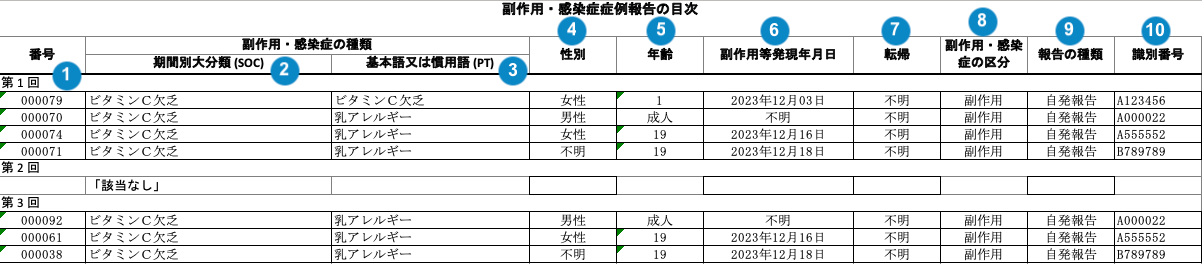
Table Constraints
Vault filters Cases to include in the J-PSR Cumulative Tabulation of Adverse Events Form 4 using the following constraints:
Case Not Suppressed
The Case Suppress Submission field must be set to No or blank (not suppressed).
case_version__v.suppress_submission__v ≠ Yes
Case Product or Product Registration in Aggregate Reporting Group
A Case must have a Product or Product Registration that is a member of the Aggregate Reporting Group.
case_version__vr.case_product__v IN aggregate_reporting_group__vr.aggregate_reporting_group_join__vr.product__vcase_version__vr.case_product__v.product_registration__v.registration_number__v IN aggregate_reporting_group__vr.aggregate_reporting_group_join__vr.product_registration__v
Case Data in Interval Reporting Period
The Case date must fall within the defined aggregate report interval reporting periods.
earliest(aggregate_report_intervals__v) ≤ DATE ≤ aggregate_report_intervals__v.latest(interval_end_date__v)
Where DATE
Local Awareness Date: Data Period Start Date ≤ localized_case__v.local_awareness_date__v ≤ Data Period End Date
Configuring Report Intervals
When defining reporting periods, Vault evaluates the interval records based on the following rules:
Required Current Interval: You must enter at least one interval in the J-NUPR / J-PSR Current Interval Range field. Vault always treats this entry as the latest (most recent) interval.
Optional Historical Intervals: If the report requires a broader data window, you can configure up to nine additional historical intervals using the Previous J-PSR Interval 1 through Previous J-PSR Interval 9 fields.
Sequential Entry: Interval dates must be entered sequentially based on the total number of periods being reported.
Example: If you are running a report across three total intervals, you must populate dates in Previous J-PSR Interval 1, Previous J-PSR Interval 2, and the J-NUPR / J-PSR Current Interval Range.
If there are multiple versions of the Case among all the reporting intervals, Vault lists only the most recent Case version.
Case Completed
The latest Case version within the reporting period must be in a lifecycle state (case_version__v.state__v) specified in the Case Completed filter.
Consider the following:
- Cases in the following states are always omitted and cannot be selected in the Case Completed filter:
- Nullified (
nullified_state__v) - Voided (
voided_state__v)
- Nullified (
- The Completed option includes Cases in the following states:
- Approved (
approved_state__v) - Closed (
closed_state__v) - Superseded (
superseded_state__v)
- Approved (
- The Open option includes any Case in a lifecycle state not defined as completed, including any custom lifecycle states.
- If you leave this field blank, the report filters for all Cases regardless of their state.
Localized Case
A Case must have a Japan localized version to be included.
case_version__v.reporter_country__v = Japan
Case Product in Drug Roles to Include
Only include Case Products in the listing where Drug Role is “Suspect” or “Interacting”.
Postmarket Cases
Only include Cases that are considered postmarket.
The case_product_registration__v.registration_type_cv__v E2B code is one of the following: (1, 2, 5, 6, 7)
Special Report Classification
Exclude Cases with a Special Report Classification of “Research Report” or “Safety Measure”.
case_version__v.special_report_classification__v IN (safety_measure_report__v, research_report__v)
Blind Setting
For Study Cases, only unblinded data is included in the report.
If your Admin has configured your Vault to isolate blinded clinical trial information, the Blinding Type on the Japan Case Product Registration must be set to Unblinded, Open, or blank.
case_product_registration__v.blinding_type__v != Blinded
Serious, Related Adverse Events
All Adverse Events that are Serious and Related are included. In addition, events that meet all of the following criteria are included:
- The Localized Case Adverse Event is Serious (
localized_case_adverse_event__v.seriousness__v = !Blank) - The event is related to the Product in the report (Causality Established is set to Yes or Blank for at least one Assessment Result)
- The event is reportable (
localized_case_adverse_event__v.special_adverse_event__v != "Non-reportable Event")
A Case must have a Product or Product Registration that is a member of the Aggregate Reporting Group:
case_version__vr.case_product__v IN aggregate_reporting_group__vr.aggregate_reporting_group_join__vr.product__vcase_version__vr.case_product__v.product_registration__v.registration_number__v IN aggregate_reporting_group__vr.aggregate_reporting_group_join__vr.product_registration__v
Vault excludes Adverse Events with no Assessment or Assessment Result records.
Reporting Interval Assignments
Vault includes Cases within a reporting interval when the applicable Case date (Local Awareness Date) is on or between the Interval Start Date and Interval End Date on the Interval Dates filter.
For example, the PMDA allows three different methods for handling cases with multiple versions. The following example is the method where only the latest version is reported:
- Interval 1: January 1 – March 31
- Interval 2: April 1 – June 30
If a Case has two versions with different Local Awareness Dates:
- Version 1 falls into Interval 1
- Version 2 falls into Interval 2
Result: Only Version 2 will be included, and it will only appear in Interval 2. Version 1 is excluded so the case is not counted twice.
Cases that do not fall into any reporting intervals will be dropped.
Table Mapping
Sorting: Rows are in order of reporting interval (earliest first), Event (SOC) International order, Event (PT) code, New Info Date (earliest first), and then Case Number. If the New Info Date is blank, Vault references the Case Receipt Date (earliest first).
Each Reporting Interval heading appears on a separate line. If an interval has no Event PTs, Vault adds the following note:「該当なし」(“N/A” in Japanese).
| Number | Name | Description |
|---|---|---|
|
Reporting Cycle # (番号) | The name of the reporting interval on the Interval Dates record.aggregate_intervals__vr.name__v |
|
Event (SOC) (器官別大分類) | The Localized MedDRA System Organ Class (SOC) affected by the Adverse Event in Japanese (from the local MedDRA version). |
|
Event (PT) (基本語) | The Localized MedDRA Preferred Term Event in Japanese (from the local MedDRA version). An asterisk (*) is prepended to unexpected Adverse Events. |
|
Gender (性別) | The sex on the Case. If the field is blank, Vault populates "不明" (Unknown in Japanese). |
|
Age (年齢) | The normalized Age (in years) on the Case. If age is not populated on the Case, the report displays Age Group. If the field is blank, Vault populates "不明" (Unknown in Japanese). |
|
Onset Date (副作用等発現 年月日) | The Onset Date of the Case Adverse Event, as entered in the Date of Onset field on the Case Adverse Event in the format "YYYY年MM月DD日". If the field is blank, Vault populates "不明" (Unknown in Japanese). |
|
Outcome (転帰) | The Outcome of the Case Adverse Event. The value in the Case Adverse Event Outcome field. If the field is blank, Vault populates "不明" (Unknown in Japanese). |
|
Infection or Adverse Event (副作用・感染症の区分) | Vault references the Localized Case Adverse Event to populate this data. If the Special Adverse Event field is set to "Infection", Vault populates 感染症 (Infection in Japanese). Otherwise, Vault populates 副作用 (Adverse Event in Japanese). |
|
Report Type (報告の 種類) | The Case Report Type. The value in the Report Type field. |
 |
PMDA ACK # (識別番号) |
The Destination ID on the latest completed PMDA Transmission. If empty, Vault populates "不明" (Unknown in Japanese). |
Summary Tabulation of Unexpected Adverse Drug Reactions Form 9
Vault generates Form 9 to summarize unexpected adverse drug reactions and infectious diseases for the PMDA Re-examination Dossier.
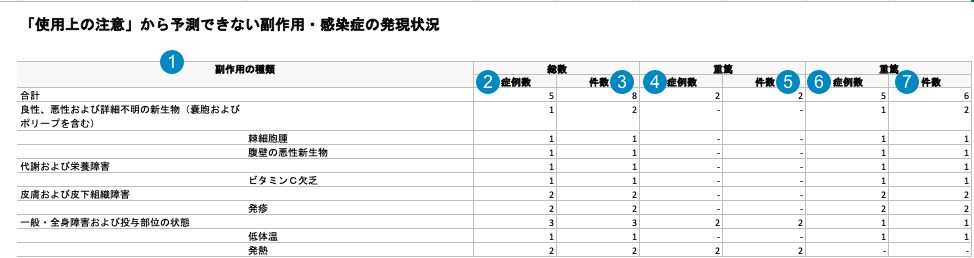
Table Constraints
Vault filters Cases to include in the Workbench Summary Tabulation of Unexpected Adverse Drug Reactions Form 9 using the following constraints:
Case Not Suppressed
The Case Suppress Submission field must be set to No or blank (not suppressed).
case_version__v.suppress_submission__v ≠ Yes
Case Product or Product Registration in Aggregate Reporting Group
A Case must have a Product or Product Registration that is a member of the Aggregate Reporting Group. Vault identifies product matches by Registration Number and excludes blank values.
case_version__vr.case_product__v IN
aggregate_reporting_group__vr.aggregate_reporting_group_join__vr.product__v OR
case_version__vr.case_product__v.case_product_registration__v.product_registration__v.registration_number__v matches aggregate_reporting_group__vr.aggregate_reporting_group_join__vr.product_registration__v.registration_number__v
Case Data in Reporting Period
The Case date (Local Awareness Date) must be on or before the end date of the current report interval.
localized_case__v.local_awareness_date__v ≤ nupr_jpsr_current_report_interval__v.data_period_end__v
Case Completed
The latest Case version within the reporting period must be in a lifecycle state (case_version__v.state__v) specified in the Case Completed filter.
Consider the following:
- Cases in the following states are always omitted and cannot be selected in the Case Completed filter:
- Nullified (
nullified_state__v) - Voided (
voided_state__v)
- Nullified (
- The Completed option includes Cases in the following states:
- Approved (
approved_state__v) - Closed (
closed_state__v) - Superseded (
superseded_state__v)
- Approved (
- The Open option includes any Case in a lifecycle state not defined as completed, including any custom lifecycle states.
- If you leave this field blank, the report filters for all Cases regardless of their state.
Localized Case
A Case must have a Japan localized version to be included.
case_version__v.reporter_country__v = Japan
Case Product in Drug Roles to Include
Only include Case Products in the listing where Drug Role is Suspect or Interacting.
Postmarket Cases
Included Cases must meet standard PMDA Post-Market criteria:
case_product_registration__v.registration_type_cv__v E2B code is one of the following: (1, 2, 5, 6, 7) OR AE > Case > Case Product Registration > Local Reporting Details > PMDA Reporting Category is one of the following:
AA: Post-Marketing Domestic Infection→ E2B code AAAB: Post-Marketing Domestic AE→ E2B code AE
Special Report Classification
Exclude Cases with a Special Report Classification of Research Report or Safety Measure.
case_version__v.special_report_classification__v NOT IN (safety_measure_report__v, research_report__v)
PMDA Transmissions Included
Include cases where the Case has a Transmission with a Destination of PMDA and a lifecycle state of E2B ACK Accepted or Completed.
case_version__v.transmission__v.destination__v = pmda__vcase_version__v.transmission__v.state__v = e2b_ack_accepted_state__v OR completed_state__v
Note: The Transmission Date may be left blank on inbound Transmissions, as it is filtered by Local Awareness Date
Event Inclusion & Recalculated Unexpectedeness Criteria
Include Case Adverse Events that meet all of the following criteria:
- Unexpected Status: Includes Case Adverse Events where Expectedness is recalculated as Unexpected at the end of the reporting period.
- Relatedness: Vault relates the Case Adverse Event to the Product in the report (Causality Established is Yes or Blank for at least one Assessment Result).
- Aggregate Reporting Group Membership: The Localized Case Assessment is in the Aggregate Reporting Group by matching Product OR matching Product Registration Number.
case_version__v.case_product__v.product__v IN aggregate_reporting_group__v.products__v ORcase_version__v.case_product_registration__v.product_registration__v.registration_number__v IN aggregate_reporting_group__v.product_registration__v.registration_number__v
- Reportable: The Case Adverse Event is reportable
localized_case_adverse_event__v.special_adverse_event__v != Non-reportable Event
Table Mapping
Sorting: Rows are in order of Event (SOC) International Order, then Event (PT) code.
| Number | Name | Description |
|---|---|---|
|
SOC / PT Term (器官別大分類 / 基本語) | Localized Japanese MedDRA SOC and PT terms. The top row displays total counts ("合計"). |
|
Total Cases (総数 症例数) | Count of total Cases (total_case_num). |
|
Total Events (総数 件数) | Count of total Case Adverse Events (total_event_num). |
|
Serious Cases (重篤 症例数) | Count of Cases (serious_case_num) where at least one Case Adverse Event has a Seriousness value. |
|
Serious Events (件数) | Count of Case Adverse Events (serious_event_num) with a Seriousness value not null. |
|
Non-Serious Cases (非重篤 症例数) | Count of Cases (non_serious_case_num) with all Seriousness values null. |
|
Non-Serious Events (件数) | Count of Case Adverse Events (non_serious_event_num) with a Seriousness value null. |
Event Tabulation of Adverse Drug Reactions Form 10
Vault generates the Event Tabulation of Adverse Drug Reactions Form 10 to summarize serious adverse drug reactions and infectious diseases across re-examination reporting intervals.
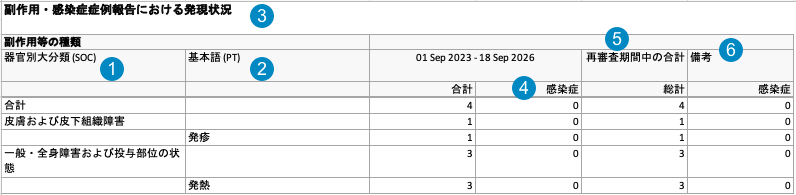
Table Constraints
Vault filters Cases and Case Adverse Events to include in the Workbench Event Tabulation of Adverse Drug Reactions Form 10 using the following constraints:
Case Not Suppressed
The Case Suppress Submission field must be set to No or blank (not suppressed).
case_version__v.suppress_submission__v ≠ Yes
Case Product or Product Registration in Aggregate Reporting Group
A Case must have a Product or Product Registration that is a member of the Aggregate Reporting Group. Vault identifies product matches by Registration Number and excludes blank values.
case_version__vr.case_product__v IN
aggregate_reporting_group__vr.aggregate_reporting_group_join__vr.product__v OR
case_version__vr.case_product__v.case_product_registration__v.product_registration__v.registration_number__v matches aggregate_reporting_group__vr.aggregate_reporting_group_join__vr.product_registration__v.registration_number__v
Configuring Report Intervals
When defining reporting periods, Vault evaluates the interval records based on the following rules:
- Required Current Interval: You must enter at least one interval in the J-NUPR / J-PSR Current Interval Range field. Vault always treats this entry as the latest (most recent) interval.
- Optional Historical Intervals: If the report requires a broader data window, you can configure up to nine additional historical intervals using the Previous J-PSR Interval 1 through Previous J-PSR Interval 9 fields.
- Sequential Entry: Interval dates must be entered sequentially based on the total number of periods being reported.
Example: If you are running a report across three total intervals, you must populate dates in Previous J-PSR Interval 1, Previous J-PSR Interval 2, and the J-NUPR / J-PSR Current Interval Range.
If there are multiple versions of the Case among all the reporting intervals, Vault lists only the most recent Case version.
Case Data in Interval Reporting Period
The Case date (Local Awareness Date) must fall within the defined Aggregate Report Interval reporting periods.
earliest(aggregate_report_intervals__v) ≤ DATE ≤ aggregate_report_intervals__v.latest(interval_end_date__v)
Case Completed
The latest Case version within the reporting period must be in a lifecycle state (case_version__v.state__v) specified in the Case Completed filter.
Consider the following:
- Cases in the following states are always omitted and cannot be selected in the Case Completed filter:
- Nullified (
nullified_state__v) - Voided (
voided_state__v)
- Nullified (
- The Completed option includes Cases in the following states:
- Approved (
approved_state__v) - Closed (
closed_state__v) - Superseded (
superseded_state__v)
- Approved (
- The Open option includes any Case in a lifecycle state not defined as completed, including any custom lifecycle states.
- If you leave this field blank, the report filters for all Cases regardless of their state.
Localized Case
A Case must have a Japan localized version to be included.
case_version__v.reporter_country__v = Japan
Case Product in Drug Roles to Include
Vault includes only Case Products in the listing with a Drug Role of Suspect or Interacting.
Postmarket Cases
Only include Cases that are considered postmarket and domestic.
case_product_registration__v.registration_type_cv__v E2B code is one of the following: (1, 2, 5, 6, 7) OR AE > Case > Case Product Registration > Local Reporting Details > PMDA Reporting Category is one of the following:
AA: Post-Marketing Domestic Infection→ E2B code AAAB: Post-Marketing Domestic AE→ E2B code AE
Special Report Classification
Exclude Cases with a Special Report Classification of Research Report or Safety Measure.
case_version__v.special_report_classification__v NOT IN (safety_measure_report__v, research_report__v)
Inbound PMDA Transmissions Included
Includes eligible Cases or domestic Cases from the PMDA via inbound transmissions.
origin__v = pmda__v, object_type__v = inbound_transmission__v, state__v IN (completed_state__v, e2b_ack_accepted_state__v)
Serious, Related Adverse Events Criteria
Include Adverse Events that meet all of the following criteria:
- Seriousness: The event is serious
localized_case_adverse_event__v.seriousness__v = !Blank - Relatedness: Vault relates the event to the product in the report (Causality Established is Yes or Blank for at least one Assessment Result).
- Aggregate Reporting Group Membership: Localized Case Assessment is in the Aggregate Reporting Group by matching Product OR matching Product Registration Number.
- Reportable: The event is reportable.
localized_case_adverse_event__v.special_adverse_event__v != Non-reportable Event
Table Mapping
Sorting: Rows are in order of Event (SOC) International Order, then Event (PT) code. Each reporting interval appears in a separate column.
| Number | Name | Description |
|---|---|---|
|
Event (SOC) (器官別大分類) | Localized Japanese MedDRA SOC affected by the Case Adverse Events in Japanese (from the local MedDRA version). |
|
Event (PT) (基本語) | The Localized MedDRA Preferred Term Event in Japanese (from the local MedDRA version). |
|
The Number of ADRs (副作用・感染症の症例報告を行った症例数) | The number of reported Case Adverse Events for that reporting interval. A report can include multiple reporting intervals. The reporting interval dates are included in the column headers of the report. |
|
The Number of ADRs (Infection) (感染症) |
The number of reported Case Adverse Events for that reporting interval that are categorized as Infection.Localized Case Adverse Events > Special Adverse Event = InfectionA report can include multiple reporting intervals. The reporting interval dates are included in the column headers of the report. |
|
Total During Re-examination Period (再審査期間中の合計) | The total number of Cases for the re-examination period for each row on the report. |
|
Non-Serious Events (件数) | Count of Case Adverse Events (non_serious_event_num) without a Seriousness value. |
Event Listing of Adverse Drug Reactions Form 11
Vault generates the Event Listing of ADR’s Form 11 for PMDA Re-Examination Dossier aggregate reports.

Table Constraints
Vault filters Cases and Case Adverse Events to include in the Workbench Event Listing of Adverse Drug Reactions Form 11 using the following constraints:
Case Not Suppressed
The Case Suppress Submission field must be set to No or blank (not suppressed).
case_version__v.suppress_submission__v ≠ Yes
Case Product or Product Registration in Aggregate Reporting Group
A Case must have a Product or Product Registration that is a member of the Aggregate Reporting Group.
case_version__vr.case_product__v IN
aggregate_reporting_group__vr.aggregate_reporting_group_join__vr.product__v OR
case_version__vr.case_product__v.case_product_registration__v.product_registration__v.registration_number__v matches aggregate_reporting_group__vr.aggregate_reporting_group_join__vr.product_registration__v.registration_number__v
Configuring Report Intervals
When defining reporting periods, Vault evaluates the interval records based on the following rules:
- Required Current Interval: You must enter at least one interval in the J-NUPR / J-PSR Current Interval Range field. Vault always treats this entry as the latest (most recent) interval.
- Optional Historical Intervals: If the report requires a broader data window, you can configure up to nine additional historical intervals using the Previous J-PSR Interval 1 through Previous J-PSR Interval 9 fields.
- Sequential Entry: Interval dates must be entered sequentially based on the total number of periods being reported.
Example: If you are running a report across three total intervals, you must populate dates in Previous J-PSR Interval 1, Previous J-PSR Interval 2, and the J-NUPR / J-PSR Current Interval Range.
If there are multiple versions of the Case among all the reporting intervals, Vault lists only the most recent Case version.
Case Data in Interval Reporting Period
The Case date (Local Awareness Date) must fall within the defined aggregate report interval reporting periods.
earliest(aggregate_report_intervals__v) ≤ DATE ≤ aggregate_report_intervals__v.latest(interval_end_date__v)
Case Completed
The latest Case version within the reporting period must be in a lifecycle state (case_version__v.state__v) specified in the Case Completed filter.
Consider the following:
- Cases in the following states are always omitted and cannot be selected in the Case Completed filter:
- Nullified (
nullified_state__v) - Voided (
voided_state__v)
- Nullified (
- The Completed option includes Cases in the following states:
- Approved (
approved_state__v) - Closed (
closed_state__v) - Superseded (
superseded_state__v)
- Approved (
- The Open option includes any Case in a lifecycle state not defined as completed, including any custom lifecycle states.
- If you leave this field blank, the report filters for all Cases regardless of their state.
Localized Case
A Case must have a Japan localized version to be included.
case_version__v.reporter_country__v = Japan
Case Product in Drug Roles to Include
Only include Case Products in the listing where Drug Role is Suspect or Interacting.
Postmarket Cases
Only include Cases that are considered postmarket and domestic.
case_product_registration__v.registration_type_cv__v E2B code is one of the following: (1, 2, 5, 6, 7) OR AE > Case > Case Product Registration > Local Reporting Details > PMDA Reporting Category is one of the following:
AA: Post-Marketing Domestic Infection→ E2B code AAAB: Post-Marketing Domestic AE→ E2B code AE
Special Report Classification
Exclude Cases with a Special Report Classification of Research Report or Safety Measure.
case_version__v.special_report_classification__v NOT IN (safety_measure_report__v, research_report__v)
Inbound PMDA Transmissions Included
Includes eligible cases or domestic cases from the PMDA via inbound transmissions (origin__v = pmda__v, object_type__v = inbound_transmission__v, state__v IN (completed_state__v, e2b_ack_accepted_state__v))
Serious, Related Adverse Events Criteria
Include Case Adverse Events that meet all of the following criteria:
- Seriousness: The Case Adverse Event is serious
localized_case_adverse_event__v.seriousness__v = !Blank - Relatedness: Vault relates the Case Adverse Event to the product in the report (Causality Established is Yes or Blank for at least one Assessment Result).
- Aggregate Reporting Group Membership: Localized Case Assessment is in the Aggregate Reporting Group by matching Product OR matching Product Registration Number.
- Reportable: The event is reportable.
localized_case_adverse_event__v.special_adverse_event__v != Non-reportable Event
Table Mapping
Sorting: Rows are in order of Event (SOC) International Order, then Event (PT) code. Each reporting interval appears in a separate column.
| Number | Name | Description |
|---|---|---|
|
Reporting Interval (第回) | The name of the reporting interval number. |
|
Case # (番号) | The Case Number. If the event is Unexpected, it will be indicated with an asterisk (*) in front of the case number. |
|
Event (SOC) (器官別大分類) | The Localized MedDRA Preferred Term Event in Japanese, ordered by MedDRA International Order. |
|
Event (PT) (基本語) | The Localized MedDRA Preferred Term Event in Japanese, ordered by MedDRA International Order. |
|
Gender (性別) |
The sex on the Case. If the field is blank, Vault populates "不明" (Unknown in Japanese). |
|
Age (年齢) |
The normalized Age (in years) on the Case. If age is not populated on the Case, the report displays Age Group and Vault populates "不明" (Unknown in Japanese) if the field is blank. |
|
Onset Date (副作用等発現 年月日) |
The Onset Date of the Case Adverse Event, as entered in the Date of Onset field on the Case Adverse Event in the format "YYYY年MM月DD日". If the field is blank, Vault populates "不明" (Unknown in Japanese). |
|
Outcome (転帰) |
The Outcome of the Case Adverse Event. The value in the Case Adverse Event Outcome field. |
|
Infection or Adverse Event (副作用・感染症の区分) | Vault populates "感染症" (Infection in Japanese) if Special Adverse Event is Infection. Otherwise, Vault populates "副作用" (Adverse Event in Japanese). |
|
Study Number (調査名) | The Study Number on the Case. |
 |
PMDA ACK # (識別番号) | The Destination Case ID on the Transmission. |
|
Remarks (備考) | Displays Trade Names, Destination Case ID, and expectedness date change remarks. |
Case Series Report
The Case Series Report acts as a log file for all of the Cases included across all PMDA line listings and tabulations. Vault generates the Case Series Report in the following structure:
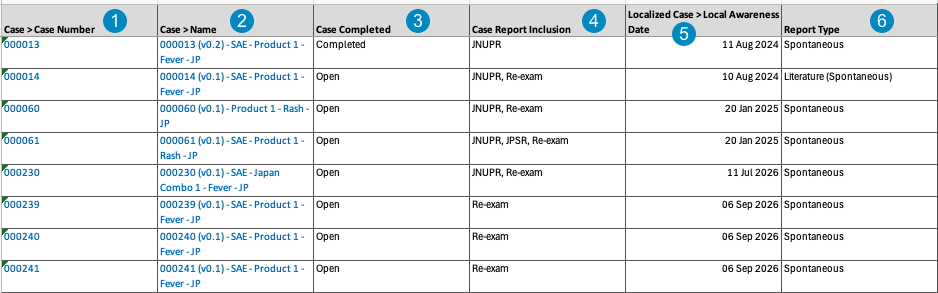
Note: To aid in understanding how Vault maps Case Series Report data to PMDA files, the following table includes both descriptions and Vault object and field names.
| Reference Image Number | PMDA Report Field Name | Description |
|---|---|---|
|
Case Number |
Vault maps the Case Number on the Case.case_number__v.id
|
|
Case Name |
Vault maps the Name on the Case.case_version__v.name__v
|
|
Case Completed |
Vault maps whether the Case is open or completed.If completed__v then 'Completed' else 'Open'
|
|
Case Report Inclusion |
Vault indicates if the Case has a valid event for one or more of the reports:
|
|
Local Awareness Date |
Vault maps the Local Awareness Date on the Case.localized_case__v > local_awareness_date__v
|
|
Report Type |
Vault maps the Report Type on the Case.case_version__v.report_type__v > localized_controlled_vocabulary__v.name__v
|
Note: Vault excludes Cases that contain the following field values:
- A Lifecycle State value of Nullified or Voided
- A Suppress Submission value of Yes
Open Cases Report
The Open Cases Report is an operational report intended to help you identify open Cases that may need to be closed before PMDA submission. It contains a log of all Cases that would be included in at least one PMDA tabulation were they in the Closed, Approved, or Superseded lifecycle state.
Vault generates the Open Cases Report in the following structure:

Note: To aid in understanding how Vault maps Open Cases Report data to PMDA files, the following table includes both descriptions and Vault object and field names.
| Reference Image Number | PMDA Report Field Name | Description |
|---|---|---|
|
Case Number |
Vault maps the Case Number on the Case.case_number__v.id
|
|
Case Name |
Vault maps the Name on the Case.case_version__v.name__v
|
|
Local Awareness Date |
Vault maps the Local Awareness Date on the Case.localized_case__v > local_awareness_date__v
|
|
Case Report Inclusion |
Vault maps the Report Type where the Case contains a valid event. Vault evaluates event eligibility and populates one or more concatenated values:
|
|
Locked By Department |
Vault maps the Department value of the Locked By user on the Case.case_version__v.locked_by_department__v.name__v
|
|
Locked By User |
Vault maps the Name of the Locked By user on the Case.case_version__v.locked_by_user__v.name__v
|
|
Report Type |
Vault maps the Report Type on the Case.case_version__v.report_type__v > localized_controlled_vocabulary__v.name__v
|