With the 26R3 release, SafetyDocs supports managing PSMF contributor reviews, providing centralized, automated verification of PSMF content ownership responsibilities and updates to document sharing settings between review cycles.
Prerequisite
Before you enable this feature, you must first enable PSMF Request Management.
Overview
To configure this feature in your Vault:
- Select a PSMF Contributor Role setting
- Update object lifecycles
- Update object layouts
- Configure custom sharing rules
- Configure custom permission sets
- Create the Finalize PSMF Contributor Review object workflow
- Add a user action to the PSMF Contributor Review Lifecycle to allow users to initiate the workflow
- Create a user action on the PSMF Binder Lifecycle document lifecycle
- Activate the standard PSMF Contributor Reviews sub-tab on the PSMF tab
Update Object Lifecycles
To update the PSMF Contributor Review Lifecycle:
- Add the standard PSMF Office role
- Edit role permissions as follows:
- Read permissions for all lifecycle states
- Edit and Delete permissions for the Active state
- Add user actions to the Active state as follows:
- Condition Type: Select Always
- Allow the following actions
- Select Generate Contributor Tasks
- Action Label: Enter
Generate Contributor Tasks
- Action Label: Enter
- Select Send Task Reminder to Contributors
- Action Label: Enter
Send Task Reminder to Contributors
- Action Label: Enter
- Select Generate Contributor Tasks
Note: Depending on the creation date and configuration of your Vault, it may have both a custom PSMF Office role and a standard PSMF Office Manager role. We recommend migrating your PSMF feature configuration to the standard PSMF Office Manager role and relabeling this role to PSMF Office. If you require assistance, contact your Veeva Representative.
To update the PSMF Contributor Review Task Lifecycle:
- Create the Cancelled lifecycle state
- Add the standard PSMF Office role
- Edit role permissions as follows:
- Read permissions for all lifecycle states
- Edit and Delete permissions for the Open state
Update Object Layouts
Copy the standard layouts for the following objects:
- PSMF Contributor Review
- PSMF Contributor Review Task
To the PSMF Contributor Review object layout, add the following fields to the bottom of the Details section:
- Exclude Annexes
- Exclude Generated Documents
Configure Custom Sharing Rules
To configure custom sharing rules:
- Enable custom sharing rules for the following objects:
- PSMF Contributor Review
- PSMF Contributor Review Task
- For each object, create a custom sharing rule with a Label as follows:
- For PSMF Contributor Review, enter
PSMF Office - Contributor Review - For PSMF Contributor Review Task, enter
PSMF Office - Contributor Review Task
- For PSMF Contributor Review, enter
- For each object, add a manual assignment to the custom sharing rule as follows:
- Role: Select PSMF Office
- Users & Groups: Select PSMF Coordination
Configure Custom Permission Sets
To configure permissions:
- Update the custom PSMF Contributor Actions permission set as follows:
- Grant object permissions as follows:
- Read permissions to the PSMF Contributor Review object
- Read and Edit permissions to the PSMF Contributor Review Task object
- View object control permissions to the PSMF Section/Group object control
- Grant View tab permissions to the PSMF Contributor Reviews tab
- Grant object permissions as follows:
- Update the custom PSMF Coordination Actions permission set as follows:
- Grant object permissions as follows:
- Read, Create, and Edit permissions to the PSMF Contributor Review object
- Read, Create, Edit, and Delete permissions to the PSMF Contributor Review Task object
- View object control permissions to the PSMF Section/Group object control
- Grant View and Execute object action permissions for the following actions on the PSMF Contributor Review object:
- Finalize PSMF Contributor Review
- Generate Contributor Tasks
- Send Task Reminder to Contributors
- Grant View tab permissions to the PSMF Contributor Reviews tab
- Grant object permissions as follows:
Create the Finalize PSMF Contributor Review Object Workflow
To create the Finalize PSMF Contributor Review object workflow:
- Create an object workflow, populating fields as follows:
- Label: Enter
Finalize PSMF Contributor Review - Lifecycle: Select PSMF Contributor Review Lifecycle
- Label: Enter
- Configure the following workflow steps:
- Activate the workflow.
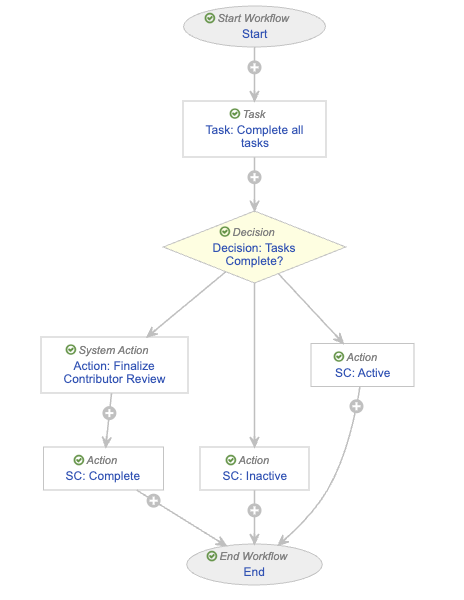
Configure the Start Step
To configure the Start step, in the Next Steps field:
- Remove the End step.
- Select Create Step.
- In the Create Step dialog, enter
Task: Complete All Tasksin the Step Name field.
Configure the Task: Complete All Tasks Step
To define the Task: Complete All Tasks task step:
- In the General Settings section, populate fields as follows:
- Task Label: Enter
Complete Tasks - Assign Task To: Select Workflow Owner
- Instructions: Enter
Review and complete all tasks for accuracy. - Task Requirement: Select Required
- Task Label: Enter
- In the Prompts section, select the Prompt for Verdicts checkbox:
- Verdict Label: Enter
Tasks are complete - Select Add Verdict
- Verdict Label: Enter
Inactivate Review
- Verdict Label: Enter
- For Next Steps, select Create Step, then enter
Decision: Tasks Complete?for Step Name.
Configure the Decision: Tasks Complete? Step
To define the Decision: Tasks Complete? decision step, create rules as follows:
- Condition Type: Select All conditions are met
- If: Select Task > Task: Complete All Tasks > all labels equal > Tasks are complete
- then: Select Create Step
- In the Create Step dialog, enter
Action: Finalize Contributor Reviewin the Step Name field
- In the Create Step dialog, enter
- then: Select Create Step
- Select Create Rule
- If: Select Task > Task: Complete All Tasks > all labels equal > Inactivate Review
- then: Select Create Step
- In the Create Step dialog, enter
SC: Inactivein the Step Name field
- In the Create Step dialog, enter
- then: Select Create Step
- In the Else section, select Create Step for the then field
- In the Create Step dialog, enter
SC: Activein the Step Name field
- In the Create Step dialog, enter
- If: Select Task > Task: Complete All Tasks > all labels equal > Tasks are complete
Configure the Action: Finalize Contributor Review Step
To define the Action: Finalize Contributor Review system action step:
- For System Action, select Finalize PSMF Contributor Review.
- For Next Steps select Create Step, then enter
SC: Completefor Step Name.
Configure the SC: Complete Action Step
To define the SC: Complete action step:
- Create a rule as follows:
- Condition Type: Select Always
- perform actions: Select Change State
- Lifecycle State: Select Complete
- perform actions: Select Change State
- Condition Type: Select Always
- For Next Steps, select End.
Configure the SC: Inactive Action Step
To define the SC: Inactive action step:
- Create a rule as follows:
- Condition Type: Select Always
- perform actions: Select Change State
- Lifecycle State: Select Inactive
- perform actions: Select Change State
- Condition Type: Select Always
- For Next Steps, select End.
Configure the SC: Active Action Step
To define the SC: Active action step:
- Create a rule as follows:
- Condition Type: Select Always
- perform actions: Select Change State
- Lifecycle State: Select Active
- perform actions: Select Change State
- Condition Type: Select Always
- For Next Steps, select End.
Add a User Action to the PSMF Contributor Review Lifecycle
To allow users to initiate the Finalize PSMF Contributor Review workflow, add a user action to the Active state of the PSMF Contributor Review Lifecycle as follows:
- Condition Type: Select Always
- Select Workflow > Finalize PSMF Contributor Review
- Action Label: Enter
Finalize PSMF Contributor Review
- Action Label: Enter
- Select Workflow > Finalize PSMF Contributor Review
Create a User Action on the PSMF Binder Lifecycle
To update the PSMF Binder Lifecycle document lifecycle, create a user action on the Approved state as follows:
- Condition Type: Select Always
- Allow the following actions
- Select Start PSMF Contributor Review
- Action Label: Enter
Start PSMF Contributor Review
- Action Label: Enter
- Select Start PSMF Contributor Review